Most people looking for the best templates and tools for AI image use cases are not actually missing tools. They are missing a system.
That is why they keep opening five tabs, testing twelve prompts, downloading three decent-looking images, then realizing none of them match the brand, the format, or the actual job. The tool was not the main problem. The workflow was a mess.
If you want AI images to be useful in a real creator business, you need two things: the right tool for the use case and a repeatable template that saves you from reinventing the wheel every Tuesday afternoon. That is what this guide covers.
You will get a practical breakdown of the best templates and tools for AI image use cases across content, newsletters, lead magnets, social posts, product visuals, and simple brand support. Not in a “here are 47 tools and all of them are magical” way. In a “use this for this, skip that for that, and stop making your life harder” way.
If you want the broader category pages first, you can also browse the main AI writing tools and workflows hub, the AI image use cases section, and the wider AI image tools and use-case collection.
Want the broader roadmap? Start with the parent guide.
What actually counts as an AI image use case?
Not every image task deserves the same setup.
Some use cases need speed. Some need consistency. Some need polished design. Some just need “good enough, on brand, and ready before lunch.” If you treat all of them the same, you end up using a cinematic image generator to make a newsletter banner or trying to force a design tool to do concept art. That is how people waste time while calling it experimentation.
The most common AI image use cases for creators, consultants, coaches, solo founders, and personal brands usually fall into a few buckets:
- Social post graphics
- Newsletter headers
- Blog feature images
- Lead magnet visuals
- Slides and presentation assets
- Simple product mockups
- Brand concept boards
- Thumbnail-style visuals
- Quote cards and text-image hybrids
- Visuals for digital products, mini offers, and promos
Each one benefits from a slightly different mix of generation, editing, layout, resizing, and brand control. So instead of asking, “What is the best AI image tool?” ask, “What job am I trying to get done?” Boring question. Very useful answer.
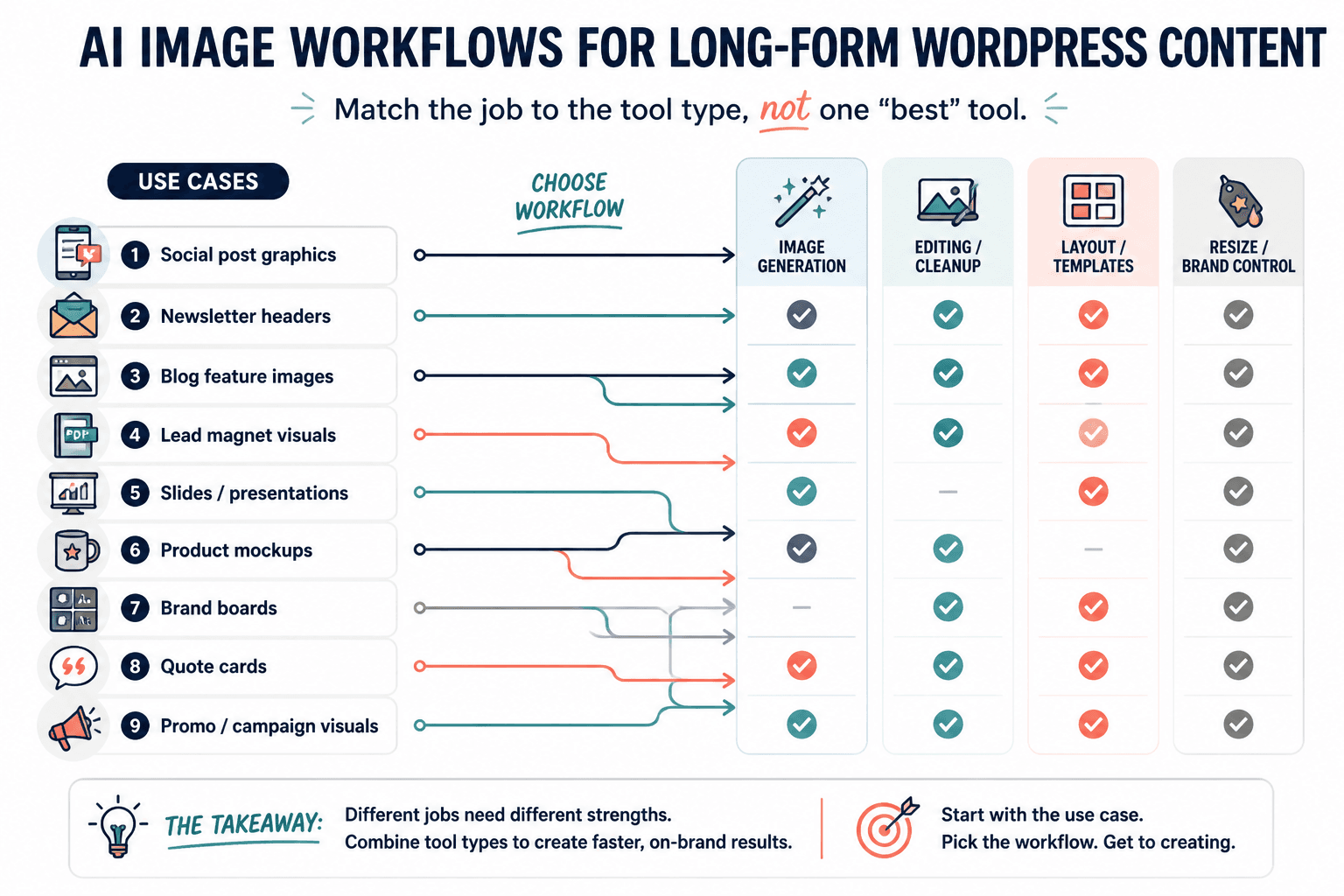
The best templates and tools for AI image use cases start with tool categories, not one “winner”
There is no single perfect stack. There is, however, a very practical way to think about your stack.
1. Image generation tools
These are for creating the raw visual direction: illustrations, concept images, backgrounds, stylized scenes, editorial artwork, mood pieces, and visual ideas you do not want to source manually.
Best for:
- Blog headers
- Newsletter art
- Digital product cover concepts
- Branded visual themes
- Social image backgrounds
Not best for:
- Final layouts with lots of text
- Precise brand design systems
- Pixel-perfect marketing assets without editing
If you want a fuller breakdown, read Best AI Image Tools and Design Tools for AI Image Use Cases and Best AI Tools for AI Image Use Cases.
2. Design and layout tools
These are for turning raw images into usable assets. Add text. Resize. Keep spacing clean. Save reusable layouts. Make things look intentional instead of “a robot made me a sunset and I panicked.”
Best for:
- Carousels
- Headers
- Lead magnets
- Promo graphics
- Template systems
3. Editing and cleanup tools
These help with background removal, upscaling, inpainting, extending image edges, and fixing weird details. Which, to be clear, you will need. AI image outputs still love adding little visual crimes around hands, objects, type, and symmetry.
4. Asset management and template storage tools
These are less glamorous, but they matter. If your prompts, favorite styles, approved headers, and repeatable layouts live in scattered folders and old chats, your future self will hate you. Quietly, but deeply.
Best for:
- Saving prompt formulas
- Organizing brand references
- Storing reusable design blocks
- Keeping campaign visuals consistent
A practical tool stack by AI image use case
Here is the useful version: match the use case to the type of tool and template you actually need.
| Use case | Best tool type | What the template should do |
|---|---|---|
| Newsletter headers | Image generator + layout tool | Keep dimensions, text placement, and brand style consistent |
| Blog feature images | Image generator + cleanup tool | Create repeatable visual framing and title-safe crop space |
| Social graphics | Design tool with saved templates | Standardize text hierarchy, margins, and variants |
| Lead magnet covers | Design tool + mockup support | Reuse cover structures with different titles and accent visuals |
| Promo assets | Design tool + resizing presets | Turn one concept into multiple format sizes quickly |
| Slides and presentations | Design tool + image editor | Maintain one visual language across sections |
| Brand concept visuals | Image generator + asset library | Save style references and prompt patterns for future reuse |
This is the basic rule: generate for ideas, design for usability, edit for quality, store for consistency.
Best template types to build if you use AI images regularly
Templates matter more than people think because they remove stupid decisions. Not all decisions. Just the repetitive ones that drain time and somehow still produce inconsistent results.
If you create content every week, these are the template types worth building first.
Newsletter header templates
This is one of the cleanest AI image use cases because the visual job is narrow. You need a consistent header format that can shift themes without looking like a different brand every send.
Your template should include:
- One fixed canvas size
- A safe area for title text
- One or two approved font pairings
- A consistent color treatment or overlay
- Space for illustration, texture, or concept image
- Optional issue number or label placement
If that is your main use case, read Simple AI Image Use Cases: Newsletter Headers Templates for Busy Creators.
Social post graphic templates
These work best when they are modular rather than overdesigned. If every post template requires ten edits, your “system” is just a decorative burden.
Build 3 to 5 versions max:
- Quote or bold statement card
- Tip or checklist graphic
- Mini promo asset
- Visual metaphor image with headline
- Case study or proof screenshot frame
Keep the text hierarchy simple. AI images should support the message, not wrestle it for attention.
Blog feature image templates
Most feature images fail because they either say nothing or try to do too much. The useful middle ground is a repeatable frame that leaves room for article branding while keeping the image style coherent.
A good feature image template usually includes:
- One title-safe area
- Consistent crop logic
- One visual style family
- A brand accent color or shape treatment
- Readable contrast if text is included
Lead magnet and digital product cover templates
This is where templates save serious time. Once your base structure is right, you can create a workbook cover, checklist cover, guide cover, or mini-course visual in a few minutes instead of messing with alignment for half an hour.
Include:
- Title zone
- Subtitle zone
- Brand marker
- Image or illustration area
- Version with and without mockup perspective
Campaign asset templates
If you are promoting a launch, workshop, offer, or event, create one visual system across multiple sizes. Same image language. Same typography. Same spacing rules. Different formats.
That means one template family for:
- Email banner
- Social square
- Story or vertical crop
- Simple website promo block
- Bonus teaser graphic
That is how you look consistent without becoming visually repetitive.
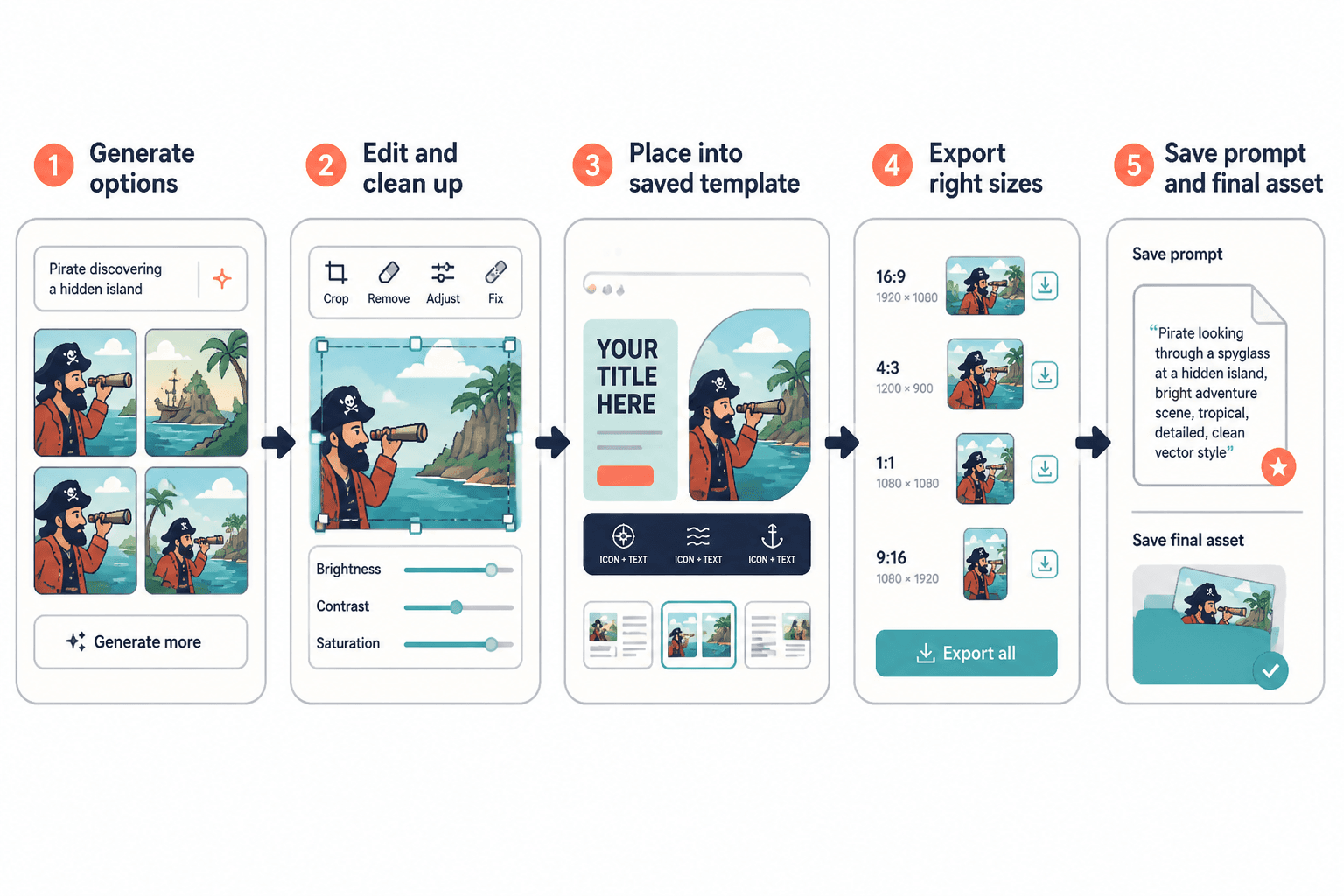
What the best AI image workflow actually looks like
The best templates and tools for AI image use cases are only useful if they fit into a sane workflow. Here is the one most creators should use.
- Start with the asset goal. What is this image for? Header, promo, feature image, quote card, product cover?
- Choose a visual direction. Editorial illustration, minimal abstract, textured brand collage, product mockup, soft background, bold conceptual art.
- Generate options. Make a few variations, not fifty. More is not always better. It is often just more sorting.
- Pick one and clean it up. Extend, crop, fix weird details, remove clutter.
- Place it into a saved template. This is where consistency happens.
- Export the right sizes. Do not manually rebuild every format if your design tool can resize intelligently.
- Save the prompt and final asset. Future reuse is the whole point.
Simple. Boring. Effective. Which is why people skip it and then wonder why every visual task feels heavier than it should.
How to choose the right tool for each AI image job
You do not need a giant stack. You need the right stack.
If you care most about speed
Use a design platform with built-in AI generation or fast import from your image generator. Pair it with a small template library. The win here is not image perfection. It is publishing without a three-hour visual detour.
Best for:
- Newsletter headers
- Social graphics
- Simple lead magnets
- Fast campaign promos
If you care most about custom visual style
Use a stronger image generation tool first, then move into a layout tool second. This gives you more control over style, concept, and visual originality.
Best for:
- Editorial blog art
- Personal brand visuals
- Launch identity graphics
- Mood-rich digital product branding
If you care most about brand consistency
Favor tools that support saved templates, brand kits, reusable styles, and asset libraries. Raw generation matters less than your ability to repeat the same visual logic over time.
Best for:
- Agencies of one
- Coaches with weekly content
- Consultants building authority
- Founders with recurring educational posts
If you care most about polish
You likely need a three-part stack: generation, editing, and layout. This is slower, but worth it when the asset is tied to an important launch, high-visibility article, sales page section, or product cover.
Prompt templates that make AI image work more repeatable
A decent prompt template is more useful than a giant prompt graveyard full of one-off experiments. You want prompts with interchangeable parts.
Prompt template for newsletter headers
Create a [style] header image for a newsletter about [topic]. Use [color mood], [composition style], and leave clean visual space on the [left/right/top center] for title text. Avoid clutter, tiny objects, and overly literal stock-photo scenes. Keep it modern, editorial, and easy to crop.
Example:
Create a minimal editorial header image for a newsletter about creator positioning. Use muted blue and warm gray tones, abstract layered paper textures, and leave clean visual space on the right for title text. Avoid clutter, tiny objects, and cheesy business imagery. Keep it modern, sharp, and easy to crop.
Prompt template for blog feature images
Create a conceptual illustration for an article about [topic]. Show [core metaphor or tension]. Use [style], [palette], and a clean composition that works in a wide horizontal format. Avoid text in the image. Keep the idea specific and professional rather than generic.
Prompt template for promo graphics
Create a bold visual background for a promotional graphic about [offer or event]. Use [visual style], [energy level], and [brand colors or color family]. Keep the center area readable for overlaid text. Avoid busy detail and photorealistic people unless specified.
Prompt template for digital product covers
Create a clean, brand-friendly illustration for a digital guide about [topic]. Use [style] with [color palette] and a simple focal element that represents [promise or transformation]. Avoid clutter and cliche icons. Design with enough negative space for title placement.
The key is not making prompts longer. It is making them more reusable. Long prompts often turn into bloated wish lists. Clear prompts behave better.
The templates most creators should save in their design tool
If you publish regularly, save these first:
- 1 newsletter header template for weekly sends
- 2 blog header templates for different article categories
- 3 social graphic templates for quotes, tips, and promos
- 1 lead magnet cover template for PDFs and mini-guides
- 1 workshop or launch promo kit with square, vertical, and horizontal versions
- 1 simple mockup template for product previews
That is enough to create a repeatable system without turning your asset library into a confusing thrift store.
Common mistakes people make with AI image templates and tools
Using one tool for every job
If a tool is great at generating visuals, it may still be annoying for text layout. If a tool is great for layouts, it may be mediocre for concept generation. That is normal. Pick complements, not a mythical all-in-one savior.
Building templates that are too complicated to use
If your template requires constant manual fixing, it is not a template. It is a hobby with branding.
Generating visuals before defining the message
Image-first workflows sound creative until you realize the final asset does not support the actual point. Know the message, then create the visual support.
Not saving what worked
People spend ages finding a good visual style, then fail to save the prompt pattern, image settings, crop logic, and template structure. Which means next month they start from scratch again. Very avoidable.
Expecting tools to replace taste
They will not. Tools can draft faster, generate options, and reduce production friction. They cannot decide what fits your audience, what looks cheap, what feels off-brand, or what makes your content more trustworthy. Taste still matters. Annoying, I know.
For more practical ideas on where AI visuals genuinely help, see Best Ways to Use AI Image Use Cases as a Creator.
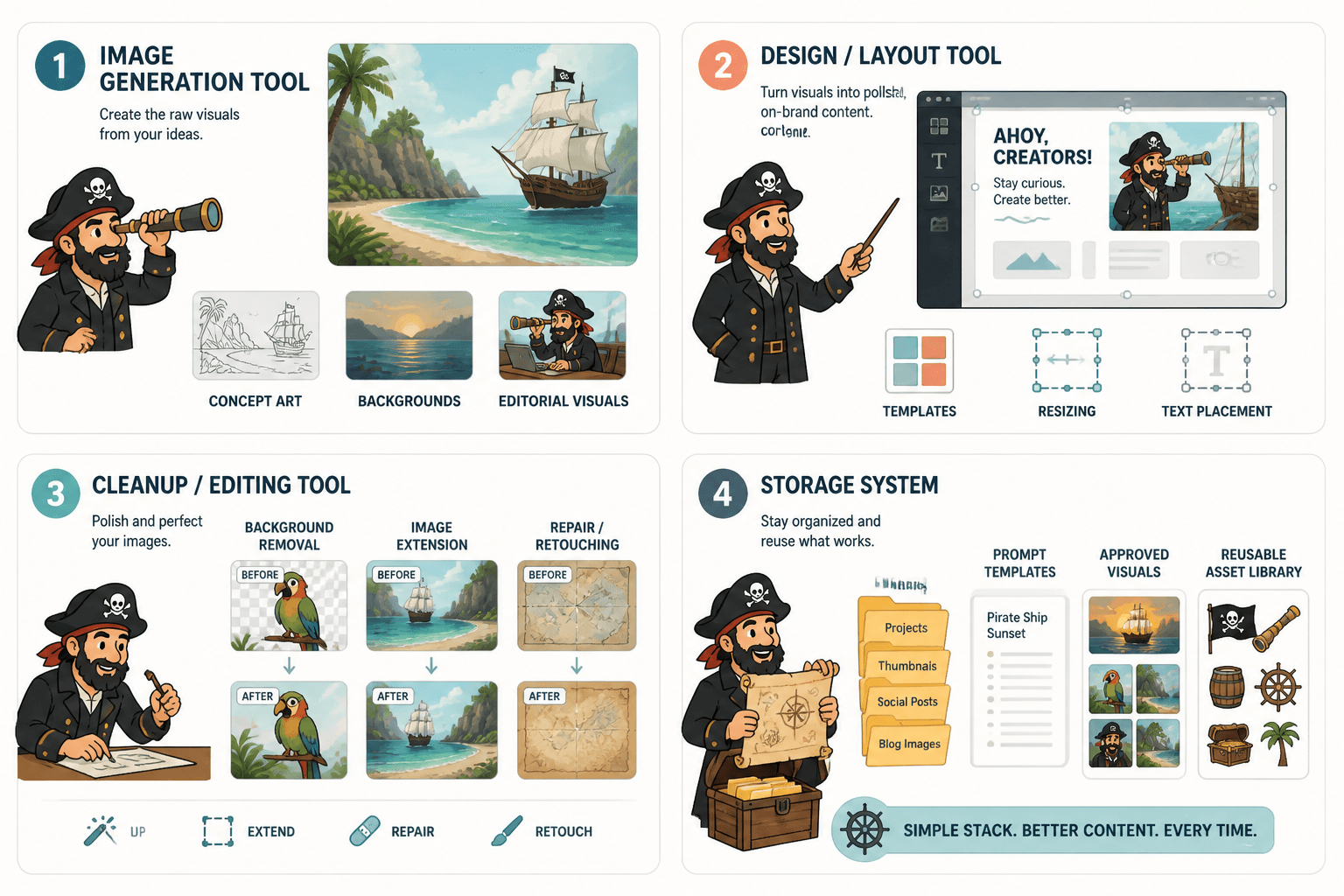
A simple starter stack for most creators
If you want a sane place to begin, this setup usually does the job:
- One image generation tool for concept art, backgrounds, and editorial visuals
- One design/layout tool for templates, resizing, and text placement
- One cleanup/editing tool for background removal, extension, or repairs
- One storage system for prompt templates, approved visuals, and reusable assets
That is enough for most solo businesses. You do not need an “elite creator stack” assembled from ten overlapping subscriptions and optimism.
How to decide what to template first
Do not start by templating the most exciting use case. Start with the most frequent one.
If you send a weekly newsletter, build that header system first. If you post educational carousels every week, build those first. If your lead magnet strategy drives actual leads, cover graphics and promo assets deserve the attention before random quote cards do.
The best templates and tools for AI image use cases are the ones attached to repeatable business activity. Not the ones that look coolest in a design folder.
If you want a broader strategic view on AI image workflows before choosing individual templates, the AI image use cases hub is the right next stop.
Quick FAQ
Do I need separate tools for generating and designing AI images?
Usually, yes. Generation tools are better for creating raw visuals. Design tools are better for text, layout, resizing, and repeatable templates.
What is the most useful template to build first?
The one tied to your most frequent publishing task. For many creators, that is a newsletter header, blog feature image, or social promo template.
How many templates should I keep?
Fewer than you think. Start with 5 to 8 strong templates total. Too many options usually creates inconsistency, not flexibility.
Can AI image tools create finished branded assets on their own?
Sometimes, but not reliably. You will usually get better results by generating the visual first, then finishing it inside a design template.
Are AI images worth using for small creators?
Yes, especially for recurring visual tasks that need speed and consistency. Just do not expect them to fix weak branding or boring content.
Use AI image tools like a system, not a slot machine
The best templates and tools for AI image use cases are not the flashiest ones. They are the ones that help you create useful, consistent assets without turning every visual task into a small identity crisis.
Pick the use case. Match the right tool type. Build the template once. Save what works. Repeat without drama.
That is the whole game, really. Not glamorous. Very effective.
The bigger point is simple: clearer structure and clearer writing make the piece more useful. That is usually what makes the ending land better too.