
Most tools for product and service descriptions promise the same thing: faster writing, better conversions, less effort. What they usually deliver is a slightly shinier version of the same vague copy you were already writing.
That is the problem. The tool is rarely the issue. The issue is using the wrong tool for the wrong job, then expecting it to magically produce clarity, trust, and sales out of thin air.
If you are looking for the best copy tools and storefront tools for product and service descriptions, the smart move is not hunting for one perfect platform. It is building a small, useful stack: one tool to help you think, one to help you write better, and one to help you present the offer cleanly where people actually buy.
This guide will help you sort the genuinely useful tools from the overhyped ones, choose the right categories for your business, and avoid the very common mistake of polishing weak descriptions instead of fixing what is weak about them.
If you want the bigger picture, start with the parent guide.
What good tools should actually help you do
A good tool should make your product or service descriptions easier to write, easier to structure, easier to test, or easier to publish. That is it. If it claims to “transform your brand voice” while you still cannot explain what you sell in one clean sentence, maybe lower your expectations a touch.
In practical terms, useful tools usually help with one or more of these jobs:
- Turning scattered notes into a usable draft
- Improving structure, clarity, and flow
- Generating variations for headlines, bullets, and CTAs
- Storing reusable templates and messaging blocks
- Publishing descriptions inside a storefront, sales page, or service page
- Organizing product details, pricing, deliverables, and FAQs
- Testing what version gets more clicks, reads, or conversions
What tools do not do well is just as important:
- Fix a weak offer
- Create trust when there is no proof
- Figure out your audience for you
- Invent positioning that makes sense
- Turn generic services into compelling ones without any real input
If your description says “high-quality solutions tailored to your unique needs,” no tool on earth is coming to save you. That sentence needs a respectful burial, not optimization.
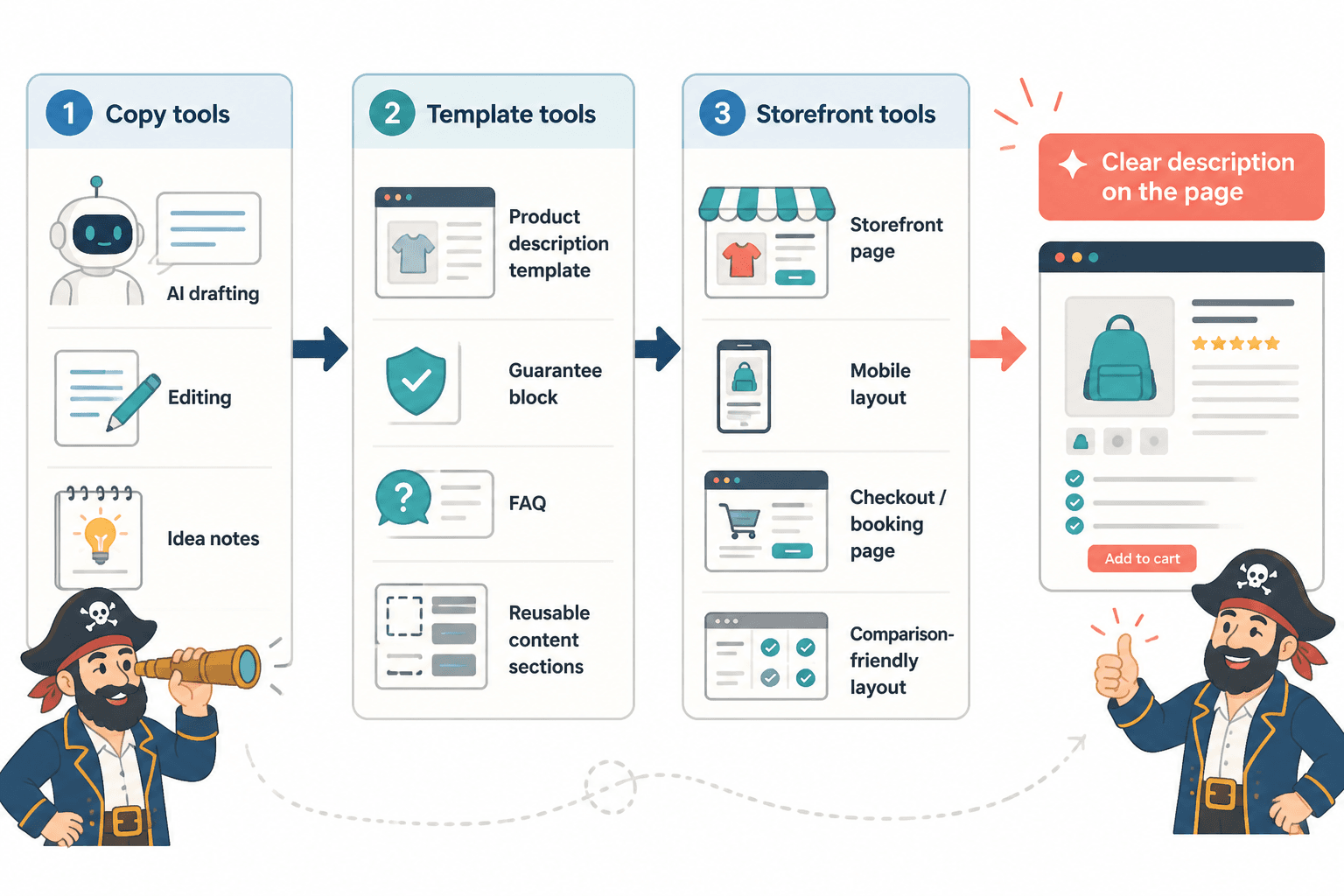
The three tool categories that matter most
You do not need 14 subscriptions and a dashboard that looks like a spaceship. For most creators, consultants, coaches, and solo businesses, the stack is simpler than that.
1. Copy drafting and rewriting tools
These help you draft descriptions faster, tighten language, generate alternatives, and clean up clunky phrasing. This category includes AI writing tools, editing assistants, headline generators, and idea organizers.
They are best used after you know the basics: who the offer is for, what problem it solves, what result it creates, what makes it different, and what someone should do next.
2. Messaging and template tools
This category is less glamorous and often more useful. Think templates, swipe files, content banks, and reusable frameworks for product pages, service sections, feature bullets, pricing blurbs, guarantee blocks, and FAQs.
These tools help with consistency. They stop you from reinventing every description from scratch like it is a dramatic act of artistic suffering.
3. Storefront and page-building tools
These are the tools that display the description where someone can browse, compare, understand, and buy. Depending on your business, that might mean an ecommerce storefront, a checkout page, a booking page, a digital product shop, or a services landing page.
Great copy hidden inside a messy storefront still loses. Presentation matters. So does layout, scannability, mobile readability, and how quickly a buyer can figure out what they are getting.
Best copy tools for product and service descriptions
Not brand-by-brand hype. Category-by-category usefulness. That is more honest, and frankly more helpful.
AI drafting tools
Best for: rough drafts, angle exploration, bullet variations, headline options, rewriting plain notes into cleaner copy.
AI tools are useful when you already have the raw material. Feed them specifics and they can save time. Feed them vague nonsense and they will hand you polished vague nonsense.
Use them for things like:
- Turning messy product notes into a first draft
- Generating 10 feature-to-benefit rewrites
- Creating short, medium, and long versions of a description
- Rewriting dry service copy to sound more human
- Testing stronger CTA options
Do not use them as your strategy department. If you want a deeper look at AI-specific options, this companion guide on best AI tools for product and service descriptions goes further into what they are good at and where they usually fall apart.
Editing and clarity tools
Best for: trimming fluff, improving readability, fixing awkward phrasing, and catching copy that sounds more impressive than useful.
This category matters because product and service descriptions often fail in very boring ways. They get too abstract. They stack empty adjectives. They say things like “comprehensive support” instead of explaining what the support actually includes.
A good editing tool helps you spot:
- Long sentences that hide the point
- Repeated words and phrases
- Passive voice that weakens conviction
- Needless filler before the actual benefit
- Readability issues on mobile
These tools are not sexy. They are useful. Which is usually better.
Headline and CTA variation tools
Best for: testing multiple ways to frame the same offer.
Sometimes the description is fine, but the headline is sleepy and the CTA sounds like a legal form. Variation tools help you push beyond your first safe draft.
Useful outputs here include:
- Outcome-led headlines
- Problem-led headlines
- Short CTA button text options
- Subhead variations for different audience segments
- Feature bullets rewritten as buyer-facing benefits
The trick is not using all 27 options they generate. Pick the one that actually fits your audience, not the one that sounds most like a startup trying too hard.
Voice and brand consistency tools
Best for: teams, repeatable messaging, and businesses with multiple product pages or service offers.
If you sell more than one offer, your copy can drift fast. One page sounds sharp and plainspoken, another sounds like a committee swallowed a brochure. Consistency tools help keep messaging aligned across descriptions, FAQs, buttons, and offer summaries.
They work best when paired with a basic messaging guide: preferred phrases, banned phrases, tone notes, product naming style, and proof points you want repeated where relevant.
Best storefront tools for product and service descriptions
The storefront matters because copy does not live in a vacuum. It lives inside a buying experience. And plenty of strong descriptions get wrecked by bad page structure, confusing layouts, or a checkout flow that feels like punishment.
Ecommerce storefront platforms
Best for: physical products, digital products, bundles, collections, and multi-item shops.
A good ecommerce storefront tool should make it easy to:
- Add short and long descriptions
- Show benefits clearly above the fold
- Display product variants and pricing cleanly
- Include reviews, FAQs, and proof
- Keep the purchase path simple on mobile
Look for flexibility in product page layout. If the tool forces every description into a cramped little text box under six giant image blocks, that is not helping your copy do its job.
Service page and sales page builders
Best for: consultants, freelancers, coaches, agencies, and service providers who need to explain scope, outcomes, process, and next steps.
Service descriptions usually need a different structure than product listings. You are not just listing features. You are reducing uncertainty. The page needs room for who it is for, what is included, how it works, what results to expect, and why someone should trust you.
Useful service-page tools should support:
- Modular page sections
- Easy placement of testimonials and proof
- FAQ blocks
- Strong CTA placement throughout the page
- Simple booking, inquiry, or checkout integration
If your business sells services, this is where storefront tools stop being a design choice and start becoming a conversion choice.
Link-in-bio and mini-store tools
Best for: creators selling lower-ticket digital products, workshops, templates, or a small menu of services.
These can work surprisingly well when the offer is simple and the audience already knows you. They can also become a cluttered little flea market of half-explained offers if you keep stacking things with no hierarchy.
Use mini-store tools when:
- You have a few focused offers
- You need a clean mobile-first buying path
- Your traffic comes from social platforms
- You want speed over heavy customization
Do not use them if your offer needs a lot of explanation, comparison, objection handling, or trust-building. In that case, a full page usually converts better than a tiny card with a hopeful one-liner.
Checkout and booking tools
Best for: calls, consulting packages, audits, retainers, workshops, and service-based offers with a direct next step.
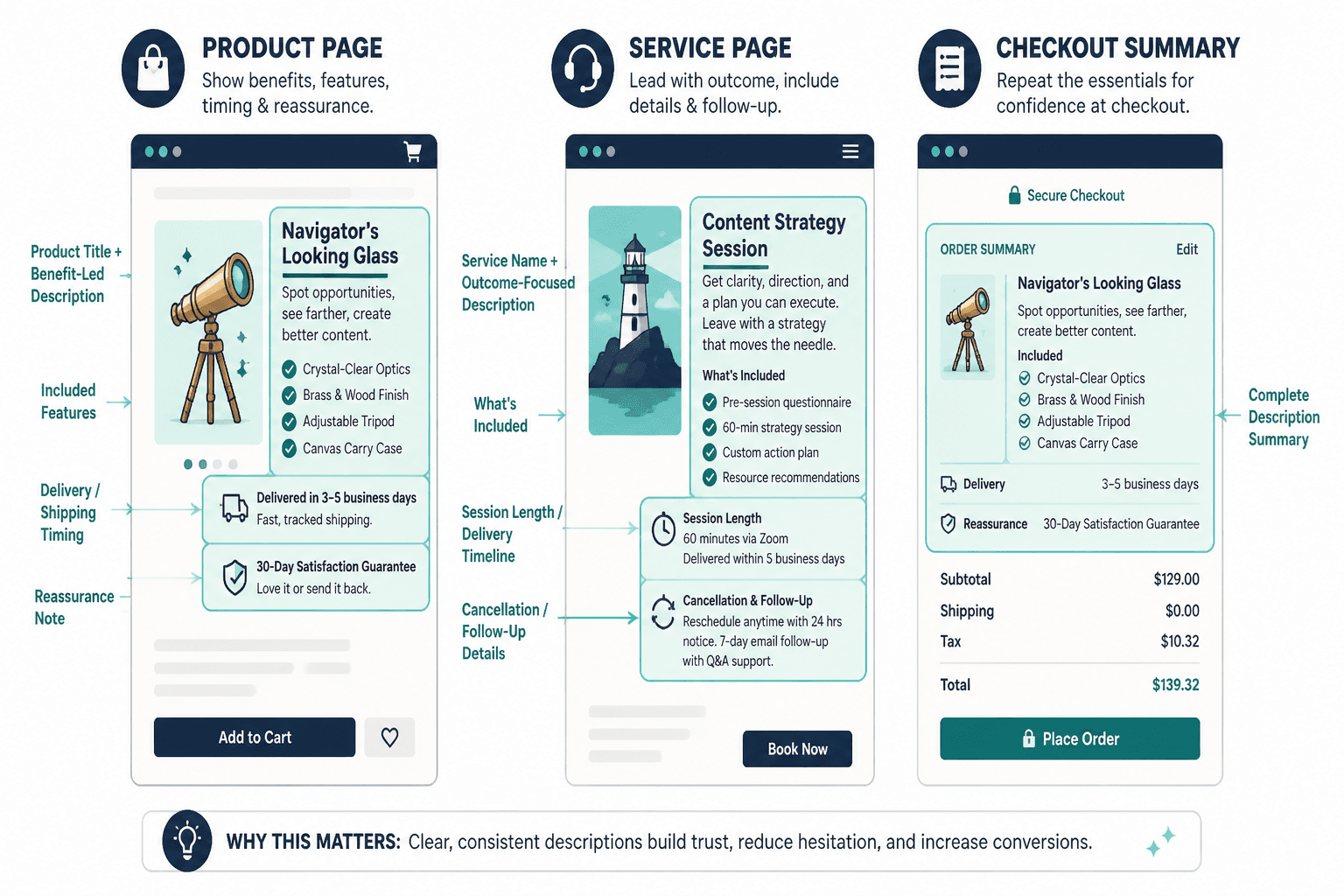
These tools often get ignored in discussions about descriptions, which is odd because the final summary near checkout is part of the description too. If the booking page strips your offer down to “60-minute session,” you just lost a lot of the context and confidence your sales page worked to build.
Make sure your checkout or booking tool lets you include:
- A clear service name
- A concise benefit-led description
- What is included
- Timing or delivery expectations
- Relevant reassurance, such as cancellation or follow-up details
How to choose the right tool stack for your business
The best tool stack depends less on what is trendy and more on what you sell.
| Business type | Best copy tool focus | Best storefront tool focus |
|---|---|---|
| Digital product creator | Drafting, CTA variations, template library | Simple ecommerce or mini-store with clean product pages |
| Consultant or coach | Service positioning, offer rewrite tools, clarity editing | Service page builder plus booking or application flow |
| Freelancer | Reusable service templates, headline variations | Portfolio or service page with inquiry or checkout option |
| Small ecommerce brand | Bulk rewriting, benefit bullets, consistency tools | Flexible storefront with review and FAQ support |
| Solo founder with multiple offers | Messaging system, reusable blocks, editing tools | Storefront or site builder that handles both products and services |
If you are building from scratch, keep it boringly sensible:
- Choose one drafting tool.
- Choose one editing or rewrite tool.
- Build a small template bank for descriptions.
- Choose a storefront or service page tool that matches how people buy from you.
- Test the actual page before buying more software.
That last part matters. Too many people “optimize the copy workflow” before they have even confirmed the page is understandable to a normal human.
What to look for in a tool before paying for it
The easiest way to waste money here is buying tools based on broad promises instead of concrete use cases. Before paying, ask these questions.
Can it handle your type of offer?
A tool that works well for physical product descriptions may be awkward for high-trust service offers. A mini-store built for quick creator sales may be too thin for a consultant selling a premium package.
Does it help with structure, not just wording?
Weak descriptions are often structural problems. Wrong order. Missing proof. Buried value. If the tool only spits out alternate adjectives, that is not enough.
Can you reuse what works?
The best systems save good messaging. Look for saved blocks, templates, snippet libraries, or easy duplication. If every page starts from zero, consistency gets ugly fast.
Will the final page actually be easy to read?
Good storefront tools make descriptions easy to scan. That means logical headings, bullets where useful, clean spacing, mobile readability, and enough flexibility to place proof and CTA near the right parts of the copy.
Does it play nicely with your workflow?
If your writing lives in one place and publishing happens in another, that is normal. But the handoff should not be chaotic. Look for tools that make it easy to move copy, store revisions, and keep your latest version from disappearing into document graveyards.
Common mistakes people make with copy and storefront tools
The tools are usually not the disaster. The way people use them is.
- Using AI before clarifying the offer. If the positioning is mush, the output will be prettier mush.
- Choosing storefront tools based on looks alone. Pretty is nice. Clear sells more.
- Writing for the brand, not the buyer. Your buyer wants to know what this does for them, not how passionately you believe in excellence.
- Overstuffing the page. More sections do not automatically mean more persuasion.
- Ignoring mobile readability. A huge chunk of people will read your description on a phone.
- Forgetting the next step. Great description, no clear CTA. Classic.
One of the stranger habits in this space is treating product and service descriptions like decoration. They are not there to fill space under a heading. They do real work. They answer questions, remove doubt, create momentum, and help the right buyer decide faster.
If you want stronger raw material before picking tools, the guides on product and service description ideas and examples and the broader product and service descriptions guide for creators who want better results will help.
A practical tool stack example
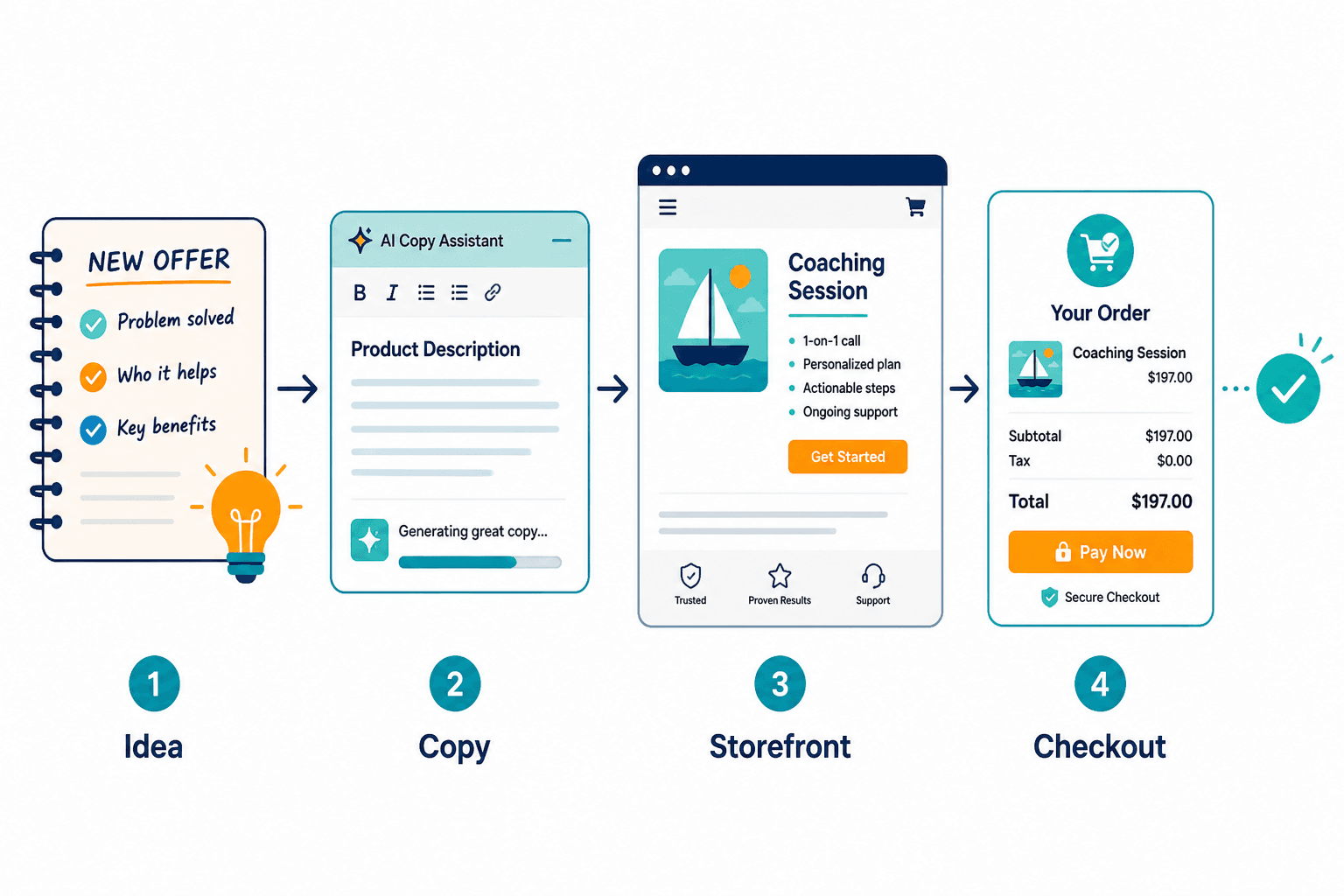
Here is what a simple, sane setup can look like for a solo business selling a mix of services and digital products:
- Drafting tool: for first-pass descriptions, angle testing, and offer summaries
- Editing tool: for clarity, readability, and trimming fluff
- Template bank: saved structures for service pages, product bullets, FAQs, and CTA blocks
- Storefront or page builder: one place to publish and organize offers clearly
- Booking or checkout tool: a clean final step with concise offer recap
That is enough for most businesses. You do not need a software tower. You need a reliable workflow.
If templates are the missing piece, read best templates and tools for product and service descriptions. Templates are often what make the tools finally useful, because they give the tool something solid to work with.
For broader context around this topic, you can also browse the main product and service descriptions hub and related conversion copy content in website conversion copy.
FAQ
What is the difference between a copy tool and a storefront tool?
A copy tool helps you write or improve the description. A storefront tool helps you display and sell the offer clearly.
Do I need AI to write product and service descriptions?
No. It can speed up drafts and rewrites, but it is optional. Clarity beats automation every time.
The bigger point is simple: clearer structure and clearer writing make the piece more useful. That is usually what makes the ending land better too.