Most product and service descriptions are either painfully vague or weirdly overcooked.
You get one version that says nothing beyond “high quality” and “designed to help you succeed,” and another that reads like it was trapped in a branding workshop for six days. Neither one helps a buyer make a decision.
If you want better conversion copy, you do not need more adjectives. You need better templates, better tools, and a clearer way to pull real buying reasons out of your own offer. That is what this guide is for.
These are the best templates and tools for product and service descriptions if you want copy that sounds human, makes the offer easier to understand, and gives people an actual reason to care. Not hype. Not beige fluff. Just useful structure that helps you write faster and sell more clearly.
If you want the broader hub for this topic first, start with product and service descriptions. If not, keep going and steal what you need.
To see how this fits into the wider strategy, open the parent guide.
What makes a product or service description actually work
Before we get into templates and tools, a quick reality check: most weak descriptions are not failing because the writer lacks talent. They fail because they skip the stuff buyers need.
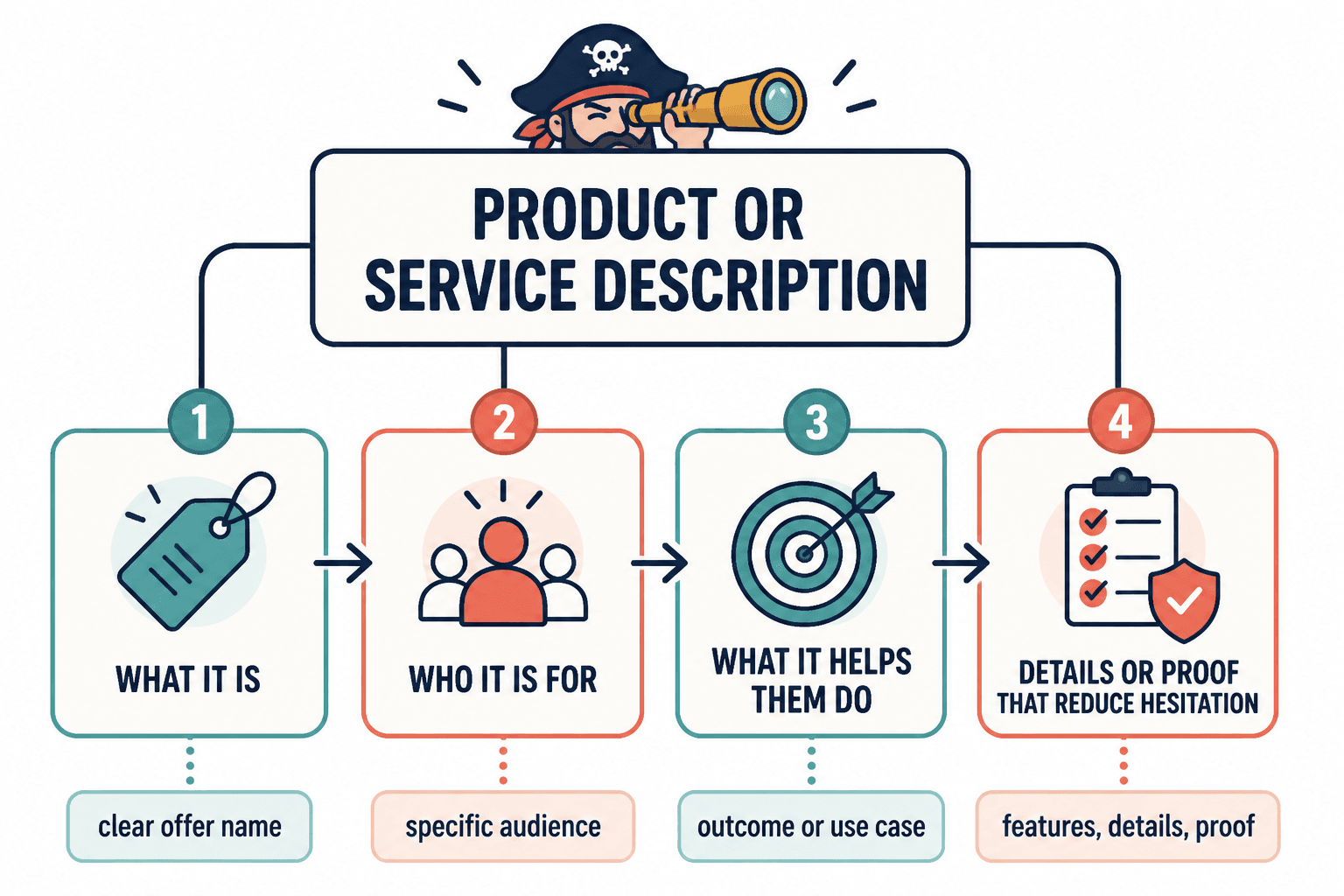
A strong description usually does four things:
- Names what the offer is clearly
- Shows who it is for
- Explains what it helps them do
- Gives enough detail or proof to reduce hesitation
That applies whether you are selling a digital product, a coaching package, a service retainer, a workshop, a template pack, or a physical product.
The mistake people make is assuming descriptions are just summary text. They are not. They are decision-making copy. Their job is to turn “I guess this exists” into “yes, this fits what I need.”
So the best templates and tools for product and service descriptions are the ones that help you surface clarity, specificity, and relevance. Not the ones that just help you produce more words faster.
The best templates for product and service descriptions
Templates are useful because they stop you from staring at a blank page like it personally offended you. But a good template is structure, not a script. If you use one too rigidly, your copy starts sounding like every other mildly competent internet sentence.
Use these as starting frameworks. Then make them sound like your brand, your audience, and your actual offer.
1. The simple outcome template
Best for: clear offers, simple products, one-core-problem services
[Offer name] helps [specific audience] do [valuable outcome] without [common frustration or barrier].
Example:
This homepage copy package helps consultants turn vague website messaging into clear, conversion-focused copy without spending three weeks rewriting the same headline.
This one works because it gets to the point fast. It is especially useful for top-of-page sections, cards, category pages, and service summaries.
2. The problem-solution-detail template
Best for: services, consulting offers, coaching, higher-consideration products
If you are dealing with [problem], [offer name] gives you [solution] so you can [desired result]. You get [key detail 1], [key detail 2], and [key detail 3].
Example:
If your service page sounds polished but still does not convert, this website messaging audit gives you strategic copy feedback so you can fix the parts that confuse buyers. You get page-by-page notes, rewritten examples, and a prioritized action plan.
This is a strong middle ground between too thin and too long. It gives enough substance to feel real without becoming a mini-essay.
3. The feature-to-benefit template
Best for: product listings, software, digital products, packs, templates, memberships
Includes [feature] so you can [benefit].
[Feature] helps you [benefit].
[Feature] means you do not have to [annoying alternative].
Example:
Includes 50 caption templates so you can write faster without sounding repetitive. Built-in hook prompts help you start stronger. And the swipe file means you do not have to keep trying to invent a fresh sentence while your coffee goes cold.
This is one of the most useful templates because it forces you to answer the question buyers actually care about: why should I care about this feature?
4. The “what it is / who it is for / why it works” template
Best for: service pages, sales pages, about-to-purchase readers
[Offer name] is a [type of offer] for [specific audience] who want [goal]. It works by [method or approach], which helps you [outcome] without [common downside].
Example:
The Authority Article Sprint is a done-with-you content strategy session for coaches and consultants who want stronger long-form content that actually supports their offers. It works by turning your expertise into clear article angles, outlines, and conversion paths, so your content builds trust instead of just existing politely on the internet.
This one is especially useful when your offer needs a bit more positioning. Which, frankly, most services do.
5. The short ecommerce template
Best for: physical products, shop listings, catalog pages
[Product name] is designed for [user or use case]. It features [materials, function, or design detail] to deliver [practical benefit]. Ideal for [specific scenario].
Example:
This leather notebook cover is designed for writers and professionals who want a cleaner way to carry notes, drafts, and planning pages. It features durable full-grain leather and a refillable insert system for daily use without disposable clutter. Ideal for meetings, travel, and desk setups that do not need more plastic nonsense.
If you sell products, you may also want the examples in best product and service descriptions ideas and examples for creators.
6. The service package template
Best for: freelancers, consultants, agencies, coaches
This package is for [audience] who need [result]. Over [time frame or format], we will [deliverable 1], [deliverable 2], and [deliverable 3] so you can [business outcome].
Example:
This package is for service-based founders who need sharper messaging before they send more traffic to their site. Over two weeks, we will clarify your positioning, rewrite core page sections, and tighten your calls to action so your website does a better job turning interest into inquiries.
This works because it combines audience fit, scope, and outcome. Very useful if your service descriptions currently sound like random deliverables stuffed in a trench coat.
How to choose the right template for your offer
Do not pick a template based on what looks clever. Pick one based on what the buyer needs to understand before saying yes.
| Offer type | Best template style | Why it works |
|---|---|---|
| Simple digital product | Simple outcome or feature-to-benefit | Fast clarity, low friction |
| Service package | Service package or problem-solution-detail | Explains scope and outcome |
| Coaching or consulting | What it is / who it is for / why it works | Builds positioning and trust |
| Physical product | Short ecommerce template | Helps shoppers scan and compare |
| Premium offer | Problem-solution-detail with proof | Supports higher consideration |
If your offer is complex, do not try to force it into a tiny two-line description and call it minimalist. That is not elegant. That is just missing information.
On the other hand, if your offer is simple, do not bury it under seven paragraphs of scene-setting and pseudo-philosophy. Buyers are busy. They would like you to respect that.
The best tools for product and service descriptions
Now for the tool side. The best tools for product and service descriptions are not all writing generators. Some help you write, some help you organize, some help you test, and some help you understand what buyers actually need to know.
That distinction matters. A tool can speed up your process. It cannot fix muddy positioning or invent customer insight you never collected.
1. AI drafting tools
Best for: first drafts, rewrites, variations, shortening, formatting rough notes
AI tools are genuinely useful here if you already know your offer and audience. They can help you turn a messy bullet list into a readable draft, generate several structure options, or rewrite one section in a tighter tone.
They are less useful when you feed them vague inputs like “make this sound premium” and hope for a miracle. You will usually get polished oatmeal.
Use AI tools for:
- Creating first-pass description options
- Turning features into benefits
- Adapting one description for multiple channels
- Shortening long copy into card or grid versions
- Generating alternate headlines or opening lines
Do not use them as your final taste-maker. If you want a deeper breakdown, read best AI tools for product and service descriptions.
2. Copy organization and swipe tools
Best for: storing angles, examples, proof points, description formulas, reusable phrases
A lot of writing problems are really organization problems. You know your offer. You just do not have your proof points, testimonials, feature notes, objections, and differentiators in one place. So every time you write a description, it feels like starting from zero.
This is where copy organization tools help. Build a simple system to keep:
- Offer summaries
- Audience pain points
- Frequently asked questions
- Customer language
- Feature-to-benefit translations
- Proof, testimonials, and examples
- Version history for testing
Not glamorous, but very effective. Which is true of most useful systems.
3. Storefront and site editing tools
Best for: ecommerce brands, service sites, creators selling on landing pages or product grids
Your description does not live in a vacuum. The layout around it matters. So do things like tabs, accordions, feature sections, comparison blocks, and how easily you can test short versus expanded versions.
Useful storefront or page-building tools help you:
- Present descriptions clearly
- Break long information into scannable sections
- Add proof near buying decisions
- Test placement of details and FAQs
- Match copy structure to buyer intent
For that angle, see best copy tools and storefront tools for product and service descriptions.
4. Voice-of-customer research tools
Best for: finding real buyer language and objections
If your descriptions feel generic, this is usually the missing piece.
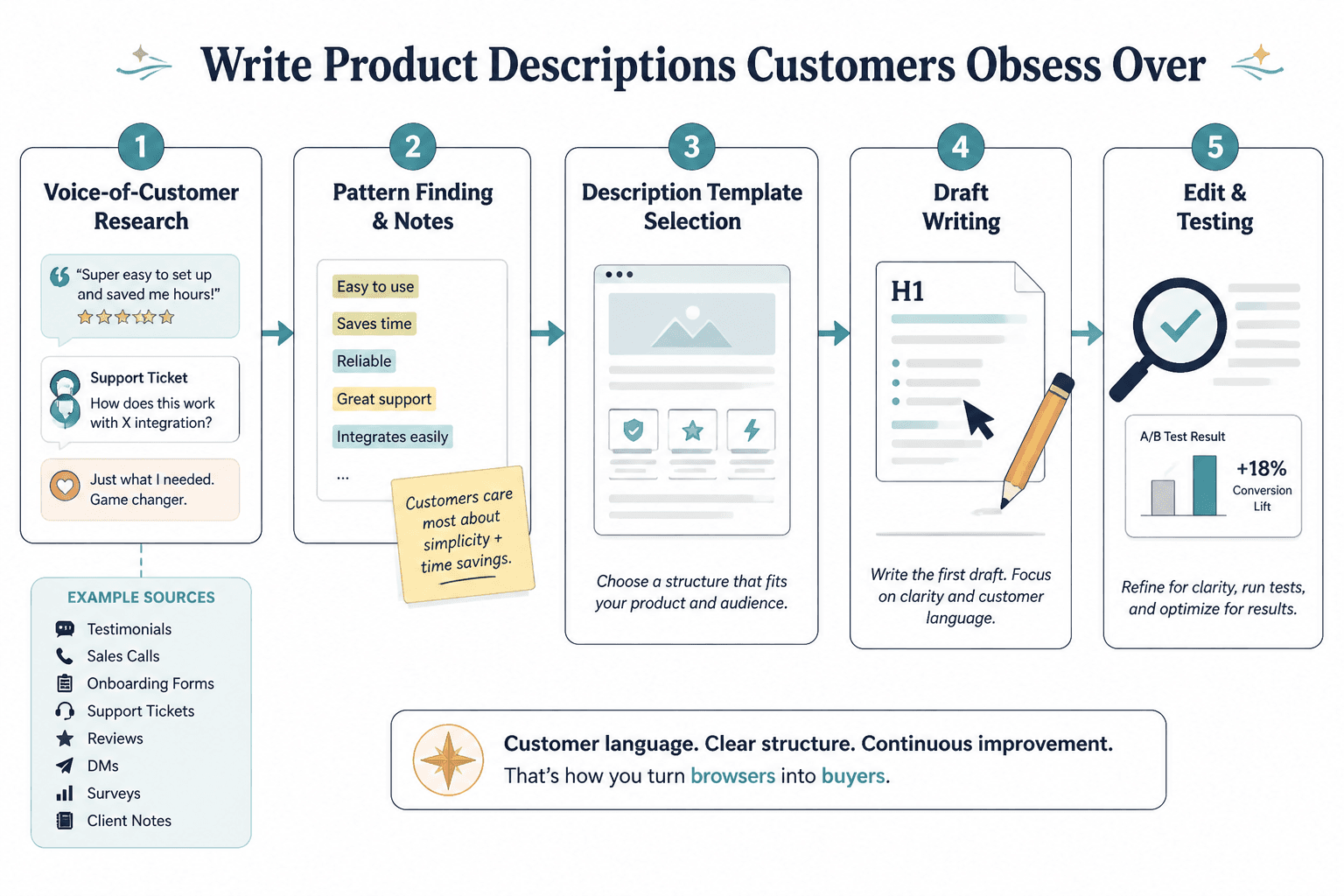
Voice-of-customer inputs can come from testimonials, sales calls, onboarding forms, support tickets, reviews, DMs, surveys, and client notes. You do not need a massive dataset. You need enough recurring language to spot patterns.
Look for phrases that reveal:
- What buyers want
- What they are tired of
- How they describe the problem
- What nearly stopped them from buying
- What result mattered most after purchase
That material gives your description teeth. It also stops you from writing copy that sounds impressive to you and meaningless to everyone else.
5. Testing and analytics tools
Best for: refining what already gets traffic
Once a product page or service page is live, testing tools can help you improve weak sections. Maybe people scroll but do not click. Maybe they click but do not convert. Maybe they stall around your pricing or deliverables section.
You do not need to become a full-time CRO gremlin. Just pay attention to where friction shows up. Then use your template and research notes to sharpen the weak spots.
A simple workflow for writing better descriptions with templates and tools
If you want a repeatable process, use this.
- Collect raw inputs. Gather features, deliverables, proof, FAQs, objections, and customer language.
- Choose the template that fits the buying context. Short grid listing? Service page? Premium offer? Pick accordingly.
- Draft the core description. Write for clarity first, not cleverness.
- Use a tool to expand, tighten, or vary it. Generate alternate versions if needed.
- Turn features into benefits. Ask why each detail matters.
- Add proof or specificity. Include examples, process details, outcomes, or practical context.
- Edit for tone. Remove filler, hype, and anything that sounds like it escaped a startup incubator.
- Format for scanning. Use short paragraphs, bullets, and section labels where needed.
- Test and refine. Improve what is unclear or underperforming.
That process works for one description or fifty. It is also why templates and tools work best together. The template gives structure. The tool helps with speed. Your judgment handles the part that machines still routinely mangle: relevance.
Common mistakes people make with description templates and tools
A few traps show up constantly.
Using a template like a personality transplant
A template should organize your thinking. It should not erase your voice. If your final copy sounds like a generic sales page assembled in a coworking space basement, pull it back.
Listing features without explaining why they matter
Buyers do not buy “three modules,” “PDF access,” or “90-minute session” because those words are inherently exciting. They buy what those things help them do.
Letting AI smooth your copy into nothing
AI is very good at making copy sound tidy. It is also very good at sanding off the parts that made it specific. If every sentence sounds professionally harmless, that is the problem.
Writing one description and using it everywhere
Your homepage card, sales page, email promo, checkout summary, and product listing do not all need the same version. Same offer, different context.
Confusing “premium” with “vague”
Expensive offers do not need blurrier copy. In fact, premium buyers often need more confidence, more clarity, and better reasoning before they buy.
If you want more practical frameworks, simple product and service descriptions feature sections templates for busy creators is a good next read.
Best templates and tools for product and service descriptions by use case
The bigger point is simple: clearer structure and clearer writing make the piece more useful. That is usually what makes the ending land better too.
The bigger point is simple: clearer structure and clearer writing make the piece more useful. That is usually what makes the ending land better too.