
Most people looking for the best AI writing tools and scheduler tools for X Posts are really trying to solve three problems at once:
- They want to post faster
- They want their posts to sound sharper
- They want a workflow that does not turn into a tab-hoarding, draft-losing, idea-forgetting mess
Fair. X rewards speed, clarity, timing, and repetition. It does not reward overthinking, bloated copy, or threads that read like someone pasted a beige webinar into a social feed.
That is where tools can help. Not because they are magical. Not because AI suddenly gives you taste. But because the right stack can help you generate angles faster, tighten wording, save good ideas before they vanish, and publish consistently without babysitting every post.
Here’s the useful version: this guide will help you choose the best AI writing tools and scheduler tools for X Posts based on what you actually need: ideation, drafting, punchier rewrites, scheduling, queue management, analytics, and keeping your content process from becoming weirdly exhausting.
If you also want broader platform-specific strategy, start with X posts. And if you want a wider content hub, there’s also the main social media writing and X writing section.
For the main guide behind this topic, visit the parent guide.
What good tools for X Posts should actually do
Before naming categories and workflows, worth clearing up a common mistake: people buy tools for features, then end up needing outcomes.
You do not need “an AI content ecosystem.” You need a way to turn rough expertise into strong posts consistently.
For X specifically, a useful tool should help with at least one of these:
- Turn a messy idea into a tighter post
- Generate multiple hook options quickly
- Compress long thoughts into short, quotable language
- Store reusable post formats and templates
- Schedule content without killing spontaneity
- Queue evergreen posts and recurring themes
- Track which ideas earn replies, saves, profile visits, or clicks
- Make it easier to test angles instead of guessing forever
What they cannot do is equally important.
- They cannot give you an actual opinion
- They cannot fix weak positioning
- They cannot tell who your audience is if you are still trying to talk to “founders, creators, entrepreneurs, and ambitious humans” all at once
- They cannot make generic advice feel alive
- They cannot rescue a post whose core idea is just not interesting
AI can help you write faster. It cannot help you matter more unless you give it something worth sharpening.
That distinction saves a lot of wasted subscriptions.
The best AI writing tools for X Posts, by job
There is no single best tool for every creator. The better question is: best for what?
1. AI drafting tools for turning raw ideas into usable first drafts
These are the tools you use when you have the thought, but not the phrasing yet. Good drafting tools help you move from “I know what I mean” to “this actually sounds like a post.”
Best for:
- Brain-dumping notes into cleaner language
- Generating 5 to 15 different versions of a post
- Turning article ideas, podcast notes, or client lessons into short-form content
- Creating hooks, replies, quote posts, and thread skeletons
What to look for:
- Fast prompt-response workflow
- Ability to save custom instructions or voice guidelines
- Good short-form compression
- Easy editing and iteration
- Not overly polished by default
The last point matters more than people think. X usually works better when the writing feels human, pointed, and a little immediate. If your AI tool keeps giving you polished sludge, it is not helping. It is just generating content-flavored wallpaper.
2. AI rewriting tools for making posts punchier
This category is often more useful than pure drafting. A lot of decent X posts are not born brilliant. They are rewritten into shape.
Good rewriting tools help you:
- Cut soft openings
- Shorten bloated sentences
- Make a point more quotable
- Add contrast, specificity, or tension
- Create stronger variants of the same idea for testing
Use these when your draft is not terrible, just sleepy.
Example:
Weak: “I think a lot of creators could benefit from being more consistent with posting because consistency is really important for growth.”
Better: “Most creators do not have a reach problem. They have a disappearing-for-12-days problem.”
A decent AI rewriting tool can help you get from the first version to the second faster. Not automatically. But faster.
3. Idea generation tools for hooks, angles, and content prompts
These are useful if your problem is not writing mechanics. It is staring at the blinking cursor and thinking, “I know stuff. Why is my brain now soup?”
The best idea tools help you generate:
- Strong opinion angles
- Contrarian takes with nuance
- Hook variations
- Reply ideas
- Thread structures
- Post ideas pulled from your niche, offer, audience objections, and recent conversations
These work best when fed real input:
- Your past best-performing posts
- Client questions
- Sales calls
- Audience objections
- Notes from articles or newsletters
- Things you genuinely disagree with in your niche
If you ask a tool for “10 viral X post ideas for entrepreneurs,” do not be shocked when it hands you reheated nonsense.
4. Template and snippet tools for repeatable post formats
Strictly speaking, not every template tool is “AI.” Still, this category matters because good X posting gets easier when you stop reinventing structure every day.
Useful template systems let you save:
- Short opinion post formats
- Problem → insight → takeaway structures
- Hot take → explanation → example formats
- Thread sequences
- Soft CTA endings
- Reply frameworks
- Launch post variations
If you want help with reusable structures, see best templates and tools for X posts.
5. Voice-guided AI tools for staying consistent without sounding cloned
This is where better AI tools start pulling ahead. A tool that can work from your examples, preferred tone, banned phrases, target audience, and post style is far more useful than one that spits out generic “creator economy” filler.
What to train or specify:
- Your audience
- Your strongest beliefs
- Words and phrases you never want used
- Your preferred sentence rhythm
- How sharp or conversational you want posts to feel
- The kinds of CTAs you will and will not use
That does not mean building some grand AI persona cathedral. It means giving the tool enough context so it stops writing like a motivational intern.
The best scheduler tools for X Posts, by workflow
Scheduling tools are less glamorous than AI writing tools, but they often save more stress. Because once you have a decent post library, publishing becomes an operations problem.
A good scheduler for X should make your posting more consistent without making your account feel robotic.
1. Simple schedulers for creators who just need consistency
If you are posting a few times a week and do not need a giant content machine, a basic scheduler is enough.
Best for:
- Solo creators
- Consultants
- Writers with a small posting rhythm
- People repurposing newsletter or article ideas into X posts
Must-have features:
- Easy compose and queue
- Preview before publishing
- Thread scheduling
- Draft saving
- Basic analytics
- Calendar or queue view
If a scheduler makes you manage 14 settings before posting one opinion, that is not a productivity tool. That is software cosplay.
2. Queue-based schedulers for evergreen content
These are useful if you have repeatable ideas that still stay relevant over time: positioning, writing principles, client lessons, offer myths, common mistakes, frameworks, and strong evergreen threads.
Best for:
- Creators building authority over months
- Coaches and consultants with recurring audience problems
- People who want a stable baseline of activity while still posting live
What to watch for:
- Category-based queues
- Recycling options for evergreen posts
- Pausing controls during launches or busy periods
- Ability to separate live content from queued content
Queue tools are great until people use them as a substitute for presence. Scheduled content can keep things moving. It cannot replace real-time replies, opinions, reactions, and conversation.
3. Thread-friendly schedulers for educational content
If threads are part of your strategy, your scheduler needs to handle them properly. That means sequencing, previews, editing, and a clean way to review the flow before publishing.
Useful features include:
- One-post-per-line drafting
- Drag-and-drop order changes
- Thread previews
- Draft duplication
- Easy editing after building the sequence
A lot of thread failures have nothing to do with ideas. They fail because the structure is clunky, repetitive, or badly paced. Tools that help you see the whole thing cleanly are worth more than one more AI “viralizer” feature.
4. Analytics-aware schedulers for testing instead of guessing
This is the category people underrate. Not because vanity metrics are thrilling, but because patterns matter.
A better scheduler should help you answer questions like:
- Which post formats get replies?
- Which hooks get ignored?
- Do short, sharp opinions outperform mini-essays for your audience?
- What topics lead to profile visits or clicks?
- Which CTAs kill momentum?
That is actually useful. “Your engagement was up 11% this week” is not. Nice chart. Still useless.

What a smart X tools stack looks like
You usually do not need one tool that does everything. You need a small stack that covers the actual workflow.
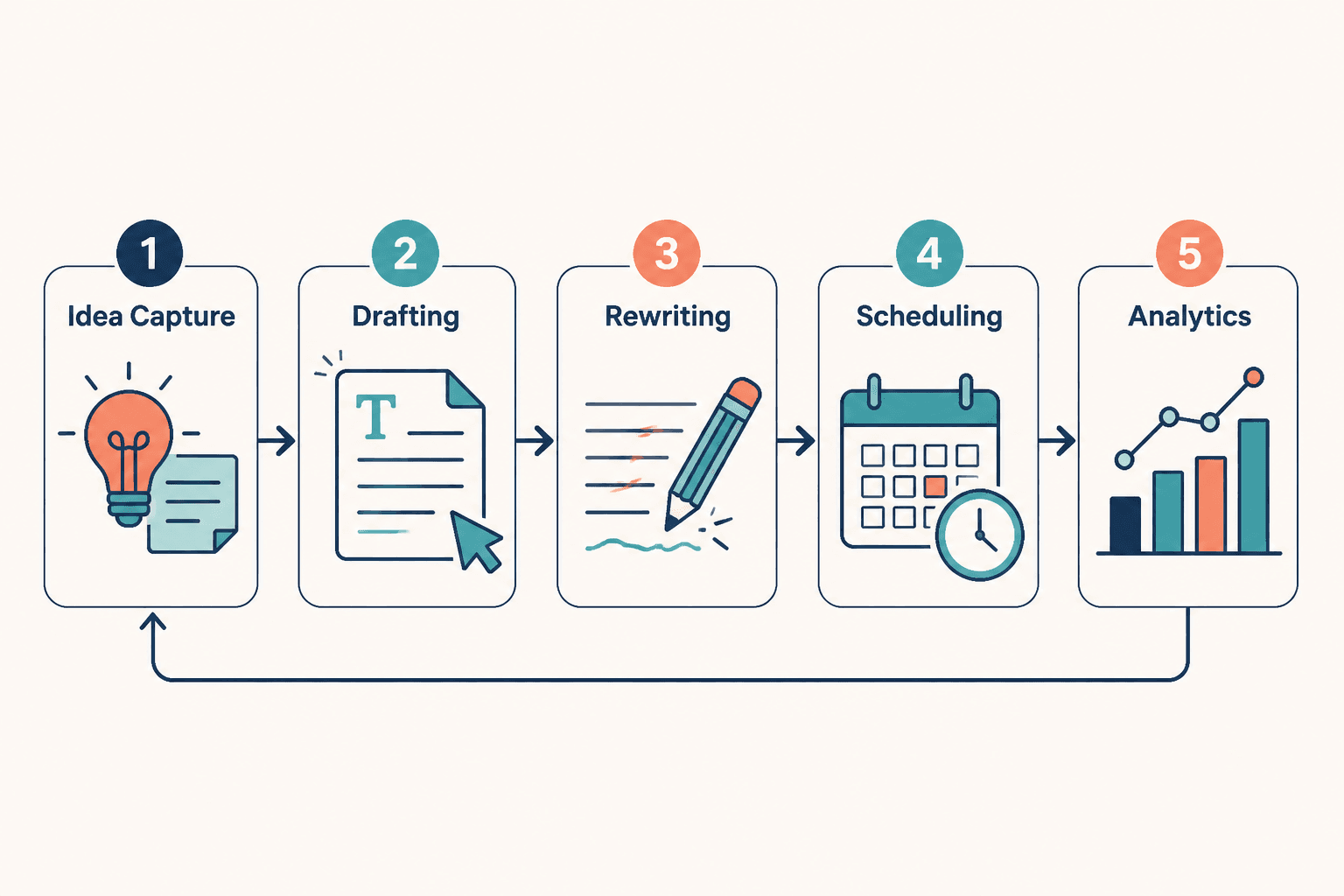
| Job | What the tool should help with | Why it matters for X |
|---|---|---|
| Idea capture | Save thoughts, hooks, replies, and observations fast | X rewards timely, sharp ideas |
| AI drafting | Turn rough notes into post options | Speeds up creation without starting from zero |
| AI rewriting | Compress, sharpen, and test variations | X needs tighter phrasing than most platforms |
| Template storage | Reuse structures that already work | Consistency gets easier when formats are repeatable |
| Scheduler | Publish posts and threads consistently | Prevents content from dying in drafts |
| Analytics | Spot useful patterns | Helps you improve based on evidence, not vibes |
For a lot of creators, the sweet spot looks like this:
- One note or capture tool
- One AI drafting or rewriting tool
- One scheduler with decent thread support and analytics
That is enough to build a sane system. You do not need a 9-tool stack held together by browser bookmarks and denial.
How to choose the best AI writing tools and scheduler tools for X Posts
Pick based on the bottleneck, not the hype.
Here is the simple version.
If your problem is “I never know what to post”
You need:
- Idea generation support
- Template libraries
- A fast capture system
You probably do not need fancy analytics yet. First, build a repeatable idea flow.
If your problem is “My posts are fine but bland”
You need:
- AI rewriting support
- Hook testing
- Voice guidance
- Examples of strong post structures
You may also want best X posts ideas and examples for creators so you can study stronger packaging instead of guessing why your decent ideas keep landing with polite silence.
If your problem is “I write good posts but do not post consistently”
You need:
- A scheduler
- A queue system
- Draft organization
- A lightweight review process
This is operational, not creative. Treat it that way.
If your problem is “I am busy and need an end-to-end workflow”
You need a stack that handles:
- Idea capture
- Drafting
- Rewriting
- Scheduling
- Performance review
In that case, choose tools that play nicely with your actual behavior. If you hate complex dashboards, do not buy the feature monster. If you write in messy bursts, make sure drafting and scheduling are both friction-light.
A practical workflow for using AI and scheduler tools without sounding automated
This is where people get into trouble. They use AI to generate 40 posts, schedule all of them, then wonder why their feed sounds like a haunted productivity app.
Better workflow:
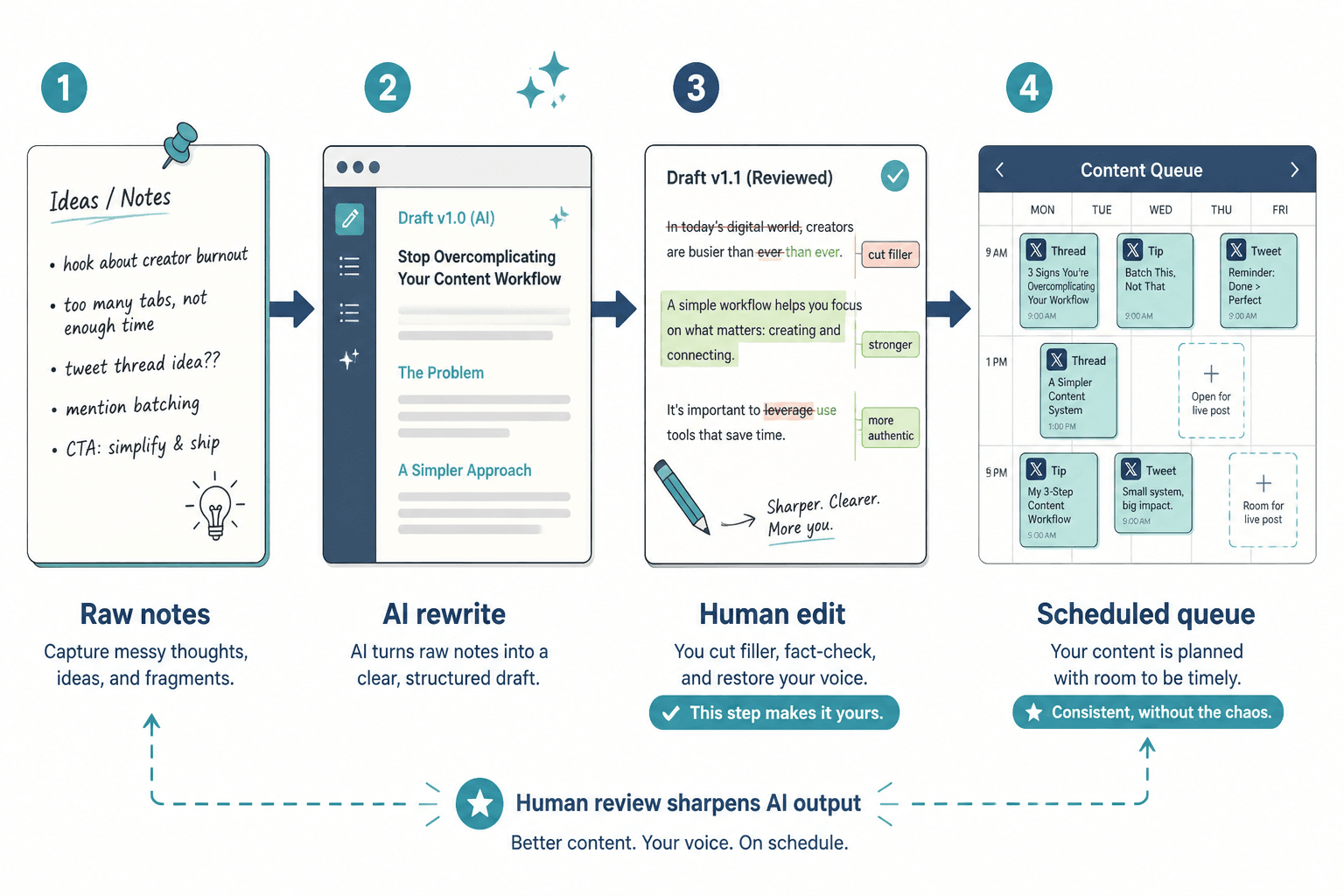
- Capture raw ideas daily. Save observations, client questions, sharp opinions, mini-rants, and sentences worth expanding.
- Use AI to expand or reframe. Ask for 10 hook variations, 5 tighter rewrites, 3 angle options, or a thread sequence from your raw note.
- Edit hard. Cut filler. Remove fake polish. Keep your own phrasing where it matters.
- Sort posts by type. Evergreen, timely, reactive, promotional, conversational.
- Schedule the evergreen and low-risk posts. Leave room for live posting and replies.
- Review results weekly. Keep track of what gets replies, profile clicks, and actual conversations.
- Turn winners into templates. Good posts should reduce future effort.
This matters because X is still a live platform. If everything feels prepackaged, people can tell. The account starts feeling technically active but socially dead.
And that is the trap with over-automation. It saves time right up until it starts making your content forgettable.
Common mistakes people make with X writing tools
Using AI before they know their point
If you feed a vague thought into a writing tool, you usually get polished vagueness back. Start with a real point.
Optimizing for volume instead of sharpness
Twenty weak posts a week do not beat five strong ones. More output is not automatically more signal.
Scheduling every post and forgetting to be present
X is not just a publishing channel. It is a conversation platform. If you only broadcast, your content gets flatter over time because you stop hearing what people actually respond to.
Letting the tool flatten their voice
If every post suddenly sounds cleaner but less like you, that is not improvement. That is erosion in nice formatting.
Buying tools before building a repeatable content angle
The tool cannot decide what you should be known for. It can only help express it. If your positioning is still muddy, fix that first or at least alongside the tooling.
What to test before paying for anything long-term
The bigger point is simple: clearer structure and clearer writing make the piece more useful. That is usually what makes the ending land better too.
X posts tend to work better when the line gets sharper and the ending earns the reaction. Cleaner payoff usually beats louder phrasing.