
Most people do not need more ideas for X. They need better packaging and a cleaner workflow.
That is the real problem behind finding the best templates and tools for X posts. The platform rewards clarity, speed, timing, opinion, and compression. Not bloated “content systems” that turn every thought into a beige quote card with a pulse.
If your posts keep disappearing, the issue usually is not that you are not posting enough. It is that your posts are too soft, too vague, too long for the point they are making, or too manually built to stay consistent without hating your life.
Here’s how to fix that. This guide will show you which templates actually help, which tools are worth using, what each one is good for, and how to build X posts faster without sounding like a threadbro clone who just discovered the word “leverage.”
If you want the wider context for writing on the platform, start with X posts. If you also want idea starters after this, these X post ideas and examples pair nicely with the templates below.
For the full path around this topic, head to the parent guide.
What makes a good X post template
A good template does one thing well: it gives your idea shape without flattening your personality.
Bad templates do the opposite. They make every post sound pre-chewed. You have probably seen them:
- “Hot take: [obvious statement]”
- “Unpopular opinion: [popular statement]”
- “I wish more people knew that [vague life lesson]”
- “Here are 7 things I learned about success”
Those are not templates. They are content costumes.
The best templates and tools for X posts help you do a few practical things:
- Get to the point fast
- Create tension or contrast early
- Make one clear idea easy to read
- Give the reader a reason to react, reply, save, or click
- Reduce drafting friction so you can publish consistently
That means your templates should be built around post types, not around random copywriting fluff.
On X, the post usually wins because it is sharp, not because it is “optimized” by some mystical machine process. If the first line is limp, no tool is coming to save it.
The best templates for X posts
You do not need 47 templates. You need a small set that covers the kinds of posts you actually want to publish.
Below are the ones worth keeping. Use them as structures, not scripts.
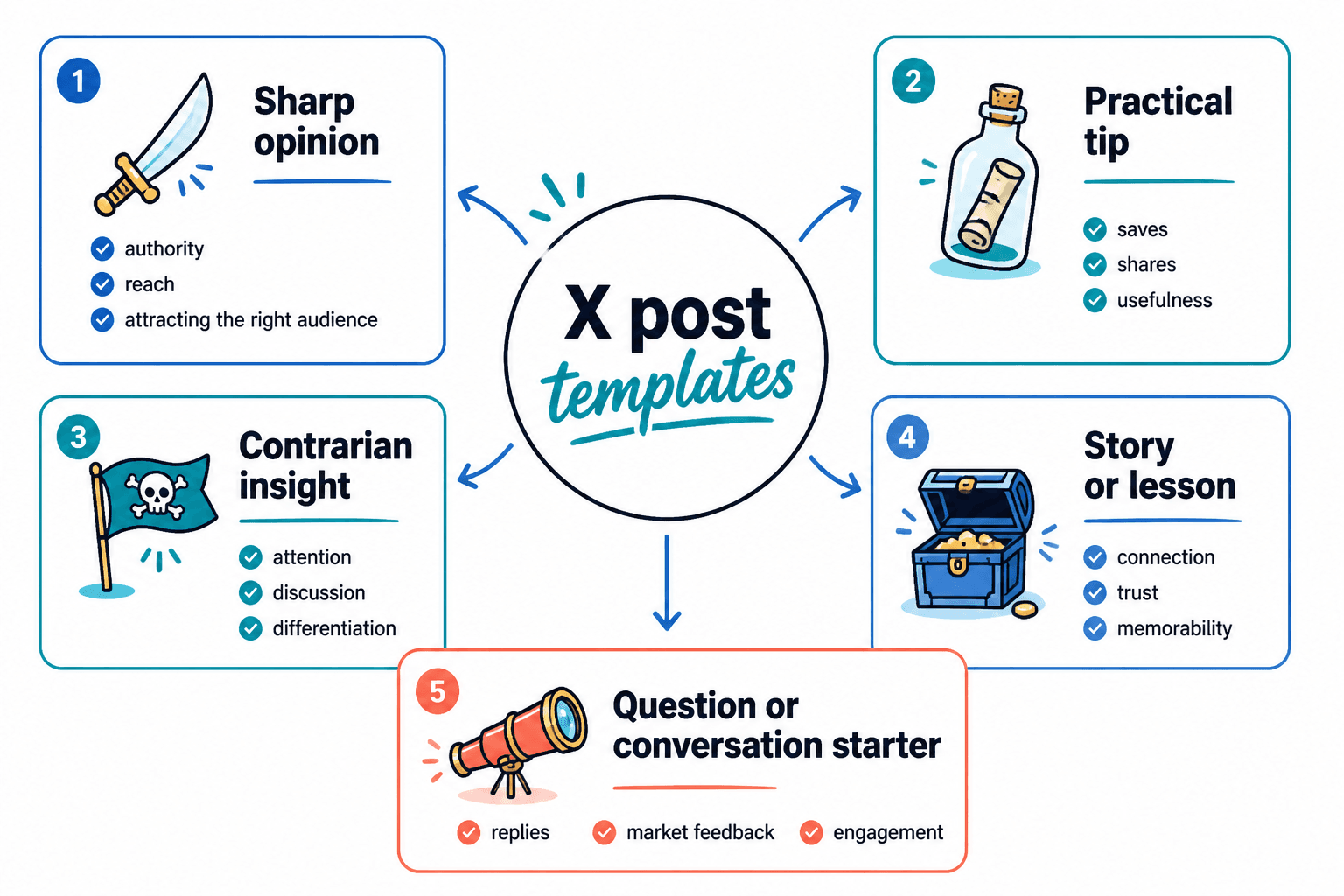
1. The sharp opinion template
Best for: authority, reach, attracting the right people, filtering out the wrong ones.
Structure:
- State the opinion clearly
- Add a reason or contrast
- Finish with a punchy implication or example
Most content does not fail because it lacks value.
It fails because the writer buried the value under polite throat-clearing.
People do not owe your point their patience.
Why it works: X rewards compression. A clear opinion with a real point is easier to quote, reply to, and remember than a safe mini-essay trying not to offend anyone.
2. The mistake-and-fix template
Best for: educational posts, consultant content, creator advice, practical authority.
Structure:
- Name the common mistake
- Explain why it fails
- Give the better approach
Trying to sound smart on X is usually the mistake.
Trying to sound clear works better.
Shorter words. Stronger point. Less fog.
This is one of the safest and most useful templates because it gives the reader a problem and a correction in about ten seconds.
3. The observation template
Best for: creators, writers, founders, marketers, and anyone whose edge comes from noticing what others miss.
Structure:
- Start with a specific observation
- Connect it to a broader insight
- Land on a useful takeaway
You can tell who actually works with clients by how they write.
People with real reps sound specific.
People with no reps sound inspirational.
Good X posts often come from seeing a pattern and naming it cleanly. This template is excellent for that.
4. The mini-framework template
Best for: saving, sharing, teaching, and packaging expertise fast.
Structure:
- Name the framework
- Give 3 to 5 parts
- Close with what it helps the reader do
A simple content test:
1. Is the point clear?
2. Is the angle specific?
3. Is there tension?
4. Is there a reason to care now?
If not, do not publish it just because it is technically written.
Frameworks work well on X because they create order quickly. Just keep them tight. If your “simple framework” needs a nap halfway through, it is a thread, not a post.
5. The before-and-after rewrite template
Best for: writers, marketers, coaches, messaging consultants, brand strategists, and anyone selling clarity.
Structure:
- Show weak version
- Show stronger version
- Explain the difference briefly
Weak: “Consistency is key in building your brand.”
Better: “Posting daily will not save bland positioning.”
Same topic.
Very different spine.
This format earns attention because it proves you know what better actually looks like.
6. The contrarian-with-proof template
Best for: standing out without drifting into lazy provocation.
Structure:
- State the contrarian angle
- Back it up with logic, experience, or example
- Clarify who the point is for
You do not need more content pillars.
You need 2 or 3 repeatable angles that people start associating with you.
More buckets often just means more unfocused posting.
The proof matters. Without it, this becomes fake edge for people addicted to saying “hot take” before room-temperature opinions.
7. The soft CTA template
Best for: leads, profile visits, replies, newsletter growth, and gentle conversion.
Structure:
- Deliver the main idea first
- Add one relevant next step
- Keep the CTA natural and low-friction
If your posts are useful but not converting, check the handoff.
Good content still needs a next step.
If you want more examples, I put a few here: X post ideas and examples.
X users are quick. The CTA should feel like a continuation, not a sudden hostage note from your funnel.
How to build your own X post template library
Do not collect templates like you are hoarding canned beans for a content apocalypse. Build a small library around your actual goals.
A practical setup looks more like this:
- Pick 3 to 5 post types you naturally write well.
- Create 2 versions of each so you are not repeating the exact same rhythm.
- Save your best-performing posts by type, not just by likes.
- Note why they worked: sharper hook, clearer angle, stronger ending, more specificity.
- Rewrite the structure into a reusable pattern.
For example, if you are a coach or consultant, your library might include:
- One sharp opinion template
- One myth-vs-reality template
- One client mistake template
- One short framework template
- One profile-click CTA template
If you are a writer or personal brand, maybe it is more like:
- One observation template
- One rewrite template
- One humor-light opinion template
- One conversation-starting question template
- One promotion template that does not feel desperate
The point is not variety for its own sake. The point is to make publishing easier while keeping the quality high enough that your posts still sound like you.
The best tools for X posts, by job
You do not need one magic tool. You need the right category of tool for the part of the workflow that keeps breaking.
That is where people get weirdly inefficient. They use an AI writer for idea storage, a scheduler for editing, a notes app for analytics, and vibes for the rest. Then they wonder why posting feels messy.
Use tools by function.
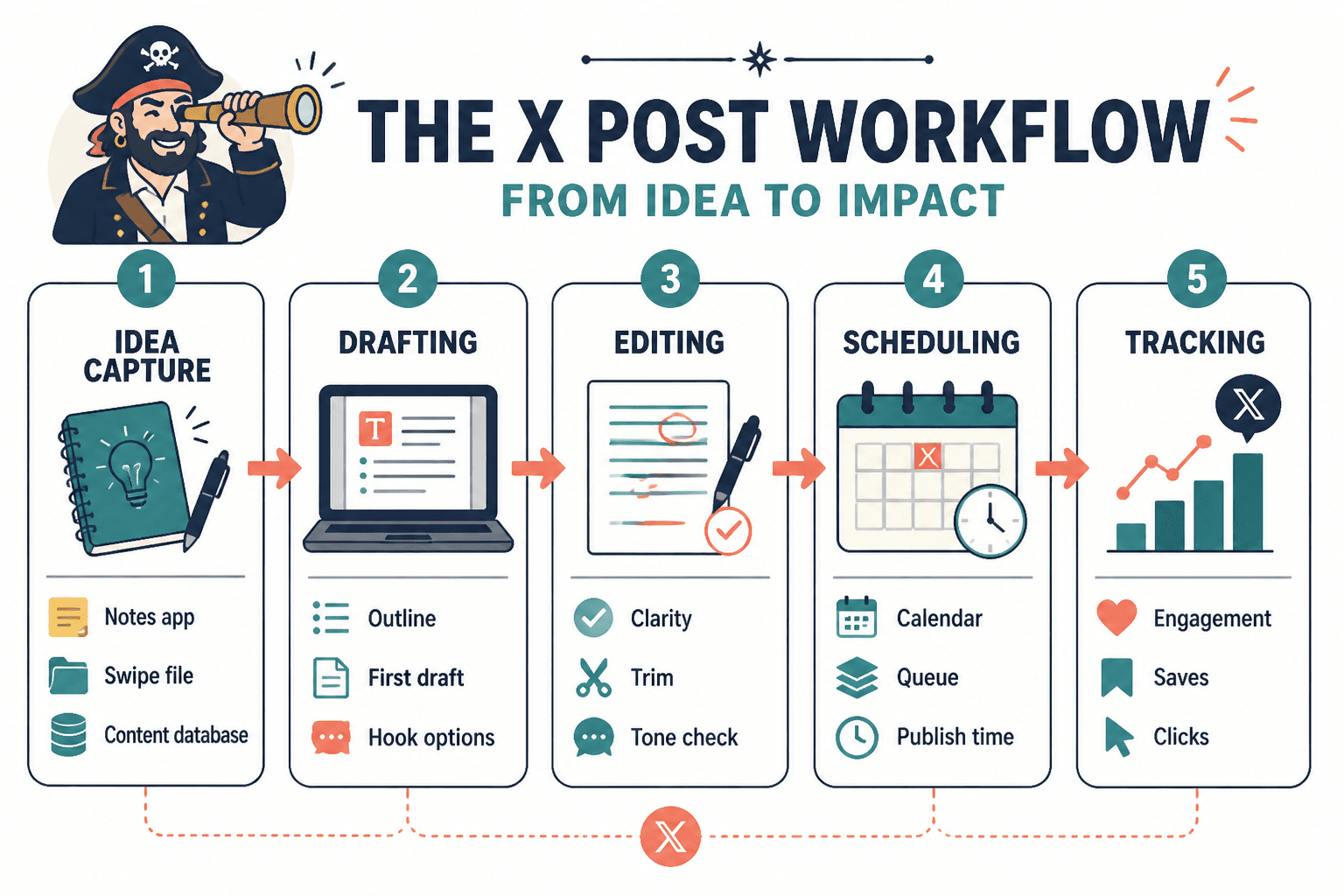
1. Idea capture tools
Use these when your problem is losing good ideas before they become posts.
- Notes apps
- Simple content databases
- Swipe files for saving strong posts and hook patterns
What they are good for:
- Saving observations quickly
- Organizing post ideas by theme
- Collecting before-and-after examples
- Tracking phrases you want to reuse
What they cannot do:
- Decide which ideas are worth posting
- Fix weak positioning
- Turn an average thought into a memorable one
If your head is full but your drafts folder is empty, this category matters more than another AI toy.
2. Drafting and AI writing tools
Use these when the bottleneck is speed, variation, or getting from rough thought to usable draft.
What they are good for:
- Generating alternate hooks
- Tightening phrasing
- Turning long notes into shorter post options
- Creating multiple versions of the same point
- Helping you repurpose articles, threads, and newsletters into posts
What they are not good for:
- Producing publish-ready voice without editing
- Creating original taste
- Knowing what your audience actually finds fresh
- Replacing judgment
This is where many creators overtrust the machine and underuse their own point of view. AI can speed up phrasing. It cannot manufacture edge. If your source idea is bland, the output usually becomes efficient blandness, which is somehow worse.
If you want help sorting through that category specifically, see best AI tools for X posts and best AI writing tools and scheduler tools for X posts.
3. Editing tools
Use these when your posts are technically fine but still feel flabby.
Good editing tools help with:
- Sentence tightening
- Clarity checks
- Redundancy removal
- Basic grammar cleanup
- Reading rhythm
But be careful. Over-edited X posts can lose the snap that makes them feel native to the platform. If a tool turns your post into a polished little corporate spoon, undo that immediately.
4. Scheduling tools
Use these when inconsistency comes from workflow, not from lack of ideas.
Scheduling tools are useful for:
- Queueing content in batches
- Spacing posts across the week
- Testing posting times
- Keeping your content habit alive when work gets busy
- Managing replies and drafts in one place, depending on the tool
They are not useful for:
- Making weak posts perform
- Replacing real-time interaction
- Magically “hacking” reach
Scheduling is infrastructure. Useful infrastructure, yes. But still infrastructure. It helps good systems run better. It does not turn stale ideas into interesting ones.
5. Analytics and tracking tools
Use these when you want to improve patterns instead of guessing.
Good tracking helps you answer questions like:
- Which post types get replies, not just impressions?
- Which hooks earn clicks?
- Which opinions attract the right audience?
- Which CTAs lead to profile visits or list growth?
That last part matters. A post that gets decent engagement from the right people is often more valuable than a flashy post that pulls in random attention and zero business relevance.
6. Content operating system tools
This is the category people often skip, even though it saves the most stress.
A content operating system can be as simple as a clean database or workspace that tracks:
- Ideas
- Drafts
- Post types
- CTA types
- Published posts
- Performance notes
- Repurposing opportunities
If you publish often, this matters more than endlessly hunting for templates on social media. Systems beat inspiration when inspiration has already ghosted you for the week.
Which tool category fits which problem
| Problem | Best tool category | What to do |
|---|---|---|
| You have ideas but never capture them | Idea capture tools | Save observations immediately and tag by topic |
| You stare at blank drafts too long | AI drafting tools | Use prompts to generate 3 to 5 versions, then edit hard |
| Your posts feel wordy | Editing tools | Cut soft openings, repetition, and filler transitions |
| You post randomly | Scheduling tools | Batch 1 to 2 weeks of posts and queue them |
| You cannot tell what is working | Analytics tools | Track hooks, post types, and CTA outcomes |
| Your workflow is chaotic | Content OS tools | Build one simple system for idea to publish to review |
A simple workflow for using templates and tools without sounding robotic
If you want the best templates and tools for X posts to actually help, use them in the right order.
- Start with a real point. Not a format. Not a prompt. A point.
- Pick the template that fits the idea. Opinion, mistake-and-fix, framework, rewrite, observation.
- Draft fast. Use AI if it helps you create options, not if it makes you lazier about thinking.
- Edit for sharpness. Cut anything soft, vague, or overexplained.
- Add a relevant CTA if needed. Only if it naturally fits the post.
- Schedule or publish. Do not keep polishing a short post into dust.
- Review what worked. Save strong posts back into your template library.
That last step is where real leverage lives, unfortunately in the least glamorous way possible. Your own best posts are better template sources than most random “viral tweet formulas” floating around online.
Study your own patterns. Which posts earned replies from people you would actually want as clients, collaborators, subscribers, or peers? Which ones got attention but felt off-brand? Which ones were easy to write and still landed? Those answers are far more useful than chasing someone else’s content ritual.
Common mistakes people make with X post templates and tools
Using templates as personality replacement
A template should support your voice, not erase it. If all your posts start sounding like they were assembled from the same startup ghost, pull back.
Using AI before you know your angle
If you feed mush in, you usually get smoother mush out. Figure out the point first.
Over-scheduling dead content
Consistency is great. Consistently posting forgettable things is not a strategy.
Tracking vanity metrics only
The bigger point is simple: clearer structure and clearer writing make the piece more useful. That is usually what makes the ending land better too.
X posts tend to work better when the line gets sharper and the ending earns the reaction. Cleaner payoff usually beats louder phrasing.