
A creator bio can get stalled in a very specific kind of mess: one tab for notes, one tab for rewrites, one tab for “maybe this sounds better,” and a profile field that is still empty because every version feels like it is one adjective away from becoming a liability. The problem is usually not the lack of words. It is the handoff between tools. The useful move is to build a lean system that helps you draft the bio, strip the fluff, and land on something that actually says who you help and why that is believable.
If you want the broader framework first, start with the creator bios profile copy guide. This page is the toolchain piece: which AI tools help, where they help, and where they absolutely do not get to run the whole show.
What creator bios and profile copy actually need
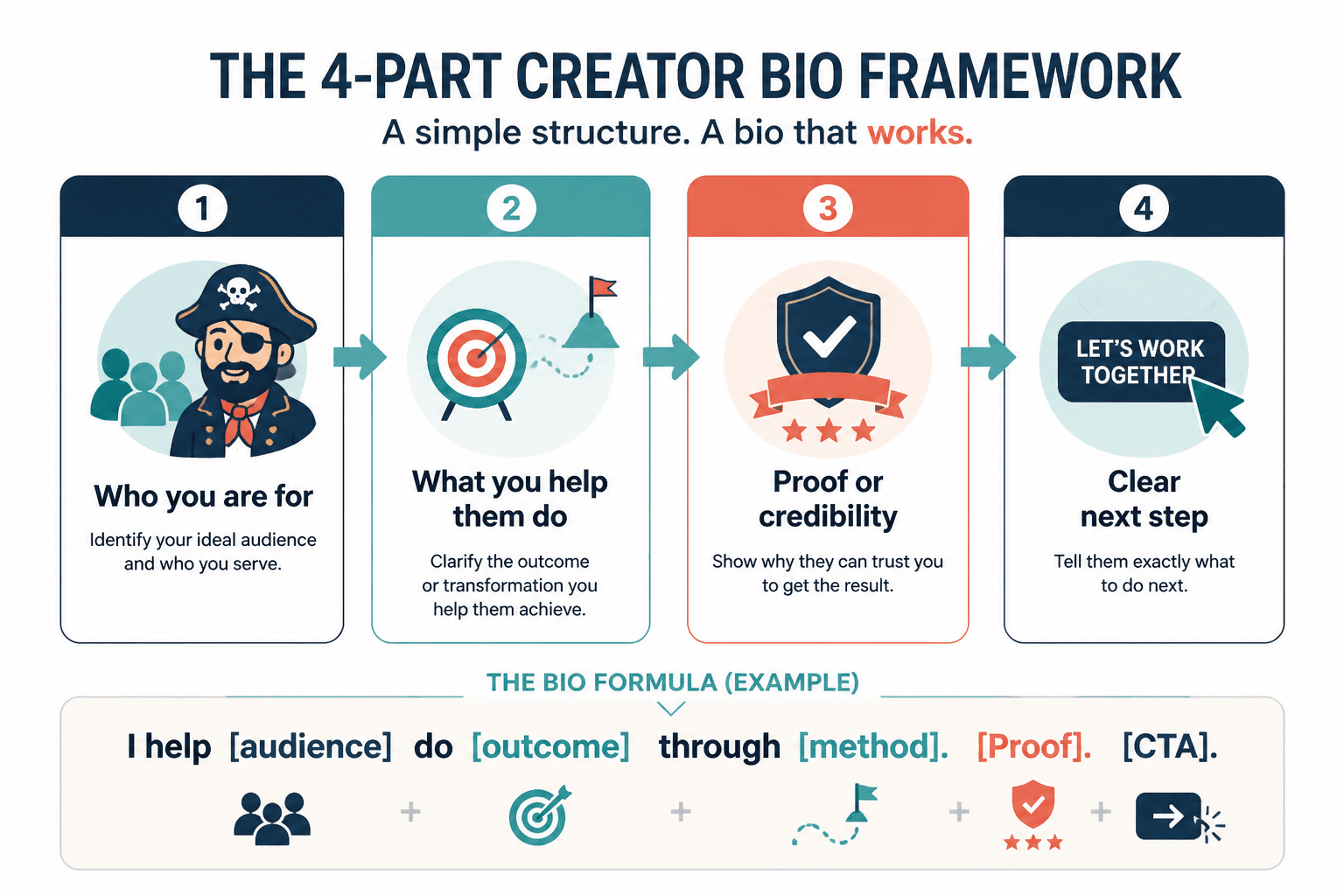
A good creator bio is not a tiny autobiography. It is a fast answer to four questions:
- Who is this for?
- What outcome does this creator help with?
- Why should anyone trust the claim?
- What should the reader do next?
That is the whole job. Everything else is decoration, and decoration has a way of eating the sentence if nobody watches it.
Profile copy has the same requirements, just under tighter constraints. A social bio, a newsletter author line, a website intro, or a platform profile all need clarity before charm. Charm can stay, but it needs a seatbelt.
The simplest structure that works
The easiest useful structure is:
- Audience: who you help
- Outcome: what changes for them
- Proof: why that claim is credible
- Next step: where to go or what to do next
That framework works for a one-line bio and for a slightly longer profile section. It also makes AI tools much easier to use because the prompt has something to aim at besides vague “make it better” energy.
Example shape:
Helping freelance designers turn scattered offers into clear profiles that bring in better-fit clients. I write about positioning, portfolio copy, and the tiny details that make a bio sound like a person instead of a brochure. Start with the guide below.
That is not flashy. It is functional. Which, for a bio, is usually the point.
Where AI tools fit in the workflow
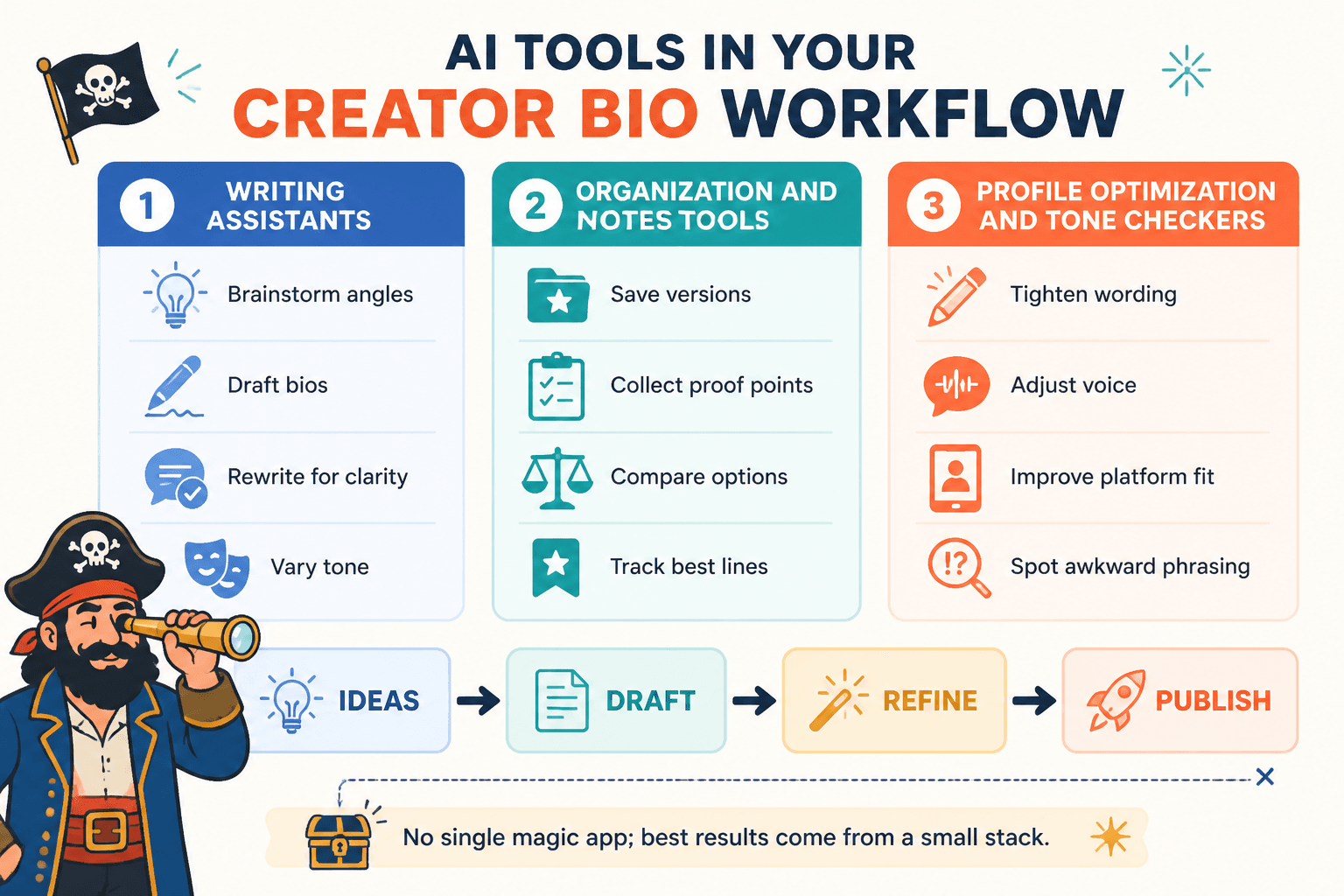
The best AI tools for creator bios and profile copy are not trying to replace judgment. They are useful when they reduce friction at specific points in the process.
1. Drafting from raw notes
General AI writing assistants are best here. Feed them rough notes, a positioning statement, or a list of services and ask for a few candidate bios in different tones. The goal is not final copy. The goal is to get out of blank-page limbo.
Useful tasks:
- turn scattered notes into first-draft bios
- generate multiple tone options
- compress a long paragraph into a cleaner profile line
2. Rewriting for clarity
Once there is a draft, AI can help cut filler, remove self-important phrasing, and make the sentence structure less clotted. This is where it earns its keep. A bio that says “passionate storyteller and innovative creative professional” is technically words, but so is a fog machine.
3. Checking structure
Some tools are useful less for the prose itself and more for spotting whether the copy actually includes the core parts: audience, outcome, proof, and next step. That kind of review is valuable because a bio can sound polished and still fail to say anything useful.
4. Tightening style and grammar
Grammar and style tools are not strategy tools, but they are good at last-mile cleanup. They help catch sentence bloat, repeated words, awkward punctuation, and the accidental use of three em dashes in one tiny profile box, which is a sign the sentence has lost the plot.
Best AI tools by job
There is no single tool that wins every bio task. A better question is: what job are you asking the tool to do?
General AI writing assistants for drafting and rewriting
Use these when you need raw output fast. They are strongest for brainstorming, versioning, and condensing long material into profile-sized copy.
- Best for: first drafts, rewrites, tone shifts, short-form compression
- Watch for: generic phrasing, overconfident claims, and bios that sound like they were assembled from a motivational poster
Practical use: give the tool a short brief with audience, offer, proof points, and preferred tone. Then ask for three versions: plain, sharper, and more human. The point is to compare, not blindly accept.
Official reference: OpenAI ChatGPT release notes.
Profile optimization tools for structure, clarity, and conversion
These tools are useful when the bio lives inside a profile system that has rules, fields, or visibility constraints. They are especially helpful for checking whether the copy is readable at a glance and whether the main value proposition survives platform formatting.
- Best for: profile structure, layout-aware copy, quick clarity checks
- Watch for: tools that optimize for completeness but not voice
This category matters most when the bio has to do more than sound decent. It has to fit, scan well, and still make sense in the first two seconds.
Official reference: Instagram Help Center: edit your profile.
Grammar and style tools for trimming the nonsense
These are the cleanup crew. They are not there to invent positioning. They are there to remove clutter, spot awkward repetition, and keep the final line from wobbling under its own ambition.
- Best for: final polish, readability, sentence-level cleanup
- Watch for: tools that “correct” into blandness
Official reference: Grammarly writing guidance.
Best templates for creator bios & profile copy
Templates are useful when they keep the bio from wandering. They are not useful when they turn every creator into the same politely competent rectangle.
1. The clear service provider template
Use when: you sell a service or offer and need the reader to understand it quickly.
Structure: who you help + what you help them do + proof or specialty + next step
I help independent consultants turn their profiles into clear, client-friendly copy that explains what they do without making people work for it.
2. The niche expert template
Use when: your work is tied to a specific topic, audience, or industry.
Structure: niche + outcome + authority cue + current focus
Writing about creator marketing for solo businesses, with a focus on simple systems that make profile copy easier to write and easier to use.
3. The creator-educator template
Use when: your profile needs to signal teaching, guidance, or editorial authority.
Structure: what you teach + who benefits + what the reader can expect
Helping creators turn messy ideas into cleaner bios, tighter intros, and profile copy that sounds like a person on purpose.
4. The proof-first template
Use when: credibility matters more than personality.
Structure: proof point + specialty + outcome
Editor and copywriter focused on creator bios, profile copy, and the kind of positioning that makes a page feel trustworthy before it feels clever.
5. The minimalist one-liner template
Use when: the platform gives you almost no space.
Structure: role + audience + result
Bio copy for creators who want to sound clear, credible, and less like a stuck tab.
If you want more pattern options, see the sibling piece on creator bios profile copy examples.
How to choose a lean stack
You do not need five tools for one bio. You need a stack that matches the actual work.
- If you are stuck at zero: use a general AI writing assistant
- If the copy feels vague: use a structure or optimization tool
- If the wording is bloated: use a grammar or style tool
- If the bio needs platform fit: preview it in the actual profile field before declaring victory
A lean stack often looks like this:
- notes or positioning draft
- one AI writing assistant for first-pass bios
- one editing tool for cleanup
- the live profile field for the final check
That is enough. Anything more should earn its place.
A simple workflow from raw notes to final bio
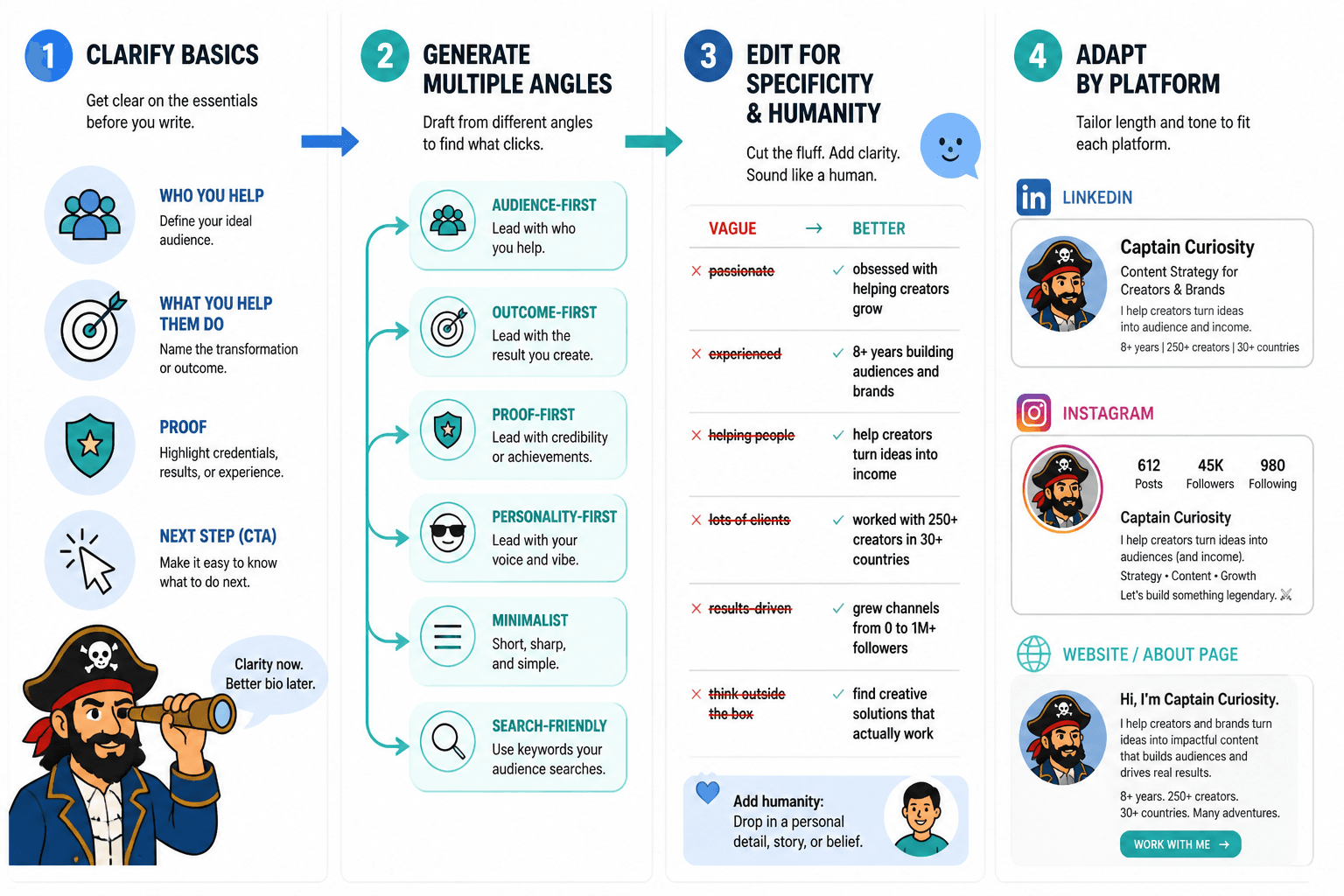
Here is a practical four-step process.
- Collect the raw material. Jot down who you help, what you help with, proof points, and the action you want the reader to take.
- Generate three rough drafts. Ask an AI writing tool for a plain version, a concise version, and a more personality-driven version.
- Trim and structure. Remove filler, restore the audience/outcome/proof/next step logic, and cut any sentence that sounds like it is auditioning for a brand deck.
- Test in context. Paste the bio into the actual platform or page and see whether it still reads cleanly at the size and length it will actually live in.
This workflow is boring in the best way. It keeps the process short enough to finish and structured enough to avoid accidental nonsense.
Common mistakes to avoid
- Leading with vague identity language: “creative professional” says almost nothing.
- Stuffing in every credential: a bio is not a résumé with a filter.
- Letting AI invent your positioning: it can help express the idea, not define it for you.
- Ignoring the platform limit: a great long bio is useless if the field truncates it.
- Skipping the next step: a bio without direction is just a neat sentence.
Bottom line
The best AI tools for creator bios and profile copy are the ones that make the work simpler, not louder. Use AI to draft, rewrite, and trim. Use templates to keep the structure honest. Use a final check in the real profile field so the copy does not collapse when it meets reality.
If you want the fuller framing behind the wording choices, the parent guide on creator bios profile copy is the right next stop.