
A website bio can start in a notes app, get half-rescued in an AI writer, move into a doc, then land in a site builder sounding like three different people argued over one paragraph. That is usually the bottleneck: not a shortage of tools, but too many handoffs. The useful move is to pick a lean system that helps you capture the raw facts, shape the message, tighten the wording, and publish without the copy wobbling on the last step.
This guide is about choosing the best AI tools for bio and profile copy for websites without building a five-tool pilgrimage around them. Some tools help you draft faster. Some help you rewrite with a steadier voice. Some live inside website builders and make the final paste less annoying than it needs to be. The trick is knowing which one solves which part of the job.
If you want the bigger strategy first, start with the bio profile copy for websites guide. If you want examples of what good output looks like, the bio profile copy examples page is the cleaner companion piece.
What good website bio and profile copy actually needs to do
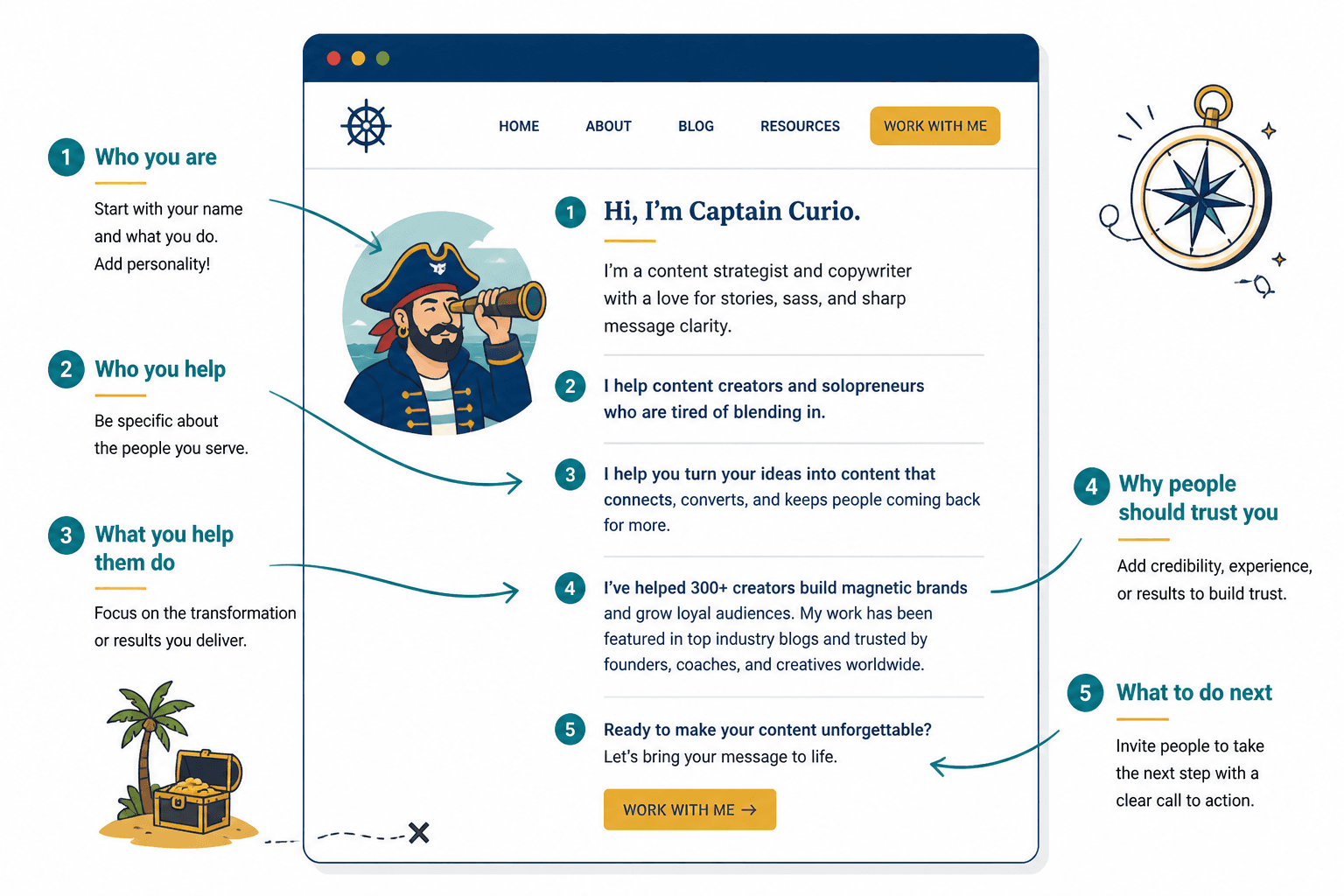
The best bio tools are not the ones that sound clever for twelve seconds. They are the ones that help you produce copy that does four things quickly:
- Identifies you clearly so a visitor knows who is speaking.
- Explains what you do without turning into corporate fog.
- Shows enough proof to make the claim feel earned.
- Points to the next step so the page does something useful.
That means your AI tool does not need to be magical. It needs to be good at extracting structure from messy input, trimming filler, and adapting one version of the message for different formats: homepage bio, about page intro, speaker bio, consultant profile, team page, social profile, or directory listing.
For the anatomy behind that structure, the parent guide on website bio and profile copy is the place to anchor the strategy.
The two tool categories you actually need to understand
Most of the useful options fall into two buckets. Anything beyond that is usually decoration with a subscription attached.
1. AI writing tools
These are the tools that help you draft, rewrite, shorten, expand, and adapt copy. They are best when you already know the substance and need help shaping it into readable website language.
2. Site builders with AI features
These tools are useful when the final problem is not just writing the bio but getting it into the page cleanly. They can help with structure, page setup, and quick edits, especially if your site builder is where the text lives anyway.
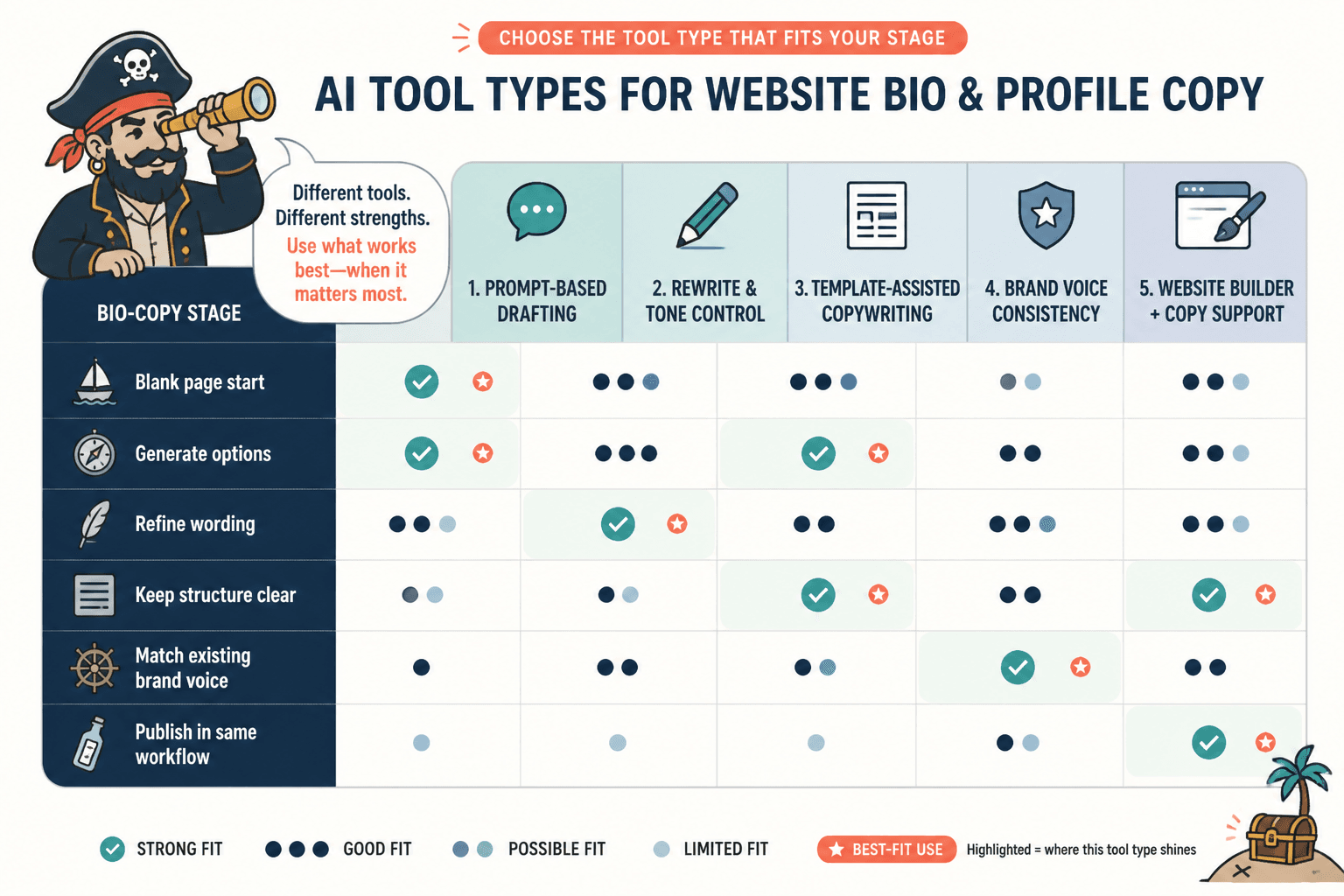
The decision is simple: if the main bottleneck is blank-page drafting, use a writing tool. If the main bottleneck is getting the copy onto the site without ugly friction, use a builder with decent AI support. If you need both, keep the stack small and make sure the tools do not overlap in a way that creates more rework than value.
Best AI writing tools for website bio and profile copy
There is no single best tool for every bio. Different tools are good at different stages of the work. Here is the practical split.
General AI writing assistants
These are useful when you need a flexible drafting partner. They are good at turning rough notes into an initial bio, producing alternate tones, and compressing long summaries into something readable.
- Best for: first drafts, rewrites, tone variations, and format changes.
- Strength: fast movement from scattered notes to workable prose.
- Watch for: generic phrasing, inflated claims, and cheerful vagueness.
These tools work best when you give them real inputs: who the person is, what they do, who they help, proof points, and the intended use case. Vague prompts produce vague bios. The machine is not a mind reader. Annoyingly, it still expects a briefing.
Brand voice and rewrite tools
If your problem is consistency rather than invention, brand voice tools and rewrite features can be more useful than a broad writing assistant. They help keep the tone aligned across different versions of the same bio.
- Best for: teams, agencies, personal brands with a defined voice, and repeat publishing.
- Strength: steadier tone across bios, summaries, and profile variations.
- Watch for: over-smoothing and a voice that sounds approved by committee.
This category is especially handy when the same core bio needs to appear on a homepage, speaker page, directory profile, and social bio without sounding like four unrelated people wrote them.
Template-plus-AI tools
Template-driven tools are a good fit when you want speed without losing structure. They are especially useful for people who know the goal but freeze when asked to begin from scratch.
- Best for: consultants, freelancers, founders, and small teams.
- Strength: reduces blank-page pressure and keeps the bio structurally sound.
- Watch for: formulaic output that needs editing before it feels human.
These tools are often the easiest bridge between raw notes and a useful first draft. They do not need to produce final copy on their own. They just need to get the shape right fast enough that editing becomes normal work instead of rescue work.
Best templates for website bio and profile copy
Tools work better when you know the structure you want. Templates keep the AI from wandering off into biography theater.
These are the most useful template types for website bio and profile copy:
1. The clear expert template
Use this when authority matters most. It usually follows a simple pattern: role, specialty, proof, and what the reader gets from working with you.
- Who you are
- What you specialize in
- Why that matters
- How readers benefit
2. The personality-plus-proof template
This one works when you want a little warmth without losing credibility. It lets the person sound like a human being instead of a credential with a pulse.
- Short identity line
- Useful personality detail
- Proof or experience
- Practical value statement
3. The founder bio template
This is useful for about pages, pitch decks, speaker pages, and company profiles where the founder story should reinforce the business.
- What you built or lead
- Why it exists
- What problem it solves
- Why your background matters
4. The short homepage bio template
Short bios have to do more with less. They usually need a name, a role, one proof point, and one line that tells the visitor why they should care.
- Name or role
- One-line value statement
- Proof or specificity
- Call to action or next step
5. The audience-first template
This version works when the reader’s problem should lead the sentence. It is less about the writer’s biography and more about the outcome they help create.
- Audience or problem
- What help looks like
- Relevant proof
- What to do next
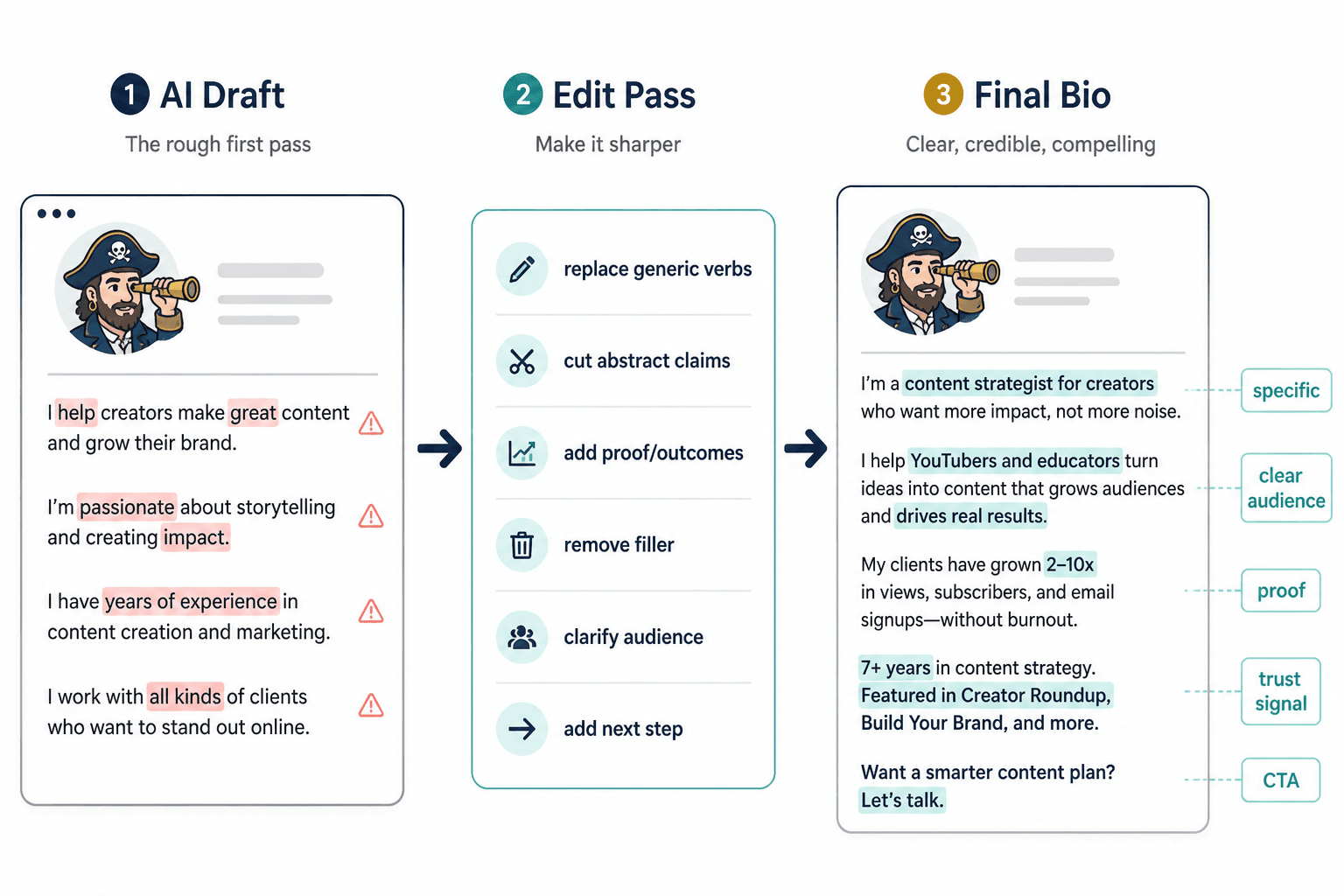
For a deeper walkthrough of how these structures fit together, the template-focused companion article, bio profile copy examples, is the better place to compare versions side by side.
The lean workflow that makes the tools useful
The best workflow is boring in the right way. It reduces context switching and gets the bio from rough notes to publishable copy with as few stops as possible.
- Collect the raw material. Pull together role, audience, proof, offer, and tone notes.
- Choose one structure. Pick a template before you open the writing tool.
- Draft once. Use AI to generate a working version, not ten competing versions.
- Trim aggressively. Cut filler, hedging, and self-congratulatory fluff.
- Adapt by use case. Make the homepage version, about page version, and short profile version from the same core message.
- Move it into the site builder. Finalize the page where it will live.
This is where site builders with AI features can be genuinely helpful. If they reduce the friction of rewriting inside the page itself, they earn their place. If they just create another place to store half-finished copy, they are decorative software.
How to choose the right stack for your situation
Here is the simplest way to think about it.
- If you are starting from nothing: use a template-first workflow with a general AI writing assistant.
- If you already have a rough bio: use a rewrite tool or strong editor to tighten the language.
- If you need multiple versions: use a tool that can vary tone and length without changing the meaning.
- If you publish directly in your site builder: use a builder with practical AI features so the final edit is not a mess.
- If brand consistency matters: add voice controls or a repeatable prompt system.
The goal is not to find the one tool that does everything. The goal is to avoid three tools doing the same thing badly while the actual bio still sits there waiting to be finished.
What to avoid when choosing AI tools for bio copy
Some tool choices create more drag than help. Watch for these:
- Too much overlap between drafting, rewriting, and publishing tools.
- Tools that produce polished nonsense faster than you can correct it.
- Templates that flatten personality into safe, forgettable language.
- Workflow sprawl where each stage adds another handoff.
- Output with no editing discipline because the first draft sounded “good enough.”
Good bio copy is usually the result of clear inputs, a sensible structure, and one or two tools used well. That is less glamorous than a giant stack. It is also more likely to work.
A simple recommendation by use case
If you want the shortest possible version of the advice:
- Use a general AI writer for draft generation and message shaping.
- Use a rewrite or voice tool when consistency matters across multiple bios.
- Use a template system to keep the structure clean.
- Use your site builder’s AI features only if they reduce final-paste friction.
For most people, that is enough. A lean setup beats a flashy one when the real task is to help a reader understand who you are and why they should care in under a minute.
Helpful sources and tool guidance
For platform-specific writing and publishing advice, these primary sources are useful starting points:
- OpenAI Help Center for prompt and product guidance.
- Jasper Support for brand voice and writing workflows.
- Canva Help Center for AI-assisted content and design features.
- Wix Support for site-building and AI-related page tools.
Bottom line
The best AI tools for bio and profile copy are the ones that help you reduce friction, not multiply it. Start with a clear template, use one tool to draft, another only if it solves a specific problem, and keep the final workflow close to the page where the copy will live. That way the bio stays useful, the message stays sharp, and the publishing process stops behaving like a relay race with dropped batons.
If you want the broader page strategy, return to the parent guide on bio and profile copy for websites. If you want to compare formats, move next to the examples page.