
Most internal linking and updating advice is weirdly sterile.
You get told to “add relevant links” and “refresh old content regularly,” which is technically true in the same way “eat better” is technically health advice. It is not wrong. It is just not useful enough to change behavior.
If you want to improve internal linking and updating, you need a system that helps readers move through your site naturally, helps search engines understand what matters, and helps your older content keep pulling its weight instead of quietly rotting in the archive.
That is the real job. Not sprinkling in three random links at the bottom of a post like an afterthought from 2019.
This guide will show you how to make internal linking and updating more strategic, less awkward, and much easier to maintain. We’ll cover what good internal links actually do, how to choose what to update, where people usually make a mess of it, and how to build a simple workflow you can keep using without hating your own content operation.
What better internal linking and updating actually looks like
Good internal linking is not about stuffing links into every paragraph until the post looks like it has a nervous tic.
Good updating is not changing one sentence, tweaking the year in the title, and calling it “fresh.”
When you improve internal linking and updating properly, a few things happen at once:
- Readers can find the next useful piece without hunting for it
- Your important pages get reinforced by related content
- Older posts stay relevant longer
- Your site structure becomes clearer
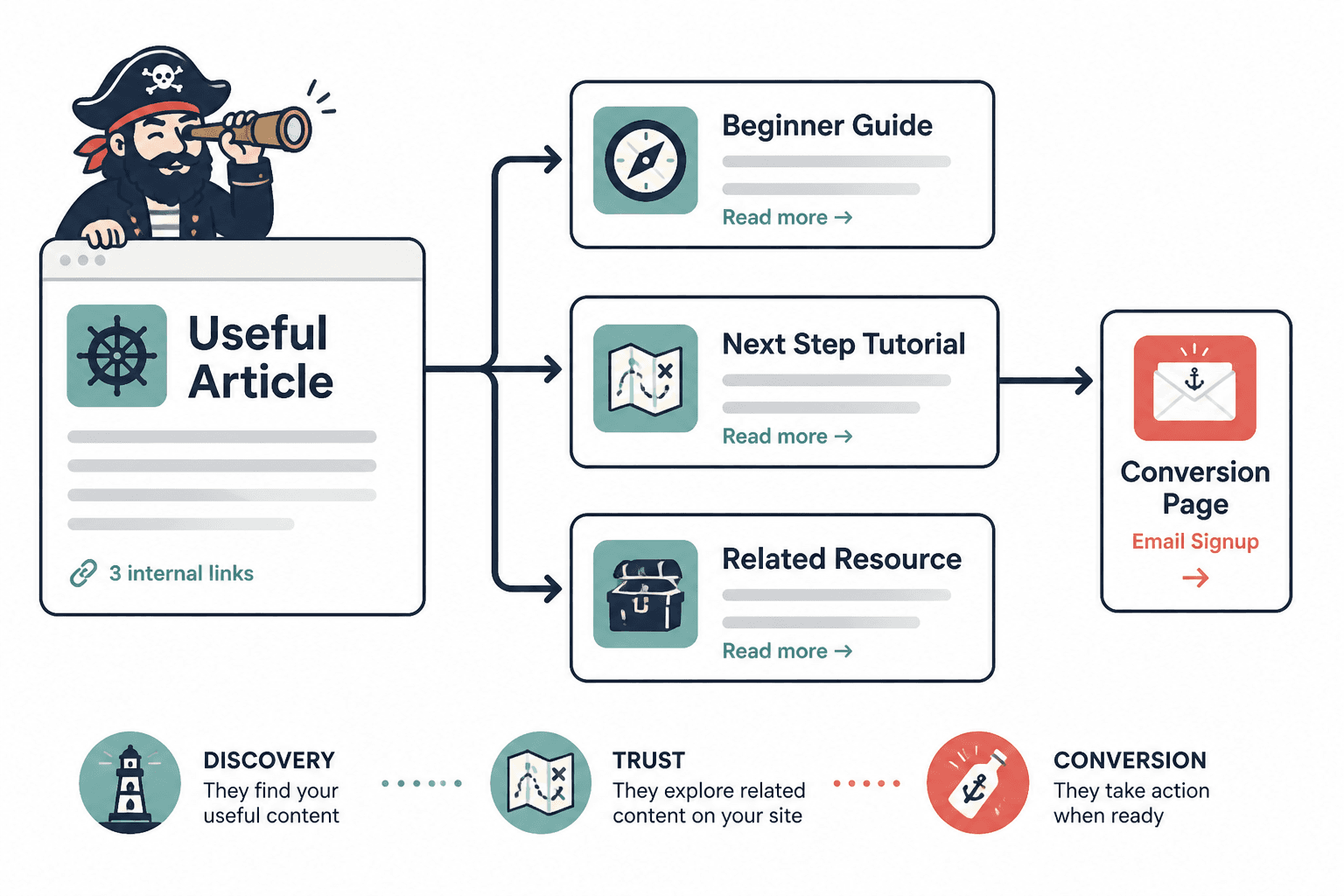
- You create more paths from discovery to trust to conversion
That last point matters more than a lot of people realize. Internal links are not just for SEO. They are how you stop every page from being a dead end.
If someone lands on one useful article and likes it, your site should make the next best step obvious. Not in a pushy way. Just in a competent one.
You can get a broader foundation for that approach in this internal linking and updating guide for creators who want better results. But for now, let’s get practical.
Start by fixing the goal, not the links
A lot of internal linking gets sloppy because the goal is vague.
If your only goal is “add more links,” you’ll add more links. They just won’t necessarily help. Same with updating. If the goal is “refresh old content,” you’ll do cosmetic edits that make a spreadsheet happy and a reader feel nothing.
Instead, define what each article is supposed to do inside the larger content system.
Ask these four questions for every page
- What topic cluster does this page belong to?
- What related page should a reader reasonably want next?
- What more important page should this article support?
- What would make this piece outdated or incomplete?
That gives you a much cleaner basis for both linking and updates.
For example, if you have an article about writing natural-sounding links, it should probably support a broader internal linking guide, connect to articles about update triggers and refreshing old content, and get reviewed when your site structure changes or your linking standards evolve.
See how that is already better than “add 3 internal links”? It has intent. Which is usually what separates useful content systems from random acts of publishing.
Build around pillar pages and support pages
If your site has no topic structure, internal linking becomes guesswork fast.
A simple way to clean that up is to organize content into:
- Pillar pages: broad, central resources on a topic
- Support pages: narrower articles that answer specific sub-questions or tactics
The support pages should usually link up to the pillar page. The pillar page should link out to the most useful support pages. And related support pages should link to each other when it genuinely helps the reader.
For this topic, the natural pillar is the internal linking and updating hub. If someone is reading a narrower article like this one, there is a good chance they would benefit from the bigger framework too.
You can also reinforce the category structure where it makes sense through your broader blog SEO writing and article systems content, especially if you are building a library instead of a pile.
A simple linking pattern that works
- Support article links to its pillar page
- Pillar page links to its strongest support articles
- Support articles link sideways to highly relevant sibling articles
- High-traffic older articles link to newer relevant resources
- Conversion-intent pages get linked where the next step makes sense
That gives your site shape. Without shape, you just have content wandering around unsupervised.
Use links where reader momentum is strongest
One of the easiest ways to improve internal linking and updating is to stop treating links like footnotes.
The best internal links tend to appear at moments where the reader naturally wants the next layer, example, or related step. That means the middle of a post often matters more than the end.
Good places to add internal links
- Right after mentioning a concept you explain in depth elsewhere
- Inside a process where the reader may need a sub-skill
- After a point that raises a likely follow-up question
- When referencing a framework, checklist, or deeper guide
- Near the conclusion when offering the most logical next read
For example, if you mention that links should feel natural instead of robotic, that is the perfect place to send readers to how to write internal linking and updating without sounding salesy or robotic. The link earns its place because it answers the exact question the sentence creates.
That is a lot better than dumping “related posts” at the bottom and hoping people are still emotionally available by then.
What weak internal links usually look like
- Anchors that say “click here” or “read more”
- Links added only in the final paragraph
- Random links that are topically adjacent but not actually useful
- Too many links in one block, which creates decision mush
- Repeated links to the same page in a way that feels mechanical
Your internal links should feel like good recommendations, not panicked cross-promotion.
Write anchor text like a human
Anchor text is one of those small things that can make your content feel polished or painfully artificial.
The job of anchor text is pretty simple: tell the reader what they are about to get, in natural language, without sounding stuffed with keywords or weirdly evasive.
Weak vs stronger anchor text
| Weak | Stronger |
|---|---|
| click here | see the full internal linking and updating guide |
| this article | learn how to turn old content into better internal linking and updating |
| read more | review practical update triggers that do not sound generic |
| internal linking post | how to write internal linking and updating without sounding salesy or robotic |
The stronger version is clearer for the reader and cleaner for the page structure. It also gives you a better shot at making the click feel relevant instead of obligatory.
If you want a simple rule, use anchor text that would still make sense if someone only read the linked words. That usually keeps things grounded.
Updating content is not maintenance theater
Some people update content in a way that technically counts and practically does nothing.
They change a few phrases, maybe swap one sentence, then move on. Meanwhile, the article still has weak examples, broken internal pathways, stale framing, and no meaningful reason for a reader to trust it more than last year.
Real updating means improving usefulness, accuracy, structure, and relevance.
What to review when updating a post
- Does the introduction still match search intent and reader expectations?
- Are the examples still sharp, specific, and current enough?
- Are there better related articles to link to now?
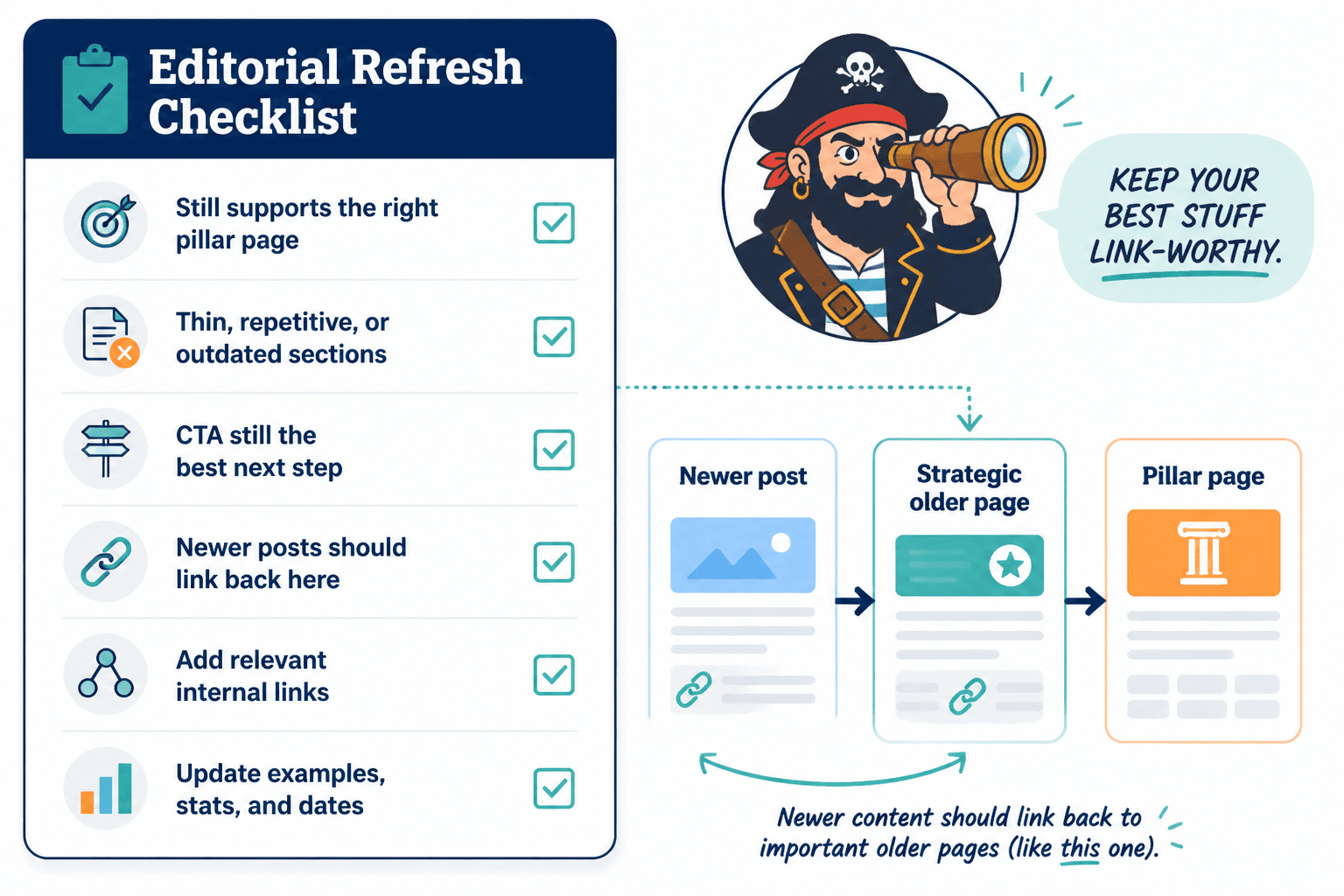
- Does this piece still support the right pillar page?
- Have any sections become thin, repetitive, or outdated?
- Is the CTA still the best next step?
- Are there newer posts that should now link back to this one?
That last point is easy to miss. Updating should not only happen inside the old article. Sometimes the bigger win is making newer content point back to older strategic pages that still deserve traffic and authority.
For a more focused approach to deciding when content needs a refresh, read how to improve internal linking and updating update triggers without sounding generic. It helps you get beyond random calendar-based updates and toward actual signals.
Use update triggers instead of random refresh cycles
A fixed “update everything every 6 months” schedule sounds organized, but it is often a waste.
Some pages need frequent attention. Others are fairly stable. You will get better results by watching for update triggers than by obeying a rigid calendar like it is your manager.
Useful update triggers
- A page starts losing traffic or rankings
- You publish a new related article that should be linked in
- The topic has changed enough that examples now feel dated
- Your offer, CTA, or positioning has changed
- A pillar page has been restructured
- You notice weak bounce paths or dead-end posts
- A competitor article is clearly doing a better job on usefulness
This makes updating more strategic because there is a reason behind it. You are not refreshing content for the aesthetic of productivity. You are responding to a change in usefulness, structure, or opportunity.
Turn old content into a linking asset, not a dusty archive entry
Old content is often more valuable than people think. Not all of it, obviously. Some old posts deserve retirement. But a lot of them are sitting there with authority, indexation history, and topical relevance that can still help your site if you clean them up.
The trick is to stop viewing older posts as finished objects. They are part of a living content system.
That means an older article can be used to:
- Link readers into newer, better, more specific articles
- Support a pillar page that did not exist when the article was first written
- Capture adjacent search intent with smarter framing
- Strengthen topical relevance across a cluster
- Create a clearer path toward your offer or newsletter
If you have a backlog of content and are not sure where to begin, how to turn old content into better internal linking and updating is the next useful read. It is especially helpful if your existing content library feels more like a storage unit than a system.
A simple triage method for old posts
| Type of old post | What to do |
|---|---|
| Still relevant and already getting some traffic | Update examples, improve links, tighten CTA |
| Relevant but thin or outdated | Rewrite sections, add depth, connect to cluster pages |
| Overlapping with stronger content | Consolidate or reposition to support a different angle |
| Irrelevant, weak, or off-topic | Retire, redirect, or leave out of active linking plans |
This is one of those places where being a little ruthless helps. Not every article needs rescue. Some just need a respectful exit.
Create contextual link paths instead of isolated recommendations
One underrated improvement is to think in paths, not individual links.
If a reader lands on Article A, where should they go next? And after that? What sequence would help them go from curiosity to understanding to action?
That is where internal linking becomes much more than SEO housekeeping. It becomes content design.
Example path for this topic cluster
- Start with the main internal linking and updating hub
- Move to writing internal links without sounding salesy or robotic
- Then read how to choose update triggers without sounding generic
- Then use old content refresh strategies to apply it across your archive
That path makes sense because each article builds on the previous one. It does not just exist because the links were available.
When planning links this way, ask yourself: is this the next most useful thing for the reader, or just another thing I happen to have published?
How to improve internal linking and updating without creating chaos
The reason many sites struggle here is not knowledge. It is workflow.
People know internal links matter. They know updates matter. They just do both inconsistently because there is no lightweight process built into publishing.
A practical workflow you can actually maintain
- Before publishing a new article, identify its pillar page. Decide what larger topic it supports.
- Choose 2 to 5 existing internal links to include. Prioritize relevance over quantity.
- Add the new article to at least 1 older related post. Do not leave new content orphaned.
- Track update triggers. Use simple notes like traffic drop, new offer, outdated examples, or new cluster page.
- Review top posts quarterly. Focus first on pages that already matter.
- Review older cluster pages when publishing related content. Every new article is a cue to revisit the network.
You do not need a huge editorial team for this. You need a repeatable habit.
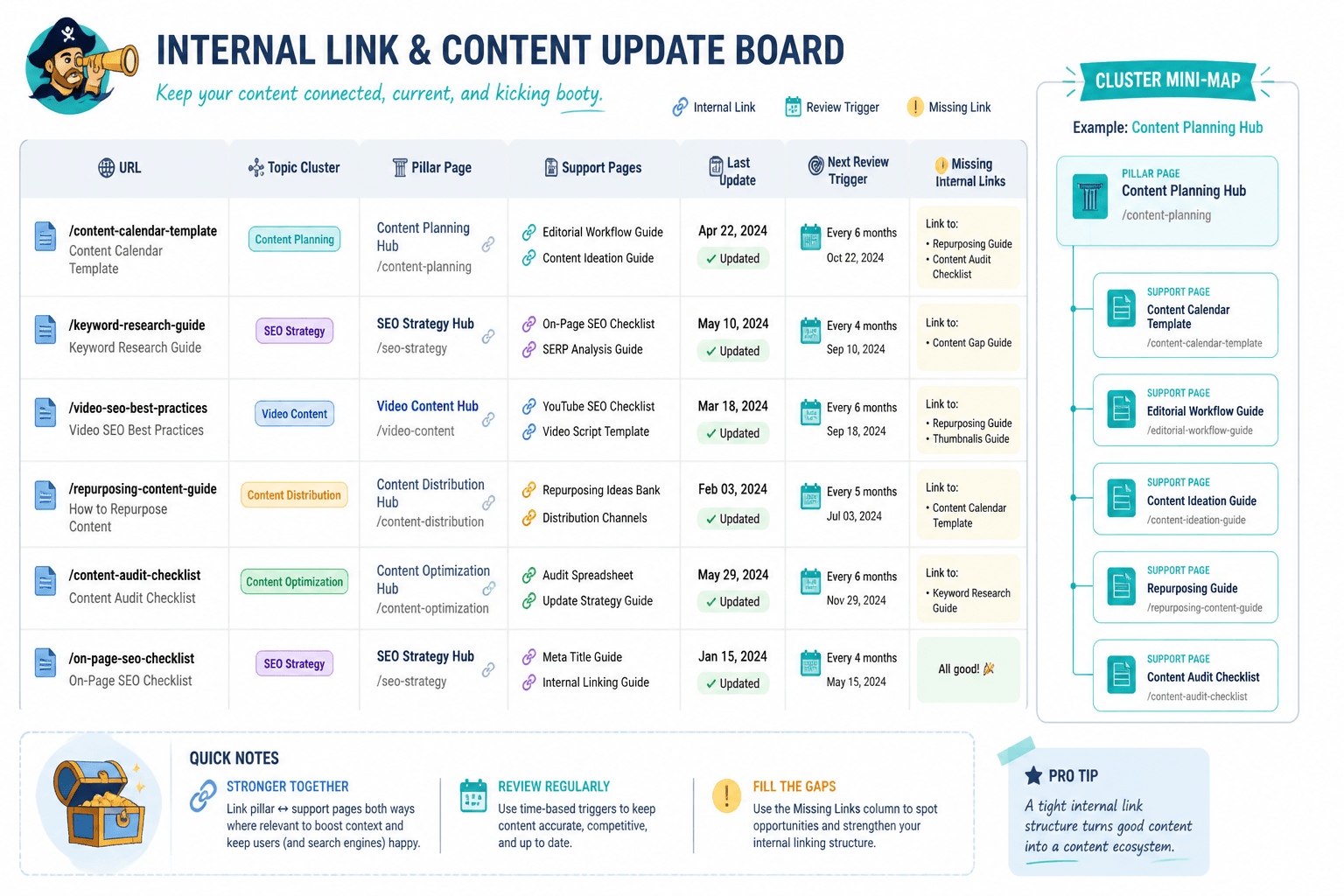
In practice, even a plain spreadsheet or content tracker can handle this if it includes:
- URL
- Primary topic cluster
- Pillar page
- Key support pages
- Last meaningful update date
- Next review trigger
- Notes on missing internal links
That is enough to make your system smarter without turning it into a full-time admin hobby.
Common mistakes that make internal linking and updating worse
Some mistakes are obvious. Others look productive until you realize they are quietly making the site harder to use.
1. Linking based on keyword overlap instead of reader need
Two articles can share a topic word and still be poor companions. Relevance is not just semantic. It is situational.
2. Updating only the post being reviewed
When one article changes, related articles may need updated links too. Otherwise your content network slowly drifts out of sync.
3. Treating every post equally
Your highest-opportunity pages deserve more attention. Not every article needs the same update schedule or link density.
4. Leaving new posts orphaned
Publishing new content without linking to it from older related pages is one of the easiest ways to waste effort.
5. Using robotic anchor text everywhere
If every internal link reads like it was engineered by a nervous SEO plugin, readers notice. Maybe not consciously. But they notice.
6. Refreshing content without improving its usefulness
Changing dates, swapping a phrase, or tweaking formatting is not enough if the substance is still thin. Cosmetic updates are not the same thing as better content.
A quick quality check before you hit update
Before republishing or revising a page, run through this quick check:
- Does the article clearly support a larger topic cluster?
- Does it link to the best next resources, not just any resources?
- Do the anchor texts sound natural and specific?
- Have you added links from older relevant content into this page?
- Is the intro still strong enough for current search intent?
- Did you improve substance, not just surface?
- Is there a clear next step for the reader?
If you can answer those questions honestly, your updating work is probably moving in the right direction. Strong internal linking is less about stuffing in more links and more about making the next useful step obvious for the reader.