
Fine-tuning in AI sounds like one of those terms people use to make basic prompting seem unsophisticated. It gets thrown around in tool demos, founder tweets, and very confident YouTube thumbnails, usually with the implication that serious people are doing it and everyone else is behind.
Most creators do not need to panic.
If you write content, build offers, run a personal brand, or use AI to speed up drafts, fine-tuning is probably not the first thing you need. In many cases, it is not the second thing either. It can be useful. It can also be expensive, unnecessary, and weirdly overrated for normal creator workflows.
So if you have been wondering, what is fine-tuning in AI, and do normal creators actually need it? Here is the practical answer: fine-tuning means training an existing AI model on additional examples so it behaves more like you want. But for most creators, better prompts, clearer source material, stronger examples, and a cleaner workflow will get you most of the benefit without the complexity bill.
This article will help you understand what fine-tuning actually is, when it helps, when it does not, and what to do first before you start fantasizing about your own custom model like you are secretly running OpenAI out of a spare bedroom.
Want the broader roadmap? Start with the parent guide.
What fine-tuning in AI actually means
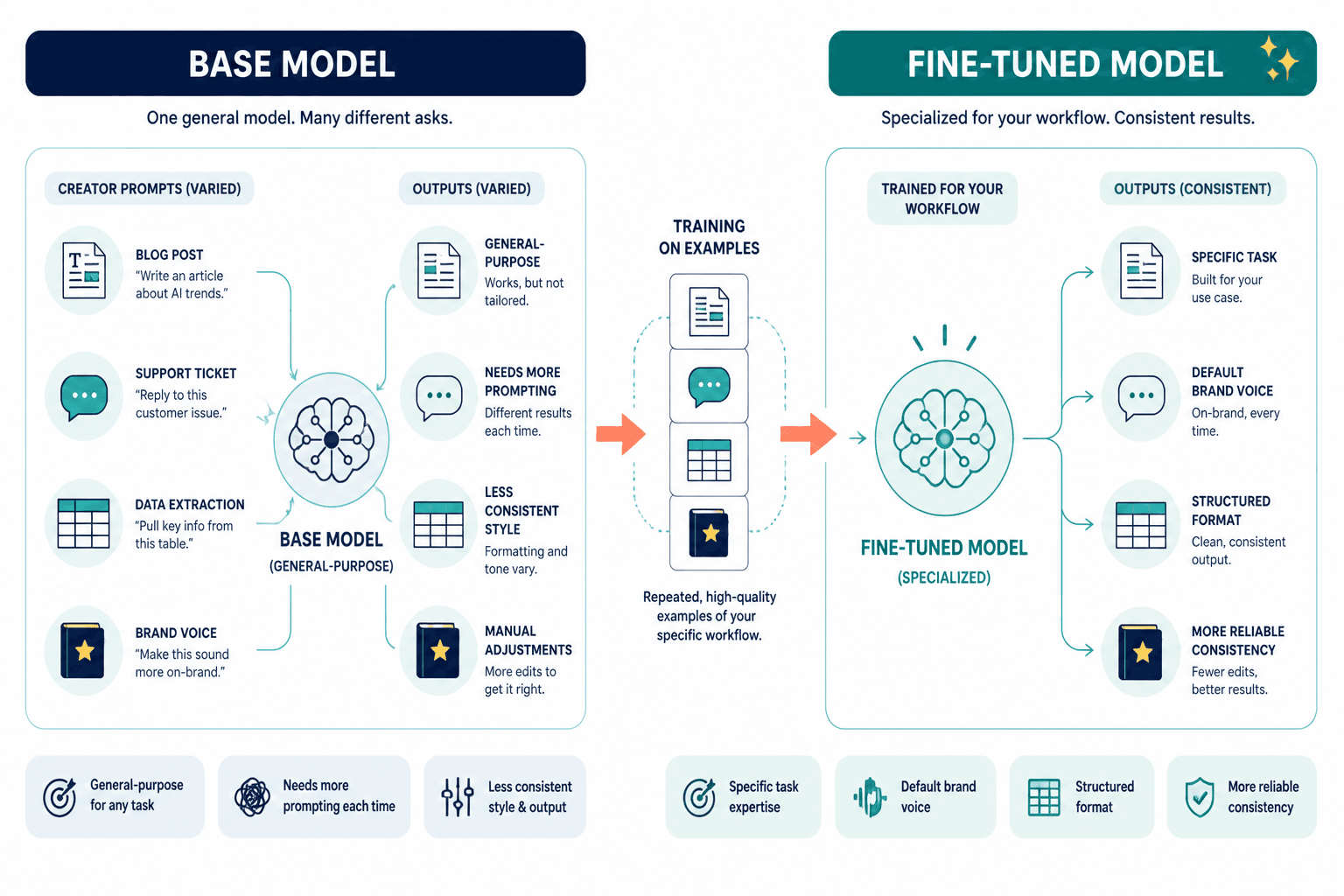
Fine-tuning is the process of taking a general AI model and training it further on a smaller, targeted dataset so it learns a narrower style, task, structure, or domain.
Think of it like this:
- A base model knows a lot about language in general.
- A fine-tuned model is pushed to perform in a more specific way.
That “specific way” could mean:
- Writing in a certain brand voice
- Classifying support tickets
- Extracting structured data from messy text
- Answering based on a niche knowledge base
- Following a precise output format
- Mimicking a consistent writing style more reliably
In plain English: instead of asking the model nicely every time, you train it to lean in a certain direction by default.
That does not mean it becomes magically brilliant. It just becomes more specialized. And specialized is useful only when the job is repetitive enough to justify the setup.
What fine-tuning is not
This matters because people lump several different things together and call all of them fine-tuning. They are not the same.
It is not just prompting better
If you give an AI better instructions, examples, constraints, and context, that is prompting. Very useful. Not fine-tuning.
It is not uploading a knowledge base
If you connect documents, PDFs, articles, transcripts, or FAQs so the AI can reference them, that is usually retrieval or knowledge grounding. Also useful. Still not fine-tuning.
It is not saving custom instructions
If you tell a tool, “Write in this tone, keep paragraphs short, avoid jargon,” and save those preferences, that is customization. Helpful. Much easier. Not the same thing.
It is not AI becoming “your voice” overnight
This one gets people. Fine-tuning can improve consistency, but it does not give a model your judgment, taste, lived experience, or strategic brain. If your content is bland before fine-tuning, congratulations, you now have a more efficient blandness machine.
How fine-tuning works in practice
At a high level, fine-tuning usually looks like this:
- You start with an existing model.
- You prepare a dataset of examples.
- You format those examples in a way the model can learn from.
- You train the model on that dataset.
- You test the new version to see if it performs better on the job you care about.
- You keep refining if needed.
For creators, the dataset might include things like:
- Past posts that actually performed well
- Email newsletters with a consistent voice
- Approved brand messaging
- Examples of weak output and preferred rewrites
- Structured templates for hooks, offers, CTAs, or bios
That sounds simple enough until you hit reality. The real work is not pressing a fine-tune button. It is curating good examples, labeling them well, testing whether the model actually improved, and making sure it does not become a weird parody of your style.
That last part matters more than people think. A lot of “trained on my voice” systems end up sounding like your most repetitive habits got promoted to management.
Why people get interested in fine-tuning
The interest is not irrational. Fine-tuning can solve real problems.
- You want more consistent outputs without re-explaining your rules every time.
- You need a model to follow a very specific format.
- You are producing high volume content in a narrow style.
- You want stronger performance on a repeated internal task.
- You are building a product, tool, or workflow that depends on predictable responses.
For teams and products, this starts making sense quickly. If you run a software product, a media operation, an AI assistant for clients, or an internal automation stack, fine-tuning can be worth exploring.
But if you are a solo creator trying to write better posts, cleaner emails, and a sharper lead magnet, you probably do not have a fine-tuning problem. You have a clarity problem, a positioning problem, or a “why does every prompt I write sound like tax paperwork?” problem.
Do normal creators actually need fine-tuning?
Usually, no.
That is the short answer. The longer answer is that most normal creators can get excellent results without fine-tuning if they do four less glamorous things well:
- Use better prompts
- Provide stronger source material
- Create reusable examples and templates
- Edit the output like a person with standards
Fine-tuning tends to become relevant when your use case is repeated, narrow, high-volume, and structured. Most creator work is messier than that. You are writing different kinds of content for different audiences with changing goals, offers, moods, and context. That is not always a great match for a heavily specialized model.
Also, most creators do not need AI to sound more automated. They need it to sound less generic. Fine-tuning can help with consistency, but consistency is not the same as quality. A lot of people chase process sophistication before they have a sharp point of view. Bad order.
You probably do not need fine-tuning if…
- You are mostly using AI for drafting, brainstorming, rewriting, or repurposing
- Your voice changes depending on platform or content type
- You have not built a library of good examples yet
- You are still figuring out your positioning
- You only create occasionally or at low volume
- You can get decent results by giving the model examples in the prompt
You might need fine-tuning if…
- You run repeated workflows with predictable input and output
- You need high formatting consistency across lots of outputs
- You are building a product that relies on model behavior
- You have a strong, proven dataset of examples
- You have already hit the limit of prompting and retrieval
- The performance improvement would save real time or money
What creators should do before even considering fine-tuning
This is the part most people skip because it is not as sexy as saying “custom model.” It is also the part that usually fixes the problem.
1. Build a voice and example library
Collect your best work. Not your most recent work. Not the stuff you were too lazy to edit. Your best work.
Save examples of:
- Strong hooks
- Good email intros
- CTAs that sound like you
- Posts that led to replies, leads, or sales
- Approved phrases and phrases you hate
- Before and after rewrites
This alone makes prompting much better because you stop asking the model to guess what “my style” means.
2. Get better at prompt structure
A lazy prompt produces lazy output. Shocking, I know.
Instead of writing:
Write a LinkedIn post about AI for creators in my voice.
Write something more like:
Write a LinkedIn post for creators and consultants who use AI for content. Tone: direct, lightly sharp, practical, anti-hype. Keep paragraphs short. Avoid cliché phrases and fake inspiration. Main point: most creators do not need fine-tuning yet. Include one punchy contrast, one practical takeaway, and a simple CTA to review their prompt library before buying more tools. Here are 3 examples of my style: [examples].
That is not overkill. That is basic guidance.
3. Use retrieval or reference material first
If your issue is “the AI does not know my offer, framework, product, or brand language,” you may need a knowledge system, not fine-tuning.
Giving the model access to:
- Brand docs
- Messaging guides
- Offer pages
- Customer research
- FAQs
- Past content
can solve a surprising amount. Often faster too.
4. Standardize recurring workflows
Before training a model, train your process.
If you regularly create:
- LinkedIn posts from podcast transcripts
- Email sequences from webinar notes
- X threads from article drafts
- Client bios from intake forms
then create a repeatable workflow with prompts, templates, and review steps. A lot of people want advanced AI because their process is sloppy and annoying. That is understandable. It is also not the model’s fault.
Where fine-tuning can actually help creators
There are cases where creators, agencies, or small media brands can benefit.