
A draft sits open in one tab, the email platform is waiting in another, the layout builder wants a decision nobody documented, and the section ideas are scattered across notes like a small administrative disaster. That is usually where newsletter work slows down: not in the writing itself, but in the handoff between idea, structure, format, and final edit. The useful fix is a lean system that gives each tool one job and keeps the human in charge of judgment.
This guide focuses on the AI tools that actually help with newsletter sections and formats: tools that can outline blocks, suggest alternate structures, tighten transitions, and keep the issue readable from top to bottom. If you want the broader structural playbook too, the parent guide on newsletter sections and formats covers the editorial side in more depth.
What AI tools are actually useful for newsletter sections and formats
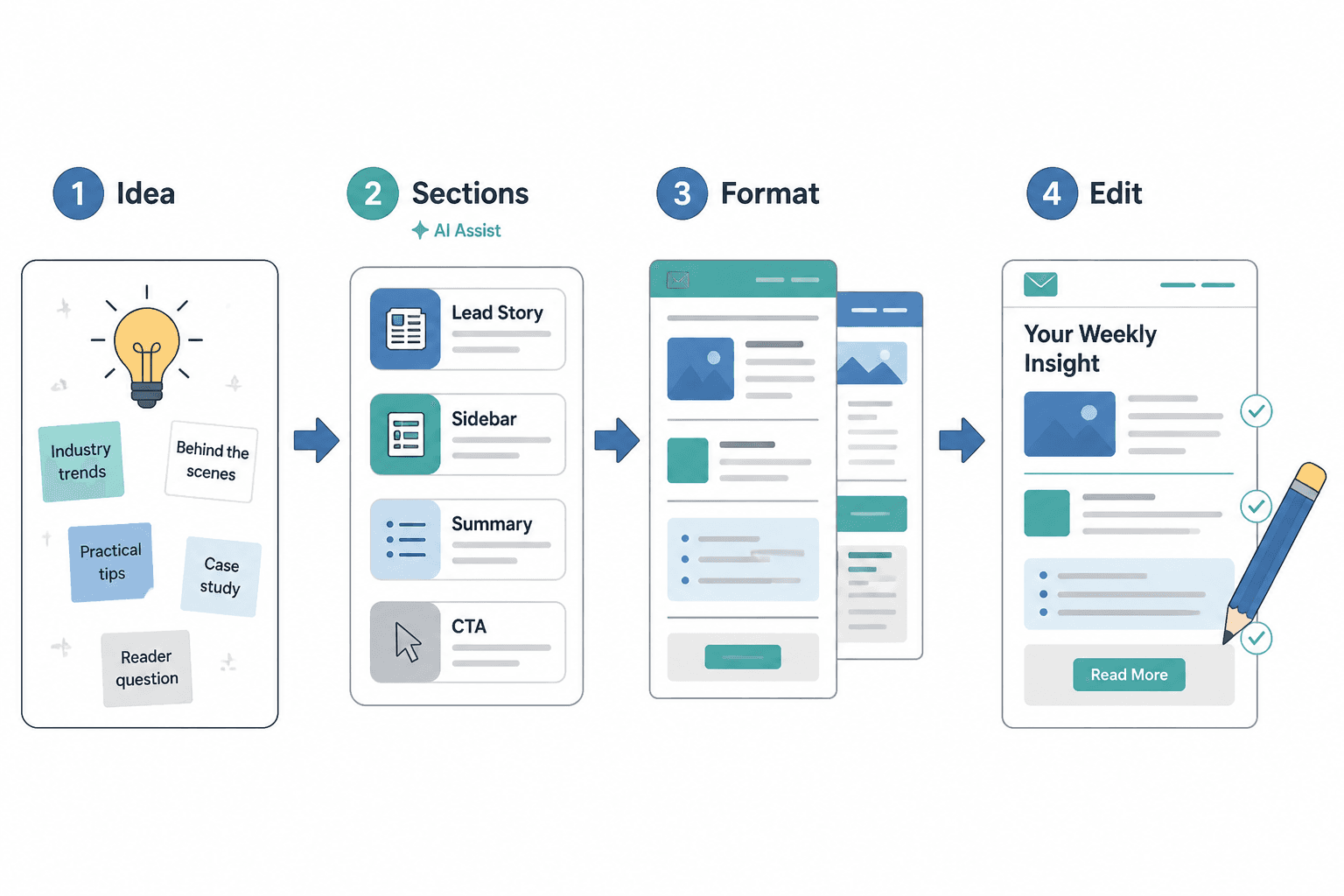
The best tools do not “write the newsletter” in some magical, vaguely corporate sense. They help with one of four jobs:
- Planning: turning a rough idea into a workable section order.
- Drafting: generating first-pass copy for headers, blocks, and transitions.
- Formatting: helping you shape the issue into a readable layout.
- Refining: improving clarity, pacing, and consistency before you send.
That sounds modest because it is. Also because “AI newsletter genius” is how people end up with five half-finished drafts and one very confident login screen.
For a related process view, see how to write better newsletter sections and formats and how to turn newsletter sections and formats into more leads or sales.
The newsletter sections AI can help with
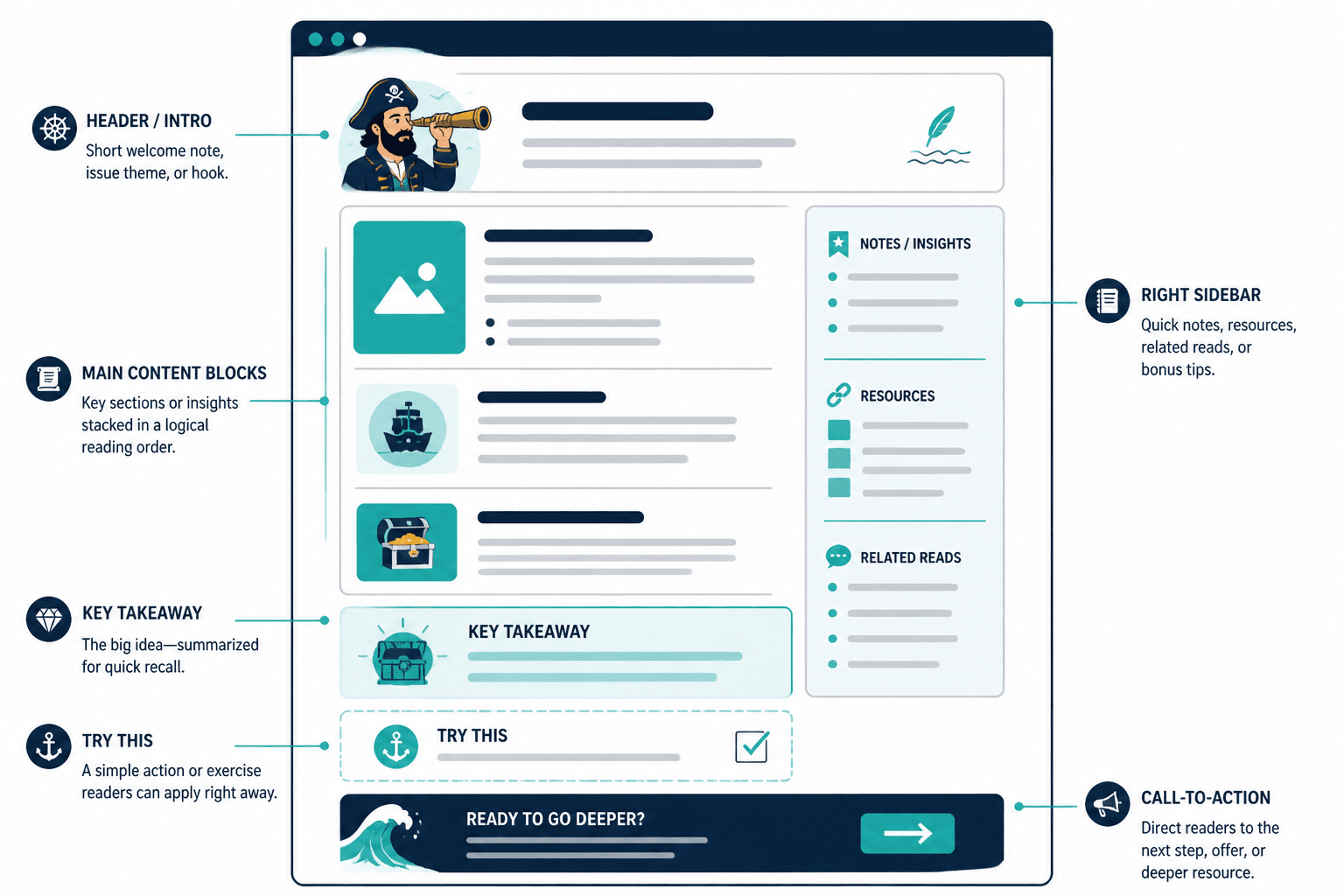
AI is most useful when each section has a clear job. Newsletter structure gets simpler when you stop asking every block to do everything.
1. The opening note
The opening should earn attention and point toward the rest of the issue. AI can help generate a few different hooks:
- a direct problem statement
- a short observation or trend
- a reader-first setup
- a tighter rewrite of a bloated opener
Useful prompt angle: ask for three openings with different tones – practical, conversational, and more editorial – then keep the one that sounds least like it was written by a committee with a deadline.
2. The main lesson or insight
This is the core idea of the issue. AI can help break a broad topic into one clear takeaway, then expand it into a few supporting points. That is especially useful when your first draft tries to cover every angle and ends up sounding like a conference panel.
3. The quick tips block
Quick tips work well when the newsletter needs momentum. AI can generate:
- 3 to 5 action steps
- mini checklists
- do/don’t comparisons
- micro examples
This is also a good place to ask the tool to shorten sentences and remove duplicate ideas. Concision is not glamourous, but neither is a reader scrolling past your third paragraph with a glazed expression.
4. The curated links or resources section
If your newsletter includes links, AI can help you group them by purpose:
- further reading
- tools and templates
- examples and inspiration
- related resources by theme
That can make the section feel intentional rather than like a desk drawer emptied onto the page.
5. The CTA block
A good CTA is specific and proportionate to the issue. AI can suggest multiple versions of the same ask:
- soft CTA for readers who are still exploring
- medium-intent CTA for warm subscribers
- direct CTA for a launch, offer, or lead magnet
For practical framing on conversion-focused sections, the sibling guide on newsletter sections and formats ideas and examples for creators is a useful companion.
What to look for in an AI tool
Not every AI feature is actually helpful. Some are just formatting confetti.
- Section-aware drafting: Can it help you write by block, not just by paragraph?
- Format flexibility: Can it adapt to a plain editorial email, a curated digest, or a more visual layout?
- Voice control: Can you keep the writing sounding like one publication instead of a machine trying on three hats?
- Revision speed: Can it rewrite, shorten, expand, or reorder without wrecking the structure?
- Export or publish fit: Does it actually work with your email platform and template system?
If you are choosing between tools, the real question is not “which one has the most AI?” It is “which one helps me publish a readable newsletter with the least friction?”
Best AI tool types for newsletter sections and formats
1. General-purpose writing assistants
These are best for brainstorming, outlining, rewriting, and tone control. Use them to:
- turn a rough topic into a section outline
- generate alternate openings
- tighten section transitions
- rewrite for clarity or brevity
They are flexible, but they need a good brief. Give them structure, not a shrug and a dream.
2. Email platform AI features
Many newsletter platforms now include AI helpers for subject lines, section drafting, or copy cleanup. These work best when the draft is already organized and you want to speed up the final stretch.
They are especially helpful when the tool can keep the structure aligned with the template you are actually sending, rather than inventing a new universe of layouts.
3. Outline and template generators
These tools help with the page architecture before you write full copy. Use them when you need:
- a repeatable format for a weekly issue
- multiple content block options
- template ideas for recurring sections
- faster planning for new newsletter series
For a more template-focused angle, the sibling page on templates and tools for newsletter sections and formats is the right companion piece.
4. Design and layout helpers
Some tools are better at helping you see the newsletter than helping you write it. That matters. Structure is easier to fix when you can actually see it.
Use layout helpers to compare:
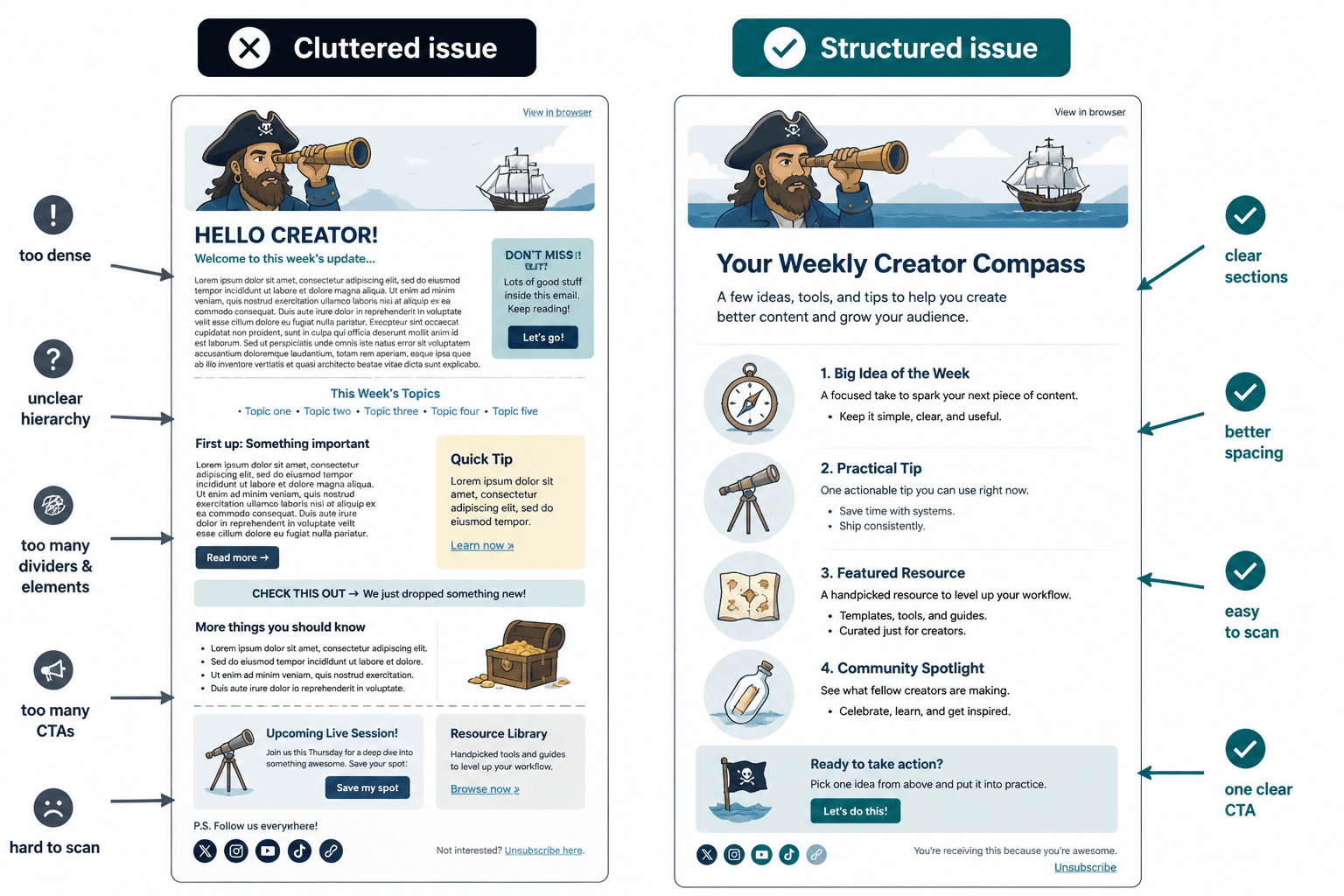
- clean versus cluttered formatting
- single-column versus mixed-block layouts
- short-section versus long-form presentation
- CTA placement options
A practical workflow for using AI without losing the plot
A workable process is usually simple:
- Start with the goal. Decide whether the issue is meant to teach, curate, sell, or support a launch.
- Ask for a section plan. Have AI suggest 3 to 5 blocks in a logical order.
- Draft one section at a time. Don’t generate the whole thing and hope structure appears by osmosis.
- Check the transitions. Make sure each block earns its place.
- Trim the excess. If a sentence does not move the reader forward, it is probably decorative.
- Match the format to the platform. What reads well in a text-heavy editorial email may need adjustment in a more visual build.
Best use cases by newsletter style
- Editorial newsletters: use AI for outlines, section pacing, and tighter intros.
- Curated digests: use AI to group links, write brief context lines, and standardize formatting.
- Creator newsletters: use AI to keep recurring sections consistent while leaving room for personality.
- Lead-gen newsletters: use AI to shape CTA blocks and move readers toward a clear next step.
For more on using sections as business assets, the parent topic’s conversion angle is covered in how to turn newsletter sections and formats into more leads or sales.
Common mistakes to avoid
- Letting AI invent the structure: the tool should support the format, not decide it for you.
- Using one prompt for everything: opening notes, CTAs, and resource blocks need different instructions.
- Ignoring the audience: a useful section for experts may be too dense for casual readers.
- Over-formatting: too many boxes, labels, and highlights can make the issue harder to read, not easier.
- Skipping the edit: AI speed is helpful. AI judgment is still fictional.
What a good AI-assisted newsletter workflow looks like
The best setup is not a giant stack. It is a small one with clear roles:
- one tool for planning
- one tool for drafting
- one tool for layout or template handling
- a human editor for the final read
That keeps the process fast without turning it into software theater. The goal is not to prove you used AI. The goal is to publish a newsletter that makes sense, reads cleanly, and leads somewhere useful.
Recommended bottom line
If your newsletter sections are still getting built from scratch every time, start with a writing assistant for outlining and rewriting, then pair it with whatever template or email platform you already use. That combination is usually enough to fix the bottleneck.
If your issue is mostly visual structure, lean harder on layout and template tools. If your issue is mostly speed and consistency, use AI to generate section variants and tighten the final draft.
The best tool is the one that helps you move from idea to readable issue without adding three more tabs and a mild sense of regret.