
Most LinkedIn articles do not underperform because the writer lacks expertise. They underperform because the structure is doing absolutely none of the heavy lifting.
You see this all the time: a decent idea, buried under a vague intro, five bloated sub-points, and an ending that quietly dies in a hedge. The writer thinks they need better ideas. Usually, they need a better frame.
If you want LinkedIn Article Structure Examples Creators Can Adapt Fast, the good news is you do not need some precious, bespoke content architecture for every article. You need a few reliable structures that fit the kind of point you are trying to make, then the good sense not to stuff them with filler.
This guide will help you pick the right article structure, shape it around your expertise, and make your LinkedIn articles more useful, more readable, and more likely to build actual authority instead of just sitting there looking professional and unloved.
If you are still figuring out the bigger picture, it also helps to read the broader guide for creators who want better results from LinkedIn articles. And if you want more category-level context, start with the main LinkedIn articles hub.
To see how this fits into the wider strategy, open the parent guide.
Why structure matters more than most creators think
LinkedIn articles are not the same as LinkedIn posts with extra paragraphs taped on.
A post can get away with one sharp idea and strong formatting. An article needs progression. It needs to earn attention for longer, build trust with more depth, and guide the reader through a point in a way that feels clean instead of chaotic.
Good structure helps you do a few useful things at once:
- Make the article easier to scan
- Keep the reader oriented
- Show your thinking clearly
- Prevent rambling
- Support search intent better
- Lead naturally to a next step
Bad structure does the opposite. It makes even smart ideas feel foggy. And fog does not convert. It barely gets read.
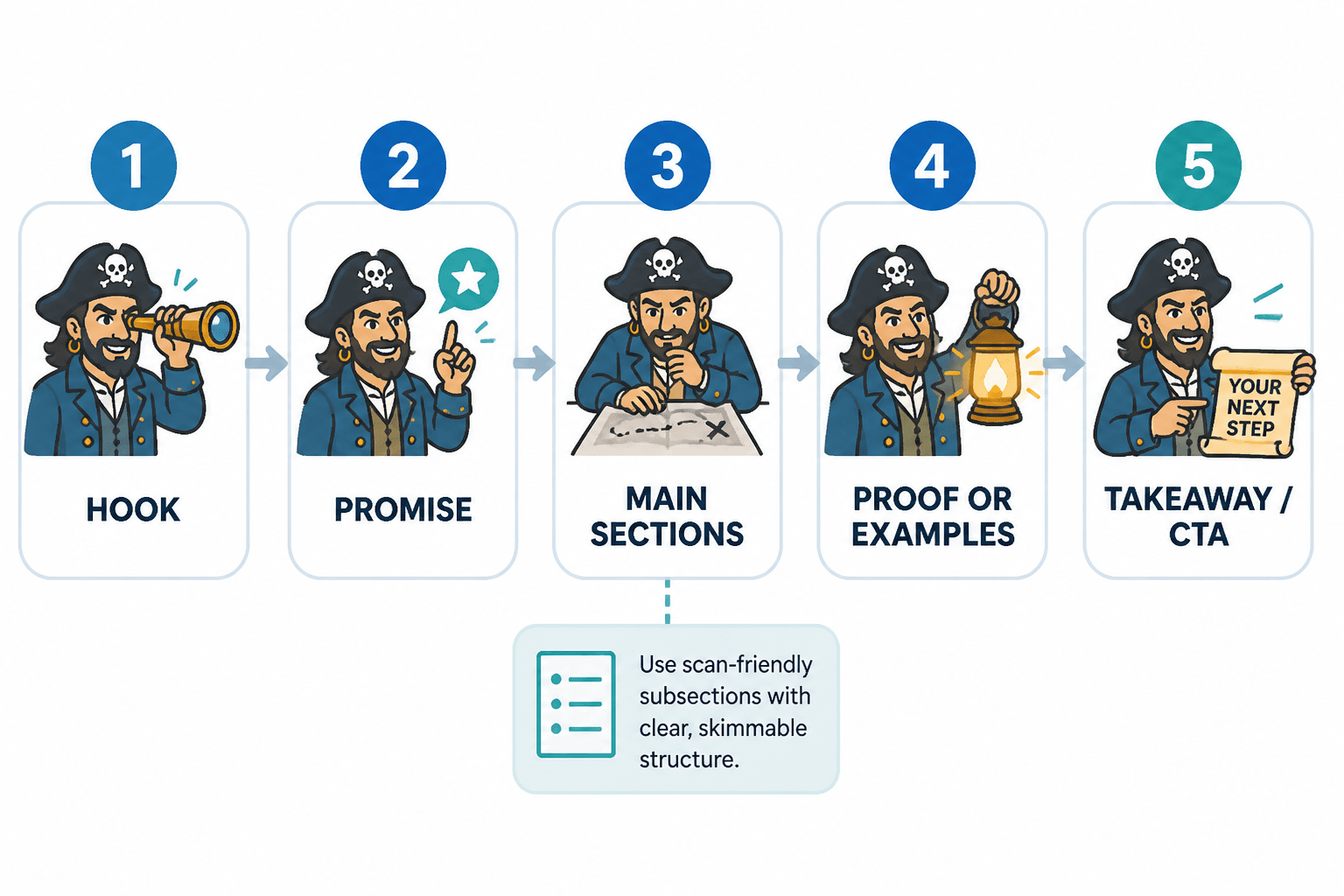
What a strong LinkedIn article structure usually includes
Before we get into examples, here is the simple version. Most useful LinkedIn articles have five working parts:
- A clear opening: the problem, mistake, tension, or argument
- A promise: what the reader will get if they keep going
- Main sections: organized points, steps, examples, or contrasts
- Proof or specificity: examples, scenarios, frameworks, rewrites, or observations
- A clean ending: a practical takeaway or next step
That does not mean every article should look identical. It means every article should have a spine. You are not just arranging paragraphs. You are controlling momentum.
If your intros tend to wander, this will help: how to improve LinkedIn article intros without sounding generic.
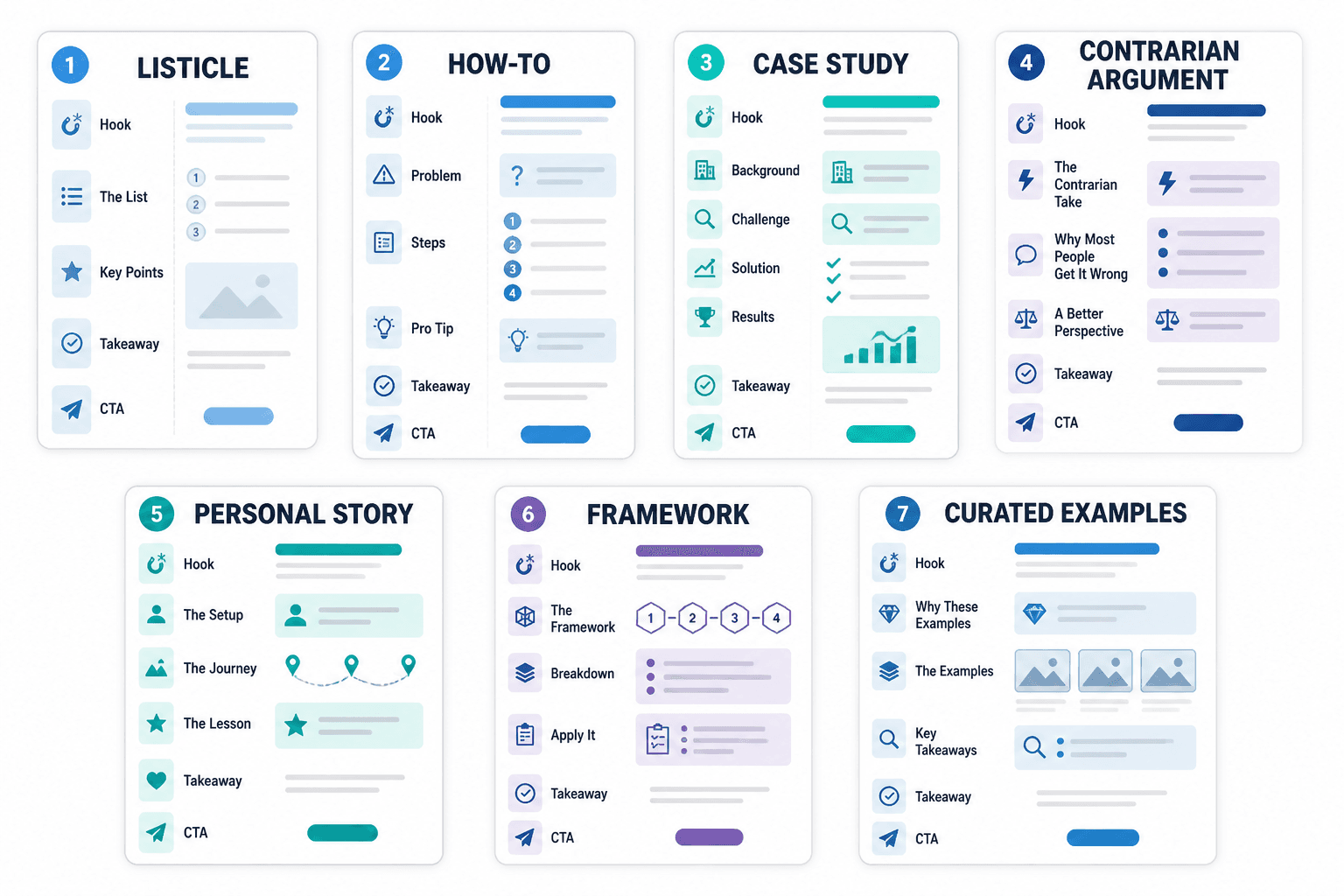
5 LinkedIn article structure examples creators can adapt fast
These are not rigid formulas. They are practical shapes. Use them when they fit the idea. Ignore them when they do not. That is how adults use templates.
1. The problem → mistake → fix structure
This is one of the easiest and most useful LinkedIn article structure examples creators can adapt fast, especially if you teach, advise, coach, write, or sell expertise.
It works because readers usually arrive with a pain point, a wrong assumption, or a mess they have not named properly yet. This structure meets them there, then moves them toward clarity.
Best for: educational articles, myth-busting, strategy pieces, content advice, client mistakes
Simple structure:
- Opening: name the problem
- Section 1: explain the common mistake
- Section 2: explain why it fails
- Section 3: show the better approach
- Section 4: give practical steps or examples
- Ending: tell the reader what to change first
Example topic: Why your LinkedIn article is getting polite silence
- Problem: you are publishing, but nobody cares
- Mistake: your article is broad, padded, and says nothing new
- Why it fails: readers cannot find a clear point worth staying for
- Fix: tighten angle, improve intro, add specific examples
- Practical step: rewrite the first 3 paragraphs and every subheading
This structure is good when the reader needs correction. Not a scolding. Just correction. There is a difference.
2. The framework structure
If you have a repeatable way of thinking about something, turn it into a framework article. Creators often avoid this because they think a framework has to be profound, trademarked, or arranged into some cursed acronym. It does not.
A framework is just a useful way to organize a complex idea so someone else can understand and apply it faster.
Best for: strategy articles, authority building, process explanation, consulting-style content
Simple structure:
- Opening: name the messy problem
- Introduce the framework
- One section per part of the framework
- Add examples or mini-applications
- Ending: show how to use the framework today
Example topic: A 4-part framework for planning stronger LinkedIn articles
- Angle: what is the core point?
- Reader: who is this actually for?
- Proof: what makes the advice believable?
- Action: what should they do next?
The main thing here is clarity. If the framework is too abstract, it becomes consultant wallpaper. If it is specific and usable, it becomes memorable.
For more angle ideas that work well in article form, see simple LinkedIn article authority angles and templates for busy creators.
3. The before → after rewrite structure
This one is wildly effective because readers can see the improvement instead of just being told to improve.
If your audience writes content, builds offers, updates profiles, sends emails, or sells with words, rewrite articles are gold. They feel concrete. They also make you look like someone who knows how to diagnose and fix weak messaging, which is useful if that happens to be your job.
Best for: copywriters, content strategists, brand consultants, coaches, editors, marketers
Simple structure:
- Opening: explain the common weak version
- Show a before example
- Break down what is not working
- Show the rewritten version
- Explain why the rewrite is stronger
- Give a repeatable rewrite checklist
Example topic: How to rewrite a boring LinkedIn article intro
Before: “LinkedIn articles are a great way to build your professional brand and connect with your audience.”
After: “Most LinkedIn articles fail before the second paragraph because the intro spends 80 words warming up to a point the reader already understands.”
That kind of contrast lands because it has tension, specificity, and a point. It also sounds like a person with taste wrote it.
4. The example stack structure
Sometimes the fastest way to teach is not to explain a concept from scratch. It is to show several examples, name the pattern, and let the reader reverse-engineer the lesson with your help.
This structure works particularly well when readers are looking for inspiration they can adapt quickly. Which, if they searched for article structures examples, they probably are.
Best for: templates, hooks, intros, CTAs, outlines, article ideas, content breakdowns
Simple structure:
- Opening: explain what the examples will help with
- Group examples by type or use case
- For each example, show structure plus a quick note on when to use it
- End with adaptation advice so people do not copy like lazy magpies
Example topic: 7 LinkedIn article outlines for coaches, consultants, and creators
You can also pair this with examples from adjacent articles, like LinkedIn article examples for coaches, consultants, and personal brands.
5. The argument structure
This is the one to use when you have a strong opinion that needs support. Not fake controversy. Not “hot takes.” An actual argument.
Good creators often underuse this structure because they are trying so hard to be helpful that they flatten their point into mush. But if you work in content, brand, strategy, marketing, coaching, or consulting, your judgment is part of the value. Sometimes you should show it.
Best for: positioning articles, contrarian takes, trend critiques, strategic opinion pieces
Simple structure:
- Opening: make the claim clearly
- Explain the common belief you disagree with
- Give 2 to 4 reasons your view is stronger
- Add examples, evidence, or practical consequences
- End by telling the reader what to do differently
Example topic: Why most LinkedIn articles should be narrower, not longer
This can work beautifully when you have enough depth to back the opinion up. Without that, it just reads like caffeinated posting.
How to choose the right structure for your article
Do not start by asking, “What structure should I use?” Start by asking, “What job is this article doing?”
That one shift saves a lot of mediocre writing.
| Article goal | Best structure |
|---|---|
| Teach a practical lesson | Problem → mistake → fix |
| Show your method | Framework |
| Demonstrate improvement | Before → after rewrite |
| Give adaptable inspiration | Example stack |
| Make a strategic case | Argument |
You can also blend structures. A framework article might include a rewrite section. An argument article might end with examples. Fine. The point is not purity. The point is usefulness.
A fast template for building your own LinkedIn article
If you want a practical drafting shortcut, use this:
- Write the core point in one sentence.
What do you actually want the reader to understand, believe, or do? - Choose the structure that fits that point.
Do not force a framework onto something that should just be a clean problem-fix article. - Draft the H2s first.
If the subheads are weak, the article probably is too. - Add one useful example per major section.
Examples stop advice from floating away. - Cut any paragraph that only sounds professional.
Professional is not the same as clear. Plenty of “professional” writing is just expensive fog. - End with one next step.
Not five. One good one.
That process is especially handy if you are writing articles as part of a larger content system. If so, you may also want to browse the broader social media writing category and the LinkedIn writing section for related pieces.
Common structure mistakes that make LinkedIn articles drag
You do not need a fancy structure to make a good article. But you do need to avoid these very common ways of quietly ruining one.
Starting too wide
If your article starts with sweeping statements about content, business, branding, or leadership, there is a decent chance the reader will leave before you arrive at the actual point.
Start closer to the tension.
Using headings that say nothing
The bigger point is simple: clearer structure and clearer writing make the piece more useful. That is usually what makes the ending land better too.
LinkedIn articles work best when the structure makes the main idea easy to follow and easy to act on. Clearer writing usually carries more weight than heavier formatting.