
Most advice about internal linking and content updates sounds like it was written by a polite robot with no actual publishing responsibilities.
You get vague reminders to “refresh old content regularly” and “add relevant internal links where appropriate,” which is technically fine and practically useless. That is not a system. That is a chore wearing a strategy hat.
If you want to know how to improve internal linking update triggers without sounding generic, the fix is not fancier wording. It is better criteria. Better linking decisions. Better reasons to update. Better timing. In other words: less content housekeeping theater, more deliberate structure.
This article will help you build internal linking and update triggers that actually mean something. You will learn how to spot real update opportunities, write links that do not feel stuffed in for SEO, and create simple rules for when a post should be refreshed, expanded, merged, or left alone.
If your current update process is basically “open old article, tweak a sentence, add two random links, hope for the best,” yes, we can do better than that.
To see how this fits into the wider strategy, open the parent guide.
Why internal linking and update triggers usually end up sounding generic
The problem is not that people do not know internal links matter. They know. The problem is that most teams treat internal linking and updating like maintenance tasks instead of editorial decisions.
That creates advice like this:
- Review old content quarterly
- Add links to related articles
- Update outdated information
- Keep content fresh
None of that tells you what counts. None of it helps you decide which article needs attention first, what kind of update is worth making, or how to link in a way that genuinely improves the reader’s path through your site.
Generic writing usually comes from generic triggers. If your update trigger is “this article is old,” your refresh will probably be shallow. If your link rule is “mention keyword, add link,” your internal links will read like someone hid a sitemap in the paragraph.
Useful internal linking and useful updates come from specificity. You need to know:
- What role the page plays in the cluster
- What questions the reader is likely to have next
- What has changed since the piece was published
- What signals suggest the page is underperforming or incomplete
- What adjacent content deserves more visibility
That is where the quality jump happens. Not in “best practices.” In actual editorial judgment.
Start with page roles, not random link opportunities
Before you improve a single internal link, get clear on what each article is supposed to do. A site with no page roles becomes a messy little maze of “related content” links that do not move the reader anywhere useful.
At minimum, most content clusters have a few distinct roles:
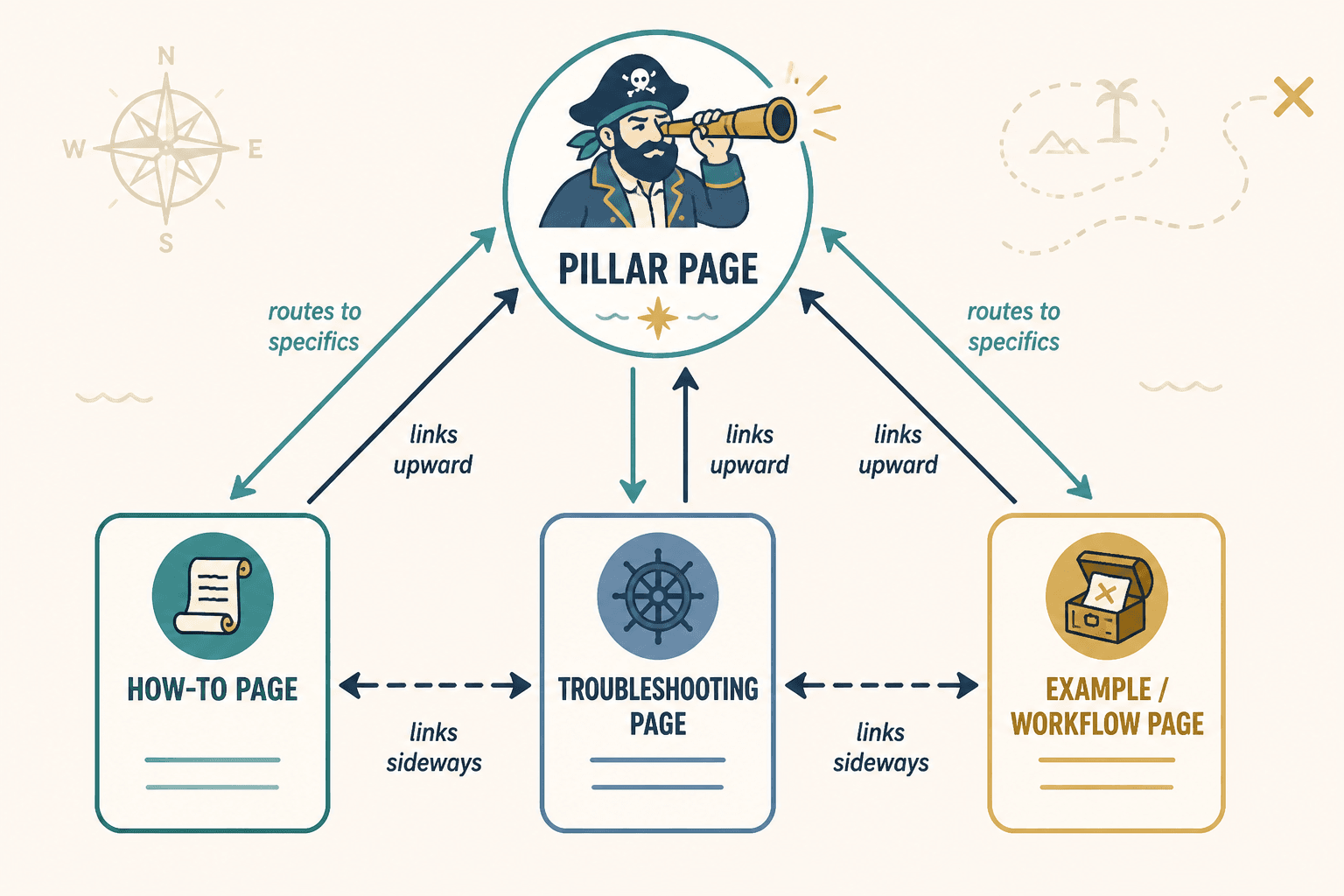
- Pillar pages: broad overview pages that organize the topic and route readers deeper
- Supporting how-to pages: practical, focused answers to one subproblem
- Comparison or decision pages: pages that help readers choose, avoid mistakes, or evaluate options
- Refresh or troubleshooting pages: content that helps readers diagnose weak spots and improve what they already have
Once you know the role, internal linking gets easier because each page has a job.
For example, if you are working inside an internal linking and updating cluster, your pillar page should route readers toward more specific subtopics. A troubleshooting article should link upward to the broader system and sideways to related fixes. A practical how-to page should link to examples, mistakes, and related workflows that naturally come next.
That means a page like internal linking and updating should not just collect links because they exist. It should act like a map. Then supporting articles can carry more precise, context-driven links back into the cluster.
What a real update trigger looks like
A real update trigger is a specific reason to revisit a page. Not “it has been a while.” Not “we should refresh content.” An actual reason.
Good triggers usually fall into five buckets.
1. The topic changed
This is the obvious one, but people still handle it lazily. If a process, platform feature, naming convention, market expectation, or audience behavior changed, the article may need more than a date update. It may need a repositioned intro, a rewritten example, and new links to better supporting content.
2. The article is structurally weak
Sometimes the content is not outdated. It is just not doing the job. Maybe the intro is bloated. Maybe the page answers the question too late. Maybe the links all cluster at the bottom like an afterthought. Maybe the article says “related resources” instead of guiding the next step.
That is still a valid update trigger.
3. The cluster grew
If you published new supporting pages, older pieces may now have better internal link opportunities. This is one of the most overlooked reasons to update content. New articles should not just sit there hoping to be discovered. Existing pages should route attention toward them where it makes sense.
For example, if you add a practical guide like how to write better internal linking and updating, older pages in the cluster may need a new contextual link when they mention writing internal links well rather than merely adding them.
4. Reader intent is not being served well
Sometimes the page gets traffic but does not move readers deeper. Maybe it ranks for a broad term but does not help the visitor progress. Maybe people land there but the next step is unclear. That is an internal linking problem disguised as a content performance problem.
5. The article has become generic compared with the rest of the site
This one matters more than people admit. As your site gets sharper, old content can start sounding thin, vague, or interchangeable. It may still be technically correct, but it no longer reflects your standards. That is a good enough reason to refresh it, especially if it sits in an important cluster.
Build update triggers around signals, not calendar guilt
A publishing calendar is useful. Calendar guilt is not.
If your only update system is “revisit everything every six months,” you will waste time polishing pages that are fine while ignoring pages that quietly need surgery. Better approach: use a handful of signals that tell you what kind of update is needed.
| Signal | What it may mean | Best response |
|---|---|---|
| Article is getting impressions but weak clicks | Title, intro, or search intent mismatch | Refresh opening, angle, and promise |
| Traffic is fine but readers do not continue | Weak internal paths or unclear next step | Add contextual links tied to next questions |
| New supporting content was published | Older pages are missing relevant pathways | Update links inside high-traffic related articles |
| Examples or terms feel dated | Page may look stale or less credible | Replace examples and update framing |
| Page overlaps heavily with another article | Cannibalization or cluster confusion | Merge, narrow, or re-position content |
| Content sounds broad and generic | Low usefulness, low differentiation | Add specifics, examples, and stronger linking logic |
This is a much better system because the trigger points to the type of action. The update is not just “touch page.” It is “fix this specific weakness.”
How to write internal links that do not sound like filler
Let’s get to the part people tend to butcher.
Bad internal links usually fail in one of three ways:
- They are too vague
- They interrupt the sentence unnaturally
- They exist for SEO more than the reader
If a link feels bolted on, readers can tell. And yes, search engines are not exactly charmed by clutter either.
Use “next-question” linking
The cleanest internal links answer the reader’s likely next question.
Instead of this:
You should also review related content. Learn more in our article on internal linking and updating.
Try this:
If the article itself is fine but the surrounding cluster is weak, the bigger issue may be your cluster refresh mistakes that hurt performance, not the page in isolation.
The second one works because it has a reason to exist. It advances the idea. It does not just wave vaguely at “related content.”
Write the sentence first, then place the link
Many awkward internal links happen because people start with the anchor text and force the sentence around it. Reverse that. Write the useful sentence. Then link the phrase that naturally carries the destination.
For example:
- Weak: To improve this process, read how to turn old content into better internal linking and updating.
- Better: If your archive is full of decent articles that no longer connect well, here is how to turn old content into better internal linking and updating without rebuilding everything from scratch.
Same destination. Much better reading experience.
Match anchor text to intent, not just keywords
Anchor text should help the reader predict what they are clicking. It does not need to be the exact page title every time. In fact, using the exact title on repeat often makes the prose clunky.
You can vary internal anchors based on intent:
- Problem-aware anchor: “why your cluster refreshes keep underperforming”
- Outcome-aware anchor: “how to make old articles support newer pages better”
- Method-aware anchor: “a better way to write internal linking and updating”
That last one would be a natural route to a better way to write internal linking and updating, while a style-focused sentence might fit how to write internal linking and updating without sounding salesy or robotic.
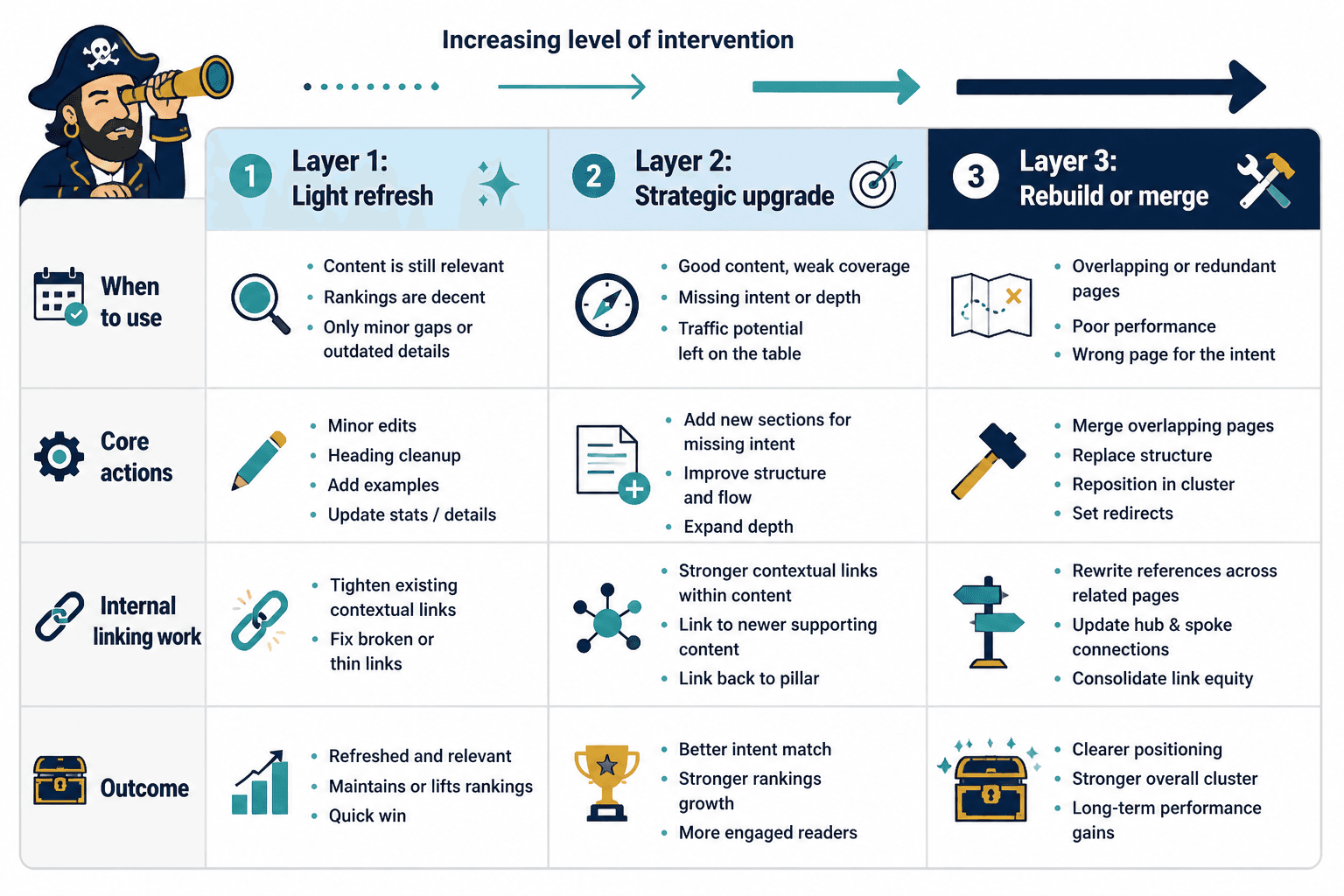
Use three update layers instead of one vague “refresh” bucket
One reason update workflows get sloppy is that every change gets called a refresh. Tiny edit? Refresh. Full rewrite? Refresh. Added one link and changed a screenshot? Refresh. That is not helpful.
Split updates into three layers.
Layer 1: Light update
Use this when the core article is solid, but small improvements are needed.
- Replace outdated examples
- Tighten the intro
- Add or improve 2–5 contextual internal links
- Fix formatting or structure issues
- Clarify the CTA or next step
Layer 2: Strategic refresh
Use this when the topic still matters, but the article is underperforming or underserving the cluster.
- Rework the article angle
- Improve heading structure
- Add new sections based on missing search intent
- Rewrite weak or generic internal links
- Link to newer supporting content and back to the pillar
Layer 3: Rebuild or merge
Use this when the article is outdated, duplicated, cannibalizing another page, or simply not worth patching.
- Merge overlapping pages
- Replace the structure entirely
- Reposition the topic in the cluster
- Redirect old pathways where needed
- Rewrite internal references across related pages
This layered approach prevents a very common mistake: doing cosmetic updates on pages that actually need structural work.
How to decide where new internal links belong
You do not improve internal linking by sprinkling links evenly across the site like SEO parmesan. You improve it by placing links where context and reader momentum already exist.
When reviewing a page, ask these four questions:
- What question does the reader likely have after this paragraph?
If another article answers that question, link it there. - What claim here needs proof, method, or example?
Link to the article that deepens that exact point. - What page in this cluster deserves more authority or traffic?
Add links from relevant, stronger pages rather than dumping links from everywhere. - Where might the reader get stuck?
Link to the article that resolves that friction.
This is what separates useful internal linking from perfunctory internal linking. You are designing pathways, not decorating paragraphs.
A simple placement model
Most good article-level internal links fit one of these spots:
- Early context link: points to the pillar or foundational explainer
- Mid-article expansion link: deepens a subpoint without derailing the main article
- Problem-solving link: routes readers to a related fix or mistake article
- End-of-section next-step link: sends readers to the most logical adjacent piece
That means if you mention cluster structure early, a natural foundation link might point to the broader internal linking and updating hub. If you are discussing weak writing, a mid-article expansion could point to writing internal linking and updating without sounding salesy or robotic. If the issue is stale archives, the next-step link could send readers to turning old content into better internal linking and updating.
What to remove when updating old content
Improving content is not just about adding. Quite often, the real quality gain comes from removing lazy clutter.
When updating older posts, cut things like:
- Empty throat-clearing intros
- Generic transition lines like “it is also important to note”
- Keyword-stuffed anchor text
- Loose “related articles” mentions inside body copy
- Broad advice with no examples
- Outdated references that lower trust
- Sections that repeat what another linked article already covers better
This matters because internal linking works better when each page is clear about its role. If one article keeps trying to do everything, your links will either feel redundant or desperate.
A cleaner article makes each internal link more meaningful. It also makes the whole cluster less cannibalized and less annoying to navigate. Lovely bonus.
Write update notes like an editor, not a content machine
If you manage content in a spreadsheet, doc, CMS note, or project board, stop writing update notes like this:
- Refresh content
- Add internal links
- Improve SEO
- Update outdated info
That language is too vague to guide quality work. It also makes it harder to hand content off to another writer or revisit later.
Write update notes like this instead:
- Rewrite intro to match practical search intent, not theory
- Add link to new supporting article on cluster refresh mistakes in section 3
- Replace generic “related resources” paragraph with contextual next-step sentence
- Cut duplicated subsection now covered in the parent cluster page
- Update examples to reflect current content workflows and archive management
See the difference? One list sounds like a task template. The other sounds like someone actually read the article.
A practical workflow for improving internal linking and updating
If you want this to become repeatable, use a simple review sequence.
- Identify the page role.
Is it a pillar, supporting guide, troubleshooting page, or something else? - Check the trigger.
Why is this page being updated now? Be specific. - Choose the update layer.
Light update, strategic refresh, or rebuild. - Review the cluster around it.
What newer or stronger pages should connect to this one? - Rewrite weak internal links contextually.
Place links where they answer the next question. - Cut generic filler.
If a sentence only exists to carry a link, fix the sentence or remove it. - Add one clear next step.
Not five. One strong route is better than a small buffet of confusion.
This workflow is especially useful if you are refreshing content in batches. It keeps updates from becoming random acts of optimization.
The more important move inside the article itself is to link toward the next genuinely useful step. Good update triggers help you refresh pages in a way that strengthens the journey instead of scattering readers at random.