
Most cluster refreshes do not fail because the writer forgot one keyword or missed one subheading.
They fail because the update is treated like light housekeeping when it is actually structural work. A few links get swapped, a date gets changed, two paragraphs get polished, and everyone acts like the cluster has been “refreshed.” Meanwhile the pages still cannibalize each other, the internal links still point vaguely at everything, and the reader journey still feels like a drunk hallway with too many doors.
If you are dealing with Internal Linking Cluster Refresh Mistakes That Hurt Performance, the good news is that most of them are fixable. The annoying part is that they are usually process mistakes, not writing mistakes. Which means you cannot solve them by sprinkling in a few new links and hoping Google or your readers applaud politely.
This is about cleaning up the logic of the cluster: what each page is for, how pages support each other, when something deserves a refresh, and which lazy update habits quietly tank performance instead of helping it.
For the main guide behind this topic, visit the parent guide.
What a cluster refresh is supposed to do
A content cluster is not just a bunch of related posts sitting near each other in your sitemap like coworkers avoiding eye contact.
It is a structure. Usually you have a parent or pillar page, then supporting articles that go deeper into specific questions, examples, workflows, mistakes, or use cases. When you refresh the cluster, you are supposed to improve:
- topical clarity
- internal link paths
- page distinctiveness
- content freshness where it matters
- reader flow from one useful page to the next
- conversion paths and next-step logic
That means a proper refresh is part editorial review, part UX cleanup, and part information architecture maintenance.
If you want a stronger foundation before fixing the mistakes, it helps to review the broader internal linking and updating system here, then compare that with your current cluster behavior instead of guessing from one post’s analytics.
The biggest internal linking cluster refresh mistakes that hurt performance
1. Refreshing pages one by one without checking the whole cluster
This is one of the most common messes.
Someone opens a post that lost traffic, improves the intro, adds two internal links, updates the year, and republishes. Fine. But if that page is part of a cluster, updating it in isolation can make the overall structure worse. You may end up strengthening the wrong page, creating overlap with a more important article, or sending users in circles.
A cluster refresh should start with a cluster view. Look at:
- the parent page
- all supporting pages
- search intent differences between them
- which page should rank for what
- which pages are weak, overlapping, outdated, or underlinked
If you skip that step, you are not refreshing a cluster. You are just touching random furniture.
2. Keeping overlapping articles because “more content” feels productive
More content is not automatically more authority. Sometimes it is just more confusion.
Cluster refreshes often expose duplicate intent across multiple posts. You might have one article about internal linking basics, another about better internal links, another about improving site structure, and another about connecting related posts. Different titles. Same basic point. Thin distinctions. Weak performance across all of them.
That overlap hurts in a few ways:
- search engines get mixed signals about which page matters most
- internal links get spread too thinly across similar pages
- readers click around and find repetitive advice instead of deeper value
- your main page never gets enough support because supporting pages are busy competing with each other
Sometimes the fix is merging. Sometimes it is repositioning. Sometimes one page needs to become the main explainer while the others become examples, templates, or advanced follow-ups.
But keeping every overlapping page alive just because it exists already is not strategy. It is digital hoarding with a CMS.
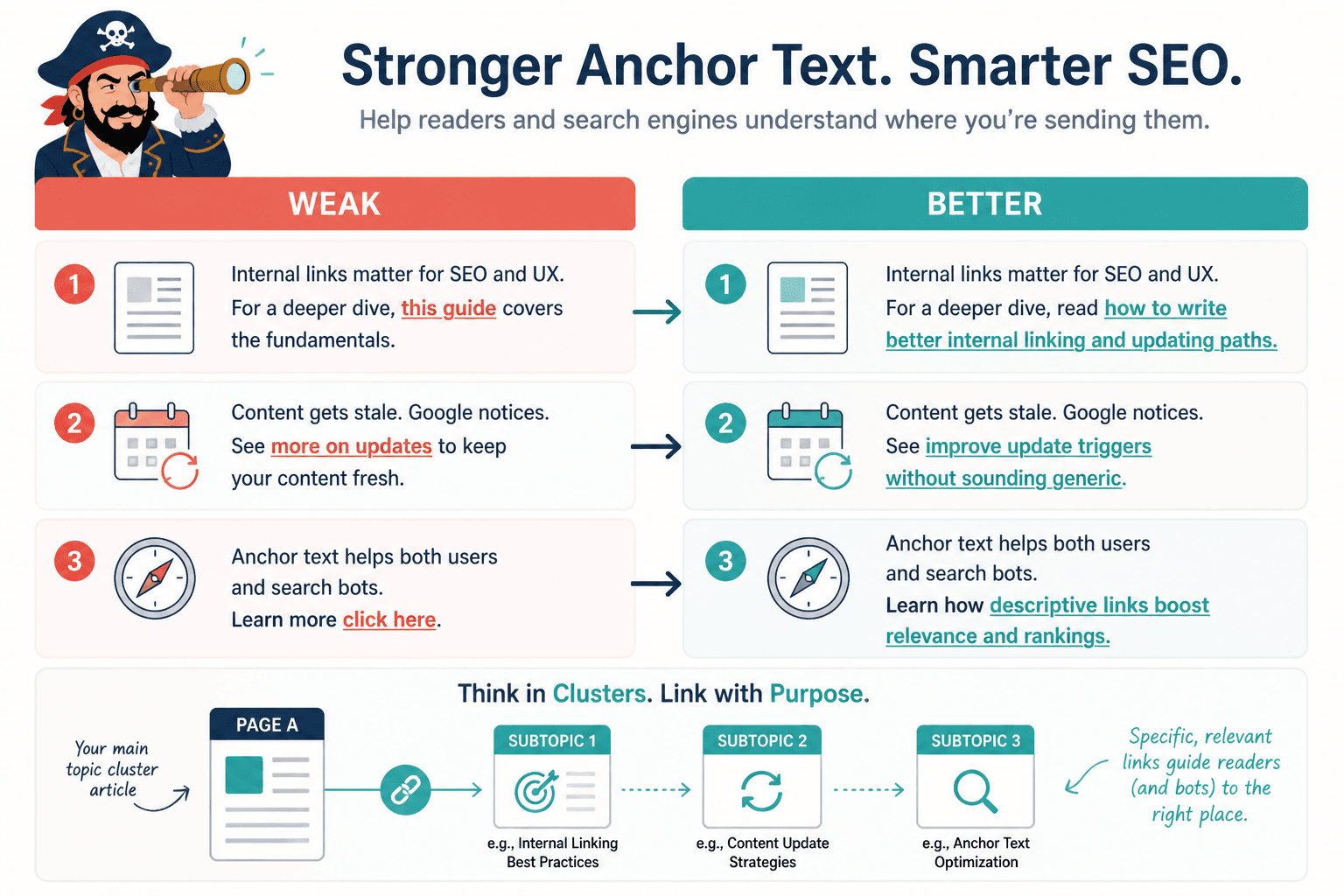
3. Using vague anchor text that says nothing useful
“Read more here.” “This article.” “Related post.” “Learn more.”
None of that helps much. It is weak for readers, weak for structure, and weak for context. A cluster refresh is the right time to tighten anchor text so the relationship between pages is obvious.
Better anchor text gives a clear reason to click. It also tells search engines more about the destination page without sounding stuffed or robotic.
Weak: see this guide
Better: learn how to write better internal linking and updating paths
Weak: more on updates
Better: improve update triggers without sounding generic
You do not need every anchor to be exact-match and stiff. In fact, that gets ugly fast. But vague anchors are usually a sign that the linking was added as an afterthought rather than as part of a real content path.
4. Linking every related page from every article
Some teams discover internal linking and immediately turn every article into a crowded airport terminal.
Yes, related pages should support each other. No, that does not mean each page needs links to every cousin, neighbor, and former roommate in the topic cluster.
When everything links to everything, two things happen:
- the hierarchy gets muddy
- the reader has too many choices and no clear next step
A stronger cluster usually has intentional paths. For example:
- pillar page links to major subtopics
- subtopic pages link back to the pillar where relevant
- closely related sibling pages link when they genuinely extend the idea
- high-intent pages point toward practical examples, templates, or action pages
That is a system. Random link abundance is not.
5. Forgetting to update old articles so they link to newer, better support pages
This one is quietly expensive.
Many sites publish a strong new supporting article, add a couple of links from the newest content, and call it done. But the older posts in the cluster still point nowhere useful, or they still link to weaker articles written two years ago when the topic structure was half-baked.
A refresh should not just improve the page you are in. It should review the incoming and outgoing links around it. That includes older pages that still get traffic, impressions, backlinks, or conversions.
If an older article has authority and relevance, it should be helping distribute that attention into the refreshed cluster. Otherwise you are leaving structural value on the table because nobody wanted to spend another 20 minutes updating legacy pages. Very efficient. Very self-sabotaging.
6. Updating wording without improving page purpose
A lot of refreshes are cosmetic. Cleaner sentences. New intro. Slightly better formatting. Fresh publish date. No meaningful strategic change.
But performance problems often come from fuzzy purpose, not clunky prose.
Ask of each page:
- What exact question does this page answer?
- How is it different from the other pages nearby?
- Who is it for?
- What should the reader do next after reading it?
- What role does it play in the cluster?
If you cannot answer those clearly, the refresh needs more than line edits.
Sometimes the right move is to narrow the scope. Sometimes it is to expand with examples. Sometimes it is to reposition the article entirely so it becomes an examples page, a mistakes page, or a tactical workflow page that supports the broader parent topic better.
7. Ignoring user journey after the first click
Internal linking is not just for search engines. It is for readers trying to move from general interest to deeper understanding without getting lost or bored.
One of the biggest cluster refresh mistakes is treating links like static SEO annotations instead of journey cues. If someone lands on a page about refresh mistakes, what should they logically want next?
- a guide to writing better internal links
- examples of link maps
- ideas for update triggers
- more examples they can adapt
That is where your links should lead. Not to random “related resources” because they happen to share two nouns.
For example, if a reader needs a stronger process after spotting mistakes, you can naturally point them to link map examples creators can adapt fast or to internal linking and updating ideas and examples for creators.
8. Refreshing based only on traffic drops
Traffic drops matter, obviously. But if they are your only trigger for a cluster refresh, you will miss a lot.
Good refresh triggers can include:
- new subtopics added to the cluster
- changes in offer positioning
- reader confusion between similar pages
- thin support around an important pillar page
- old examples that no longer help
- new pages that need incoming internal links
- messy hierarchy caused by years of publishing without a map
If your refresh process is reactive only, your clusters will stay lopsided. You will keep patching obvious losers while ignoring the structural reasons they lost.
If you need a cleaner way to think about this, the article on better update triggers pairs well with this one.
9. Not deciding which page is the authority page
Every cluster needs a center of gravity.
That does not mean one page gets all the links and all the attention. It means you know which page is the main destination for the broad topic, and which pages exist to deepen or support that main page.
Without that decision, cluster refreshes become chaotic. Different pages compete for the same role. Internal links point in multiple directions. Search intent gets blurred. Calls to action drift.
In this topic, the parent page should likely be the broad system page, with supporting posts covering writing links, update triggers, maps, mistakes, and examples. That is cleaner for readers and cleaner for the site.
You can also browse the broader category structure through these related blog SEO writing paths if you are reviewing how the cluster sits inside the larger content system.
10. Leaving weak or irrelevant CTAs in refreshed articles
A refresh is also a chance to fix what happens after the information lands.
Plenty of cluster pages still end with nothing useful. Or worse, they end with a generic pitch that has no relationship to the content the reader just consumed.
Better CTA options in a cluster refresh include:
- pointing readers to the pillar page for a broader system view
- sending them to examples if they need implementation help
- moving them to a tactical follow-up article
- inviting the next logical conversion step if intent is high enough
The CTA does not need to sell with jazz hands. It just needs to match reader intent and article role.
What a smarter cluster refresh process looks like
If your refreshes have been ad hoc so far, do not overcomplicate the fix. You need a repeatable review process, not a giant content operations spreadsheet that becomes its own hobby.
Here is a practical workflow.
Step 1: Map the cluster before editing anything
List all pages in the cluster and note:
- target query or topic angle
- page role
- current traffic or visibility trends
- key internal links in and out
- overlap with other pages
- whether the page should stay, merge, redirect, rewrite, or expand
This alone will reveal half the problem. Most underperforming clusters are not mysterious. They are just messy.
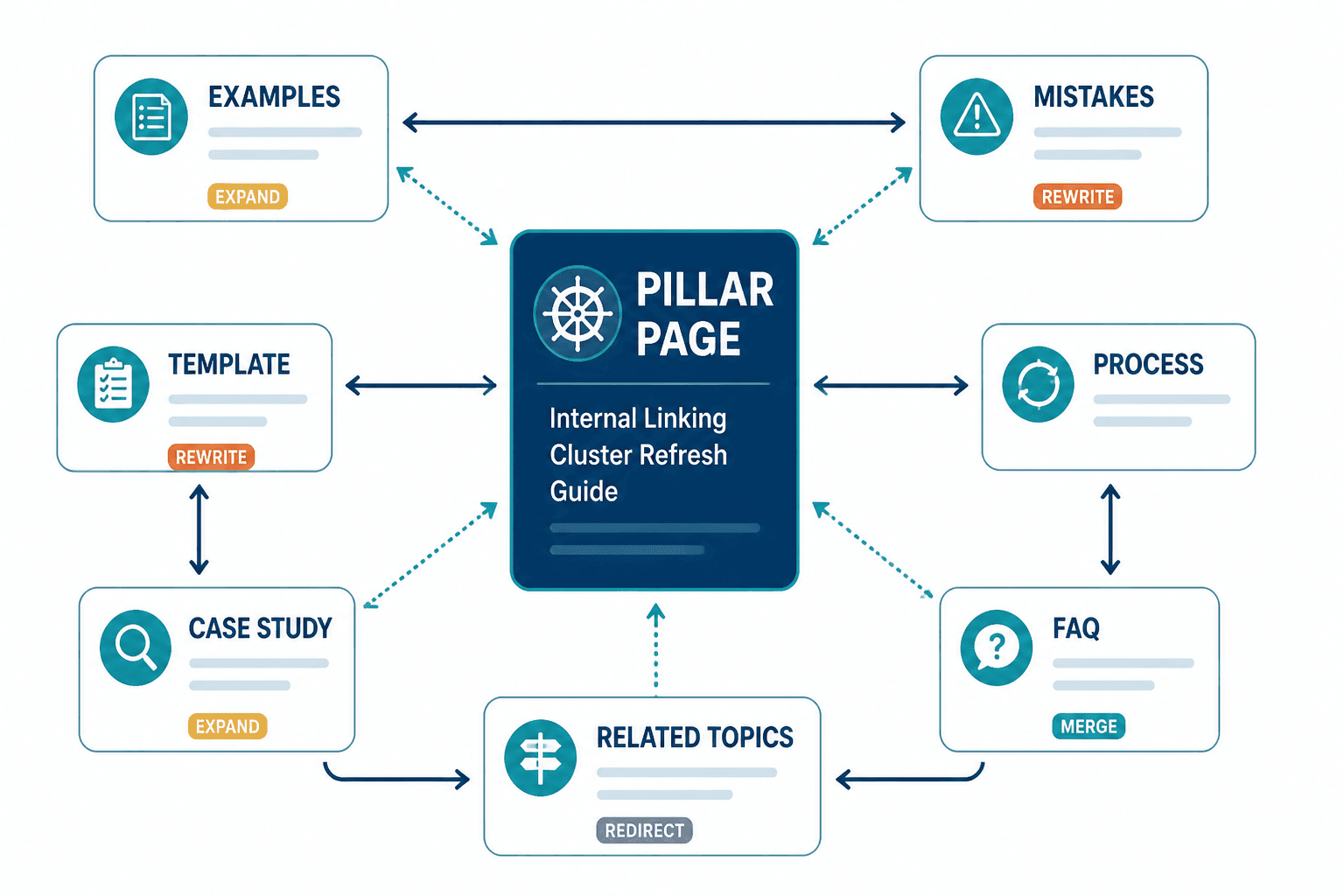
Step 2: Define the role of each page
Every page should have a job. Broad explainer. Examples page. Mistakes page. Template page. Process page. Case-study-style page. If two pages have the same job, decide which one actually deserves it.
This is where a lot of bloat gets exposed. Good. Let it.
Step 3: Fix hierarchy and internal paths
Now review links based on relationship, not mere relevance.
- Does the pillar link to the most important supporting pages?
- Do supporting pages link back where useful?
- Are there obvious next-step links for readers?
- Are old pages pointing to your best current resources?
- Are there unnecessary links cluttering the article?
If you need practical models, the piece on link maps examples creators can adapt fast is useful here.
Step 4: Improve substance, not just polish
Once the structure is clearer, improve the pages that need stronger substance. Add examples. Cut repetition. Clarify the opening. Expand thin sections. Remove generic filler. Tighten CTA logic.
If you are refreshing ten pages, not every page needs a rewrite. But every page should be checked for purpose, quality, and fit in the cluster.
Step 5: Update surrounding articles, not just the main one
This is where many refreshes stop too early.
Once a refreshed page is stronger, add or update links from related older pages so the cluster actually behaves like a cluster. Otherwise the improved page sits there waiting to be discovered like a nice shop with no sign out front.
Quick before-and-after examples of cluster refresh mistakes
| Mistake | Weak version | Stronger version |
|---|---|---|
| Anchor text | “Read this article” | “See how to write better internal linking and updating paths” |
| Cluster role | Three pages all explain the basics | One basics page, one examples page, one mistakes page |
| Refresh trigger | Only update after traffic falls | Update when structure, intent, examples, or support pages change |
| Internal links | Every page links to everything | Pages link based on hierarchy and next-step usefulness |
| CTA | Generic “contact us” ending | Send readers to the most useful next article in the cluster |
A simple cluster refresh checklist
- Identify the pillar page and supporting pages
- Check for overlapping search intent
- Merge, reposition, or rewrite duplicate-purpose pages
- Review anchor text for clarity and usefulness
- Remove unnecessary links that muddy hierarchy
- Add links from older relevant articles to refreshed pages
- Make each page’s role obvious
- Improve examples, proof, and specificity where thin
- Fix the next-step CTA
- Review the cluster as a system after changes go live
If your current process is mostly “open article, tweak article, publish article,” this checklist will already make your updates much less sloppy.
How to know your cluster refresh actually helped
Do not judge the refresh only by whether one page jumps in rankings next week.
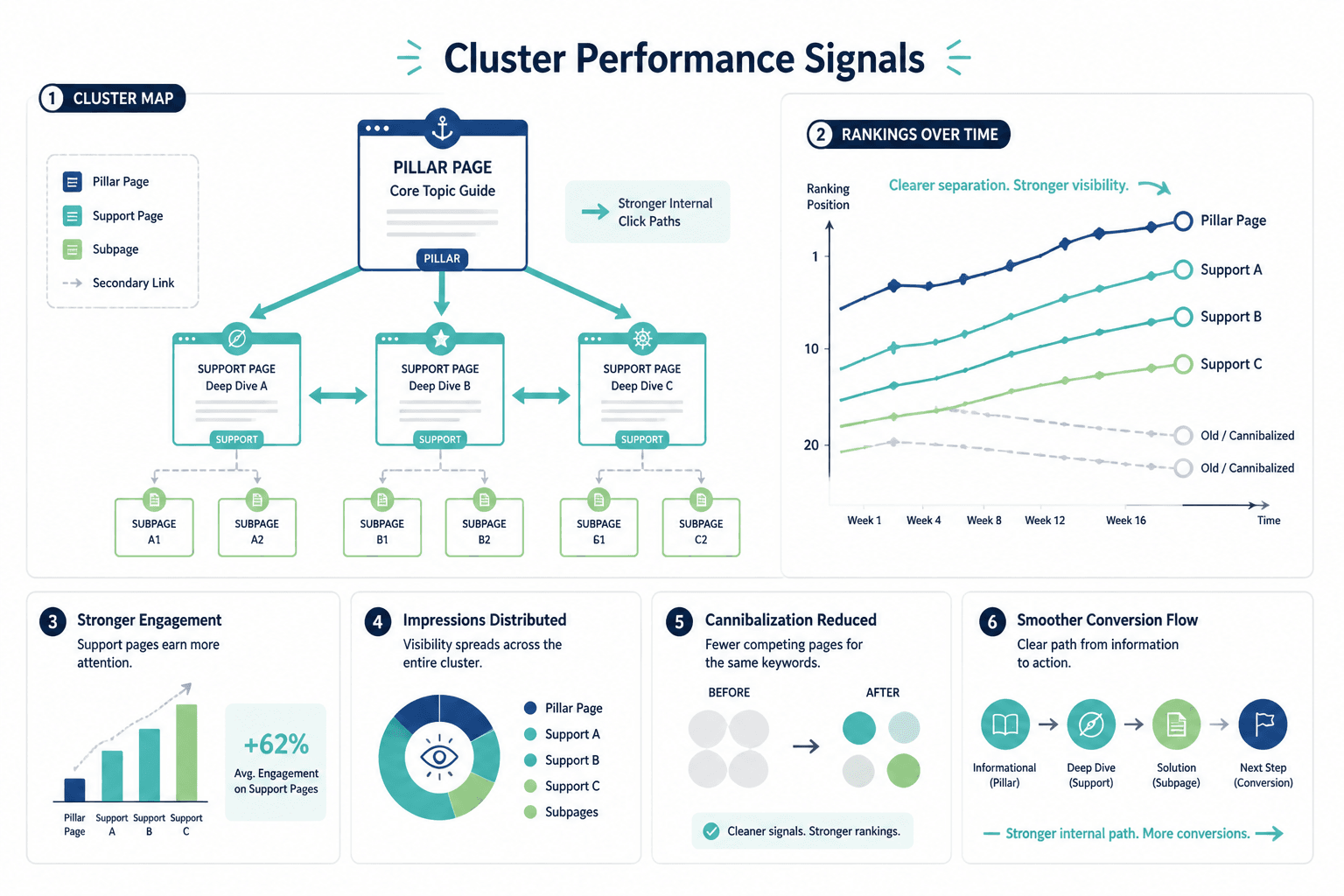
Look at signals across the cluster over time:
- clearer ranking separation between pages
- stronger internal click paths
- better engagement on support pages
- more impressions spread across the cluster appropriately
- reduced cannibalization headaches
- better conversion flow from informational pages to next steps
A good cluster refresh usually creates compounding clarity. Readers find the right page faster. Search engines understand page relationships more cleanly. Your own editorial decisions get easier because the structure makes sense again.
And that is the real point. Not performing a ceremonial content update so the team can say things were “optimized.”
FAQ
How often should you refresh a content cluster?
Not on a rigid calendar by default. Refresh when the cluster has overlap, outdated examples, weak internal paths, shifting search intent, new support content, or declining usefulness.
Should every article in a cluster link to the pillar page?
Often yes, but not awkwardly or mechanically. The link should make sense for the reader and the page’s role.
Is it better to merge overlapping pages or keep both?
If the pages target the same intent and do not serve meaningfully different jobs, merging them is often the cleaner move. Fewer stronger pages usually beat several half-competing ones.