
Most creator AI repurposing flows do not fail because the tools are bad. They fail because the system is built to produce volume before it produces judgment.
That is how you end up with one decent idea stretched into a thread, a carousel, a LinkedIn post, an email, and a caption that all sound like they were written by the same very polite productivity intern. Clean enough. Fast enough. Completely forgettable.
If you want to know how to improve creator AI repurposing flows without sounding generic, the fix is not “use better prompts” and call it a day. You need a better flow. One that keeps your actual voice, protects the sharp parts of the original idea, and knows the difference between adapting content and flattening it.
Here’s how to build a repurposing system that is faster, cleaner, and far less likely to turn your content into beige paste.
For the full path around this topic, head to the parent guide.
Why AI repurposing gets generic so fast
AI is good at patterns. Generic content is also a pattern. You can probably see the problem.
When creators hand an AI tool a transcript, a long post, or a rough draft and say “turn this into 10 pieces of content,” the model usually reaches for the safest, most common version of that request. It strips out the weird phrasing, the tension, the bite, the specifics, and the opinions that made the original worth reading in the first place.
It does this because your workflow often tells it to. Most repurposing systems reward speed, quantity, and neat formatting. They do not reward judgment, voice, or strong editorial choices unless you deliberately build those in.
- The source content is too broad or too messy
- The prompt asks for output types, not useful outcomes
- No voice guidance is included
- No one decides which idea deserves emphasis
- The same draft gets lightly resized for every platform
- There is no editing pass to remove generic wording
So yes, tools matter. But flow matters more. A better tool inside a lazy process just creates cleaner generic content.
If you are building AI-assisted content systems more broadly, or working deeper inside creator AI editing and repurposing workflows, this is the layer that usually decides whether your content sounds useful or suspiciously pre-chewed.
Start with stronger source material, not more source material
You cannot repurpose mush into signal. If the original content has no clear point, no tension, no opinion, and no usable examples, AI will not magically create those from thin air.
Good repurposing starts by identifying what the original piece is actually saying. Not the topic. The point.
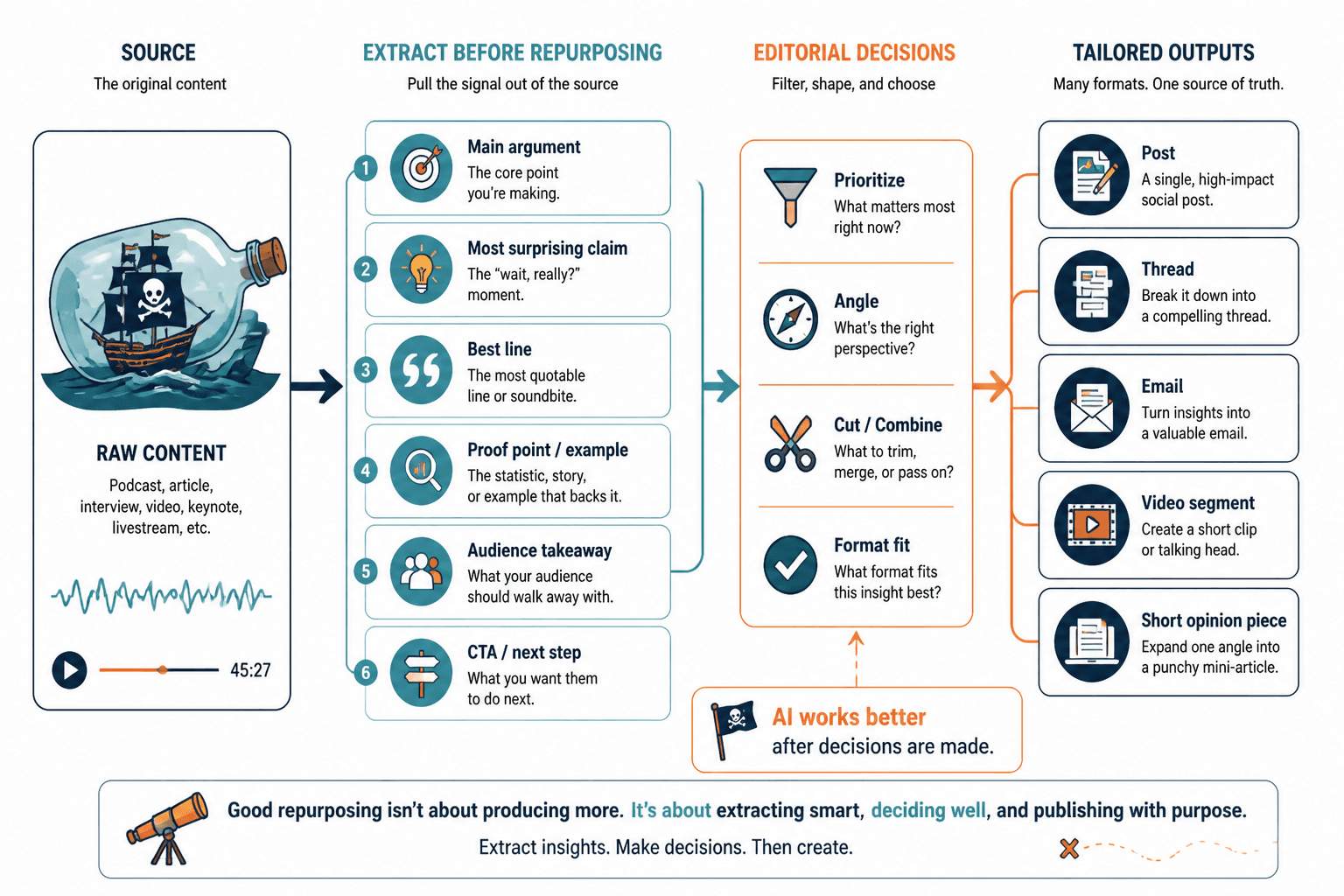
For example, “using AI for content” is not a point. It is a vague topic wearing office clothes. But this is a point: “AI speeds up repurposing best when you use it after you make editorial decisions, not before.” That can become a post, a thread, an email, a video segment, or a short opinion piece without losing its spine.
Before repurposing, extract these from the source
- Main argument
- Most surprising claim
- Best line or phrasing worth preserving
- Useful example or proof point
- Audience-specific takeaway
- Strongest CTA or next step
If your workflow skips this step, the AI ends up guessing what matters. And frankly, it guesses like a machine trained on too much medium-quality internet.
Build your AI repurposing flow around decisions, not formats
One of the most common mistakes in creator workflows is treating repurposing like a formatting job.
People ask AI to turn a podcast into a thread, a thread into a post, a post into an email, an email into captions. Fine. But that still leaves the hard part untouched: what angle should lead, what gets cut, what gets changed for the audience, and what tone fits the platform?
A useful flow has decision points between source and output. That is where the quality comes from.
A better repurposing flow
- Capture the source
Transcript, long-form article, voice note, live session notes, original post, or client lesson. - Extract the real ideas
Pull out claims, examples, frameworks, sharp lines, objections, and stories. - Choose the angle per platform
Do not post the same emotional temperature everywhere. - Draft with AI
Generate options, not final copy. - Edit for voice and specificity
Put back the human judgment the AI removed. - Trim generic filler
Kill soft openings, fake summary language, and padded transitions. - Add platform-native CTA
Comment prompt, profile step, email signup, soft lead-in, or related article. - Save what worked
Hooks, structures, phrasing patterns, and prompts worth reusing.
This is also why creators who get the most from AI usually are not the ones asking for one-click miracles. They are the ones using AI like a fast junior assistant, then making the calls that actually shape the content.
Create a voice guardrail before you generate anything
If you want your content to stop sounding generic, stop leaving voice until the end.
Most people try to fix tone in the final edit. That helps, but it is inefficient. It is easier to steer the draft earlier with a lightweight voice guide that tells the AI how you sound, what you avoid, and what your content usually does well.
Include these in your voice guardrail
- Words and phrases you avoid
- How direct or conversational you are
- How much humor or sass you use
- Typical sentence length and rhythm
- Whether you lead with examples, opinions, stories, or frameworks
- What “bad writing” looks like in your brand voice
That last one matters more than people think. It helps to define what you do not want. Maybe you hate vague motivational fluff. Maybe you do not want every post to sound polished and bloodless. Maybe you want practical writing with a little edge. Tell the system that before it writes, not after it has already generated six bland drafts.
If your AI writing still comes out stiff, this will pair well with writing creator AI editing and repurposing content without sounding salesy or robotic.
Match the repurposed piece to the platform’s job
Repurposing is not just resizing content. It is re-framing content for a different environment.
A LinkedIn post can handle a more explicit takeaway. An email can hold more nuance. An X post needs compression and force. A short video script needs clearer rhythm and spoken language. If your workflow spits out basically the same draft in four places, it is not repurposing. It is duplication with better branding.
| Platform | What it needs | What to avoid |
|---|---|---|
| LinkedIn post | Clear point, credibility, scannable structure, useful takeaway | Bloated intros, fake wisdom, over-polished tone |
| X post | Compression, punch, one strong claim | Explaining everything, soft language, filler |
| Flow, specificity, reader relevance, stronger CTA | Post-style fragmentation, weak transitions | |
| Short video script | Spoken rhythm, simpler phrasing, verbal hooks | Written-blog syntax, too many sub-points |
| Carousel or visual post | Sequence, contrast, quick readability | Walls of copy, repeated ideas, abstract lessons |
You do not need a separate identity for each platform. You do need to respect what the format can carry.
Use AI to generate options, then choose one sharp direction
A lot of generic repurposing comes from trying to keep every possible angle alive at once.
The original content may contain a story, a lesson, a mistake, a framework, a strong opinion, and a CTA. That does not mean every repurposed piece should include all of them. In fact, that is usually how it becomes muddy.
Ask AI for multiple angles from the same source, then pick one.
- Contrarian angle
- Practical how-to angle
- Mistake-focused angle
- Story-led angle
- Client or audience problem angle
- Framework or checklist angle
Once you choose the direction, have the AI write to that angle only. This keeps the output tighter and gives the content an actual point of view.
And yes, this means doing some editorial choosing yourself. Tragic, I know.
Edit the draft where AI usually goes bland
If you only remember one section from this article, make it this one.
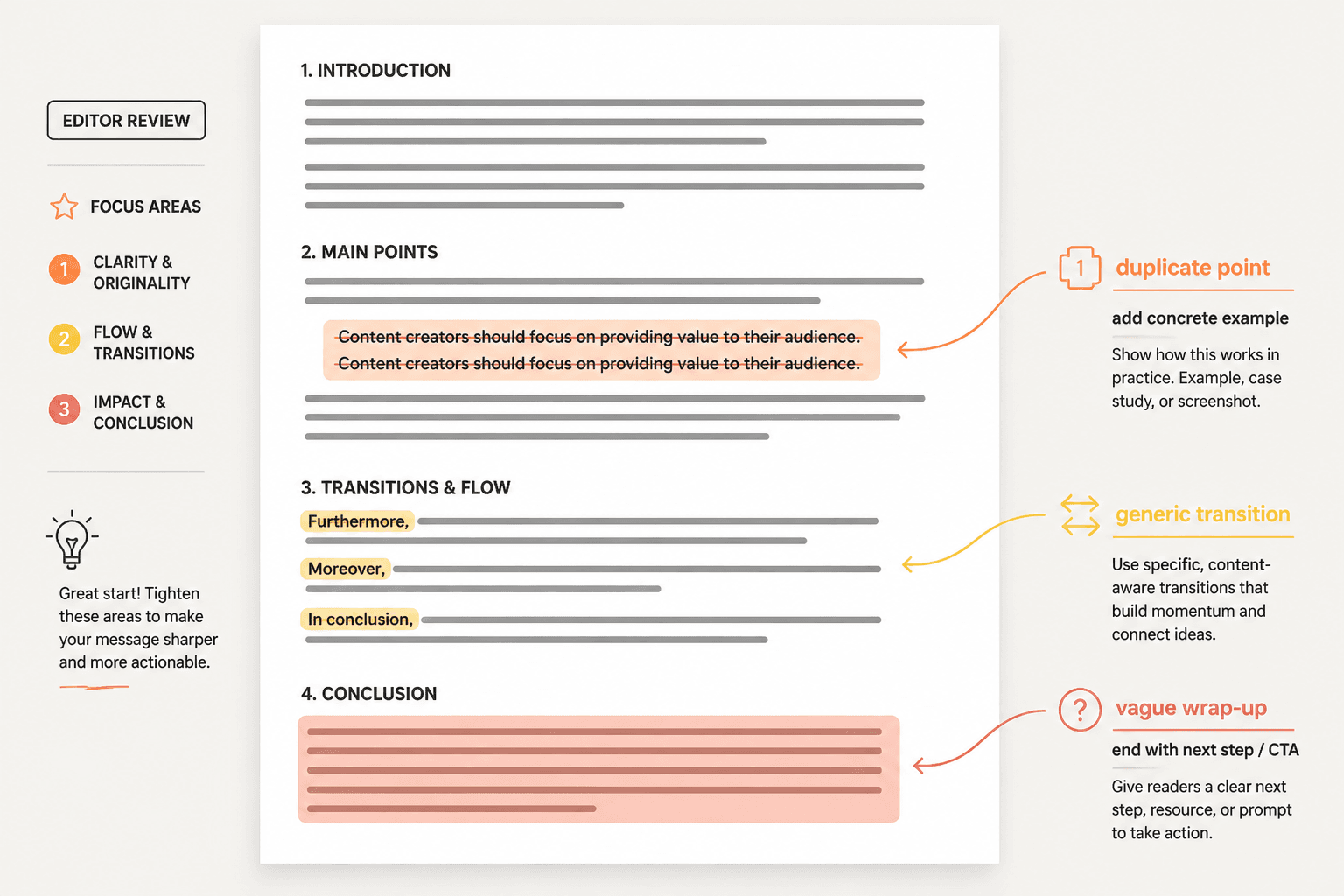
AI drafts often go generic in the same predictable places. Once you know where those are, you can clean them fast instead of rewriting everything from scratch.
1. The opening
AI loves a soft runway: “Many creators struggle with…” or “Repurposing content is important because…” That is usually your cue to delete the first two lines.
Lead with the tension, mistake, or useful claim instead. If you need help with this step specifically, read how to start creator AI editing and repurposing without a weak opening.
2. The middle
This is where AI starts repeating itself with slightly different shoes on. Cut duplicate points. Add examples. Replace abstract claims with one concrete detail.
3. The transitions
Generic transitions make everything feel prepackaged. You do not need “furthermore,” “moreover,” or “in conclusion” floating around like borrowed office furniture. Short, direct movement is usually better.
4. The ending
AI often wraps up by vaguely summarizing what it already said. Fine for a school essay. Useless for creator content. End with a next step, a sharper point, or a clear CTA.
Replace generic wording with content that carries weight
Here is a simple upgrade rule: when the draft sounds smooth but empty, swap broad wording for one of these five things.
- Specificity: name the actual problem, format, audience, or outcome
- Contrast: say what works and what usually fails
- Proof: include an example, result type, pattern, or observation
- Tension: show the tradeoff or mistake
- Voice: keep your phrasing if it sounds more like you
Quick rewrite examples
Generic: AI can help creators save time when repurposing content.
Better: AI is useful for repurposing once you know what the original piece is trying to do. Before that, it just helps you make faster copies of an unclear idea.
Generic: You should tailor your content for different platforms.
Better: A post that works on LinkedIn often needs more structure and proof. On X, the same idea needs to be sharper, shorter, and less interested in explaining itself.
Generic: Maintain your brand voice across repurposed content.
Better: If the original content sounds like you and the repurposed version sounds like a tidy intern from a content agency, your workflow is stripping out the wrong things.
If your drafts need heavier cleanup, this guide on rewriting boring creator AI editing and repurposing content should help.
Keep a reusable repurposing system, not just reusable prompts
Prompts are useful. But creators often overestimate them and underestimate systems.
A strong repurposing workflow usually includes a small set of reusable parts that keep the quality steady without forcing every piece to sound identical.
What to save in your system
- Voice guidance notes
- Source content extraction template
- Platform-specific prompt variants
- Editing checklist for generic phrasing
- CTA options by platform and funnel stage
- Examples of your strongest past outputs
- A swipe file of lines, hooks, and structures that feel like you
The point is not to automate your personality into a jar. It is to make the good decisions easier to repeat.
That is also where a lot of creators get better results from workflows under the broader creator AI editing and repurposing category: they stop treating every content session like a blank page and start building a repeatable editorial process.
A practical creator AI repurposing checklist
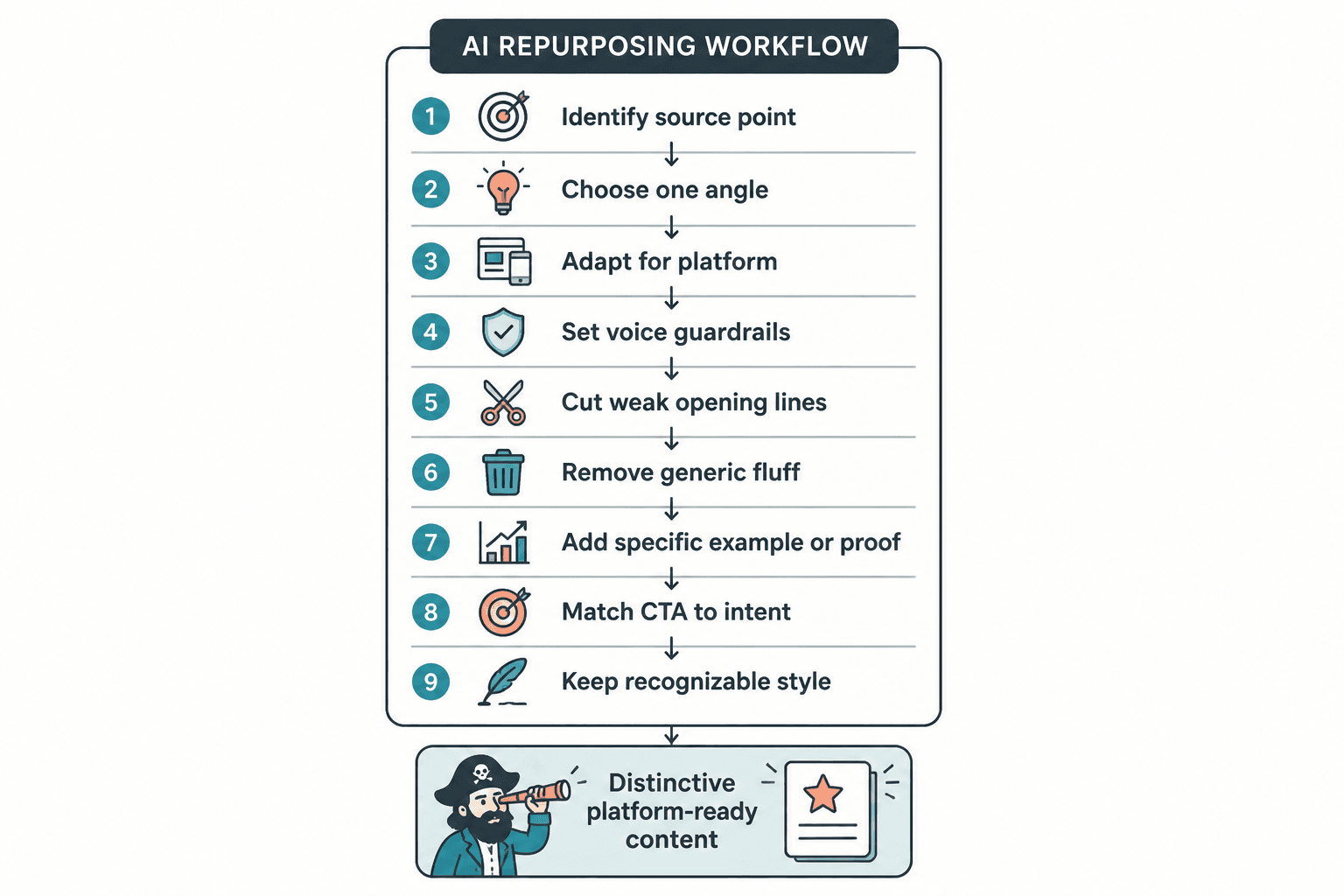
- Did I identify the actual point of the source content?
- Did I choose one angle for this output?
- Did I adapt for the platform instead of lightly resizing?
- Did I give the AI clear voice guardrails?
- Did I cut the first weak lines?
- Did I remove generic transitions and summary fluff?
- Did I add at least one specific example, tension point, or proof element?
- Does the CTA match the platform and the audience’s intent?
- Would a reader recognize this as my style, not just competent formatting?
What good AI repurposing should actually do
Good repurposing does not just multiply content. It sharpens distribution without blurring identity.
That means your workflow should preserve the point, adapt the packaging, and keep enough of your voice that the content still feels owned. Not perfect. Not handcrafted by candlelight. Just recognizably yours.
The bigger point is simple: clearer structure and clearer writing make the piece more useful. That is usually what makes the ending land better too.