
Most creators do not have a writing problem. They have an editing problem.
More specifically, they have a “one-pass and pray” problem. They draft something, clean up a typo or two, ask AI to “make it better,” and then post a version that sounds smoother but somehow less human, less sharp, and less useful. Lovely.
Creator AI editing and repurposing works a lot better when you stop treating editing like one vague cleanup step and start treating it like a few distinct passes with a job to do. One pass fixes the point. Another fixes structure. Another sharpens voice. Another turns one solid idea into platform-specific content that does not feel like a lazy copy-paste wearing different shoes.
This article will show you the editing passes that actually help, plus examples you can adapt fast for posts, threads, emails, articles, and short-form educational content. If your current workflow produces bland drafts, repetitive repurposing, or “technically fine” content nobody remembers, this should help clean that up.
If you want the broader strategy behind this workflow, it pairs nicely with this guide for creators who want better results and the main creator AI editing and repurposing hub.
For the broader learning path, visit our parent guide.
Why editing passes beat “make this better” prompts
The phrase “make this better” is one of the fastest ways to get polished oatmeal.
AI is usually pretty willing to improve grammar, smooth transitions, and inflate the tone into something suspiciously confident. What it does not reliably do without direction is preserve your real point, protect your positioning, or shape the draft for a specific outcome.
That is where editing passes help. Instead of asking the tool to magically know what “better” means, you decide what better means for this draft. Maybe the problem is weak structure. Maybe it is a soft opening. Maybe the content says the same thing three times in slightly different blazers. Different problem, different pass.
A good pass has one job. That keeps the output cleaner and makes your own judgment easier. You are not trying to fix everything at once. You are checking one layer at a time, which is faster than it sounds and much less messy than rewriting from scratch after AI sanded off all the edges.
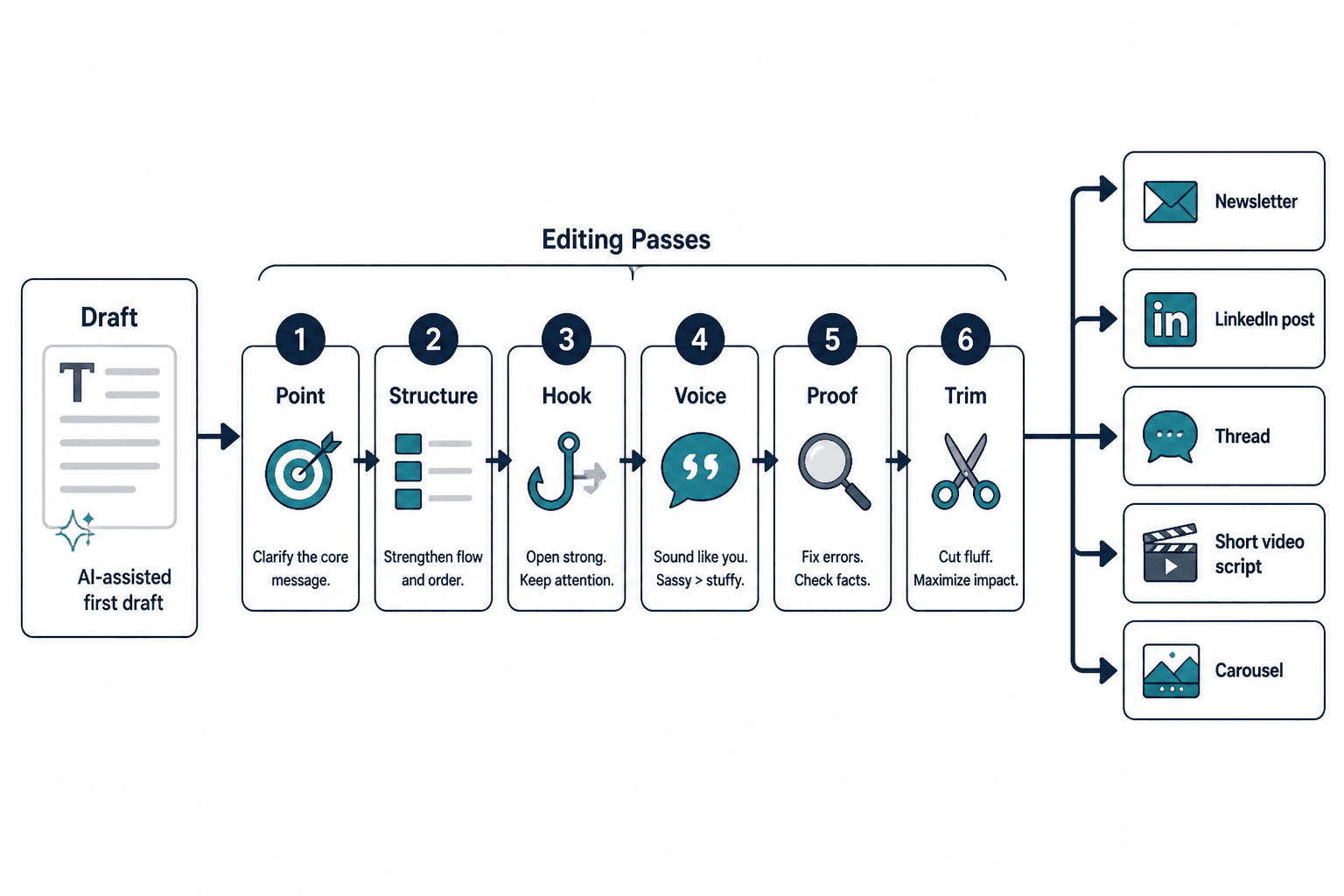
The 6 editing passes worth using
You do not need all six on every piece. But these are the ones that tend to matter most in creator AI editing and repurposing.
1. The point pass
This pass answers one question: what is this actually saying?
A lot of drafts contain information, but not a point. They circle around a topic, mention a few decent ideas, and never really land on a clear claim. That is why they feel readable but forgettable.
Use this pass to extract the core argument, lesson, or takeaway in one sentence.
- What is the main claim?
- Who is it for?
- What misconception, mistake, or opportunity does it address?
- Why should anyone care right now?
Weak draft idea: “Consistency matters in content marketing.”
After point pass: “Creators blame reach when the real issue is inconsistent positioning. Random content trains people to ignore you.”
That second version has a spine. It gives the rest of the content something to build around.
2. The structure pass
Once the point is clear, the next question is whether the piece unfolds in a way that makes sense.
This is where you fix rambling, repetition, awkward sequencing, and “good point buried in paragraph six” syndrome. AI can be useful here if you ask it to reorganize around a clear shape rather than merely rewrite sentence by sentence.
Simple structures that work well:
- Problem → mistake → fix → example → CTA
- Claim → proof → implication → action
- Myth → reality → what to do instead
- Observation → lesson → application
Messy version: a post that starts with a personal observation, wanders into three tips, then ends with a broad statement about authenticity.
After structure pass: open with the mistake, explain why it fails, give three useful fixes in order, end with one clear next step.
This pass is especially useful before repurposing because bad structure multiplies badly. If the original is mushy, all the spin-off content will be mushy too, just in different aspect ratios.
3. The voice pass
This is the pass that stops your content from sounding like a respectable corporate intern with no pulse.
Voice editing is not about adding slang or trying too hard to sound “real.” It is about making the language sound like someone with taste, judgment, and a point of view wrote it.
- Cut generic filler
- Replace vague abstractions with plain language
- Keep some edge where it helps
- Remove fake enthusiasm
- Make the rhythm less monotonous
Before: “It is important to create valuable content that resonates with your audience and builds meaningful engagement over time.”
After: “If your content says the same polished nothing as everyone else, people will scroll past it and feel correct for doing so.”
You do not need every line to be spicy. Please do not do that. But you do need a voice pass when the draft sounds interchangeable.
4. The proof pass
Useful content needs support. Not academic footnotes. Just something more solid than declarations floating in the air.
The proof pass adds examples, specifics, contrasts, mini case points, and concrete outcomes. This is often the difference between content that feels plausible and content that feels credible.
- Add a before/after rewrite
- Add a short scenario
- Add one specific mistake and one correction
- Add a pattern you have seen repeatedly
- Add a concrete example for one audience type
Weak claim: “Specific hooks perform better.”
Stronger with proof: “’Three homepage mistakes costing consultants leads’ will usually beat ‘Improve your website today’ because the reader can instantly place the advice and judge whether it is for them.”
5. The platform pass
This is where repurposing becomes actual repurposing instead of posting the same chunk everywhere and hoping the internet adjusts.
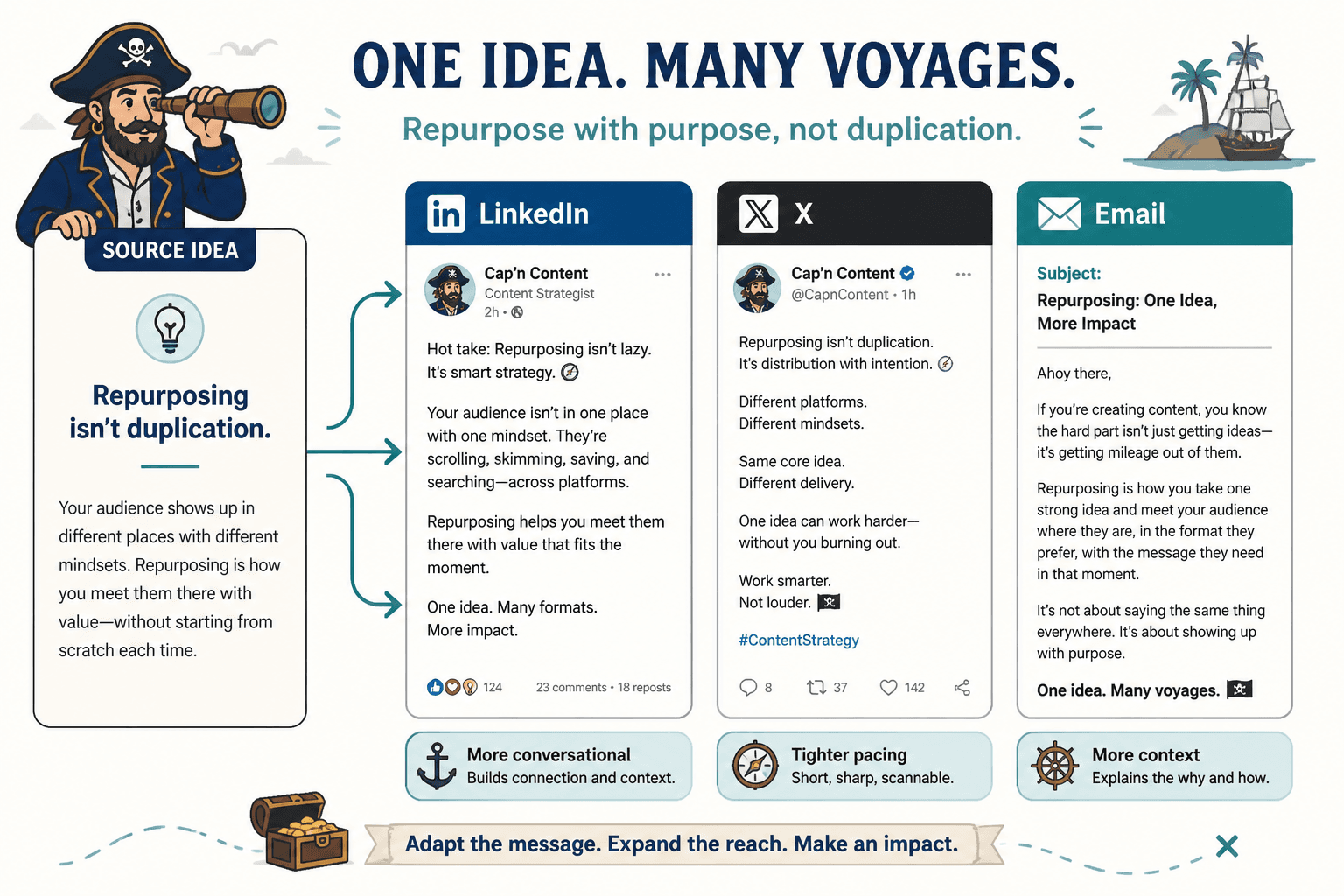
Different platforms reward different shapes of clarity. A decent long-form article can become a LinkedIn post, an X thread, an email, and a carousel outline, but only if you rebuild the packaging for the platform.
| Platform | What to emphasize |
| LinkedIn post | Clear opinion, practical takeaway, easy scanning, mild proof |
| X post | Tight compression, punch, one sharp point |
| X thread | Strong hook, sequence, one point per post, payoff |
| Intimacy, directness, one clear lesson or offer | |
| Article | Depth, examples, structure, search intent, internal links |
A platform pass is not cosmetic. It changes the form, the opening, the pacing, and often the CTA. If you skip this, your repurposed content will often feel slightly off everywhere.
6. The conversion pass
Not every piece needs a hard CTA. In fact, many should not. But if the content is meant to move people somewhere, this pass matters.
The conversion pass checks whether the next step fits the content and the reader’s level of trust. It makes sure you are not dropping “DM me to work together” onto a post that has not earned that kind of ask.
- Does the CTA match the value of the content?
- Is the next step low-friction?
- Does the reader know why they should click, reply, or subscribe?
- Does the CTA sound normal?
Weak CTA: “If this resonated, book a strategy session to unlock growth.”
Better CTA: “If you are rebuilding your content workflow, start with the headline rewrite templates here: simple creator AI editing and repurposing headline rewrites.”
A fast editing workflow creators can actually use
You do not need a giant production system. You need a repeatable one.
- Draft the raw idea quickly.
- Run a point pass to clarify the main claim.
- Run a structure pass to reorganize the logic.
- Run a voice pass to remove stiffness and filler.
- Run a proof pass to add examples and specifics.
- Run a platform pass for each destination format.
- Run a conversion pass only where a next step matters.
If that sounds like a lot, remember: these passes are usually short. They are checklists, not ceremonies. The point is not to create a precious workflow. The point is to avoid publishing things that are fine in the most disappointing way possible.
For more examples across creator workflows, you can also browse the best creator AI editing and repurposing ideas and examples for creators and the broader AI writing tools and workflows collection.
Editing pass examples creators can adapt fast
Here is where this gets more useful. Below are a few practical before-and-after examples you can adapt to your own content.
Example 1: Turn a bland draft into a stronger LinkedIn post
Raw draft:
“A lot of people struggle with content consistency. One thing that has helped me is using AI tools to support my workflow. They can save time and help generate ideas. It is important to stay authentic though.”
Point pass:
“AI does not fix inconsistent content strategy. It helps when the real problem is speed, not positioning.”
Structure pass:
- Open with mistake
- Explain what AI helps with
- Explain what it cannot fix
- End with practical takeaway
Voice pass + proof pass result:
“Creators keep buying AI tools when the real issue is that their content has no consistent angle.
AI can help you draft faster, repurpose smarter, and clean up rough writing.
It cannot decide what you want to be known for.
If your posts jump from mindset to marketing to random productivity takes, the bottleneck is not output. It is positioning.
Use AI for speed.
Use your own brain for judgment.
That order matters.”
Example 2: Repurpose one article point into an X thread
Original article point: “Most content underperforms because the opening is vague and the body repeats common advice.”
X thread version:
- Post 1: Most content does not fail because the idea is bad. It fails because the packaging is sleepy.
- Post 2: Two usual problems: vague openings and repetitive bodies.
- Post 3: If the first line could introduce 50,000 other posts, it is too generic.
- Post 4: If the middle repeats the same advice in softer words, cut it.
- Post 5: Better structure: sharp claim → why it matters → one example → one action.
- Post 6: Tight writing wins more often than longer writing pretending to be thoughtful.
- Post 7: If you want a faster way to rewrite weak headlines, start here: headline rewrites templates for busy creators.
Same idea. Different shape. Better fit.
Example 3: Turn one lesson into an email
Source lesson: “Creators often repurpose too literally, which makes their content feel stale.”
Email version:
Subject: Repurposing is not copy-paste with better intentions
A quick content mistake I keep seeing:
People take one decent post, split it into six weaker versions, and call that repurposing.
That is not repurposing. That is dilution.
Real repurposing keeps the core idea but rebuilds the format around the platform and the reader’s context.
A LinkedIn post can carry more explanation.
An X post needs more compression.
An email can hold more tension and a cleaner ask.
Same point. Different delivery.
If your repurposed content keeps feeling flat, the fix usually is not more tools. It is a better editing pass before you distribute the idea.”
Notice what changed here: the writing got more conversational, the pacing loosened up, and the lesson had room to breathe. This is one of those cases where a little expansion actually helps. Not everything should be reduced to bullets and a brisk little shrug.
Some ideas need a paragraph or two because they depend on contrast, not just information. If you are explaining why creators confuse repurposing with duplication, a compact opinion alone may not be enough. You may need to show the distinction clearly, especially if the audience has been trained by content advice that treats volume as strategy.
Example 4: Rewrite an educational carousel outline
Weak outline:
- Slide 1: Tips for better content
- Slide 2: Be consistent
- Slide 3: Know your audience
- Slide 4: Use AI tools
- Slide 5: Stay authentic
The bigger point is simple: clearer structure and clearer writing make the piece more useful. That is usually what makes the ending land better too.