
Most creators do not have a content creation problem. They have a content waste problem.
They record something useful, publish it once, then move on like that idea has been fully squeezed dry. Meanwhile, the good part was not the original draft. The good part was what that draft could have become with better editing, sharper packaging, and smarter repurposing.
That is where AI can help. Not by replacing your brain. Not by hallucinating a personality for you. And definitely not by turning every post into polished beige mush. AI is useful when it helps you edit faster, spot stronger angles, extract reusable ideas, and turn one solid piece of content into several better ones.
This Creator AI Editing and Repurposing Guide for Better Results will show you how to use AI in a way that actually improves your content instead of sanding off everything human about it. We will cover what AI is good at, where it tends to make a mess, and how to build a simple workflow that helps you publish more without sounding like a business robot trying very hard to be relatable.
If you want the broader category view first, start here: AI writing tools and workflows. If you want the more specific hub for this topic, the main resource lives here: creator AI editing and repurposing.
To see how this fits into the wider strategy, open the parent guide.
What AI editing and repurposing should actually do for creators
A lot of creators use AI backwards.
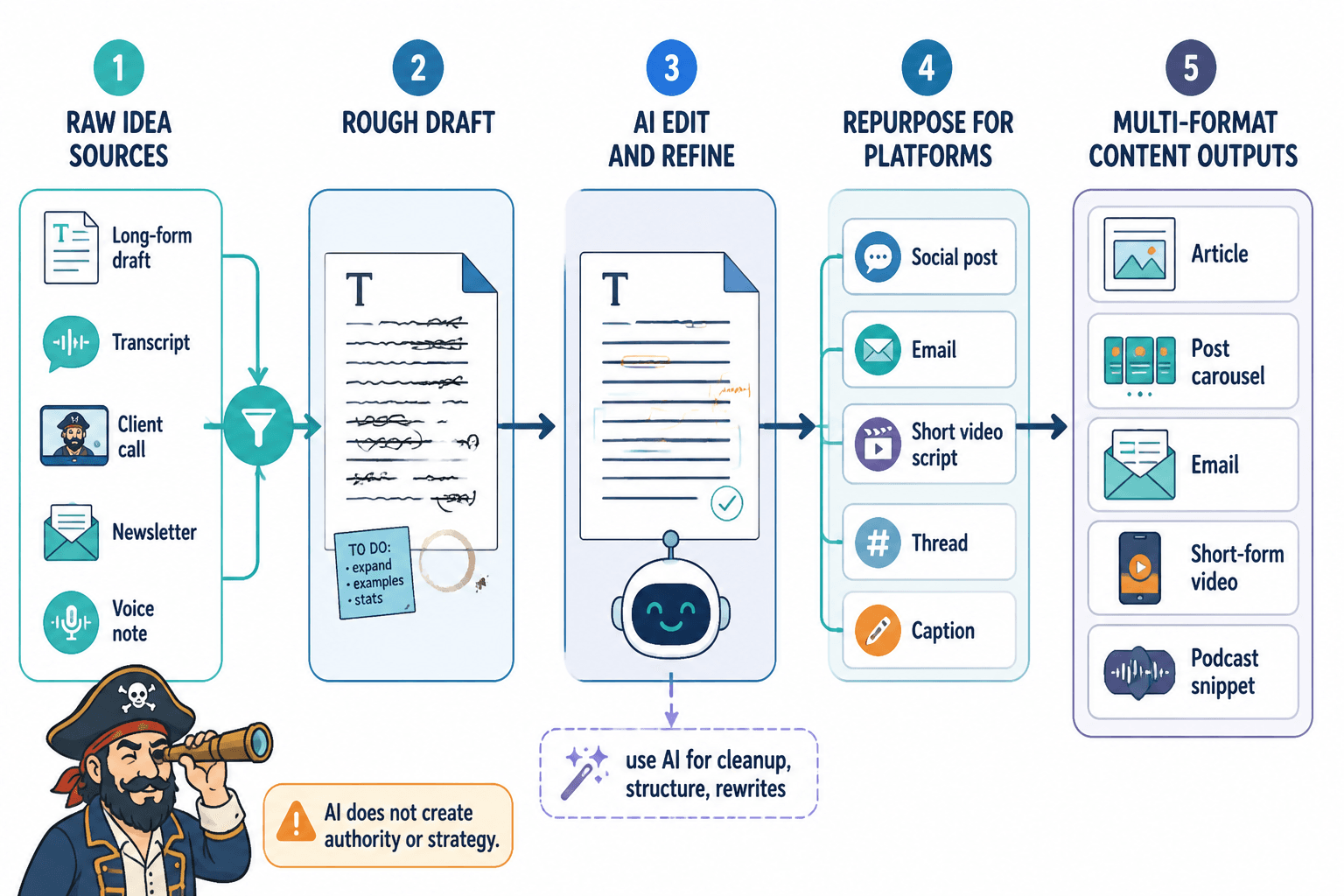
They ask it to generate more content from scratch when what they really need is better judgment around the content they already have. The fastest path to better results is usually not “make 40 new posts.” It is “take the good idea already sitting in your long-form draft, transcript, client call, newsletter, or voice note and turn it into sharper assets.”
Good AI editing and repurposing helps you:
- tighten messy drafts
- pull out strong hooks and angles
- rewrite content for different platforms
- adapt tone without losing the point
- turn one piece into multiple formats
- spot repetition and filler
- organize raw ideas into usable structures
- save time on the mechanical parts of content work
What it does not do is create authority where there is none, fix a weak offer, or magically know which opinions you should stand behind. That part is still yours. Annoying, yes. Also true.
Where creators get better results with AI
If you use AI at the right stages, it becomes useful fast. If you use it at the wrong stages, it just creates more cleanup work. Here are the places where it tends to earn its keep.
1. Cleaning up rough drafts
This is the easiest win.
You already have the idea. You probably also have too many words, a weak opening, and three paragraphs doing the job of one. AI is good at helping you trim, reorganize, and rewrite for clarity. It can suggest tighter versions, more direct phrasing, and cleaner structure.
The catch: it often overcorrects into blandness. So do not ask it to “make this better” and wander off. Ask it to cut repetition, preserve voice, sharpen the argument, and offer multiple versions with different levels of directness.
2. Pulling content from transcripts
Creators who speak well often write slower than they think. That is normal. A transcript from a podcast, workshop, coaching call, livestream, webinar, or voice note is often packed with usable content.
AI can help you extract:
- post ideas
- thread angles
- article outlines
- quotes
- carousel slide copy
- email talking points
- FAQ snippets
- lead magnet material
This is one of the cleanest use cases because you are not asking AI to invent expertise. You are asking it to mine and shape expertise that already exists.
3. Rewriting for different platforms
A decent article is not automatically a decent LinkedIn post. A solid LinkedIn post is not automatically an X thread. A useful thread is not automatically a good email.
Each format has different expectations. AI can help adapt the same idea for different environments without making you manually rewrite everything from zero every time.
For example:
- a webinar transcript becomes a long-form article
- the article becomes three LinkedIn posts
- one of those posts becomes an X thread
- the key point becomes an email intro
- the strongest framework becomes a lead magnet section
The idea stays the same. The packaging changes.
4. Finding stronger angles
Sometimes the draft is fine. The angle is the issue.
AI can help you pressure-test the framing by generating alternate hooks, audience-specific intros, contrarian takes, benefit-driven versions, and problem-first rewrites. This is useful when your content is technically good but still gets polite silence.
Often the problem is not quality. It is packaging. Useful does not automatically mean interesting.
5. Building repeatable systems
The creators getting the best results are usually not winging it every week. They have prompts, checklists, templates, swipe files, content banks, and a rough process for turning raw material into finished assets.
AI becomes more valuable when it plugs into a system. One-off prompting can help, sure. But repeatable workflows help more. That is where speed starts compounding instead of just making you produce random extra stuff.
A practical creator AI editing and repurposing workflow
If you want better results, do not just “use AI more.” Use it in a sequence that makes sense.
Here is a straightforward workflow most creators can use without turning their content process into a six-tab prompt shrine.
Step 1: Start with strong source material
Your source can be:
- a podcast transcript
- a video transcript
- a newsletter draft
- a client FAQ
- a live training
- a lesson from a sales call
- a high-performing post
- a rough voice note
Do not begin with a vague prompt like “write me content about marketing.” Start with material that already contains insight, examples, proof, or lived expertise. AI is much better at shaping substance than inventing it.
Step 2: Ask AI to extract the core ideas
Before you start rewriting, get clear on what is actually in the source.
Useful extraction prompts might ask AI to identify:
- the main argument
- 3 to 7 distinct sub-ideas
- quotes worth reusing
- practical takeaways
- stories or examples
- contrarian opinions
- objections the content addresses
- lines that could become hooks or titles
This stage matters because a lot of repurposing fails before it starts. People try to turn one messy blob into 12 pieces of content without first identifying what the blob is actually saying.
Step 3: Choose formats based on goal, not mood
Not every idea needs to become everything.
Pick formats based on what the idea can best do:
- Need reach? Turn the sharpest point into a short post, hook-led post, or quotable thread.
- Need trust? Turn the teaching into a deeper article, email, or story-backed post.
- Need leads? Turn a practical framework into a post that points to a resource, article, or next step.
- Need authority? Expand the strongest idea into a structured, evergreen piece.
Repurposing is not just resizing. It is deciding which form gives the idea the best chance to work.
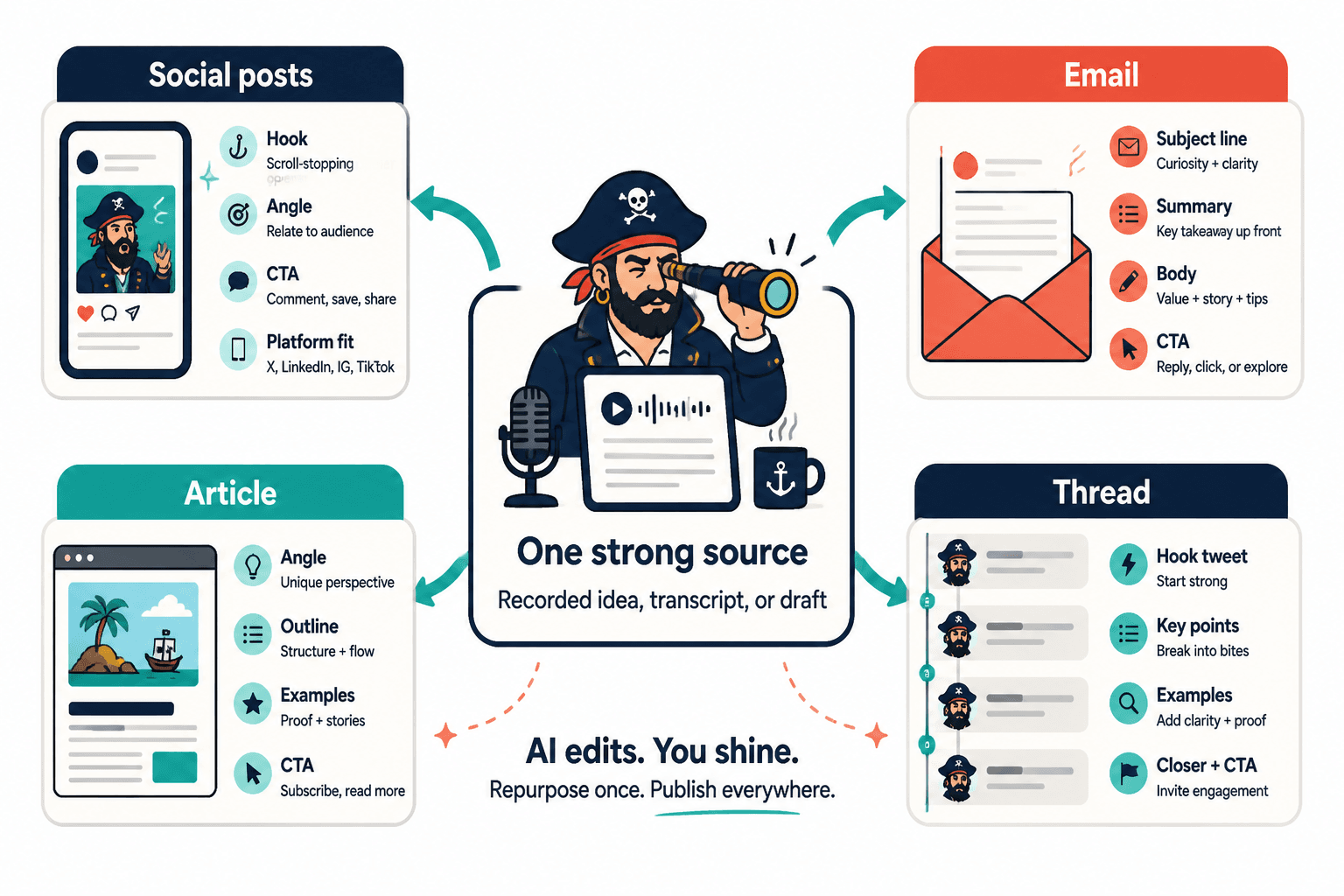
Step 4: Rewrite for platform fit
This is where you stop copying and start adapting.
Ask AI to rewrite based on platform-specific constraints:
- LinkedIn: clearer opening line, practical insight, readable spacing, grounded CTA
- X: tighter phrasing, punchier contrast, less explanation, stronger compression
- Facebook: more conversational flow, story shape, comment-friendly ending
- Email: stronger relationship tone, smoother transitions, one main point, clear action
- Article: better structure, examples, subheads, search intent, stronger depth
This part is worth taking seriously because many creators “repurpose” by pasting the same text everywhere. That is not a system. That is just multi-platform laziness wearing productivity glasses.
Step 5: Edit the AI output like a person with standards
This is where most of the quality gap lives.
Once AI gives you a draft, you still need to:
- remove generic phrasing
- cut repeated points
- restore your natural rhythm
- add specifics and proof
- make the hook less vague
- tighten the ending
- check that it still sounds like you
If you skip this, you get the kind of content that is technically clean and spiritually dead. Plenty of creators are publishing that already. The internet does not need your contribution to the pile.
Step 6: Save what worked into a reusable system
Every good content process should get easier over time.
When a prompt, template, content transformation, or editing method works, save it. Build a library for:
- repurposing prompts
- hook formulas
- CTA styles
- post structures
- article frameworks
- audience-specific messaging
- tone controls
If you want help building that side of the workflow, these related resources will help: best AI tools for creator AI editing and repurposing, best templates and tools for creator AI editing and repurposing, and how to write better creator AI editing and repurposing.
What to repurpose first if you want better results fast
If you are staring at a pile of content and wondering where to begin, do not start with the mediocre stuff. Start with content that already has one of these qualities:
- it performed well
- it taught something clearly
- it led to good replies or DMs
- it came from a sales or coaching conversation
- it contains a strong opinion or useful framework
- it solves a frequent audience problem
- it includes proof, examples, or case detail
High-signal source material creates better repurposed content. Shocking stuff, I know.
Good source material to prioritize
- top-performing newsletters
- webinar transcripts
- podcast interviews where you explained something clearly
- sales call questions that keep repeating
- client wins and case study notes
- articles with a strong structure
- posts that earned saves, replies, or useful conversations
Lower-value source material to be careful with
- generic opinion posts with no proof
- rambling videos with no point
- old drafts full of filler
- trend-chasing content that aged badly
- anything you posted just to “stay visible”
Repurposing does not rescue weak thinking. It multiplies whatever is there. If the source is foggy, the outputs will be foggy faster.
How to use AI without flattening your voice
This is the part creators worry about most, and for good reason.
AI tends to smooth everything into the same oddly polished tone unless you give it better constraints and then edit what comes back. If your content starts sounding like a polite corporate ghost wrote it, trust drops. Readers might not always know why, but they feel it.
To keep your voice intact, do these things:
- give AI real samples of your writing
- tell it what to preserve: directness, humor level, sentence rhythm, point of view
- ask it to avoid specific phrases and clichés
- have it produce multiple versions instead of one “final” answer
- rewrite the opening and ending yourself when needed
- add your own examples, proof, and opinions back in
It also helps to know your own voice more clearly than “casual but professional.” That phrase has ruined enough content already.
A stronger voice brief sounds more like this: direct, a little dry, practical, skeptical of hype, short paragraphs, no fake inspiration, no corporate filler, no fluffy transitions, no webinar-bro urgency. That gives the model something usable.
A simple voice-preserving prompt structure
You can use a prompt structure like this:
Rewrite this draft for clarity and stronger flow while preserving my voice. Keep the tone direct, useful, and lightly sharp. Do not make it sound corporate, motivational, or overly polished. Cut repetition, tighten the opening, and keep short paragraphs. If a line becomes generic, rewrite it with more specificity.
That alone will not make the output perfect, but it usually gets you much closer than “improve this post.”
Editing tasks AI handles well versus badly
| Usually good with AI | Usually bad with AI unless closely supervised |
|---|---|
| Tightening long drafts | Writing original thought leadership from nothing |
| Extracting key points from transcripts | Capturing nuanced personal stories |
| Generating multiple hook options | Making bold claims without sounding fake |
| Reformatting for different platforms | Creating trustworthy proof where none exists |
| Summarizing and outlining | Handling subtle humor or sharp voice consistently |
| Spotting repetition and filler | Understanding audience nuance without context |
| Turning one idea into multiple drafts | Knowing which opinion you should actually publish |
This table is the whole game, really. Use AI for leverage, not for judgment. Judgment is still your job.
Examples of creator repurposing that actually make sense
Repurposing gets much easier when you stop thinking in terms of “content formats” and start thinking in terms of “idea transformations.” Here are a few examples that are practical for creators, coaches, consultants, and personal brands.
Example 1: Podcast episode to trust-building content stack
- Source: 30-minute podcast episode about common client mistakes
- AI extracts: 5 mistakes, 3 good quotes, 1 framework, 2 objection points
- Outputs: 1 article, 3 LinkedIn posts, 1 X thread, 1 email, 1 FAQ section for your site
This works because one spoken explanation often contains enough nuance to support several useful angles without repeating yourself exactly.
Example 2: Sales call notes to lead-generating post series
- Source: notes from 10 sales calls
- AI extracts: recurring objections, desired outcomes, phrases prospects use, misconceptions
- Outputs: 5 objection-handling posts, 2 authority articles, 1 email nurture sequence, 1 updated landing page section
This is especially useful because your audience is basically handing you messaging. Ignoring that and asking AI to invent “engaging content ideas” is a strange hobby, but many people do it.
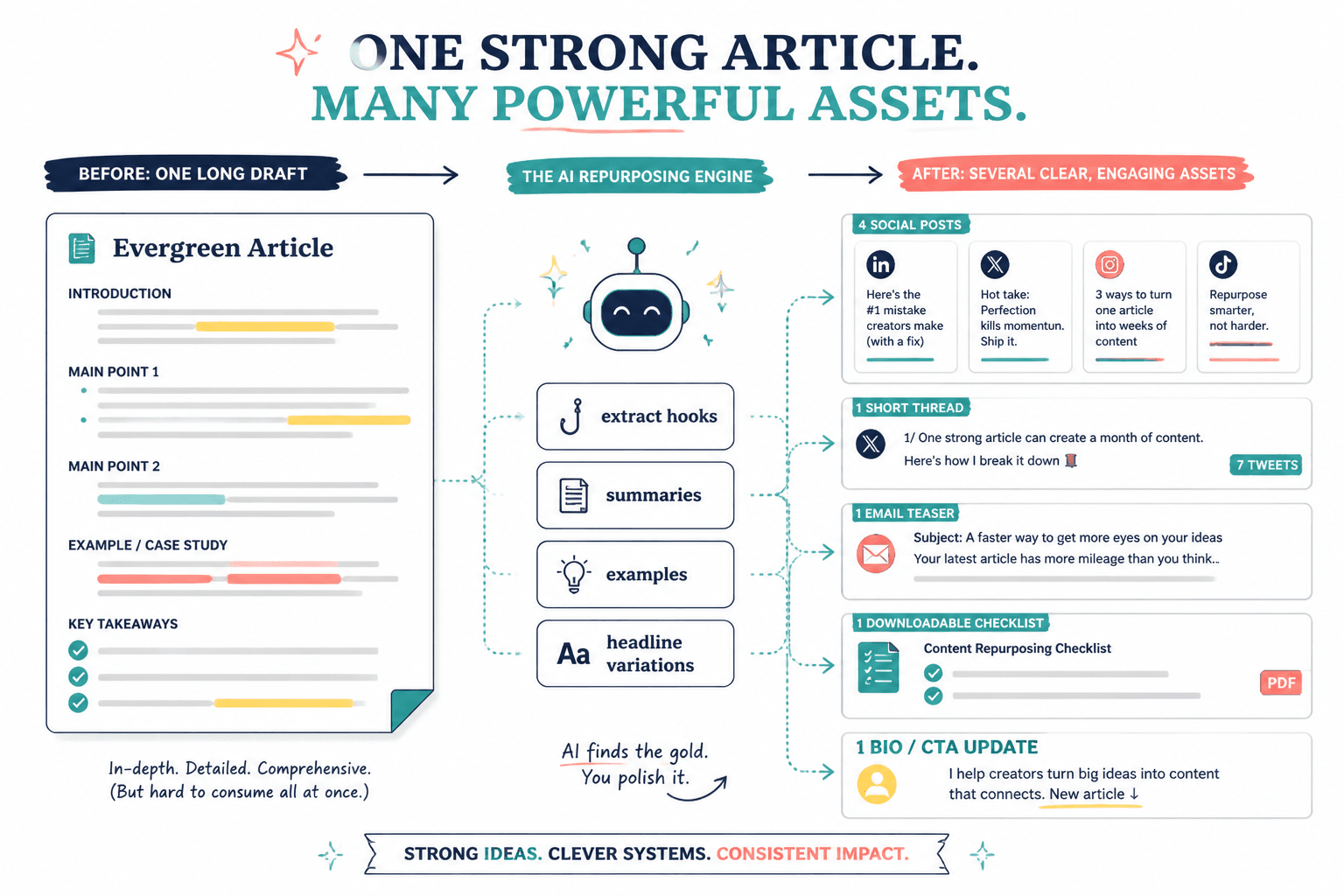
Example 3: Long article to multi-platform distribution set
- Source: a strong evergreen article
- AI extracts: headline variations, hook lines, section summaries, strongest examples
- Outputs: 4 social posts, 1 short thread, 1 email teaser, 1 downloadable checklist, 1 updated bio CTA reference
If you want more concrete idea banks and examples, see best creator AI editing and repurposing ideas and examples for creators.
Common mistakes that make AI repurposing worse instead of better
AI can absolutely help creators get better results. It can also help them produce a larger volume of forgettable sludge at record speed. Here are the mistakes that usually cause that.
Using bad source material
If the original content has no real point, no examples, and no tension, AI cannot rescue it. It can only rearrange the furniture in the same dull room.
Repurposing without a goal
Do not turn everything into everything. Choose outputs based on what you want the content to do: reach, trust, leads, sales conversations, or authority.
Publishing AI drafts with barely any human editing
This is how you get content that sounds clean but forgettable. The draft may be acceptable. Acceptable is not usually enough.
Keeping the same structure across every platform
Different platforms reward different pacing, tone, and density. If everything reads like the same article chopped into weird shapes, people notice.
Over-automating the whole process
Automation is useful until it starts making strategic decisions you should still be making. Topics, opinions, proof, and positioning are not admin tasks. Treating them like admin tasks is how brands get generic.
Ignoring what actually performs
If your repurposing system never looks back at what earned replies, leads, saves, or useful conversations, then it is not really a system. It is just production.
A simple weekly workflow creators can actually maintain
You do not need a massive machine. You need something sustainable.
Here is a simple weekly rhythm:
- Day 1: Record or write one strong source piece
- Day 2: Use AI to extract key ideas, hooks, quotes, and content angles
- Day 3: Turn those into platform-specific drafts
- Day 4: Edit manually for voice, clarity, proof, and CTA
- Day 5: Publish, collect responses, save insights for the next round
That is enough for many creators to build a meaningful body of work without burning out or flooding their feed with filler.
If you are scaling output, the same structure still works. You just increase the number of source assets and templates rather than improvising your way into chaos.
How to measure whether your AI repurposing is actually working
Do not just measure output volume. That metric flatters people while teaching them nothing.
Instead, track whether repurposed content is improving:
- time saved per piece
- consistency of publishing
- quality of replies and comments
- saves, shares, and click-throughs
- newsletter signups
- profile visits
- DMs or inquiries from relevant people
- how often one source asset yields multiple genuinely usable pieces
The goal is not to become a content factory. The goal is to get more value from your thinking, your conversations, and your expertise.
FAQ
Can AI repurposing hurt my brand voice?
Yes, if you publish the raw output or use vague prompts. It helps most when you use AI for structure and speed, then edit for voice yourself.
What is the best content to repurpose?
Start with strong source material: transcripts, newsletters, articles, sales calls, webinars, and high-performing posts with clear ideas and proof.
Should I use one tool for everything?
Usually not. Most creators do better with a small stack: one drafting tool, one storage system, and one publishing or scheduling workflow.
How much should I edit AI outputs?
More than you think. At minimum, rewrite weak openings, remove generic filler, add specifics, and check that the CTA still sounds like a normal person wrote it.
Is repurposing the same as reposting?
No. Reposting repeats the same asset. Repurposing adapts the same idea into a better format, angle, or platform fit.
Use AI to sharpen your content, not replace your taste
The best use of AI is not turning yourself into an infinite-content machine. It is helping you waste less of what you already know.
If you use this Creator AI Editing and Repurposing Guide for Better Results properly, the payoff is simple: better editing, smarter reuse, stronger packaging, and more mileage from the ideas, lessons, and proof you already have. That is a much better deal than asking AI to cosplay as your content strategist while you hope for the best.
Start with one strong source piece this week. Extract the real ideas. Turn them into a few platform-specific assets. Edit them like you care. Then keep the workflow that actually saves time and improves quality.
More content is easy. Better content, reused intelligently, is where the results tend to show up.
The bigger point is simple: clearer structure and clearer writing make the piece more useful. That is usually what makes the ending land better too.