
Most creators do not have an idea problem. They have a research problem dressed up as an idea problem.
They sit down to make content, open twelve tabs, skim three newsletters, ask an AI tool to “give me content ideas,” and end up with a pile of bland, recycled sludge nobody needed. The issue is not a lack of information. It is messy inputs, weak filtering, and bad tool use.
The best research tools and AI assistants for Creator AI Research and Ideation are not magic content machines. They are better thought of as a research stack: tools that help you collect signals, spot patterns, organize insights, pressure-test angles, and turn raw material into publishable ideas without sounding like a motivational fridge magnet.
This guide will help you choose the right mix. Not the most hyped mix. The useful one. If you create content for a business, personal brand, audience, newsletter, social platform, or offer, this is how to build a research and ideation workflow that actually gives you better material to work with.
If you want the broader workflow picture first, start with AI writing tools and workflows, then the deeper hub on creator AI workflows, and the pillar on creator AI research and ideation.
For the full path around this topic, head to the parent guide.
What the best research tools actually help you do
A good creator research stack should help you do five things well:
- Collect useful source material fast
- Separate trends from noise
- Save insights in a way you can reuse later
- Turn research into angles, hooks, outlines, and questions
- Keep your ideas connected to your audience and offer
That last part matters more than people think. A lot of creators use AI assistants to generate “content ideas,” but those ideas are detached from positioning, buyer questions, platform fit, and real experience. So the result looks productive on paper and dead on arrival in public.
Good research does not just help you publish more. It helps you say sharper things, with more specificity, in a way that sounds like you know what you are talking about because you actually do.
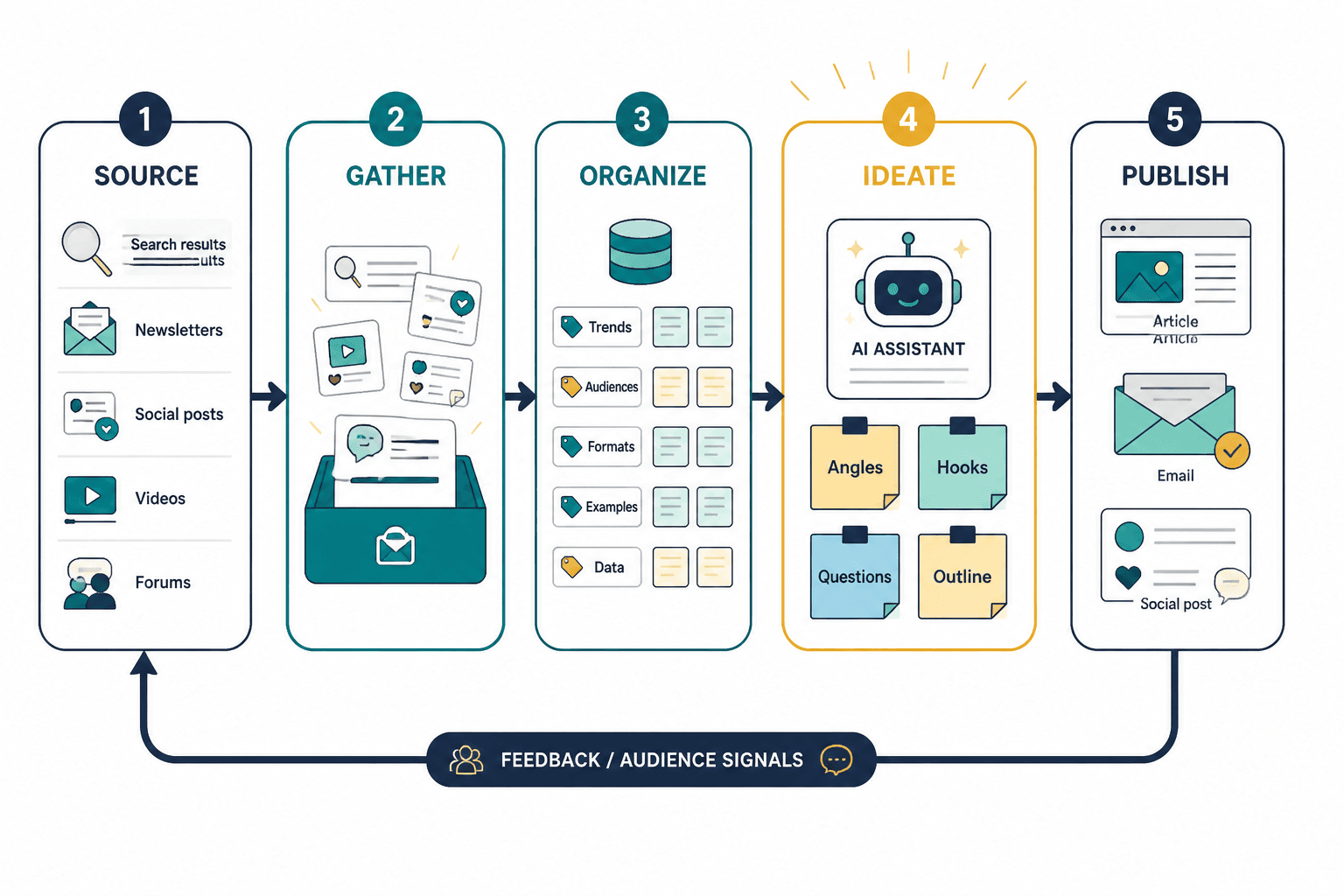
The tool categories that matter most
You do not need one perfect tool. You need a few categories covered well enough that your process stops leaking time.
1. AI assistants for synthesis and ideation
These help you summarize source material, compare viewpoints, find patterns, generate angles, rewrite rough notes, build outlines, and pressure-test ideas. Used well, they save time. Used badly, they produce beige nonsense at speed.
2. Note-taking and knowledge management tools
This is where your research lives after the initial hunt. If your best ideas are scattered across screenshots, tabs, voice notes, and messages to yourself, your future self is being sabotaged by your current self.
3. Search and discovery tools
These help you find what people are asking, discussing, searching for, and arguing about. Very useful if your content needs demand signals rather than random inspiration.
4. Social listening and trend spotting tools
Useful for creators whose business depends on relevance, fast reactions, or seeing repeated audience pain points before everyone else posts the same lukewarm take.
5. Workflow and capture tools
These are the boring adults in the room. Clipping tools, read-it-later systems, voice capture, bookmarks, simple databases. Not glamorous. Extremely useful.
Best AI assistants for creator research and ideation
The best AI assistants for Creator AI Research and Ideation are the ones that help you think better, not just faster. Here are the main roles they play well.
General-purpose AI assistants
General AI chat tools are strong for:
- Summarizing long notes or source documents
- Turning research into topic clusters
- Generating different angles for different platforms
- Drafting rough outlines from your notes
- Surfacing objections, FAQs, and audience questions
- Comparing multiple ideas and finding overlap
They are weak at:
- Knowing what your audience actually cares about without good context
- Giving original taste
- Judging strategic fit for your brand on their own
- Distinguishing real insight from polished filler unless you push them
If you use a general AI assistant, do not ask for “10 content ideas.” That is how you get content nobody wants. Feed it source material, audience context, your offer, your strongest opinions, and the platform you are writing for. Then ask it to extract patterns, identify content gaps, and suggest angles with tension, specificity, or proof.
Bad prompt: “Give me 20 content ideas for creators.”
Better prompt: “Using these customer questions, sales call notes, and top-performing posts, identify 12 content angles for solo consultants on LinkedIn. Prioritize ideas with strong tension, common mistakes, or buyer objections. Avoid generic productivity advice.”
AI tools with document and note analysis
These are especially useful when your research lives inside transcripts, PDFs, call notes, course notes, workshop materials, and internal docs. Their main value is not “writing for you.” It is reducing the friction between messy source material and usable content insight.
For creators with a body of work already sitting around unused, this category often delivers the best return. You probably already have enough material for months of content. It is just trapped inside recordings, client notes, comments, and old drafts.
AI tools built into knowledge systems
Some note-taking and workspace tools now include AI search, summarization, idea extraction, and Q&A across your own database. This can be excellent if your bottleneck is not finding information but finding your information.
That distinction matters. Public research helps you stay relevant. Private research helps you sound experienced. You need both.
Best non-AI research tools creators should not ignore
People love talking about AI because it sounds futuristic. Meanwhile, basic research tools keep quietly doing the real work.
Search suggestion and keyword tools
These are useful for finding:
- Questions people are already asking
- Topic variations and adjacent subtopics
- Search intent language
- Common pain-point phrasing
- Evergreen article and video ideas
If you write articles, newsletters, YouTube scripts, or search-friendly LinkedIn content, this category is worth having. It keeps you anchored in what people actually look for instead of what sounds clever in your own head.
Reddit, forums, comment mining, and community spaces
This is one of the best sources for raw language. Not polished marketing language. Real language. The words people use when they are frustrated, confused, embarrassed, skeptical, or trying to solve a problem at 11:40 p.m. because a funnel broke.
That language is gold for hooks, article titles, FAQs, offer messaging, lead magnets, and positioning. It also keeps your content from sounding like it was assembled by a panel of consultants in a beige conference room.
Feed readers and newsletter collection tools
For creators in fast-moving fields, these help you monitor industry voices without living in a swamp of tabs. Use them to track recurring ideas, repeated predictions, changes in framing, and overhyped talking points you may want to challenge.
Clipping and read-later tools
Anything that makes it easier to save an article, highlight a useful section, tag it properly, and pull it back later is worth more than people admit. Research fails when capture is sloppy.
Transcript tools
If you speak more easily than you write, transcript tools are one of the smartest research assets you can have. Record thoughts, client debriefs, live sessions, Q&As, and brainstorming sessions. Then use AI to extract themes, repeated questions, quotable lines, and strong contrarian points.
A practical creator research stack by use case
You do not need an enterprise setup. You need a setup that fits how you make content.
| Creator type | Best tool mix | Why it works |
|---|---|---|
| Solo consultant | AI assistant + notes app + transcript tool + keyword research tool | Turns client conversations into authority content and evergreen demand-led topics |
| Personal brand on LinkedIn | AI assistant + swipe file + comment mining + simple database | Helps extract sharp opinions, useful proof, and repeatable post ideas |
| Newsletter writer | Feed reader + clipping tool + notes app + AI summarizer | Keeps source material organized and easier to turn into issue themes |
| Course creator or coach | Transcript tool + AI doc analysis + FAQ database + notes app | Turns audience questions and teaching material into content assets |
| Fast-moving niche creator | Social listening + feed monitoring + AI synthesis + idea tracker | Spots trends early without losing strategic focus |
If you want more tool-specific recommendations, see best AI tools for creator AI research and ideation and best templates and tools for creator AI research and ideation.
How to use AI assistants without flattening your ideas
This is the part people keep getting wrong. They use AI too early, with weak inputs, and then wonder why the output sounds like a TED Talk generated inside a toaster.
AI is usually most useful after you have gathered some raw material, not before. Once you have source notes, transcripts, comments, search questions, and maybe a few opinions of your own, AI becomes much better at helping you shape something strong.
A better sequence
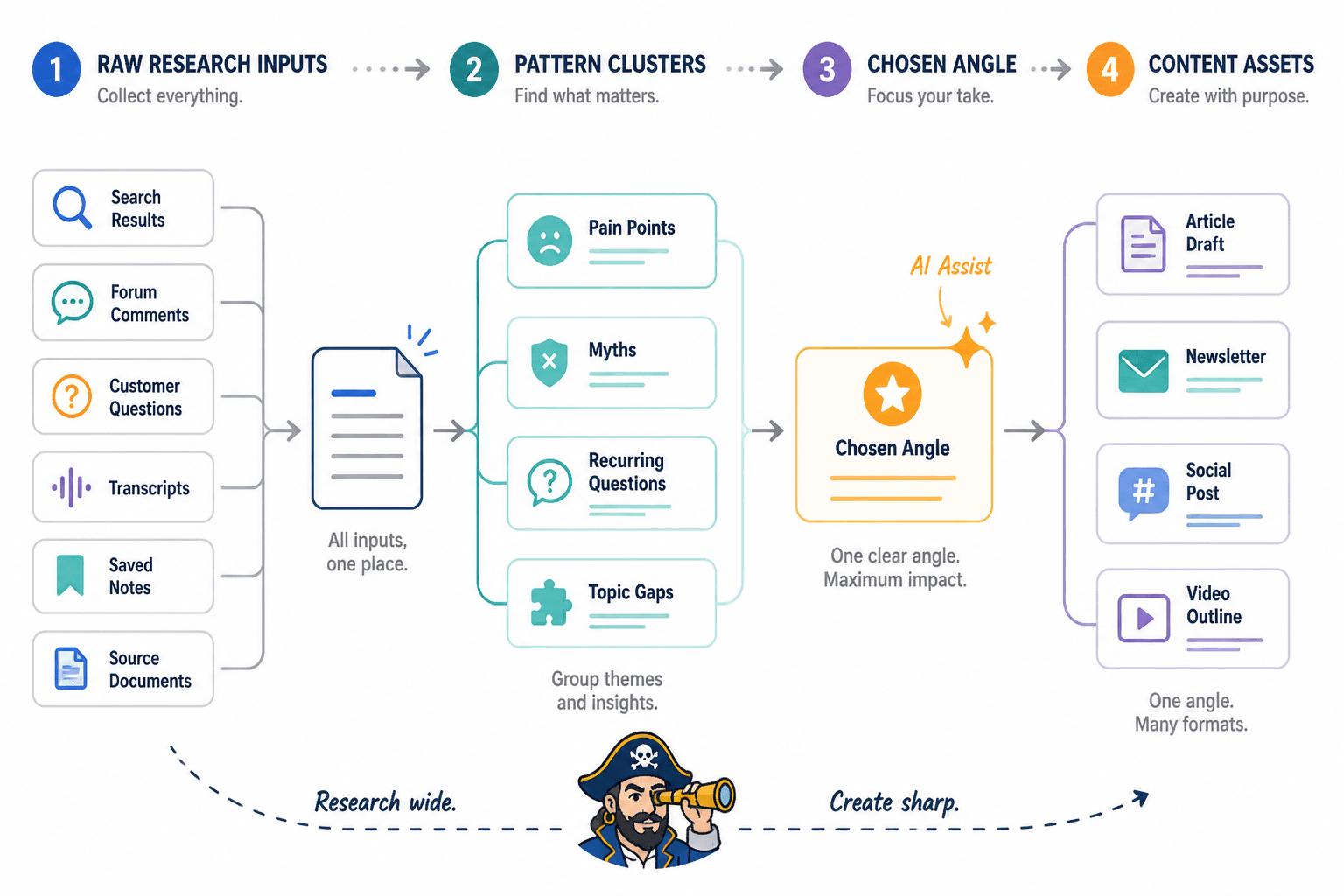
- Collect raw signals from search, comments, forums, customer questions, transcripts, and saved sources
- Dump them into one working document or note system
- Ask AI to cluster patterns, recurring pain points, myths, and topic gaps
- Choose one angle that fits your audience, offer, and platform
- Ask AI to help pressure-test the angle, not replace your point of view
- Draft from that stronger angle using your own examples and specifics
The quality jump here is not subtle. Instead of asking AI to invent ideas from nowhere, you are asking it to help refine and structure reality.
What to look for when choosing research tools
Do not choose tools because creators on X are posting stack screenshots like they are showing off a race car garage. Choose tools based on friction.
Ask these questions:
- Can I capture ideas quickly from desktop and mobile?
- Can I search and retrieve saved material without wanting to throw my laptop?
- Can I tag, organize, and reuse research later?
- Can this tool handle transcripts, long notes, or source docs?
- Can I connect research to outputs like posts, articles, or newsletters?
- Will I actually use this weekly, or is it just shiny?
Simple beats elaborate if simple gets used.
Best workflows for different content goals
If your goal is better content ideas
- Mine comments, FAQs, and communities
- Use AI to cluster recurring questions
- Turn each cluster into myths, mistakes, frameworks, examples, and hot takes
If your goal is better authority content
- Analyze transcripts, workshop recordings, and client questions
- Use AI to pull patterns and repeated advice
- Build articles and LinkedIn posts from real proof and repeated experience
If your goal is SEO-friendly ideation
- Use search and keyword tools first
- Layer on forum language and audience objections
- Use AI to create article clusters, subhead ideas, and angle variations
If your goal is faster social content
- Save strong lines, examples, screenshots, and recurring talking points
- Use AI to turn one source into multiple post angles
- Keep a swipe file of hooks, structures, and CTAs that actually sound human
For more examples of how to turn research into usable content, read best creator AI research and ideation ideas and examples for creators and creator AI research and ideation guide for creators who want better results.
Common mistakes when using research tools and AI assistants
Using AI before gathering source material
If your input is vague, your output will be vague with surprisingly good punctuation.
Saving research badly
If your system is just “I bookmarked it somewhere,” that is not a system. That is a future scavenger hunt.
Collecting too much and processing too little
Some creators are not researching. They are hoarding tabs. If you never turn inputs into notes, patterns, and publishable angles, the stack is mostly decoration.
Using tools to avoid having a point of view
Research should sharpen your perspective, not replace it. If every article or post sounds balanced, neutral, and slightly dead, you may be over-smoothing the interesting parts.
Buying too many tools too early
Most creators can do excellent work with one AI assistant, one notes system, one capture method, and one source-discovery habit. You do not need a premium stack before you have a repeatable process.
A simple weekly research and ideation routine
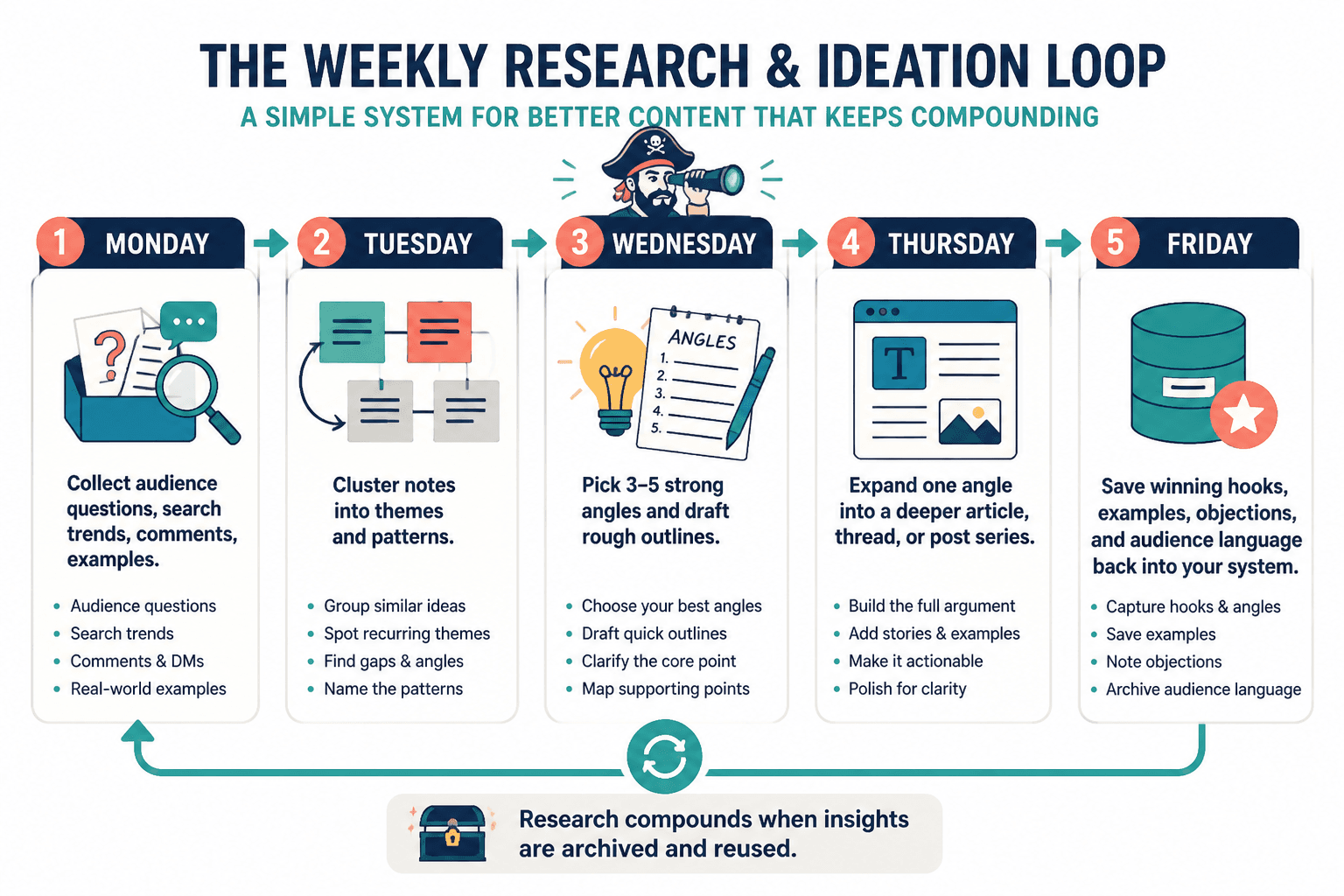
If you want a practical rhythm, use this.
- Monday: Collect questions, comments, search phrases, and useful sources
- Tuesday: Review notes and ask AI to cluster themes and tensions
- Wednesday: Pick 3 to 5 strong angles and draft rough outlines
- Thursday: Turn one angle into a deeper article, thread, or post series
- Friday: Save winning hooks, examples, objections, and audience language back into your system
This kind of loop matters because research should compound. If each week starts from zero, your process is broken. Over time, your system should become easier to mine, easier to repurpose, and much more reflective of your actual audience.
That is also why knowledge systems become more useful the longer you use them. A good research archive is not just storage. It becomes your idea engine. You stop asking, “What should I post?” and start choosing from a backlog of strong, relevant, already-vetted angles.
The best tool stack is the one that keeps you close to reality
The best research tools and AI assistants for Creator AI Research and Ideation do not pull you away from your audience. They help you hear them more clearly.
That means the right stack usually blends three things: public demand signals, private experience, and AI-assisted synthesis. Public signals tell you what people care about. Private experience gives you authority. AI helps you sort, shape, and scale the useful bits without drowning in your own notes.
If you skip any one of those, the content gets weaker. Too much public research and you sound generic. Too much private experience and you risk making content only you understand. Too much AI and you get smooth, tidy, forgettable output that reads like it was focus-grouped by wallpaper.
Quick FAQ
Do creators need paid research tools?
Not always. Many can start with a general AI assistant, a notes app, search suggestions, and manual comment mining.
What is the best AI assistant for ideation?
The one that handles your source material well and lets you iterate quickly. The workflow matters more than the brand.
Can AI replace research?
No. It can speed up synthesis, organization, and drafting, but it cannot replace real audience insight or lived expertise.
What is the biggest mistake creators make with research tools?
Collecting endlessly without turning that material into structured notes, patterns, and usable content angles.
How many tools should I use?
As few as possible while still covering capture, organization, discovery, and synthesis.
Pick fewer tools. Build a better process.
If you want better ideas, do not start by asking for more ideas. Start by improving how you research, save, sort, and stress-test what you already have.
That is what the best research tools and AI assistants for Creator AI Research and Ideation are really for. Not replacing your brain. Not manufacturing authority. Just helping you notice better raw material and turn it into sharper content before your next draft wanders off into generic nonsense.
Clean system. Better inputs. Stronger angles. That is the whole game.