
Most content does not die because it was bad. It dies because nobody touched it again after publishing.
That is the real problem behind internal linking and content updating in 2026. People obsess over publishing cadence, then leave perfectly decent articles to rot with stale links, weak pathways, outdated examples, and zero connection to newer pages. Then they wonder why rankings wobble, traffic fades, and readers vanish after one page.
If you are asking how often should you update internal links and content in 2026, the honest answer is not “every X days” like some neat little productivity cult spreadsheet. It depends on the page, the topic, the traffic, the business goal, and how fast the surrounding content ecosystem is changing.
But that does not mean you need chaos either. You need a review rhythm, a few update triggers, and a way to decide what deserves a light refresh versus a real rewrite. That is what makes internal linking useful instead of becoming one more “best practice” everyone claims to do and almost nobody actually maintains.
Here is how to think about update frequency in a way that is practical, sane, and actually worth doing.
For the main guide behind this topic, visit the parent guide.
Why update frequency matters more than publishing more pages
A neglected site usually has two quiet problems.
- Important articles stop reflecting what the site now knows, sells, or targets.
- Internal links freeze in time, which means newer and better pages stay buried.
That second one gets underestimated constantly. Internal links are not just navigation fluff. They help readers move to the next useful thing, help search engines understand topic relationships, and help you distribute attention to pages that matter. If those links are outdated, random, or missing, your site starts acting like a filing cabinet that was kicked down a staircase.
Updating is not glamorous, which is probably why people avoid it. Nobody posts a victory lap because they refreshed anchor text and added three relevant links to newer supporting articles. But that kind of maintenance often does more for performance than publishing another thin article nobody asked for.
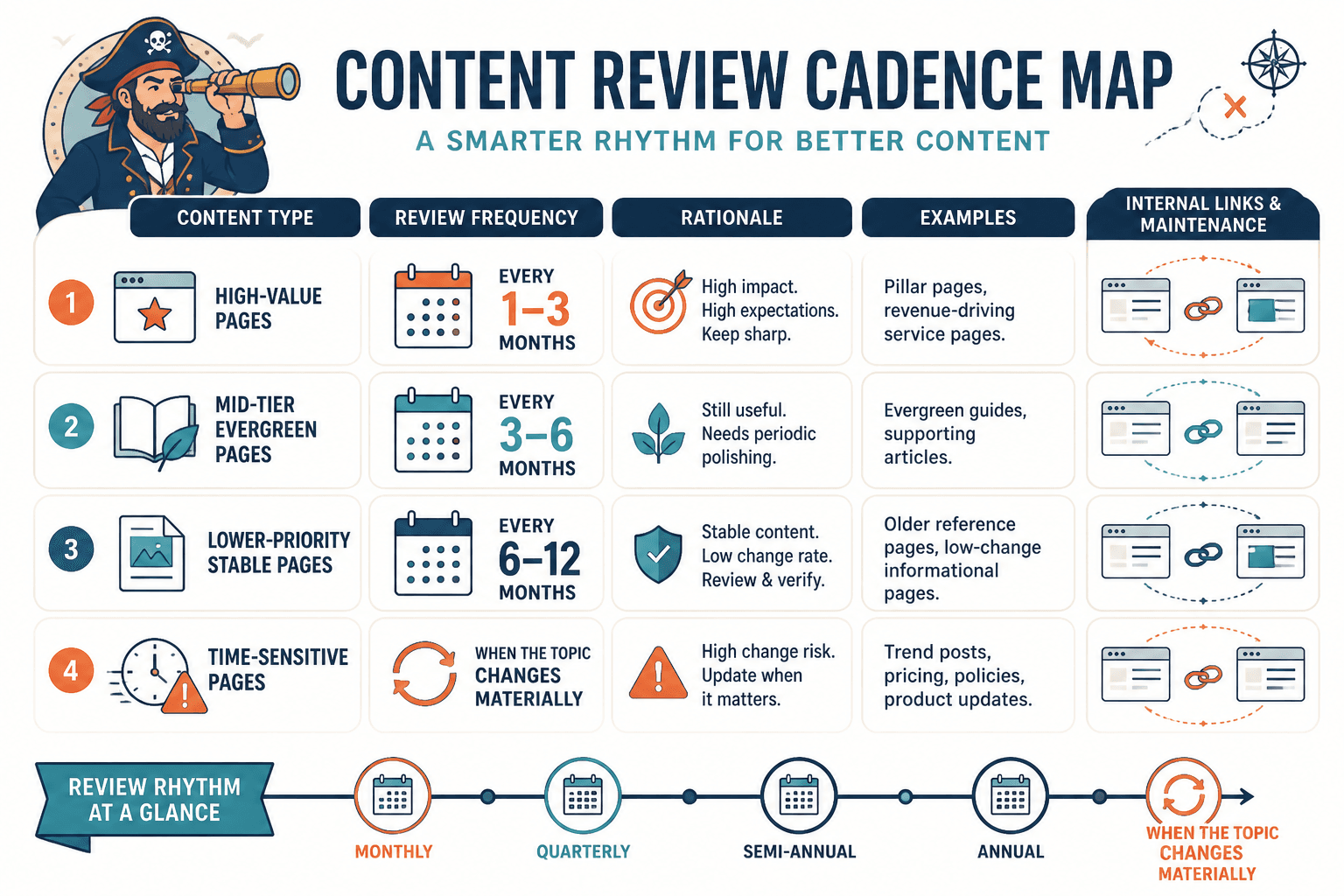
How often should you update internal links and content in 2026?
For most sites, a good rule is this:
- High-value pages: review every 1 to 3 months
- Mid-tier evergreen pages: review every 3 to 6 months
- Lower-priority stable pages: review every 6 to 12 months
- Time-sensitive pages: review whenever the topic changes materially
That is the clean version. The more useful version is to match frequency to risk and value.
Pages to review monthly or quarterly
- Pillar pages
- Revenue-driving service pages
- Articles bringing meaningful search traffic
- Posts ranking for competitive terms
- Posts tied to current tools, platform features, or trends
These pages earn attention or money, so they deserve maintenance. If a page is one of your site’s main doors, leaving it untouched for a year is lazy in the least strategic way possible.
Pages to review every 3 to 6 months
- Evergreen educational posts
- Cluster articles supporting bigger topics
- Case studies that are still broadly relevant
- Templates and frameworks with stable logic
These usually do not need constant rewriting, but they do benefit from fresh links, tighter intros, better examples, and newer related pages worked into the structure.
Pages to review every 6 to 12 months
- Foundational opinion pieces
- Stable glossary-style content
- Archive pieces with modest but consistent relevance
- Pages with low strategic importance but still some value
If the topic barely changes and the page is not central to your growth, annual maintenance is usually fine. Not everything needs a quarterly makeover. That is how update plans turn into fake ambition and real neglect.
Do not use one update schedule for every page
This is where a lot of “content optimization” advice goes sideways. People want one neat answer because it is easier to systemize. Fair. But if you apply the same schedule to every page, you waste time on low-impact content and miss obvious issues on high-impact pages.
A better approach is to sort your content into maintenance tiers.
| Tier | What it includes | Review cadence | What to check |
|---|---|---|---|
| Tier 1 | Pillar, money, top traffic pages | Every 1 to 3 months | Fresh links, rankings, outdated claims, CTA relevance, weak sections |
| Tier 2 | Strong evergreen support content | Every 3 to 6 months | Internal links, examples, structure, related content additions |
| Tier 3 | Stable archive or lower-priority pages | Every 6 to 12 months | Basic accuracy, broken links, obvious update opportunities |
This gives you enough structure to be consistent without pretending every page is equally important. It is not.
What actually counts as an update?
Not every update needs a dramatic rewrite. Sometimes people hear “update your content” and immediately assume they need to rebuild the whole article from scratch. Usually, they do not.
There are at least four levels of updating, and it helps to know which one you are doing.
1. Link refresh
This is the fastest win. You review the page and:
- Add links to newer relevant articles
- Replace outdated or weaker destination pages
- Improve vague anchor text
- Remove links that no longer make sense in context
For many pages, this alone improves usefulness. Readers get a better path through the site. Search engines get clearer topic relationships. Everyone wins, and nobody had to write a dramatic Medium post about “content velocity.”
2. Light content refresh
This includes:
- Updating examples
- Refreshing screenshots or tool references
- Tightening intros
- Clarifying subheads
- Improving CTAs
- Adding a missing section readers now need
This is ideal for evergreen content that is still solid but a little dusty around the edges.
3. Substantial revision
This is for pages where the core topic is still relevant, but the article itself is no longer competitive or complete. Maybe search intent shifted. Maybe your expertise got sharper. Maybe the post rambles because Past You had no editor and too much coffee.
A substantial revision might involve:
- Reworking the structure
- Adding new sections
- Removing outdated advice
- Rewriting major chunks for clarity
- Rebuilding the internal linking map around the page
4. Full rewrite or consolidation
Some pages do not need updating. They need mercy.
If a page is thin, overlapping, poorly targeted, or built around an angle that no longer makes sense, a light edit is lipstick on a broken funnel. Rewrite it fully or merge it into a stronger page.
If you want a cleaner way to decide when shorter maintenance passes beat bigger revisions, this is a good place to read when short internal linking and updating beat long ones.
Use triggers, not just calendars
Calendar-based reviews are useful. Trigger-based reviews are better.
Why? Because some pages need attention long before the next scheduled audit, while others are fine sitting quietly and doing their job. If you only update by date, you will miss the pages actively asking for help.
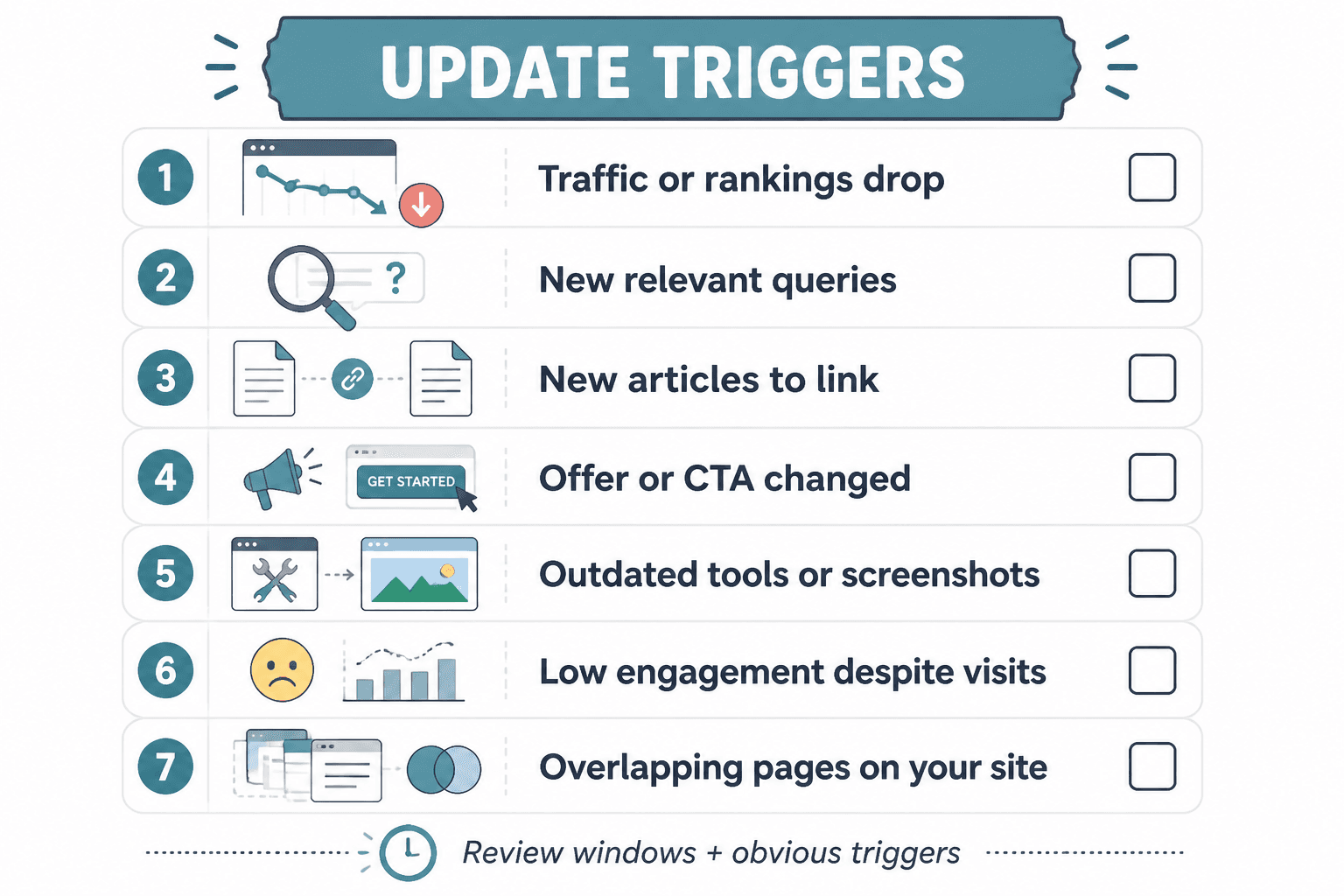
Good update triggers include:
- A noticeable traffic decline
- Dropping rankings on important queries
- New articles published that should link in or out
- A shift in offer, CTA, or business positioning
- Outdated tool references, screenshots, or process steps
- Low engagement on a page that still gets visits
- Thin average time on page because the article no longer answers the need well
- Competing pages on your own site starting to overlap awkwardly
A smart update system uses both: regular review windows and obvious triggers that pull a page forward when needed.
If you want help setting those triggers without making them vague and useless, read how to improve internal linking and updating update triggers without sounding generic.
How many internal links should you update each time?
Another question people ask badly.
The goal is not to hit some magical number of new internal links per session. The goal is to improve the page’s relationship to the rest of the site in a way that actually helps readers and supports topic structure.
That said, for a normal review pass, here is a practical range:
- Light refresh: add or improve 2 to 5 relevant internal links
- Mid-level update: review all existing links and usually update 3 to 8
- Major revision: rework the internal linking path across the whole article, sometimes 5 to 15+ changes depending on length
The right number depends on article depth, topic breadth, and how many related pieces now exist on your site. Forcing links just to feel productive is how pages end up cluttered, awkward, and weirdly desperate.
What a good internal link update usually looks like
- One link to the closest pillar or hub page
- Two to four links to related support articles where they naturally help
- One link to a next-step article, template, or process page
- Anchor text that makes sense to humans first
You can explore the wider topic cluster here: internal linking and updating.
What to check during an internal linking and content update pass
You do not need a 47-point forensic audit every time. You need a repeatable review checklist that catches the stuff most likely to matter.
Quick review checklist
- Does the page still match current search intent?
- Is the intro still sharp, or is it doing that sleepy throat-clearing thing?
- Are there newer articles that should be linked from this page?
- Are the existing internal links still the best destinations?
- Do anchor texts describe the destination naturally?
- Are any examples, screenshots, or references outdated?
- Does the page still reflect your current offer, strategy, or positioning?
- Is the CTA still relevant?
- Are there sections that feel thin compared with competing pages?
- Should this page be expanded, merged, or left alone?
That is enough for most review cycles. You are not trying to write a dissertation on your own blog post. You are trying to make the page more useful and more connected.
How to prioritize what to update first
If your site has more than a handful of articles, you probably already have a backlog. So do not start randomly. Start where maintenance has the best odds of paying off.
Prioritize pages that are:
- Already getting traffic but losing momentum
- Close to page one or slipping from stronger positions
- Strategically important to your offers
- Missing links to newer, relevant supporting content
- Built around topics you want stronger authority on
- Frequently visited entry pages with weak next-step pathways
In plain English: update the pages that can still do something for your business, not the ones that just happen to be older.
If you have older pieces worth rescuing, how to turn old content into better internal linking and updating will help you pull more value from what is already sitting there.
A practical update workflow for busy creators and small teams
You do not need an enterprise content ops machine to do this well. You need a boring little system that survives real life.
Monthly
- Review your top 5 to 10 traffic or revenue-relevant pages
- Add links to any new supporting content
- Fix obvious stale examples or weak CTAs
- Flag pages needing a deeper revision
Quarterly
- Review pillar pages and cluster structure
- Check whether related articles still link logically to each other
- Refresh old pages with traffic dips or intent mismatch
- Merge or redirect overlapping content if needed
Twice a year
- Review lower-priority evergreen pages
- Clean up outdated references at scale
- Look for underlinked useful pages buried in your archive
- Reassess your internal linking patterns across major topic clusters
That is enough for most creator sites, consultant sites, service businesses, and lean content teams. You do not need to update everything constantly. You need to keep important content alive and connected.
Common mistakes people make with content updating
Some of these are oddly common for something so fixable.
- Only updating words, not pathways. They rewrite a paragraph but ignore broken or missing internal links.
- Adding links with no strategy. Every mention of a term becomes a link, and now the page reads like it was attacked by a plugin.
- Ignoring newer content. Great fresh articles exist, but older pages never point to them.
- Updating low-value pages first. Feels productive. Usually is not.
- Treating all declines as a rewrite problem. Sometimes a page just needs better internal support and fresher examples.
- Never revisiting CTAs. A page can be accurate and still convert badly because the next step is stale or unclear.
The biggest one, though, is waiting too long. A page that could have been improved with a 20-minute refresh often turns into a 3-hour rewrite because it was ignored for a year and a half.
How internal linking updates fit into a bigger site structure
Internal linking works best when it is not done as random maintenance on isolated pages. It works best when each page has a role.
That usually means some version of this:
- A broad pillar or hub page
- Supporting articles targeting narrower subtopics
- Cross-links between related support pieces where useful
- Clear next-step links for readers who want depth or action
If you want a wider view of that structure, explore the blog SEO writing section and the blog article systems topic on internal linking and updating.
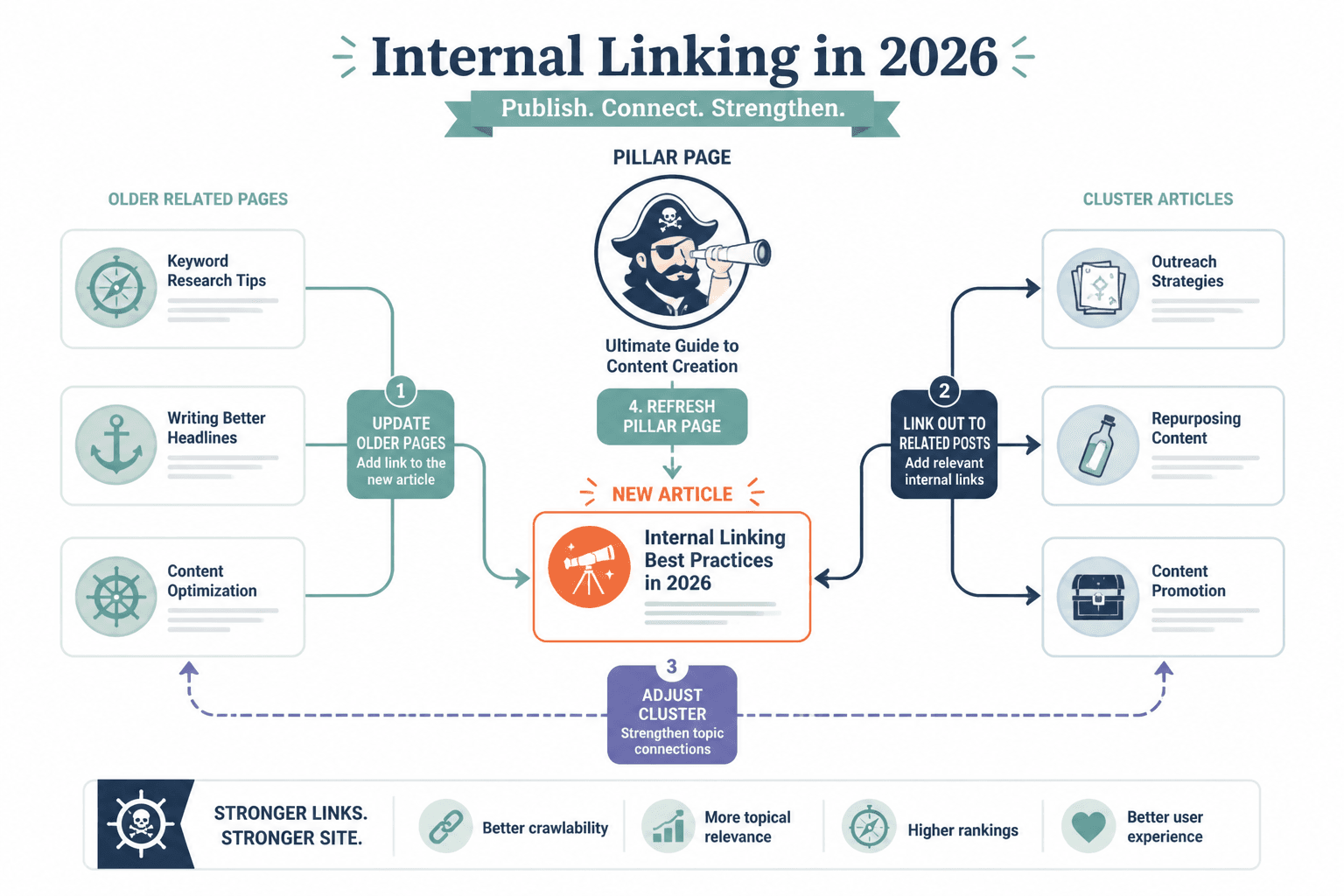
When a new article goes live, the job is not done. You should usually ask:
- Which older pages should now link to this?
- Which related articles should this page link out to?
- Does this change the structure of a bigger cluster?
- Should a pillar page be updated to include it?
That is what keeps your site from turning into a pile of disconnected essays.
When not to update a page
Not every old page deserves your energy.
Sometimes the better move is to leave it, merge it, redirect it, or remove it from your active priorities. A page probably does not deserve a refresh if:
- The topic no longer matters to your site
- The keyword or intent is irrelevant to your business now
- The content overlaps heavily with a stronger page
- The article has no realistic strategic value
- The only reason to update it is guilt
Guilt is not a content strategy. It is just admin with worse vibes.
A simple rule of thumb for 2026
If a page matters, review it before it decays.
That is the cleanest answer to how often should you update internal links and content in 2026. Do not wait for obvious collapse. Put your important pages on a review rhythm, use triggers to catch earlier issues, and treat internal links like part of the content, not an afterthought bolted on at the end.
A strong site is not just a library. It is a guided system. Readers should have somewhere useful to go next, and your older content should keep helping newer content get found.
If you want the maintenance side to be less messy, these simple internal linking and updating content decay templates for busy creators can help you make the process repeatable without turning it into spreadsheet theater.
FAQ
Internal linking improves when each update makes the next useful step clearer. Cleaner structure usually does more work than a bigger pile of links ever will.