
Most homepage copy does not fail because the writer is untalented. It fails because the page is trying to do six jobs badly instead of one job clearly.
That is why “best templates and tools for homepage copy” can be a slightly dangerous search. Templates help. Tools help. But if you grab a swipe file built for vague SaaS mush or let an AI tool spit out polished nonsense, you end up with a homepage that sounds competent and converts like wet cardboard.
So here is the useful version. This guide will show you which homepage copy templates are actually worth using, which tools make the work faster without making the writing worse, and how to choose the right combination for your site. If you are a creator, coach, consultant, solo founder, or service business, this should help you write a homepage that is clearer, sharper, and much more likely to lead somewhere useful.
If you need broader context first, the main homepage copy guide is a solid place to start.
If you want the bigger picture, start with the parent guide.
What homepage copy actually needs to do
Before templates and tools, a reality check.
Your homepage is usually not there to explain every detail of your business, autobiography, worldview, process, and service menu in one heroic scroll. It needs to do a few things clearly and in the right order:
- Tell the right person they are in the right place
- Explain what you do and why it matters
- Show enough proof that you are not making it up as you go
- Guide them to a sensible next step
That is the spine. Everything else is support.
A good template gives you that spine. A good tool helps you write and refine it faster. Neither one can fix weak positioning, a fuzzy offer, or a homepage built around phrases like “empowering ambitious businesses with strategic excellence.” That sentence means nothing. It just means nothing in a blazer.
The best homepage copy templates to start with
Not every homepage needs the same structure, but most strong homepages use some version of the same building blocks. Below are the templates that tend to work best because they match how people actually browse: quickly, skeptically, and while mildly distracted.
1. The clear service homepage template
This works especially well for consultants, freelancers, agencies, coaches, and done-for-you service businesses.
- Hero section: Who you help + what you help them do + simple CTA
- Subheadline: A little more detail about the problem, result, or approach
- Credibility strip: Client logos, featured proof, short trust markers, or a results snapshot
- Problem section: Show that you understand what the reader is dealing with
- Offer section: Explain the service clearly
- How it works: Simple process, usually 3 steps
- Proof section: Testimonials, case studies, measurable outcomes
- CTA section: Book, inquire, apply, or get the resource
Simple hero formula:
We help [audience] get [result] without [painful obstacle].
Example:
We help consultants turn messy expertise into homepage copy that earns more inquiries without sounding like they swallowed a funnel template.
2. The creator or personal brand homepage template
This is better when the site revolves around your ideas, content, offers, newsletter, speaking, or multiple revenue streams.
- Hero section: Clear positioning statement
- What you are known for: A few core themes or outcomes
- Start here section: Best content, newsletter, free resource, or main offer
- Proof and credibility: Audience size is optional, relevance is not
- Offer pathways: Work with you, buy, read, subscribe, or book
- About snippet: Enough personality to feel human, not enough to become a memoir
- Final CTA: Direct people toward the most important next step
This kind of homepage needs better navigation logic than most people give it. If you do five things, the copy has to help people choose the right thing quickly. Otherwise the homepage becomes a polite little maze.
3. The simple one-page conversion template
This is useful for a focused service, mini offer, launch page, or solo business that does not need a sprawling site.
- Headline with clear promise
- Problem and stakes
- Offer and outcome
- What is included
- Who it is for and not for
- Proof
- FAQ
- CTA
It is simple because it has one job. That is usually why it converts better than the homepage trying to be a brochure, blog, diary, and TED Talk at the same time.
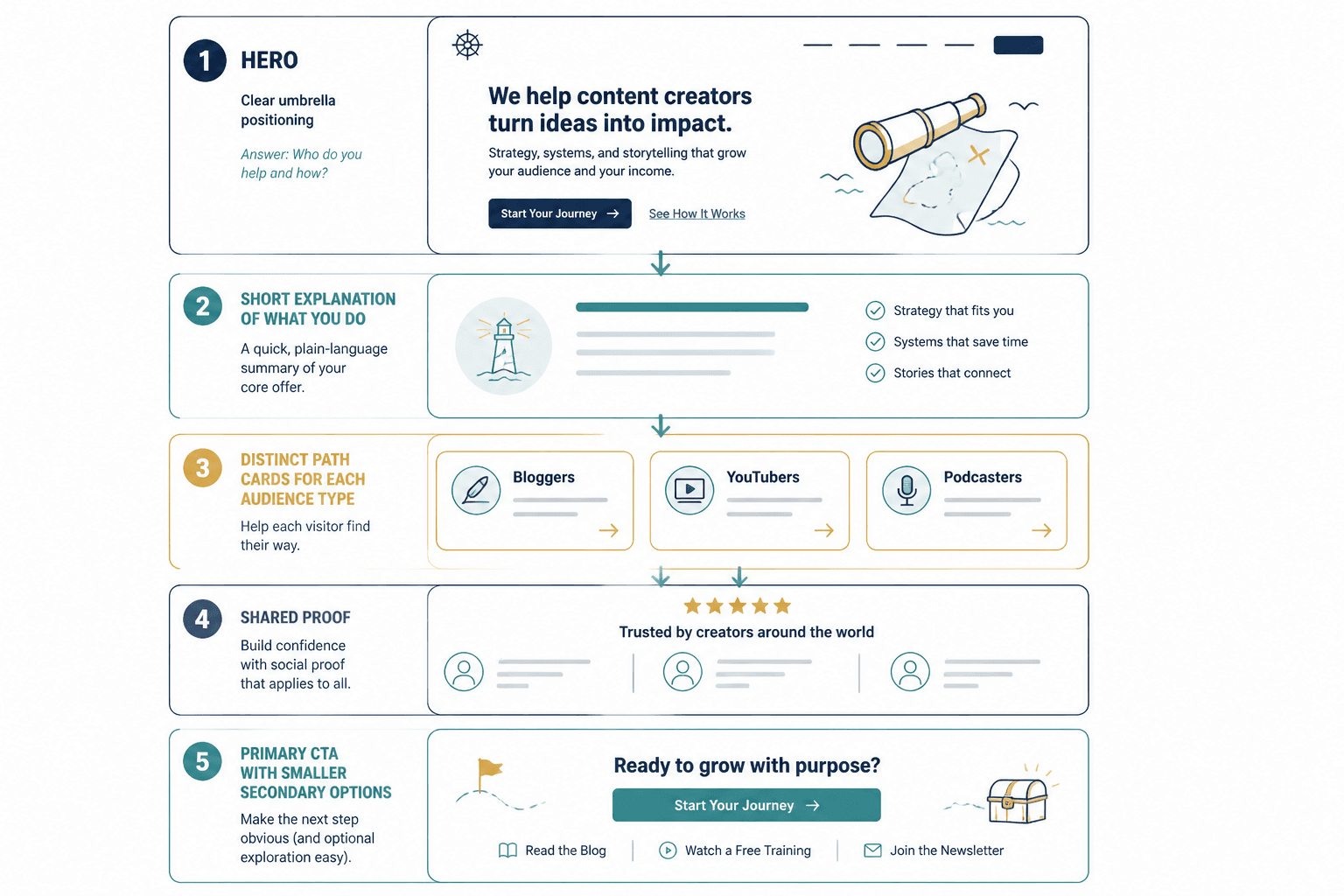
4. The “homepage as router” template
If your audience includes different buyer types, your homepage may need to route people rather than pitch one thing aggressively.
Example: one homepage for speaking, consulting, training, and content.
- Clear umbrella positioning
- Short explanation of what you do
- Distinct path cards or sections for each audience type
- Proof that applies across categories
- One primary CTA and a few secondary options
This only works if each path is obvious. If every section sounds equally important and equally vague, people hesitate and leave. The homepage is not a storage closet for all your business ideas.
For more plug-and-play examples, see simple homepage copy value proposition templates and homepage copy examples for creators.
Which homepage copy template should you choose?
Use this quick rule:
| If your business is mostly… | Use this template |
|---|---|
| One main service | Clear service homepage |
| Personal brand with content and offers | Creator or personal brand homepage |
| One focused offer or campaign | Simple one-page conversion template |
| Multiple audience paths | Homepage as router |
Do not pick the fanciest one. Pick the one that matches how people buy from you.
That sounds obvious, but people miss it constantly. They borrow a homepage structure from a design gallery, then wonder why it reads like a sleek puzzle. Pretty pages can still be unclear pages.
The best tools for homepage copy, by job
The best templates and tools for homepage copy are not one big software stack. They are a small set of tools that help with specific jobs: clarity, research, drafting, editing, testing, and implementation.
1. Message and positioning tools
Before writing the homepage, you need raw material. That means understanding your audience, offer, language, and proof.
- Voice-of-customer collection tools: forms, surveys, interview notes, testimonials, sales call transcripts
- Simple note databases: good for collecting recurring pains, phrases, objections, and desired outcomes
- Messaging worksheets: useful for clarifying audience, problem, promise, proof, and CTA before you write a line
This part is unglamorous, which is exactly why people skip it and end up with homepage copy that sounds nice but says very little. The copy should reflect what your audience already wants, fears, asks, and compares. If it does not, even clean writing feels off.
2. Drafting and rewrite tools
This is where AI can help, with a giant asterisk.
- AI writing tools: good for ideation, first-pass structure, angle variations, CTA options, and rewrites
- Prompt libraries: useful if they help you generate better inputs, not just faster sludge
- Template docs: excellent for turning a blank page into a working draft
AI is especially handy when you already know your offer and just need speed. It is much less handy when you are still fuzzy on positioning. In that case, it tends to produce homepage copy that sounds polished, broad, and suspiciously proud of itself.
If you want a fuller breakdown, read the guide to the best AI tools for homepage copy.
3. Editing and clarity tools
These tools help you spot friction, fluff, or awkward phrasing.
- Readability tools: helpful for tightening long, clunky sections
- Grammar and style tools: useful for cleanup, not judgment
- Plain-English check passes: often the best “tool” is reading the page out loud and hearing where it starts performing instead of communicating
Do not outsource taste to an editing tool. Many of them flatten sharp writing into something technically correct and completely forgettable. A homepage is not a school essay. A little rhythm, edge, and personality are allowed.
4. Website builder and CRO tools
Once the copy exists, it needs to live somewhere sensible.
- Website builders: useful for page layout, section hierarchy, and fast updates
- Heatmaps and session tools: helpful for spotting confusion and drop-off
- A/B testing tools: useful when traffic volume supports testing
- Form and CTA tracking: essential if you actually want to know whether the page works
If your design tool makes it painfully annoying to update copy, that is a conversion problem too. Great copy trapped inside a site nobody wants to edit becomes stale fast.
For the technical side, see best website builders and CRO tools for homepage copy.
A practical homepage copy toolkit that works for most people
You do not need a giant stack. For most creators and service businesses, a practical homepage copy toolkit looks more like this:
- A homepage template document
- A place to store customer language and proof
- An AI drafting or brainstorming tool
- A plain editing tool for cleanup
- A website builder you can actually update
- Basic analytics or conversion tracking
That is enough to do strong work.
The problem is rarely “I need more tools.” The problem is usually one of these:
- The message is vague
- The offer is buried
- The proof is weak or absent
- The homepage has too many competing CTAs
- The writer used a template without adapting it to the business
How to use templates without sounding templated
This is the part people mess up. They blame the template when the real issue is that they copied the shape but did not add any actual substance.
A template should give you structure, not final copy. If your homepage headline could be pasted onto 5,000 other websites without anyone noticing, the issue is not that templates are bad. The issue is that the inputs were lazy.
Start with these five inputs
- Who exactly you help
- What result they want
- What gets in the way
- Why your approach is credible or different
- What they should do next
Then use the template to arrange that information clearly.
Weak template fill vs stronger template fill
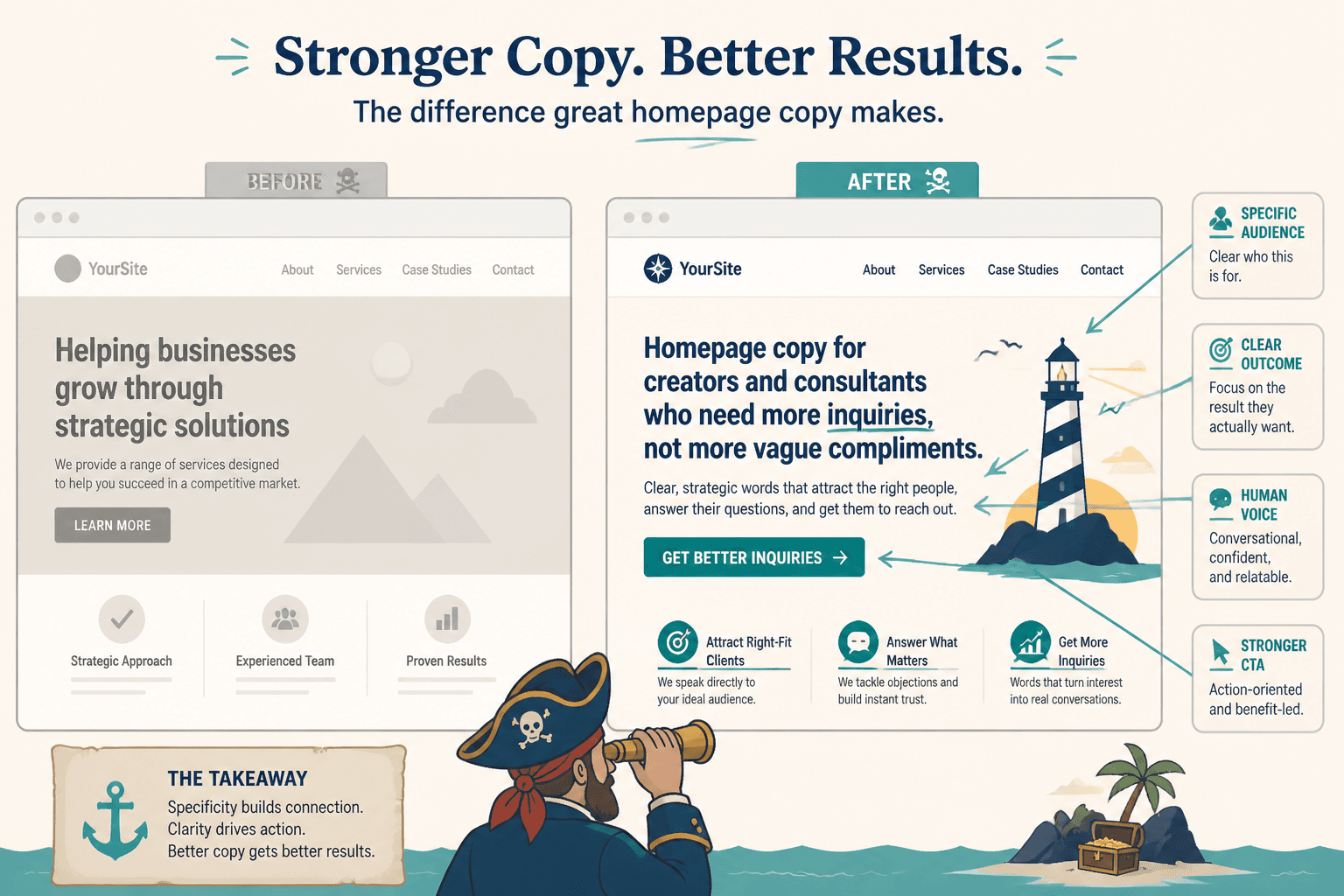
Weak headline:
Helping businesses grow through strategic solutions
Better headline:
Homepage copy for creators and consultants who need more inquiries, not more vague compliments
Weak subheadline:
We create compelling messaging that resonates with your audience and drives results.
Better subheadline:
I write and refine homepage copy that explains what you do, shows why it matters, and gives visitors a clear reason to take the next step.
See the difference? One sounds like a brochure from the Ministry of Beige. The other sounds like a person with a job to do.
A simple process for writing homepage copy with templates and tools
If you want a workflow that is fast but not sloppy, use this.
- Choose the right homepage template. Match it to your business model, not your aesthetic mood.
- Collect source material. Pull customer questions, objections, testimonials, sales notes, and proof.
- Write the hero manually first. Do not outsource the most important section immediately.
- Use AI or templates to build the rest. Generate section options, proof angles, CTA variations, and cleaner transitions.
- Edit for clarity and specificity. Remove fluff, broad claims, and throat-clearing.
- Check page logic. Does each section lead naturally to the next?
- Add proof where skepticism is highest. Usually after the promise and before the ask.
- Track what happens. Watch clicks, form fills, and where visitors stall.
One thing worth emphasizing: write your hero section with your own brain first, even if you use tools for the rest. The hero carries a ridiculous amount of the page’s burden. If that section is fuzzy, everything downstream gets weaker.
What the best tools cannot do for you
Tools can help you draft faster, organize ideas better, and spot weak phrasing sooner. Great. Useful. Keep them.
But they cannot do the harder strategic work for you. They cannot magically decide who your best-fit customer is. They cannot turn a generic offer into a sharp one. They cannot create trust if you have no proof. And they definitely cannot rescue homepage copy that is trying very hard to sound impressive while avoiding saying anything concrete.
That is why the best templates and tools for homepage copy work best in the hands of someone willing to make actual decisions: who this page is for, what matters most, what goes first, what gets cut, and what action the visitor should take.
Common mistakes when using homepage copy templates and tools
- Using a template built for the wrong business model. A SaaS homepage structure is not automatically right for a solo consultant.
- Letting AI write broad claims with no proof. It loves phrases like “drive growth.” Nobody trusts them.
- Stuffing every section with equal importance. Hierarchy matters.
- Overwriting the hero. You do not need a headline, preheadline, subheadline, microcopy, two buttons, a trust strip, and a philosophy statement in the first screen.
- Writing for yourself instead of the buyer. Your homepage is not there to admire your range.
- Skipping the CTA strategy. If visitors do not know what to do next, that is on the page.
Best templates and tools for homepage copy: the smart way to use them
The smart way is not “use more tools.” It is “use the right template, then use tools where they reduce friction without reducing quality.”
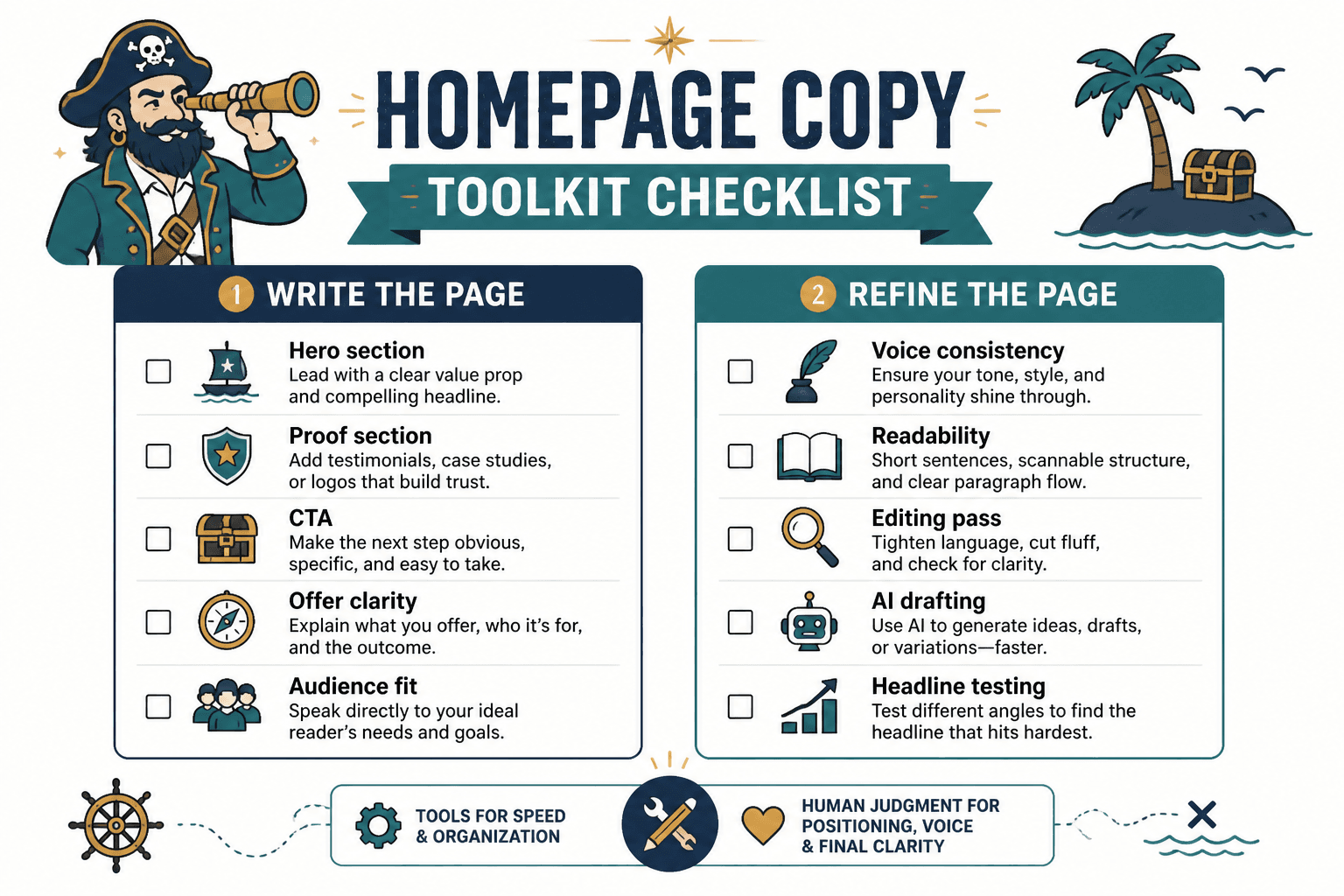
Use templates for structure. Use tools for speed, organization, and refinement. Use your own judgment for positioning, voice, proof, and final clarity. That is the split.
If you want the fuller content trail, you can also browse the broader website conversion copy resources.
And if you are still staring at a blank homepage draft, start smaller. Pick one template. Write one clear hero. Add one proof section. Choose one CTA. Most homepage improvements do not come from brilliance. They come from finally stopping the page from trying to be everything at once.
FAQ
What is the best homepage copy template for a solo business?
Usually a clear service homepage or a simple one-page conversion structure. Pick the one that matches how people buy from you.
Can AI write homepage copy well?
It can help draft and refine it, yes. But it still needs strong inputs, clear positioning, and human editing if you want the page to sound believable.
Homepage copy works best when the core promise is clearer and the next step is easier to understand. Simpler, sharper messaging usually does more work.