
Most creator bios are trying way too hard to sound impressive and not nearly hard enough to be useful.
They stack vague roles, toss in a soft promise, maybe sprinkle one shiny credential on top, and then wonder why profile visitors do not click, follow, reply, or buy. The problem usually is not that your bio is too short. It is that it says very little, very slowly.
If you want the best templates and tools for creator bios & profile copy, start here: the right template gives your profile structure, and the right tool helps you draft, refine, test, and tighten it faster. Neither one can save a muddy offer or a generic position. Harsh, but useful.
This guide will help you write a bio that actually does its job: tell the right people who you help, what you help them do, why they should trust you, and what they should do next. We’ll cover practical templates, smart tool categories, examples of what to fix, and where most people quietly wreck the whole thing.
Want the broader roadmap? Start with the parent guide.
What a creator bio is supposed to do
A good creator bio is not a tiny autobiography. It is not a personal mission statement. And it definitely is not an awkward pile of nouns like “writer | strategist | speaker | founder | mentor | thinker.” That is not positioning. That is a lost luggage tag.
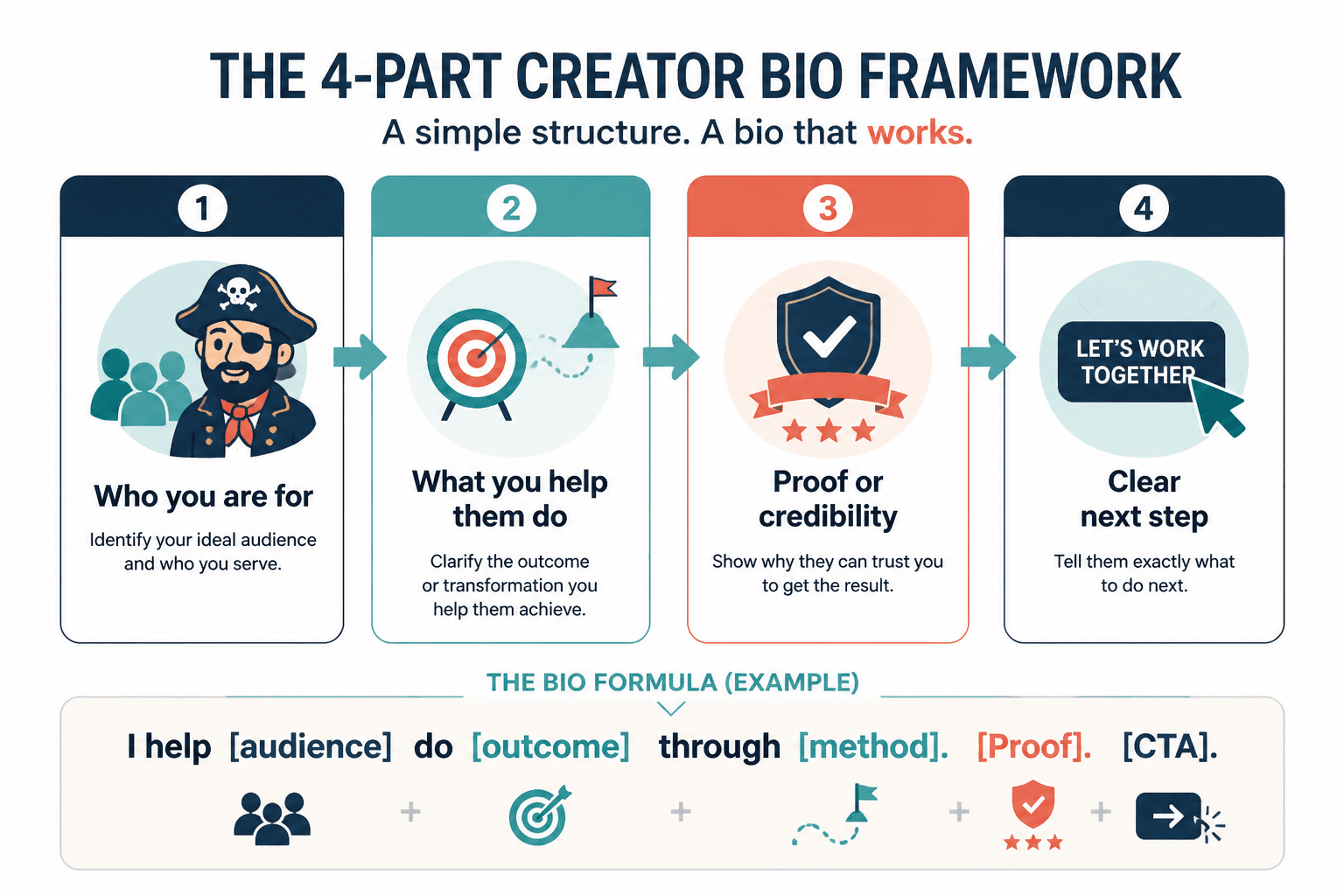
Your bio has four jobs:
- Show who you are for
- Explain what you help them do
- Add proof or credibility
- Point to a clear next step
That is true on LinkedIn, X, Instagram, Facebook, your website, and even email signatures, though the wording and space will change. The structure stays surprisingly consistent.
If you want a broader foundation first, it helps to review the main principles behind creator bios and profile copy. This article is more focused on the templates and tools side of the job.
The simplest structure that works
Before we get into tools, use this basic formula:
I help [specific audience] do [specific outcome] through [method, angle, or type of work]. [Proof]. [CTA or next step].
That formula is not sexy. It is effective. Which is a better trade.
Here is a weak version:
Helping ambitious founders unlock authentic growth through content and storytelling.
And here is a stronger version:
I help B2B founders turn sharp ideas into LinkedIn content that builds trust and brings in leads. 120+ client posts written. Grab the free profile checklist below.
The second one has an audience, an outcome, a channel, a touch of proof, and a next action. It sounds like somebody knows what they do.
Best templates for creator bios & profile copy
The best templates are not the ones with the most blanks. They are the ones that force clarity. Use the one that matches your business model, audience, and platform.
1. The clear service provider template
Best for freelancers, consultants, coaches, and solo service businesses.
I help [audience] get [result] without [pain/problem]. [Specific service or method]. [Proof]. [CTA].
Example:
I help executive coaches write LinkedIn content that attracts better-fit clients without posting every day. Ghostwriter for 40+ experts. Message me “profile” for help.
Why it works: it names the audience fast, shows the outcome, reduces friction, and makes the service feel concrete.
2. The niche expert template
Best for specialists with a strong point of view.
[Role] helping [audience] solve [specific problem]. [Point of view or specialty]. [Proof, result, or credential].
Example:
Email strategist helping course creators fix underperforming launches. Less funnel theatre, more buyer-ready sequences. Helped clients add 20–40% more sales from existing lists.
This works well when your expertise matters more than your personality. Which, honestly, is more often than people think.
3. The creator-educator template
Best for people building audiences through content, teaching, and products.
I share [topic] for [audience] who want [outcome]. [What makes your advice different]. [Offer or resource].
Example:
I share content strategy for solo consultants who want better leads from a smaller audience. Practical, sharp, no guru sludge. Read the profile copy guide.
This one is great when your bio needs to support content-first growth instead of direct outbound selling.
4. The proof-first template
Best when you have strong credibility and should use it.
[Result/credential/proof]. I help [audience] achieve [outcome] through [service or method]. [CTA].
Example:
Built a 6-figure consulting business from content. Now I help other consultants write authority-building posts that bring inbound leads. Start with the one-line bio templates.
Use this when your proof is real and relevant. Not when you once got featured in a listicle nobody remembers.
5. The minimalist one-liner template
Best for X, short social bios, and profile headers with tight character limits.
I help [audience] do [outcome] with [method].
Example:
I help coaches turn expertise into content people actually read.
Simple is not lazy. Simple is usually harder because there is nowhere for weak thinking to hide.
If you need more stripped-down options, these simple creator bios and profile copy one-liners templates for busy creators are worth bookmarking.
6. The personality-with-positioning template
Best when brand voice matters, but clarity still needs to win.
[What you do] for [audience]. [Short personality line or point of view]. [Proof or CTA].
Example:
Profile copywriter for creators, consultants, and experts. I make bios less cringey and more useful. 200+ rewrites done.
This is often the sweet spot. A little personality makes you memorable. Too much personality before clarity makes you confusing.
How to choose the right bio template
Do not choose a template because it sounds polished. Choose it based on what the profile needs to do.
| If your goal is… | Use this template style |
|---|---|
| Get discovery calls or client inquiries | Clear service provider |
| Build authority in a niche | Niche expert |
| Grow through educational content | Creator-educator |
| Leverage strong credibility | Proof-first |
| Fit a short character limit | Minimalist one-liner |
| Show voice without losing clarity | Personality-with-positioning |
You can also combine them. In fact, many strong profiles do. A LinkedIn headline might use the minimalist version. The About section might use the service provider or proof-first structure. Your profile CTA can then point people to a resource, offer, booking page, or a relevant article.
Best tools for creator bios & profile copy
The best tools are the ones that make the writing sharper, not just faster. Speed is helpful. Better messaging is the point.
1. AI drafting tools
Useful for generating rough options, testing variations, shortening bios, and escaping blank-page syndrome.
What they are good at:
- Turning rough notes into first drafts
- Creating multiple versions for different platforms
- Shortening long bios into tighter versions
- Helping you spot missing parts like audience or CTA
What they are bad at:
- Knowing what makes you distinct
- Writing from actual taste
- Avoiding generic “helping founders thrive” sludge unless prompted hard
- Making strategic positioning decisions for you
If you want deeper tool recommendations, see best AI tools for creator bios and profile copy and best AI writing tools and profile optimization tools for creator bios and profile copy.
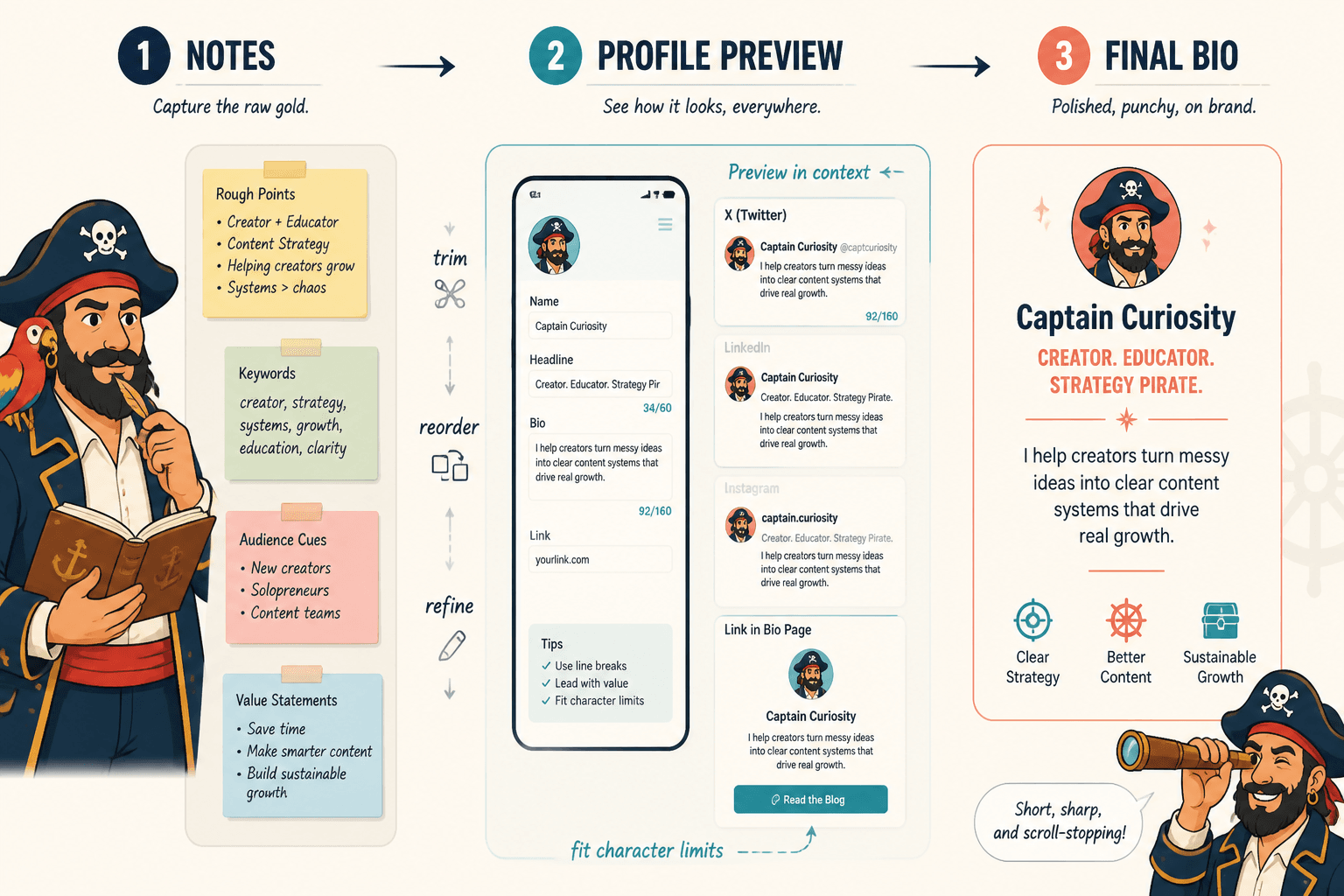
2. Notes and idea capture tools
Before you write a bio, you need raw material. Good notes tools help you collect proof, client language, repeated questions, offer angles, and positioning ideas.
Useful things to collect:
- Who your best clients actually are
- The outcomes they wanted
- The phrases they use to describe their problem
- Proof points, wins, credentials, and results
- Common objections or hesitations
A boring bio often starts long before the writing. It starts with thin thinking. Better input gives you better copy.
3. Profile preview and formatting tools
These help you see how your bio appears across platforms, character counts, mobile layouts, and line breaks. Tiny detail, big effect.
Especially useful for:
- X bios with tight character limits
- LinkedIn headlines
- Instagram bios with line spacing constraints
- Creator link-in-bio pages
A line that reads cleanly in a doc can become a cluttered mess inside an actual profile field. Always preview in context.
4. Readability and editing tools
These are useful for trimming clutter, simplifying sentences, and spotting when your bio is trying to sound smart instead of being clear.
Use them to catch:
- Bloated phrasing
- Passive voice where it weakens the point
- Repeated words and filler
- Generic abstract language
- Sentences that are longer than the platform deserves
Do not outsource your judgment to these tools. They can help you tighten. They cannot tell you if the positioning is strong.
5. Swipe files and template libraries
This category is underrated. A good swipe file shows you patterns that work across platforms, niches, and offers. Not for copying line for line. For seeing structure clearly.
Build your own library of:
- Strong bios from people in adjacent niches
- Different CTA formats
- Good proof phrasing
- Headline examples
- Short and long bio variations
If you need inspiration without the usual fluff, these creator bios and profile copy ideas and examples for creators can help.
A practical workflow for writing better profile copy
Here is a cleaner process than staring at the bio box and typing something tragic.
Step 1: Start with raw positioning notes
- Who do you help?
- What do you help them achieve?
- What do they want to avoid?
- How do you help?
- What proof do you have?
- What should they do next?
Step 2: Choose one template
Not three. One. You can make variations later, but start with one structure so the writing has a spine.
Step 3: Draft a clear version before a clever one
Clarity first. Voice second. If the clear draft works, then add a little personality. Most people do this backward and end up with a bio full of vibe and no signal.
Step 4: Create platform-specific versions
Your LinkedIn headline, About section, X bio, and website profile blurb should not be identical copies pasted around the internet like a hostage note. They should be adapted to fit the platform.
- LinkedIn headline: compact positioning
- LinkedIn About: more context, proof, and CTA
- X bio: compressed and sharp
- Website bio: clearer conversion path and broader credibility
Step 5: Cut every vague phrase
Watch for phrases like:
- passionate about helping
- unlocking growth
- empowering leaders
- building authentic brands
- creating impact
- purpose-driven
These phrases are not always evil. They are just usually empty. If a phrase could describe 50,000 other profiles, it is probably not doing much for yours.
The bigger point is simple: clearer structure and clearer writing make the piece more useful. That is usually what makes the ending land better too.