
Most people do not have a bio problem. They have a clarity problem wearing a bio problem as a fake mustache.
They open an AI tool, type “write me a professional creator bio,” and get back something like: Helping purpose-driven entrepreneurs elevate their brand through authentic storytelling and strategic visibility. Which sounds polished right up until you realize it could belong to 47,000 other people with a ring light and a Canva subscription.
The best AI writing tools and profile optimization tools for Creator Bios & Profile Copy can help a lot. They can speed up drafts, tighten language, surface positioning options, and make your profile easier to read. What they cannot do is invent a sharp point of view, a real audience, or proof that anyone should trust you. That part is still annoyingly your job.
So this guide is about using tools properly. Not as magic. Not as a substitute for thinking. As assistants that help you write a bio that actually answers four basic questions fast: who you help, what you help them do, why you are worth listening to, and what someone should do next.
If your current profile copy is vague, bloated, trying too hard to sound impressive, or giving “consultant generated by committee,” this will help you fix it.
For the full path around this topic, head to the parent guide.
What good creator bios and profile copy actually need
Before tools, standards.
A strong creator bio is not a tiny résumé. It is not your life story. It is not a pile of roles glued together with commas until nobody knows what you do.
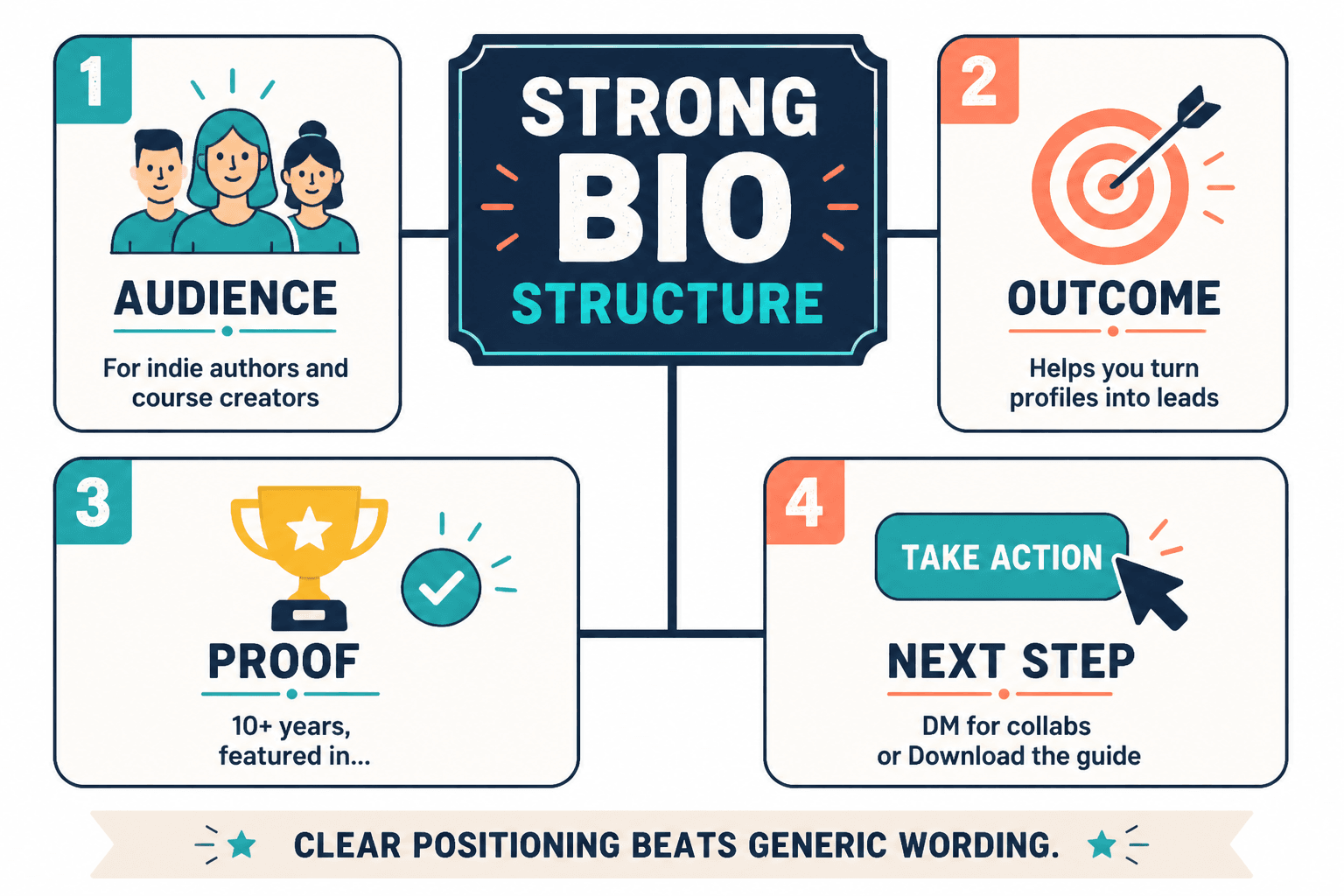
Good profile copy usually does four things quickly:
- Names the audience you are for
- States the outcome you help with
- Adds proof or credibility without puffing itself up like a stressed pigeon
- Gives a next step if the platform allows one
That is why many AI-written bios fail. The wording is often clean enough. The positioning is mush.
For a fuller breakdown of what strong profile copy needs, this creator bios and profile copy guide for creators who want better results is worth reading after this one.
What AI writing tools are actually good for here
Used well, AI is great for bio work in a very specific way: it helps you generate and refine options faster than staring into the middle distance and rewriting the same bland sentence six times.
That matters because bio writing is usually not about pulling one perfect line from the heavens. It is about pressure-testing multiple versions until one sounds clear, credible, and human.
What these tools can help you do
- Generate positioning angles
- Rewrite vague lines into clearer ones
- Shorten bloated bios for platform limits
- Create multiple tone variations
- Spot redundancy and filler
- Turn long “about me” notes into tighter profile copy
- Adapt one core bio across LinkedIn, X, Instagram, website, and speaker pages
- Suggest CTA wording that sounds less stiff
What these tools cannot do well on their own
- Choose your audience for you
- Fix weak positioning
- Create proof you do not have
- Make generic expertise feel specific
- Know which tone matches your brand without direction
- Replace taste
That last one matters more than people think. A tool can make your bio smoother. It can also iron out every useful edge until you sound like a laminated keynote speaker. Smooth is not always good. Clear is good. Memorable is better.
The best AI writing tools and profile optimization tools for Creator Bios & Profile Copy
There is not one perfect tool here. Different tools are useful for different jobs. The smart move is picking the category that solves your actual problem instead of collecting apps like emotional support tabs.
1. General AI writing assistants for drafting and rewriting
This is the category most people start with, and fair enough. General AI writing assistants are useful when you already have rough material and need help turning it into cleaner options.
Best use cases:
- Turning messy notes into bio drafts
- Generating 10 to 20 positioning versions quickly
- Rewriting for different tones: sharper, warmer, simpler, more direct
- Condensing a long bio into short profile copy
- Adapting one bio for multiple platforms
What to watch for: these tools tend to default to polished nonsense if your prompt is vague. If you ask for “a compelling creator bio,” you are begging for trouble. Give audience, outcome, proof, style, platform, and word limit.
Bad input gives you generic fluff faster. That is not innovation. That is just efficient mediocrity.
A better prompt looks more like this:
“Write 12 short bio options for a content strategist who helps coaches and consultants turn expertise into clearer LinkedIn posts and profile copy. Tone should be direct, smart, slightly conversational, not corporate, not hypey. Include proof where useful: worked with service businesses, focuses on leads and trust, strong at rewriting vague messaging. Keep each option under 220 characters.”
That kind of prompt gives the tool a fighting chance.
2. Profile optimization tools for structure, clarity, and conversion
Some tools are less about writing from scratch and more about evaluating what is already on your profile. These can be genuinely useful, especially for LinkedIn and creator-facing website bios.
Best use cases:
- Checking if your headline communicates value clearly
- Finding missing elements like proof, audience fit, or CTA
- Improving scannability
- Spotting profile sections that are doing nothing for you
- Comparing your current positioning against stronger alternatives
These tools work best when they act like a sharp editor, not a fake expert claiming to know exactly what the algorithm craves this week. If a tool promises guaranteed profile growth because of one wording trick, put it down gently and walk away.
If you want a more tool-specific companion piece, read best AI tools for creator bios and profile copy.
3. Grammar and style tools for trimming the nonsense
These are not glamorous, but they are useful. A lot of bios do not fail because of strategy. They fail because they are full of clutter, repeated phrases, awkward rhythm, and words that sound expensive but mean nothing.
Good style tools can help you:
- Cut filler words
- Simplify long sentences
- Fix readability issues
- Remove repetition
- Tighten tone so it sounds more natural
They will not position you. They will help you stop sounding like you swallowed a branding workshop. That still counts as progress.
4. Template-based bio generators for speed
These are handy if you are starting from absolutely nothing. Templates can give you structure fast, which is helpful for people who know what they do but freeze when asked to describe it.
Useful formula patterns include:
- I help [audience] do [result] without [pain/problem]
- [Role] helping [audience] achieve [outcome] through [method]
- [Outcome] for [audience] | [proof] | [CTA]
The danger is obvious: templates produce template-shaped bios. If you use them, use them as scaffolding, not as the final paint job.
For more structured options, see best templates and tools for creator bios and profile copy.
5. Idea and example libraries for profile inspiration
Sometimes the real problem is not wording. It is that you cannot tell what “good” looks like for your kind of work. Example libraries help there. Not because you should copy them, but because they reveal patterns.
Study examples to notice:
- How strong bios name a clear audience
- How proof is woven in without sounding desperate
- How tone shifts by platform
- How strong CTAs feel simple, not pushy
This is where best creator bios and profile copy ideas and examples for creators can help. Examples are often more useful than another lecture about authenticity.
How to choose the right tool for your actual bio problem
People often choose tools by brand popularity, then wonder why their profile still reads like beige wallpaper. Start with the problem instead.
| Problem | Best tool category | What it should help with |
|---|---|---|
| You cannot explain what you do clearly | General AI writing assistant | Drafting positioning options and audience-outcome statements |
| Your bio is too vague | Profile optimization tool | Identifying missing specificity, proof, and clarity |
| Your copy is bloated | Grammar and style tool | Cutting filler and improving readability |
| You have no structure | Template-based generator | Giving you a usable bio framework fast |
| You do not know what good looks like | Example library or swipe file | Showing patterns and stronger reference points |
| You need platform versions | General AI writing assistant | Adapting one core bio for multiple formats and limits |
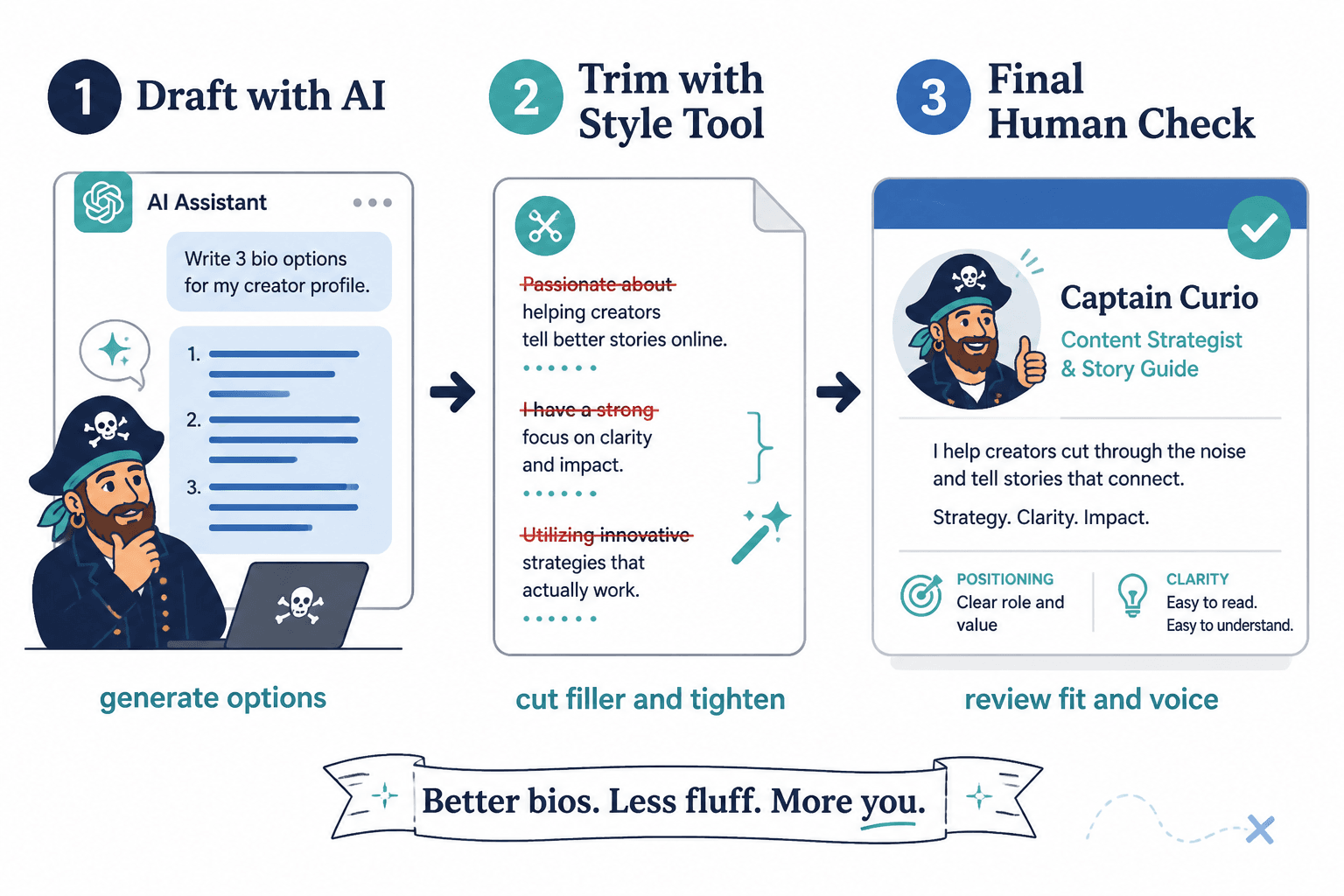
The best setup is often not one tool. It is a simple sequence: draft with AI, trim with a style tool, then sanity-check for positioning and clarity yourself.
Because yes, sadly, you are still the creative director here.
A practical workflow for using AI to write a better creator bio
Here is the process that tends to work better than asking for one miracle bio and accepting whatever shiny paragraph drops out.
Step 1: Write your raw inputs first
Before touching a tool, write down these five things in ugly plain language:
- Who you help
- What you help them do
- How you do it
- What proof you have
- What action you want people to take
Example raw input:
- Help: coaches, consultants, and service businesses
- Outcome: clearer content and profile messaging
- Method: strategy, rewrites, positioning, content systems
- Proof: focused on trust, leads, and authority-building content
- CTA: book, read, subscribe, or grab a resource
Step 2: Generate multiple angles, not one final answer
Ask the tool for 15 to 20 options with different styles:
- Direct and practical
- Warm and credible
- Sharp and punchy
- Authority-led
- Minimalist
You are not looking for perfection. You are looking for useful ingredients.
Step 3: Pull the best phrases into a shortlist
Usually one draft has the best audience line, another has the clearest promise, and a third lands the tone better. Steal from all of them. It is your material. You are allowed.
Step 4: Add the missing human judgment
Now ask:
- Would the right person instantly know this is for them?
- Does it say anything specific?
- Does any phrase sound like LinkedIn wallpaper?
- Is the proof believable?
- Does it sound like me on a good day, not me trapped in a webinar funnel?
Step 5: Adapt for the platform
Your LinkedIn headline, X bio, website homepage intro, and speaker bio should not be copy-pasted clones. The core positioning can stay the same, but the shape should fit the room.
- LinkedIn: value, clarity, professional proof
- X: compressed, punchy, a little more voice-driven
- Instagram: clear niche, personality, simple CTA
- Website: slightly fuller, more proof, smoother conversion path
Before and after: what tool-assisted bio improvement actually looks like
Here is where people get stuck. They think “better bio” means “more polished bio.” Usually it means “less vague.”
Example 1: Generic expert bio
Before: I help ambitious entrepreneurs build authentic brands through strategic content and meaningful connection.
After: I help coaches and consultants turn scattered expertise into clearer content, stronger profiles, and more trust with the right clients.
Why it is better: specific audience, specific outcomes, less fog, no fake grandeur.
Example 2: Overstuffed multi-role bio
Before: Writer | Strategist | Speaker | Consultant | Founder | Mentor helping brands grow, scale, and thrive in the digital space.
After: Content strategist for service-based experts who want sharper messaging, better bios, and content that does more than collect polite likes.
Why it is better: cuts the role pileup and replaces it with one clear function.
Example 3: Weak CTA bio
Before: Helping founders grow online. DM me for more info.
After: I help solo founders sharpen their profile copy and content positioning. Start with the guide below if your bio currently says a lot and means very little.
Why it is better: clearer offer, stronger audience fit, better next step.
Common mistakes people make with AI bio tools
The bigger point is simple: clearer structure and clearer writing make the piece more useful. That is usually what makes the ending land better too.
The bigger point is simple: clearer structure and clearer writing make the piece more useful. That is usually what makes the ending land better too.