
Most creators do not have an ideation problem. They have a filtering problem.
They are drowning in tabs, screenshots, half-saved notes, voice memos, swipe files, AI chats, and “this could be a post” thoughts that never become anything useful. Then they open a tool, ask for ideas, and get a polite buffet of generic sludge.
That is why the best templates and tools for creator AI research and ideation are not the ones that spit out the most words. They are the ones that help you find better raw material, shape it faster, and keep your ideas tied to something real: your audience, your offer, your point of view, and the content formats you actually publish.
This guide will help you build a cleaner research and ideation workflow without turning your process into a weird little productivity cult. We’ll cover which tools are actually useful, what templates make the work easier, and how to stop using AI like a slot machine for mediocre content.
To see how this fits into the wider strategy, open the parent guide.
What creator AI research and ideation should actually do
Before the tools, fix the goal.
Good creator AI research and ideation should help you do five things:
- Spot content opportunities faster
- Organize audience pain points and recurring questions
- Turn messy research into usable angles, hooks, and structures
- Repurpose one insight into multiple content formats
- Build a repeatable system so you are not starting from zero every week
What it should not do is replace judgment. AI can cluster ideas, summarize patterns, suggest angles, and speed up first drafts. It cannot tell you which opinion is worth publishing, which story is too soft to matter, or which idea sounds suspiciously like every other person trying to “build authority” with six beige tips and a fake breakthrough.
If you want a broader breakdown of workflows in this area, start with AI writing tools and workflows, then drill into the creator AI workflows section and the main creator AI research and ideation hub.
The best tool categories for creator AI research and ideation
You do not need one magical platform that does everything. You need a stack that covers the actual job. For most creators, that means four tool categories.
1. AI assistants for idea expansion and synthesis
This is where a lot of people start, and fair enough. AI assistants are useful for:
- Turning one topic into subtopics
- Summarizing research notes
- Finding patterns in audience questions
- Generating content angles for different platforms
- Rewriting rough ideas into clearer drafts
- Creating idea variations fast
They are less useful when your input is vague. If you type “give me viral content ideas for coaches,” do not act shocked when the result sounds like everyone else’s lunch-break carousel.
Use AI assistants after you’ve gathered raw inputs: customer questions, comments, objections, search themes, call notes, case study details, content performance patterns, and your own opinions. The assistant is there to sharpen and organize, not invent relevance from thin air.
For a dedicated breakdown, see best research tools and AI assistants for creator AI research and ideation.
2. Research tools for finding what people actually care about
If AI assistants are the blender, research tools are the ingredients.
You need places to pull useful signals from, such as:
- Search trends and recurring keyword themes
- Forum and community questions
- Competitor content gaps
- Comments on your own posts
- Sales call notes and discovery call objections
- Email replies and DMs
- Reviews, testimonials, and client language
These sources matter because they give you live language. Not polished marketing language. Real language. The kind people use when they are confused, skeptical, annoyed, stuck, or ready to buy. That is gold for ideation because content works better when it sounds like it belongs in the reader’s head, not in a strategy deck.
If you want the software angle specifically, read best AI tools for creator AI research and ideation.
3. Knowledge capture tools for storing idea inputs
Research is useless if your system is “I definitely saved that somewhere.”
You need a place to store:
- Audience questions
- Good hooks you notice
- Strong post structures
- Objections worth addressing
- Examples and case studies
- Quotes, phrases, and patterns from clients
- Your own unfinished ideas
This can live in a notes app, database, document system, or project board. The exact tool matters less than the structure. If your capture system does not make retrieval easy, it becomes a digital junk drawer with delusions of greatness.
4. Workflow tools for turning ideas into publishable assets
Research and ideation often fail at the handoff. The insight exists. The topic exists. The rough angle exists. But there is no clean path from “interesting note” to “published post, article, thread, email, or lead magnet.”
That is where workflow tools help. Use them to:
- Tag ideas by format and platform
- Track status from raw note to published asset
- Batch similar themes together
- Assign next steps
- Store approved templates
- Connect ideas to offers, funnels, or campaigns
The best templates for creator AI research and ideation
Templates matter because they reduce blank-page nonsense. A good template does not make your content robotic. It makes your thinking more consistent.
Here are the most useful ones.
Audience question capture template
Use this to collect what your audience keeps asking, implying, resisting, or misunderstanding.
- Question or pain point: What did they ask or struggle with?
- Exact wording: How did they phrase it?
- Context: Where did this come from? DM, comment, sales call, email, forum?
- Underlying issue: What is the real problem behind the surface question?
- Content angle: Teach, myth-bust, simplify, compare, reframe, warn, or show process
- Best format: Post, thread, article, email, FAQ, lead magnet, video script
- CTA path: What should happen next if this content lands?
This template is brutally effective because it keeps ideation tied to live audience demand, not random inspiration. It also helps you spot clusters. If five people ask different versions of the same question, congratulations, you found a content pillar instead of another disposable post.
Topic expansion template
Use this when you have one decent topic and need more useful angles without watering it down.
- Core topic: The main idea
- Audience segment: Who specifically needs it?
- Stage of awareness: Problem-aware, solution-aware, comparing options, ready to buy
- Common mistakes: What do people get wrong?
- Contrarian take: What is overrated or misunderstood here?
- Use cases: Where does this matter in practice?
- Proof available: Results, examples, screenshots, client outcomes, observations
- Possible formats: Short post, deep article, checklist, thread, carousel, FAQ
Feed this into an AI assistant and ask it to generate 10 angle variations based on audience segment and awareness stage. That usually gets you much better material than asking for “content ideas” in the abstract.
Hook and angle template
Once you have a topic, you still need a reason for someone to care. This is where creators get lazy. They have a useful idea, then wrap it in a sleepy opening and wonder why nobody clicks.
- Topic: What are we talking about?
- Reader tension: What is frustrating, expensive, confusing, or annoying about it?
- Main claim: What are you saying, clearly?
- Hook style: Mistake, myth, contrast, blunt truth, warning, checklist, breakdown
- Proof or support: What makes the claim credible?
- Desired action: Read, comment, click, subscribe, book, save
If you want a bigger bank of reusable research prompts and structures, the most directly useful companion piece is simple creator AI research and ideation topic research templates for busy creators.
Content repurposing matrix
This one saves creators from doing fresh research for every single asset.
| Source Insight | Short Post | Thread/Series | Article | Lead Magnet | |
|---|---|---|---|---|---|
| Common client objection | Myth-busting post | 5-part objection breakdown | Detailed explanation with examples | Story + lesson | FAQ guide |
| Strong opinion | Hot take post | Argument thread | Deeper authority piece | Behind-the-scenes note | Framework PDF |
| Process walkthrough | Quick checklist | Step-by-step thread | Full how-to guide | Mini tutorial | Template pack |
A repurposing matrix keeps your ideation grounded in leverage. One decent piece of research should not produce one lonely post and then disappear into the void.
How to choose the right tools without overcomplicating your stack
The best templates and tools for creator AI research and ideation depend less on features and more on friction. If a tool is technically powerful but annoying enough that you avoid it, it is not part of your workflow. It is decorative software.
Use this simple filter when choosing tools.
Pick tools based on workflow stage
- Input: Where do you collect audience signals and examples?
- Storage: Where do you organize and tag ideas?
- Synthesis: What helps you turn raw notes into patterns and angles?
- Production: Where do ideas become drafts and assets?
- Distribution: How do those assets reach the right channels?
If one tool can cover two stages well, great. If it claims to cover all five and does each one badly, that is not efficiency. That is branding.
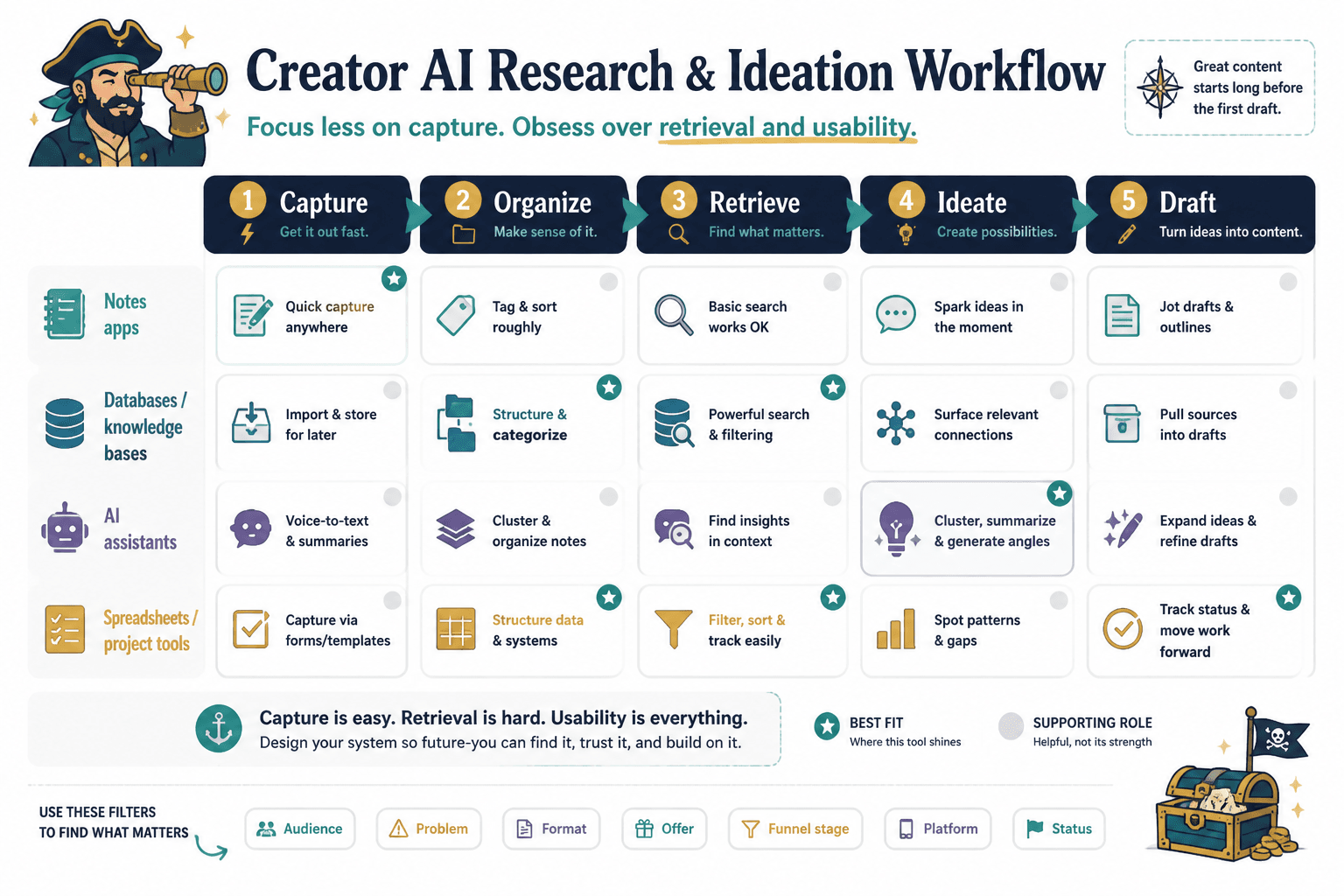
Prioritize retrieval over capture
Most creators are quite good at collecting. They save links, screenshots, comments, and prompts like a raccoon with a premium notes app. The problem is retrieval. Can you find the right idea, in the right category, tied to the right audience, when it is actually time to publish?
Choose systems that make it easy to sort by things like:
- Audience type
- Problem
- Content format
- Offer relevance
- Funnel stage
- Platform
- Status
Good ideation systems are searchable. Great ones are usable under deadline.
Use AI where speed helps, not where taste matters most
AI is excellent for pattern recognition, summarization, expansion, sorting, first-pass outlining, and variation generation. It is much worse at nuanced positioning, clean opinions, strategic restraint, and knowing when a piece of content sounds overcooked.
So use it to:
- Group similar audience questions
- Turn raw notes into content buckets
- Create angle options
- Draft rough outlines
- Suggest repurposing ideas
- Condense research into briefs
Do not let it make final calls on:
- Your core message
- Your sharpest hook
- Your strongest opinion
- Your offer positioning
- The examples you choose to prove your point
A practical creator AI research and ideation workflow
Here is a simple workflow that works well for solo creators, consultants, coaches, and lean content teams.
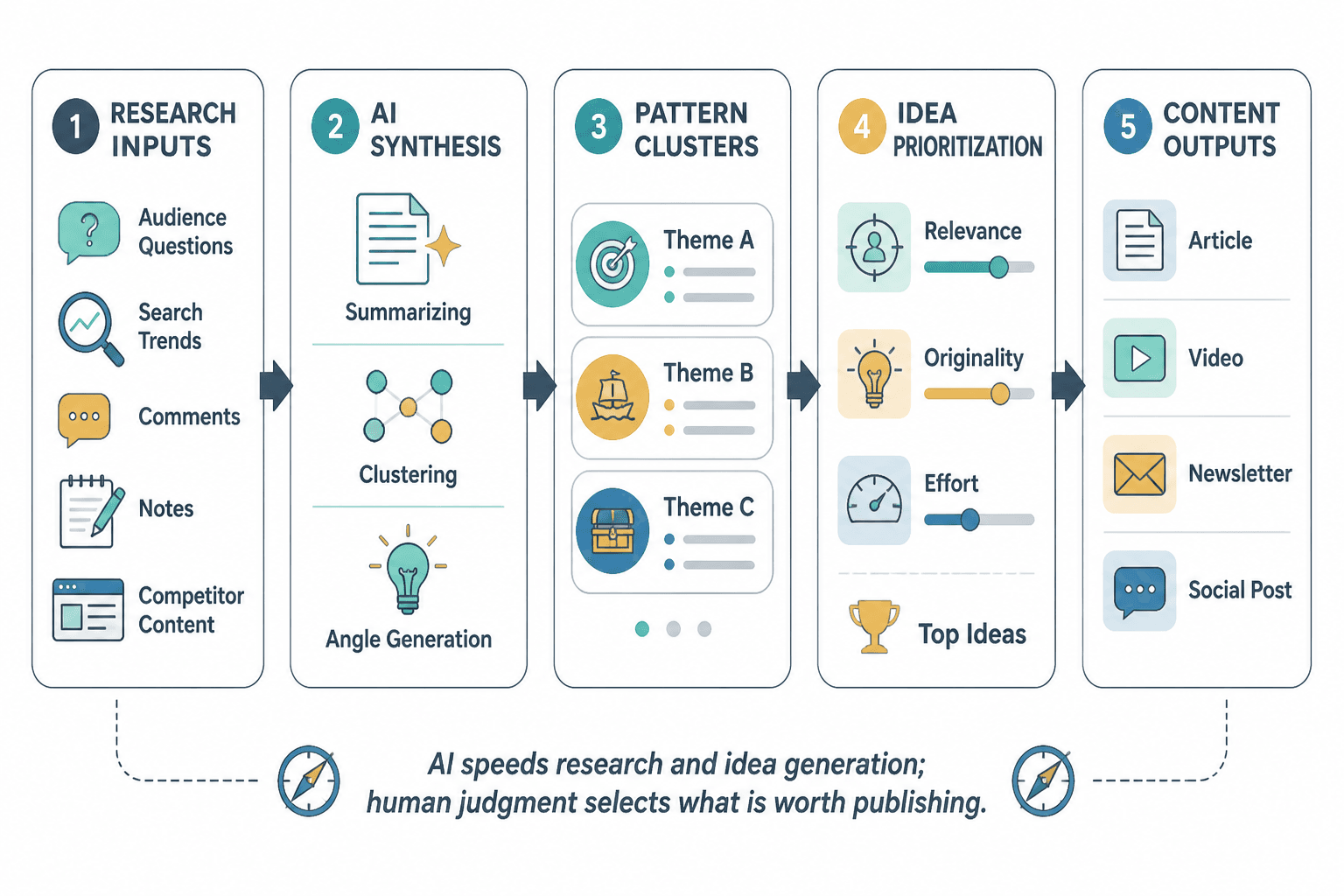
Step 1: Collect raw audience inputs weekly
Pull from comments, DMs, client calls, sales calls, emails, testimonials, competitor posts, search patterns, and your own notes. Do not judge yet. Just collect.
Step 2: Tag and cluster inputs by theme
Group similar questions and objections together. This is where AI can help. Feed in 20 to 50 notes and ask it to cluster them by problem, intent, or content opportunity.
Step 3: Run a topic expansion template on the best clusters
Take the strongest themes and expand them into angles, misconceptions, examples, and relevant formats. This gives you a richer idea bank, not just a pile of titles.
Step 4: Match ideas to platform and funnel goal
Not every idea belongs everywhere. Some topics work best as short opinion posts. Others need a full article, a thread, or a lead magnet. Match each idea to what it is actually trying to do: attract attention, build trust, answer objections, or move someone closer to a sale.
This is also where monetization gets less awkward. If you are doing research and ideation well, content can naturally feed into offers without every post sounding like a mugging. For that side of the system, see best funnel ideas to pair with creator AI research and ideation.
Step 5: Turn the best ideas into briefs, not just prompts
A prompt is not a strategy. A brief is closer.
For each strong idea, create a brief with:
- Main topic
- Audience segment
- Core claim
- Supporting points
- Examples or proof
- Suggested hook angle
- Best format
- CTA or next step
This makes drafting much faster and keeps the final content from wandering off into polite generic nonsense.
What to avoid when using AI for research and ideation
A few things go wrong over and over here.
Using AI before gathering real inputs
If you start with empty prompts, you get empty-calorie ideas. AI performs much better when it is working with your notes, your audience language, your niche, your offer, and your previous content patterns.
Confusing volume with usefulness
Fifty bad ideas are not better than five strong ones. Fast output feels productive, but if the ideas are vague, obvious, repetitive, or disconnected from your business, you are just manufacturing options you will not use.
Keeping no link between ideas and outcomes
If your ideation system does not connect content topics to audience segments, offers, objections, or funnel stages, then your content engine is running in place. Busy, yes. Useful, debatable.
Over-automating the interesting parts
The danger is not that AI makes everything terrible. The danger is that it makes everything acceptable. Smooth. Passable. Nicely shaped and easy to ignore.
The parts that create traction usually need some human edge: a stronger claim, a more specific example, a better question, a clearer stance. If your content sounds like it was assembled by a competent intern who fears offending anyone, it probably needs more of you in it.
A lean starter stack for most creators
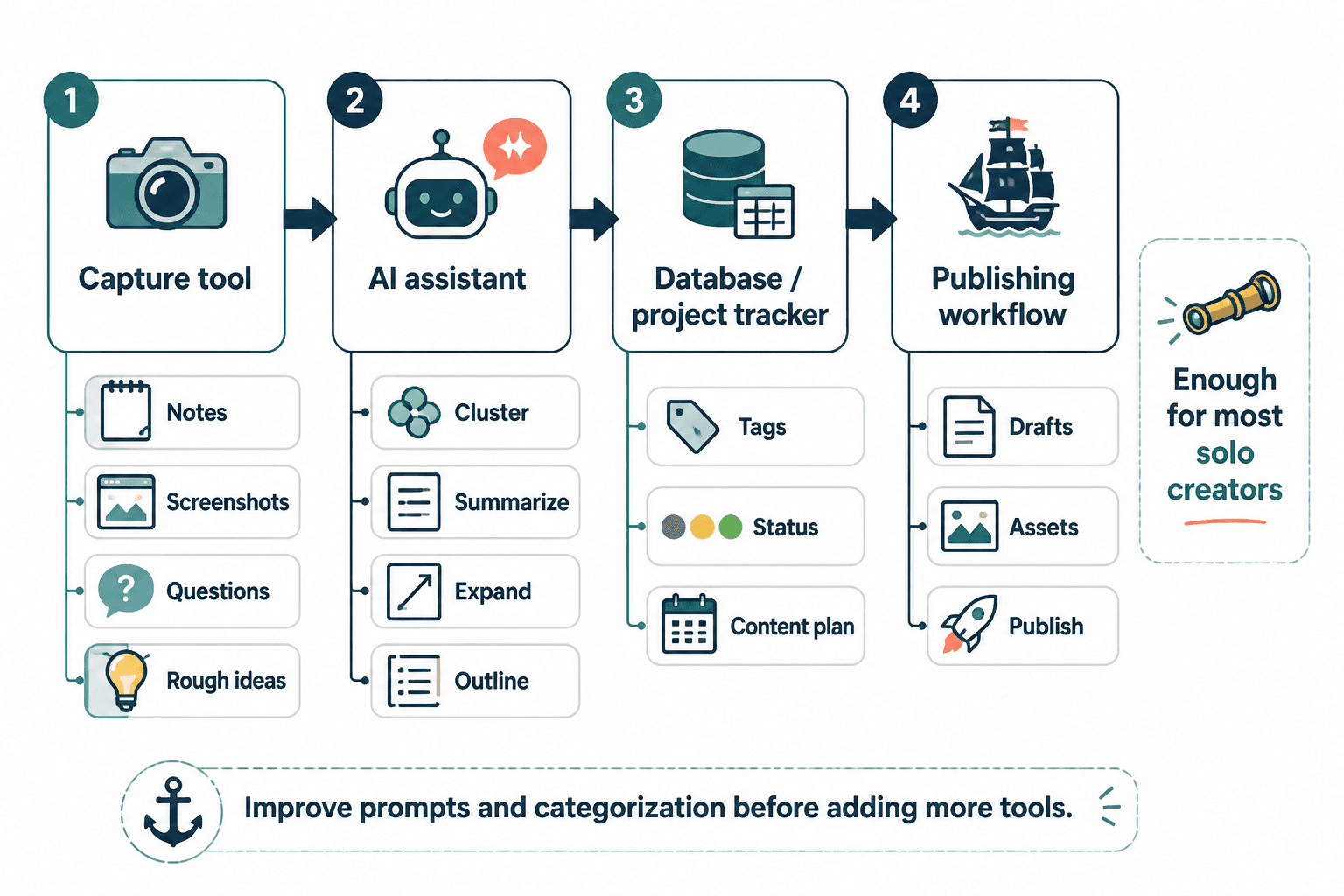
If you want a practical setup without turning your workflow into software Jenga, start here:
- One capture tool: for notes, screenshots, questions, and rough ideas
- One AI assistant: for clustering, summarizing, expanding, and outlining
- One database or project tracker: for tagging, status, and content planning
- One publishing workflow: where ideas become actual drafts and assets
That is enough for most solo operators. You can get fancier later if needed. But many creators would be better off improving their prompts, templates, and categorization before adding another platform with a dashboard trying very hard to look indispensable.
Simple prompt directions that make these tools more useful
You do not need 97 prompt formulas. You need better instructions.
- Ask the AI to cluster these audience questions by hidden problem
- Ask it to pull recurring objections from this call transcript
- Ask it to turn these notes into content angles for LinkedIn, X, and email
- Ask it to compare beginner vs advanced audience concerns on this topic
- Ask it to generate hook options based on tension, not hype
- Ask it to turn this research into a content brief with proof, angle, and CTA
The pattern is simple: give it better source material and a narrower task. That usually beats long theatrical prompts full of role-play instructions and accidental nonsense.
FAQ
What are the best templates and tools for creator AI research and ideation if I am a solo creator?
Start with one note capture system, one AI assistant, one tagging or database tool, and two or three core templates: audience questions, topic expansion, and content briefs.
Can AI handle ideation without human research?
Technically, yes. Strategically, not well. It needs real audience inputs if you want ideas that feel relevant instead of generic.
How often should I do research and ideation?
Weekly is usually enough for creators publishing consistently. Monthly reviews help you spot bigger patterns and content gaps.
Should I use one tool for everything?
Only if it genuinely works well across capture, synthesis, storage, and production. Most all-in-one setups are stronger in some stages than others.
The bigger point is simple: clearer structure and clearer writing make the piece more useful. That is usually what makes the ending land better too.