
Most creators do not have a content problem. They have a workflow problem.
They record one good podcast episode, write one decent post, or publish one solid article, and then somehow manage to squeeze exactly 4% of the value out of it. The rest dies in a folder called “repurpose later,” which is basically content hospice.
That is where the best templates and tools for creator AI editing and repurposing actually earn their keep. Not by magically making you interesting. Not by replacing strategy. But by helping you turn one useful idea into multiple sharp assets without rewriting the same thought 14 times and slowly losing the will to post.
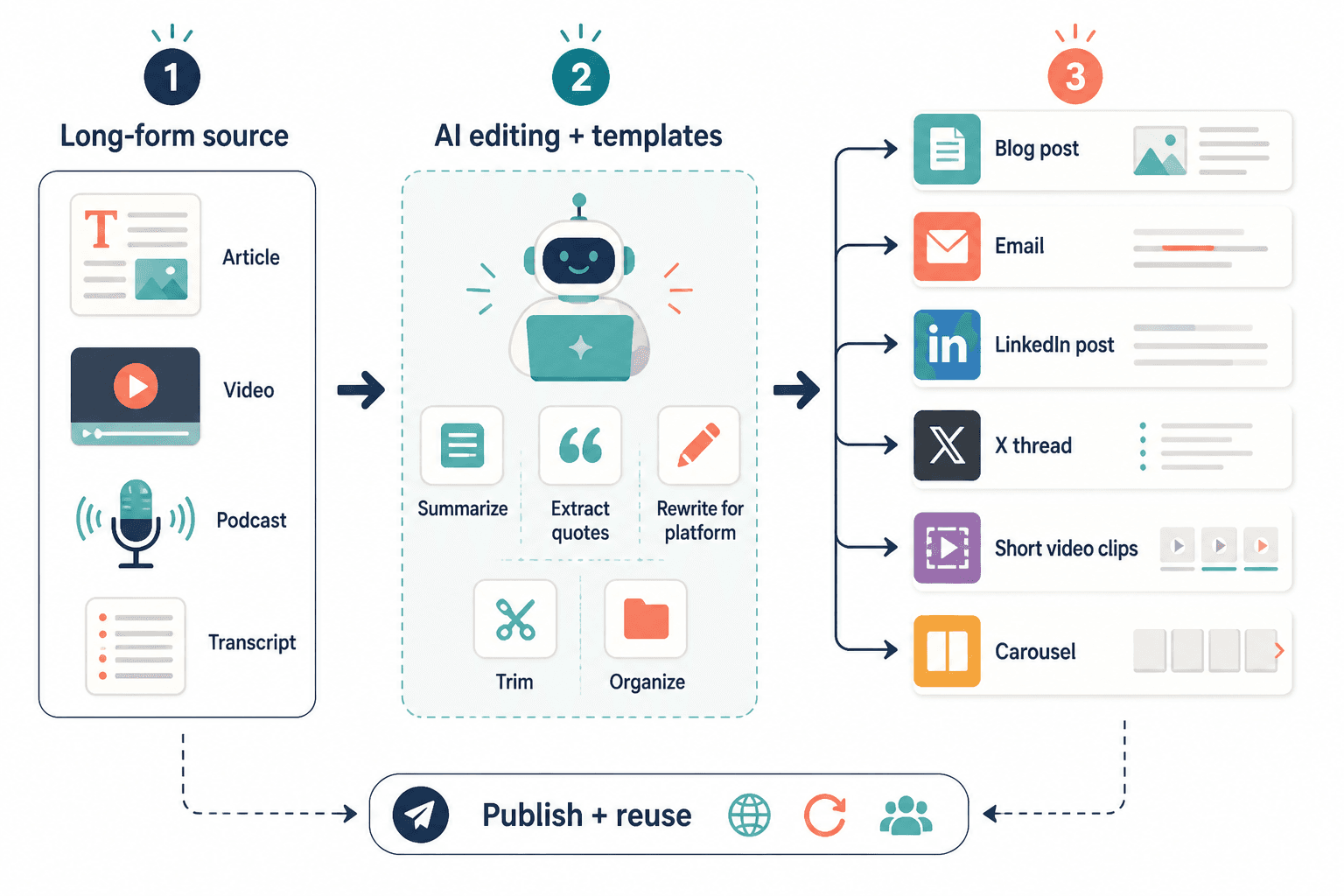
This article will help you build a cleaner, faster repurposing workflow using AI templates, practical tool categories, and a few systems that stop your content from sounding like machine-made oatmeal. If you want a broader hub for this topic, start with creator AI editing and repurposing.
For the full path around this topic, head to the parent guide.
What AI editing and repurposing tools are actually good for
Before we get into templates and tools, one correction: AI is not your content strategist, brand brain, or resident taste level. It is an assistant. A fast one, sometimes a weird one, occasionally a useful one.
Used well, AI can help creators:
- turn transcripts into usable drafts
- pull key ideas from long-form content
- rewrite the same core point for different platforms
- create first-pass headline options
- compress rambling sections
- extract quotes, clips, and thread points
- organize content into reusable formats
- speed up repetitive editing work
Used badly, it creates:
- generic summaries nobody wants
- bland hooks with no tension
- repetitive posts that sound suspiciously sterilized
- overwritten captions and threads
- fake polish where actual clarity should be
So the real play is simple: use tools to speed up the mechanical parts, then use judgment to make the content worth reading.
The best templates and tools for creator AI editing and repurposing start with one thing: a source asset
If your source material is thin, no tool will rescue it. A flat idea repurposed ten ways is still a flat idea. Efficiently.
Your best source assets are usually:
- podcast transcripts
- video transcripts
- articles and newsletters
- client Q&As
- webinars
- sales calls with repeated objections
- strong social posts that already proved demand
- voice notes where you explained something clearly once
Repurposing works best when the original piece has a real point, a clear audience, and at least a little tension. A useful disagreement. A mistake people keep making. A framework that solves an obvious problem. That gives the AI something to work with besides vague competence.
The tool stack that makes sense for most creators
You do not need 11 tools held together by desperation and monthly subscriptions. Most creators can get a lot done with four tool categories.
1. Drafting and rewriting tools
These are for transcript cleanup, first drafts, headline variations, trimming bloated passages, and changing format.
Good for:
- turning a transcript into an article outline
- rewriting a long paragraph into a tighter post
- generating multiple hook directions
- adapting one idea into LinkedIn, X, and email versions
Bad for:
- knowing your audience without context
- finding your positioning for you
- creating trust from scratch
- fixing weak ideas
If you want a more direct breakdown, this companion piece will help: best AI tools for creator AI editing and repurposing.
2. Editing and cleanup tools
These tighten sentence flow, spot awkward phrasing, catch repetition, and help remove the slightly haunted AI tone that slips into drafts.
What they do well:
- readability improvements
- grammar and punctuation cleanup
- cutting redundancy
- improving rhythm
What they cannot do well:
- decide what is actually worth keeping
- add stronger opinions where none exist
- know which parts sound most credible to your audience
For a workflow-focused breakdown of this category, see best editing tools and repurposing tools for creator AI editing and repurposing.
3. Storage and template systems
This part gets ignored because it is not sexy. Which is unfortunate, because sexy is not usually what saves you from rewriting your CTA system every Tuesday.
You need a place to store:
- repurposing prompts
- headline templates
- platform-specific post structures
- CTA variants
- good source material
- approved brand phrases and banned phrases
- before/after rewrites
This can live in a doc, notes app, project manager, database, or content hub. The exact tool matters less than whether you can find your good stuff again.
4. Scheduling and workflow tools
These help with publishing, batching, assigning statuses, and making sure your repurposed content actually ships instead of becoming a private hobby.
They are useful when you need to:
- batch content from one source asset
- track what was posted where
- queue platform-specific versions
- hand content off to an editor or VA
They are not useful if the underlying content is still mush. Scheduling bad content just helps you fail on time.
The templates that save the most time
Templates are where this gets practical. Good templates remove repeated thinking without flattening your voice. The trick is to template the structure, not the soul.
Template 1: Long-form to short-form extraction
Use this when you have a podcast, video, webinar, or article and want multiple social assets from it.
Prompt structure:
Analyze this source content and extract the 5 strongest standalone ideas for social posts. For each idea, provide:
1. a one-sentence core point
2. why it matters to [audience]
3. one hook variation for LinkedIn
4. one tighter version for X
5. one CTA that feels natural, not salesy
Keep the language specific, practical, and free of generic motivational filler.
Why it works: it forces the draft tool to separate actual ideas from transcript clutter. That matters because transcripts are full of verbal furniture. Nice in conversation. Less useful in a post.
Template 2: Headline and hook rewrite template
Most repurposed content fails at the opening. Not because the idea is weak, but because the hook sounds like every other “nobody talks about this” post wandering around online.
Prompt structure:
Rewrite these hooks to be clearer, more specific, and more credible. Avoid clickbait, fake drama, and vague curiosity. Use contrast, specificity, or a sharp opinion where useful. Provide 10 options with different angles: direct, contrarian, proof-based, mistake-focused, and result-focused.
If you want more hook-specific options, pair this with simple creator AI editing and repurposing headline rewrites templates for busy creators.
Template 3: Platform adaptation template
One of the easiest ways to make repurposed content worse is to post the same format everywhere. LinkedIn is not X. X is not your email list. Facebook is not your fake thought-leadership showroom.
Prompt structure:
Take this core idea and rewrite it for 3 platforms:
– LinkedIn: professional, useful, clear formatting, one practical takeaway
– X: tighter, punchier, one strong angle per post
– Email/newsletter: more context, smoother transitions, slightly warmer tone
Keep the main idea intact, but adapt cadence, depth, and CTA to fit the platform.
This is where a lot of creators get lazy. You can reuse the idea. You should not reuse the exact clothing.
Template 4: Transcript cleanup template
This is for turning spoken content into something readable without scrubbing out all signs of human life.
Prompt structure:
Clean up this transcript into clear written prose. Remove filler, repetition, and false starts, but keep the original point and voice. Break the content into sections with useful subheads. Do not over-formalize the writing. Preserve strong phrases and examples.
Notice the line about not over-formalizing. That one matters. Otherwise your transcript may come back sounding like it applied for a middle-management role.
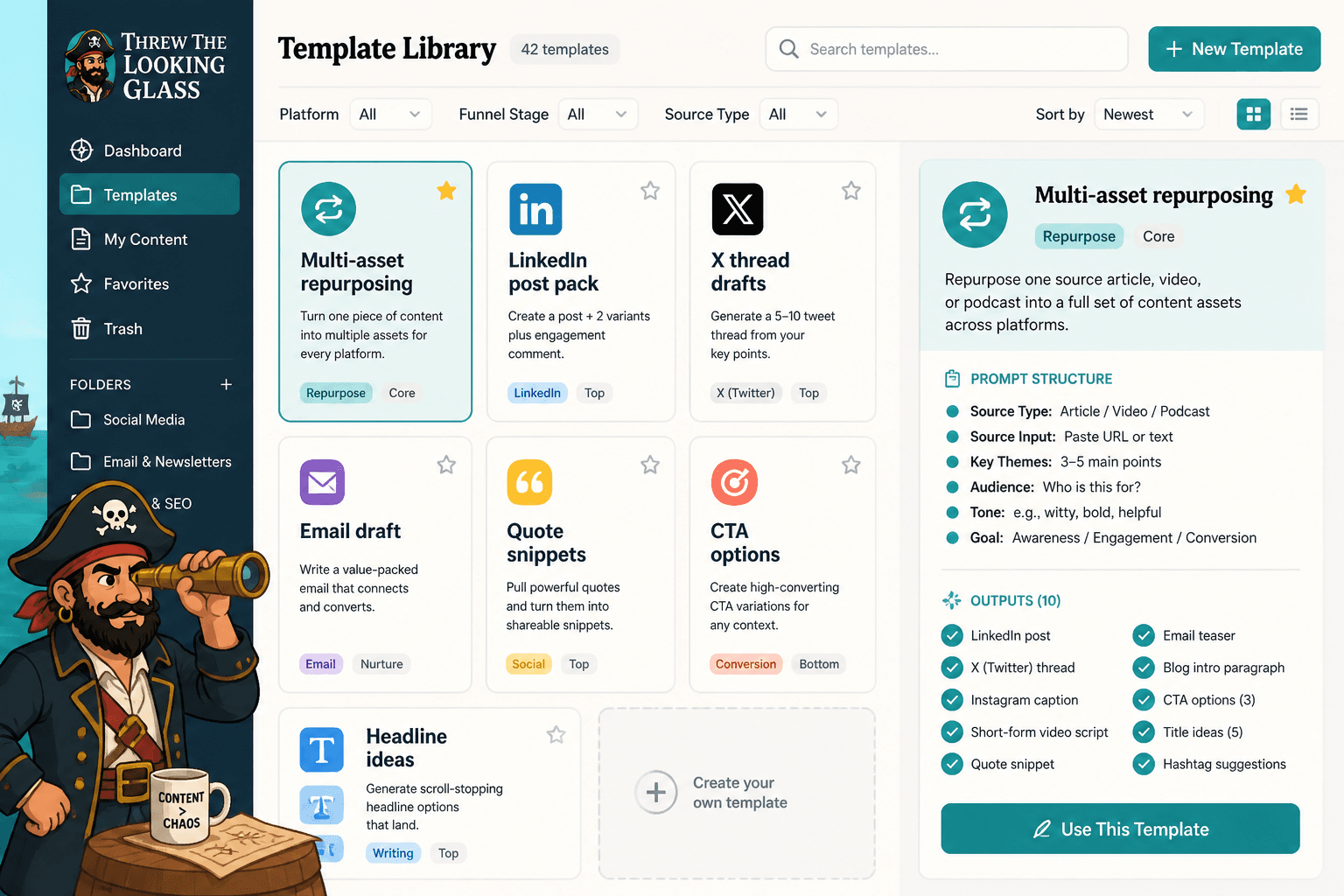
Template 5: Multi-asset repurposing template
This is the one to use when you want a single source asset turned into a complete content pack.
Prompt structure:
Turn this source content into a repurposing pack that includes:
– 3 LinkedIn post drafts
– 5 X post drafts
– 1 short email draft
– 7 quote-style content snippets
– 3 CTA options
– 5 possible headlines
Make each asset distinct. Do not repeat the same opening or conclusion across formats. Keep all outputs practical and audience-specific.
This template is especially useful for creators who batch content from one weekly article, video, or podcast. One solid source can carry a lot more weight than most people realize.
How to choose the right tools without buying digital clutter
If you are comparing tools, do not ask which one has the most features. Ask which one fits your actual workflow.
| Need | Best tool type | What to watch for |
|---|---|---|
| Turn transcripts into usable drafts | AI drafting tool | Overly generic summaries |
| Tighten writing and reduce repetition | Editing tool | Over-correcting your voice |
| Store prompts and templates | Docs or database system | Messy naming and no retrieval system |
| Track repurposed assets | Workflow or project tool | Too much setup for a simple process |
| Publish across platforms | Scheduler | Posting identical copy everywhere |
For most solo creators, the smart setup is boring in a good way:
- one drafting tool
- one editing tool
- one place to store prompts and templates
- one scheduling or workflow system
That is enough to create a reliable machine. Add more only when a clear bottleneck shows up.
A simple creator workflow that actually works
Here is a clean five-step system for creator AI editing and repurposing. Nothing fancy. Just usable.
- Start with one strong source asset. Use an article, transcript, newsletter, call recording, or video with a clear point.
- Extract the best ideas. Use AI to pull out 3 to 7 strong angles, not 25 forgettable ones.
- Adapt by platform. Rewrite each angle for LinkedIn, X, email, or wherever you publish.
- Edit for voice and sharpness. Cut filler. Add specifics. Improve the opening. Fix the CTA.
- Store and schedule. Save the best prompts, tag reusable content, and queue the final assets.
This is where templates really shine. They reduce decision fatigue, speed up execution, and make your output more consistent without making it robotic.
Also, worth saying: consistency gets much easier when repurposing is part of creation, not an optional chore afterward. Build for reuse from the start. If you record a podcast, know what kinds of clips, posts, and email ideas you want from it before you hit publish.
What creators keep getting wrong with AI repurposing
A few things go sideways over and over.
They ask the tool to do all the thinking
If your prompt is basically “make this good,” do not be shocked when the result is aggressively average. AI performs better with constraints, audience context, tone direction, and format rules.
They repurpose too literally
Copy-pasting the same paragraph into three platforms is not strategy. It is formatting. Real repurposing means changing the shape, depth, and pacing to fit where the content lives.
They keep weak source content
Not every transcript deserves a second life. Some content should be cut down, not multiplied. If the original piece has no tension, no insight, and no specificity, repurposing it will just spread the problem around.
They do not build a reusable system
Without a template library, naming system, and basic workflow, every content cycle starts from zero. That is exhausting, and completely unnecessary.
How to make AI-assisted repurposing sound more human
This part matters more than the tool itself.
If you want AI-assisted content to feel human, do these five things:
- feed it real source material from your voice, not just topics
- ask for multiple angles, then choose one instead of merging all of them into bland soup
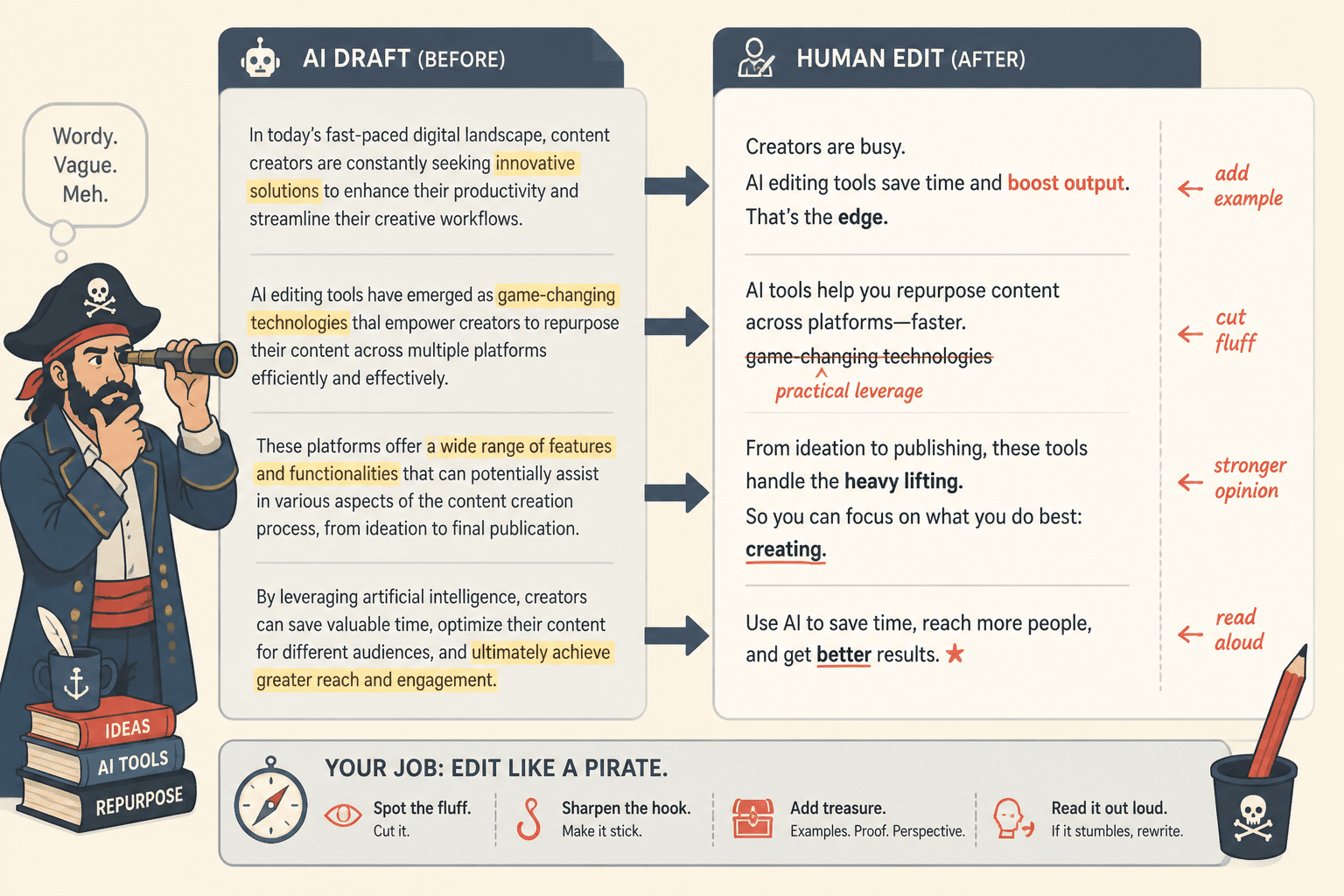
- add specifics, examples, and opinions after the draft
- cut inflated phrases and vague claims
- read the final version out loud to catch fake rhythm
The fastest way to spot bad AI content is that it sounds technically competent and emotionally uninhabited. It says things that are not wrong, exactly. Just not alive.
That is why human editing still matters. The tool can create options. You decide which ones deserve oxygen.
Best use cases by creator type
The best templates and tools for creator AI editing and repurposing can look slightly different depending on what you make.
For coaches and consultants
- turn client call themes into educational posts
- repurpose sales objections into articles and FAQs
- convert workshop transcripts into lead-generating email sequences
For writers and personal brands
- turn essays into quote posts, threads, and shorter argument posts
- create alternate hooks for the same core idea
- adapt article sections into newsletter intros or social posts
For podcasters and video creators
- extract clips, captions, post ideas, and episode summaries
- turn guest conversations into thematic content packs
- build content calendars from one recording session
For solo founders and service businesses
- turn product explanations into trust-building content
- reuse customer stories across multiple formats
- repurpose founder notes into authority-building articles and posts
Do not stop at content. Pair repurposing with a next step.
A repurposing workflow gets much more valuable when it feeds a simple funnel. Otherwise you are just making more content for the sake of feeling productive, which is a very online kind of trap.
Simple examples:
- article to newsletter signup
- LinkedIn post to profile CTA
- thread to lead magnet
- podcast clip to consultation page
- case study post to service inquiry
If you want to connect repurposed content to actual business outcomes, read best funnel ideas to pair with creator AI editing and repurposing.
And if you want the broader category page for related workflow topics, use AI writing tools and creator AI workflows.
Quick setup: your minimum viable repurposing system
If you want to leave with something practical, build this:
- a folder or database for source content
- 5 to 10 reusable AI prompts for extraction, rewriting, and cleanup
- 3 platform templates for your main channels
- a shortlist of approved CTAs
- a simple workflow board: source, drafted, edited, scheduled, posted
That is enough to make repurposing easier, faster, and less chaotic. You do not need an enterprise stack. You need a system you will actually use next week.
FAQ
What is the best tool for creator AI editing and repurposing?
There is no single best tool. Most creators need one drafting tool, one editing tool, one storage system, and one scheduler or workflow tool.
Can AI repurpose content for different platforms well?
Yes, if you give clear platform instructions. No, if you expect one generic draft to fit everywhere unchanged.
Should I use templates for every post?
Use templates for structure, not for sounding identical. They should speed you up, not flatten your voice.
What content is best for repurposing?
Strong source assets with clear ideas: transcripts, articles, newsletters, webinars, client questions, and proven posts.
How do I keep AI-generated repurposed content from sounding generic?
Add audience context, use better prompts, edit for specifics, and remove any sentence that sounds polished but pointless.
Final thought
The best templates and tools for creator AI editing and repurposing do not replace your voice. They protect your time.
That is the real win. You keep the thinking, judgment, and taste. The tools handle the repetitive parts. The templates keep you from rebuilding the wheel every week. And your content gets more mileage without sounding like it was assembled by a committee of eager robots in a beige room.
Start small: one source asset, one extraction template, one platform rewrite template, one editing pass. Build from there. A clean workflow beats a clever mess every time.
The bigger point is simple: clearer structure and clearer writing make the piece more useful. That is usually what makes the ending land better too.