
Most creators do not have a content creation problem. They have a content processing problem.
You record the podcast, write the post, film the video, or dump a decent draft into a doc. Then everything after that gets messy. Editing takes too long. Pulling clips is annoying. Turning one solid idea into five useful assets somehow becomes an all-day admin project. And that is usually the point where “I should repurpose more” goes to die.
The best editing tools and repurposing tools for Creator AI Editing and Repurposing are not the ones with the loudest landing pages or the most dramatic promises. They are the ones that help you clean up content faster, keep your voice intact, and turn one good idea into multiple usable assets without making everything sound like polished mush.
This guide will help you choose tools by job, not by hype. Because “AI-powered” is not a strategy. It is just a feature label people slap on software when they want you to forgive a clunky workflow.
For the full path around this topic, head to the parent guide.
What the best tools actually need to do
If you are looking for the best editing tools and repurposing tools for Creator AI Editing and Repurposing, start with this: the tool should reduce friction in a real workflow.
That means it should help you do one or more of these things well:
- Clean up rough writing without flattening your personality
- Transcribe audio or video accurately enough to save time
- Pull clips, quotes, or snippets from longer content
- Turn one source piece into multiple platform-ready assets
- Store reusable prompts, frameworks, and templates
- Speed up review and revision without creating extra chaos
- Help you publish consistently without rebuilding the wheel every week
Notice what is not on that list: “write all my content for me.” That is where people wander into trouble. AI can help you edit, reshape, compress, extract, reframe, and organize. It cannot replace taste, judgment, audience context, or your actual point of view. If the source material is weak, the tool just helps you produce weak content faster. Efficiently bad is still bad.
If you need the broader landscape first, this creator AI editing and repurposing hub is the best place to start, along with the full guide for creators who want better results.
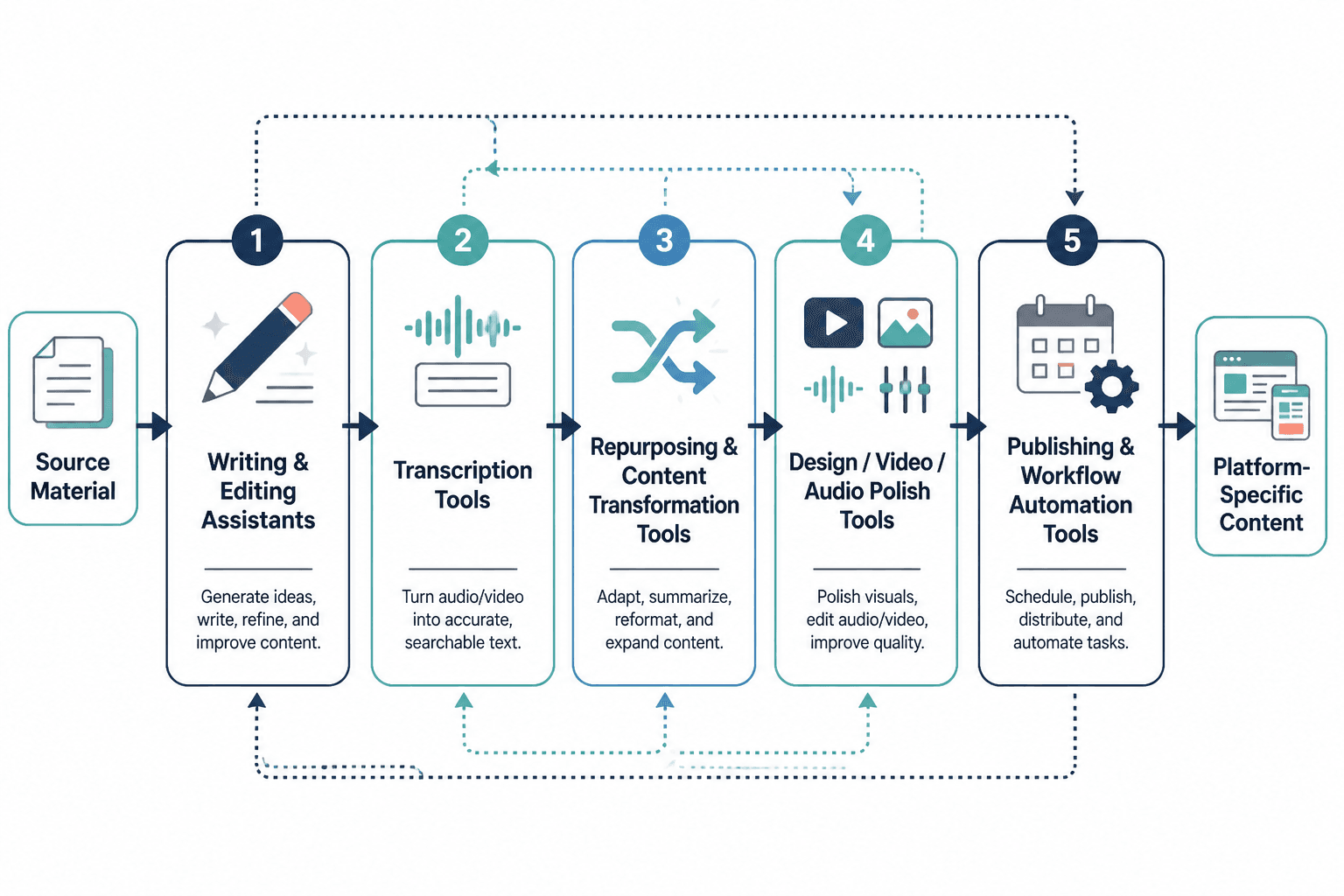
The 5 tool categories that matter most
You do not need one magical tool. You need a small stack that covers the actual jobs. For most creators, that stack falls into five categories.
1. Writing and editing assistants
These tools help tighten drafts, rephrase awkward sections, shorten bloated paragraphs, generate variations, and clean up grammar or structure.
What they are good for:
- Turning rough notes into cleaner drafts
- Rewriting long passages into shorter platform versions
- Improving readability and flow
- Generating hook or CTA variations
- Spotting repetition and fluff
What they are not good for:
- Inventing your positioning
- Knowing your audience better than you do
- Making generic ideas sound genuinely original
- Replacing final human review
If your drafts keep coming out sounding like a conference room wrote them, the issue usually is not the tool. It is that you are asking the tool to create conviction where none existed.
2. Transcription and media editing tools
These are the tools that turn spoken content into usable text, let you edit by transcript, remove filler, clean up pacing, and pull clips from longer audio or video.
They matter because spoken content is often the easiest raw material for creators to produce. A 20-minute video, podcast, coaching call, workshop, or voice note can become posts, threads, emails, captions, quote graphics, article outlines, and lead magnets. But only if you can process it without wanting to throw your laptop into a hedge.
3. Repurposing and content extraction tools
These help you turn one core asset into multiple outputs. Think:
- Podcast to blog summary
- Video to social clips
- Article to LinkedIn post series
- Transcript to thread draft
- Long post to carousel copy
- Webinar to email sequence
The good ones preserve the useful parts of the original. The bad ones produce slightly different versions of the same vague content and call it omnichannel strategy.
4. Knowledge management and template systems
This category gets ignored because it feels less glamorous, but it is usually where the real leverage lives.
A proper template and idea system helps you save:
- Post structures
- CTA variations
- Hook patterns
- Brand voice notes
- Repurposing prompts
- Content examples worth studying
- Reusable workflows by platform
Without that system, every piece of content starts from zero, and zero is a very expensive place to begin.
5. Scheduling and workflow tools
These are not editing tools in the strict sense, but they matter because repurposing falls apart when assets never make it into an actual publishing pipeline.
A good workflow tool helps you track:
- What the source asset is
- What derivatives need to be created
- What has been edited
- What is scheduled
- What performed well enough to reuse again
How to choose the right editing and repurposing tools
Before you pick software, get brutally clear about the bottleneck. Not the fantasy workflow. The real one.
Ask yourself:
- Do I struggle more with creating source content or reshaping it?
- Is my main raw material writing, audio, or video?
- Do I need better editing, faster extraction, or stronger distribution?
- Am I working solo or with a team?
- Do I need lightweight speed or a more organized content system?
- Which platforms am I actually publishing on regularly?
That last one matters more than people admit. If you post mainly on LinkedIn, X, email, and articles, your stack should support text-first repurposing. If your business is built around video, transcript editing and clip extraction matter more. If you are trying to do all of it at once with no clear primary format, that is not a tools issue. That is a strategy issue with a software shopping habit.
A practical tool stack for most creators
You can build a very workable creator stack with one tool from each of these functions:
| Function | What to look for | Why it matters |
|---|---|---|
| Draft editing | Fast rewriting, tone control, summarizing, cleanup | Speeds up rough-to-clean drafting |
| Transcript editing | Accurate transcription, clip selection, edit by text | Makes audio/video easier to repurpose |
| Repurposing | Platform-specific outputs, excerpt extraction, formatting help | Turns one asset into several usable pieces |
| Template storage | Easy organization, searchable notes, prompt libraries | Prevents starting from scratch every time |
| Publishing workflow | Scheduling, asset tracking, approvals, status visibility | Keeps repurposed content moving |
That is usually enough. You do not need 14 overlapping subscriptions and a Notion dashboard that looks like a small airport. You need a stack that removes friction from your current workflow and still feels usable on a Tuesday when your brain is cooked.
If you want a broader shortlist of AI software options, read best AI tools for creator AI editing and repurposing. If you need more plug-and-play systems, go to best templates and tools for creator AI editing and repurposing.
Best tool types by use case
Here is where most “best tools” articles become useless. They dump a giant list on you with no context. So instead, match the tool type to the job.
For creators who write first
If your source material is mostly docs, newsletters, LinkedIn posts, articles, and notes, you need:
- A writing assistant that can rewrite cleanly without over-polishing
- A place to store hooks, post formats, and CTA patterns
- A repurposing workflow that turns long-form writing into short-form assets
Your main risk is not underproduction. It is sounding increasingly artificial as the tool starts sanding off your edges. Keep your own phrases. Keep your own opinions. Keep some texture. Not every sentence needs to be optimized like it is auditioning for an ad campaign.
For creators who speak first
If your best ideas come out in conversation, on camera, or in voice notes, prioritize:
- Strong transcription
- Transcript-based editing
- Quote and clip extraction
- Summarization into written formats
- A workflow for turning one recording into several content pieces
This is often the easiest and most natural workflow for coaches, consultants, and founders. You talk through ideas once, then use tools to shape that raw material into multiple outputs. Less staring at a blank page. More working with something real.
For creators publishing across multiple platforms
If you are active on LinkedIn, X, email, and your website, your repurposing tools need to understand format differences. A decent article summary is not automatically a good X post. A polished LinkedIn paragraph often needs tightening before it belongs anywhere near X. A thread usually needs more structure than a clipped quote. Different platforms reward different levels of context, compression, and tone.
So choose tools that help you adapt content, not just duplicate it.
For teams or creators with assistants
If more than one person touches the content, workflow and handoff matter as much as generation.
Prioritize tools that support:
- Comments and review
- Version control
- Shared template libraries
- Clear naming and asset organization
- Status tracking across source and derivative content
The best AI output in the world does not help if nobody knows which draft is final.
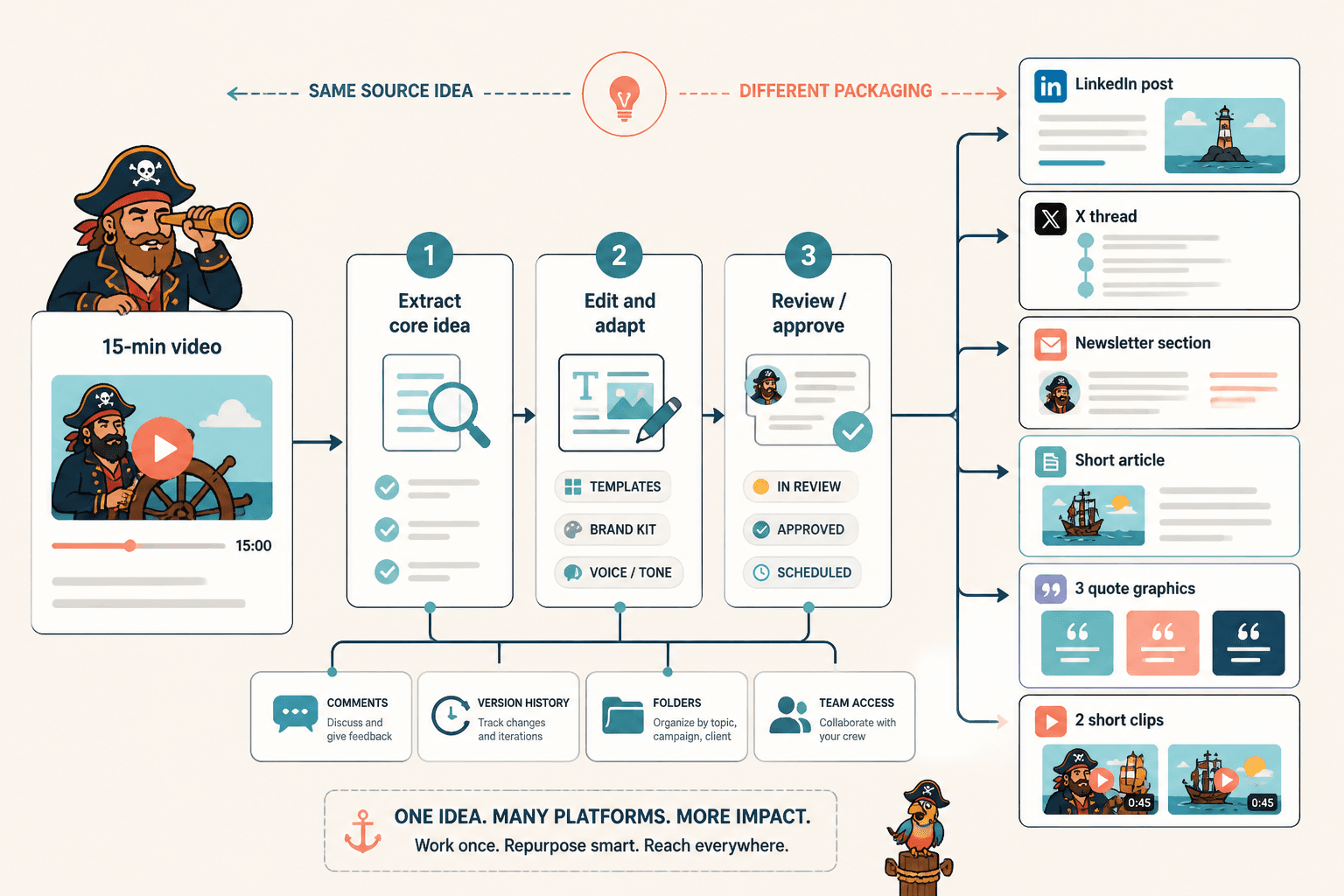
What good repurposing looks like in practice
Repurposing is not copy-pasting the same thought into six places and pretending it is a strategy. Good repurposing keeps the core idea but changes the packaging to fit the platform and the reader’s attention.
For example, one 15-minute video could become:
- A LinkedIn post with one sharp lesson and a practical CTA
- An X thread that breaks the idea into steps
- A newsletter section with more nuance and context
- A short article expanding one argument from the video
- Three quote snippets for social graphics
- Two short clips with platform-specific captions
Same source idea. Different containers. That is the point.
If you want more concrete content conversions, see these creator AI editing and repurposing ideas and examples.
Common mistakes when using AI editing and repurposing tools
Using AI to skip thinking
If the tool is doing all the interpretation, you are probably feeding it weak source material or weak direction. AI is much better as an amplifier than a substitute.
Keeping every output too generic
“Turn this into five social posts” is lazy prompting and usually gets lazy results. Better prompt: ask for five distinct platform-specific angles for creators selling services, each with a different hook style, a practical takeaway, and a non-cringey CTA.
Over-editing until the voice disappears
Many creators start with something human, then pass it through so many cleanup layers that it comes out sounding like a committee wrote it in a softly lit co-working space. Clean is good. Sterile is not.
Repurposing too early
Not every piece of content deserves to be atomized into twelve assets. First make sure the original idea is worth keeping. Good repurposing starts with a strong source piece, not with a desperate need to fill a content calendar.
No system for saving what works
If you create solid prompts, CTAs, hook formats, or content structures and then lose them in a pile of tabs and docs, you are wasting your own learning. Save the assets. Build a repeatable system. Future-you has enough problems.
A simple workflow for Creator AI Editing and Repurposing
You do not need a giant workflow map to make this useful. For most creators, this simple process works well:
- Create one strong source asset each week: article, video, podcast, workshop, or voice-note lesson.
- Use an editing tool to clean the original without stripping your voice.
- Use transcript or summarization tools to extract the strongest ideas, examples, and quotes.
- Turn those into platform-specific drafts: posts, threads, emails, short clips, captions, article sections.
- Polish each output for the platform instead of duplicating blindly.
- Store the best structures, prompts, and high-performing variations in a template system.
- Schedule or publish in a simple workflow so the repurposed assets actually go live.
That process is boring in the best possible way. It is repeatable. It saves time. And it does not depend on waiting for inspiration to descend from the ceiling.
How to evaluate a tool before paying for it
Before committing to any editing or repurposing platform, test it against one real asset you already have. Not a fantasy example. Not the demo. Use your own material.
Check these things:
- Does it save time after the learning curve?
- Does the output still sound like you?
- Can it handle your main format well: text, audio, or video?
- Does it create usable first drafts or just messy filler?
- Can you get from source asset to publishable outputs without too much manual repair?
- Will you actually keep using it weekly?
That last one is underrated. A tool can be powerful and still be wrong for you. If the workflow is annoying, confusing, or weirdly fragile, you will stop using it the second client work gets busy.
For a broader path through these options, you can also browse the wider AI writing tools and creator AI workflow collection.
What to prioritize if your budget is limited
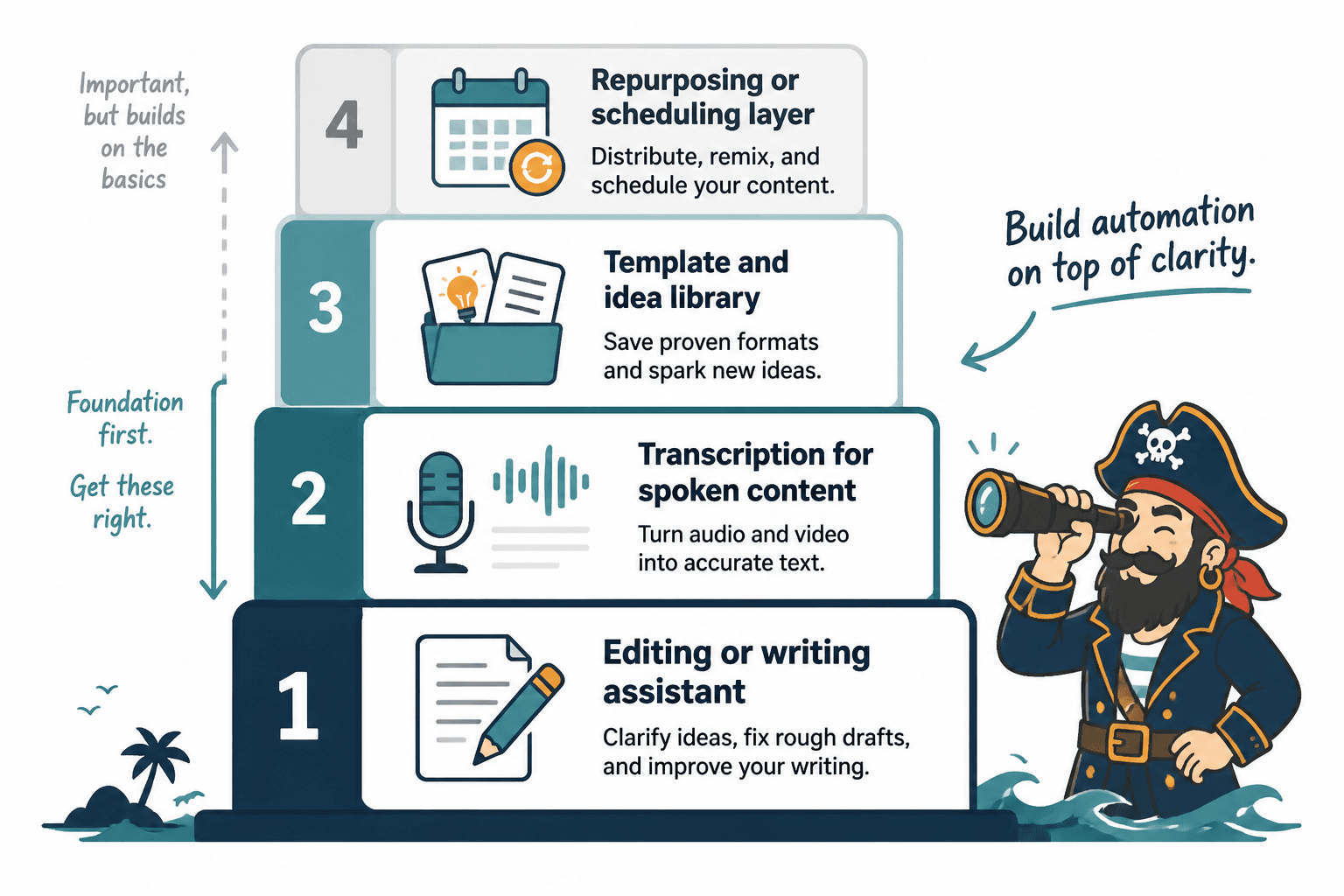
If you are not trying to fund a software museum, here is the sane order of operations:
- First, get one solid editing or writing assistant
- Second, add transcription if you create spoken content
- Third, build a template and idea library
- Fourth, add a repurposing or scheduling layer if volume justifies it
Why this order? Because better source content and cleaner editing usually create more value than fancy automation on top of mediocre drafts. Automation should sit on top of clarity, not try to replace it.
Quick FAQ
Do I need separate tools for editing and repurposing?
Not always. Some overlap exists. But many creators still do better with one strong editing tool and one tool focused on transcription, clipping, or content transformation.
Can AI repurposing tools replace a human editor?
No. They can speed up drafting, extraction, and formatting. They cannot fully replace judgment, brand voice, audience awareness, or strategic editing.
What is the best source content to repurpose?
Usually content with depth: podcasts, videos, workshops, articles, interviews, and strong newsletters. Short weak posts do not magically become better by multiplying them.
How many tools should a solo creator use?
Usually three to five is enough: one for editing, one for transcripts or media, one for templates or notes, and optionally one for repurposing or scheduling.
What should I avoid?
Avoid tools that generate lots of bland output, force awkward workflows, or promise to replace strategy. Also avoid stacking too many tools that do almost the same thing.
Choose tools that support your thinking, not replace it
The best editing tools and repurposing tools for Creator AI Editing and Repurposing help you do more with your real ideas. They make your workflow lighter, your content sharper, and your distribution less chaotic. They do not rescue weak positioning. They do not create trust from nothing. And they definitely do not fix boring source material with a magic button.
Pick tools that fit the way you already create. Build a small stack around actual bottlenecks. Save what works. Repurpose with intention. And if a tool makes your content faster but worse, that is not efficiency. That is just accelerated mediocrity with a subscription fee.
The bigger point is simple: clearer structure and clearer writing make the piece more useful. That is usually what makes the ending land better too.