
A draft audit is open in one tab, a spreadsheet of old posts is open in another, and the site map looks like it was assembled during a mild emergency. A few pages pull real traffic. A few pages have useful material buried in paragraph seven. Most of the site is just sitting there, hoping somebody remembers to connect the dots. That is exactly where examples help: they turn internal linking and updating from vague advice into something you can actually place on the page.
For creators, these edits are not cleanup chores. They decide whether a reader keeps moving, whether an older post still earns its keep, and whether the site behaves like a connected system instead of a pile of one-off posts. If you want the broader strategy behind this cluster, start with the parent guide to internal linking and updating. This article stays in the weeds with ideas, templates, and examples you can adapt fast.
If you want the companion “how to” version next, the related guide How to Write Better Internal Linking and Updating covers the mechanics in a more step-by-step format. For a tools-first angle, there is also Best AI Tools for Internal Linking and Updating. And if you are trying to turn these edits into revenue rather than just tidier navigation, see How to Turn Internal Linking and Updating Into More Leads or Sales.
What internal linking and updating examples are actually for
Examples do three useful things:
- They show where a link should go, not just that one should exist.
- They show how an older article can be refreshed without rewriting everything.
- They help you decide which pages should do the heavy lifting and which pages should support them.
That matters because internal linking is not just “add more links.” A useful link moves a reader to the next relevant page. A useful update makes an older page more accurate, more useful, or more connected to the rest of the site. Those are related jobs, but they are not the same job.
What a link map is
A link map is the rough plan for how a site should connect its pages. It is not fancy. It is basically:
- one central page that covers the broad topic,
- supporting pages that go deeper into narrower angles,
- older pages that get updated and pointed toward newer, more relevant material,
- conversion pages that sit where a reader might reasonably be ready to act.
Think of it as a working route, not a piece of art. A good map reduces random linking and makes updates easier because you are not guessing where the post should point. You already know which pages belong together.
If you want a dedicated breakdown of the map format, use the sibling article Internal Linking Link Map Examples Creators Can Adapt Fast.
Why most internal linking setups fail
Most linking systems fail in boring ways:
- they only link from new posts to old posts, never the other way around;
- they scatter links to irrelevant pages because “more internal links” sounds productive;
- they use the same anchor text over and over until it sounds robotic;
- they ignore older posts that already have authority or traffic;
- they never create a clear next step for the reader.
The result is a site that looks linked in theory but feels disconnected in practice. Search engines can crawl it, sure. Readers, meanwhile, have to do the interpretive dance.
Helpful internal linking is contextual. It should appear because the linked page genuinely extends the point being made. If the link only exists because someone needed to “get a few more in,” it is decorative at best and distracting at worst.
The simplest link map model that works
A practical creator-friendly model usually needs only four page types:
- Pillar page – the broad guide that introduces the topic.
- Supporting article – a narrower post that goes deeper on one angle.
- Update target – an older page that needs fresh information, examples, or links.
- Conversion page – a service page, signup page, product page, or contact page.
That is enough to build a useful site structure without turning your content plan into a cathedral project. The point is not volume. The point is flow.
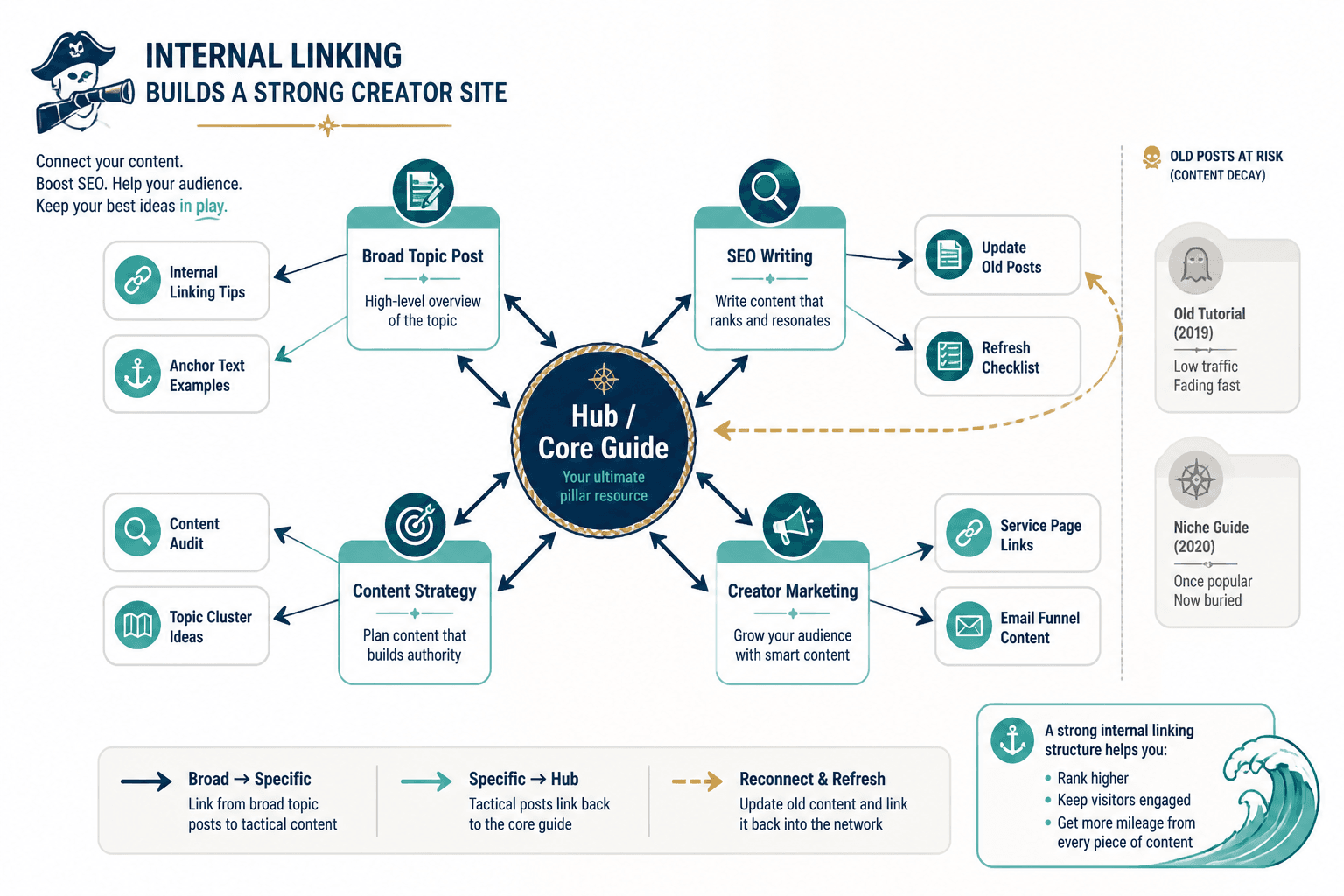
For a visual companion to the structure, the image below shows a simple hub-and-support pattern that creators can adapt without overthinking it.

A clean creator-friendly structure
Here is the practical version of the model:
- The main guide introduces the topic and links out to the most useful subtopics.
- The subtopic posts link back to the main guide and sideways to closely related articles.
- Older posts get refreshed with new examples, better links, and updated calls to action.
- Service or offer pages get linked where the reader is most likely to want the next step.
That structure works for solo creators, studios, consultants, and small businesses because it keeps the site from becoming a maze. A reader should be able to move from broad question to specific answer to next action without wondering whether they took a wrong turn.
Example 1: the solo creator topic cluster
Imagine a creator writing about content strategy. The site has:
- a broad guide on content planning,
- a post on internal linking,
- a post on content updates,
- a post on repurposing old articles,
- a signup page for a newsletter or resource library.
Here is how the links could work:
- The broad guide links to the internal linking post when it reaches the section on site structure.
- The internal linking post links to the content updates post when it mentions older articles losing relevance.
- The content updates post links to the repurposing post when it explains how refreshed posts can feed new formats.
- Each post links to the newsletter or resource page if the reader is likely to want a template or checklist.
This is a simple chain, but it is effective because each link earns its place. It does not ask the reader to leap randomly from one topic to another. It keeps the path close to the subject.
Example 2: the service business trust path
A coach, consultant, or service provider usually needs a slightly different structure. The site may have:
- a core authority article on a major problem the client wants solved,
- supporting posts that explain symptoms, process, and options,
- a service page that explains the offer,
- a case-study or results page that shows proof.
A useful path might look like this:
- The authority article introduces the problem and points to the service page only after the reader understands the issue.
- The supporting posts link back to the authority article and across to the service page where relevant.
- The service page links to proof, FAQs, or a related post that reduces hesitation.
This is less about “SEO juice” and more about trust. The reader should never feel hustled into a sales page before they understand why it exists.
Example 3: the update-first archive rescue map
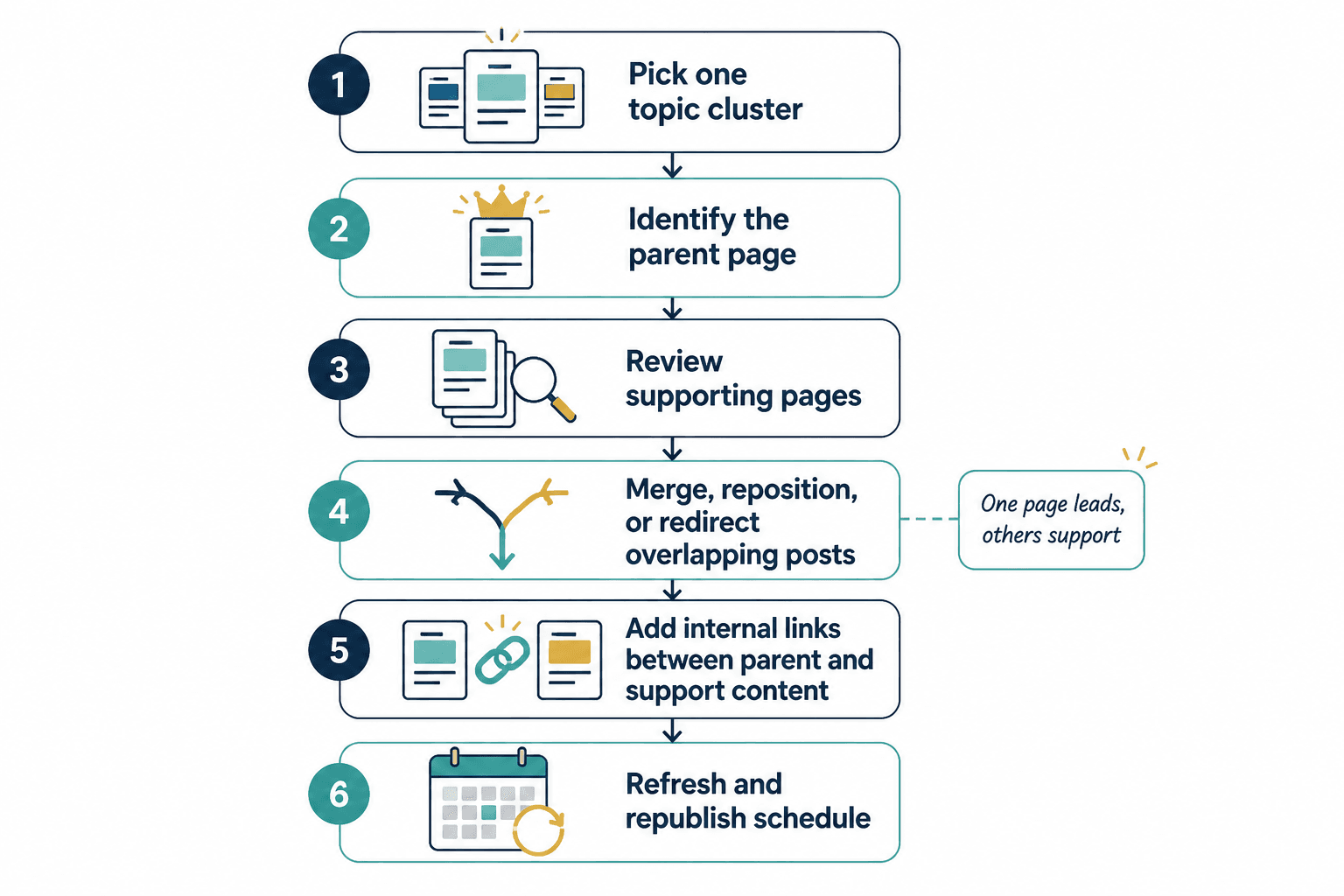
Some sites already have a pile of older posts that still attract visits but no longer do enough. That does not mean they are dead. It means they need an update plan.
Start with three buckets:
- Keep – pages that still work and only need light adjustments.
- Refresh – pages that need updated examples, better links, or clearer sections.
- Retire or merge – pages that should be folded into stronger content.
Then update the surviving pages by:
- adding newer internal links to relevant guides,
- linking from high-traffic older pages to newer strategic pages,
- replacing outdated references,
- tightening the intro and conclusion so the page has a clearer job.
This is where a content audit turns into something more useful than a guilt spreadsheet. It becomes a map for where attention should go first.
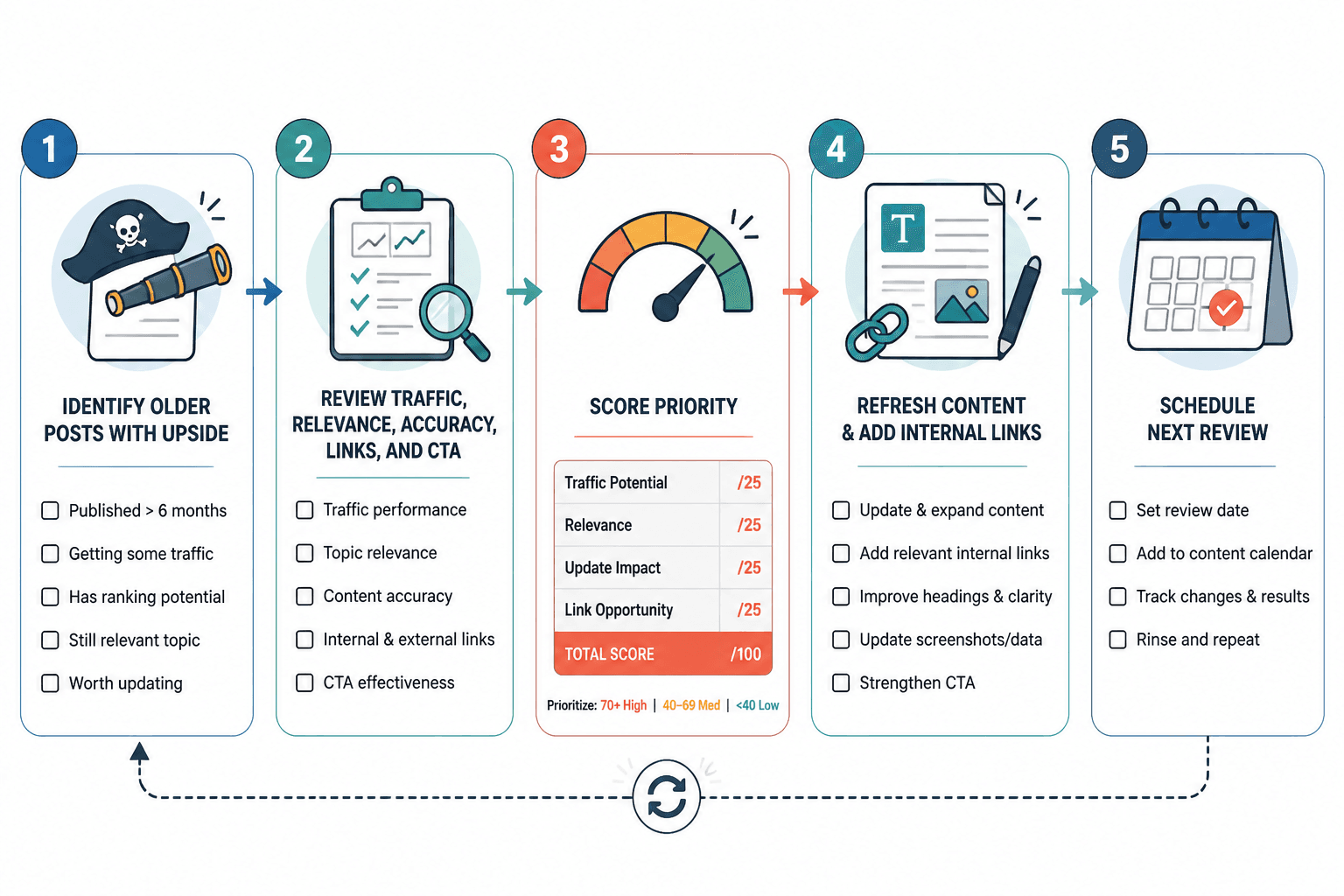
The workflow below shows the general shape of that process: review, update, reconnect, and move on before the calendar eats the afternoon.
How to update links inside older posts without breaking the post
Updating an older post does not need to become a full rewrite unless the page is truly off target. In many cases, the right move is a controlled set of edits:
- Swap weak links for stronger ones. Link to the most relevant live page, not the nearest page alphabetically.
- Add one or two contextual links where the topic naturally expands.
- Trim redundant links. One good link is usually better than three desperate ones.
- Update examples, stats, or references that have gone stale.
- Check the CTA. If the page has a next step, make sure the reader can actually see it.
Search engines use links as pathways for discovery and context. Google’s own documentation on crawlable links and site structure signals is a useful reminder that navigation is not decoration. It is infrastructure.
For broader guidance on search quality and helpful content principles, Google’s helpful content guidance is still the right sort of thing to keep in mind while editing.
Quick rules for choosing the right link target
- Link to the page that answers the next question, not the page you most want to promote.
- Prefer pages with a clear relationship to the sentence around the link.
- Use anchor text that sounds like language a person would actually use.
- Do not force a money page into every article just because it exists.
- Update links when a newer page becomes the better destination.
That last point matters more than it sounds. Good internal linking is not static. A newer guide may deserve the link because it is more complete, more relevant, or simply less out of date. The site should reflect the current best path, not the path somebody created two years ago and never revisited.
Where the parent guide and sibling posts fit
If you are building this cluster out, the best use of this article is as the examples-and-templates piece. It pairs well with:
- the parent guide for the strategy overview,
- the how-to guide for execution details,
- the link map examples article for structure planning,
- the content decay templates article for quick triage,
- the personal-brand examples article for a more niche application.
A simple monthly workflow
If you want a process that does not eat the week, try this:
- Pick one pillar or high-traffic page.
- Check which internal links still make sense.
- Find one or two newer pages worth linking to.
- Identify one aging post that should be refreshed.
- Update the older page with clearer links, cleaner examples, and a better next step.
- Repeat the same pattern next month on another page.
That is enough to keep the site healthy without turning every update into a redesign. The trick is consistency. A site with modest but regular maintenance usually outperforms a site that gets “fixed” once a year by someone muttering about priorities.
Final takeaway
Internal linking and updating work best when they are planned as a system. Examples make that system visible. A link map shows the path. A content update workflow keeps the older pages useful. And a good set of contextual links makes the whole site feel like it was built to help readers move forward, not just land on a page and leave.
If you are deciding where to start, start with one strong page, one supporting post, and one older article that deserves a refresh. That is usually enough to prove the model before you expand it.