
Most creators do not need more AI tools. They need fewer tabs, better prompts, and a setup that does not make simple work feel like airport security.
That is why Best Gemini Gems and Connected Apps for Content Creators is not really a “look at these shiny features” conversation. It is a workflow conversation. Gems can help you stop rewriting the same instructions every day. Connected apps can pull your actual files, notes, calendars, and docs into the process so you are not copy-pasting your life into a chatbot like it is 2023.
If you create posts, articles, lead magnets, client content, emails, scripts, or research notes, the real question is simple: which Gemini setup actually saves time without making your work sound like machine-marinated oatmeal?
Here is the practical version. You will get the best Gemini Gems to build, which connected apps are actually useful for creators, where this setup helps, where it absolutely does not, and how to avoid turning your workflow into a complicated little productivity shrine.
Want the broader roadmap? Start with the parent guide.
What Gemini Gems are, in plain English
Gems are custom AI assistants inside Gemini that you configure for a specific job. Think of them as reusable roles with instructions, tone rules, goals, and context baked in.
Instead of typing “Act like a content strategist who helps me turn rough ideas into LinkedIn posts for consultants” every single time, you build that once as a Gem. Then you use it when needed.
That is the appeal. Not magic. Not genius in a box. Just less repetition and more consistency.
For content creators, Gems work best when the task is repeated often enough to deserve a repeatable setup:
- Post drafting
- Hook generation
- Repurposing long-form content
- Research summarizing
- Offer messaging refinement
- Client voice adaptation
- Email and newsletter structuring
- Content calendar planning
They work much worse when you expect them to invent your positioning, develop your taste, or rescue a dull idea. AI can help package a strong idea. It still struggles to make a weak one worth reading.
Why Gemini Gems matter more when they are paired with connected apps
Used alone, a Gem is basically a tidy prompt with memory-like structure. Useful, yes. Transformative, not always.
Used with connected apps, it becomes more practical. Now your assistant can reference your documents, notes, spreadsheets, email context, meeting information, or stored assets. That cuts a lot of grunt work. It also reduces the quality drop that happens when you ask AI to work without enough context and then wonder why it answered like a generic intern who skimmed one blog post.
For creators, the sweet spot is not “AI does everything.” The sweet spot is “AI can access the right materials so it can help me do good work faster.”
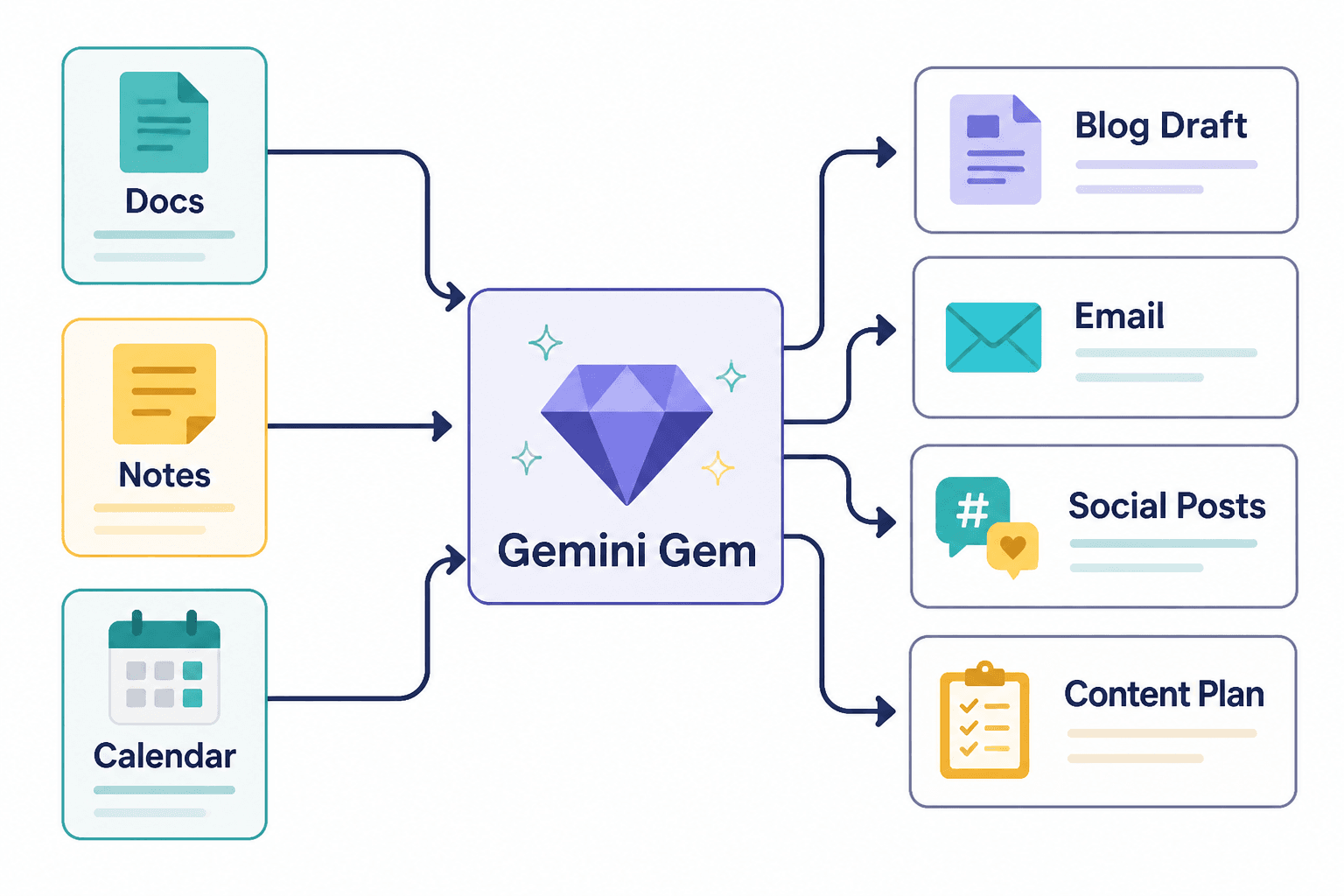
Best Gemini Gems and Connected Apps for Content Creators
Here are the setups worth building first. Not because they sound impressive, but because they remove repeat friction from actual content work.
1. The content repurposing Gem
This is probably the most useful Gem for busy creators. Feed it a transcript, article, podcast notes, webinar outline, or client call summary, and have it turn that material into multiple formats.
What it should do:
- Extract the strongest ideas
- Group ideas by audience pain point
- Turn one source into posts, email ideas, article angles, and short hooks
- Keep your tone grounded and specific
- Flag weak or repetitive sections instead of blindly repackaging everything
Best connected apps for this Gem:
- Google Docs for transcripts and drafts
- Google Drive for source files and content folders
- Google Sheets if you track repurposing outputs or content inventory
Why it works: creators often have enough raw material already. The problem is not idea scarcity. It is extraction, sorting, and formatting.
2. The rough-idea-to-post Gem
If your notes app is full of half-thoughts, this one earns its keep fast.
Build a Gem that takes brain-dump bullets and turns them into platform-ready drafts without making them sound inflated or weirdly polished. The best version does not just write. It asks smart follow-up questions when the idea is too vague to be useful.
What it should do:
- Find the actual point in a messy note
- Offer 2 to 4 positioning angles
- Draft in your preferred style
- Suggest a stronger hook if the first line is sleepy
- Keep CTAs simple and not funnel-goblin creepy
Best connected apps for this Gem:
- Google Keep or Docs for raw idea capture
- Drive for archived examples of your best-performing content
This one is especially handy for solo founders, coaches, and consultants who know their subject but do not want to spend 45 minutes turning one decent thought into one decent post.
3. The research summarizer Gem
Research is where many creators lose half a day and then produce three bullet points and a mild headache.
A research Gem should gather, summarize, compare, and organize material into something usable for content. Not just “here is what I found,” but “here are the patterns, debates, examples, caveats, and best angles to write from.”
What it should do:
- Summarize source material clearly
- Pull out contradictions or repeated themes
- Separate facts, assumptions, and opinions
- Turn research into article outlines or post ideas
- Highlight where you still need human verification
Best connected apps for this Gem:
- Google Docs for saved notes
- Drive folders for reports, PDFs, and source material
- Sheets for tracking topic clusters or source libraries
This setup is excellent for writers, educators, consultants, and anyone creating thought leadership that should contain some actual thought.
4. The brand voice guardrail Gem
One of the easiest ways to make AI useful is to stop asking it to “sound professional” and start giving it sharper boundaries.
A brand voice Gem should not be written like a fluffy brand workshop deck. It should have practical rules. What you sound like. What you never sound like. What vocabulary you use. What clichés get banned on sight.
What it should do:
- Rewrite drafts into your actual voice
- Remove robotic phrasing and filler
- Keep tone consistent across posts, articles, and emails
- Flag lines that sound too generic, too salesy, or too stiff
Best connected apps for this Gem:
- Docs for voice guidelines and writing samples
- Drive for examples of strong past content
This is one of those setups that seems boring until it saves you from publishing another draft that sounds like a pleasant corporate hallucination.
5. The newsletter and email drafter Gem
Email content often gets treated like the forgotten cousin of social content, which is strange considering it usually converts better.
A newsletter Gem can help turn one topic into a structured, readable email that sounds like a person and leads somewhere sensible.
What it should do:
- Draft short or medium-length newsletters from source ideas
- Create subject line variations
- Suggest transitions and tighter openings
- Keep one clear point per email
- Match CTA style to the offer and audience temperature
Best connected apps for this Gem:
- Docs for previous emails and swipe files
- Drive for lead magnets, offers, and promo context
- Calendar if your newsletter ties to launches, events, or publishing schedules
6. The content planner Gem
Not everyone needs a full content calendar. Plenty of people just need a realistic weekly plan that does not collapse by Tuesday.
A planning Gem can use your goals, content pillars, launches, and existing assets to build a simple schedule. The useful version is flexible and strategic. The useless version spits out 30 generic prompts you will never use.
What it should do:
- Turn business goals into content themes
- Map platform-specific content ideas
- Balance authority, trust, conversation, and offer-related posts
- Reuse existing source material before inventing new work
Best connected apps for this Gem:
- Google Calendar for publishing rhythm and campaign timing
- Sheets for tracking topics, status, and formats
- Drive for source content library
Which connected apps are actually useful for creators
Not every app connection matters equally. For most content creators, these are the ones with the most practical value.
| Connected app | Best use for creators | Why it matters |
|---|---|---|
| Google Docs | Drafts, notes, transcripts, swipe files | Keeps source material accessible and editable |
| Google Drive | Content library, brand assets, client files | Useful context lives here already |
| Google Sheets | Content planning, research tracking, idea databases | Good for structured workflows and status tracking |
| Google Calendar | Launch planning, newsletter timing, editorial workflow | Helps align content with actual deadlines |
| Gmail | Pulling insights from conversations, offers, client context | Helpful in moderation, but do not get sloppy with privacy |
If your work already lives in Google’s ecosystem, Gemini becomes more useful faster. That is the unglamorous truth. Less friction means more chance you will actually use the setup.
How to build a Gem that is genuinely useful
The quality of a Gem depends less on cleverness and more on specificity. Most weak AI setups fail because the instructions are vague, the task is too broad, or the creator expects the tool to read their mind and also fix their business.
A better Gem usually has one clear job, a defined tone or output shape, and enough context to be useful without turning into a giant dumping ground. That kind of setup is less exciting to describe, but much better to actually use.