
Most creators do not need more tools. They need fewer tabs, fewer copy-paste rituals, and fewer tiny admin tasks quietly eating the hour they thought would become writing time.
That is where Claude integrations can actually help. Not in the cheesy “AI changes everything” way. In the much more useful “I would like this draft, note, transcript, research pile, or client input to move through my workflow without me babysitting it” way.
If you are looking for the best Claude integrations for creators who want less busywork, the right setup usually is not about finding one magical app. It is about choosing a few integrations that reduce friction around the work you already do: capturing ideas, turning raw material into usable drafts, organizing research, repurposing content, and moving finished pieces toward publishing or delivery.
This article will help you figure out which kinds of Claude integrations are actually worth your attention, which ones are overrated, and how to build a setup that saves time without turning your creative process into a beige automation factory.
To see how this fits into the wider strategy, open the parent guide.
What creators should actually want from Claude integrations
Before the tool list, a quick reality check.
A good Claude integration should do at least one of these things well:
- Reduce repetitive manual work
- Make existing content easier to reuse
- Help you organize inputs before writing
- Speed up drafting without flattening your voice
- Move work cleanly between systems
- Make collaboration less annoying
What it should not do is encourage you to mass-produce generic slop slightly faster. That is not a workflow win. That is just more efficient mediocrity.
For most creators, the best Claude integrations are not the ones with the most features. They are the ones that remove the most boring steps between idea and output.
The best Claude integrations for creators who want less busywork
These are the integration categories worth paying attention to, especially if you are a writer, coach, consultant, marketer, founder, or personal brand creating content regularly.
1. Notes and knowledge-base integrations
If your ideas live in a notes app, docs folder, swipe file, or second brain system, this is one of the most useful places to connect Claude.
Why it helps: creators usually do not have an idea problem. They have an “I know I wrote something about this three months ago and now it has vanished into the swamp” problem.
Claude works well when you can give it strong source material. Integrating it with your notes, research library, or internal knowledge base makes it much easier to:
- Summarize long notes into usable content angles
- Pull patterns from scattered idea fragments
- Turn old drafts into fresh versions for new platforms
- Organize research into themes, arguments, or article sections
- Create reusable source packs for future writing
This is especially useful if you write articles, threads, newsletters, client content, or educational posts. The integration does not need to be fancy. It just needs to make retrieval and transformation easier.
What to watch for: if your notes are messy, Claude will not magically turn them into strategic brilliance. Garbage in still has a work ethic.
2. Document and cloud storage integrations
Creators end up with transcripts, client questionnaires, PDFs, workshop notes, content briefs, draft folders, and way too many “final-v2-actual-final” files. Connecting Claude to your document storage can save a surprising amount of time.
Useful jobs here include:
- Summarizing uploaded documents
- Extracting key points from PDFs or reports
- Comparing multiple documents to find overlap or contradictions
- Turning raw materials into outlines, briefs, or talking points
- Building content from workshop transcripts or interview notes
For consultants, coaches, and service providers, this can be especially practical. Instead of rereading a messy intake form and a call transcript from scratch, you can use Claude to pull out themes, objections, goals, and useful language from the client’s own words.
That means less admin drag and better source material for proposals, follow-ups, messaging, and content.
3. Writing and document editor integrations
This is the obvious category, but it is still one of the most valuable when used properly.
A Claude integration inside your writing environment can help with:
- Outlining articles from rough notes
- Rewriting clunky sections
- Generating alternatives for hooks, headlines, and CTAs
- Condensing long passages
- Expanding underdeveloped arguments
- Turning bullet points into readable drafts
The key is using it as a thinking and editing assistant, not a replacement for judgment. Claude can help you get to a stronger draft faster. It cannot decide what is actually worth saying on your behalf.
Writers usually get the best results when they bring their own raw material first: notes, opinions, stories, examples, source points, rough structure. If you ask it to invent the whole thing from nothing, you often get polished emptiness. Very smooth. Very readable. Also weirdly dead behind the eyes.
Used well, though, this integration category removes a lot of friction from drafting and revising.
4. Project management and task workflow integrations
If your content process involves tasks, deadlines, approvals, campaign stages, client deliverables, or recurring workflows, Claude can help at the project layer too.
Useful integration jobs here include:
- Turning meeting notes into task lists
- Converting content plans into production checklists
- Summarizing long update threads into next actions
- Generating first-pass briefs from a task prompt
- Creating repeatable SOPs from the way you already work
This category matters because creators do not just make content. They manage the machinery around content: planning, review, revisions, client handoff, launch timing, repurposing, and follow-up. That operational layer gets ignored until it becomes the reason nothing ships.
Claude can help reduce that friction, especially if you are juggling multiple content channels or client projects at once.
5. Automation platform integrations
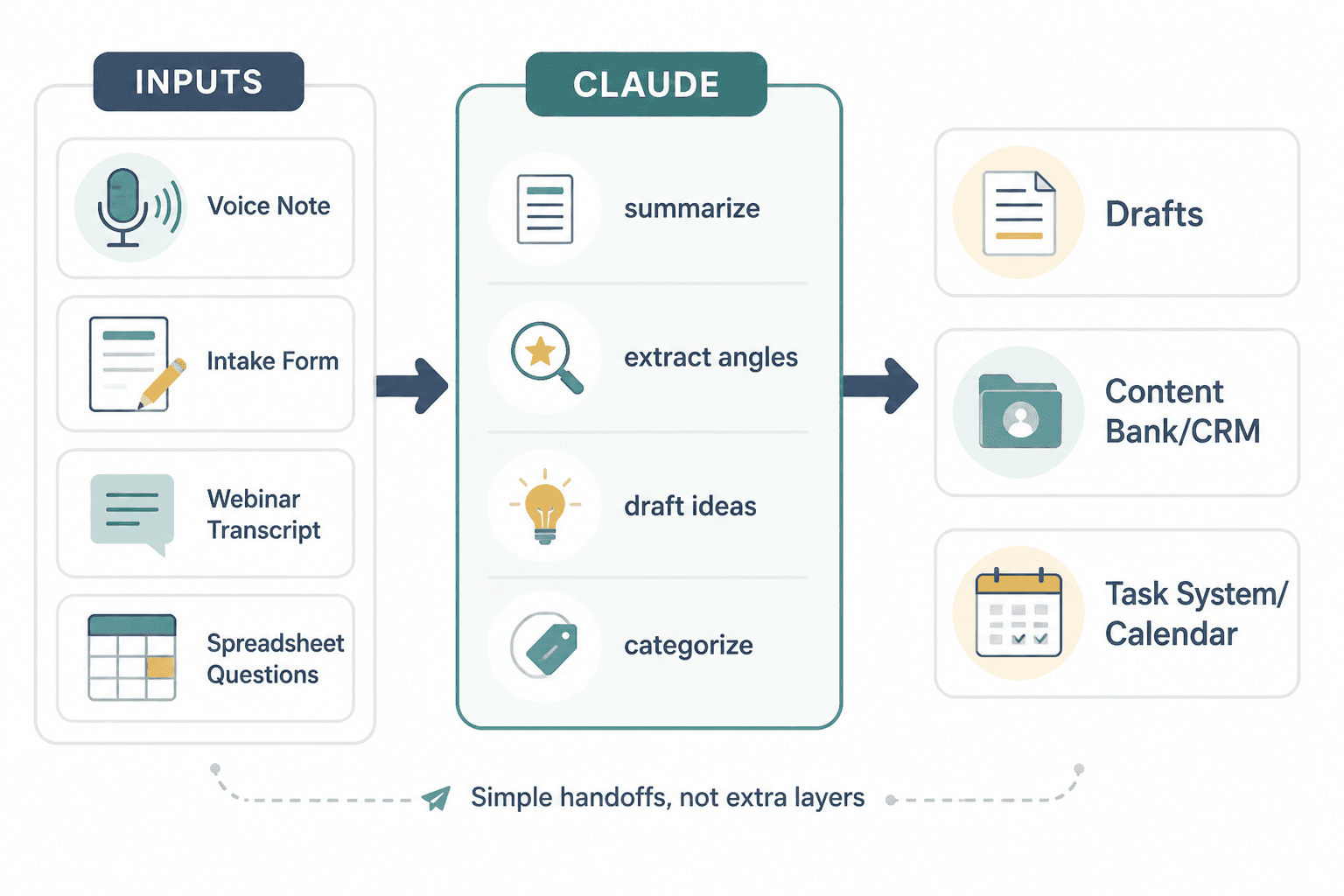
This is where things get interesting. Automation tools can connect Claude to forms, spreadsheets, notes apps, CRMs, project tools, storage systems, and publishing workflows.
In plain English: instead of manually moving information around, you can set up simple handoffs.
Examples:
- A voice note lands in a folder and triggers a summary plus content angle extraction
- A client intake form gets turned into a messaging brief
- A webinar transcript gets converted into article ideas, post drafts, and newsletter themes
- A spreadsheet of audience questions becomes categorized content prompts
- A completed call note gets summarized and logged into a CRM or content bank
Automation is useful when it removes repeated steps. It becomes stupid when it creates five extra layers of setup to avoid thirty seconds of work. Keep your standards high here.
6. Spreadsheet integrations
Not glamorous. Very useful.
Many creators use spreadsheets for editorial calendars, lead tracking, swipe files, content inventories, keyword ideas, repurposing plans, or customer research. Claude can help turn those rows into something more useful.
Good use cases include:
- Clustering content ideas into themes
- Summarizing survey responses
- Turning repeated audience questions into post topics
- Cleaning rough data into usable talking points
- Generating post variations from a bank of ideas
If your content research currently lives in a giant spreadsheet nobody wants to open, this can help make it less miserable and more actionable.
7. Communication and meeting integrations
For creators who work with clients, teams, communities, or collaborators, meeting and communication workflows are a sneaky source of busywork.
Claude integrations can help by turning conversations into useful outputs:
- Meeting summary notes
- Action items
- Client recap emails
- Content ideas pulled from calls
- FAQ extraction from repeated customer questions
- Clean handoff docs for collaborators
This is one of the best ways to reclaim time if you are tired of spending half your week in calls and the other half trying to remember what everyone said.
Which Claude integrations are most useful for different types of creators
Not every creator needs the same setup. Here is a cleaner way to think about it.
| Creator type | Most useful integrations | Why |
|---|---|---|
| Writers and solo publishers | Notes, docs, writing editors | Better drafting, idea retrieval, research handling |
| Coaches and consultants | Docs, meetings, automation, CRM-adjacent workflows | Turns client inputs and calls into useful assets faster |
| Personal brands | Notes, writing tools, spreadsheets, automation | Makes repurposing and content planning less chaotic |
| Freelancers and marketers | Project management, docs, editors, communication tools | Helps manage briefs, revisions, and delivery |
| Founders creating thought leadership | Meeting summaries, notes, docs, writing tools | Turns internal thinking into publishable content without extra admin drag |
You do not need all of these. In fact, you probably should not have all of these. A lean workflow usually beats a “creator stack” held together by hope and forgotten subscriptions.
What Claude integrations are actually good at
There is a practical ceiling to what integrations can do well. They are best when they support one of these jobs:
- Summarizing
- Structuring
- Categorizing
- Extracting key points
- Rewriting rough material into cleaner drafts
- Creating first-pass outputs from source material
- Moving information from one step of your workflow to the next
That is the sweet spot. The combination of good source material plus clear workflow plus Claude usually produces useful leverage there.
What Claude integrations will not fix
This part matters because people keep asking tools to solve business problems that are not tool problems.
- They will not give you a strong point of view
- They will not fix weak positioning
- They will not make bland offers compelling
- They will not create trust from thin air
- They will not turn weak source material into strong strategy
That is why the best integrations are practical helpers, not miracle workers. When the workflow is already sensible, Claude can speed it up. When the underlying thinking is weak, the integration just exposes that faster.