
Most people do not have a welcome email problem. They have a tool mismatch problem.
They pick email software because a big creator mentioned it, or because the landing page promised “powerful automation,” or because it looked clean in a demo. Then they sit down to build a simple welcome sequence and realize the platform is either weirdly limited, annoyingly bloated, or designed for a company with three departments and a meeting problem.
If you are trying to choose the Best email software and automation tools for Welcome Emails, the real question is not “Which tool has the most features?” It is “Which tool helps me send the right first emails without turning setup into a side quest?”
This guide will help you pick the right kind of email software for your welcome emails, understand what automation features actually matter, and avoid paying for a fancy dashboard that still leaves you writing limp, generic first-touch emails. We will also cover where tools help, where they absolutely do not, and which categories make sense for creators, coaches, consultants, and solo businesses.
If you need the strategy side too, start with the broader welcome emails hub. And if you are building out your larger email setup, the email newsletter writing and creator email systems section is the right rabbit hole.
If you want the bigger picture, start with the parent guide.
What welcome email software actually needs to do
A welcome email is not just the first message after signup. It is the start of trust, positioning, and expectation-setting. So the software you choose should make a few things easy, not painful.
You do not need a tool that can run a 47-step enterprise nurture labyrinth. You need one that can reliably deliver a clean, useful first impression and maybe a short sequence after that.
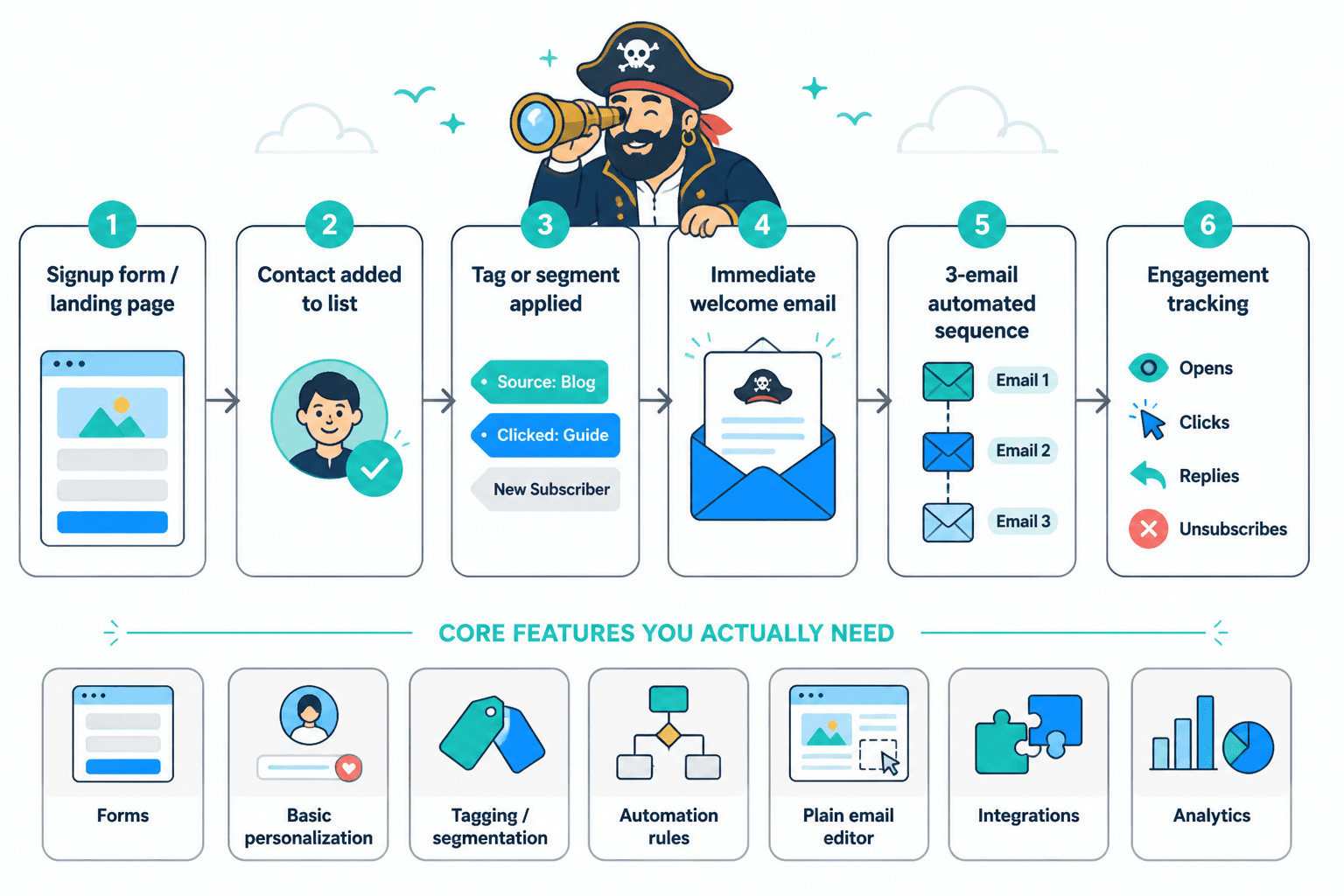
- Trigger an email instantly after someone signs up
- Build a short automated sequence without needing a certification in workflow diagrams
- Segment subscribers by source, interest, or action
- Personalize basic fields like name, signup form, or offer type
- Track simple engagement metrics like opens, clicks, replies, and unsubscribes
- Let you write plain, human emails without forcing ugly templates everywhere
- Connect to forms, landing pages, and your site without duct tape and hope
That is the core. Everything beyond that is a bonus, not a requirement.
And yes, this is where people get distracted. They buy a system built for “advanced customer journeys” when all they actually need is a solid opt-in form, a welcome email, a 3-email sequence, and a tag if someone clicks a specific link. Congratulations, you now own a spaceship to drive to the grocery store.
How to choose the best email software for welcome emails
The best tool depends less on “best overall” and more on your business model, technical comfort, and how complex your welcome flow really is.
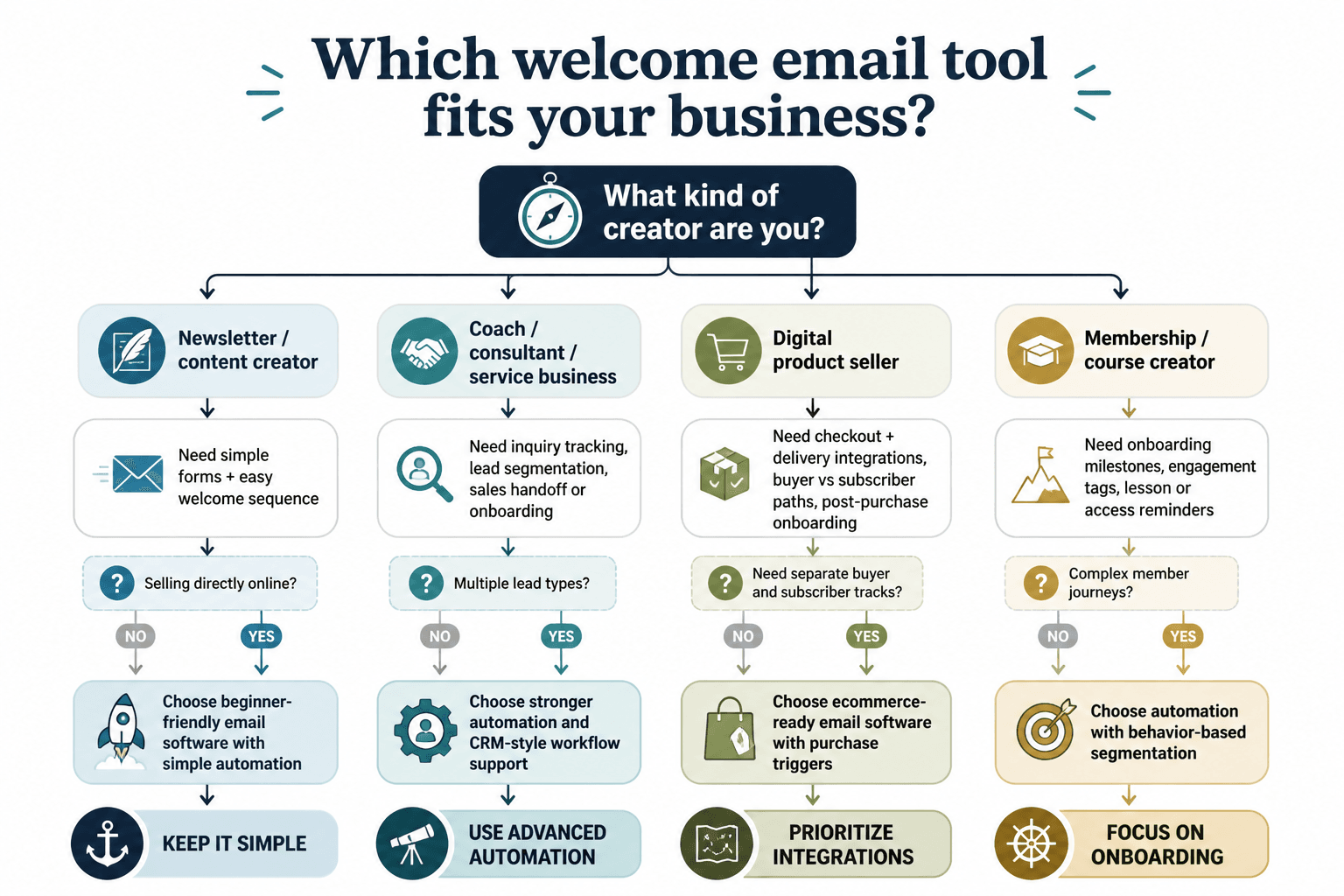
Choose based on your actual use case
- Creators and writers usually need simple sequences, easy writing, clean forms, and solid deliverability
- Coaches and consultants often need segmentation, lead magnets, booking CTAs, and a few branching paths
- Solo founders and service businesses may want CRM-lite features, tagging, and stronger automation rules
- Course or digital product sellers often need checkout integration, onboarding emails, and behavior-based follow-up
Pay attention to workflow friction
A tool can be “powerful” and still be annoying enough that you avoid using it properly. That matters. If creating a welcome sequence feels like assembling office furniture with no instructions, your automation will stay half-finished.
Look for software that lets you do these things quickly:
- Create a form or connect an existing signup source
- Write a plain-text or lightly formatted welcome email
- Set a delay for follow-up emails
- Add simple conditions like clicked, did not click, tagged, or purchased
- Edit emails without opening five separate menus
Do not overbuy automation
There is a strange little productivity trap in email software. The more advanced the automation builder looks, the more people assume it is the grown-up choice. Sometimes it is. Often it is just more stuff to maintain.
For most welcome email sequences, you do not need complexity. You need clarity. A strong first email, a useful next step, maybe a follow-up with proof or resources, and a clean path toward your offer. That is not primitive. That is called not making your subscribers regret meeting you.
The main types of email tools that work for welcome emails
Instead of pretending there is one perfect platform for everyone, it is more useful to break tools into categories. That is how people actually shop, even if they tell themselves otherwise.
1. Creator-friendly email platforms
These tools are usually the best fit for writers, creators, coaches, and solo operators who want clean newsletters plus simple automation.
Best for: newsletters, lead magnets, welcome sequences, audience-building, simple segmentation
Usually strong at:
- Easy writing experience
- Fast setup
- Basic automations
- Landing pages and forms
- Simple audience tagging
Usually weaker at:
- Deep CRM features
- Complicated multi-branch workflows
- Heavy ecommerce logic
If your welcome email system is mostly about introducing your brand, delivering a free resource, and guiding people toward your content or services, this category is often enough.
2. Marketing automation platforms
These are broader tools built for businesses that want deeper automations, audience logic, tagging systems, scoring, and more detailed customer journeys.
Best for: consultants with multiple lead magnets, service businesses with segmented funnels, small teams, more advanced nurture paths
Usually strong at:
- Behavior-based automations
- Segmentation and tagging
- Conditional branches
- CRM connections
- Sales pipeline support
Usually weaker at:
- Simplicity
- Speed of setup
- Clean writing-first experience
- Budget friendliness
These tools are useful when your welcome email changes meaningfully based on source, interest, service type, or sales stage. If that is not you, they can be overkill.
3. Ecommerce email tools
If your welcome emails need to connect directly to products, purchases, browsing behavior, discount flows, and customer retention, ecommerce-focused platforms make more sense.
Best for: stores, product sellers, brands with carts and customer behavior data
Usually strong at:
- Shop integrations
- Purchase-triggered emails
- Customer data syncing
- Revenue attribution
- Post-purchase welcome and onboarding
Usually weaker at:
- Creator-style editorial workflows
- Simple service-business positioning
- Minimalist setup if you do not sell products
If you sell coaching, consulting, digital services, or expertise, ecommerce software can feel oddly shaped for your needs. Not bad. Just wrong-shaped.
4. CRM-first tools with email automation
Some businesses want their welcome emails tied tightly to a contact database, sales process, booking system, or service pipeline.
Best for: consultants, agencies, B2B service providers, sales-led businesses
Usually strong at:
- Contact records
- Pipeline stages
- Lead source tracking
- Sales handoff
- Automation tied to deal activity
Usually weaker at:
- Writing experience
- Newsletter-style publishing
- Easy creator workflows
These can be a smart choice if your welcome email’s main job is moving people toward a consultation, demo, or service inquiry rather than nurturing a broad audience over time.
The features that matter most for welcome email automation
Not every feature deserves equal attention. A lot of software comparison pages act like 200 features beat 20 features by default. They do not. Here is what actually matters for welcome emails.
| Feature | Why it matters | What to watch for |
|---|---|---|
| Instant trigger | Your welcome email should send right after signup | Delays, syncing lag, or confusing trigger setup |
| Sequence builder | Lets you add follow-up emails logically | Clunky workflow editors that make simple things feel hard |
| Tags and segmentation | Helps tailor emails by source or interest | Rigid list systems or limited filtering |
| Plain email formatting | Good welcome emails often work better when they feel personal | Template-heavy builders that force design clutter |
| Form and landing page support | Makes it easier to capture subscribers cleanly | Weak customization or hard integrations |
| Basic analytics | Shows what people click, ignore, or reply to | Overcomplicated dashboards with unclear reporting |
| Easy editing | You will revise these emails often | Too many clicks to change one sentence |
| Deliverability support | No point writing welcome emails nobody receives | Poor sender setup or weak domain authentication guidance |
If a tool does these well, it is already in the running.
What the best email software will not fix
This part matters because software gets blamed for bad strategy all the time.
The best email software and automation tools for Welcome Emails can help you send better systems. They cannot rescue weak thinking. If your welcome email is vague, self-absorbed, or confusing, no automation builder is going to sweep in wearing a cape.
- It will not fix poor positioning. If subscribers still cannot tell who you help or why they signed up, the problem is your messaging.
- It will not create trust from thin air. Automation can deliver consistency. It cannot fake relevance.
- It will not make boring writing interesting. Clean workflows do not cancel out stale copy.
- It will not repair a weak offer. If your lead magnet or service is underwhelming, your sequence will feel underwhelming too.
- It will not replace strategic segmentation. Having tags available is not the same as knowing how to use them well.
This is why tooling and writing need to be chosen together. If you want stronger ideas for what to actually send, read these welcome email ideas and examples for creators. Because software can send the message. It cannot make the message worth receiving.
Best tool categories by creator type
Here is the practical version. Different business types should usually prioritize different things.
For writers and newsletter-first creators
- Prioritize ease of writing
- Look for clean forms and landing pages
- Use lightweight automations
- Prefer tools that support simple audience segmentation
You probably do not need a giant automation suite. You need to publish consistently, greet new readers well, and move them toward your best content or offers.
For coaches and consultants
- Prioritize welcome sequences plus tags
- Look for booking-page integrations
- Use branching based on interest or lead magnet source
- Choose tools that make CTA tracking easy
Your welcome email often has to do more than say hello. It may need to position your expertise, filter the right leads, and guide people toward a call, resource, or case study.
For service businesses and agencies
- Prioritize CRM connection
- Use source-based segmentation
- Track inquiry and consultation activity
- Choose software that supports handoff to sales or onboarding
If you are juggling multiple service lines or lead types, stronger automation may actually save you time. This is one of the cases where “advanced” can be justified, not just decorative.
For digital product sellers
- Prioritize checkout and delivery integrations
- Use onboarding flows after purchase
- Segment by product interest or buyer status
- Track clicks into sales pages and product education
Your welcome emails may need two tracks: one for general subscribers and one for buyers. Pick software that makes that separation painless.
A simple framework for evaluating email software
If you are comparing several tools and your brain is starting to leak out of your ear, use this.
The 5-part welcome email tool test
- Can I build my first welcome sequence in under an hour?
If not, the tool may be too complex for your current needs. - Can I segment subscribers in a way that matches my business?
You want tags, forms, or source tracking that map to real audience differences. - Can I write emails that feel like me?
If the editor keeps nudging you toward glossy nonsense, that is a problem. - Can this grow with me for the next 12 to 24 months?
You do not need forever software. You need software that will not become wrong in three months. - Does the pricing still make sense when my list grows?
Cheap at 500 subscribers and brutal at 5,000 is not actually cheap.
That framework beats comparing random feature checklists for two hours and then choosing based on which logo looked more “premium.”
Common mistakes when choosing welcome email automation tools
People mess this up in very predictable ways.
Buying for the future fantasy business
You do not need the same system as a seven-person media brand if you currently run one newsletter and one lead magnet. Buy for your real workflow, not your imaginary empire.
Ignoring writing experience
This one gets overlooked constantly. If writing inside the platform feels stiff or clumsy, you will avoid improving your emails. That matters more than people think.
Choosing based only on price
Cheap tools that waste your time are not cheap. Expensive tools you barely use are not “investments.” Value comes from fit.
Overcomplicating the sequence too early
Your first welcome automation probably does not need six branches, conditional delays, and a scoring model. Start with a clean sequence. Add complexity only when behavior data gives you a reason.
Confusing templates with strategy
A nice automation template can save time. It cannot decide what your subscriber actually needs to hear first. For that, check out these welcome email templates and tools so you can pair software with actual structure.
Where AI tools fit into welcome email software
AI can be useful here, but this is the part where people get a little too enchanted by speed.
AI tools can help you draft welcome emails faster, generate subject line options, summarize offer positioning, rewrite awkward sections, and create variants for different segments. That is useful. Very useful, actually.
But AI does not know what your audience actually expects from you unless you tell it. And if your inputs are generic, your outputs will come back tasting like microwaved corporate fog.
- AI is good for: drafts, rewrites, variation, idea expansion, CTA options, summarizing
- AI is bad at: taste, brand voice by default, audience nuance, trust, and deciding what should be said first
If you want help using AI without making your welcome emails sound suspiciously polished and oddly hollow, read this guide to AI tools for welcome emails.
A lean welcome email stack that works for most people
If you want the non-chaotic version of this, your setup usually only needs four parts:
- Email platform for sending broadcasts and automations
- Signup form or landing page to collect subscribers cleanly
- Basic tag or segment system to separate audience types
- Short welcome sequence that introduces, helps, and directs
That stack handles a lot. More than enough for most creators and service businesses to start building trust and generating leads.
A simple sequence might look like this:
The bigger point is simple: clearer structure and clearer writing make the piece more useful. That is usually what makes the ending land better too.