
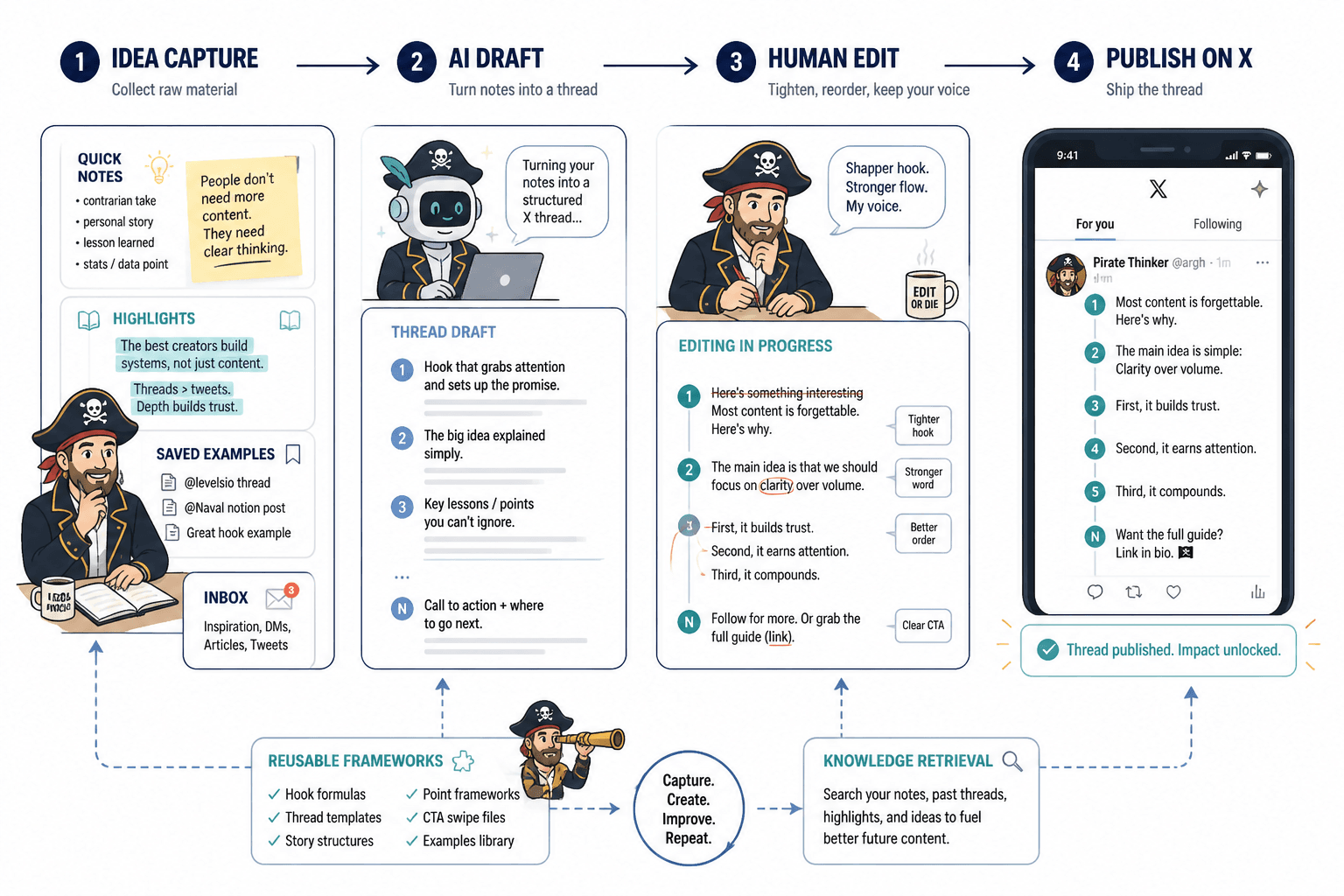
A thread draft can start in notes, get half-fixed in a writing app, wander through a scheduling tool, and still arrive on X sounding like it was assembled by committee. That is the bottleneck: not ideas, but handoffs. The useful move is not collecting a museum of software. It is picking a lean toolchain that helps you capture the thought, shape the structure, tighten the wording, and get the thread published without losing the plot halfway through.
This guide looks at the best AI tools for X threads by job, not by logo worship. If you want the broader strategy behind thread structure and examples, start with the X threads guide and the companion X threads examples page.
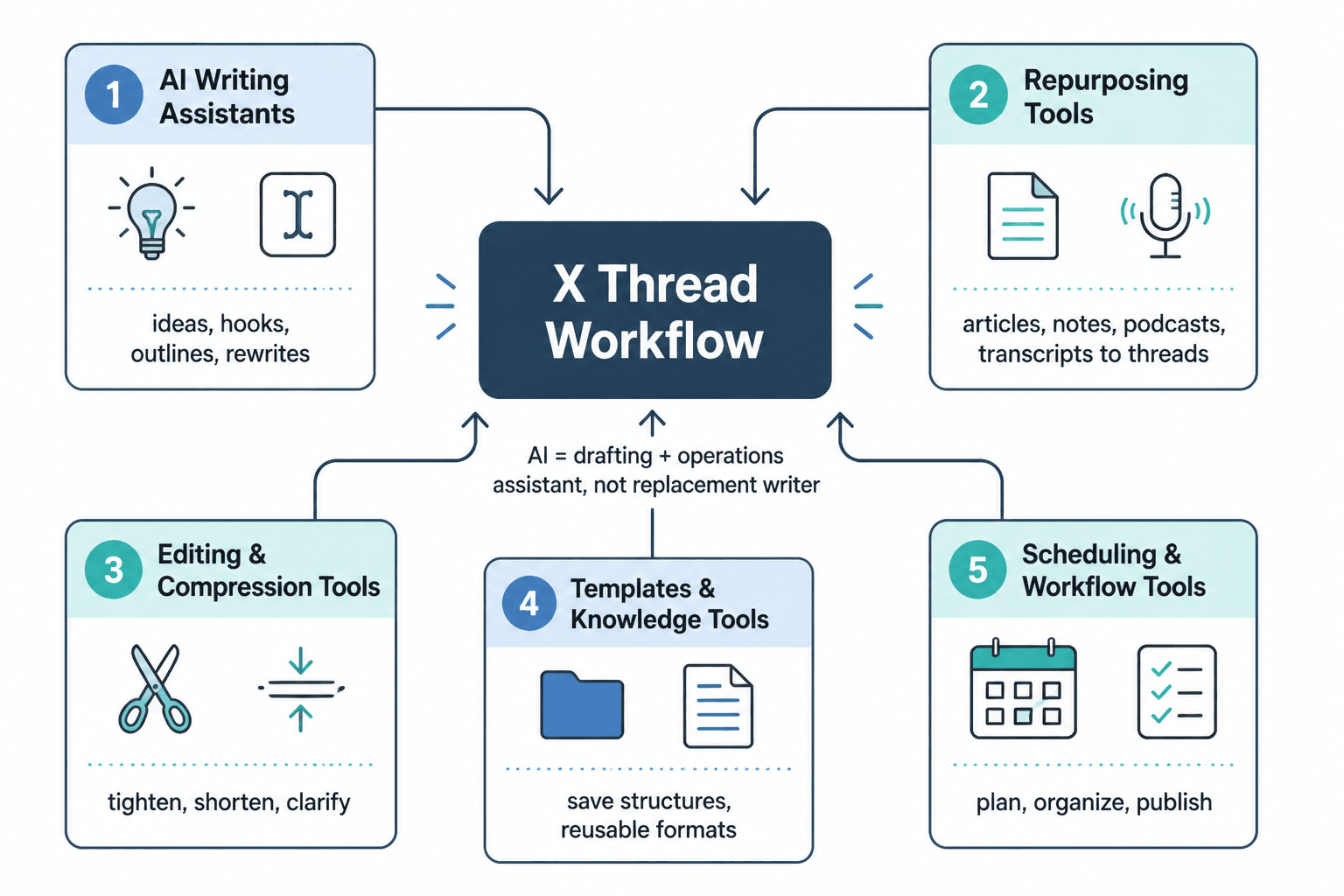
What AI tools should do for an X thread workflow
The point of AI in a thread workflow is not to write the entire thing for you and call it craft. The point is to reduce the most annoying parts: getting the first draft moving, turning a loose idea into a sequence, spotting weak transitions, and making the final version clearer without sanding off all the personality.
A useful tool stack usually handles five jobs:
- Capture: catch raw ideas before they vanish into the void.
- Structure: turn a topic into a thread outline with a clear arc.
- Draft: generate a rough version fast enough to be worth editing.
- Refine: tighten tone, length, clarity, and flow.
- Publish and reuse: schedule the thread and repurpose the best bits later.
That is the whole game. Anything beyond that is optional garnish with a subscription fee.
Best AI tools by job
1. Idea capture tools
Good threads usually start as scraps: a saved link, a blunt observation, a customer question, a small contradiction, or a useful breakdown you do not want to forget. Capture tools are for grabbing those fragments before they turn into “I should write about that sometime” and vanish.
For this job, lightweight note apps and inbox-style capture systems matter more than fancy generation. Use whichever tool lets you dump ideas quickly and tag them later. If your capture process is slow, your thread ideas will be too.
Best fit: writers who collect ideas in a dozen places and need one clean intake point.
2. Thread planning and outlining tools
Once you have the topic, the next problem is shape. A thread that starts with a strong point and then drifts into loose commentary is just a long post wearing a fake mustache. Planning tools help you decide what the thread is actually doing: teaching, persuading, showing a process, breaking down a mistake, or arguing a point.
Large language models are useful here when you give them a real brief. Ask for:
- a hook angle,
- a 5-10 tweet outline,
- possible transitions between sections,
- and a clean ending that points somewhere useful.
If you want a mental model for when a thread should exist at all, keep the decision simple: use a thread when the idea needs progression, not just a single punchy line. The broader X threads guide covers that shape in more detail.
3. Drafting and rewriting tools
Drafting tools are useful when they help you get from blank page to workable mess quickly. That is all a first draft needs to be. Do not ask it to be “final.” Final is for humans with enough taste to say no.
The best drafting setup is usually an AI writing assistant plus a plain editor where you can see the thread as a sequence. You want the tool to help with:
- opening lines that do not sound recycled,
- shortening dense sentences,
- keeping each post focused on one idea,
- and smoothing the transitions so the thread does not feel like six separate thoughts in a trench coat.
A practical use case: take a rough outline and ask for three versions of the opener – direct, contrarian, and curiosity-led. Then choose the one that sounds most like the actual thread, not the one that sounds most like a keynote slide.
4. Editing and tone tools
Editing is where most AI tools either become helpful or become noisy. Good editing support should make the writing clearer without making it flatter. That means checking for:
- redundant phrasing,
- overlong sentences,
- stiff transitions,
- vague claims,
- and places where the thread suddenly starts acting like a brand deck.
For tone work, the best tool is often the one that can rewrite a sentence in a few different styles without losing the original point. Use it to sharpen, not to disguise. If the thread only works after three layers of “make it more engaging,” the idea probably needed more thinking, not more adjectives.
5. Scheduling and publishing tools
A thread is not done when the draft looks decent. It is done when it gets published on purpose. Scheduling tools reduce the final handoff friction and make it easier to line up timing, formatting, and consistency.
The best scheduling tools do a few simple things well:
- store the final version cleanly,
- let you preview the sequence,
- make edits painless before the post goes live,
- and help you avoid publishing a broken chain because one tweet swallowed a line break like a raccoon with a sandwich.
For platform behavior and posting mechanics, it is worth checking X’s own help resources when you need the current rules around post length, media, and publishing behavior. X’s help center is the primary source for that: X Help Center.
6. Repurposing and creator ops tools
The best thread tools do not stop at publish. They help you reuse the work. A good thread can become a short post, a newsletter section, a lead magnet, a carousel outline, or a FAQ answer. Repurposing tools are what keep the thread from becoming a one-time event with a short shelf life.
This is where creator ops tools matter too. A simple content system can track:
- idea source,
- draft status,
- publish date,
- performance notes,
- and repurposing opportunities.
That is less glamorous than “AI content engine,” which is good, because those words usually precede a dashboard you will resent within a week.
The best AI tools for X threads, grouped by outcome
Instead of building a stack because the internet told you to, group tools by what you need done.
- Need ideas captured fast? Use a note or inbox tool with quick entry.
- Need the thread shaped? Use an LLM for outlining and sequencing.
- Need tighter copy? Use an editing assistant for clarity and compression.
- Need consistent publishing? Use a scheduler with thread support.
- Need reuse after publish? Use a content ops system that tracks assets and outcomes.
A lean stack is often enough:
- Capture tool for ideas.
- AI writer for outline and draft.
- Editor for human cleanup.
- Scheduler for publishing.
That is the sensible version. Not glamorous. Very effective. Mildly annoying to marketing departments.
How to choose tools without creating a productivity shrine
There is a point where “tool stack” stops meaning “helpful system” and starts meaning “a graveyard of half-used subscriptions.” The fix is to choose tools against a real thread workflow and ignore anything that does not reduce friction.
Use this checklist:
- Can I capture an idea in under 30 seconds?
- Can I get from raw topic to usable outline quickly?
- Does the tool help me shorten and clarify, not just generate more words?
- Can I preview the thread before it publishes?
- Can I reuse the output later without rebuilding it from scratch?
If a tool cannot answer at least one of those, it is probably decorative. Decorative software is how teams end up with five logins and no thread.
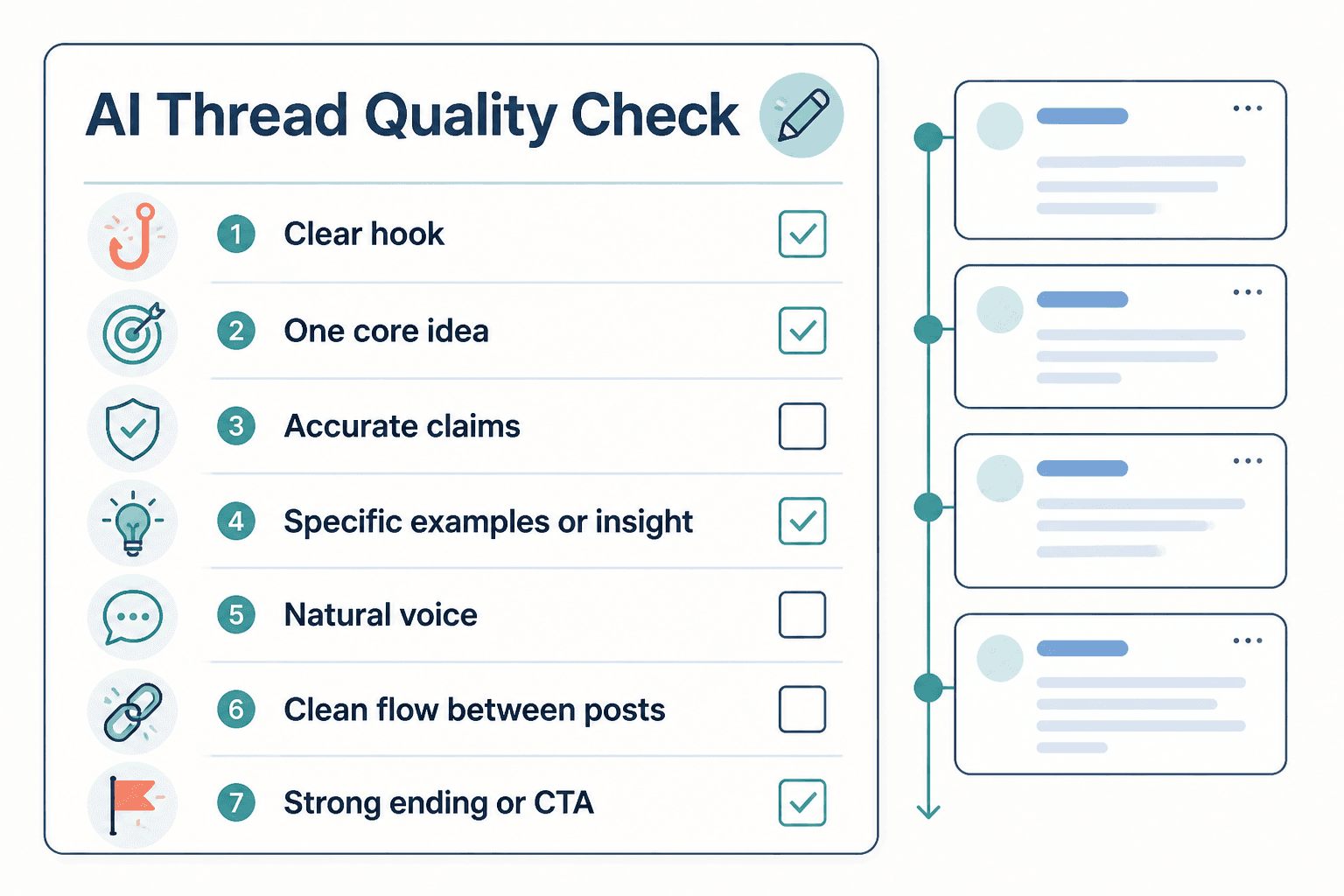
A simple pre-publish review for AI-assisted threads
Before posting, run the thread through a fast human check. AI is useful, but it still misses the obvious things when the obvious things are boring.
- Hook: does the first post earn the rest of the thread?
- Arc: does each post move the argument or story forward?
- Clarity: is every post easy to read on its own?
- Tone: does it sound like a person, not a policy memo?
- Payoff: does the ending leave the reader with something useful?
If you want more examples of how a finished thread should feel, compare your draft with the X threads examples page and then edit with slightly less affection for your favorite sentence. That sentence is usually the problem.
Recommended citation and source notes
A few primary sources are enough here. Use them where the article needs grounding, not as decorative proof that the internet exists.
- X Help Center for current posting and platform guidance.
- Notion Help Center if discussing note capture, databases, or content ops workflows.
- OpenAI Help Center if mentioning AI writing workflows and product behavior.
- Google Docs Help if referring to lightweight editing and collaboration in a shared draft process.
Final take
The best AI tools for X threads are the ones that remove friction without flattening the writing. Capture quickly. Outline cleanly. Draft fast. Edit like you mean it. Publish on purpose. Reuse the good bits. That is the stack.
If you are building the broader system around threads, the parent X threads guide is the right next stop. If you want more pattern-level help, the examples page shows what the finished shape can look like when the tools stop getting in the way.