
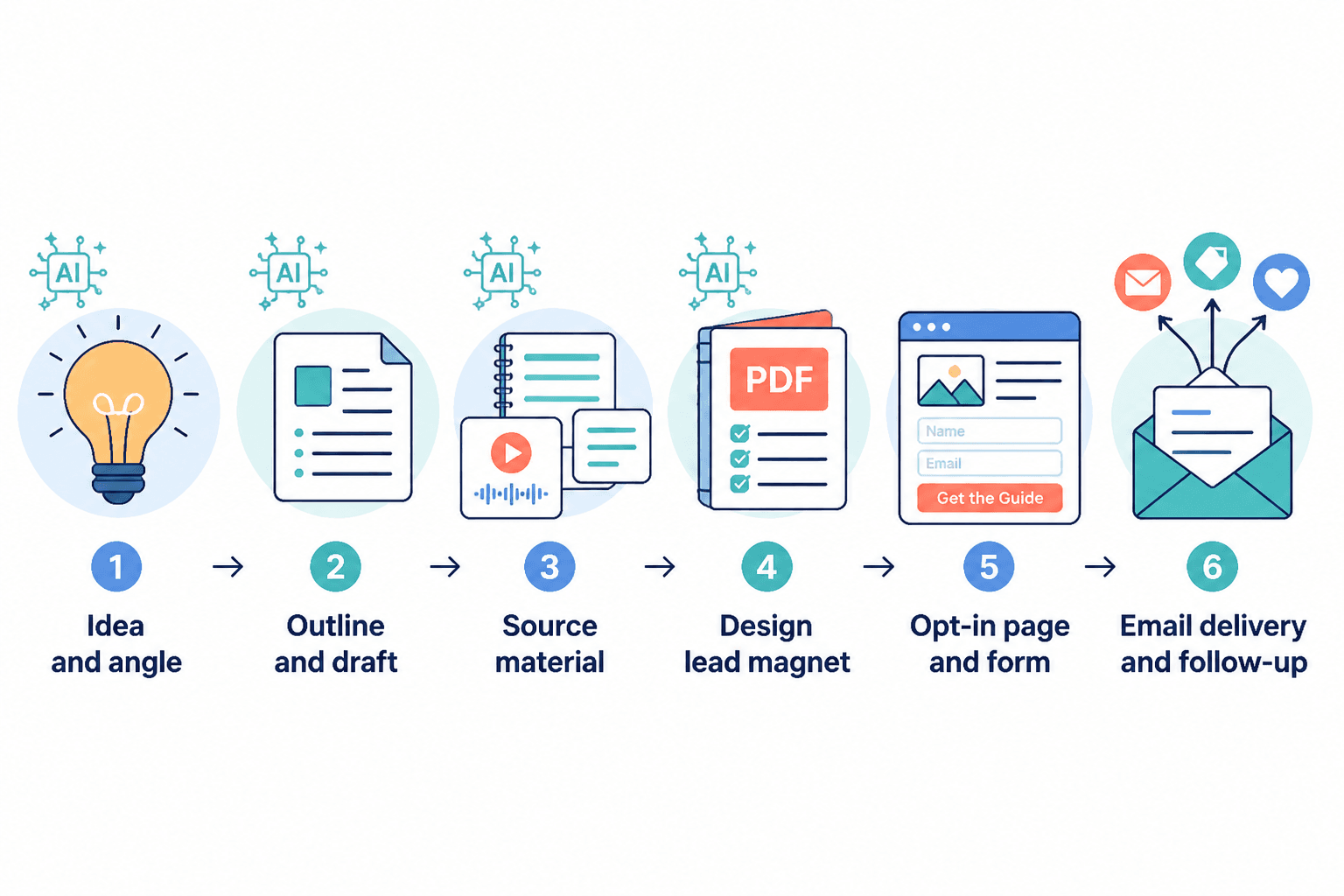
A lead magnet workflow can get messy fast: one tab for ideas, one for drafting, one for design cleanup, one for the landing page, and one more for the email sequence that is somehow still “in progress.” The software is not the problem by itself. The problem is the handoff pileup. A lean tool system fixes that by giving each stage one job and no extra drama.
This guide focuses on the AI tools that actually help you make lead magnets faster without turning them into generic mush. If you want the strategy behind the offer itself, start with how to write better lead magnets. If you are trying to turn the asset into actual revenue, the next stop is how to turn lead magnets into more leads or sales. For format ideas, these lead magnet examples are the useful kind of reference, not the “inspiration board” kind.
What AI tools should actually do for lead magnets
The point is not to automate judgment out of the process. It is to remove the slow, repetitive parts so the offer stays sharp. Good tools help you move from rough idea to useful resource without bloating the magnet into a fourteen-page apology for existing.
- Clarify the promise: turn a vague topic into one specific result.
- Speed up drafting: get to a usable first version faster.
- Improve structure: keep the asset scannable and easy to finish.
- Clean up presentation: make it readable without overdesigning it.
- Support delivery: connect the magnet to the opt-in form, email, and next step.
If a tool only makes the document look fancier, that is not much of a win. A prettier weak offer is still weak. The useful AI stack makes the lead magnet easier to understand, easier to finish, and easier to hand off into the funnel.
The 4 tool categories that matter most
You do not need a large stack. You need the right categories doing the right work.
1. AI research and outlining tools
These tools help you figure out what the lead magnet should actually cover. They are useful for keyword discovery, audience pain points, content clustering, and shaping the outline before you start writing.
2. AI writing tools
These are for drafting the magnet itself: summaries, checklists, mini guides, worksheets, script prompts, and edited copy. They are best when they help you write faster, not when they try to invent a voice from scratch like a very eager intern with a thesaurus.
3. Design and formatting tools
Lead magnets do not need to look expensive. They do need to be clean, readable, and easy to skim. AI-assisted design tools help with layout, image cleanup, brand consistency, and resizing assets for export.
4. Email, landing page, and automation tools
These tools handle the actual delivery path: opt-in form, confirmation email, download link, follow-up sequence, and any segmentation or tagging that connects the lead magnet to the next offer.
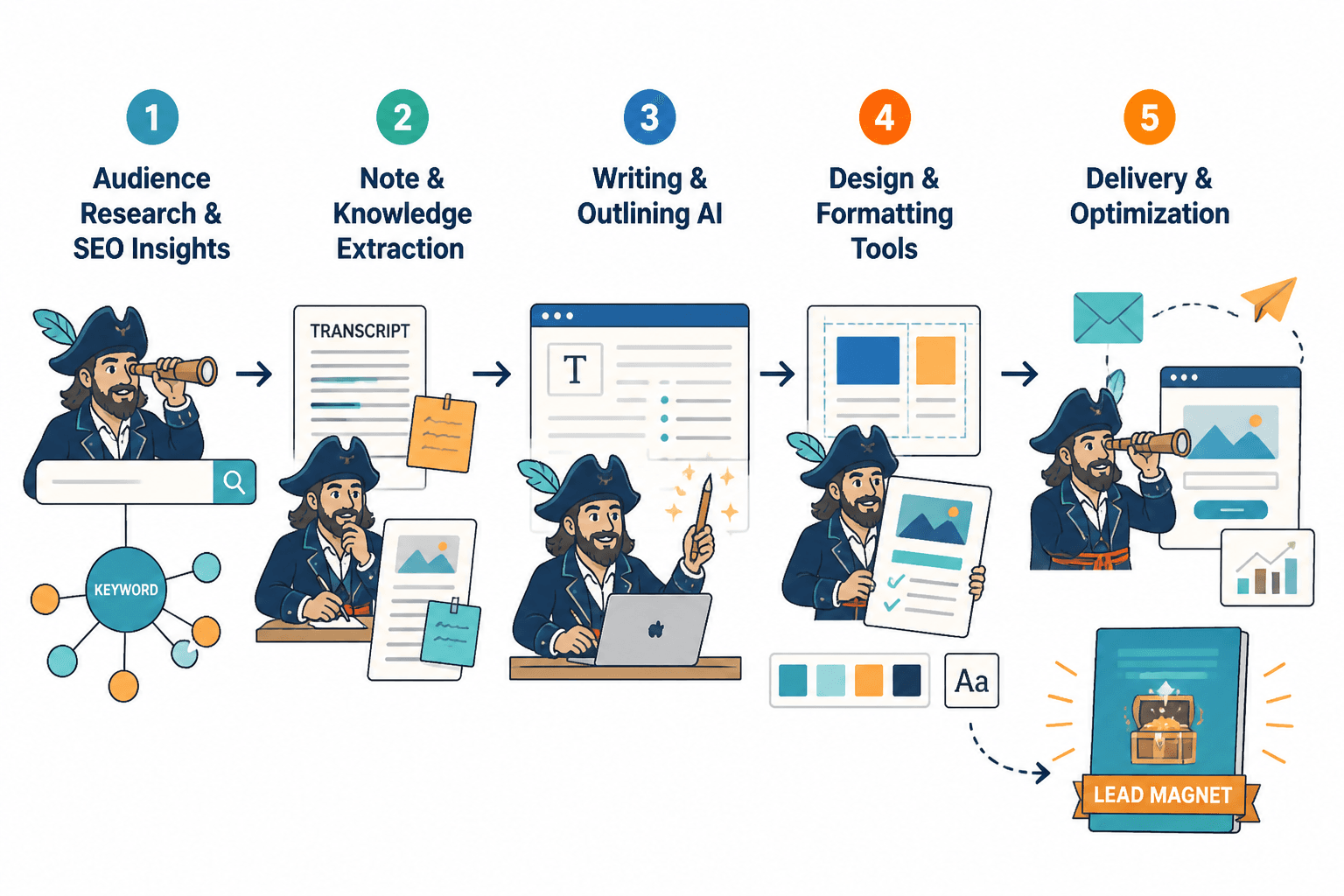
Best AI tools for the lead magnet workflow
Different tools shine at different parts of the workflow. The goal is not to pick the “best” tool in a vacuum. It is to pick the tool that removes friction from the stage you are stuck in.
Best for research and ideation
- ChatGPT – strong for brainstorming lead magnet angles, refining audience pain points, and turning scattered notes into a usable outline.
- Claude – useful when you want cleaner long-form synthesis and a calmer drafting partner for detailed outlines or workbook structure.
- Perplexity – helpful for fast research and source gathering when you need a current fact base before you draft.
Use these tools to sharpen the offer, not to substitute for it. The best lead magnets still need a clear business purpose. Otherwise the AI just helps you produce a better-organized distraction.
Best for drafting and editing
- ChatGPT – useful for drafting checklists, cheat sheets, short guides, and email follow-ups.
- Claude – good for reorganizing clunky sections, improving flow, and making a dense draft easier to read.
- Grammarly – helpful for line-level cleanup when the draft is already structurally sound.
If you are making a workbook or mini guide, draft the ugly version first. Then use the AI tool to shorten, reorder, and clarify. Do not start by polishing a page that still does not know what it is trying to say.
Best for layout and visual cleanup
- Canva – the most practical option for quick lead magnet layout, simple branded templates, and fast export.
- Adobe Express – useful if you already work in Adobe’s ecosystem and want simple AI-assisted design help.
- Gamma – helpful for turning structured content into a clean presentation-style asset when that format fits the offer.
Design tools should make the resource easier to consume. They should not create a museum piece. A good checklist in a plain format will outperform a bloated, overdesigned PDF with trust issues.
Best for delivery and follow-up
- ConvertKit – a strong option for creators who want simple forms, tags, sequences, and straightforward delivery.
- MailerLite – useful for clean opt-in pages, automations, and a relatively lightweight setup.
- Zapier – helpful when you need one tool to pass data between the form, CRM, spreadsheet, or email platform.
This is the part that gets skipped too often. A lead magnet without a clean follow-up path is just a file with confidence problems. The delivery system should be boring in the best way: reliable, automatic, and hard to break.
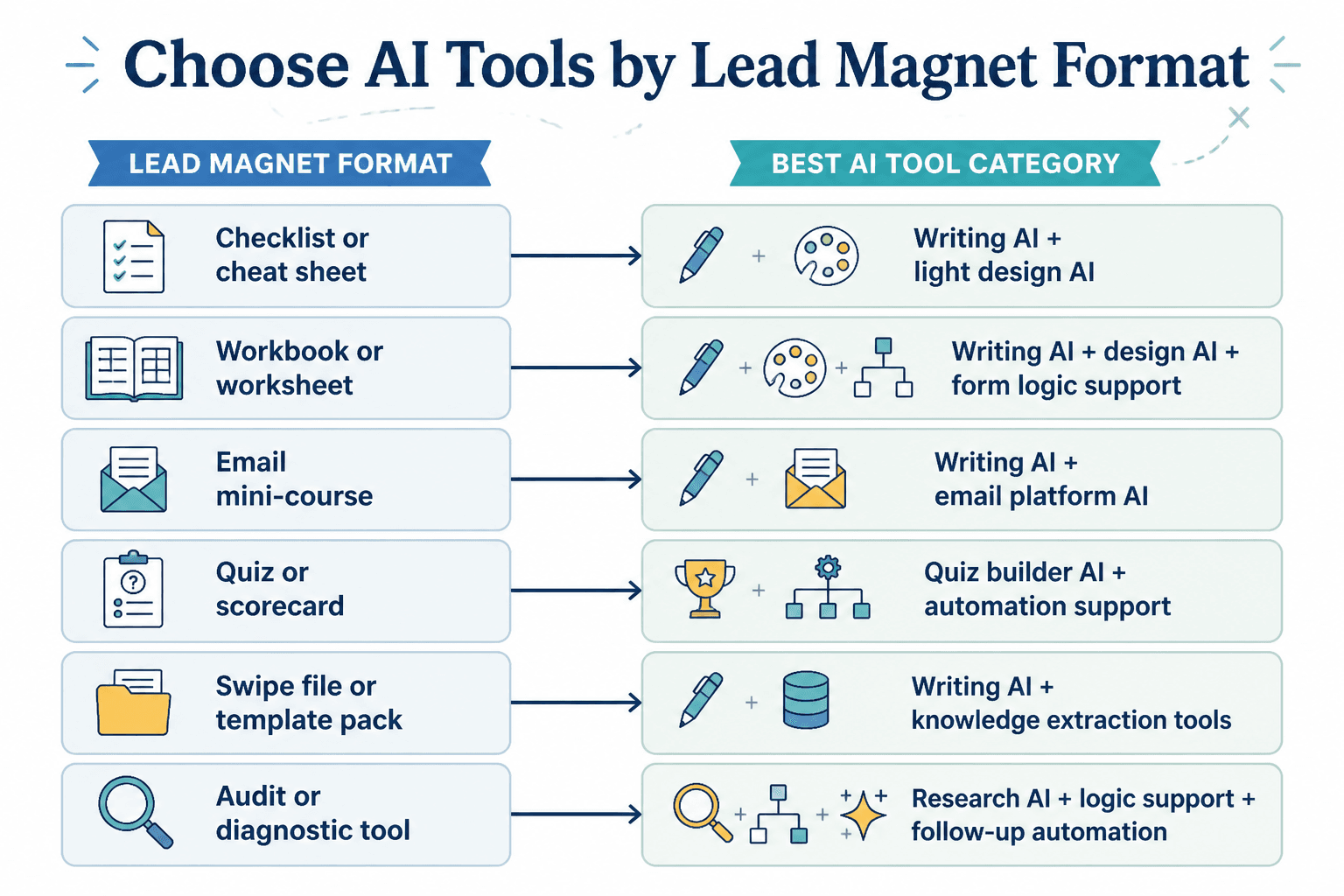
Match the tool to the lead magnet format
Not every lead magnet needs the same stack. A one-page checklist and a multi-step workbook are different beasts. The format tells you what the tool should do.
Checklist
Best tool use: AI writing tool plus simple design tool.
Checklists work when the value is immediate and obvious. Use AI to compress the task into a short sequence of actions. Keep the design minimal so the reader can use it quickly.
Cheat sheet
Best tool use: AI drafting tool plus layout tool.
Cheat sheets need compact phrasing and clear visual hierarchy. AI is useful here for shortening explanations into usable cues, but the final layout still needs human judgment.
Workbook or worksheet
Best tool use: AI outline tool, writing tool, and clean formatting tool.
Workbooks usually need more structure because they ask the reader to think and fill things in. AI can help sequence the exercises and draft prompts that do not feel generic.
Mini guide or playbook
Best tool use: research tool, writing tool, and design tool.
This is where the tool stack can get bloated if you let it. The job is to make the guide useful enough to earn attention, not long enough to prove you own a laptop.
Swipe file
Best tool use: research tool, curation workflow, and simple delivery system.
Swipe files are mostly about selection and organization. AI helps you categorize examples, summarize patterns, and create a quick intro that explains how to use the file.
Audit or self-assessment
Best tool use: outline tool, scoring logic, and form or automation tool.
Audits work best when the questions are specific and the outcome is actionable. AI can help you build the rubric, but the offer needs a real decision at the end: what to fix first, what to ignore, and what to sell next.
A lean lead magnet tool stack by creator type
Different business sizes need different levels of complexity. The safest move is usually the smallest stack that can still do the job well.
For solo creators
- One AI writing tool for draft and edit
- One design tool for formatting
- One email platform for delivery and follow-up
This setup keeps things manageable. It also prevents the common solo-creator trap of spending more time connecting tools than making the magnet.
For coaches and consultants
- One AI research/outlining tool
- One AI writing tool
- One landing page and email platform
- Optional automation tool for tagging and segmentation
Coaches and consultants usually benefit from a more intentional follow-up path. The lead magnet should point toward a diagnosis, a framework, or a next-step conversation.
For small teams and agencies
- Shared research and drafting workflow
- Design tool with reusable templates
- Email and automation system with clear handoffs
Teams need consistency more than novelty. A good shared stack makes it easier to update old lead magnets, reuse patterns, and keep new assets aligned with the same offer logic.
How to build the workflow without overcomplicating it
Here is the simplest useful sequence.
- Pick the format: checklist, guide, worksheet, swipe file, or audit.
- Define the outcome: what the reader should understand, do, or decide.
- Use AI to draft the structure: outline first, prose second.
- Clean up the content: remove fluff, duplicates, and clever detours.
- Format it clearly: enough design to help reading, not enough to distract from it.
- Connect delivery: opt-in form, email, link, and follow-up.
- Test the handoff: make sure the file, message, and next step all work.
That workflow is plain on purpose. Lead magnets win by being useful, not by looking like they were assembled during a product launch panic attack.
What to avoid when choosing AI tools
- Too many tools: complexity is not a strategy.
- Tools that generate bloat: if the output gets longer but less useful, skip it.
- Design before clarity: the offer should work in plain text first.
- Automation before message: do not build a slick funnel around a vague promise.
- One-size-fits-all stacks: a workbook workflow and a checklist workflow should not look identical.
There is a reason a lean system works: it leaves more room for judgment. The best lead magnet tools do not replace the thinking. They keep the thinking from getting buried under tabs, templates, and tiny acts of self-sabotage.
Use the tools to support the offer, not the other way around
The best AI tools for lead magnets are the ones that reduce friction at the right stage. Research tools help you decide what to make. Writing tools help you make it faster. Design tools help people use it. Email and automation tools make sure the lead magnet actually leads somewhere.
If you want the bigger strategy around the offer, the parent guide on lead magnets is the right next step. If you want format-first guidance, compare this piece with lead magnet examples for coaches, consultants, and personal brands. If you are already building the asset, the next useful move is to improve the writing itself and then wire the follow-up so the thing does not just sit there being admired by no one.