
A draft About page can start in a notes app, bounce through an AI writer, get half-fixed in a doc, then land in a page builder sounding like three different people fought over the same paragraph. That is the bottleneck: not a shortage of tools, but too many handoffs. The useful move is to build a lean system that helps you capture the raw story, shape the message, tighten the wording, and publish without the page falling out of the cart on the way.
This guide focuses on the tools that actually help with about page copy, not the ones that merely promise to “transform your brand voice” while quietly producing five paragraphs of corporate oatmeal. The goal is simple: pick tools that reduce friction, make decisions easier, and help the page do its job.
If you want the bigger strategy behind the page itself, start with the About page copy guide. If you want examples of the finished shape, the About page copy examples are the better companion.
What AI tools should actually do for an About page
A good About page is not a personality contest. It needs to answer a few plain questions: who you are, what you do, why it matters, and why the visitor should keep going. The best tools help with those jobs without turning the page into a generic brand monologue.
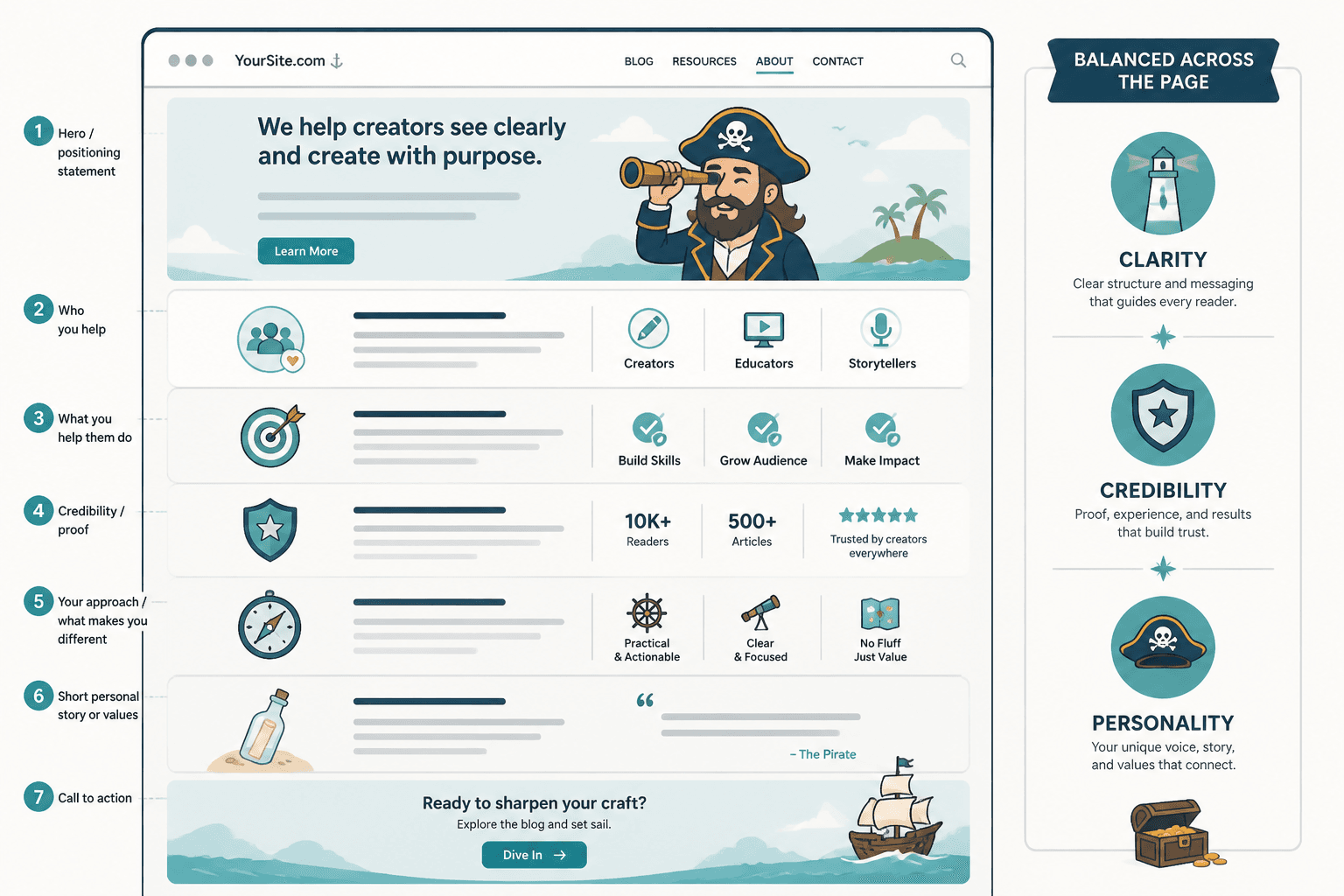
In practice, that means the right tools should help you:
- turn scattered notes into a clearer story
- identify the strongest positioning angle
- draft a section that sounds human instead of inflated
- tighten long-winded copy into something readable
- surface proof, credibility, and helpful specifics
- move from draft to publish without too many tab-switching rituals
The point is not to hand your About page to a machine and hope for enlightenment. It is to use tools where they are useful and then take back the wheel before the page starts sounding like a marketing deck with feelings.
The best AI tools for about page copy, by job
Instead of sorting tools by brand name and feature soup, it helps to sort them by what they actually do for the page. That makes the stack easier to keep lean.
1. Positioning and messaging tools
These tools help you answer the annoying but necessary questions first: what do you want to be known for, what should the page emphasize, and what should get left out.
Good uses:
- pulling themes from notes, interviews, or a rough brand brief
- testing different positioning angles for clarity
- finding plain-language summaries of what you do
- spotting vague claims before they become the whole page
Useful tool types here include AI chat tools, messaging workshops, and structured prompt systems. For this kind of work, a general AI assistant can be enough if you give it real source material instead of asking it to invent your business out of thin air.
A practical workflow: paste in your rough notes, ask for three possible positioning angles, then choose the one that sounds most useful to a visitor. Not the one that sounds most “strategic.” Those are often different animals.
2. Planning and outlining tools
About page copy gets easier when the structure is clear. Planning tools help you decide what sections belong on the page before you start polishing sentences that may not need to exist.
Good uses:
- mapping the page into sections
- deciding what proof belongs where
- organizing a story, process, or timeline
- turning chaotic notes into a sensible order
This is where a simple outline tool or a template-based planning doc can do more good than a flashy writer. The page usually needs less creative chaos and more order. Revolutionary, irritating, effective.
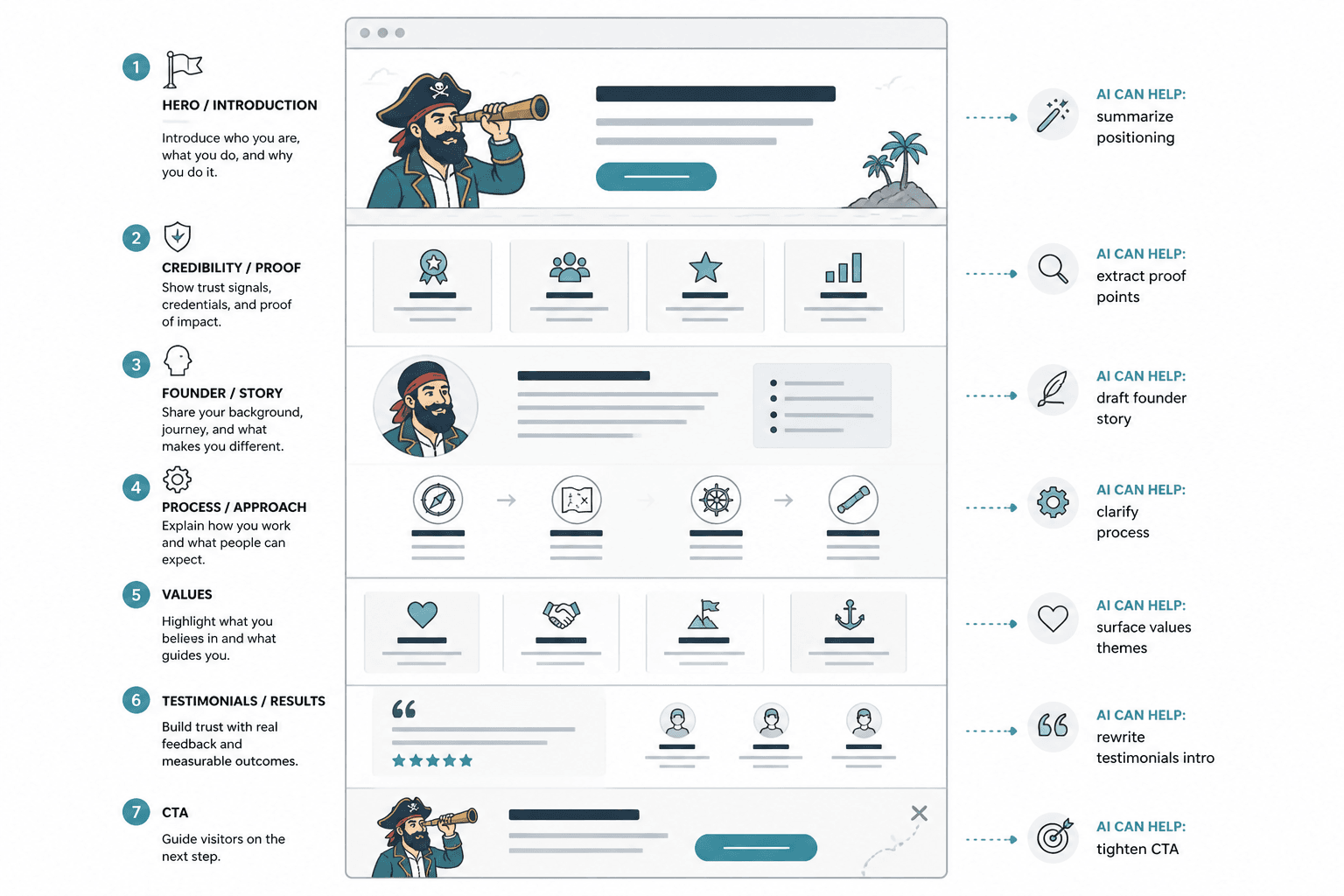
That wireframe-first approach is especially useful if the page has multiple jobs: intro, origin story, proof, values, process, and call to action. Planning the sequence stops the page from wandering around in a suit pretending it has a purpose.
3. Drafting and rewrite tools
This is the obvious category, but it is easy to use badly. Drafting tools are helpful when they turn notes into workable copy. They are less helpful when they turn a clear thought into ten enthusiastic but useless sentences.
Good uses:
- writing a first pass from an outline
- rewriting clunky sections into cleaner prose
- adjusting tone without losing meaning
- compressing overlong paragraphs
- generating alternatives for a headline or intro
The best drafting tools are the ones that respond well to constraints. Tell the tool what the page must do, what tone it should use, and what it should avoid. “Sound professional” is not a brief. It is a plea for blandness.
For About page copy, the most useful prompts are usually specific: shorten this paragraph, make this more direct, give me three ways to say this in plain English, or rewrite this so a first-time visitor understands the offer faster.
4. Proof and research tools
About pages live or die on trust. That means the facts matter. Proof tools help you verify claims, gather supporting details, and avoid the very human tendency to write “award-winning” when no one has, in fact, handed you an award.
Good uses:
- checking dates, company details, and service descriptions
- pulling in bios, credentials, or accomplishments accurately
- finding quotes, mentions, or references you can verify
- making sure claims are specific enough to mean something
For credibility work, keep the source material close and the speculation far away. If you are using AI to help summarize proof, verify the summary against the original source before it reaches the page.
This matters for more than style. It also matters for accessibility and trust. Clear, accurate copy is easier to read and easier to believe. The W3C headings guidance is a useful reminder that structure supports comprehension, not just design. For plain-language principles, PlainLanguage.gov is a solid reference. And if your About page includes any AI-assisted content, the OpenAI usage policies and broader platform guidelines are worth keeping in mind while you work.
5. Conversion and page-building tools
Once the copy is ready, the last job is getting it onto the page without wrecking the structure. Page builders, CMS editors, and block tools matter here because About page copy is not just text. It is text in a layout.
Good uses:
- placing headings, bios, proof blocks, and CTAs in order
- previewing the page as a visitor will see it
- keeping spacing and section rhythm clean
- making final edits without losing the thread
The risk in this stage is classic: a copy draft that was clear in a doc turns mushy in the builder because the section order changed or a helpful little module got involved. The page builder should support the message, not reinterpret it.
Tool stacks that keep the process lean
You do not need every category of tool. For most About pages, a small stack works better than a maximal one.
Solo creator stack
- one notes app for raw material
- one AI chat tool for outlining and rewriting
- one simple doc for editing
- one page builder or CMS for publishing
This is usually enough if you are writing a personal About page or a small business page with a limited proof set. The key is keeping the workflow linear enough that you do not keep re-inventing the same paragraph in three different places.
Small business stack
- a positioning or messaging tool
- an AI writer for section drafts
- a research/checking workflow for proof
- a page builder for final assembly
This setup works well when more than one person has opinions, but not all of them should be invited to the keyboard. Use tools to reduce debate, not multiply it.
Agency or team stack
- shared brief or messaging doc
- AI assistant for versioning and rewrites
- editorial checklist for proof and tone
- CMS workflow with review stages
In team settings, the best tool is often the one that prevents copy from becoming a scavenger hunt. A clean process beats a clever one.
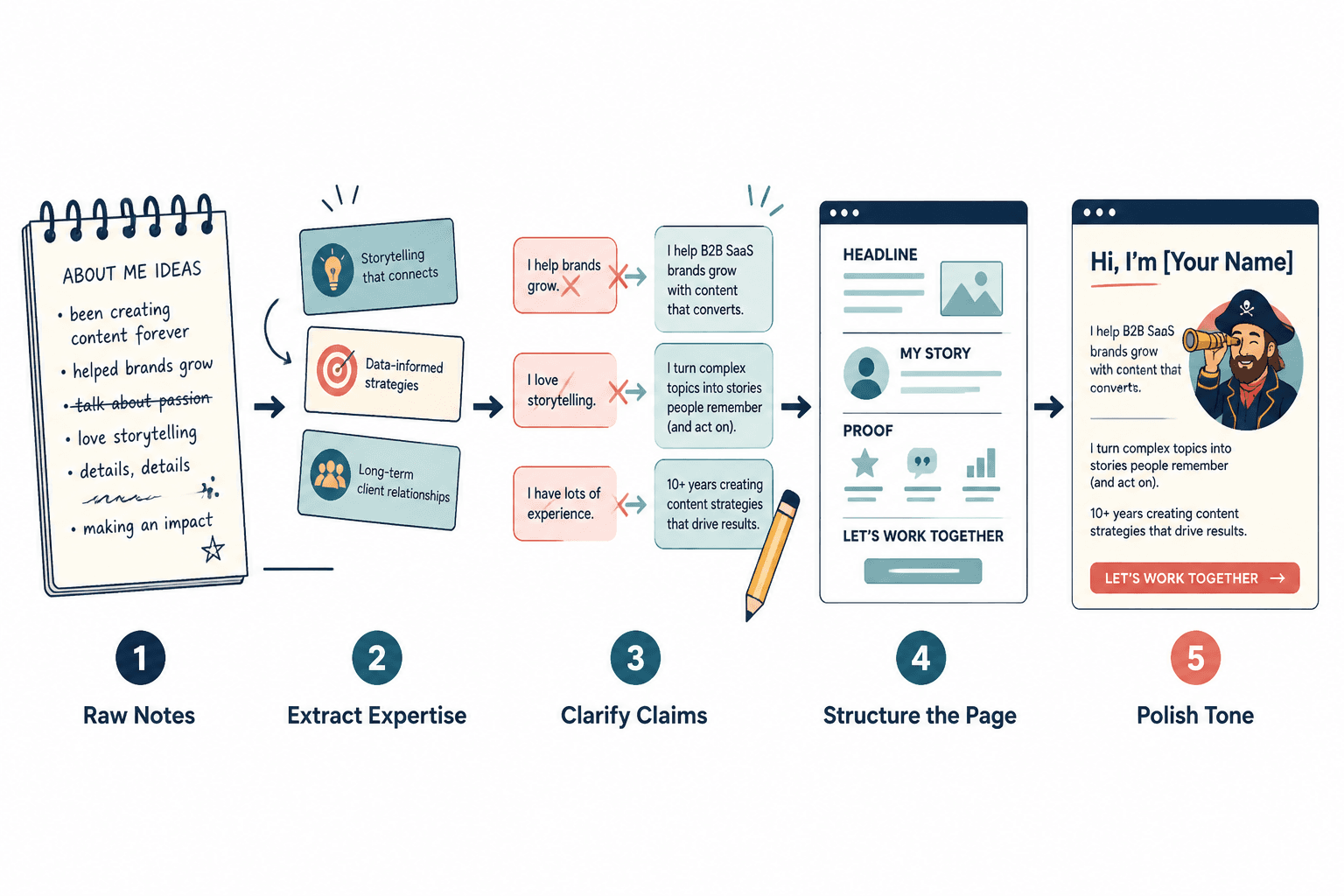
How to choose the right tools for your About page
Choose tools based on the job you need done, not the number of features in the landing page. A lean system is usually the better one because it is easier to repeat.
Ask these questions:
- Does this tool help me clarify the message, or just produce more text?
- Can it handle my actual source material, or does it need a fake prompt persona to work?
- Does it save time across the whole workflow, not just the first draft?
- Will I still understand and control the copy after the tool has helped?
- Can I use it again on the next page without relearning the thing from scratch?
If the answer to most of those is no, the tool is probably a detour dressed up as productivity.
Common mistakes when using AI tools for About page copy
- Starting with the draft instead of the structure. The page gets wordy before it gets useful.
- Asking AI to invent the story. The result is often generic, even when it sounds smooth.
- Using too many tools. More handoffs usually mean more drift.
- Skipping proof. Credibility details matter, and sloppy facts are not a vibe.
- Leaving the CTA vague. “Learn more” is sometimes fine; “Let’s connect” is often a soft landing into nowhere.
One of the easiest ways to improve the page is to remove anything that sounds like it was written to avoid being specific. Specificity is doing a lot of heavy lifting here.
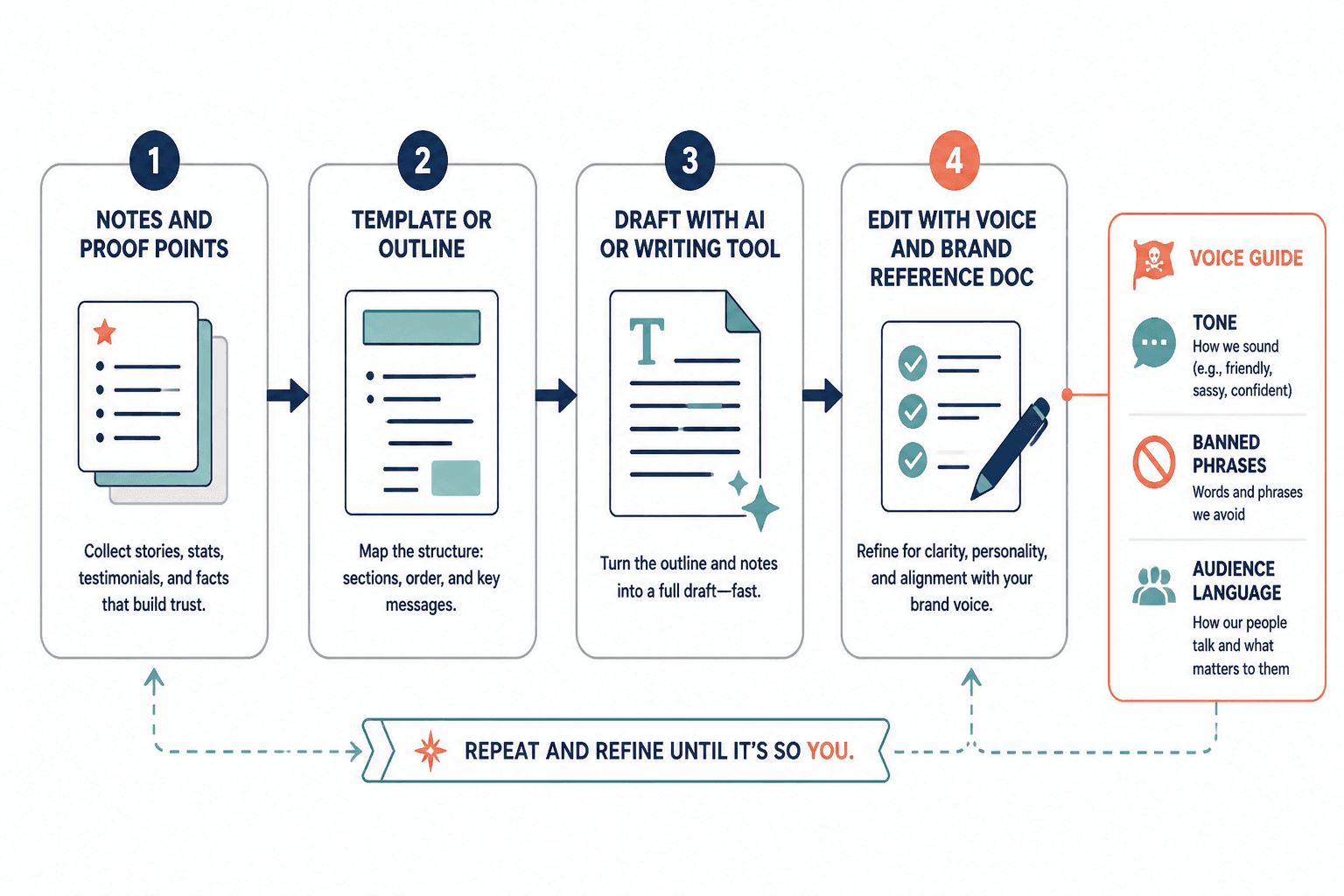
A simple AI-assisted About page workflow
- Collect the raw material: notes, bio details, proof points, mission, and audience pain points.
- Use a planning tool or AI assistant to create a clean section outline.
- Draft each section in plain language.
- Rewrite for clarity and cut anything that repeats.
- Check facts, dates, credentials, and links.
- Place the copy into the page builder and confirm the flow.
- Read the page like a visitor who is mildly skeptical and slightly busy. That is the real test.
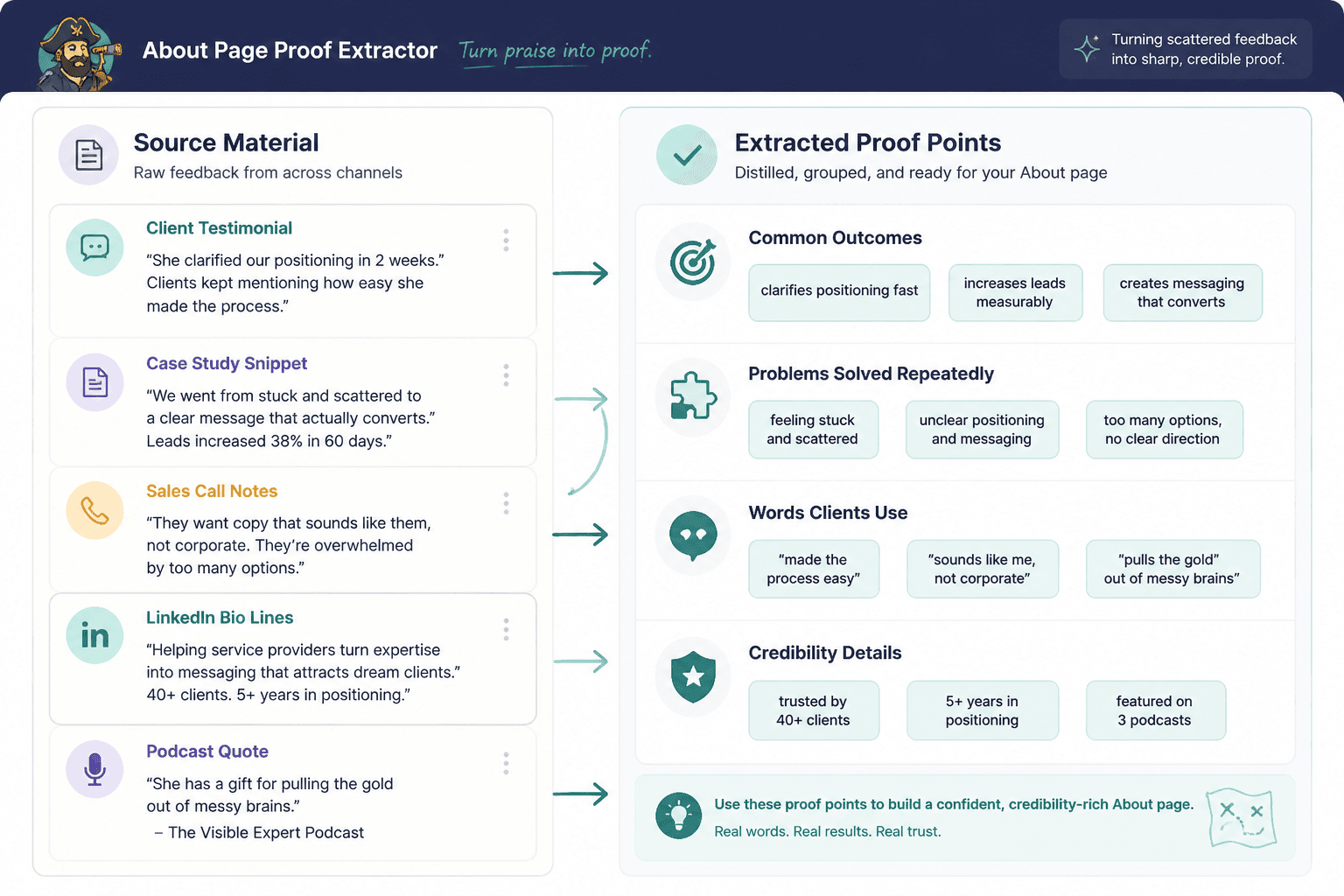
That proof step is where a lot of About pages become more convincing. You do not need to stack up every accolade ever collected. You need the few details that help a visitor decide whether to trust you and keep reading.
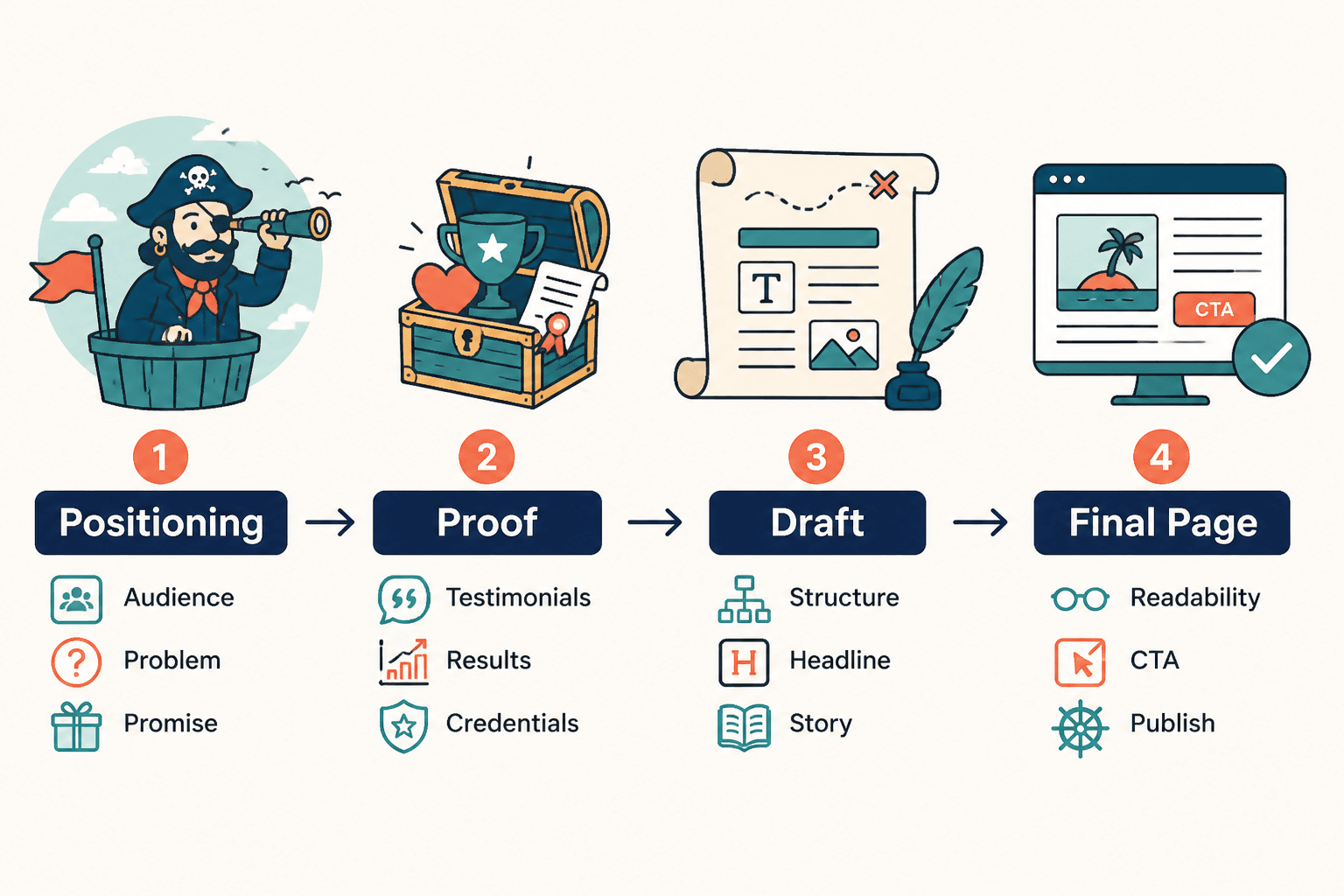
Where this fits in the bigger About page system
This article is the tools piece of the cluster. If you need the broader strategy, the parent guide covers the full structure and purpose of the page: About page copy. If you want a faster start, the template and examples articles in the cluster are the better next stops.
For a practical writing process, the best path is usually:
- use the guide to understand the page
- use a template or outline to shape the structure
- use AI tools to draft and tighten the copy
- use examples to judge whether the page feels complete
That combination keeps the process from turning into a tool demo in search of a point.
Bottom line
The best AI tools for About page copy are the ones that reduce friction at the right moments: planning, drafting, tightening, proofing, and publishing. You do not need the most tools. You need the smallest stack that can help you make a clear page faster.
If a tool helps you write a page that says what you do, why it matters, and why a visitor should trust you, it earns its place. If it just gives you more words, it is probably decorative.
Use the tools to get to the point. The page will thank you in its own subdued, conversion-friendly way.