Most people looking for the best AI image tools and design tools for AI Image Use Cases are really asking a messier question: which tools are actually worth using for the kind of work I need to produce?
Because “best” gets weird fast here. The best tool for mockups is not the best tool for brand graphics. The best tool for photoreal image generation is often clunky for editing. And the best design tool for creators is sometimes the one that does not try to be your mystical all-in-one robot art director.
So this guide keeps things practical. Not hypey. Not “AI will replace creativity by Thursday.” Just a clear breakdown of which kinds of AI image and design tools are useful for which use cases, where they help, where they absolutely do not, and how to pick a stack that does not turn your workflow into a tab-hoarding problem.
If you are building content, products, lead magnets, social posts, thumbnails, mockups, simple brand assets, or client visuals, this will help you choose faster and better. And if you need the broader strategy first, start with AI image use cases and this creator-focused guide to getting better AI image results.
Want the broader roadmap? Start with the parent guide.
What “best” actually means for AI image tools
A lot of roundups lump everything together like one giant toolbox smoothie. That is not helpful. AI image tools fall into different jobs, and you will get better results if you judge them by the job instead of by hype.
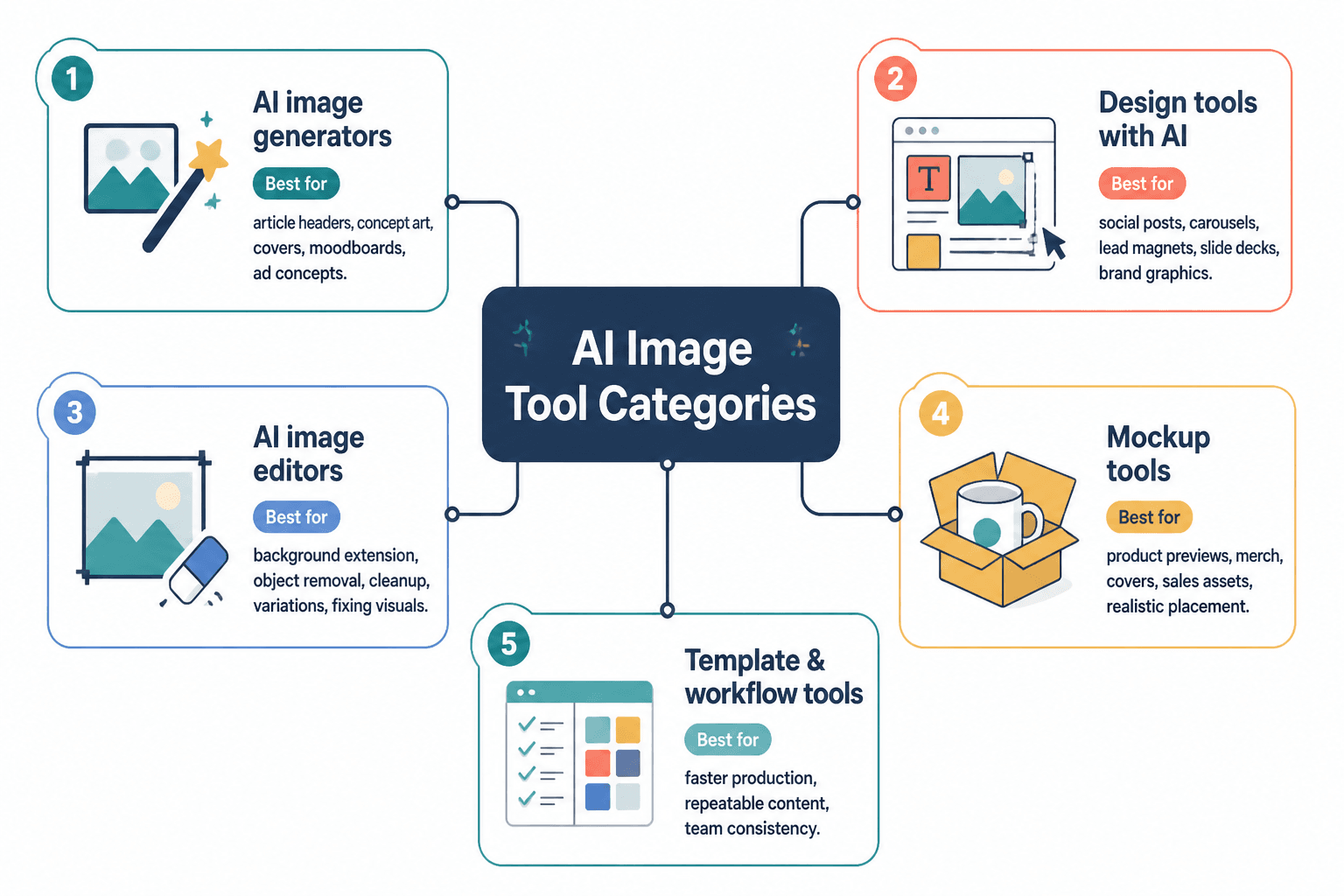
In plain English, you are usually choosing between five broad categories:
- Image generation tools for creating original visuals from prompts
- AI-assisted design tools for layouts, social graphics, presentations, and brand assets
- Image editing tools for background removal, retouching, expansion, cleanup, and variations
- Mockup and asset tools for product visuals, thumbnails, ads, and merch previews
- Workflow tools for organizing prompts, templates, reusable brand systems, and production speed
The mistake is assuming one tool should do all five. That usually ends in disappointment and a folder full of weird hands.
Best AI image tools and design tools for AI Image Use Cases by category
Here is the clean version first. Then we will get into what each category is actually good for.
| Tool category | Best for | Less good for |
|---|---|---|
| AI image generators | Concept art, hero visuals, stylized images, custom scenes, idea exploration | Precise brand consistency, editable layouts, reliable text inside images |
| AI design tools | Social posts, carousels, lead magnets, slide decks, simple brand graphics | Highly original art direction, deep image realism |
| AI image editors | Fixing visuals, extending backgrounds, object removal, variations, cleanup | Full campaign design systems on their own |
| Mockup tools | Product previews, merch, covers, sales assets, realistic placement | Original visual ideation from scratch |
| Template and workflow tools | Faster production, repeatable content, team consistency | Saving weak creative decisions |
That distinction matters. A creator making branded Instagram carousels needs a different stack than a consultant building ebook covers, course visuals, and article illustrations. Same broad universe, different actual job.
1. AI image generators: best for creating original visuals fast
This category is what most people think of first. Prompt in, image out. Useful, yes. Magical, not really. These tools are strongest when you need something custom that does not exist yet or when stock photos would look painfully generic.
Good use cases include:
- Article header images
- Concept illustrations
- Book or lead magnet covers
- Moodboards and creative direction
- Custom social visuals
- Ad concept testing
- Storyboarding rough ideas
What they do well is speed up ideation and remove the need to source every visual manually. What they do badly is precision. If you need exact typography, exact brand layout logic, or exact repeatability across 30 assets, pure generation tools tend to get messy.
This is where creators waste time. They keep trying to force an image generator to become a design system. That is like trying to use a fog machine as office lighting. Interesting effect. Wrong tool.
2. AI design tools: best for branded content and usable layouts
If your job involves making content that people actually need to read, save, or click, AI design tools are often more useful than pure image generators. They help with structure, layout, resizing, templates, quick asset creation, and keeping your visual output from looking like five different personalities made it.
These are usually the better choice for:
- Carousel posts
- Presentation slides
- Lead magnets
- PDF guides
- Sales pages visuals
- Quote graphics
- Thumbnails
- Simple ad creatives
For most creators and personal brands, this category is where the practical value lives. Not because it is sexier. Because it is shippable. You can actually create consistent assets and publish them without spending two hours fighting a prompt for a hand holding a notebook near a tasteful beige desk.
3. AI image editors: best for fixing and upgrading what you already have
This category deserves more respect than it gets. Editing tools are often more valuable than generation tools because they help you improve useful assets instead of endlessly creating random new ones.
They are great for:
- Removing backgrounds
- Cleaning up product shots
- Expanding image edges for new formats
- Replacing awkward objects
- Creating alternate crops
- Improving low-quality images
- Generating variations from an existing asset
If you already have photos, screenshots, mockups, or branded assets, this category can save a ridiculous amount of time. It is less glamorous than “generate cinematic masterpiece,” but frankly, useful beats cinematic when there is a deadline.
4. Mockup and product visual tools: best for selling the thing clearly
If you sell digital products, courses, templates, books, merch, or services, mockup tools matter because presentation changes perceived value. A PDF shown as a clean device mockup lands better than a sad flat screenshot. Not because people are fools. Because context helps them understand what the offer is.
This category helps with:
- Ebook previews
- Course dashboard visuals
- Template bundle graphics
- Merch mockups
- Client presentation visuals
- Website product sections
- Launch graphics
Some design tools now include these features, but dedicated mockup workflows still tend to look cleaner and feel more reliable when you need sales-ready assets.
5. Templates and workflow tools: best for scale without creative chaos
This category is less about making images and more about not rebuilding your process every single week like you have just arrived on earth.
Use them for:
- Saving prompt patterns
- Reusing brand styles
- Organizing content assets
- Managing approvals
- Creating repeatable visual systems
- Keeping client work consistent
- Repurposing one visual into multiple platform sizes
If you are producing visual content regularly, templates beat raw inspiration almost every time. Inspiration is lovely. Templates are why the thing gets published on Tuesday.
You can get more specific tool ideas in this breakdown of the best AI tools for AI image use cases and this guide to templates and tools.
How to choose the right tool for your actual use case
Before picking any tool, answer this first: what do you need the image to do?
Not what style you want. Not what the app demo looked like. What job the image needs to do.
- If you need attention: choose tools that create bold, distinctive visuals quickly.
- If you need trust: choose tools that keep branding clean, readable, and credible.
- If you need conversion: choose tools that support clarity, mockups, product context, and polished layouts.
- If you need volume: choose tools with templates, resizing, asset libraries, and workflow speed.
- If you need originality: use generation tools, then refine in editing or design tools.
That is the core workflow most people miss. The best stack is often not one tool. It is usually one generator, one editor or design tool, and one system for reuse.
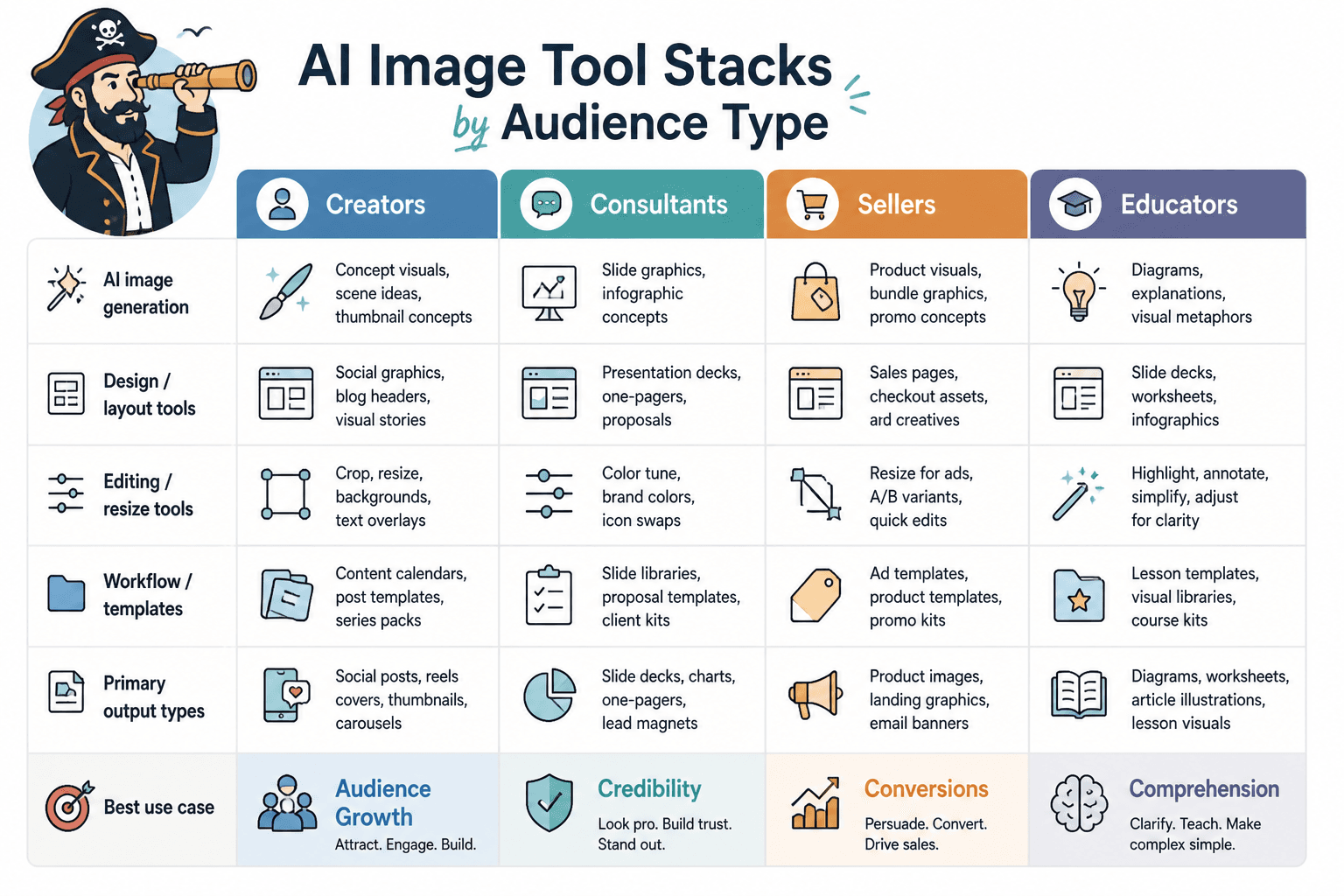
Best tool setups for common creator and business scenarios
Different use cases call for different combinations. Here are a few sane setups.
For content creators making social graphics and thumbnails
- Use an AI design tool for templates, text layout, and resizing
- Use an AI image generator for occasional custom visuals or backgrounds
- Use an editor for cleanup, cropping, and fast variations
This setup works because most social content is design-first, not art-first. Readability matters more than cinematic prompt wizardry.
For coaches, consultants, and personal brands
- Use a design tool for lead magnets, quote cards, PDF guides, and sales assets
- Use mockup features for product presentation
- Use editing tools for profile banners, headshot cleanups, and website visuals
If your business depends on trust, your visuals should look clear and intentional, not like a synthetic fever dream in lavender lighting.
For digital product sellers
- Use mockup tools for sales visuals
- Use design tools for bundle graphics, checkout assets, and promo images
- Use editing tools to turn one product visual into multiple campaign formats
People do not need endless visual novelty here. They need to understand what they are buying and why it feels credible.
For writers and educators creating articles, newsletters, and guides
- Use AI generation for article illustrations or conceptual visuals
- Use design tools for diagrams, feature boxes, charts, and lead magnets
- Use workflow templates so your visual language stays consistent across pieces
Good visuals here support comprehension. They are not there to audition for an art grant.
What AI image tools are good at, and what they still cannot fix
It helps to be brutally honest about the limits. AI image tools are useful. They are not a substitute for judgment.
What they are genuinely good at
- Generating rough concepts quickly
- Saving time on repetitive design work
- Creating visual starting points
- Helping non-designers ship cleaner assets
- Repurposing assets into more formats
- Making simple branded visuals faster
- Turning one good idea into several testable versions
What they are not good at
- Understanding your positioning without input
- Creating a brand identity from nothing
- Replacing taste
- Fixing muddy messaging
- Guaranteeing visual consistency across every asset
- Making generic offers feel premium
- Knowing what your audience actually finds trustworthy
This part matters more than the software list. A boring offer wrapped in AI polish is still a boring offer. Cleaner, yes. Better, not necessarily.
Common mistakes people make when choosing AI image and design tools
If your current setup feels expensive, chaotic, or oddly disappointing, one of these is probably why.
Picking tools based on hype instead of workflow
A tool can be wildly impressive and still wrong for you. If you mostly create carousels, guides, and promo assets, a flashy art generator may end up as a fun detour and not much else.
Expecting one tool to do everything
You usually need a small stack, not one miracle app. Generation, editing, and layout are different jobs. Treat them that way.
Using AI visuals with no brand system
If every asset has different colors, framing, style, and visual logic, the problem is not AI. The problem is that there is no system. Even a basic style guide helps.
Creating visuals before clarifying the message
A lot of people polish images before they know what the asset needs to communicate. That is backwards. Message first. Visual second. Otherwise you end up decorating confusion.
Using AI-generated visuals where real proof would work better
For testimonials, case studies, product screenshots, and trust-building assets, real proof usually beats generated flair. A crisp screenshot of results can outperform a gorgeous synthetic image because one feels concrete and the other feels decorative.
A simple process for picking your AI image stack
If you want a fast decision framework, use this.
- List your top 3 visual jobs. For example: social graphics, product mockups, article visuals.
- Choose one primary tool for the main job. This should cover at least 60 to 70 percent of your output.
- Add one support tool. Usually editing, mockups, or generation.
- Create 3 to 5 reusable templates. Covers, post graphics, promo banners, lead magnet pages.
- Save prompt and style patterns. Do not reinvent your visual language every time.
- Review after one month. Keep what saves time. Drop what only looked cool in demos.
This approach is boring in the best possible way. It keeps you from collecting software like decorative kitchen appliances.
If you want to think through creator-specific application before building the stack, this guide on the best ways to use AI image use cases as a creator is a useful next step.
How to get better results from any AI image or design tool
Tool choice matters, but the workflow matters more. Even average tools produce decent results when the inputs are clear and the output gets edited with some taste.
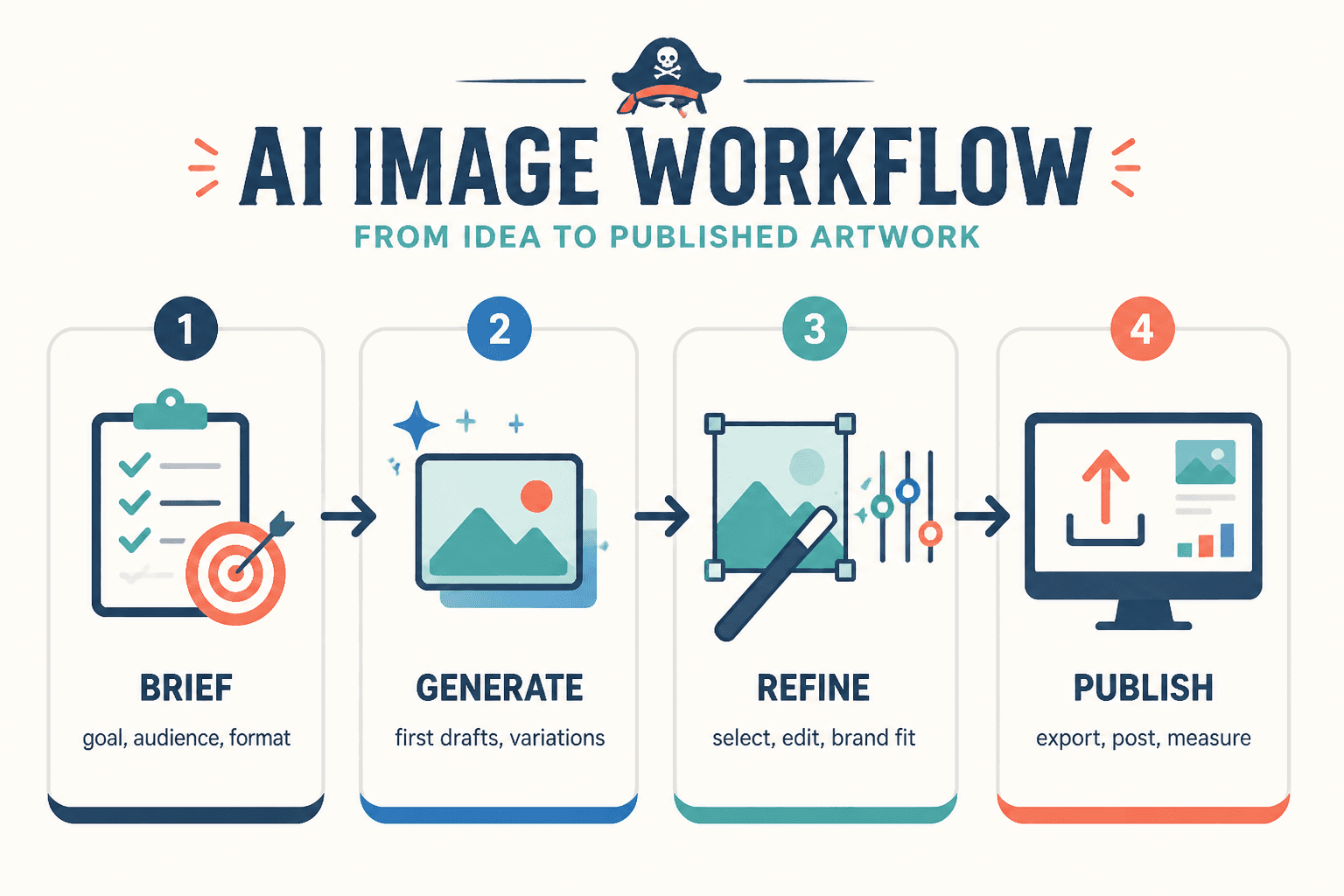
Start with a use-case brief, not a vague prompt
Instead of “make a modern professional image,” write a short brief:
- Who it is for
- Where it will be used
- What action it should support
- What mood fits the brand
- What elements must be included or avoided
That one shift alone improves output more than hopping between trendy apps.
Use AI for first draft, then refine manually
This is the sane workflow. Generate or assemble quickly, then clean up alignment, hierarchy, cropping, contrast, text, and composition. The first pass is speed. The second pass is quality.
Build a small visual system
Choose a few fonts, colors, thumbnail styles, image treatments, and layout patterns. Save them. Reuse them. Consistency beats constant novelty for most creator businesses.
Judge the output by performance, not novelty
A useful graphic that earns clicks, saves, leads, or sales is better than a dazzling image that mainly makes you want to post “made this with AI” and wait for applause.
There is a difference between visual production and visual vanity. The internet already has enough of the second one.
When to use AI image tools, and when to skip them
Use AI image tools when:
- You need speed
- You need affordable visual variety
- You need concept exploration
- You need repeatable content assets
- You do not have in-house design support for every task
Skip or limit them when:
- You need authentic proof or documentary credibility
- You have original photography that already serves the goal better
- You need highly specific brand illustration with strict controls
- You are using visuals for sensitive or trust-heavy communication where realism matters a lot
That balance matters. AI should support your content and offers, not make everything look vaguely synthetic and emotionally airbrushed.
FAQ
Do I need both an AI image generator and a design tool?
Usually, yes. Generators help create visuals. Design tools help turn those visuals into usable assets.
What is the best AI image tool for creators?
The best one is the one that matches your main output. For most creators, a design-first tool plus basic AI editing is more useful than a pure generator alone.
Are AI design tools enough for branding?
They can support branding, but they do not replace strategy, positioning, or a clear visual system.
Should I use AI images for sales pages?
Sometimes. They work best as supporting visuals, mockups, or illustrations. Real screenshots, proof, and product visuals are often stronger for trust.
How many tools should I use?
Start with two or three. One core tool, one support tool, and one simple system for templates or asset organization.
Pick tools that help you ship better work, not just prettier demos
The best AI image tools and design tools for AI Image Use Cases are the ones that fit the job, fit your workflow, and help you produce useful assets without turning every content task into a production circus.
If you create content, sell expertise, or package ideas for a living, the winning move is usually simple: generate when you need originality, design when you need clarity, edit when you need polish, and use templates when you need consistency.
That is not the flashiest answer. It is the one that tends to work.
For more practical next steps, you can explore the broader AI writing tools and AI image tools path, plus best AI tools for AI image use cases and best templates and tools for AI image use cases if you want to build a stack that is actually usable next week, not just interesting for twelve minutes today.