Most affiliate comparison blocks do not underperform because the products are bad. They underperform because the block itself is doing a sloppy job.
It is either too vague, too crowded, too obviously biased, or written like somebody copied a pricing table and hoped buyer intent would do the rest. Readers hit the block, feel a little friction, lose trust, and leave. Quietly. Which is annoying, because comparison sections are often the part of the article closest to actual conversion.
If you are publishing affiliate content, this is one of the easiest places to improve performance without writing an entirely new article. A better comparison block can make your recommendations clearer, your article more trustworthy, and your clicks a lot more qualified. That matters more than stuffing in three extra CTA buttons and calling it optimization.
This guide breaks down the affiliate article comparison block mistakes that hurt performance, why they hurt, and how to fix them without turning your content into a sales page wearing a blog costume. If you want the broader strategy behind affiliate content structure, start with the main affiliate articles guide, then come back and tighten the money section.
What a comparison block is actually supposed to do
A comparison block is not there to impress people with how many tools you know.
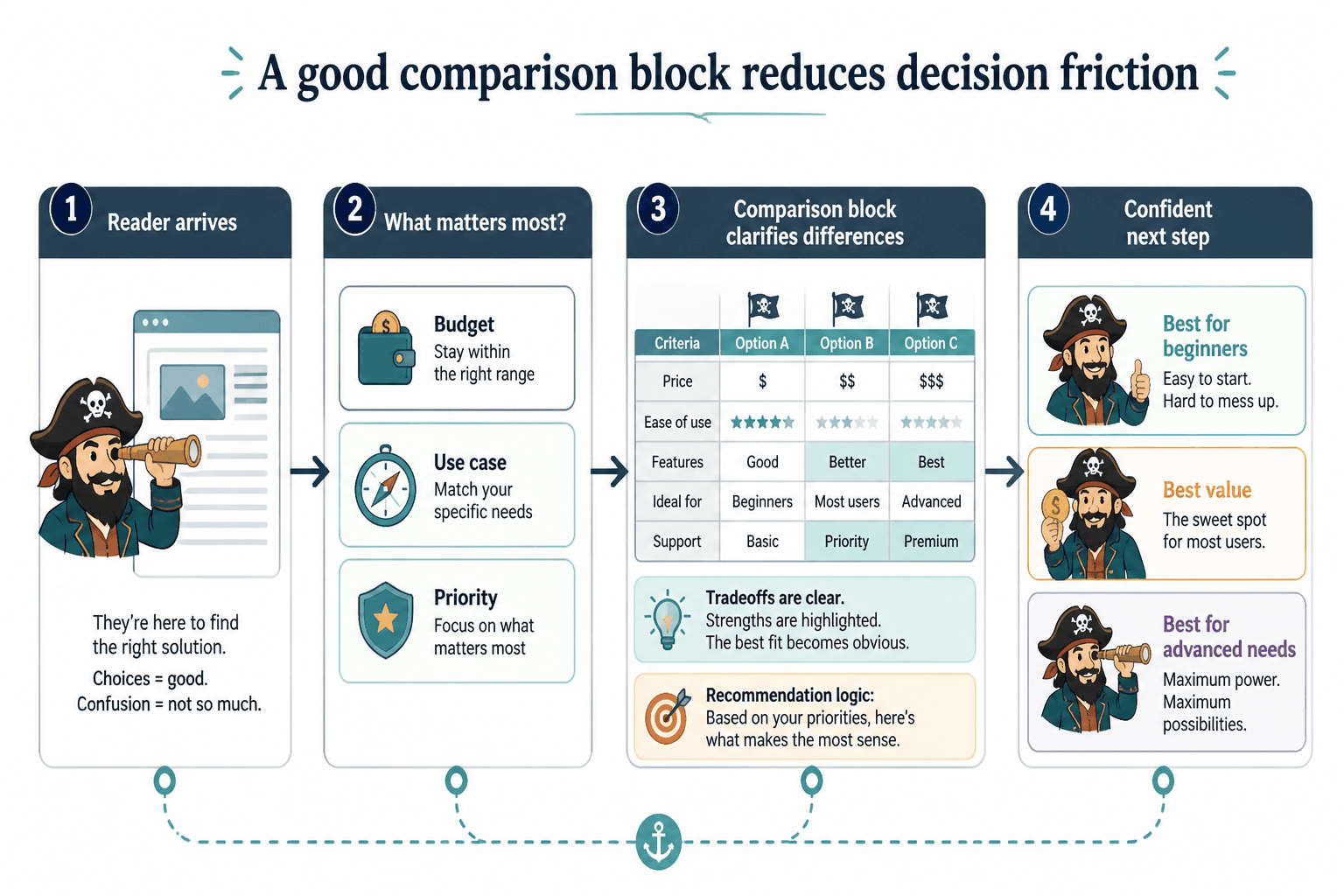
Its job is simpler than that. It should help a reader quickly understand the relevant differences between options and make a next-step decision with less friction. That is it.
When the block works, the reader feels oriented. They can tell which option fits their situation, what tradeoff they are making, and why your recommendation is sensible. When it fails, they feel pushed, confused, or weirdly unconvinced.
Good comparison blocks do four things well:
- They compare the right criteria
- They make meaningful differences obvious
- They match the article’s buyer intent
- They support trust instead of draining it
That sounds basic. It is. And people still mess it up constantly.
Affiliate Article Comparison Block Mistakes That Hurt Performance most
1. Comparing features instead of decisions
This is one of the biggest mistakes.
A lot of comparison blocks read like a product manager’s leftovers: storage limits, dashboard tabs, integrations, seat counts, maybe a badge or two. Useful sometimes, sure. But readers are not usually trying to admire feature architecture. They are trying to choose.
People make buying decisions around outcomes, constraints, and fit. So your comparison criteria should reflect that.
Instead of only comparing feature lists, compare things like:
- Best for beginners vs advanced users
- Best for solo creators vs teams
- Fastest setup
- Best for customization
- Best if budget matters most
- Best if support matters most
- Best for a specific workflow or use case
Feature data can support the block, but it should not be the spine of it unless the reader truly is comparing technical specs. Most are not.
Bad comparison blocks ask, “What does each tool have?” Better ones answer, “Which one should I pick, and why?”
2. Including too many options
More options do not automatically make a comparison block more helpful. Usually they make it mushier.
If your article is comparing ten tools inside one block, odds are the reader is not getting clarity. They are getting buffet fatigue. And when people feel overloaded, they postpone the decision or bounce.
For most affiliate articles, three to five options inside a comparison section is plenty. Enough contrast to be useful. Not so much that the whole thing turns into spreadsheet soup.
If you truly need more products, break them into categories. That way the reader can navigate by situation instead of scanning one giant slab of sameness.
For example:
- Best all-around picks
- Best budget options
- Best for advanced users
- Best for specific use cases
If you want help structuring the article around buyer intent before the comparison block even appears, these affiliate article buyer-intent sections and templates can make the whole piece cleaner.
3. Making every product sound equally good
This one is subtle, and it kills conversions.
Writers often try to sound fair by making every option look great. The result is a comparison block with no useful hierarchy, no tension, and no obvious recommendation logic. Every product is “powerful,” “user-friendly,” “great for different needs,” and somehow also “worth considering.”
That is not fairness. That is evasiveness.
Real comparisons need contrast. One option should be better for this. Another should be weaker at that. A third might only make sense if someone values a specific thing enough to tolerate the downside.
If everything looks equally solid, the reader does not trust the comparison. They can smell the affiliate politeness.
A stronger approach looks more like this:
- Tool A: best overall for most people, but pricier than it needs to be for casual use
- Tool B: best budget option, but noticeably less flexible
- Tool C: ideal for advanced workflows, but overkill for beginners
Now the reader can actually decide.
4. Hiding the tradeoffs
Nothing wrecks trust faster than pretending products have no downsides.
If your comparison block only includes positives, it reads like sponsored copy even when it is not. Readers do not need a dramatic takedown. They just need honest framing. Every option has a compromise. Price, learning curve, flexibility, support, setup time, reporting depth, integrations, design, speed, whatever. Something.
State the tradeoff clearly. That usually increases trust more than it hurts clicks, because it makes the recommendation feel filtered rather than pushed.
For example:
- “Best if you want speed, but not ideal if you need deep customization.”
- “Great reporting, though the interface is clunkier than the others.”
- “Affordable entry point, but costs can climb once your usage grows.”
That kind of honesty does not weaken the affiliate article. It makes it believable.
5. Using weak comparison criteria
Not all criteria are useful just because they are easy to list.
Some blocks compare things readers barely care about, or care about much later. If someone is trying to pick a course platform, “number of available themes” may not be the decision-maker. If they are choosing an email tool, “sleek interface” probably matters less than deliverability, automation ease, and segmentation.
Your criteria should match the reason the reader searched for the article in the first place.
Ask:
- What is this reader most worried about getting wrong?
- What tradeoff are they actually trying to make?
- What would make one option clearly better for their use case?
- What details are nice, but not decision-critical?
This is also where article angle matters. If your article is framed around beginners, creators, coaches, or consultants, the comparison criteria should reflect that audience, not some generic software review checklist. If you need stronger review framing, these review angles and examples are useful.
6. Writing labels that sound helpful but mean nothing
“Best value.” “Most powerful.” “Top choice.” “Best for growth.”
These labels feel useful because they sound decisive. But half the time they say absolutely nothing.
Best value for whom? Most powerful in what way? Top choice based on what criteria? Best for growth is one of those phrases that should probably be taken outside and retired quietly.
If you are assigning tags or recommendation labels in a comparison block, make them concrete:
- Best for first-time creators
- Best if you need built-in automation
- Best low-cost option for simple use
- Best if reporting matters more than design
- Best for teams, not solo users
Specific labels reduce guesswork. Vague labels just decorate indecision.
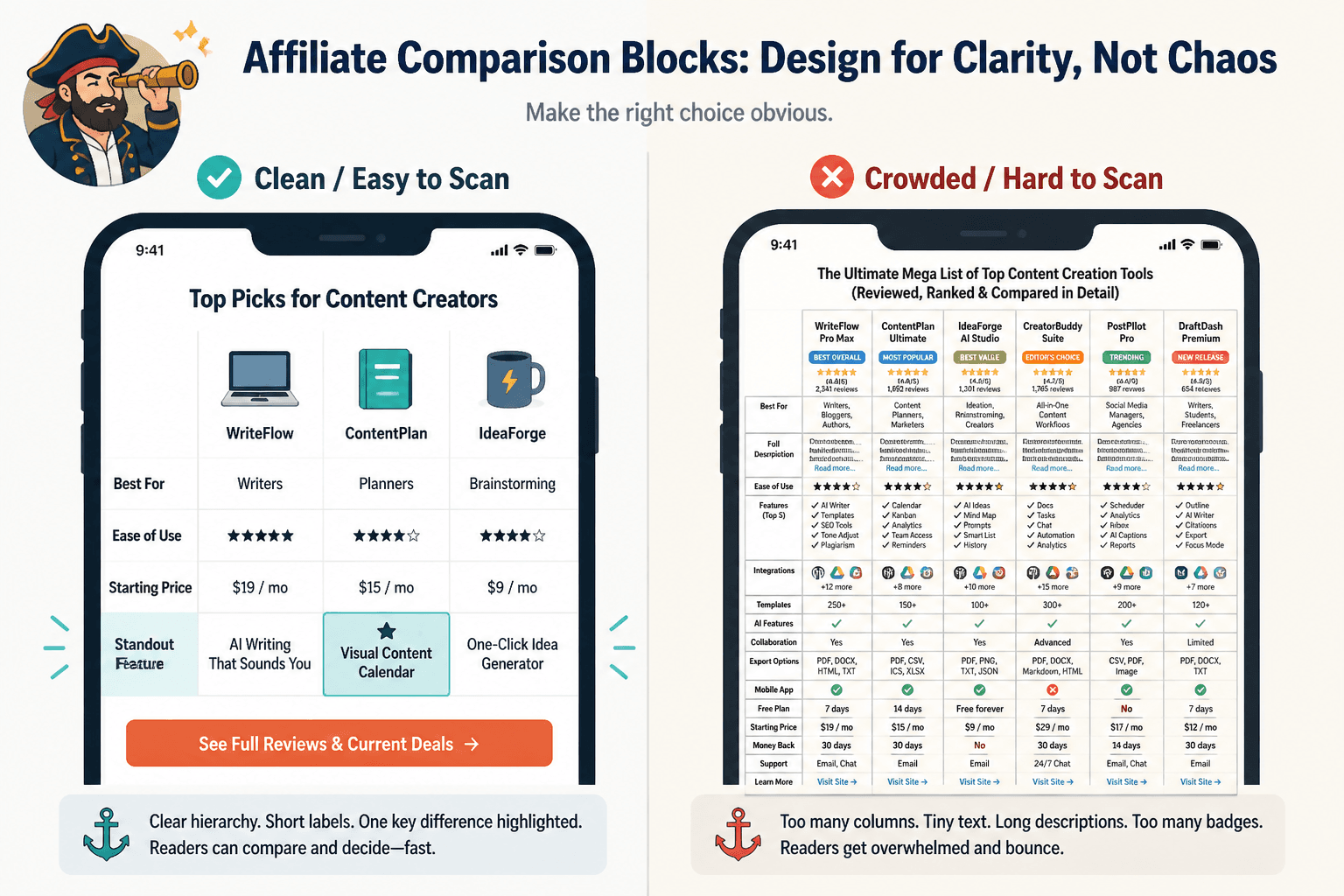
7. Turning the block into a giant wall of tiny text
Even when the logic is good, formatting can still tank performance.
If the comparison block is visually dense, packed with tiny details, or hard to scan on mobile, readers will skip it. They do not care that you worked hard on it. They care that it feels like homework.
Keep the design and structure light enough to scan fast:
- Use short labels
- Keep descriptions tight
- Limit columns to what is truly needed
- Make sure the key difference is obvious at a glance
- Use supporting text below the table or list when nuance is needed
Sometimes a simple bullet comparison works better than a complicated table, especially if the differences need interpretation. The point is not to look sophisticated. The point is to reduce friction.
8. Placing the comparison block in the wrong part of the article
Comparison blocks are often placed based on habit, not reader flow.
Too early, and the reader has not built enough context to care. Too late, and they are exhausted or already gone. The right placement depends on search intent.
If the article targets high buyer intent, a comparison block can appear relatively early, after a short setup that clarifies the article’s angle. If the article is more educational, the comparison may work better after you explain the selection criteria, use cases, or key decision factors.
A good test is simple: by the time readers hit the block, do they know what matters and why? If not, the comparison is showing up before the decision frame is ready.
9. Using generic CTA buttons that break trust
Comparison blocks often end with terrible calls to action.
Not because CTAs are bad. Because the wording sounds like a late-night funnel template got lost in your article.
Buttons like “Buy Now,” “Claim Deal,” or “Get Started Today” can work in some contexts, but inside a trust-based affiliate article they often feel too aggressive, especially if the reader is still comparing.
Usually a softer, clearer CTA works better:
- See pricing
- Visit site
- Try it here
- Check current plan options
- View features
The wording should match buyer temperature. If the article has not earned a hard sell, do not force one. For a deeper breakdown, here is how to improve affiliate article CTAs without sounding generic.
10. Not matching the comparison block to the article’s intent
This is the strategic version of the problem.
A comparison block should reflect what the article is trying to help the reader do. That sounds obvious, yet plenty of affiliate posts have mismatched sections. A “best tools for beginners” article suddenly includes enterprise-level criteria. A “cheapest options” article spends most of the block on premium features. A “fastest setup” article buries setup speed under five rows of unrelated product trivia.
The comparison block should feel like the logical payoff of the article’s promise. If the promise is one thing and the block prioritizes another, readers feel the disconnect even if they cannot explain it.
What better comparison blocks do differently
A strong comparison block is not just tidier. It is better aligned with how readers decide.
Here is the basic shape that tends to perform better:
- It narrows the options to a manageable set
- It compares criteria that matter to the reader’s use case
- It names clear strengths and honest tradeoffs
- It highlights one or two meaningful differences per option
- It uses recommendation labels that are specific
- It ends with a CTA that fits the trust level of the article
This is where a lot of creators overcomplicate things. You do not need a giant custom widget or some elaborate CRO science fair project. You need clarity, relevance, and enough honesty that the reader does not feel managed.
A simple rewrite example
Here is a weak version of a comparison block summary:
Tool A is a powerful and user-friendly platform with great features. Tool B is also an excellent choice with robust functionality and affordable pricing. Tool C stands out for its innovation and flexibility.
That says almost nothing. It sounds polished, but it is content fog.
Here is the stronger version:
Tool A is the best fit for most solo creators because it is easier to set up and simpler to maintain. Tool B makes more sense if budget is your main filter, though you give up some automation flexibility. Tool C is the strongest option for advanced workflows, but most beginners will find it heavier than they need.
Now we have actual decisions, actual tradeoffs, and actual reader usefulness. Funny how that helps.
How to audit your existing comparison blocks
If you already have affiliate articles live, you do not need to rewrite everything from scratch. Audit the comparison sections first. That is usually where fast gains hide.
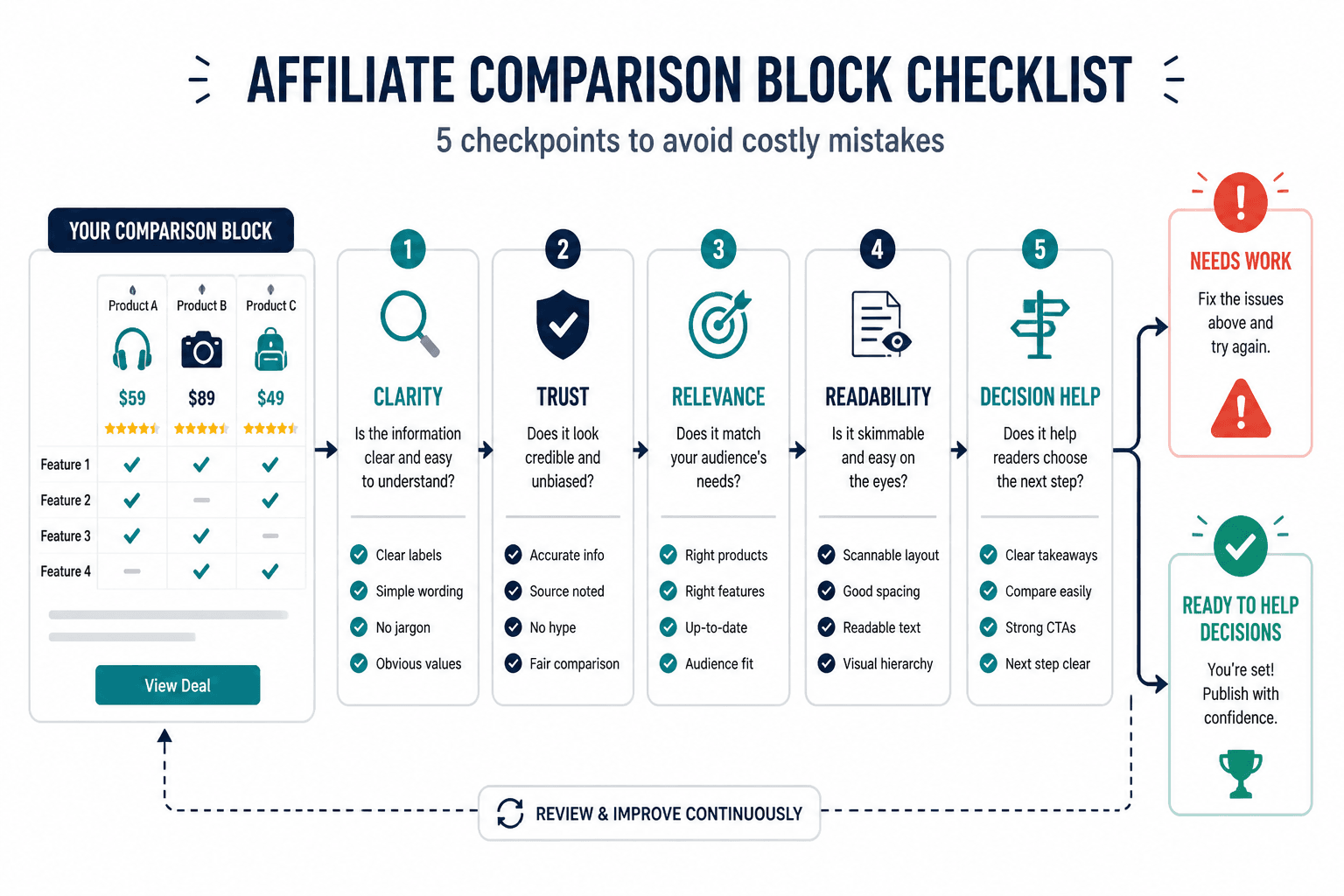
Use this checklist:
- Does the block compare options based on reader decisions, not just features?
- Are there too many choices in one section?
- Is there a clear recommendation hierarchy?
- Have you included honest downsides?
- Are the criteria relevant to the article’s promise?
- Do the labels mean something specific?
- Is the block easy to scan on mobile?
- Is the CTA clear without sounding pushy?
- Does the comparison appear at the right point in the article?
- Would a real reader feel more informed after this section, or just more marketed to?
If you answer “not really” to more than two or three of those, the block probably needs work.
And yes, this matters even if your article gets traffic. Traffic alone does not mean the decision section is doing its job. You can have a page that ranks decently and still wastes buyer intent with a weak comparison experience.
If your goal is not just clicks but actual downstream revenue, pair this with a broader conversion path. This guide on turning affiliate articles into more leads or sales helps connect the article to a better funnel.
Comparison block formats that usually work best
You do not need one universal format. You need the format that best fits the decision complexity.
| Format | Best for | Watch out for |
|---|---|---|
| Simple table | Quick side-by-side comparisons with clear criteria | Too many columns, tiny text, feature overload |
| Bullet-based comparison | Situational recommendations with nuance | Getting too wordy or repetitive |
| “Best for” cards or summaries | Fast decision support for buyer-intent readers | Vague labels and missing tradeoffs |
| Hybrid format | Short table plus explanation below | Repeating the same information twice |
If your niche is more trust-sensitive, like coaching tools, creator software, education platforms, or service-related products, the hybrid format often works best. Quick scan first, explanation second. Readers can move fast without feeling rushed into a click.
Where these fixes fit into your wider affiliate content strategy
Comparison blocks are not the whole article, obviously. But they are one of the places where strategy and conversion meet in plain sight.
If the article angle is weak, the comparison block struggles. If the trust is weak, the comparison block feels salesy. If the article structure is messy, the block lands without context. This is why affiliate performance is rarely fixed by tweaking one button color and acting like you discovered fire.
Better comparison blocks work best when they are supported by the rest of the article:
- A clear buyer-intent angle
- Useful review framing
- Trust-building language
- A next step that fits the reader’s stage
If you are building or cleaning up a cluster of affiliate content, it also helps to work from the broader monetization and affiliate article path so the content connects properly instead of sitting there like isolated product posts hoping for mercy.
FAQ
How many products should an affiliate comparison block include?
Usually three to five. More than that often reduces clarity unless you split products into categories.
Should comparison blocks include product downsides?
Yes. Honest tradeoffs usually improve trust and help readers self-select better.
Are tables always the best format for comparison blocks?
No. Tables are useful for quick scanning, but bullet summaries or hybrid formats often work better when context matters.
What kind of CTA works best in affiliate comparison sections?
Usually a CTA that helps the reader continue the decision with less friction. Usually that means a related comparison, a buyer guide, or a recommendation framed around fit rather than pressure.
The best CTA in a comparison section feels like the next useful step, not the moment the article suddenly starts lunging for the sale.