
Most people looking for the best AI writing tools and community tools for Facebook posts are actually trying to fix three different problems at once:
- They want to post faster
- They want their posts to sound better
- They want more real interaction instead of polite silence and the occasional pity-like
Those are not the same problem, and no single tool fixes all three.
That is where people get weirdly optimistic. They grab an AI writer, ask it for “engaging Facebook content,” and end up with bland little speeches that sound like a conference badge learned to type. Or they join a community tool and expect it to create conversation for them. It won’t. Tools can speed things up, sharpen what you already know, and make community management less messy. They cannot give you taste, point of view, or social instincts you never developed in the first place.
Here’s the useful version: the best AI writing tools and community tools for Facebook posts help you come up with stronger angles, draft faster, organize replies, spot patterns in what your audience cares about, and keep your posting workflow from turning into a sticky note graveyard. If you use them well, your posts feel more human, not less.
This guide breaks down which kinds of tools are actually worth using, what they’re good at, where they tend to fail, and how to build a simple stack that helps you write better Facebook posts without sounding polished to death. If you also want broader strategy for Facebook posts, that’s worth reading alongside this.
For the main guide behind this topic, visit the parent guide.
What the best tools for Facebook posts should actually help you do
Facebook is not LinkedIn in a hoodie. Posts that work here usually feel more conversational, more personal, and more open to response. They do not need to sound hyper-optimized. In fact, over-optimized Facebook posts often die because people can smell the performance.
So when you are evaluating tools, ask a better question than “What writes content for me?” Ask this instead: “What helps me write posts people might actually reply to?”
The right tools should help with things like:
- Finding post angles from real audience questions
- Turning rough ideas into cleaner drafts
- Generating multiple hook options fast
- Saving your best frameworks and reusable post patterns
- Tracking content ideas, comments, and follow-ups
- Managing Facebook groups or community replies without losing the plot
- Repurposing posts into variations instead of repeating yourself badly
They should not tempt you into posting generic “relatable” filler five times a week. That path leads straight to low-trust content and a very boring brand.
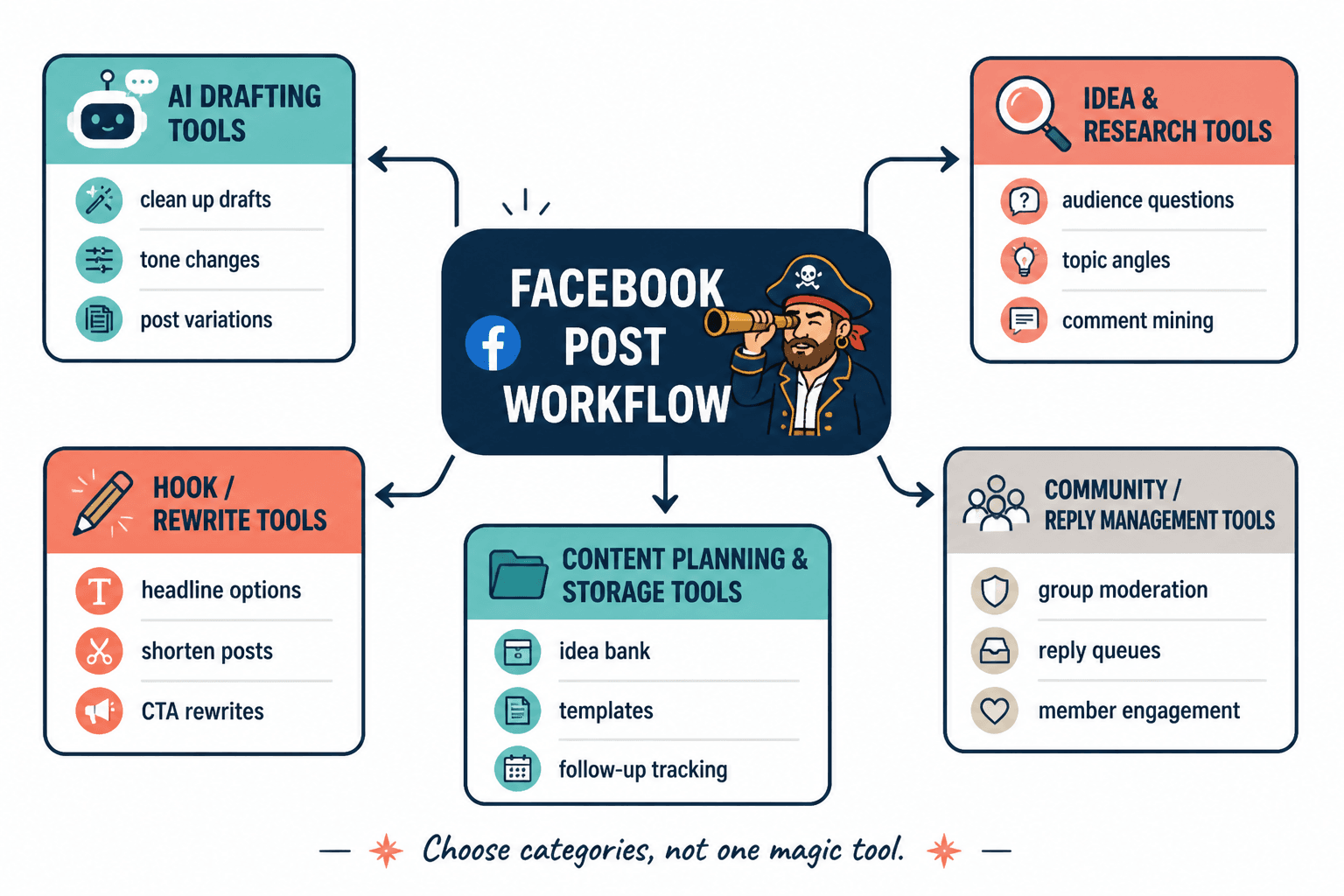
The main categories of AI writing tools for Facebook posts
You do not need one magical tool. You need a useful category match.
1. AI drafting tools
These help you turn notes, voice memos, rough bullets, or ugly first drafts into something clearer and more readable.
Good for:
- Cleaning up rough writing
- Generating first drafts from your ideas
- Creating post variations
- Shortening long thoughts into tighter Facebook-friendly structure
- Testing different tones
Not good for:
- Producing original insight from nothing
- Knowing what your audience finds emotionally relevant
- Replacing your examples, proof, or lived expertise
What to watch for: if the draft sounds too polished, too universal, or weirdly motivational, it probably needs more you in it. Facebook posts usually work better when they feel like a person talking to other people, not a mini keynote.
2. AI idea-generation tools
These are useful for brainstorming angles, hooks, questions, counterpoints, and post structures. Often, this is where AI is more helpful than in actual full-draft writing.
Good for:
- Generating 10 angles from one topic
- Finding stronger hooks
- Turning client questions into content prompts
- Creating conversation-starting endings
- Exploring different stances on one issue
This matters because a weak Facebook post is often not a writing problem. It is an angle problem. The writing may be fine. The point is just too obvious to deserve a reaction.
3. AI editing and rewriting tools
These tools help tighten clunky paragraphs, simplify overlong sentences, improve rhythm, and remove the corporate dust from your draft.
They are especially useful if you naturally write too formally or too long. Plenty of smart people do. That is not a character flaw. It just needs editing.
Good use case: write your post the way you naturally would, then use AI to create three tighter versions:
- one more conversational
- one more punchy
- one with stronger emotional clarity
Then steal the best bits from each. That works far better than asking AI to make the whole thing from scratch.
4. Template and swipe-file tools
These are not always marketed as AI tools, but they are part of a practical content system. Good template tools help you save structures that already worked: mini-story posts, hot takes, community questions, “here’s what I’m seeing” posts, contrarian observations, soft CTA closers, and so on.
Used well, templates save time. Used badly, they turn your posts into paint-by-numbers nonsense.
If you want examples of better structures and reusable ideas, this guide to templates and tools for Facebook posts is a helpful companion.
The community tools that actually matter for Facebook posts
Community tools are often ignored in “content tool” roundups, which is odd because Facebook is one of the few platforms where community behavior matters as much as the post itself.
If your content strategy ends at “publish post,” you are leaving a lot on the table. Facebook rewards participation, not just posting. That does not mean there is a secret algorithm ritual. It means people respond better when you behave like a person in a room instead of a content vending machine.
1. Comment management tools
These help you track replies, respond consistently, and avoid missing good conversations that could become leads, partnerships, content ideas, or client insight.
Useful for:
- Creators with active comment sections
- Consultants who use posts to start conversations
- Group admins who need to keep interaction organized
- Anyone who tends to forget to reply after posting
What matters here is not fancy automation. It is visibility. You need to see who is engaging, what patterns keep showing up, and where a casual comment might deserve a better follow-up.
2. Group moderation and community management tools
If Facebook groups are part of your strategy, community tools can save your sanity. Approval workflows, moderation queues, saved responses, member tagging, and recurring topic prompts all help.
Good group tools help you:
- Keep quality high without living in the group all day
- Spot recurring member questions worth turning into posts
- Welcome new members consistently
- Encourage discussion without forcing awkward prompts
- Reduce spam and repetitive admin work
That last point matters more than people admit. Once group management gets messy, your writing quality usually drops too, because your attention is split between actual communication and digital janitorial work.
3. CRM-style tools for creator relationships
This is where things get useful fast for coaches, consultants, and solo founders. A lightweight CRM or relationship tracker can help you connect posts to actual business outcomes.
For example:
- Someone comments regularly on your Facebook posts
- You note their interests or business type
- You follow up later with something relevant
- The relationship moves naturally toward a call, referral, or collaboration
That is a lot better than “I post every day and hope clients materialize from the mist.”
Best AI writing tools and community tools for Facebook posts by use case
The best stack depends on what you are trying to improve. Here is the practical version.
| Goal | Best tool type | What it helps with |
|---|---|---|
| Write posts faster | AI drafting tool | Turning rough notes into usable drafts |
| Get better ideas | AI brainstorming tool | Angles, hooks, questions, reframes |
| Sound more human | AI rewriting/editor tool | Tightening and de-corporatizing stiff copy |
| Post more consistently | Template library or scheduler | Reducing startup friction |
| Build actual conversation | Comment management tool | Reply tracking and relationship follow-up |
| Run a Facebook group better | Community management tool | Moderation, prompts, workflows, member engagement |
| Turn engagement into leads | CRM or creator relationship tool | Tracking warm interactions and next steps |
If you only pick one category, make it either AI brainstorming or AI editing. Those two tend to improve quality without flattening your voice.
What to avoid when using AI for Facebook posts
There are a few common ways people make their Facebook writing worse with tools. Impressively fast, too.
Using AI to generate fully finished posts with no original input
This is how you get generic “relatable” content that says almost nothing. AI needs raw material: opinions, examples, observations, client questions, mistakes you keep seeing, lines you would actually say out loud.
If your prompt is vague, your post will be vague. There is no miracle hiding in there.
Over-polishing the tone
Facebook usually responds better to a voice that feels slightly lived-in. Not sloppy. Just human. If the post reads like a marketing intern ironed all the wrinkles out of it, engagement can drop because nothing feels easy to respond to.
A little texture helps. Short opinion lines. Concrete examples. Mildly imperfect rhythm. Language people actually use.
Using community tools to automate fake friendliness
Saved replies can be useful. Generic “Thanks for sharing!” pasted 48 times is not community management. It is digital wallpaper.
Use community tools to reduce admin load, not to cosplay warmth.
Chasing volume instead of relevance
More posts do not automatically mean better results. Seven AI-assisted posts that all sound interchangeable will lose to two sharp posts that start real conversation.
If you need better source material, these Facebook post ideas and examples for creators can help you find angles worth writing in the first place.
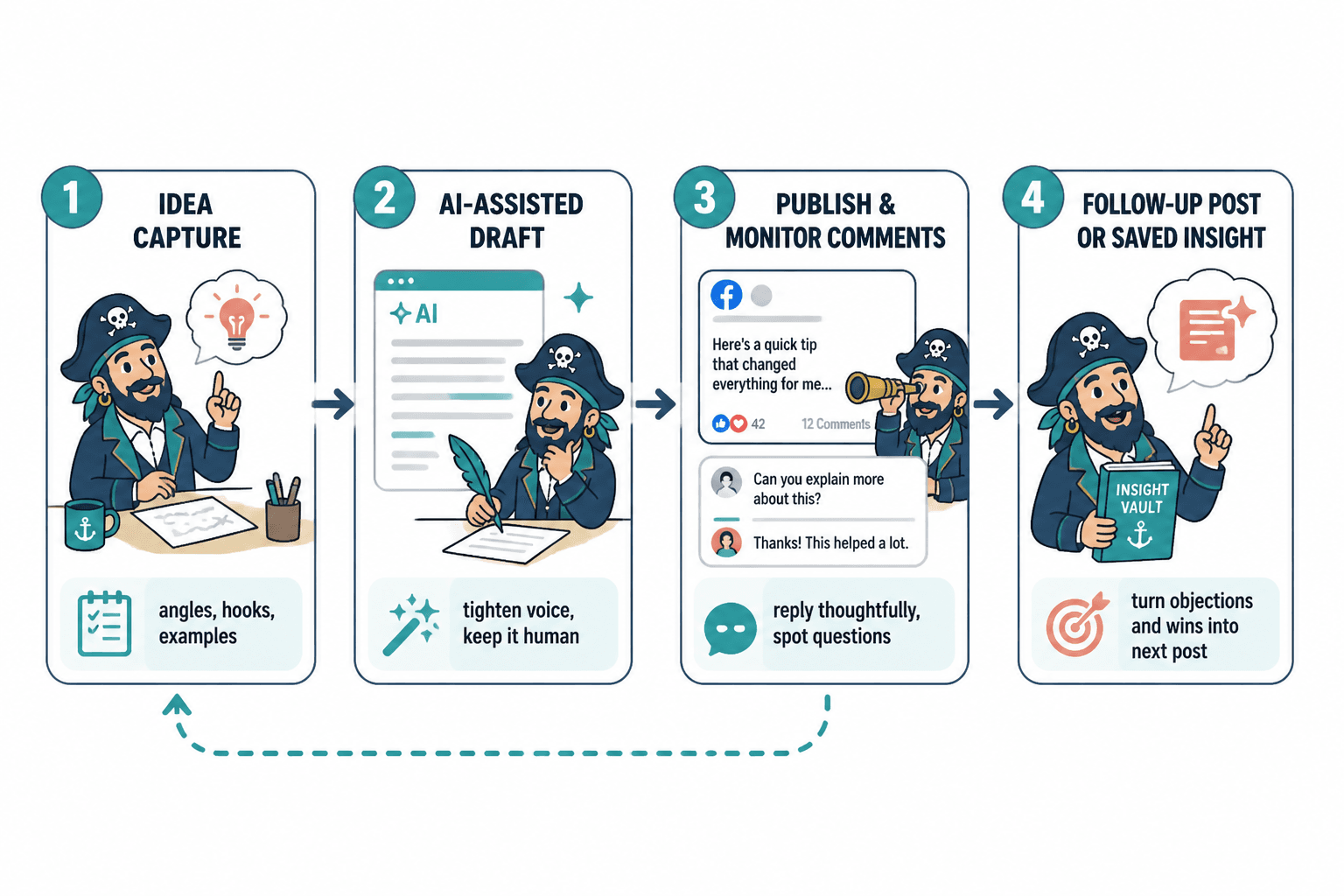
A simple tool stack for better Facebook posts
You do not need a giant stack. Most people need four things, max.
Option 1: The lean solo creator stack
- AI brainstorming tool: for post angles, hooks, and endings
- AI editor: for tightening your natural drafts
- Note-taking or swipe file tool: for storing ideas, stories, and post structures
- Basic comment tracking habit: even if it is manual at first
This is enough for most writers, coaches, freelancers, and consultants.
Option 2: The audience-growth stack
- AI drafting tool: to turn rough material into first drafts quickly
- Template tool: to save repeating post formats
- Scheduler: if you genuinely need workflow help, not because posting manually offends your systems brain
- Comment management tool: to maintain conversations after publishing
This works well if consistency is your weak point and your audience is already active enough to justify response management.
Option 3: The Facebook group and community stack
- Community management tool: for moderation, approval, tagging, and recurring workflows
- AI prompt assistant: to help create discussion starters, member questions, and weekly prompts
- CRM or relationship tracker: for notable members, prospects, and conversations
- Idea database: for recurring themes worth turning into content
If your business depends on groups or recurring discussion, this setup usually pays for itself in time and sanity.
How to use AI without making your Facebook posts worse
The best use of AI is usually collaborative, not fully delegated. Think editor, sparring partner, or idea expander. Not ghostwriter overlord.
Here is a workflow that works well:
- Start with your own raw thought. A note, rant, question, client pattern, observation, screenshot, story fragment, or opinion.
- Ask AI for angles. Not full posts yet. Angles. Ask for 10 ways to frame the same point for different emotional reactions: curiosity, frustration, relief, recognition, debate.
- Pick one angle and draft it roughly yourself. This keeps the post anchored in your actual voice.
- Use AI to rewrite for clarity. Ask for a tighter version, a more conversational version, and a version with a stronger opening.
- Add specificity back in. Examples, details, phrases you’d naturally use, and one line that sounds unmistakably like you.
- End with a real conversation opener. Not “Thoughts?” You can do better than that.
- After posting, use your community tools. Track comments, spot useful replies, and continue the conversation.
This process is slower than one-click AI posting, yes. It is also much more likely to produce content that people care about.
Examples: bad AI use versus useful AI use for Facebook posts
Bad use
Write me an engaging Facebook post about consistency in business for entrepreneurs.
That usually produces a post full of vague encouragement, familiar clichés, and zero reason for someone to respond.
Better use
I help solo consultants. I keep seeing them confuse consistency with frequency. Give me 12 Facebook post angles showing that posting less often with stronger positioning can outperform daily generic tips. Make the angles conversational, specific, and suitable for comments.
That gives AI something to work with: audience, insight, contrast, and outcome.
Bad use
Make this sound professional and polished.
Professional and polished is often exactly how you drain the life out of a Facebook post.
Better use
Tighten this post, keep the tone warm and direct, remove corporate phrasing, and make the opening stronger without making it sound like a LinkedIn humblebrag.
That is a much better brief. Specific constraints produce better writing.
What to look for in a good Facebook post tool, even if the brand changes
Specific tools come and go, rebrand, get acquired, get bloated, or suddenly decide they are “all-in-one creator ecosystems” now. Very moving. Slightly exhausting. So it helps to judge tools by traits, not just names.
Look for tools that do at least some of these well:
- Easy idea capture from mobile and desktop
- Fast prompt iteration
- Good tone control
- Multiple draft variations without too much sameness
- Reusable prompt libraries or saved frameworks
- Simple content organization
- Comment, reply, or relationship tracking
- Workflow support without forcing over-automation
If the tool is flashy but makes your writing more generic, it is not helping. If it saves time while preserving your voice and improving follow-through, that is a keeper.
If you want a broader AI-focused roundup, this article on AI tools for Facebook posts pairs well with this one.
How community tools improve content quality, not just management
This part gets underrated.
Community tools are not only for handling the mess after publishing. They can directly improve what you write next. When you track comments, recurring questions, objections, and stories from your audience, you stop guessing what content to make. Your next post becomes more relevant because it comes from live conversation, not from your own content calendar hallucinations.
That is especially important on Facebook, where people often respond to posts that feel socially aware. Not trendy. Just aware of what people are frustrated by, confused about, or quietly trying to figure out.
In practical terms, a decent community workflow helps you:
The bigger point is simple: clearer structure and clearer writing make the piece more useful. That is usually what makes the ending land better too.