
Most people use AI and SEO tools for LinkedIn articles in the laziest possible way: they ask for a draft, paste it into LinkedIn, and then wonder why it reads like a medium-confident intern trying to sound “strategic.”
The problem usually is not the tool. It is how the tool is being used. AI can help you think faster, structure better, and polish rough ideas. SEO-research tools can help you find angles people actually care about. But neither one can rescue a vague idea, a weak point of view, or an article with no real payoff.
If you want to publish stronger LinkedIn articles, the sweet spot is simple: use AI for speed and structure, use SEO tools for direction and relevance, and keep your own judgment firmly in charge. That is how you get something useful, readable, and credible instead of another polished slab of business oatmeal.
This guide breaks down the best AI writing tools and SEO-research tools for LinkedIn Articles, what each type is actually good for, where people misuse them, and how to build a workflow that helps you publish better authority content without sounding like a chatbot in a blazer.
To see how this fits into the wider strategy, open the parent guide.
What makes a tool good for LinkedIn articles
LinkedIn articles are not the same thing as LinkedIn posts with more paragraphs glued on. Good articles need stronger structure, clearer ideas, better examples, and enough depth to justify the click.
So when you are evaluating tools, the question is not “Which one writes the most words fastest?” That is usually how you end up with 1,800 words of tidy nonsense.
A good tool for LinkedIn articles should help with at least one of these jobs:
- Finding article topics people are already searching for or talking about
- Clarifying the angle before drafting
- Building a useful outline
- Improving readability and flow
- Generating variations for hooks, subheads, and CTAs
- Organizing notes, source material, and drafts
- Spotting gaps in logic, examples, or specificity
- Repurposing article ideas into posts, summaries, and follow-up content
It should not be expected to do your thinking for you. That part remains annoyingly your job.
The best AI writing tools and SEO-research tools for LinkedIn Articles by category
There is no single perfect stack for everyone. A coach writing practical authority pieces, a consultant publishing lead-gen articles, and a founder building brand trust may need different mixes. What matters is picking tools based on function, not hype.
| Tool category | Best for | What to watch out for |
|---|---|---|
| AI drafting tools | Outlines, rough drafts, rewrites, idea expansion | Generic voice, fake confidence, filler |
| SEO topic research tools | Finding demand, keyword themes, related questions | Chasing traffic over relevance |
| Content optimization tools | Improving structure, topical coverage, readability | Writing for scores instead of humans |
| Note and workflow tools | Organizing research, outlines, swipe files, drafts | Building a system too fancy to actually use |
| Repurposing tools | Turning articles into posts, snippets, newsletters | Publishing repetitive clones everywhere |
That is the useful way to think about your stack. Category first. Brand second.
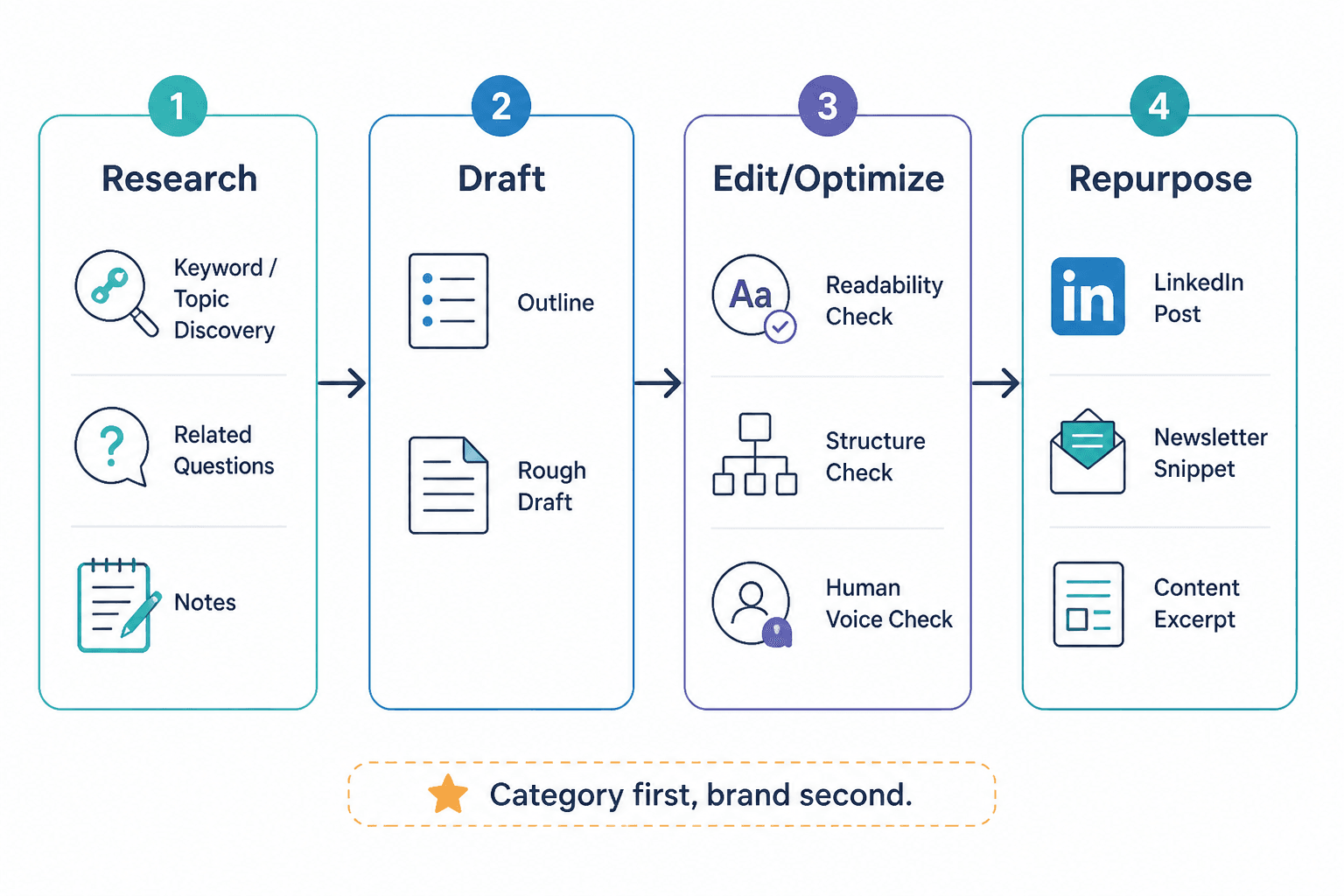
Best AI writing tools for LinkedIn articles
AI writing tools are most useful before and after the first draft. In the middle, they can help too, but that is also where they are most likely to flatten your voice.
1. General AI drafting tools
These are the flexible tools people usually mean when they say “AI writing tools.” They are strong for brainstorming, outlining, summarizing source material, rewriting clunky paragraphs, generating headline options, and pressure-testing your logic.
What they are good at:
- Turning a rough idea dump into a cleaner outline
- Giving you alternate intros or headline directions
- Pulling key themes out of notes, transcripts, and messy drafts
- Suggesting examples, objections, or sections you forgot
- Rewriting stiff sentences into something more readable
What they are not good at:
- Sounding exactly like you without training and cleanup
- Knowing which opinions are actually worth publishing
- Adding real proof if you did not give it any
- Producing a credible final draft in one shot
If you use a general AI drafting tool, the best prompt is rarely “write me a LinkedIn article about X.” Better prompts are narrower and bossier.
Better prompt: “Create a practical outline for a LinkedIn article aimed at consultants and coaches. Topic: using AI and SEO tools to write better LinkedIn articles. Focus on what tools help with, what they cannot do, common mistakes, and a simple workflow. Keep it opinionated, specific, and free of generic marketing language.”
That gets you something you can actually work with. The one-line “write my article” prompt usually gets you polished wallpaper.
2. AI editing and rewriting tools
This category is often more valuable than drafting. If you already have decent ideas, AI-assisted editing can help tighten the article without replacing your voice completely.
Use these tools to:
- Cut repetition
- Tighten openings
- Simplify overcooked sentences
- Improve transitions
- Turn bloated subheads into clearer ones
- Generate alternate CTAs that do not sound thirsty
The best use case here is not “make this smarter.” It is “make this sharper.” Smarter often becomes more abstract. Sharper becomes more readable.
3. AI research assistants
These can help you summarize transcripts, extract patterns from interviews, cluster content themes, and compare your draft against common reader questions. For consultants, coaches, and subject-matter experts with lots of raw material, that is a real time-saver.
They are especially useful if your LinkedIn articles are built from:
- Client calls
- Workshop notes
- Podcast transcripts
- Sales conversations
- Long voice memos
- Internal documentation
This matters because your best article ideas often already exist inside your work. They are just trapped in messy source material and nobody has time to manually dig through all of it.
Best SEO-research tools for LinkedIn articles
SEO tools for LinkedIn articles are not about gaming LinkedIn search with mystical hacks. They are about understanding demand, language, and adjacent questions so your article is not built on a topic nobody asked for in the first place.
LinkedIn articles can support authority, show up in search results, and give you stronger evergreen content than short posts. That makes SEO-research useful, especially when you are writing educational articles, how-to pieces, comparisons, templates, or examples.
1. Keyword research tools
These help you find phrases people are actively searching for, related terms, and question variants that can shape a more useful article.
Use them to answer:
- What exact phrase are people using?
- What related questions keep appearing?
- Is this topic broad, narrow, rising, or stale?
- What subtopics should probably be included?
For example, if your article topic is AI tools for LinkedIn articles, keyword research may reveal connected intents like templates, prompts, SEO tools, article examples, article structure, and repurposing. That helps you write something fuller and more aligned with what readers actually want.
Just do not become the kind of person who wedges every related phrase into the article like you are stuffing a suitcase with your knees.
2. Topic and question research tools
These are useful for pulling actual question patterns, pain points, and subtopics around a subject. They are often better than raw keyword tools when you are trying to sound like a human and not a search-optimized filing cabinet.
They help you build article sections people naturally care about, such as:
- Which AI tools are worth paying for?
- Are SEO tools useful for LinkedIn if LinkedIn is not Google?
- How do you avoid AI-sounding writing?
- What is the best workflow for article writing and optimization?
That is much more useful than writing another vague “top tools” list with no selection criteria and no actual guidance.
3. Content optimization tools
These tools usually compare your draft to common topical coverage and suggest terms, sections, or improvements. They can be handy when your article is thin or missing obvious related ideas.
They are best used as a quality check, not as a dictator.
Use them to:
- Spot missing subtopics
- Catch weak structure
- Improve topical completeness
- See where your draft is too shallow
Do not use them to mechanically force every suggested phrase into every paragraph. Readers can smell that kind of writing from orbit.
What these tools can do well, and what they absolutely cannot
This is where a lot of content goes sideways. People expect tools to provide strategy, judgment, and taste. Then they act surprised when the output sounds like a networking event brochure.
| Tools can help with | Tools cannot reliably do |
|---|---|
| Faster drafting | Create original authority from nothing |
| Organizing ideas | Know your market deeply without context |
| Improving readability | Replace your point of view |
| Generating title and hook options | Fix a boring core idea |
| Finding related search terms | Guarantee article performance |
| Repurposing one article into many assets | Build trust if your content feels generic |
If the article has no insight, no specificity, no proof, and no clear audience, tools simply help you produce a cleaner version of the same problem.
That sounds harsh. It is also useful.
A smart workflow for using AI and SEO tools on LinkedIn articles
The best workflow is simple enough to repeat and structured enough to stop you from publishing rushed sludge.
Step 1: Start with audience and article goal
Before touching any tool, answer these:
- Who is this article for?
- What do I want it to help them do, understand, avoid, or choose?
- Is this article meant for reach, trust, leads, or authority?
- What point of view or practical angle makes it worth reading?
If you skip this step, every tool after it becomes less useful. Research without direction just gives you more tabs open and less clarity.
Step 2: Use SEO-research tools to shape the topic
Look for the main phrase, adjacent questions, and relevant subtopics. You are not trying to stuff keywords into an article. You are trying to understand search intent and topic breadth.
For this article, that could include terms around AI writing tools, SEO-research tools, LinkedIn article writing, article optimization, and content workflows.
Step 3: Build an outline with AI
Once the topic is clear, use AI to help generate a structured outline. Then edit it manually. This matters. The first outline AI gives you is usually decent but generic. Your job is to remove the boring sections and strengthen the useful ones.
Good outline prompt:
“Build a practical outline for a LinkedIn article aimed at solo founders, consultants, coaches, and personal brands. Topic: best AI writing tools and SEO-research tools for LinkedIn articles. Include tool categories, what each category helps with, common mistakes, selection criteria, and a realistic workflow. Keep the tone direct and useful.”
Step 4: Draft with human input, not just AI output
Use AI to help draft sections, but feed it your notes, examples, points of view, client patterns, and objections. The more raw material you provide, the less likely the article is to sound like everybody else’s.
Think of AI as a drafting partner that works fast and needs supervision. A lot of supervision.
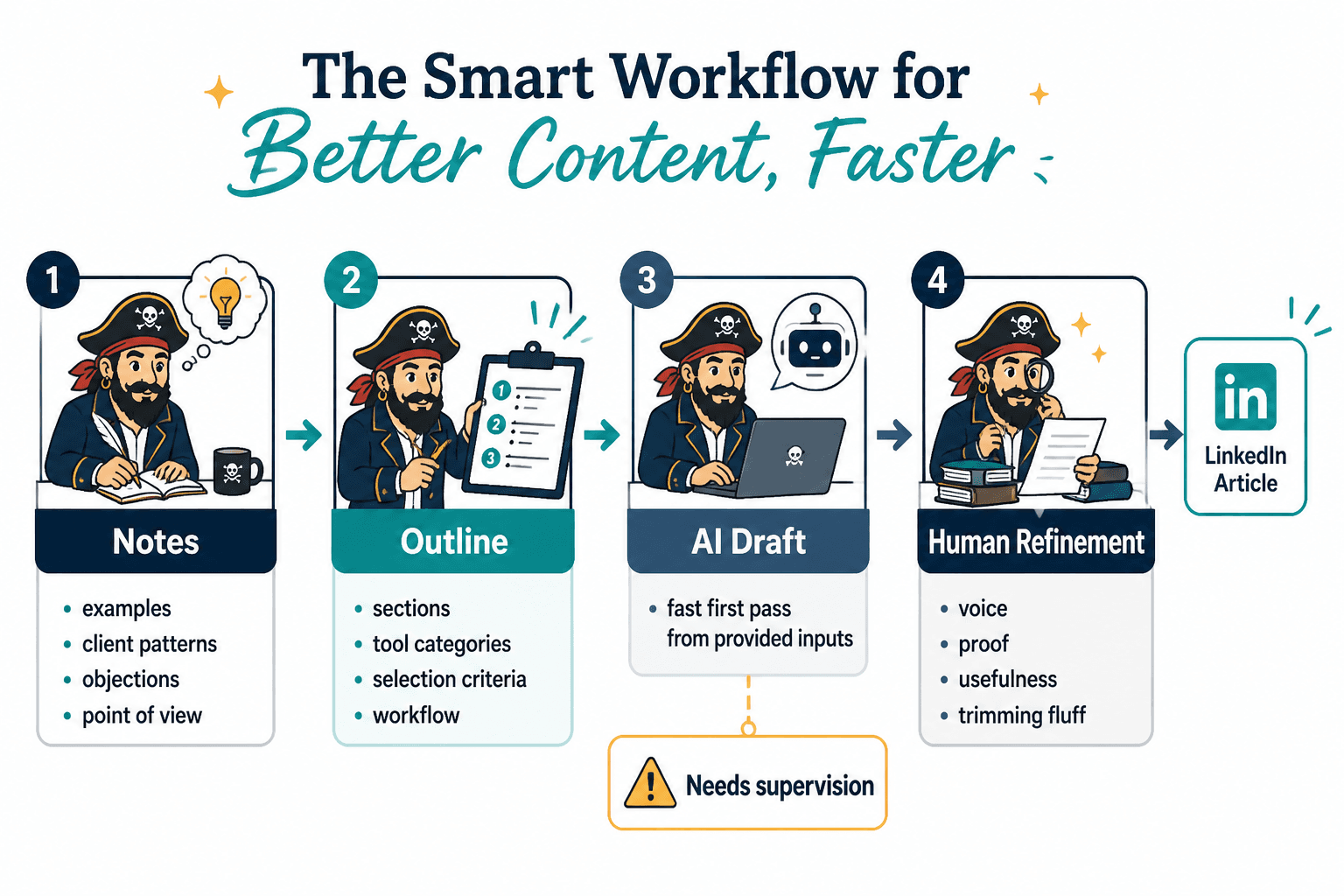
Step 5: Edit for voice, proof, and usefulness
This is the part people rush. Bad idea.
Check the draft for:
- Generic claims with no examples
- Repetition disguised as emphasis
- Soft openings
- Phrases you would never actually say
- Fluff transitions
- Sections that explain but do not help
- Weak or vague CTA language
If a sentence sounds smart but says nothing, cut it. Mercilessly.
Step 6: Run a final SEO and completeness check
Now use optimization tools or your own checklist to make sure the article covers the important subtopics, uses the main phrase naturally, and answers the reader’s likely questions clearly.
This is where SEO supports the article. It should not bully it.
Step 7: Repurpose the article into supporting content
A solid LinkedIn article should not live alone in a dark corner of your profile. Turn it into posts, summaries, hooks, snippets, and follow-up angles. That is where AI can save serious time.
You can also connect this article workflow with related resources on social media writing, more specific guidance on LinkedIn writing, and the broader hub for LinkedIn articles.
Common mistakes when using AI and SEO tools for LinkedIn articles
Using AI to replace expertise instead of express it
If your article could have been written by anyone with a Wi-Fi connection and a vague interest in personal branding, it is not helping your credibility.
Choosing topics by search volume alone
High-volume topics are not automatically good topics for your business, audience, or positioning. Relevance beats raw traffic when you are trying to build trust and attract the right readers.
Publishing drafts that sound too polished and not human enough
AI has a habit of making everything sound smooth, balanced, and faintly lifeless. A good LinkedIn article needs clarity, yes, but it also needs a real voice and a clear point.
Stuffing in keywords like you are hiding evidence
Use the main phrase naturally in the intro, a heading if it fits, and the conclusion if appropriate. Beyond that, write like a person trying to be understood, not a person trying to impress a spreadsheet.
Skipping examples
Tool articles fall apart when they stay abstract. Readers want to know what a tool helps with, how to use it, what not to expect from it, and where it fits in the process.
How to choose the right tools for your situation
You do not need the biggest stack. You need the smallest stack that solves real bottlenecks.
If your problem is topic selection, prioritize SEO and question research tools.
If your problem is getting rough drafts moving, prioritize a flexible AI drafting tool.
If your problem is messy structure and weak readability, prioritize editing and optimization tools.
If your problem is consistency, prioritize workflow and repurposing tools so one article becomes multiple assets.
A simple stack is usually enough:
- One AI drafting or editing tool
- One SEO topic research tool
- One place to organize notes and outlines
That is plenty for most creators, consultants, coaches, and solo founders publishing LinkedIn articles regularly.
Useful companion resources if you want to improve the full article workflow
If you are building a stronger LinkedIn article system, these related reads make sense next:
- Best AI tools for LinkedIn articles
- Best templates and tools for LinkedIn articles
- Best LinkedIn articles ideas and examples for creators
- LinkedIn articles examples for coaches, consultants, and personal brands
Those pair well with this topic because tools are only one part of the job. The article still needs a good idea, a useful structure, and a reason to exist beyond “I should probably post something smart this week.”
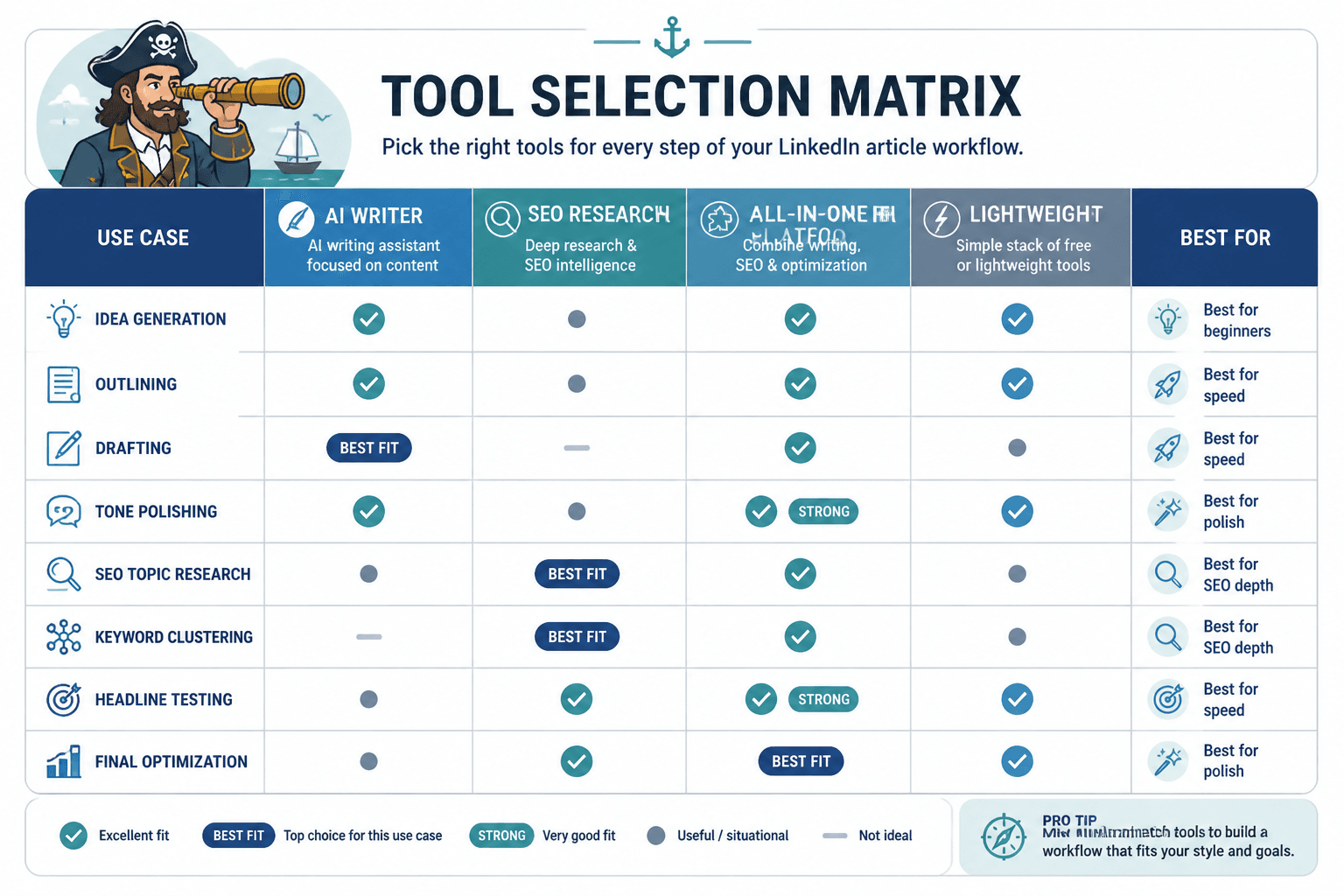
The bigger point is simple: clearer structure and clearer writing make the piece more useful. That is usually what makes the ending land better too.