
Most creators treat LinkedIn articles like one of two things: a blog post copy-pasted into LinkedIn because “why not,” or a stretched-out post with a slightly more serious haircut.
Both usually flop.
A good LinkedIn article does a different job than a post. It is not mainly for quick reach. It is for authority, search visibility inside and outside the platform, and giving the right person enough depth to think, “Alright, this person actually knows what they’re talking about.”
That is what this LinkedIn Articles Guide for Creators Who Want Better Results is about: writing articles that build trust, sharpen your positioning, and quietly do sales-adjacent work without reading like a dehydrated funnel doc.
If your current articles feel too broad, too bland, too long, or weirdly invisible, the problem usually is not that LinkedIn articles are dead. It is that the article has no clear angle, no strong opening, no real proof, and no obvious next step. Harsh, yes. Also fixable.
For the main guide behind this topic, visit the parent guide.
What LinkedIn articles are actually good for
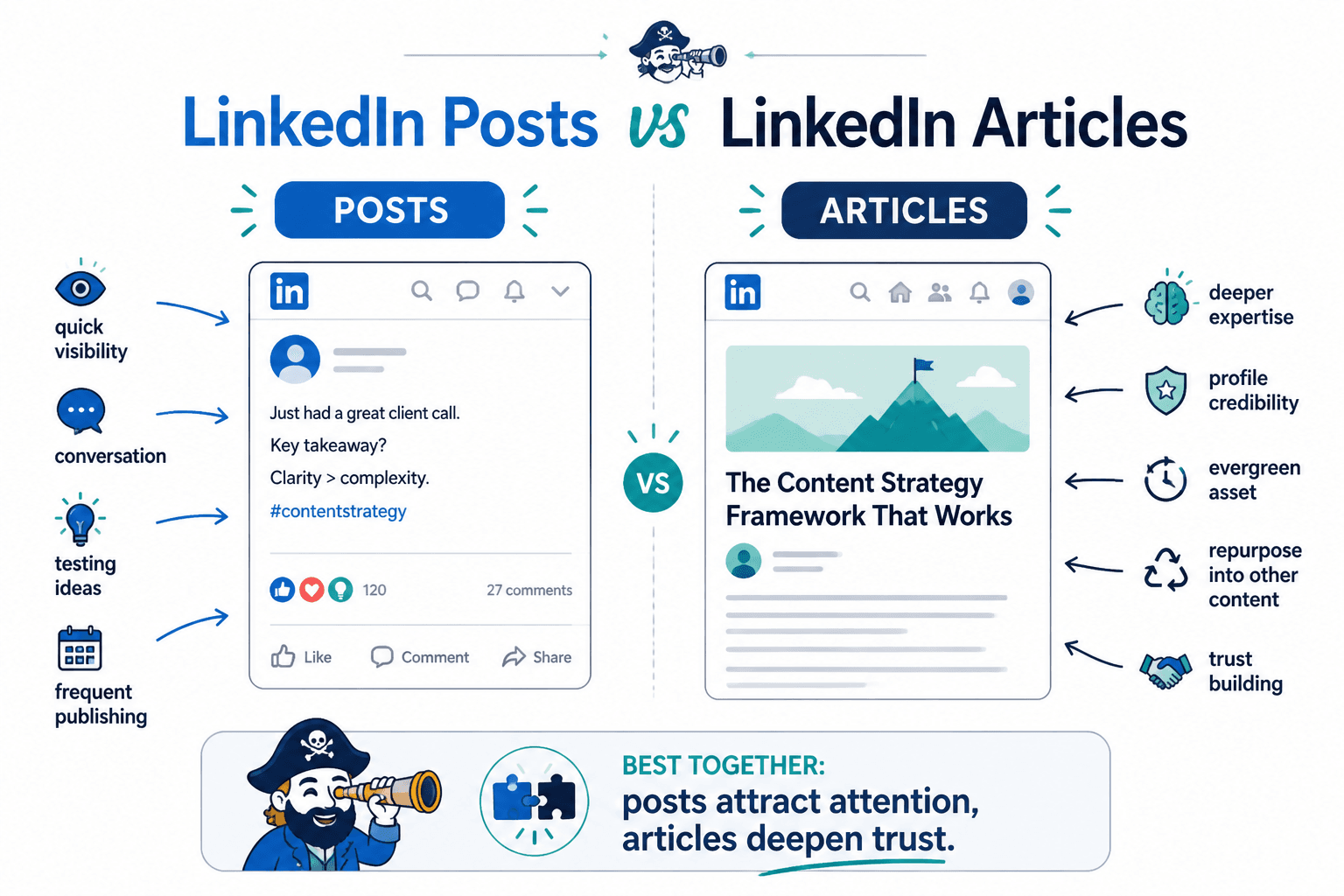
LinkedIn posts are better for speed, conversation, and testing ideas quickly. Articles are better when you want to go deeper, rank for relevant topics, and create something with a longer shelf life.
That matters because too many creators expect article performance to look like post performance. Different format. Different job. Different win condition.
- Posts are for attention, interaction, and fast feedback
- Articles are for authority, depth, discoverability, and trust
- Posts can spark curiosity
- Articles can answer the buyer’s “Can this person really help me?” question
So if you publish one article, get fewer likes than your average post, and decide articles are pointless, that is not analysis. That is impatience wearing glasses.
A strong article can help you:
- Show deeper expertise than a short post can hold
- Support your profile when someone clicks through from a post or comment
- Create evergreen content you can repurpose into posts, threads, emails, and lead magnets
- Give prospects a stronger reason to trust your thinking
- Own a useful topic in your niche over time
If you want a broader path through this topic, the main LinkedIn articles hub is worth bookmarking.
Why most LinkedIn articles underperform
Usually, it comes down to one of these problems.
- The topic is too broad. “How to grow on LinkedIn” is not an article angle. It is a content landfill.
- The opening takes too long. Readers do not need three paragraphs of throat-clearing before the point appears.
- There is no real opinion. Safe, generic advice gets polite silence.
- There are no examples. If everything stays abstract, nothing sticks.
- The article sounds AI-smoothed. Grammatically fine. Spiritually dead.
- There is no next step. The reader finishes and has no reason to continue with you.
The fix is not to write longer. It is to write sharper.
How to choose a LinkedIn article topic that can actually work
The best LinkedIn article topics usually sit at the intersection of four things:
- Something your audience actively struggles with
- Something you can explain with specificity
- Something tied to your service, expertise, or positioning
- Something narrow enough to cover properly in one article
That last one matters a lot. Broad articles feel impressive to write and annoying to read. Narrow articles feel more useful because they are.
Weak topic vs strong topic
- Weak: How to Write Better Content
- Better: How to Turn One Boring Expert Insight Into a LinkedIn Post People Actually Read
- Weak: Personal Branding Tips for Consultants
- Better: The 5 Profile Mistakes Making Smart Consultants Look Generic on LinkedIn
- Weak: LinkedIn Strategy for Founders
- Better: A Simple LinkedIn Content System for Founders Who Do Not Want to Post Every Day
Specificity does two useful things at once: it attracts the right reader, and it makes the article easier to write because you are not trying to solve all of modern professional communication in one sitting.
If you need help picking stronger angles, these related resources will help: LinkedIn article ideas and examples, LinkedIn articles for creators with small audiences, and authority angles and templates for busy creators.
A simple structure for LinkedIn articles that hold attention
You do not need a literary masterpiece. You need a clear shape.
Here is a structure that works well for most creator, consultant, and personal brand articles on LinkedIn.
- Sharp opening: name the real problem fast
- Why it happens: show the common mistake or bad assumption
- What to do instead: give a framework, process, or principles
- Examples: show the idea in action
- Common mistakes: help the reader avoid predictable errors
- Next step: point them to a related action, resource, or offer
That is enough structure to create momentum without turning the article into a padded textbook.
What the opening should do
Your opening does not need drama. It needs traction.
A good opening should quickly answer three silent reader questions:
- Is this about a problem I actually care about?
- Does this person understand the real issue?
- Will this be concrete, or am I about to read 1,800 words of recycled content lint?
That means opening with the problem, tension, or misconception. Not a history lesson. Not a motivational preamble. Not “LinkedIn has become an essential platform for professionals.” We know. We are here already.
What the middle should do
The middle is where most articles lose the plot. They either become a list of obvious points or a swamp of overexplaining.
What works better is a sequence of useful sections that each earn their place. If a section does not add clarity, proof, or action, cut it. Readers do not need your article to feel long. They need it to feel worth their time.
What the ending should do
Do not end by vaguely restating everything. Land the point, then give the reader a next move.
That next move could be:
- Read a related article
- Comment on a linked post
- Visit your profile
- Download a resource
- Book a call
- Follow you for more specific content on the topic
How long should a LinkedIn article be?
There is no magic number, which is annoying if you wanted one, but useful if you want the truth.
The right length depends on the topic, the depth required, your goal, and how much proof the article needs. Still, practical ranges help.
| Article type | Typical useful range | Best for |
|---|---|---|
| Short practical article | 800–1,200 words | One narrow tactic, framework, or mistake |
| Standard authority article | 1,200–2,000 words | Most creator and consultant topics |
| Deep evergreen guide | 2,000–3,000 words | Search-friendly, comprehensive authority content |
For most creators, the sweet spot is somewhere between 1,200 and 2,000 words. Long enough to go deeper than a post. Short enough to avoid turning into a hostage situation.
If the idea is simple, keep it tight. If the idea needs examples, nuance, and common-mistake handling, earn the extra length.
How to make LinkedIn articles more credible
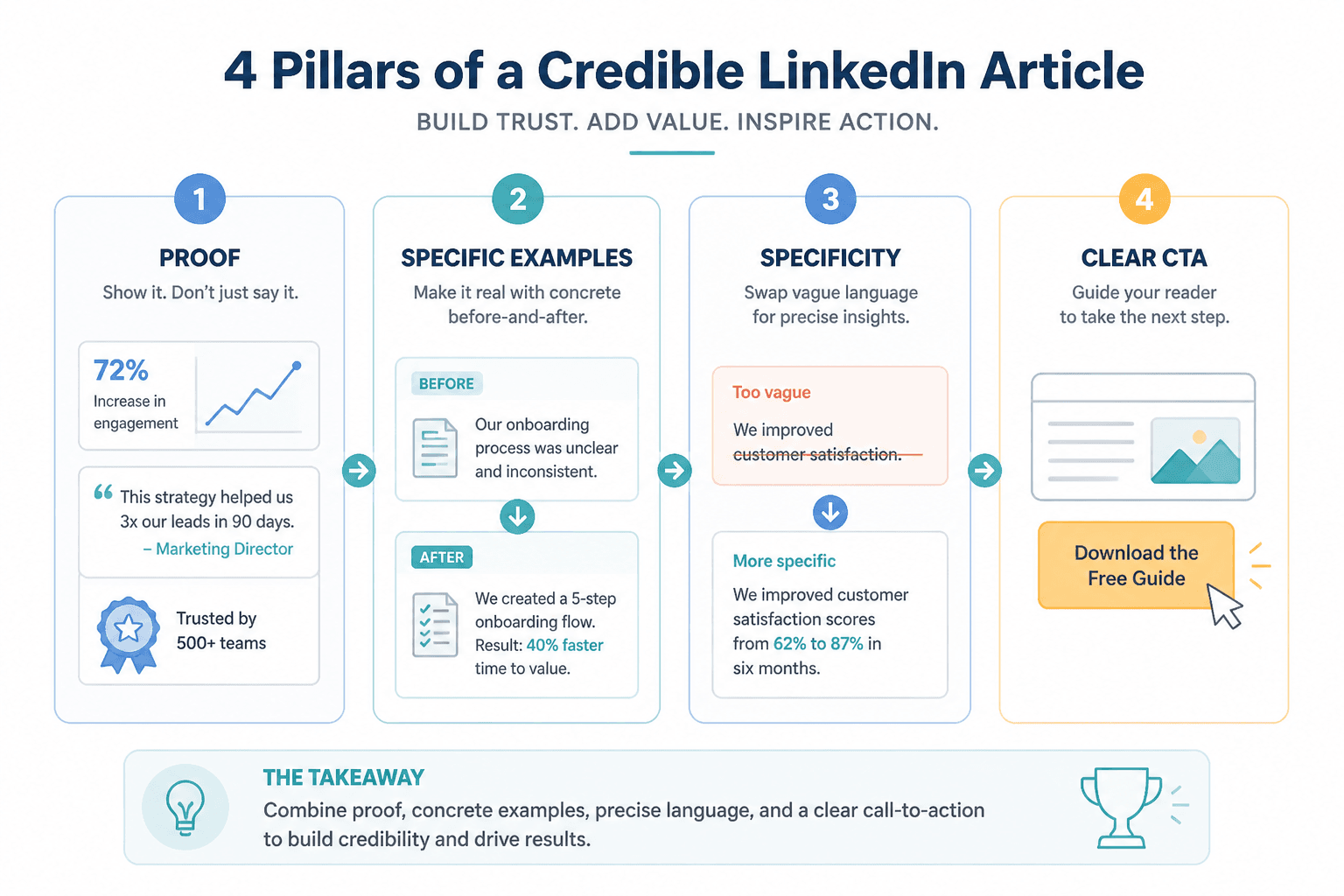
Authority does not come from sounding formal. It comes from sounding specific, useful, and grounded in reality.
That means your article should not just make claims. It should support them with things like:
- Clear examples
- Before-and-after rewrites
- Patterns you have observed repeatedly
- Small frameworks with logic behind them
- Tradeoffs and caveats
- Concrete language instead of vague promises
Notice what is not on that list: trying to sound more corporate. That move rarely creates authority. It mostly creates distance.
Example: weak advice vs useful advice
Weak: “Use storytelling to connect with your audience.”
Better: “If you are using stories in LinkedIn articles, make sure the story leads to a business point quickly. Most ‘storytelling’ fails because the anecdote takes over and the reader has to guess why it matters.”
The second version is better because it gives direction, not just a polished slogan.
Formatting tips that make LinkedIn articles easier to read
Formatting matters because most people do not read articles in a pure, noble, linear way. They scan first. Then they commit if the structure looks sane.
Good LinkedIn article formatting is not fancy. It is readable.
- Use clear H2s and H3s
- Keep paragraphs short
- Use bullets when they genuinely improve clarity
- Use tables only when comparison matters
- Bold sparingly for emphasis
- Avoid giant text blocks that look like punishment
One caution, though: do not over-format an article the way some people over-format posts. If every line is trying to be dramatic, nothing feels important.
What to include in every LinkedIn article
If you want better results, make sure your article covers these basic jobs.
1. A clear promise
The reader should know what they are getting and why it matters within the first few paragraphs.
2. A narrow angle
One useful argument beats seven fuzzy ones.
3. Real examples
Examples are where understanding usually clicks. Without them, even good advice can feel slippery.
4. Some level of opinion
You do not need to be inflammatory. But if your article could have been written by every mildly competent ghostwriter on the internet, it is probably too generic.
5. A relevant CTA
Do not bolt on a random pitch at the end. The CTA should match the article topic and the reader’s likely level of trust.
For example:
- If the article is educational, invite them to read a related article
- If the article is strategic, point them to a tool or template resource
- If the article relates directly to your offer, suggest a low-friction next step
Strong CTA options for LinkedIn articles
The CTA does not need to sound like a webinar registration page from 2018. It just needs to make sense.
Here are a few better options.
- Read next: “If you want stronger article angles, read this guide to simple authority templates.”
- Tool assist: “If drafting takes too long, these LinkedIn article templates and tools can speed things up without flattening your voice.”
- Audience fit: “If your audience is still small, start here: LinkedIn articles for creators with small audiences.”
- Idea expansion: “If you are stuck on topics, this list of LinkedIn article ideas and examples should help.”
Notice how each CTA continues the journey instead of abruptly trying to close a sale on someone who just arrived.
A simple workflow for writing LinkedIn articles faster
If article writing feels heavy, the problem may be your process more than your skill. A lot of creators try to write from a blank page with a vague idea and a cup of false confidence. That tends to go badly.
Try this instead.
- Start with one narrow question. Example: “Why do smart consultants publish LinkedIn articles that nobody reads?”
- Write the answer in one blunt paragraph. This usually reveals the real point faster than outlining first.
- Pull out 3 to 5 supporting sections. These become your H2s or H3s.
- Add one example under each major point. This stops the article from becoming abstract mush.
- Write the introduction last. It is easier once the article knows what it is.
- Trim anything that repeats the same idea. Repetition is not depth.
- Add a CTA that fits the topic. Keep it natural.
That workflow is also easier to systemize if you are publishing regularly. If you want help with the process side, the broader social media writing section and the LinkedIn writing resources can help you build a more repeatable content system.
Mistakes creators keep making with LinkedIn articles
Some of these show up constantly.
Treating the article like a longer post
Posts can thrive on one sharp thought. Articles need progression. If the piece does not deepen the idea, it just feels stretched.
Writing for everyone
Broad appeal sounds smart and performs blandly. Narrower articles usually win because they feel more relevant.
Using generic intros
If the opening could fit almost any article, it is not doing enough work.
Skipping proof
Advice without examples often sounds more complete in the writer’s head than on the screen.
Ending with nothing
Even a soft CTA is better than a dead stop. A strong article should lead somewhere.
Publishing and disappearing
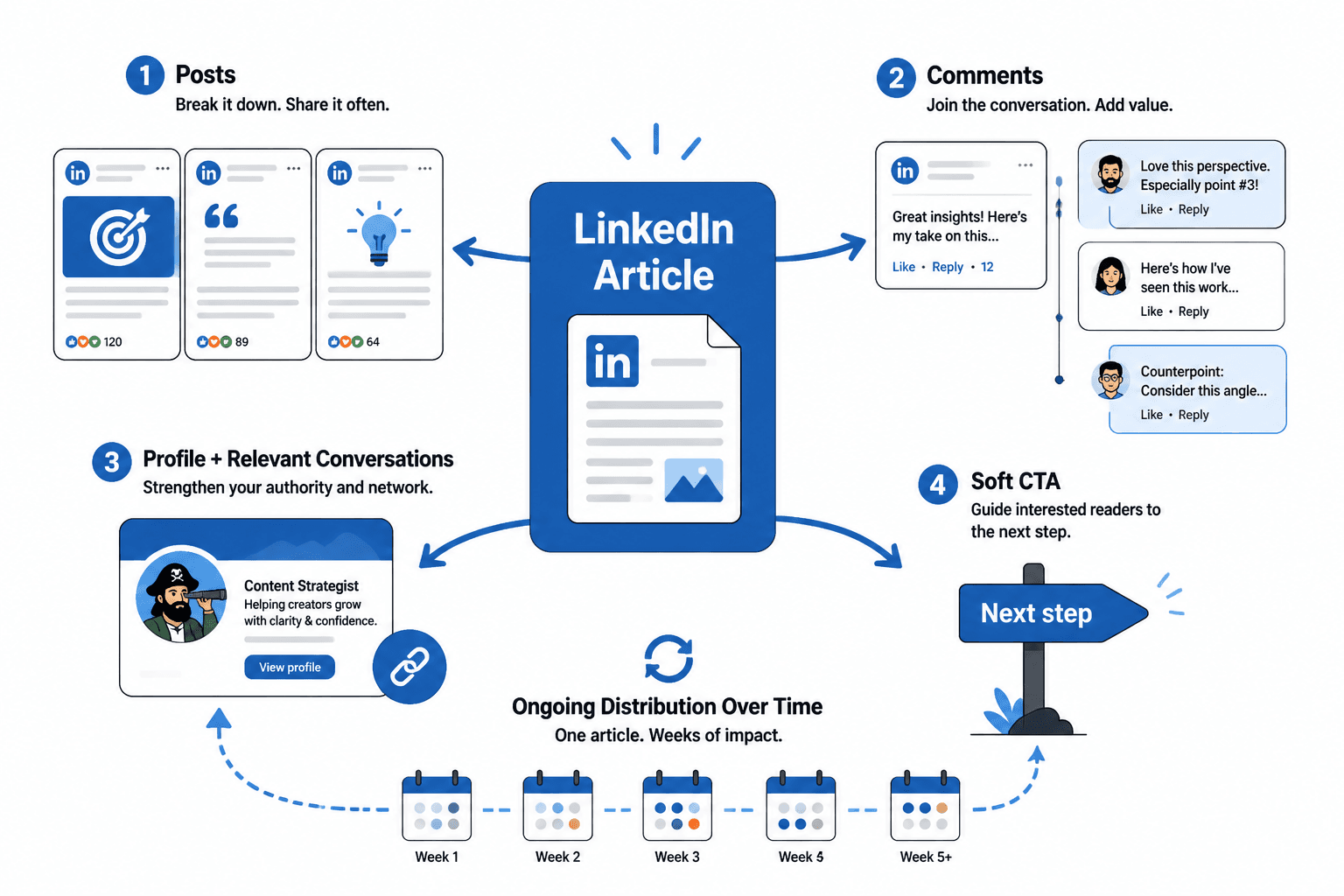
If you want better results from LinkedIn articles, do not just publish them and hope. Pull posts from them. Reference them in comments. Link to them from relevant conversations and future content. One article can support weeks of useful distribution if the topic is good enough.
How to get more mileage from each LinkedIn article
This is where articles become much more valuable than they first appear. A good article is not just a standalone asset. It is source material.
From one article, you can create:
- 3 to 5 LinkedIn posts based on key points
- A contrarian post built from the strongest opinion in the article
- A carousel or checklist from the framework
- An email newsletter edition summarizing the core argument
- A lead magnet section or resource page
- A DM follow-up resource when someone asks about the topic
This is one reason articles work especially well for creators with expertise but limited time. You do the deeper thinking once, then reuse it intelligently.
If you have a small audience, LinkedIn articles can still work
You do not need a huge audience to benefit from articles. In some ways, they are more useful when your audience is smaller, because they help the right people understand your expertise faster once they find you.
For smaller creators, the goal is not “go viral with articles.” The goal is to create trust assets that support your positioning.
That means articles should be:
- Specific to a clear audience
- Closely tied to your actual offer or expertise
- Rich in examples and proof
- Easy to repurpose into posts and profile content
If that is your situation, this guide on LinkedIn articles for creators with small audiences goes deeper.
Tools can help, but they will not save a weak article
Templates, AI tools, research tools, and drafting assistants can absolutely make article creation faster. They can help you organize ideas, build outlines, rewrite clunky sentences, and repurpose sections into posts.
What they cannot do is supply taste, positioning, or original judgment on your behalf. If the idea is stale, no prompt stack is going to resurrect it into something memorable.
Use tools for speed and support, not as a substitute for thinking. If you want the practical version of that, start with best templates and tools for LinkedIn articles.
Quick checklist before you publish
- Is the topic narrow enough to be useful?
- Does the introduction get to the real issue fast?
- Are there examples, not just advice?
- Is the structure easy to scan?
- Does the article sound like you, not an HR-approved appliance manual?
- Is there a clear next step at the end?
- Can you pull at least 3 post ideas from it after publishing?
FAQ
How often should I publish LinkedIn articles?
Less often than posts. For most creators, one strong article every few weeks is more useful than frequent thin ones.
The bigger point is simple: clearer structure and clearer writing make the piece more useful. That is usually what makes the ending land better too.