
Most LinkedIn articles are not failing because LinkedIn articles are dead. They are failing because people publish watered-down blog posts with a professional headshot attached and call it authority.
That is the real problem.
People treat LinkedIn articles like a more respectable version of a post, so they stretch one decent idea into 1,200 words of polite fog. Or they treat them like an SEO blog from 2019 and stuff them with broad advice, generic intros, and a CTA that sounds like it escaped from a webinar funnel.
If you want to know how to write better LinkedIn articles, the answer is not “write longer” or “sound more professional.” It is to write with more clarity, more specificity, and more actual point. LinkedIn articles work best when they deepen your authority, make your thinking easier to trust, and give readers a next step that does not feel like a trap.
This is about writing LinkedIn articles people can actually finish, remember, and act on. The kind that help someone think, “Right, this person clearly knows what they are talking about,” instead of, “Cool, another article that says consistency matters.”
To see how this fits into the wider strategy, open the parent guide.
What LinkedIn articles are actually good for
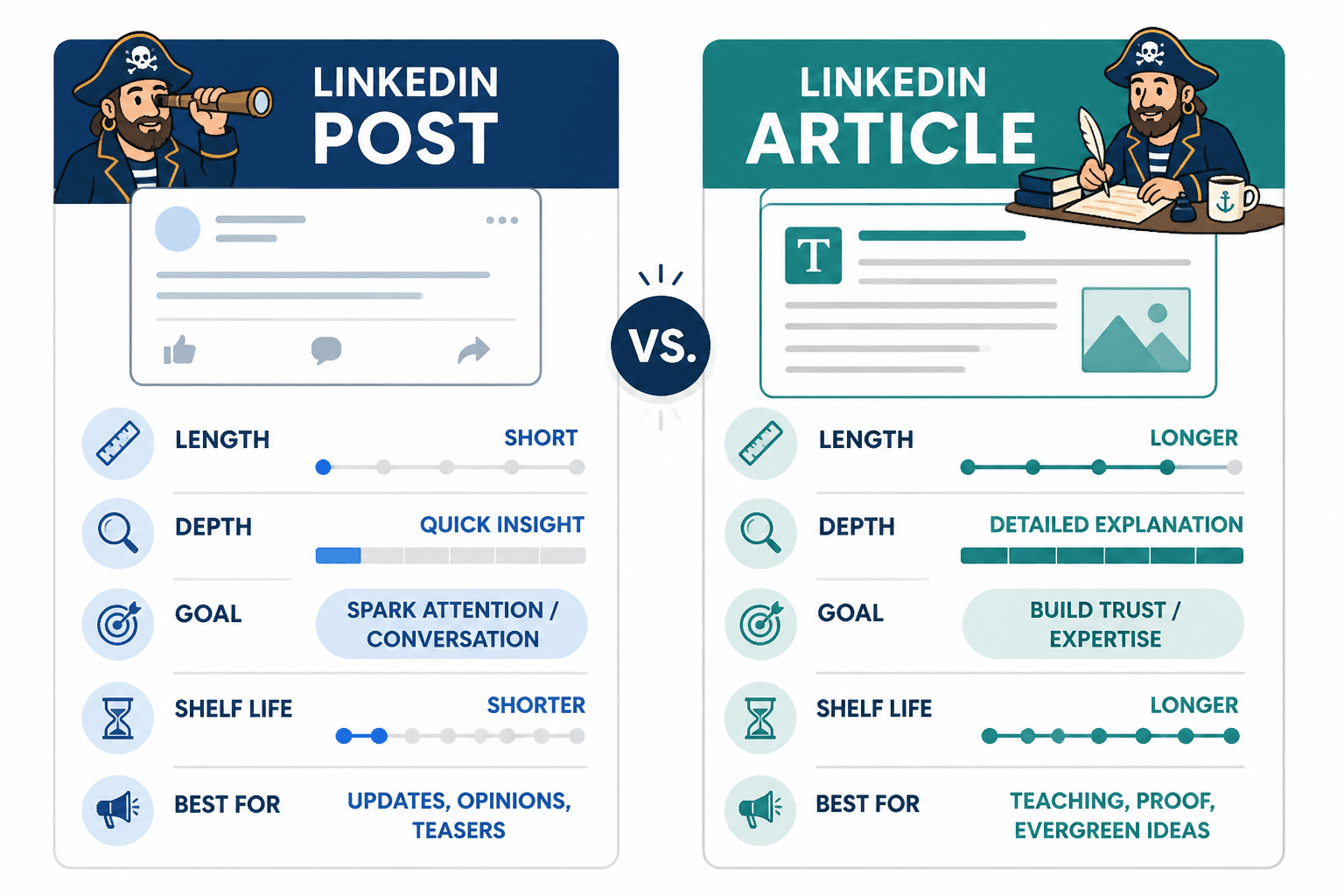
LinkedIn posts are better for quick attention. LinkedIn articles are better for depth, credibility, and evergreen authority.
That distinction matters. A post can win because the hook is sharp and the timing is right. An article needs to hold up after the click. It has to reward attention.
A strong LinkedIn article can help you:
- show deeper expertise than a short post allows
- build trust with readers who need more proof before they buy or follow
- create a useful asset you can reshare later
- support your positioning around a topic or niche
- turn one strong idea into something with a longer shelf life
What it should not be is a padded version of your regular posting. If your post says, “Here are three mistakes consultants make with content,” your article should not just become, “Here are the same three mistakes but now with six extra paragraphs of oatmeal.”
If you want a broader foundation for platform-specific writing, it also helps to understand where LinkedIn articles fit inside your overall social media writing strategy and your wider LinkedIn writing approach.
How to write better LinkedIn articles starts with choosing a real angle
The biggest article mistake is choosing a topic that is too broad to say anything useful about.
“How to use LinkedIn for business” is not an article angle. It is a content landfill. No one expects anything specific from it, which means you will probably deliver nothing specific.
Better LinkedIn articles usually do one of these things:
- solve one narrow problem clearly
- explain one strong opinion with proof
- break down one process step by step
- challenge one common bad habit or assumption
- give examples that make a fuzzy topic concrete
Here is the difference.
| Weak topic | Stronger article angle |
|---|---|
| How to write on LinkedIn | Why most LinkedIn advice posts sound smart but convert badly |
| Content strategy tips | How to turn one client question into a month of authority-building LinkedIn content |
| Personal branding guide | The profile mistake that makes good consultants look interchangeable on LinkedIn |
| Article writing basics | How to structure a LinkedIn article so readers do not drop off after the intro |
A good angle creates tension. It gives the reader a reason to care.
That tension might be:
- they are doing something wrong
- they are missing a better opportunity
- common advice is incomplete or overrated
- there is a cleaner way to get the result
If the article could apply to everyone in every situation, it will probably hit no one with any force.
A simple angle filter
Before you write, ask:
- Who is this for, specifically?
- What exact problem is it solving?
- What does this article say that a lazy generic article would not?
- What will the reader be able to do better after reading it?
If you cannot answer those quickly, the angle probably needs tightening.
Your intro needs to earn the scroll
Weak LinkedIn article intros usually spend too much time warming up. They explain the topic exists. They mention the platform matters. They sound like someone clearing their throat in a conference room.
Readers do not need a ceremonial opening. They need a reason to continue.
A stronger intro usually does three things fast:
- names the actual problem
- shows why common advice is not enough
- promises a practical payoff
For example:
Weak intro: LinkedIn articles have become an important tool for professionals who want to build their brand and share thought leadership in a competitive digital world.
Better intro: Most LinkedIn articles do not fail because the writing is terrible. They fail because they are too broad, too careful, and too padded to leave any impression. If you want your articles to build authority instead of collecting polite indifference, they need a sharper point and a much better structure.
See the difference? The stronger version starts with friction. It names the failure. It hints at the fix. It sounds like a person with a point, not a committee.
If article intros are a weak spot for you, read how to improve LinkedIn article intros without sounding generic. It will save you from writing three opening paragraphs that say almost nothing.
Structure the article like an argument, not a diary entry
A good LinkedIn article has shape. It moves. It makes one idea easier to understand and use.
A bad one just keeps continuing.
You do not need a fancy framework, but you do need a clear flow. A useful default structure looks like this:
- Opening problem: what is going wrong or being misunderstood
- Context: why this matters and where common advice falls short
- Main points: 3 to 5 sections that build the case or process
- Examples or proof: what this looks like in practice
- Next step: what the reader should do with this information
That is enough for most article types.
If your article is teaching a process, make the sections sequential. If it is arguing against a common mistake, build the case in a logical order. If it is showing examples, move from weak to strong and explain the difference.
What you want to avoid is the article version of “some thoughts.” That usually turns into repeated points, mushy transitions, and the strange experience of finishing 1,800 words without remembering a single useful sentence.
For more examples of article structure that actually holds together, the resources in the LinkedIn articles hub are worth keeping nearby.
Use subheadings like they mean something
Subheadings are not decoration. They should help the reader scan the article and immediately understand the logic.
Compare these:
- Weak: Introduction, Tips, More Tips, Conclusion
- Better: Why broad article topics quietly kill reader interest
- Better: The structure shift that makes articles easier to finish
- Better: How to write examples that do not sound copied from everyone else
The second set does actual work. It creates curiosity and clarity at the same time.
Go deeper, but do not get fluffier
This is where a lot of people mess up LinkedIn articles. They know an article should go deeper than a post, so they add more words. But depth is not the same thing as length.
Real depth comes from things like:
- better explanation
- clearer distinctions
- specific examples
- practical steps
- useful nuance
- stronger reasoning
Fluff looks like this:
- saying the same idea three different ways
- adding obvious statements just to sound complete
- using abstract language instead of examples
- writing long transitions that do nothing
- padding with motivational filler
If a section can be cut without losing meaning, cut it. If a sentence sounds polished but says nothing, cut it harder.
A good test is this: if someone highlighted the most useful lines in your article, would there be anything worth highlighting?
What depth actually looks like
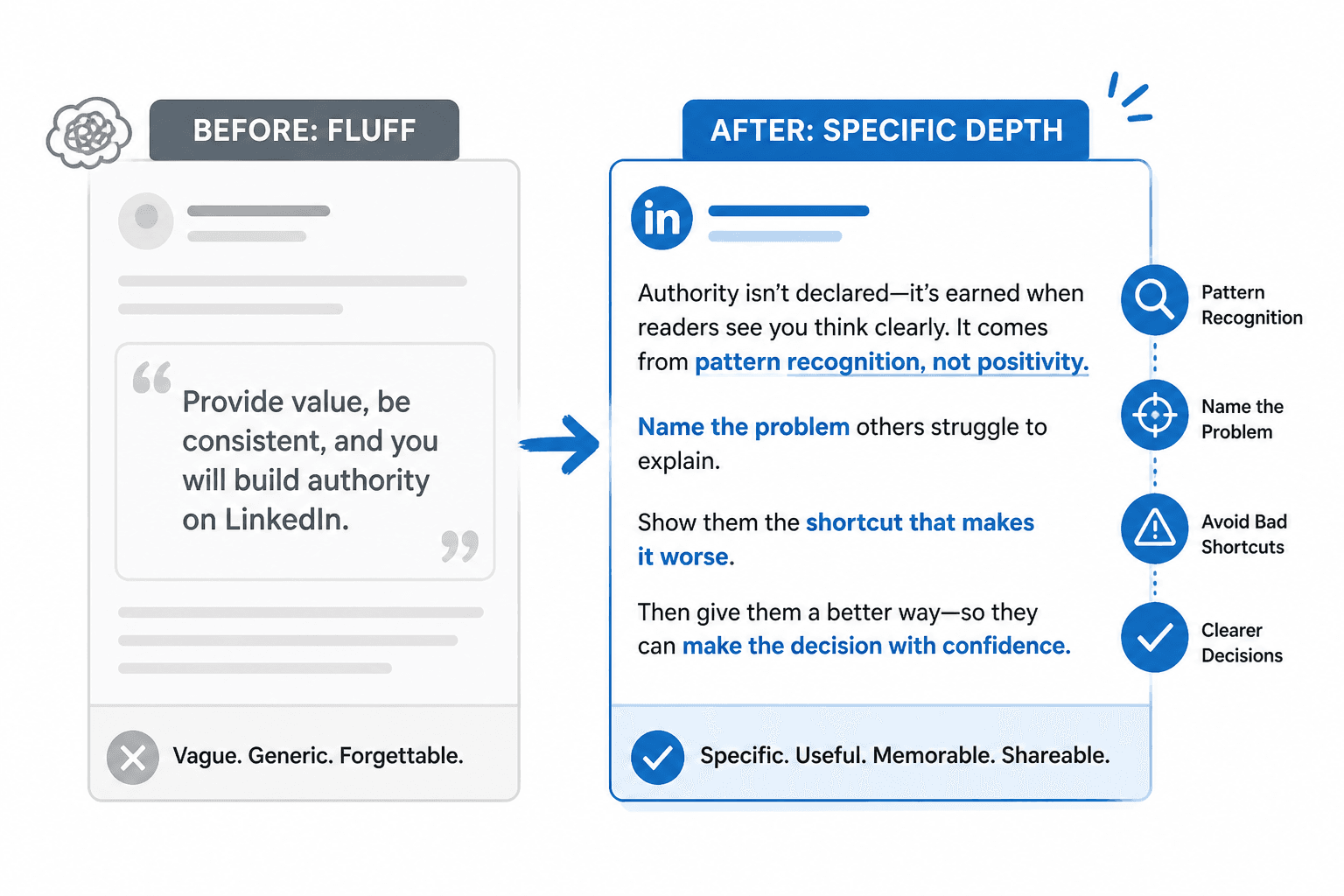
Instead of writing:
To build authority on LinkedIn, it is important to provide value and be consistent with your content.
Write something like:
Authority on LinkedIn usually comes from pattern recognition, not volume. If your articles consistently help readers name a problem, avoid a bad shortcut, or understand a decision more clearly, people start associating your name with useful judgment. That is more persuasive than posting every day and saying almost nothing.
That second version has an actual point. It says something a reader can use. It also sounds more like a person thinking clearly and less like a recycled content checklist.
Use examples, rewrites, and proof instead of vague claims
If you want readers to trust your advice, show your work.
That does not mean every article needs case studies and screenshots. It does mean your points should not float around unsupported like office air freshener.
Here are a few ways to make your article more believable and more useful:
- show a weak example and rewrite it
- compare broad advice with a sharper version
- explain what happens when someone follows bad advice
- include a simple scenario that makes the point concrete
- use a short framework with a clear reason behind it
For example, if you are teaching article writing, do not just say “be specific.” Show the reader what vague writing looks like and what stronger writing looks like instead.
A simple before-and-after
Before: LinkedIn articles can help businesses showcase expertise and connect with their target audience in meaningful ways.
After: A good LinkedIn article gives potential clients something more substantial than a quick post. It shows how you think, how clearly you explain things, and whether your expertise survives contact with detail. That is often what turns passive interest into real trust.
The second version is stronger because it explains the mechanism. It gives the reader a reason to believe the advice, not just admire its posture.
Write like a credible human, not a corporate brochure
LinkedIn already has enough content that sounds like it was approved by Legal, HR, and a very nervous intern. Your article does not need to join them.
Professional does not mean stiff. Clear does not mean bland. And “thought leadership” definitely does not mean writing every sentence like you are presenting a quarterly forecast to people who hate joy.
A better LinkedIn article voice usually sounds:
- clear rather than formal
- confident rather than inflated
- specific rather than buzzwordy
- helpful rather than self-congratulatory
Some quick fixes help a lot:
- replace abstract nouns with plain language
- cut phrases like “in order to,” “leverage,” and “utilize” unless you enjoy sounding pre-declined
- use contractions where they feel natural
- write the way a smart expert would explain this aloud to a client
- remove anything that sounds like it was written to impress strangers instead of help them
If this is something you struggle with, read how to write LinkedIn articles without sounding salesy or robotic. It will help you stop sounding like a pamphlet in a blazer.
Do not bury the useful part under throat-clearing
Many articles have one strong paragraph hiding inside several weak ones. Your job is to get to the useful part faster.
Common throat-clearing looks like this:
- explaining the topic is important
- repeating the title in softer words
- adding generic background everyone already knows
- using transitional sentences that say nothing
- opening each section with a mini-intro before making the actual point
Try this editing question as you revise each section: What is the first sentence here that says something worth reading?
Then move that sentence up.
It is a simple trick, but it removes a shocking amount of fluff.
Format for readability, because walls of text are not authority
Even a strong article will underperform if it looks annoying to read.
LinkedIn readers are scanning first. If the structure looks dense, they may not even give your ideas a chance.
So yes, formatting matters. Not because formatting is magic, but because friction is real.
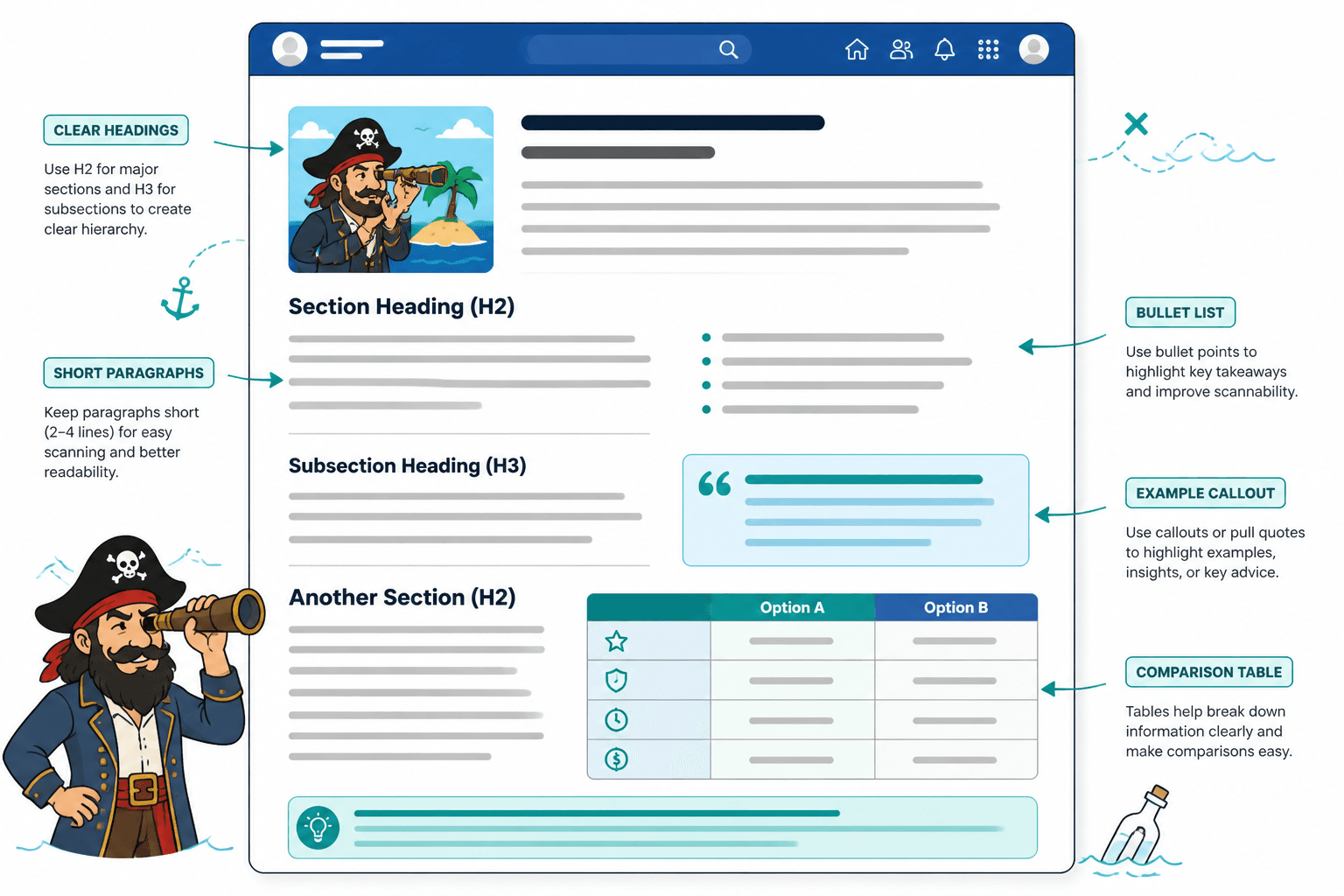
Use:
- short paragraphs
- clear H2s and H3s
- bullet points where they genuinely simplify something
- tables only when comparison helps
- quotes or examples to break up abstraction
Do not turn every article into a stack of bullets either. Some ideas need a proper paragraph to breathe. The point is variety with purpose, not formatting for its own sake.
Good formatting helps the reader feel guided. Bad formatting makes the article feel like a task.
Give the article a clear next step
A surprising number of LinkedIn articles just stop. No next action. No invitation. No bridge to anything else. The reader gets to the end and then… cool, I guess.
Your CTA does not need to be aggressive. It does need to make sense.
A good LinkedIn article CTA might:
- point to a related article
- invite the reader to apply one step
- lead to a newsletter, resource, or offer
- encourage a reply or connection around the topic
- move them gently toward the next useful thing
Examples:
- If your articles are useful but still sound too polished, read this guide on writing without sounding salesy or robotic.
- If the intro is where your article keeps losing energy, start with this article on stronger LinkedIn intros.
- If you already have decent old material sitting around, turn it into something stronger with this guide to repurposing old content into better LinkedIn articles.
And if you want more deliberate help with article endings, CTAs deserve more attention than they usually get. This guide to better LinkedIn article CTAs for personal brands covers how to close without sounding needy, vague, or weirdly funnel-shaped.
A practical editing checklist for better LinkedIn articles
Before you publish, run through this:
- Is the topic narrow enough to say something useful?
- Does the intro get to the real problem quickly?
- Does each section add a distinct point, not just more wording?
- Are there specific examples, rewrites, or proof?
- Can a skim reader understand the article from the subheadings alone?
- Did you cut throat-clearing and repeated ideas?
- Does the voice sound human and credible?
- Is there a clear next step at the end?
If you get through that list honestly, your article will already be ahead of a lot of what gets published.
One strong workflow for writing LinkedIn articles consistently
If you want LinkedIn articles to become part of your regular content system instead of a thing you vaguely mean to do someday, keep the workflow simple.
- Start with a question or opinion you already have. Use real client questions, recurring objections, common mistakes, or one strong belief you can defend.
- Choose a narrow angle. Make sure the article solves one clear problem or explains one sharp idea.
- Draft the core points first. Do not fuss with the intro yet. Get the useful middle on the page.
- Write the intro last. Once you know the actual point, the opening gets much easier.
- Add examples and rewrites. This is where the article becomes more than opinion.
- Edit for speed and clarity. Cut fluff, sharpen headings, tighten transitions.
- Add a real CTA. Give the reader a logical next move.
- Repurpose it. Pull posts, hooks, or shorter ideas from the article later.
That last step matters more than people think. A good article should not live once and disappear. It can feed multiple posts, email ideas, short videos, comment prompts, or even future articles. If you already have old material worth reworking, turning old content into better LinkedIn articles is one of the easiest ways to publish smarter without starting from scratch every time.
FAQ
How long should a LinkedIn article be?
Long enough to do the job properly. For most topics, that usually means somewhere between 1,000 and 2,000 words. Go longer if the idea genuinely needs it. Do not add length just to feel substantial.
The bigger point is simple: clearer structure and clearer writing make the piece more useful. That is usually what makes the ending land better too.