
Most people treat old content like attic junk. It sits there, quietly collecting dust, while they keep publishing new stuff and wondering why traffic feels random, conversions feel weak, and half their best ideas are buried three clicks deep like a shameful family secret.
That is a waste.
How to Turn Old Content Into Better Internal Linking and Updating is really about getting more value from what you already made. Not through some heroic full-site overhaul. Just by being less careless with the assets you already have. Old posts can strengthen rankings, guide readers to the right next step, improve time on site, and make your expertise feel more connected and deliberate.
If your archive is a pile of unrelated posts with vague links, outdated examples, and no clear path for readers, this is the fix. We’ll cover how to audit old content, decide what deserves updating, add internal links that actually help, improve anchor text, and turn forgotten articles into stronger traffic and conversion paths.
For the main guide behind this topic, visit the parent guide.
Why old content is usually more useful than people think
New content gets all the attention because it feels productive. You publish something, share it, maybe post about it on social, and for five minutes it looks like momentum.
Old content is less glamorous, but often more valuable. It already has history. It may have impressions, backlinks, rankings, clicks, or at least a bit of topical relevance built up. That means updating and linking it properly can move faster than publishing another brand-new article nobody asked for.
Also, readers do not experience your site as a content calendar. They experience it as a journey. They land on one page and decide, very quickly, whether your site feels useful, coherent, and worth continuing with. Internal linking and updating are what make that journey feel intentional instead of accidental.
Publishing new content without maintaining old content is how you end up with a blog that is technically growing and practically getting worse.
What better internal linking and updating actually does
Done well, this work helps in four ways:
- It helps search engines understand your site structure. Related pages support each other when they are clearly connected.
- It helps readers keep moving. A good internal link answers the next question before the reader has to go looking for it.
- It helps older posts stay relevant. Updated posts are more accurate, more useful, and less likely to embarrass you.
- It helps business outcomes. Better paths through your content can lead to newsletter signups, offers, services, consultations, and trust.
If you want the broader strategic view first, start with internal linking and updating or the more practical internal linking and updating guide for creators who want better results. If your real concern is conversion, not just structure, read how to turn internal linking and updating into more leads or sales.
Start with an old-content audit, not random edits
The biggest mistake here is opening random posts, tossing in two links, changing a sentence, and calling it optimization. That is not a system. That is digital tidying.
You need a lightweight audit. Nothing dramatic. Just enough to see what you have, what is worth saving, and where the linking opportunities live.
What to look for in the audit
- Posts that already get some search traffic or impressions
- Posts that rank for useful terms but sit lower than they should
- Posts with outdated advice, examples, screenshots, or references
- Posts covering topics related to newer articles that were never linked together
- Thin posts that could be merged, expanded, or redirected
- Strong posts with no obvious next step for the reader
- Posts with weak or generic anchor text like “click here” or “read more”
You are not just identifying bad pages. You are identifying underused pages. There is a difference. Some content is weak and should be retired. Some is perfectly decent but disconnected, stale, or structurally lazy.
A simple way to sort old content
| Content type | What to do |
|---|---|
| High-value but outdated | Update and add better internal links |
| Relevant but thin | Expand, combine, or reposition |
| Useful but isolated | Add links from and to related pages |
| Overlapping with stronger content | Merge or consolidate |
| No longer relevant | Retire, redirect, or leave alone if harmless |
This part matters because not every old post deserves CPR. Some pages need updating. Some need linking. Some need mercy.
Find the pages that should become your linking hubs
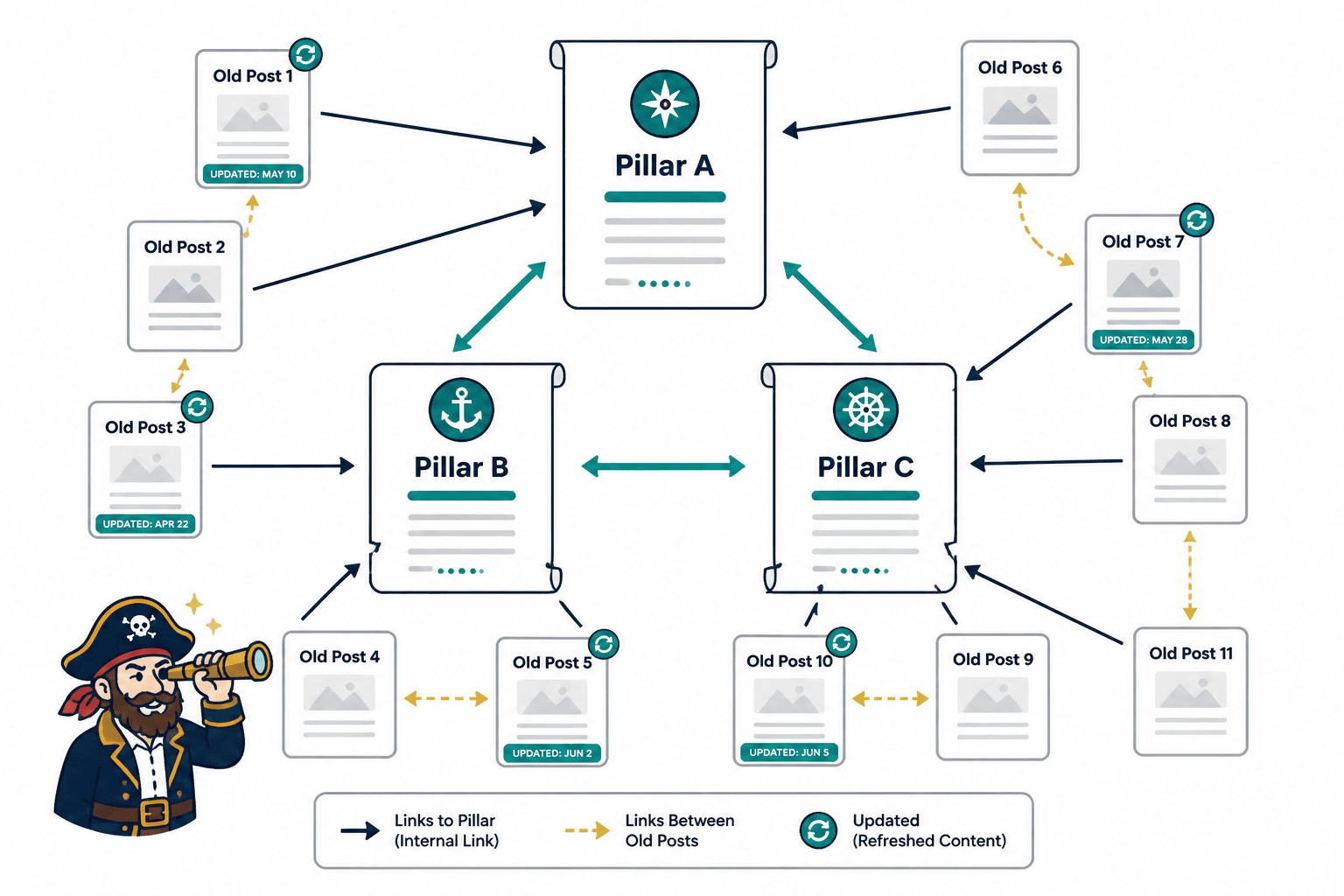
Not all content should carry the same weight. Some pages should act as central resources for a topic. These are your hub pages, pillar pages, or core guides. Whatever you call them, they should do more than exist. They should organize the topic and send readers to the right supporting content.
For this topic, the natural hub is the pillar page on internal linking and updating. Supporting articles should link to it when appropriate, and it should also point outward to narrower, more specific pieces.
If your archive has several posts around one theme, do not leave them acting like strangers at a networking event. Connect them.
Good hub pages usually do three things
- Cover the main topic clearly enough to orient the reader
- Link to more specific subtopics naturally
- Act as a useful entry point for both search traffic and human readers
That makes your site easier to crawl, easier to read, and easier to trust. It also reduces the weird little dead ends where a reader finishes a post and has nowhere sensible to go next.
Update the substance before you add links
Internal linking works better when the page itself is worth reading. Obvious point, yes, but often ignored.
Before you start adding links, improve the article enough that a reader landing on it today would not feel like they just found a fossil. You do not need a total rewrite every time. Usually, you need targeted improvements.
What to update first
- The intro, if it is vague or slow
- Outdated terminology, examples, or platform references
- Weak headers that do not match search intent
- Thin sections that need a clearer explanation
- Missing examples, templates, or practical steps
- CTAs that no longer match your current offer or funnel
This is also the moment to tighten the article’s purpose. Ask: what is this page actually trying to help the reader do? If the answer is muddy, the links you add later will also feel muddy.
If you want a more focused approach to writing stronger pages before linking them, see how to write better internal linking and updating.
How to add internal links that help instead of clutter
This is where people get sloppy. They hear “add internal links” and suddenly every paragraph has three awkward hyperlinks jammed into it like the article is trying to win a contest.
Better internal linking is not about volume. It is about relevance, timing, and usefulness.
Use links where the reader naturally needs the next thing
The best internal links usually appear at one of these moments:
- When you mention a concept you explain more deeply elsewhere
- When a reader would reasonably want an example, template, or case study next
- When a broader article should point to a narrower one
- When a tactical article should point back to a strategic guide
- When the next step in the reader journey is obvious
That means the link should feel like assistance, not decoration.
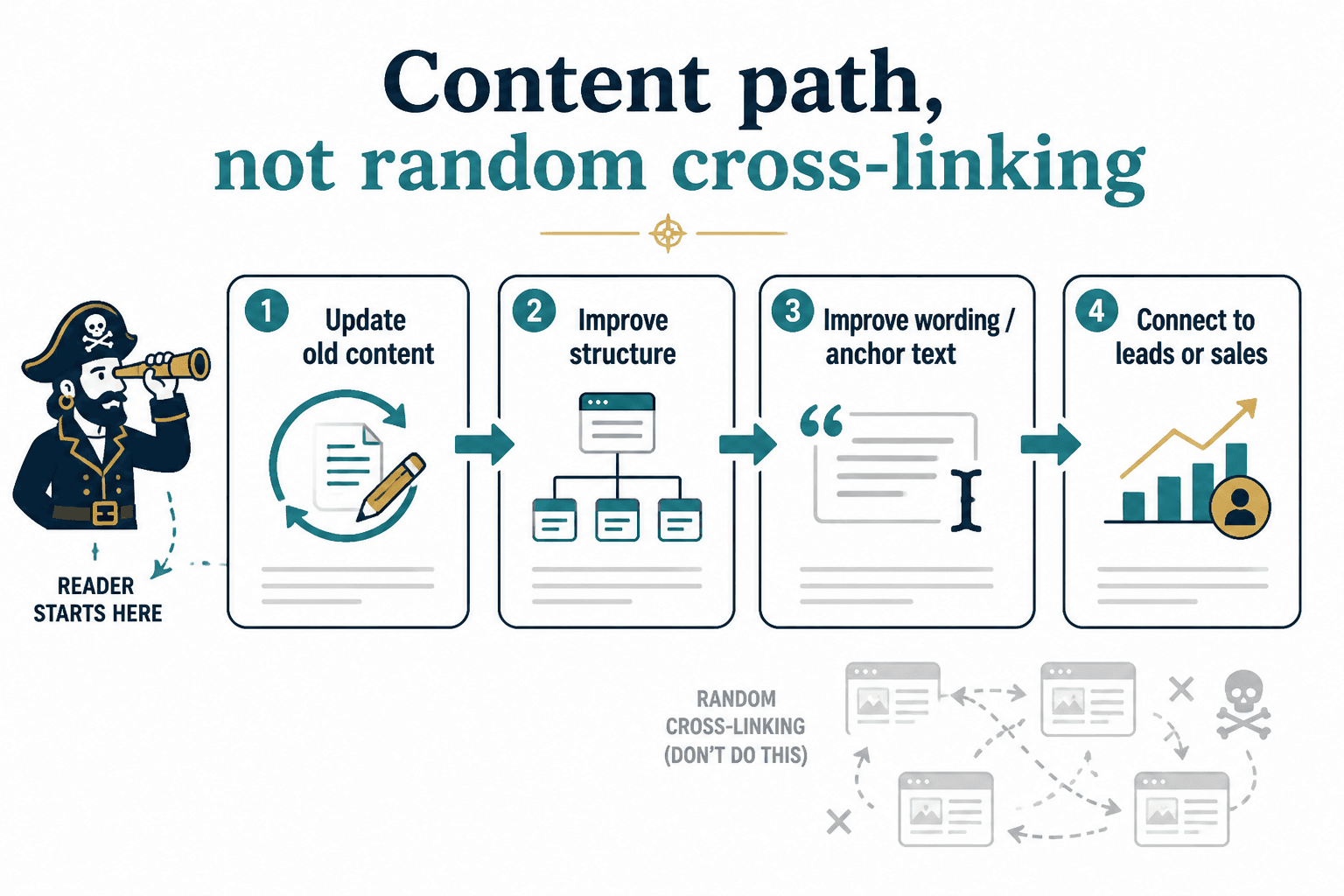
Think in paths, not isolated links
One internal link can help. A useful path helps more.
For example, someone reading about updating old content might also need:
- better internal linking and updating anchor text for personal brands
- how to write better internal linking and updating
- how to turn internal linking and updating into more leads or sales
That is not random cross-linking. It is a content path. The reader starts with maintenance, then improves structure, then improves wording, then connects it to business outcomes. Clean. Logical. Useful.
Do not cram links into every paragraph
Too many links can make a page noisy and weirdly desperate. Add enough to support navigation and topic relationships, but not so many that the article starts looking like it is trying to escape itself.
A decent rule: if a link does not genuinely help the reader understand, explore, or act, it probably does not belong there.
Anchor text is not a tiny detail. It is part of the job.
Weak anchor text quietly ruins good internal linking. If your links say “this post,” “read here,” or “learn more,” you are giving up clarity for no reason.
Anchor text should tell the reader what they will get if they click. It should also help reinforce topical relationships between pages. Not in a spammy way. In a clear way.
Weak vs better anchor text
| Weak | Better |
|---|---|
| read more | how to write better internal linking and updating |
| this guide | internal linking and updating guide for creators who want better results |
| click here | better internal linking and updating anchor text for personal brands |
| learn more | turn internal linking and updating into more leads or sales |
The better versions are clearer, more useful, and less annoying. They also make your site feel more deliberate.
If you want to get this part right, read better internal linking and updating anchor text for personal brands. Most people underthink anchor text. Then they wonder why their internal links feel limp.
Use a repeatable update workflow
If you have more than a dozen posts, you need a workflow. Otherwise this turns into “I updated a few things once” and then nothing happens for six months.
Here is a practical process that works without becoming a full-time archival profession.
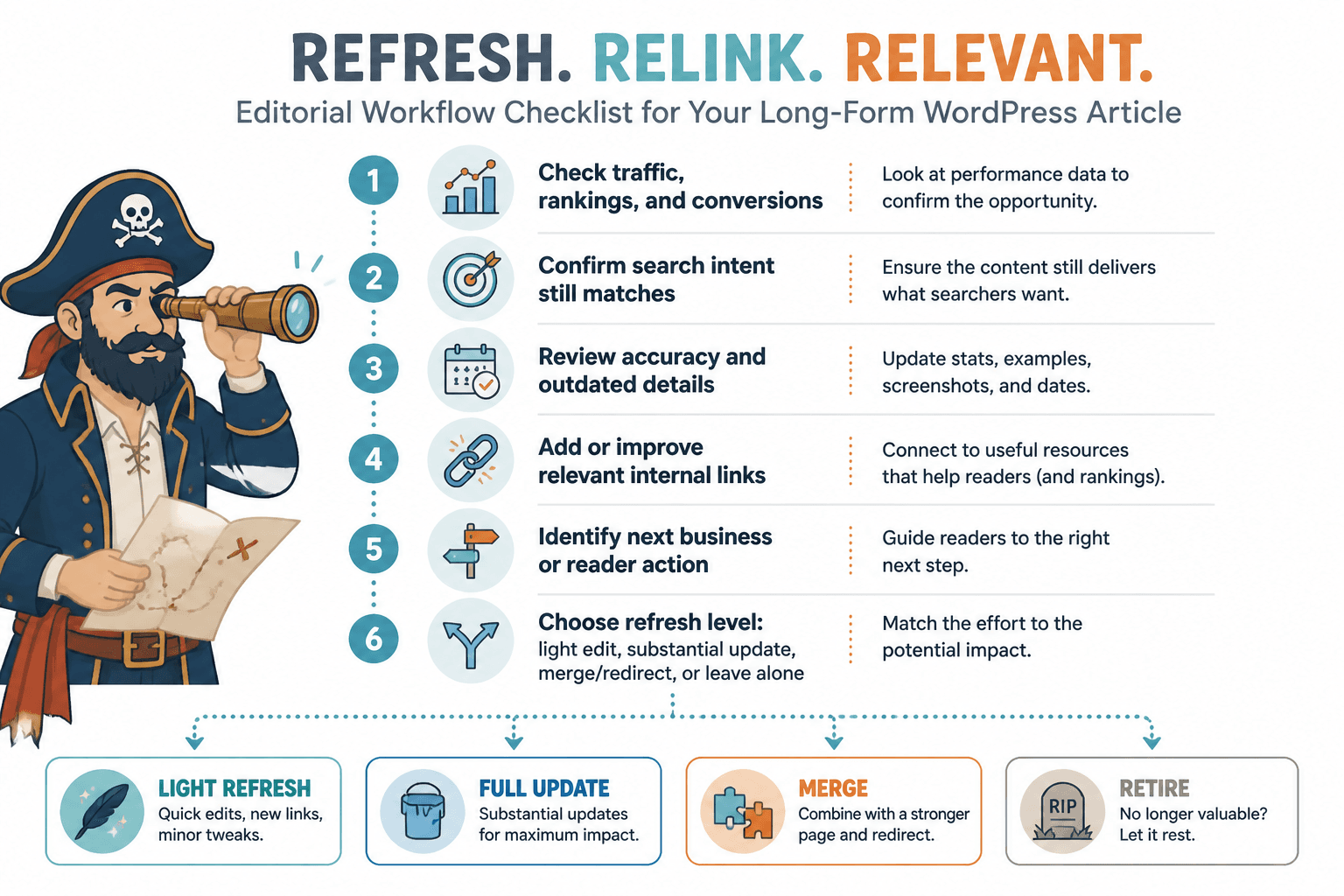
A simple 6-step workflow
- Pull a list of older posts. Start with anything older than 3 to 6 months, depending on your publishing pace.
- Sort by opportunity. Traffic, impressions, conversions, topic relevance, and business value all matter.
- Refresh the content. Fix outdated sections, improve weak intros, tighten headings, add examples.
- Add inbound and outbound internal links. Do not just link out from the old post. Also find newer posts that should link back to it.
- Improve anchor text. Make links descriptive and natural.
- Add or refine the next step. Newsletter, related article, service page, guide, or consultation path.
That last point gets missed a lot. Internal linking is not only about SEO structure. It is also about helping a reader continue the relationship with your site. If every article ends in a shrug, that is not a content system. That is a pile of documents.
What to update inside old posts besides the links
Sometimes the best internal linking opportunities appear only after you improve the article itself. New examples create natural places to point to related resources. Better headers reveal content gaps. A stronger CTA makes it clearer what other pages should support the journey.
Here are a few upgrades that tend to help immediately.
1. Rewrite generic intros
Old articles often open with too much throat-clearing. If the intro is bland, readers bounce before they ever reach your carefully placed internal links.
Get to the real problem faster. Name the mistake. Promise a useful outcome. Then move.
2. Add missing context
Some older posts assume too much. Others explain everything like the reader just discovered the internet this morning. Both can be fixed by adding a little context where needed and cutting fluff where it is not.
3. Improve article structure
Clear H2s and H3s make updating easier, linking easier, and reading easier. They also help you spot where a supporting article should be linked in naturally.
4. Refresh examples and screenshots
If examples are outdated, the article feels stale even when the advice is still sound. Replace old references with more durable ones where possible.
5. Add a stronger CTA or next-step recommendation
This does not need to be pushy. In fact, please do not make it pushy. A clean next step is enough:
- Read a more detailed guide
- Explore a related subtopic
- Join the newsletter
- Check out a service page
- Book a consultation
Subtle is fine. Vague is not.
How to decide which old content gets updated first
If your archive is large, start where effort and upside meet. Not where your nostalgia lives.
Prioritize posts that hit at least one of these conditions:
- Already ranking or getting impressions for relevant search terms
- Closely related to a service, offer, or lead path
- Strong topic fit with your current content strategy
- One of your better pieces, but poorly linked
- Frequently shared, referenced, or visited from other channels
- Important enough to become or support a pillar page
What you do not want is a giant update project based on equal treatment. Not every post deserves equal energy. Some are traffic assets. Some are trust assets. Some are conversion assets. Some are just old blog posts with a brave face.
Common internal linking and updating mistakes
A few of these show up constantly, and they make the whole thing less effective than it should be.
- Only adding links from new posts to old posts. You also need old posts linking to newer, relevant pages.
- Using vague anchor text. Readers should know what they are clicking.
- Updating surface details but not substance. Swapping one sentence and calling it refreshed is lazy.
- Forcing links where they do not belong. Relevance matters more than volume.
- Ignoring business paths. If readers cannot get from content to the next meaningful step, you are leaking value.
- Leaving orphaned content alone. If a page has no internal links pointing to it, it is harder to discover and easier to forget.
- Treating the archive like a museum. Content is supposed to work, not just sit there under dim lighting.
And yes, there is also the opposite mistake: over-updating. You do not need to rewrite everything every month. Aim for meaningful improvements, not perpetual fiddling.
A practical example of turning one old post into a stronger content asset
Let’s say you have an older article called something like “Tips for Improving Your Blog.” Fine. Serviceable. Also broad enough to disappear into the wallpaper.
Here is how you would make it more useful:
- Tighten the topic. Reframe it around a clearer search intent or problem.
- Improve the intro. Cut generic scene-setting and get to the issue faster.
- Add sections on internal linking and updating. Especially if the post is about improving existing blog performance.
- Link to specific supporting resources. Such as how to write better internal linking and updating and better internal linking and updating anchor text for personal brands.
- Add links from related articles into it. Especially broader SEO writing or content system pages.
- End with a next step. Maybe direct readers to the main internal linking and updating resource or a lead-focused follow-up.
Now the article is not just “improved.” It is positioned inside a useful site structure. That is the real goal.
Build topic clusters from old content you already have
If you have written consistently for a while, you probably already have the raw material for topic clusters. You just have not organized them well.
Internal linking improves when each update makes the next useful step clearer. Cleaner structure usually does more work than a bigger pile of links ever will.