
A creator opens five tabs to plan next week’s content: an AI chat window, a notes app, a half-finished spreadsheet, a social platform search page, and a document called “ideas-final-final-new.” Twenty minutes later, there are 37 possible topics, no clear angle, and a growing suspicion that another tool might fix the whole thing.
It probably will not.
The best AI tools for creator AI research and ideation are not the ones that generate the most ideas. That is how you get a folder full of synthetic oatmeal: technically edible, impressively abundant, and impossible to get excited about.
A useful tool stack does four jobs:
- Find signals from your audience, niche, competitors, search behavior, and recurring questions.
- Filter noise so every passing thought does not become a “content pillar.”
- Synthesize patterns into themes, tensions, objections, and angles.
- Store decisions so your best ideas do not disappear into chat history or notebook fog.
This article focuses on the tools and templates that make that workflow practical. For the broader strategy behind this system, see the creator AI research and ideation guide. For practical use cases and prompt patterns, the companion creator AI research and ideation examples page goes deeper on execution.
What creator AI research and ideation should actually do
Good creator research is not just “find trending topics.” Trends can be useful, but a creator’s strongest ideas usually come from a mix of audience demand, personal perspective, timing, and format fit.
Your research and ideation system should help you answer questions like:
- What is my audience already asking, searching, misunderstanding, or avoiding?
- Which topics keep returning across comments, emails, forums, search results, and social posts?
- Where is the existing content shallow, outdated, overcomplicated, or too generic?
- Which ideas fit my voice, offer, format, and publishing cadence?
- What should become a post, newsletter, video, lead magnet, podcast segment, or long-form article?
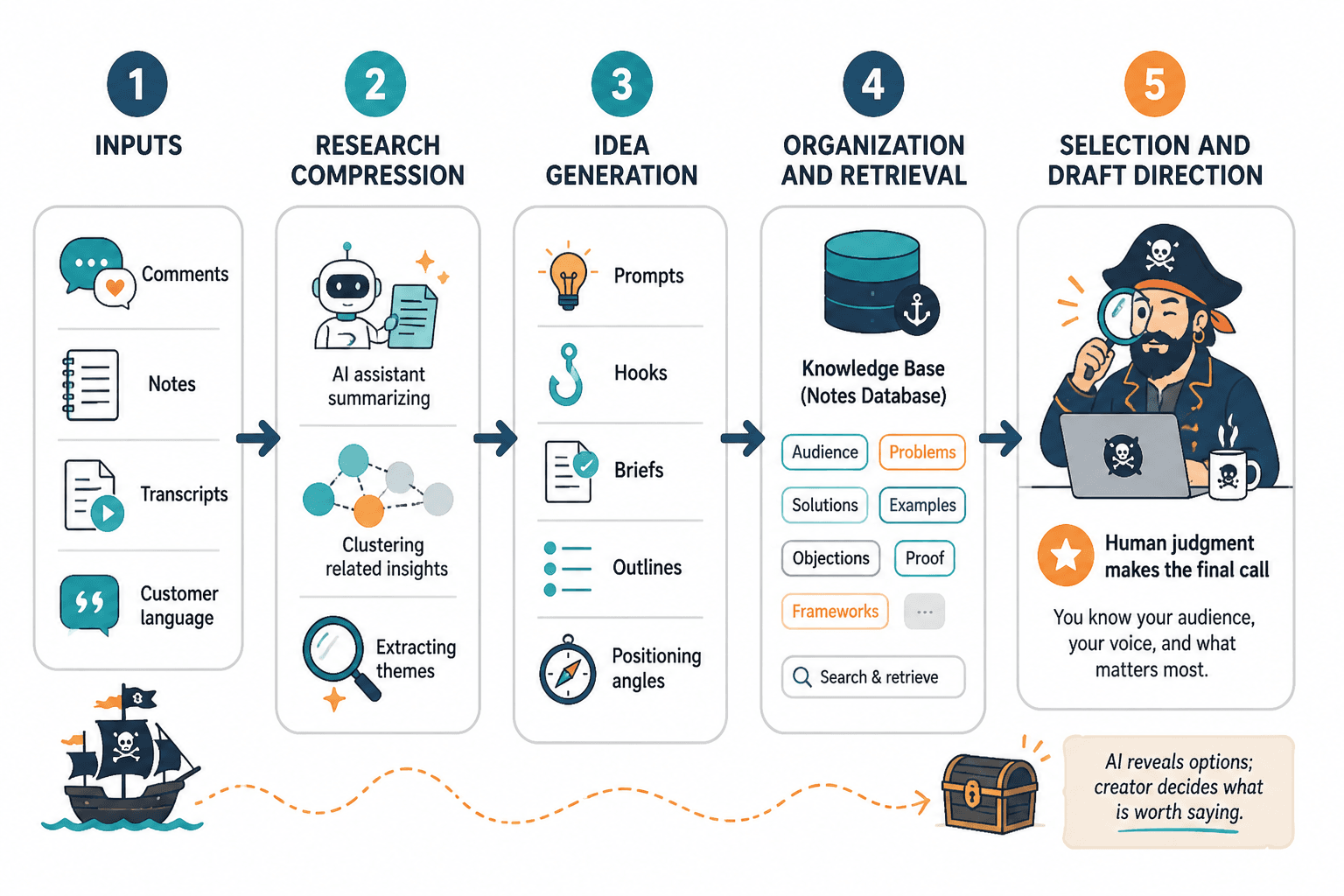
The key shift is moving from “generate ideas” to “process inputs.” AI is far more useful when it has real material to work with: audience questions, transcripts, comment threads, customer language, search terms, notes, old drafts, and observed patterns.
If your input is vague, your output will be vague. If your input is structured, specific, and grounded in real signals, AI becomes a much better research partner.
The lean creator AI research stack
You do not need a sprawling software cabinet. A strong creator AI research and ideation workflow usually needs five layers:
- An AI assistant for synthesis, expansion, critique, and angle development.
- Research and discovery tools for finding what people are already searching, asking, sharing, or debating.
- A knowledge capture system for storing useful inputs and insights.
- An idea database for ranking, tagging, and developing content opportunities.
- A workflow tool for turning selected ideas into publishable assets.
The exact tools matter less than the handoffs between them. A creator who uses three tools consistently will usually outperform someone who has twelve tools and a thrilling new dashboard nobody asked for.
Best AI assistants for creator research and ideation
An AI assistant is the center of the stack, but it should not be the whole stack. Its job is to help you think through research, not replace research with plausible filler.
1. ChatGPT
ChatGPT is useful for brainstorming, summarizing inputs, comparing angles, editing drafts, creating outlines, and exploring variations on a theme. OpenAI’s own overview describes ChatGPT as a tool that can help users brainstorm, edit, explore ideas, upload files for analysis, search the web, and collaborate on writing in canvas. That combination makes it a strong general-purpose assistant for creators who want one tool for research synthesis and drafting support. OpenAI’s ChatGPT overview is the primary reference for those capabilities.
Use it for:
- Turning messy notes into themes.
- Extracting audience pain points from comments or transcripts.
- Generating multiple content angles from one research input.
- Comparing formats: article, video, carousel, email, podcast outline.
- Creating stronger prompts and research questions.
Best fit: creators who want a flexible ideation partner that can move between research, writing, editing, and planning.
2. Claude
Claude is especially useful for creators working with longer research materials, recurring projects, and organized bodies of work. Anthropic’s Claude overview highlights Projects for keeping related work together with persistent context, along with research workflows that can include web search, Google Workspace context, integrations, and shareable reports with citations. That makes it a strong option for creators building repeatable research systems rather than one-off idea sessions. See the official Claude product overview for current capabilities.
Use it for:
- Synthesizing long notes, transcripts, articles, or research dumps.
- Maintaining project-specific context for a niche, series, or content pillar.
- Developing structured reports from gathered research.
- Comparing competing arguments or audience objections.
- Building reusable ideation frameworks.
Best fit: creators who work in deeper research cycles, long-form content, newsletter strategy, course development, or recurring editorial themes.
3. Gemini, Copilot, and other general AI assistants
Other major AI assistants can also support creator research and ideation, especially if they fit your existing ecosystem. If your files, emails, docs, or browser workflow already live inside a particular platform, the best tool may be the one with the least friction.
Use these assistants for:
- Quick topic expansion.
- Summarizing documents already inside your workspace.
- Drafting rough outlines from notes.
- Creating alternate titles, hooks, and format variations.
The deciding factor is not which assistant sounds cleverest in a demo. It is whether the assistant can reliably work with your actual research inputs and help you make better publishing decisions.
Best research and discovery tools
AI assistants are powerful once you have something to feed them. Research tools help you gather the raw material: questions, search demand, phrases, objections, trends, and recurring audience concerns.
1. Google Trends
Google Trends is useful for checking whether interest in a topic is rising, falling, seasonal, or tied to a specific location. Google describes Trends as a way to see what the world is searching for right now. For creators, that makes it useful for validating timing, comparing topic variations, and spotting seasonal patterns. The official site is Google Trends.
Use it for:
- Comparing two topic phrasings before choosing an angle.
- Finding seasonal moments for evergreen content.
- Checking whether a topic is gaining or losing public interest.
- Spotting regional differences in search behavior.
Do not use it as a creativity machine. Use it as a signal-checking tool. Trends are data points, not marching orders.
2. Native platform search
Search bars on YouTube, TikTok, Reddit, LinkedIn, Instagram, Pinterest, and podcast platforms can reveal what people are already asking and how they phrase their problems.
Use native platform search to collect:
- Autocomplete phrases.
- Repeated questions in comments.
- Popular video titles in your niche.
- Common objections or myths.
- Content formats that seem to travel well.
This is not glamorous research. It is simply useful. A comment section can contain more useful audience language than a 40-page trend report with a gradient cover.
3. Search engine results pages
Search results still matter for creators publishing articles, newsletters, YouTube videos, tutorials, comparison posts, or educational assets. Look at what already ranks, what questions appear repeatedly, and where the existing results feel thin.
When reviewing search results, capture:
- Recurring subtopics.
- Questions from “People also ask” style modules.
- Common beginner misunderstandings.
- Missing advanced perspectives.
- Outdated examples or advice.
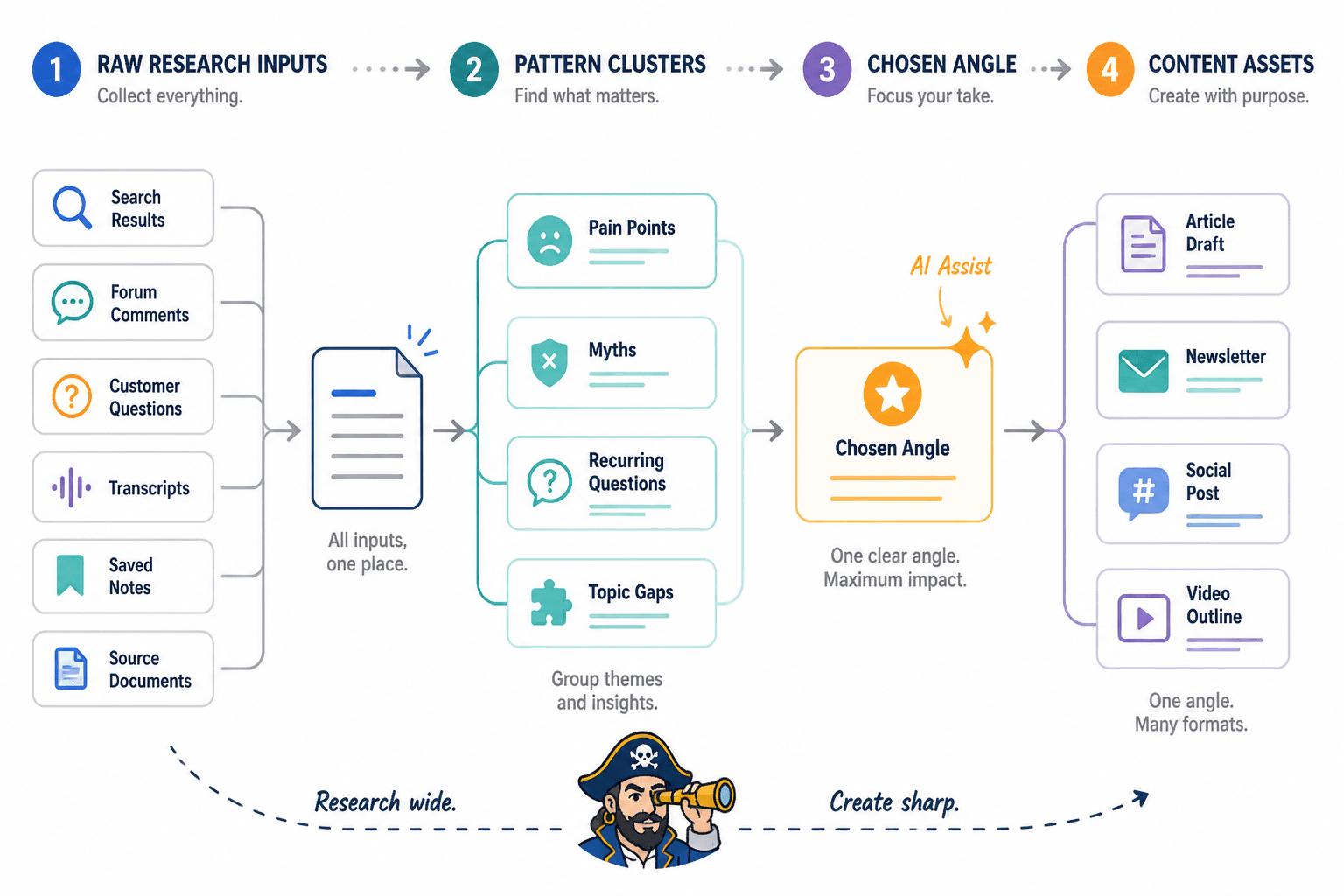
Then bring that material into your AI assistant and ask for patterns. The assistant should not be inventing the market. It should be helping you read it.
4. Social listening and community research tools
Social listening can be as simple as saved searches and recurring review sessions, or as formal as dedicated monitoring software. The key is to track repeated language over time.
Useful sources include:
- Reddit threads.
- YouTube comments.
- Newsletter replies.
- Podcast reviews.
- LinkedIn comments.
- Discord or Slack community discussions.
- Customer support questions.
Your goal is not to collect everything. Your goal is to notice repetition. One angry comment is a mood. Twenty variations of the same confusion may be a content opportunity.
Best knowledge capture tools
A creator research system fails when good inputs vanish. A strong knowledge capture tool gives you one place to store audience questions, research snippets, source links, quotes, rough angles, and decisions.
1. Notion
Notion is a strong fit for creators who want notes, databases, briefs, tasks, and editorial planning in one flexible workspace. Notion says its AI works inside pages, docs, tasks, and databases, can search across connected apps, and offers enterprise search capabilities. See the official Notion AI product page for current details.
Use Notion for:
- An audience question database.
- A content idea board.
- Research source libraries.
- Content briefs.
- Publishing calendars.
- Reusable prompt and template storage.
Best fit: creators who like structured databases, tags, linked pages, and all-in-one workspaces.
2. Obsidian
Obsidian is useful for creators who think in linked notes and want a personal knowledge base that is not overly dependent on rigid database structures. It works well for evergreen notes, concept maps, argument development, and long-term idea accumulation.
Use it for:
- Connecting recurring themes across projects.
- Building a personal library of concepts and frameworks.
- Developing essays, scripts, or course ideas over time.
- Tracking how one idea relates to another.
Best fit: creators who prefer writing, linking, and thinking in networks rather than managing a formal content database.
3. Google Docs, Apple Notes, or a simple notes app
A basic notes app is perfectly acceptable if you keep the workflow clear. The danger is not simplicity. The danger is having 800 undifferentiated notes called “content ideas.” A notes app can work well if you maintain consistent headings and review it regularly.
Use a simple notes tool for:
- Quick capture.
- Draft fragments.
- Audience language.
- Rough hooks.
- Questions to revisit later.
Best fit: creators who need low friction more than advanced structure.
Best workflow tools for turning ideas into publishable assets
Research and ideation are only useful if they eventually become published work. A workflow tool connects the idea database to the actual production process.
Your workflow tool should show:
- What ideas are captured.
- Which ideas are being researched.
- Which ideas have a defined angle.
- Which pieces are drafted, edited, scheduled, or published.
- Which assets can be repurposed into other formats.
1. Notion or Airtable for editorial databases
Database-style tools are useful when you want to tag ideas by audience segment, funnel stage, format, topic, priority, and status.
Useful fields include:
- Idea title.
- Audience question.
- Source or signal.
- Content angle.
- Primary format.
- Secondary formats.
- Priority score.
- Status.
- Publish date.
- Performance notes.
2. Trello, Asana, ClickUp, or Kanban boards
Kanban-style tools work well if you want a simple pipeline from capture to publish.
A practical board might include:
- Captured.
- Researching.
- Angle chosen.
- Outline ready.
- Drafting.
- Editing.
- Scheduled.
- Published.
- Repurpose later.
This kind of workflow prevents a common creator problem: treating every idea as equally urgent until none of them get finished.
3. Spreadsheets
A spreadsheet is not glamorous, which is part of its charm. It can still be one of the best tools for creator AI research and ideation if you use it for scoring and prioritization.
Use a spreadsheet to compare:
- Audience demand.
- Search potential.
- Originality.
- Business relevance.
- Format fit.
- Effort required.
- Repurposing potential.
If your idea list is large but your publishing time is limited, scoring prevents the loudest idea from automatically winning.
The best templates for creator AI research and ideation
Tools become useful when they are wrapped in repeatable templates. Without templates, every research session starts from zero, which is a heroic way to waste a Tuesday.
Audience question capture template
Use this when reviewing comments, emails, communities, sales calls, search results, or social posts.
- Exact audience question: Copy the wording as closely as possible.
- Source: Where did it come from?
- Audience segment: Beginner, intermediate, advanced, buyer, subscriber, skeptic, peer, etc.
- Underlying problem: What are they really trying to solve?
- Emotional tone: Confused, skeptical, urgent, frustrated, curious, overwhelmed.
- Possible content angle: What could you make from this?
- Best format: Short post, article, video, email, checklist, comparison, tutorial.
Source-to-angle template
This template turns raw research into usable ideas.
- Research source: Link, transcript, comment thread, report, search result, or note.
- Repeated theme: What pattern appears?
- Audience tension: What conflict, fear, misconception, or desire is present?
- Common advice: What does everyone else say?
- Fresh angle: What can you add, challenge, simplify, or reframe?
- Proof needed: What examples, data, screenshots, or citations would strengthen it?
- Content asset: What should this become?
Idea scoring template
Give each idea a simple score from 1 to 5 in these categories:
- Audience relevance: Does this solve a real problem?
- Specificity: Is the angle clear enough to publish?
- Originality: Does this add something beyond common advice?
- Strategic value: Does it support your positioning, product, service, or authority?
- Effort: Can you realistically make it soon?
- Repurposing potential: Can it become multiple assets?
You do not need a perfect scoring model. You need enough structure to stop treating “mildly interesting” and “obviously valuable” as the same thing.
Structured AI ideation prompt
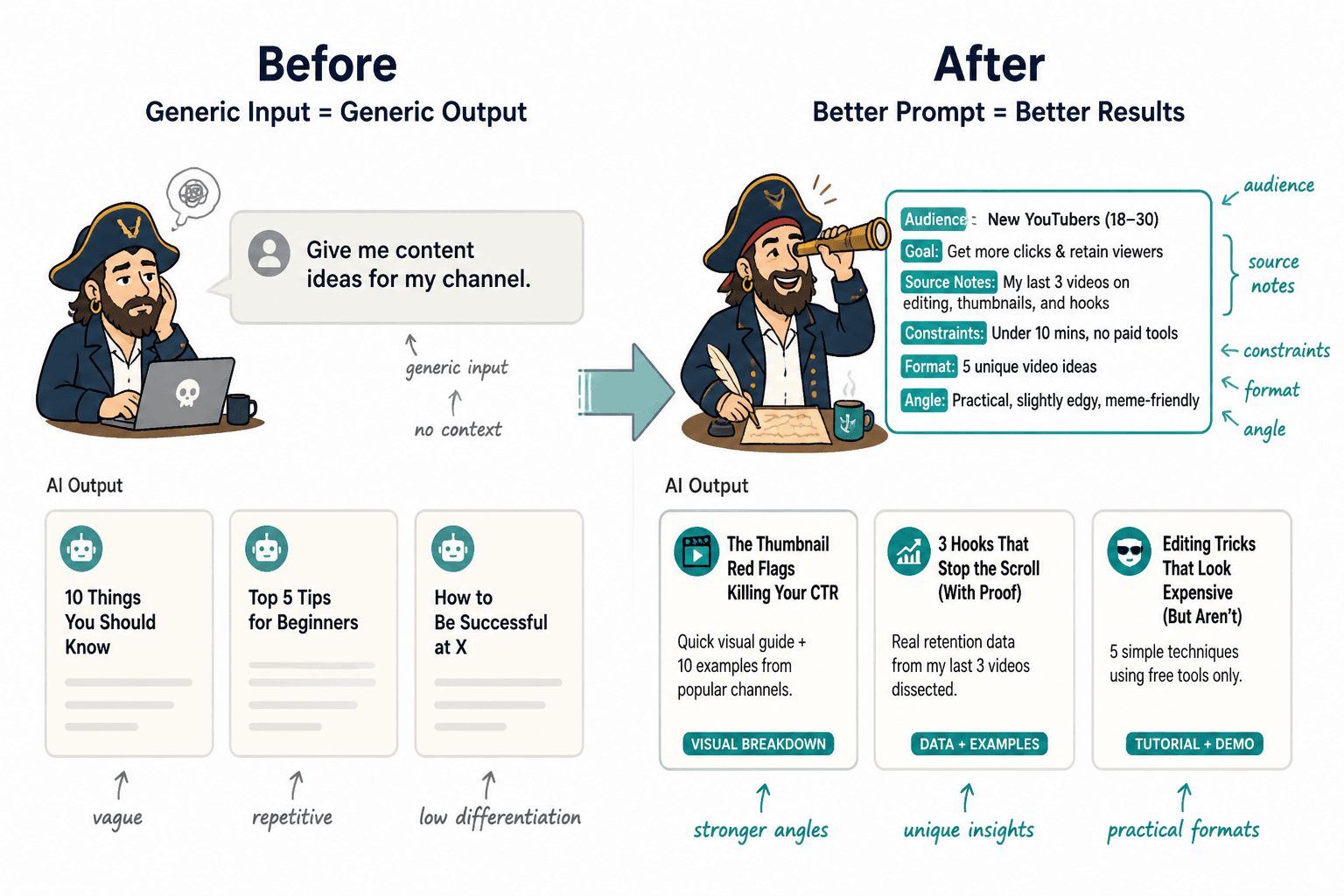
A vague prompt produces vague ideas. A better prompt gives the AI assistant audience context, research inputs, constraints, and an output format.
Weak prompt:
Give me content ideas about productivity.
Stronger prompt:
I create practical productivity content for freelance designers who struggle with project overload and inconsistent client communication. Below are audience questions and comments I collected this week. Group them into recurring themes, identify the underlying tensions, and suggest 10 specific content angles. For each angle, include the best format, the audience problem it addresses, and what would make the piece more original than standard productivity advice.
A simple weekly creator research and ideation workflow
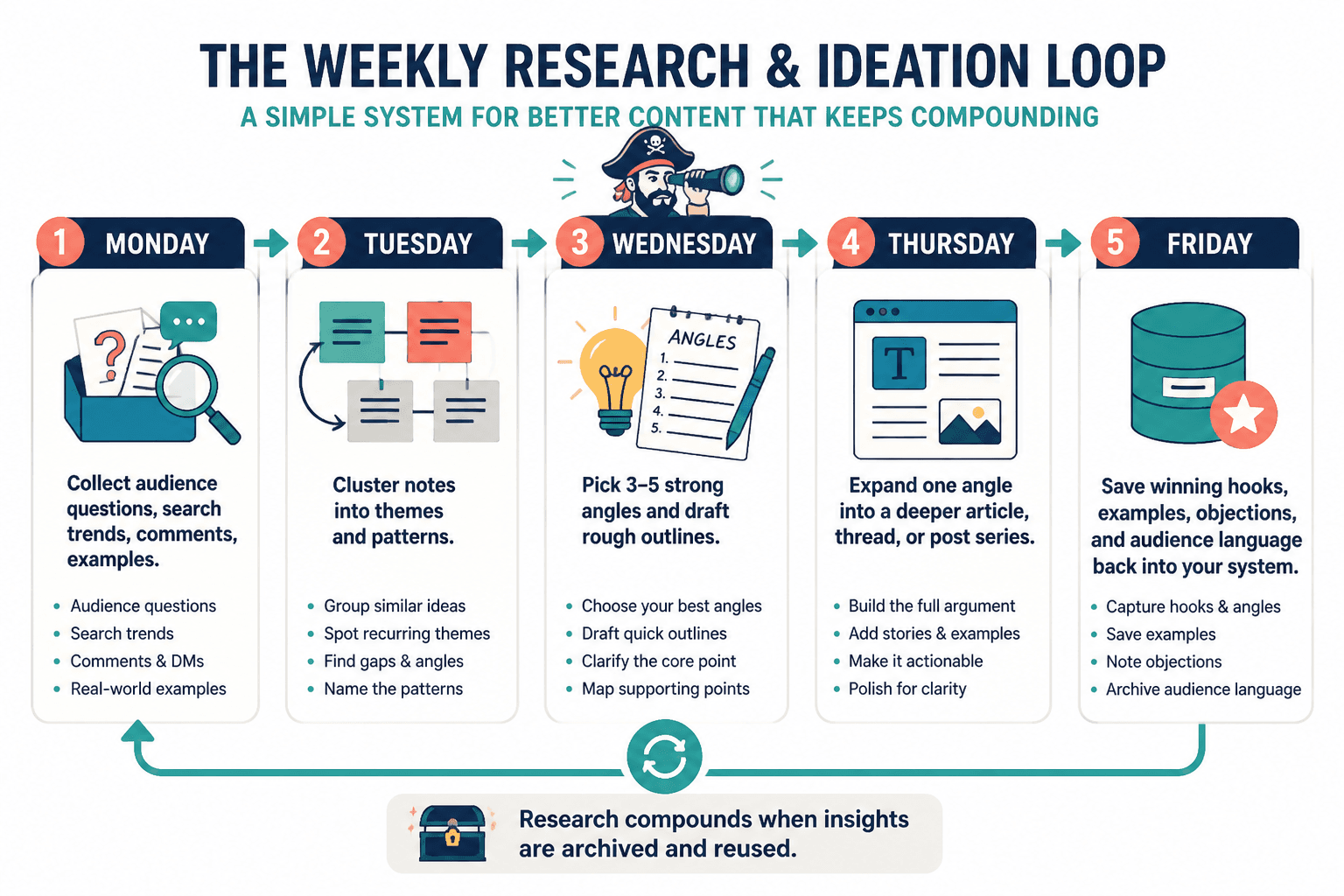
Here is a practical loop you can run once a week.
Step 1: Gather signals
Collect 10 to 30 inputs from search, comments, emails, social posts, communities, customer questions, or platform analytics. Do not judge them yet. Just capture useful raw material.
Step 2: Group patterns
Paste the inputs into your AI assistant and ask it to group them by theme, audience problem, objection, desire, and content opportunity. Review the output manually. AI is good at clustering, but it is not exempt from being confidently weird.
Step 3: Choose angles
For each strong theme, develop 3 to 5 possible angles. Look for contrast:
- Beginner versus advanced.
- Common advice versus better advice.
- Myth versus reality.
- Fast fix versus durable system.
- Tool comparison versus workflow explanation.
Step 4: Score and prioritize
Move the best ideas into your database or workflow tool. Score them by relevance, originality, strategic value, effort, and repurposing potential.
Step 5: Turn winners into briefs
For each selected idea, create a short brief:
- Working title.
- Audience problem.
- Core promise.
- Primary angle.
- Supporting points.
- Needed examples or citations.
- Format and distribution plan.
Step 6: Archive what you learned
After publishing, record performance notes. Which topics got attention? Which angles led to replies, saves, clicks, shares, or conversions? Feed that back into your next research cycle.
What not to add to your creator AI tool stack
Some tools create leverage. Others create the pleasant illusion of progress. Be careful with tools that mainly add more places for ideas to hide.
Skip or delay tools that:
- Generate endless ideas without helping you filter them.
- Require heavy setup before you can capture anything useful.
- Create a separate workspace for a problem your current tools already solve.
- Do not connect to your actual writing, planning, or publishing process.
- Encourage you to chase trends that do not fit your audience or positioning.
- Make it hard to export, search, or reuse your own research.
The cleanest stack is the one you will actually use. If a tool adds friction at the capture stage, confusion at the synthesis stage, or clutter at the publishing stage, it is not helping. It is just wearing a little productivity hat.
The best tool stack for creator AI research and ideation
If you want a simple default setup, start here:
- AI assistant: ChatGPT or Claude for synthesis, prompts, outlines, and angle development.
- Research sources: Google Trends, search results, native platform search, comments, emails, and community threads.
- Knowledge capture: Notion, Obsidian, Google Docs, or another notes system you already trust.
- Idea database: Notion, Airtable, a spreadsheet, or a structured document.
- Workflow board: Notion, Trello, Asana, ClickUp, or a simple Kanban board.
Then add templates for audience questions, source-to-angle synthesis, idea scoring, and content briefs.
The strongest creator AI research system is not the one with the most tools. It is the one that helps you notice real audience signals, develop sharper angles, and publish better work with less rummaging. Start lean, make the handoffs clear, and only add another tool when you can name the bottleneck it will remove.