
ChatGPT is not “forgetting” because it is lazy, broken, or secretly annoyed with your prompts. Most of the time, it is running into a context window limit.
That phrase sounds technical in the most boring possible way, but the idea is simple: AI can only keep a certain amount of information in view at one time. Once the conversation gets too long, too messy, or too stuffed with instructions, older details start getting pushed out, ignored, or compressed badly.
If you have ever thought, “Why did ChatGPT forget my brand voice, the format I asked for, or the thing we were literally discussing five minutes ago?” this is usually the reason.
Here’s how context windows actually work, why they make AI feel weirdly smart and weirdly forgetful at the same time, and what to do if you want better outputs without repeating yourself like a tired middle manager in a broken Zoom meeting.
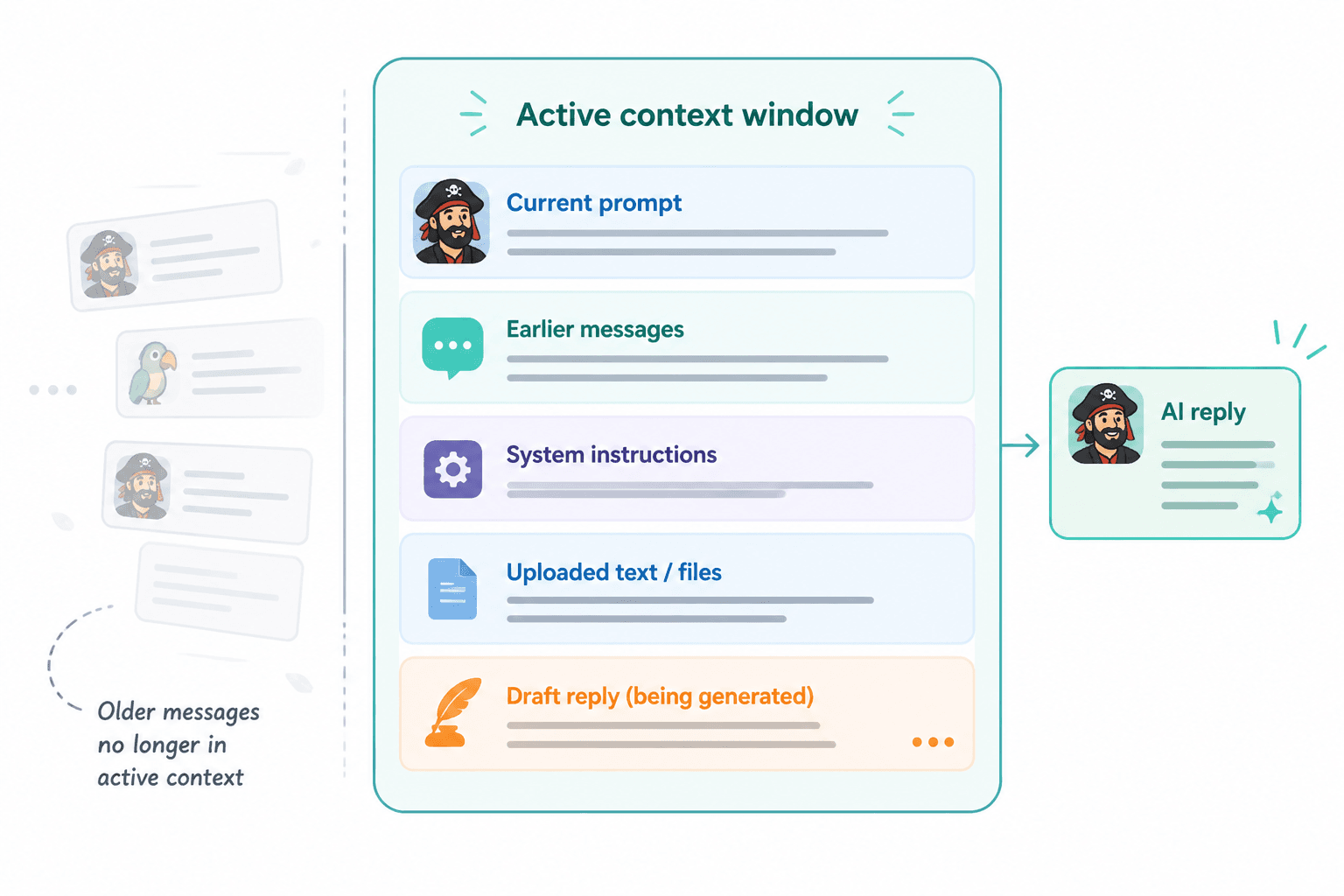
A context window is the amount of text an AI model can consider at once when generating a response.
That includes things like:
- your current prompt
- earlier messages in the conversation
- system instructions
- uploaded text or reference material
- the model’s own draft as it generates a reply
Think of it like a working desk, not a warehouse.
If the desk is small, only a limited number of pages can stay open. Once you pile on too much, something has to go. Pages get pushed aside. Notes get buried. Important details stop being “visible” in the moment.
That is basically what happens inside a context window. The model is not storing your whole conversation in some magical permanent memory and thoughtfully revisiting all of it whenever needed. It is working with what fits in the active window.
Want the broader roadmap? Start with the parent guide.
Why ChatGPT sometimes forgets things
When people ask, “What Is a Context Window in AI? Why ChatGPT Sometimes Forgets Things,” what they usually mean is this: why does the model seem to remember details perfectly for a while, then suddenly act like it has never met me before?
The short answer is that AI does not remember the way humans do. It does not have stable conversational memory by default in the way most people imagine. It relies heavily on what is still present inside the current context window.
Once the total amount of text crosses the model’s limit, a few things can happen:
- older messages may drop out of the active context
- important instructions may get diluted by newer content
- the model may prioritize recent text over earlier text
- long, cluttered prompts may make it miss the actual priority
- it may respond based on partial context and sound oddly confident about it
That last part is worth noting. AI does not usually say, “Sorry, I lost track around message 14.” It often just keeps going with whatever it still has available. Which is how you end up with a tool that can sound competent while quietly ignoring the instruction you cared about most.
What “forgetting” can look like in practice
- It stops following your requested tone or format.
- It forgets your target audience halfway through a project.
- It contradicts something established earlier.
- It repeats a mistake you already corrected.
- It gives a generic answer even though you provided detailed context.
- It answers the latest message but ignores the larger task.
None of this feels intelligent, obviously. But it is usually not random. It is a context management problem.
How context windows actually work without the annoying jargon
AI models process text in chunks often called tokens. A token is not exactly the same as a word. Some words are one token, some are several, punctuation counts too, and formatting adds up faster than people expect.
The context window is measured in tokens, not pages or messages. So a long chat, a pasted article, a giant prompt, and a long answer from the model all compete for the same limited space.
That means context is not just about what you type. It is the total load.
If you paste in:
- a 2,000-word article draft
- your brand guide
- three examples
- a list of audience pain points
- ten formatting instructions
- and then ask for five rewrite options
you are using up a lot of the window before the model even starts replying.
And then the reply itself takes space too.
This is why some AI conversations start strong and then get mushy. The early exchange was clean. Then more material got piled in. Then the model had less room to keep everything straight. Then things got beige.
Context window vs memory: not the same thing
This is where a lot of confusion comes from.
A context window is temporary active working space. Memory, when available in a product, is a separate feature that may store certain user preferences or facts across chats.
So if ChatGPT remembers that you prefer concise writing in one session, that does not automatically mean every detail from your last 40 messages is still actively in play. And if a tool has little or no persistent memory, then each conversation depends mostly on what is inside that current context window.
Put differently:
- Context window: what the model can actively “see” right now
- Memory: what the product may store for future use across sessions
People mix these up constantly, then blame the model for “forgetting” when the problem is really that they expected permanent memory from a temporary workspace.
Why bigger context windows help, but do not solve everything
Yes, larger context windows are useful. They let models handle longer chats, larger documents, more examples, and more reference material before details start falling off the edge.
But bigger is not magic.
A larger context window can still produce weak output if your prompt is messy, your source material is contradictory, or your instructions bury the real goal under six layers of waffle. More room helps. It does not replace clarity.
This matters for creators and teams using AI for writing, repurposing, content planning, and research. A lot of people assume a more powerful model means they can dump in everything they have ever thought about a topic and get brilliance back. Sometimes you get brilliance. Sometimes you get an expensive summary of your own chaos.
What a larger context window is genuinely good for
- analyzing long transcripts
- working from detailed brand docs
- editing long drafts without losing the opening
- comparing multiple source documents
- maintaining continuity across longer chats
- handling larger research inputs in one pass
What it does not fix
- vague prompting
- weak positioning
- generic ideas
- bad source material
- conflicting instructions
- trusting the model to infer priorities you never stated clearly
Common reasons ChatGPT loses the thread
Sometimes the context window limit is the direct cause. Sometimes it is the bigger background issue while your workflow makes it worse.
1. Your chat is too long
Long back-and-forth conversations gradually fill the available window. Older instructions get less reliable over time, especially if you keep changing direction.
2. You buried the important instruction
If your main instruction appears halfway down a giant block of notes, examples, disclaimers, and side comments, the model may not weight it the way you expect.
3. You kept stacking revisions in the same thread
“Make it shorter.” “Now warmer.” “Actually more premium.” “Bring back the old CTA.” “Use example two.” After enough rounds, the chat becomes a junk drawer of conflicting directives.
4. The response itself is eating the window
Long outputs consume context too. If you ask for a giant answer every time, you burn space fast.
5. You assumed the model knew what mattered most
This is a classic mistake. People provide ten constraints and never rank them. Then they get annoyed when the AI preserves the least important one and drops the thing they actually cared about.
How to stop ChatGPT from “forgetting” important details
You cannot fully remove context limits, but you can work with them instead of constantly tripping over them.
Start new chats more often than you think
If a thread is getting long, muddy, or inconsistent, start fresh and restate the essentials. This feels inefficient until you compare it with wasting 20 minutes correcting a model that is now hallucinating your content strategy.
Put the key instruction near the top
Lead with the real task, the audience, the output format, and the highest-priority constraint.
For example:
Rewrite this LinkedIn post for consultants. Keep it under 180 words. Tone: clear, smart, lightly sharp. Do not make it sound motivational or salesy. Preserve the main lesson about weak hooks.
That is much better than dumping six paragraphs of background and hoping the model picks the right mission out of the pile.
Use compact reference blocks
Instead of repeating your brand voice from scratch every time, create a tight reusable block. Same for audience details, formatting rules, and offer positioning.
Short, reusable context beats giant repeated explanations.
Summarize before continuing
If a conversation is getting long but you want to continue in the same direction, ask the model to summarize the key decisions so far. Then start a new chat using that summary as the foundation.
This works especially well for content workflows, editing rounds, and strategy chats.
Ask for shorter outputs unless length is necessary
Do not request a 1,500-word answer when you really need five options, a short outline, or a tighter rewrite. Long answers feel productive, but often they are just chewing through space instead of helping you think more clearly.
A better habit is to ask for the shortest useful version first, then expand only if you truly need more detail. That keeps the context window working on the information that matters instead of wasting it on filler.