
Most creator email sequences do not fail because the tool was wrong.
They fail because the sequence is vague, the emails all sound the same, and the creator hoped automation would somehow compensate for weak positioning. It won’t. A slick dashboard cannot rescue a boring welcome sequence or a sales arc that reads like a hostage note from a funnel bro.
If you want the best templates and tools for creator email sequences, the useful question is not “what software should I buy?” It is “what kind of sequence am I trying to run, what should each email do, and which tool makes that easier without turning my workflow into admin soup?”
That is what this guide covers. You will get practical sequence templates, the tool categories that actually matter, what each type of tool is good at, what it absolutely cannot do for you, and how to choose a setup that fits your stage, offer, and energy level.
If you want the broader strategy behind sequence planning first, start here: email newsletter writing, creator email systems, and creator email sequences.
If you want the bigger picture, start with the parent guide.
What creators actually need from an email sequence
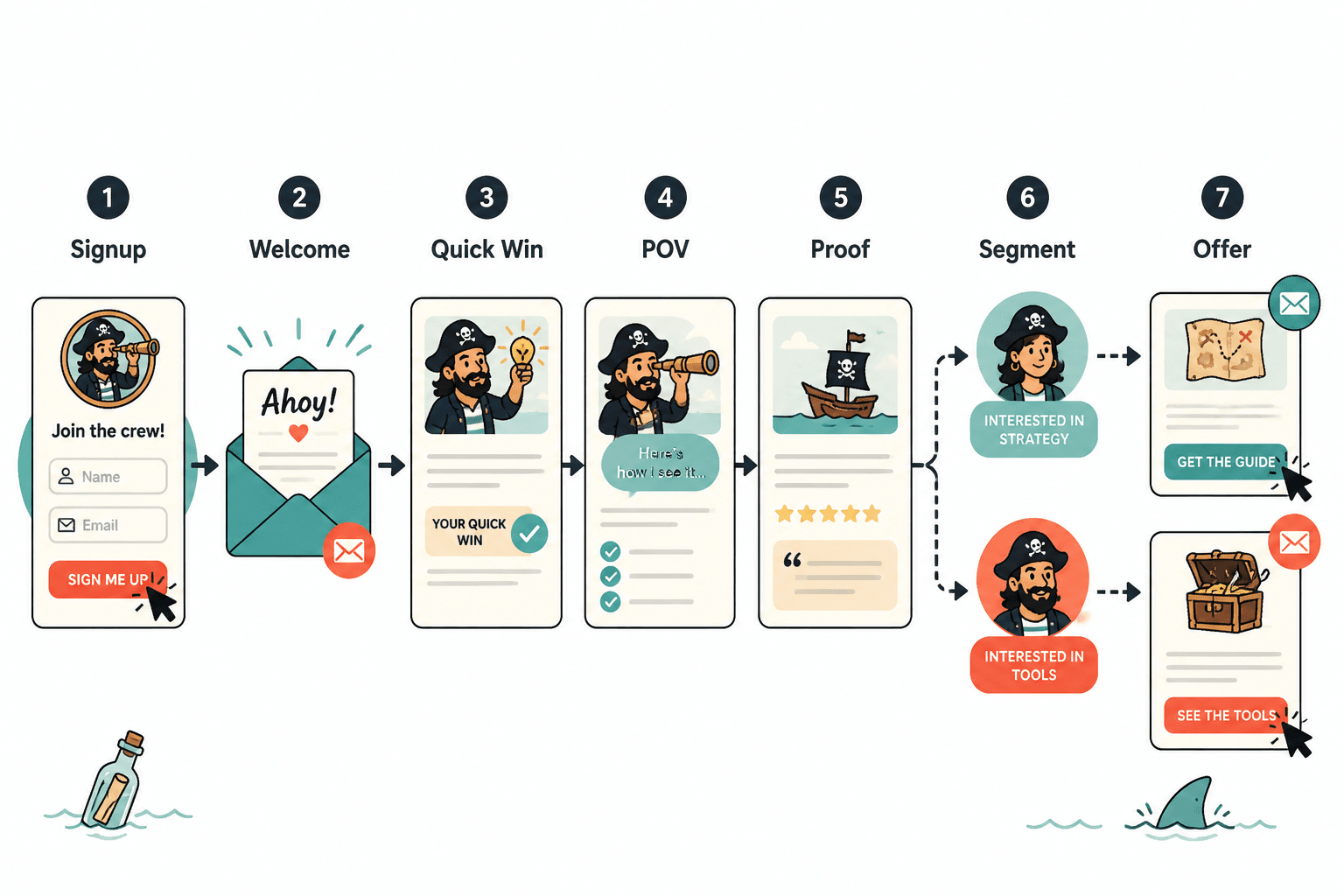
A creator email sequence is not just a pile of scheduled emails. It is a guided path. Each email should move the reader toward one thing: understanding you faster, trusting you more, using your ideas, or buying something that actually fits.
That means the best templates are not the ones with the fanciest subject lines or the most “proven” persuasion tricks. They are the ones that make your thinking clearer and make the reader’s next step easier.
For most creators, a strong sequence should do at least some of this:
- Introduce your point of view
- Set expectations for what kind of emails you send
- Show proof, examples, or useful ideas early
- Segment people by interest where possible
- Move readers toward a relevant offer, resource, reply, or action
- Keep sounding like a person, not a compliance-approved content appliance
That last one matters more than people admit. Plenty of creators build email sequences that are technically organized and strategically dead. Everything is clean. Everything is polite. Nothing feels alive. Then they wonder why nobody clicks.
The best templates and tools for creator email sequences start with the sequence type
Before tools, figure out the job. Different sequences need different structure. If you skip that part, you end up shopping for features you do not need.
1. Welcome sequence
This is the backbone for most creators. Someone joins your list, and you use the first few emails to set the tone, deliver value, and point them somewhere useful.
Simple template:
- Email 1: Welcome, expectation setting, and one quick win
- Email 2: Your point of view or method
- Email 3: Proof, case study, or example
- Email 4: Best resources or most useful content
- Email 5: Soft offer or next step
This works because it balances relationship and movement. You are not just saying hello five different ways. You are helping them understand what you do, why your approach matters, and what they should do next.
2. Lead magnet follow-up sequence
If someone signs up for a checklist, guide, mini-course, or template, do not stop at delivery. That is one of the laziest mistakes in email marketing, and yes, creators do it constantly.
Simple template:
- Email 1: Deliver the resource and explain how to use it
- Email 2: Highlight one common mistake related to the resource
- Email 3: Show an example or transformation
- Email 4: Answer a likely objection
- Email 5: Offer the next logical product or service
The key here is continuity. The offer should feel like the next step after the resource, not a trap door beneath it.
3. Sales sequence
This is where many creators become weirdly dramatic or weirdly timid. They either write six emails that all scream “buy now” in different outfits, or they tiptoe around the offer like they are afraid of making eye contact.
Simple template:
- Email 1: Open the offer and frame the problem
- Email 2: Explain the method or mechanism
- Email 3: Share proof or a detailed example
- Email 4: Handle objections and fit concerns
- Email 5: Clarify urgency or deadline if real
- Email 6: Final reminder, direct and clean
If you want more practical structures for this kind of sequence, read simple creator email sequences sales email arcs templates for busy creators.
4. Re-engagement sequence
This sequence is for subscribers who have gone quiet. Do not send them a sulky “do you still want to hear from me?” message unless you enjoy sounding like an abandoned app notification.
Simple template:
- Email 1: Share a genuinely useful resource or insight
- Email 2: Ask a simple preference or interest question
- Email 3: Offer a reason to stay, update preferences, or leave cleanly
The point is not guilt. It is relevance.
5. Nurture sequence for longer sales cycles
Consultants, coaches, service providers, and higher-ticket creators often need more than a quick welcome then a pitch. They need a longer runway.
Simple template:
- Educational email
- Perspective-shifting email
- Case study or proof email
- Common mistake email
- Behind-the-scenes process email
- Offer email or consultation invite
This kind of sequence works best when the emails are varied. Not every email needs a lesson list. A good sequence can use short essays, examples, mini stories, FAQs, checklists, and direct invitations. Variety keeps it human.
Best creator email sequence templates to keep in your library
You do not need 47 templates. You need a small set that you can adapt quickly. A smart creator template library saves time without flattening your voice.
Template 1: The clean welcome email
Structure:
- Thank them for joining
- Remind them what they signed up for
- Set expectations for future emails
- Give one useful next step
- Optional: ask one simple reply question
Subject: You’re in — here’s the useful part
Thanks for joining.
You signed up for practical creator email sequence advice, so that’s what you’ll get: sharper sequence strategy, cleaner email structure, and fewer “just nurture your list” platitudes.
First, start with this: if a new subscriber cannot tell what you help with in the first two emails, your sequence is already wobbling.
Over the next few days, I’ll send a few emails on what works, what to avoid, and how to build a sequence that does more than sit there looking automated.
If you want, hit reply and tell me what you sell. I read those.
Template 2: The point-of-view email
Structure:
- Name a common belief
- Explain why it is incomplete or wrong
- Give your approach
- Show what changes when people follow it
This email is useful because it separates you from generic advice. It gives readers a reason to care about your angle, not just your existence.
Template 3: The proof email
Structure:
- Start with the situation
- Show the problem
- Explain what changed
- Highlight the result or lesson
- Connect it back to the reader
Proof does not have to mean giant revenue screenshots. It can be a before-and-after workflow, stronger reply quality, better lead quality, cleaner positioning, or a simpler system that reduced chaos. Readers care about outcomes they can recognize.
Template 4: The objection email
Structure:
- Name the hesitation directly
- Show that it is reasonable
- Clarify what is true and what is not
- Explain who the offer is and is not for
- Point to the next step
This is far more effective than pretending objections do not exist. Smart readers have questions. Your sequence should respect that.
Template 5: The soft pitch email
Structure:
- Reference the problem or desire
- Introduce the offer plainly
- Explain what it helps with
- Include who it is best for
- Give a clear CTA
Soft pitch does not mean vague. It means proportionate. You are not forcing urgency where none exists. You are giving the right people a clean path forward.
For more examples you can adapt, see best creator email sequences ideas and examples for creators.
The tool categories that matter most
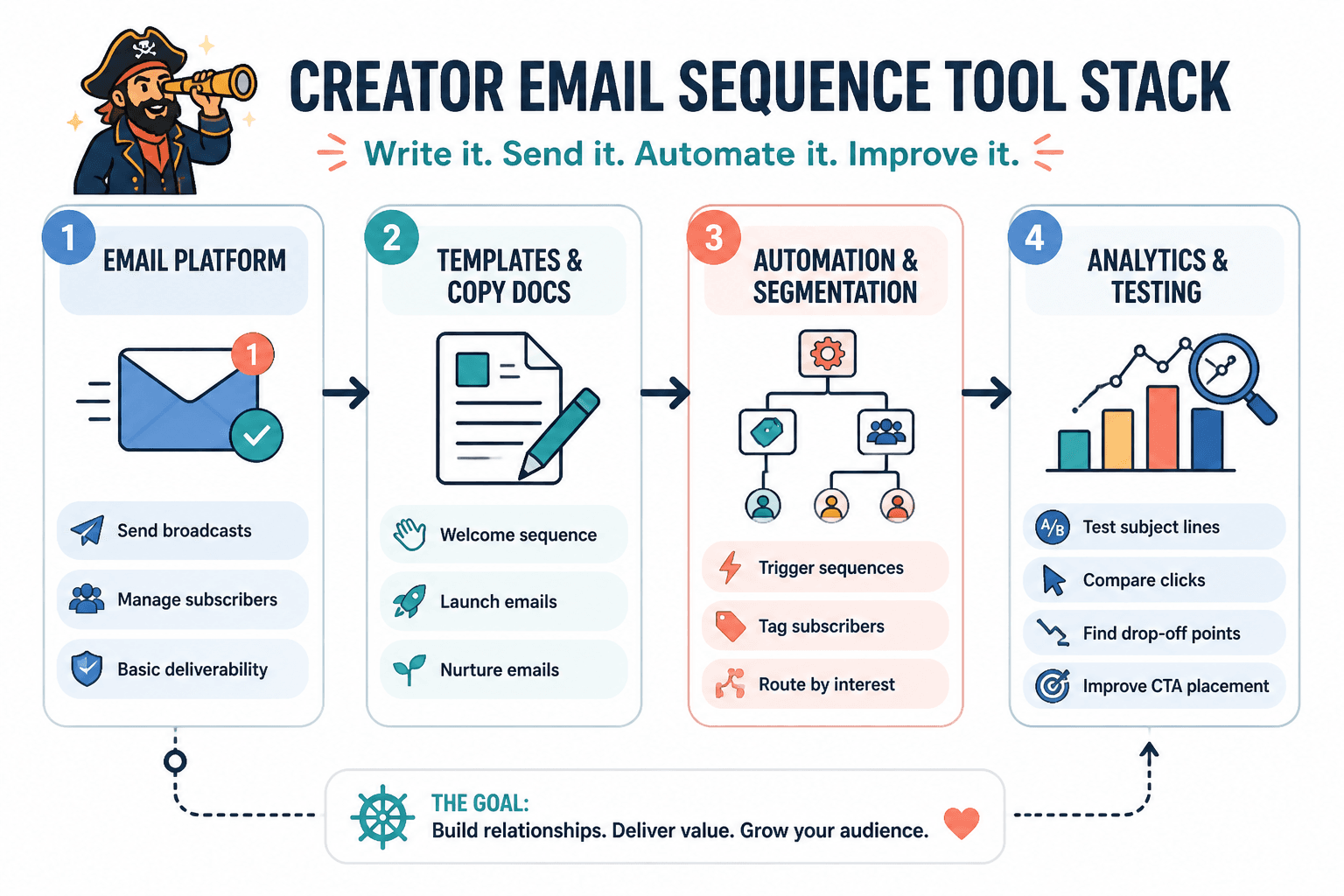
Now the software part. The best tools for creator email sequences are usually not the biggest all-in-one platforms with a thousand enterprise toggles you will never touch. They are the tools that make your core workflow simple: write, automate, segment, track, and improve.
Here are the categories that actually matter.
Email service providers and automation platforms
This is the core system. It handles list management, automations, broadcasts, forms, sequence delivery, and basic reporting.
Best for:
- Building welcome and nurture sequences
- Creating automation rules
- Tagging and segmenting subscribers
- Scheduling regular newsletters
- Tracking opens, clicks, and subscriber movement
What to look for:
- Easy sequence builder
- Reliable tagging and segmentation
- Simple forms and landing pages if you need them
- Decent analytics without becoming a data maze
- Smooth writing experience
- Pricing that does not punish modest list growth too early
What it cannot do: invent your voice, fix a weak offer, or make people care about a sequence with no clear point.
If you want a breakdown focused more on software and CRM mechanics, read best email automation tools and CRM tools for creator email sequences.
AI writing and workflow tools
Useful? Yes. Magical? No. AI tools can help creators draft emails faster, generate variations, repurpose ideas, summarize transcripts, and turn rough notes into usable first drafts. They are especially handy when you already know what the email needs to do.
Best for:
- Drafting first versions
- Generating subject line options
- Repurposing long-form content into sequence emails
- Tightening copy
- Creating alternate angles for the same offer
What to watch for:
- Overly polished, generic tone
- Fake certainty
- Repeated structure across emails
- Flimsy examples that sound plausible but say very little
Use AI as a draft partner, not a substitute for judgment. If your sequence starts sounding like every creator on the internet was merged into one chirpy consultant blob, that is your cue to edit harder.
For more on that side of the stack, see best AI tools for creator email sequences.
CRM and subscriber management tools
Some creators need more than a simple list. If you sell services, consultations, sponsorships, or higher-ticket offers, you may need to track people by lead stage, conversation history, and offer fit.
Best for:
- Managing warm leads from email
- Tracking consultation or sales conversations
- Connecting email behavior with outreach or follow-up
- Keeping high-intent subscribers from disappearing into your inbox abyss
Not every creator needs this on day one. In fact, many do not. If your list is still small and your offers are simple, a well-organized email platform plus a sane manual process is often enough.
Template and swipe libraries
This category is underrated when used correctly and awful when used lazily. A good template library helps you move faster and keep structure tight. A bad one turns your emails into recycled internet furniture.
Best for:
- Reusing winning structures
- Speeding up campaign creation
- Keeping your sequence logic consistent
- Avoiding blank-page paralysis
Bad use: copying the emotional cadence, hooks, and persuasion moves so closely that your emails sound rented.
Analytics and testing tools
Most creators do not need advanced analytics dashboards. They need enough data to see where people drop off, which emails get clicked, and which subject lines pull better attention.
Best for:
- Testing subject lines
- Comparing click performance
- Spotting weak emails in a sequence
- Improving CTA placement
- Tracking which sequence leads to actual sales or replies
The point of analytics is not to become obsessed with every decimal point. It is to notice where the sequence gets fuzzy, stale, or too self-indulgent.
How to choose the right tool stack without overbuilding it
A lot of creators build for an imaginary future business instead of the actual one they have now. That is how you end up paying for advanced branching automations when you are still manually writing every other email at 11:40 p.m.
Pick tools based on current needs plus the next sensible step.
| Creator stage | What you likely need | What to avoid |
|---|---|---|
| Early-stage creator | Simple email platform, welcome sequence, basic template library | Overcomplicated CRM setups and heavy automation branches |
| Growing audience with one main offer | Automation platform, lead magnet sequence, sales sequence, basic AI drafting help | Too many disconnected tools |
| Service provider or consultant | Email platform plus light CRM and lead tracking | Newsletter-only setup with no lead follow-up system |
| Creator with multiple offers or segments | Better tagging, segmentation, sequence mapping, stronger analytics | One-size-fits-all sequences sent to everyone |
If your setup feels fragile, messy, or too clever by half, simplify it. Email systems should help you create momentum, not inspire a color-coded notion board you never use.
A practical workflow for building creator email sequences faster
Here is a workflow that works for most creators without requiring a week-long funnel retreat.
- Choose one sequence goal. Welcome, lead magnet follow-up, nurture, sales, or re-engagement.
- Map the reader journey. What should they understand, believe, feel, or do by the end?
- Pick 3 to 6 emails. Most creators do better with a tight sequence than a sprawling one.
- Use templates for structure. Not for personality.
- Draft fast. You can use AI or notes to get rough copy down.
- Edit for voice and specificity. This is where the real work is.
- Load into your tool. Add tags, timing, and triggers.
- Track behavior. Watch clicks, replies, conversions, and drop-off points.
- Improve one weak email at a time. Do not rewrite the whole machine every week.
This process is boring in the best way. It is repeatable. It also keeps you from the classic creator trap of endlessly “optimizing” tools instead of improving messages.
Common mistakes when using templates and tools for creator email sequences
Most mistakes are not technical. They are strategic and editorial.
The bigger point is simple: clearer structure and clearer writing make the piece more useful. That is usually what makes the ending land better too.