
Most blog posts do not need a total rewrite. They need an adult with decent judgment, a sharp editing process, and the right tools.
That is the real job with blog rewrites and refreshes. Not pumping old posts through five AI tabs and calling it optimization. Not sprinkling in a few keywords like seasoning. Not replacing every sentence until the article loses whatever personality made it worth reading in the first place.
The best editing tools and SEO refresh tools for blog rewrites and refreshes help you do three things well: spot what is weak, improve what matters, and update the article without turning it into polished mush.
This guide breaks down which tools are actually useful, what each category is good for, where people overuse them, and how to build a cleaner refresh workflow. If you are updating old blog content for traffic, clarity, authority, or conversions, this will save you time and a few avoidable mistakes.
If you are building a broader system around this, it also helps to read our hub on blog rewrites and refreshes, plus related guides on AI tools for blog rewrites and refreshes, templates and tools for blog rewrites and refreshes, and rewrite ideas and examples for creators.
For the full path around this topic, head to the parent guide.
What these tools should actually help you do
A blog refresh is not one task. It is a stack of smaller jobs:
- Audit the post
- Improve structure
- Tighten language
- Update examples, stats, and references
- Find missing search intent angles
- Fix on-page SEO gaps
- Improve internal linking
- Make the CTA less sleepy
That is why no single tool does this perfectly. One tool might be excellent at sentence-level editing but useless for keyword coverage. Another might surface SEO gaps but make terrible rewrite suggestions. Another might help with readability while quietly flattening your voice into “helpful software company from nowhere.”
So the better question is not “What is the best tool?” It is “What part of the refresh process am I trying to improve?” That question usually leads to better choices and fewer subscriptions collecting dust.
The main tool categories worth using
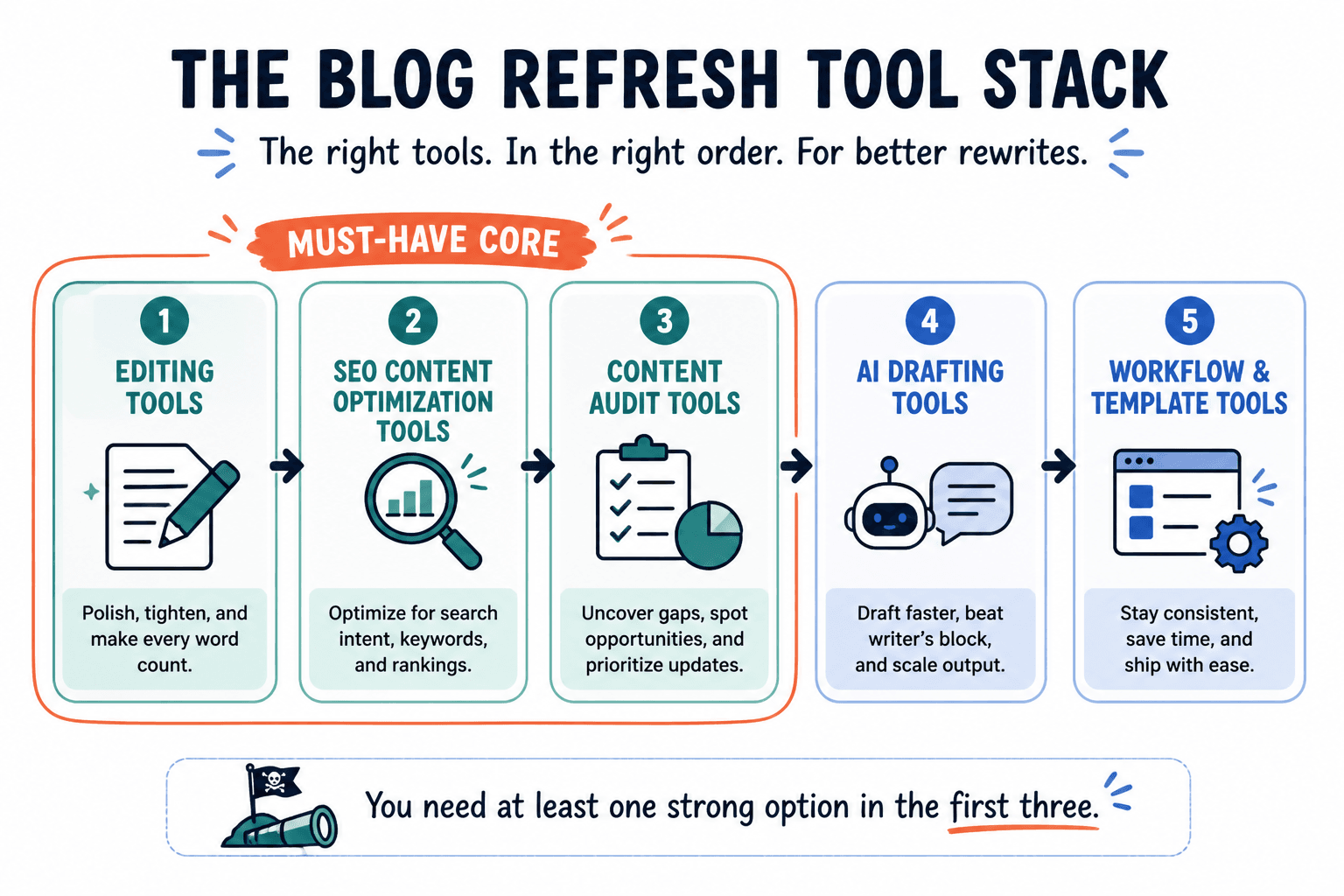
For blog rewrites and refreshes, most useful tools fall into five buckets:
- Editing tools for clarity, grammar, tone, and flow
- SEO content optimization tools for search intent coverage and on-page gaps
- Content audit tools for identifying which posts to refresh first
- AI drafting tools for fast rewrites, alternate angles, and rough restructuring
- Workflow and template tools for keeping the process repeatable
You do not need the fanciest version of all five. But you probably do need at least one strong option in the first three.
Best editing tools for blog rewrites and refreshes
Editing tools are for the article itself, not the search strategy around it. Their job is to help you make the piece clearer, cleaner, more readable, and less awkward.
Grammarly
Grammarly is useful for catching obvious grammar issues, clunky phrasing, repetition, and readability problems fast. It is especially helpful if you are refreshing older articles written quickly, by multiple contributors, or during a period when your standards were, let’s say, more optimistic than disciplined.
What it is good for:
- Grammar and punctuation cleanup
- Basic readability improvements
- Spotting overlong sentences
- Catching repeated words and small errors before publishing
What it is not good for:
- Preserving brand voice by itself
- Making strategic editorial decisions
- Improving weak ideas
- Understanding search intent deeply
Use it as a line editor, not as your editor-in-chief.
Hemingway Editor
Hemingway is great for identifying dense, overcomplicated writing. If your older blog content sounds like you were trying to win a Victorian essay contest, this tool helps.
It flags hard-to-read sentences, adverb overload, passive voice, and general bloat. Sometimes it is a little aggressive. Not every sentence needs to be punched into kindergarten simplicity. Still, for blog rewrites, it is excellent at surfacing where the article drags.
Best use cases:
- Simplifying educational content
- Tightening intros
- Cleaning up rambling sections
- Making posts more skimmable without dumbing them down
Google Docs or Word with suggestion mode
This is less glamorous, but still one of the best editing environments for rewrites. Commenting, version history, side-by-side collaboration, and suggestion mode matter a lot when you are revising old content carefully instead of just smashing replace.
If you work with writers, editors, SEO people, or clients, this matters even more. Fancy optimization software can tell you what to change. It usually cannot manage actual editorial thinking nearly as well as a solid shared doc.
ProWritingAid
ProWritingAid is stronger than many basic editing tools if you want deeper reports on style, pacing, repeated phrasing, sentence variety, and structure patterns. It can be overkill for quick refreshes, but helpful for cornerstone posts that deserve more care.
It is especially useful when the article is technically fine but still feels flat. That usually means the problem is rhythm, repetition, or weak sentence movement rather than grammar alone.
Best SEO refresh tools for blog rewrites and refreshes
This is the other half of the job. If editing tools improve the writing, SEO refresh tools improve the article’s fit with search intent, topic coverage, on-page structure, and competitive usefulness.
Google Search Console
Search Console is not flashy, but it should be one of the first places you check before refreshing anything. It tells you what the post already gets impressions for, which queries are slipping, where click-through rate is weak, and which pages have actual refresh potential.
That matters because a refresh should start with evidence, not vibes.
Use Search Console to find:
- Pages with high impressions but weak clicks
- Pages slipping in average position
- Queries the article is almost ranking for
- Posts getting traffic from terms you did not intentionally target
If a post has traction already, a refresh can often do more than a brand-new article. That is one of the least sexy and most profitable truths in content.
Ahrefs
Ahrefs is strong for competitive analysis, keyword gap spotting, backlink context, and understanding what your refreshed article is up against. It helps you see whether the problem is the article itself, the SERP, or your site authority.
Useful features for refreshes include:
- Organic keyword rankings for existing pages
- Competing pages for the same topic
- Content gap ideas
- Top pages and traffic trend data
- Backlink checks before changing pages with link equity
This is a strong choice if you want strategy, not just content scoring.
Semrush
Semrush is also solid for refresh work, especially if your process includes keyword research, topic expansion, on-page checks, and ranking comparisons in one place. Its content and SEO toolset is broad enough to support both the “what should we update?” question and the “how should we optimize it?” question.
Where it helps most:
- Refreshing posts based on ranking movement
- Finding related terms and subtopics
- Improving metadata and on-page structure
- Auditing multiple pages at scale
Surfer SEO
Surfer is useful when you want article-level optimization guidance while actively rewriting. It compares your draft against pages ranking for similar queries and suggests term coverage, structure, and content depth ideas.
That said, this is where people get weird. They start writing for the score instead of the reader. Then the article becomes technically optimized and spiritually dead.
Use Surfer to spot missing angles, weak topical coverage, and structural opportunities. Do not use it as permission to stuff in every suggested phrase like a raccoon hoarding keywords.
Clearscope
Clearscope is one of the cleaner options for content optimization if your team values editorial quality. It tends to be more straightforward and less noisy than some score-driven tools, which makes it useful for serious refreshes on high-value posts.
It works well when you already have a good article and want to strengthen relevance, depth, and term coverage without wrecking the prose.
Yoast SEO or Rank Math
These are not full refresh strategy tools, but they are useful once you are updating the actual page in WordPress. Think of them as on-page hygiene helpers.
Helpful for:
- Title tag and meta description checks
- Basic internal linking prompts
- Slug review
- Simple readability and SEO reminders
Not helpful for:
- Deep search intent analysis
- SERP strategy
- Meaningful rewrite decisions
These plugins are useful assistants. They are not content strategists. Important distinction.
Best tools for deciding which blog posts to refresh first
Before you start rewriting random posts, figure out what deserves the effort. Not every underperforming page is one refresh away from glory.
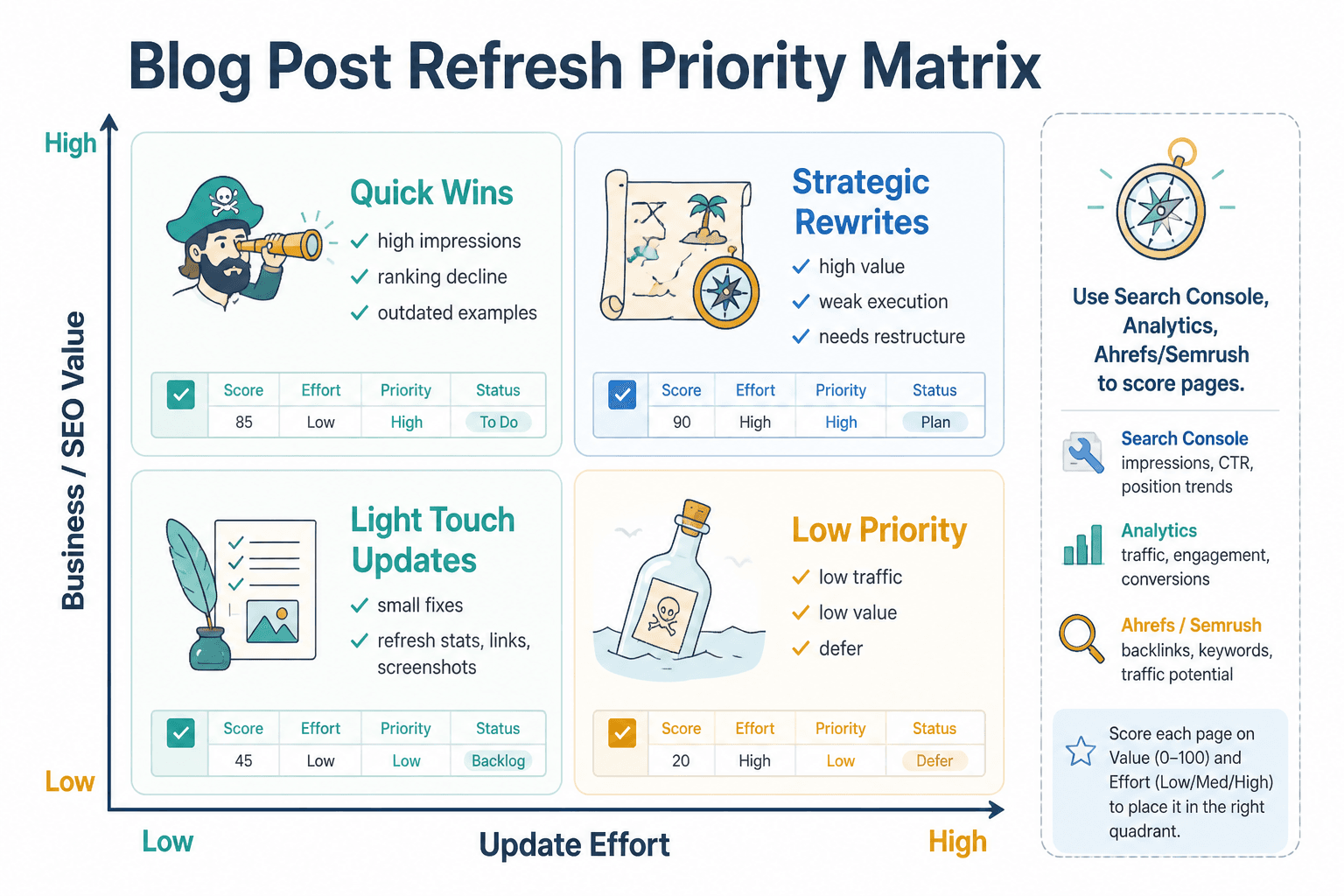
The best candidates usually have one or more of these traits:
- They already get impressions
- They used to rank better than they do now
- They are on topics still relevant to your business
- They have useful bones but weak execution
- They target keywords with clear commercial or authority value
- They have outdated examples, screenshots, or references
For this part of the process, the most useful tools are:
- Google Search Console for impression and query trends
- Google Analytics for traffic and engagement context
- Ahrefs or Semrush for ranking history and competitive comparisons
- Airtable, Notion, or Sheets for tracking refresh priority, status, and outcomes
A simple spreadsheet often beats a bloated content ops platform here. You mostly need to know what page is being updated, why, what changed, and what happened after publication.
A practical tool stack for most creators and small teams
You do not need enterprise software for every refresh. In most cases, a lean stack works better because you actually use it consistently.
| Job | Good tool options | What it helps with |
|---|---|---|
| Find refresh opportunities | Google Search Console, Ahrefs, Semrush | Impressions, ranking drops, keyword opportunities |
| Edit clarity and style | Grammarly, Hemingway, ProWritingAid | Readability, grammar, sentence cleanup |
| Optimize on-page SEO | Surfer, Clearscope, Semrush | Topic coverage, gaps, structure, relevant terms |
| Update page SEO settings | Yoast SEO, Rank Math | Titles, meta, readability checks, internal linking prompts |
| Manage workflow | Google Docs, Notion, Airtable, Sheets | Tracking, collaboration, revision notes |
If you are solo, a very workable stack is this:
- Search Console for opportunity spotting
- Google Docs for rewrites
- Grammarly or Hemingway for cleanup
- Surfer or Clearscope if you want optimization support
- Yoast or Rank Math when publishing
- Sheets or Notion to track the refreshes
That is enough to do strong refresh work without building a software shrine.
What good refresh tools still cannot do for you
This part matters because people expect tools to fix problems that are not tool problems.
No editing tool can give your writing taste. No SEO platform can invent a sharp point of view. No optimization score can make a boring article interesting. And no AI rewrite pass can magically know what your audience actually finds useful if you have not done that thinking yourself.
Tools can help you:
- See issues faster
- Organize rewrite decisions
- Catch sloppy phrasing
- Spot missing subtopics
- Improve consistency
- Scale a repeatable workflow
They cannot help you if:
- The article targets the wrong keyword
- The search intent is mismatched
- The original piece had no real insight
- The offer behind the content is weak
- Your site lacks topical authority in that area
- You keep refreshing posts nobody cares about
This is why refreshes work best when they are editorial and strategic, not just technical.
How to use editing and SEO refresh tools without making the article worse
A lot of refreshed content gets cleaner and less effective at the same time. That usually happens when people optimize too mechanically.
Here is the safer process.
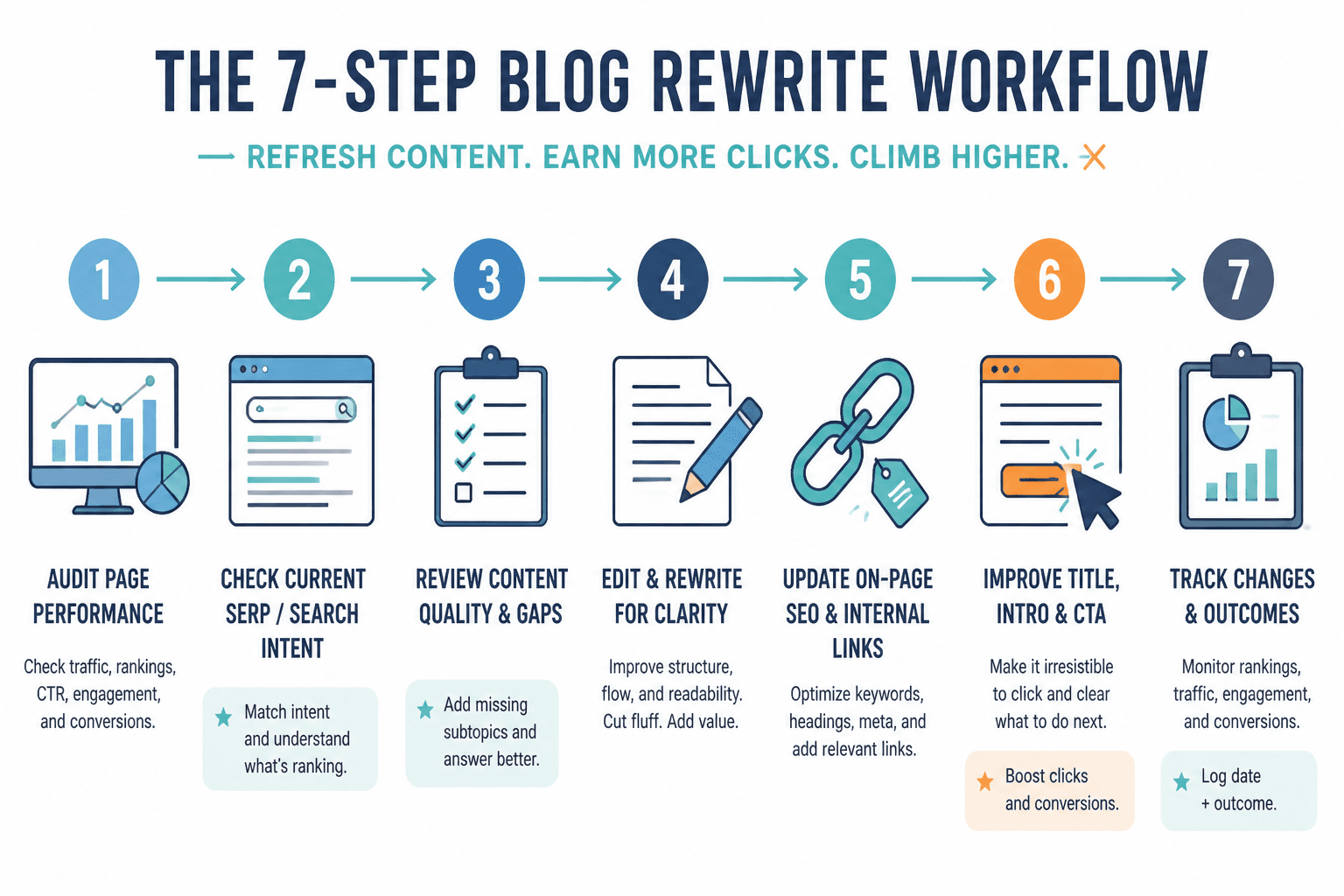
1. Start with performance data
Check Search Console, rankings, and page performance first. Look for signs of opportunity or decay. Do not rewrite pages blindly just because they are old.
2. Read the article like a normal person
Before opening optimization software, read the post straight through. Where does it drag? What feels dated? What is missing? Where does the intro fail to earn attention? Where does the CTA flop? This gives you a human baseline before the tools start shouting suggestions at you.
3. Fix structure before sentence polish
If the article has weak sections, bad sequencing, or vague subheads, solve that first. There is no point polishing lines inside a messy structure.
4. Use editing tools for cleanup, not personality replacement
Run Grammarly, Hemingway, or similar tools after the structural changes. Accept what improves clarity. Ignore changes that make the writing flatter, stiffer, or weirdly corporate.
5. Use SEO tools to fill genuine gaps
Check what the article is missing compared with current search intent and top results. Add missing subtopics, examples, FAQs, definitions, comparisons, or practical steps if they improve the article. Do not cram in junk for a score.
6. Improve the click and the conversion
A refresh is also the right time to tighten the title tag, sharpen the intro, improve internal links, update the CTA, and make the next step clearer. Traffic without movement is just nice-looking stagnation.
7. Track what changed
Log the date, updates made, target queries, and outcome. Otherwise you will never know what refreshes are actually working versus what just makes everyone feel busy.
Common mistakes when using blog rewrite and refresh tools
Some of the worst refresh outcomes come from perfectly good tools used badly.
- Refreshing based on age instead of opportunity. Old does not automatically mean worth updating.
- Trusting optimization scores too much. A higher score is not the same thing as a better article.
- Editing for “professionalism” until the voice disappears. You want clear, not sterile.
- Fixing grammar while ignoring search intent. The article can be pristine and still irrelevant.
- Adding keywords without adding value. Readers notice. Search engines probably do too.
- Skipping the SERP check. If the search results changed, your article might need a different angle, not just cleaner wording.
- Forgetting internal links. Refreshing a post without improving its place in your site is a missed opportunity.
A good refresh should make the article more useful, more current, easier to read, and more aligned with what the reader wanted when they searched. If your tools are helping with that, great. If they are just generating prettier fog, maybe step away from the software for a minute.
How to choose the right tools for your situation
The best editing tools and SEO refresh tools for blog rewrites and refreshes depend on your setup.
If you are a solo creator
- Use Search Console first
- Add Grammarly or Hemingway for editing
- Use one optimization tool only if it saves real time
- Track refreshes in Sheets or Notion
The bigger point is simple: clearer structure and clearer writing make the piece more useful. That is usually what makes the ending land better too.