
Most CTA tools do not fail because they are missing one magical feature. They fail because people expect software to fix a weak offer, a vague audience, or a button that says something limp like “Learn More” when what they really want is action.
Best copy tools and conversion tools for CTA Writing is really a question about leverage. What actually helps you write sharper calls to action faster, test them with less guesswork, and improve conversion without turning your page into a lab experiment with trust issues?
That is what this article covers. Not hype. Not a giant shopping list of software dressed up as strategy. Just the tool categories that actually help, what they are good for, where they are overrated, and how to use them without outsourcing your brain.
If you want the broader strategic foundation first, start with the main CTA writing guide. If you want examples after this, read best CTA writing ideas and examples for creators. Those two together will do more for your results than blindly installing another plugin because some marketing thread told you it “boosted conversions by 47%.”
For the full path around this topic, head to the parent guide.
What CTA tools can actually help with
A good CTA tool can help you do five practical things:
- Generate stronger CTA variations faster
- Spot weak phrasing and friction in your copy
- Test different CTA versions on real pages
- Understand where people drop off before the CTA
- Store and reuse proven CTA patterns across offers
What it cannot do is more important.
- It cannot make a mediocre offer feel irresistible
- It cannot invent audience trust from thin air
- It cannot rescue a page that explains nothing clearly
- It cannot tell you what your buyers care about if you have never bothered to learn that
- It cannot fix “book a call” fatigue if every page sounds like every other consultant’s page
That distinction matters. Otherwise you end up polishing the CTA while the rest of the page is quietly sabotaging it.
CTA writing is not isolated button copy. It is promise, context, timing, friction, and next step. The best tools help you tighten those parts. They do not replace them.
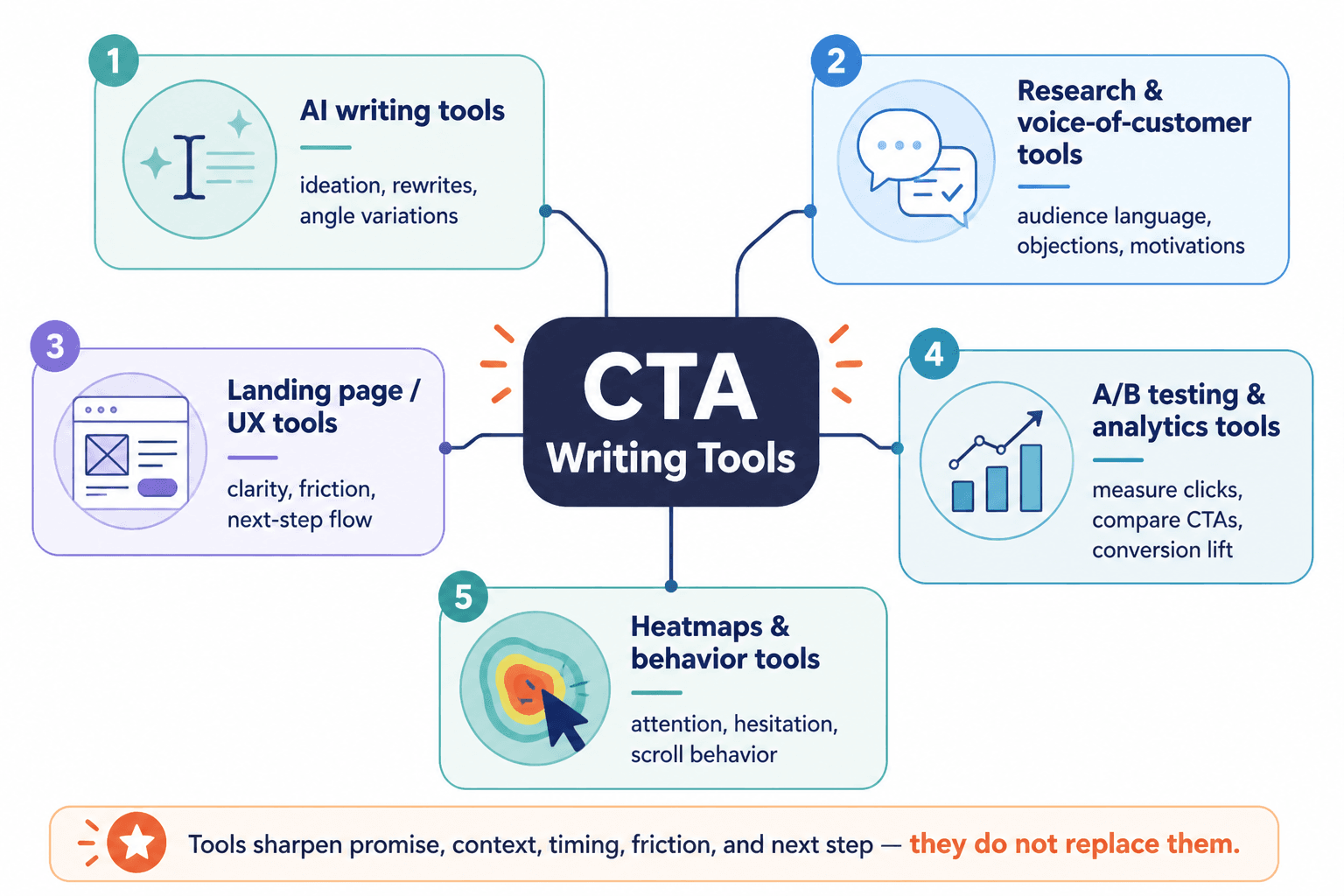
The best copy tools and conversion tools for CTA Writing, by category
There is no single best tool for everyone. Annoying answer, yes. Still true. The better question is: what kind of tool helps at your current bottleneck?
Here are the categories that actually earn their keep.
1. AI writing tools for CTA ideation and variation
This is the category people overhype and underuse at the same time.
AI writing tools are useful for generating multiple CTA angles quickly. They are especially handy when you already know the offer, audience, and action you want, but your wording feels stale. They can also help rewrite CTA copy by tone, clarity level, or funnel stage.
They are not especially good at original persuasion without guidance. Left alone, they love generic sludge like “Unlock exclusive insights today” and other phrases that sound like a landing page got dressed in borrowed confidence.
Use AI tools for:
- Generating 10 to 20 CTA options from one core offer
- Rewriting weak CTAs in different tones
- Testing button copy versus text-link CTA phrasing
- Creating versions for cold, warm, and hot traffic
- Turning long CTA sections into tighter options
Do not use them for:
- Blindly pasting first-draft outputs onto sales pages
- Writing the whole page and hoping the CTA lands
- Pretending generic urgency is strategy
- Replacing your actual understanding of buyer hesitation
If you want a deeper breakdown of this category, read best AI tools for CTA writing. That piece pairs nicely with this one because AI is one slice of the toolbox, not the whole garage.
Use AI to multiply options, not to make decisions for you.
2. A/B testing tools for CTA experiments
If AI helps you create options, testing tools help you stop guessing which one works better.
This is where conversion tools matter most. Not because every site needs endless experiments, but because CTA performance is often surprisingly sensitive to framing. A few words can change perceived effort, clarity, urgency, or trust.
For example, these are not the same CTA:
- Book a call
- See if we are a fit
- Get a custom plan
- Request pricing
- Start with the free guide
Each one asks for a different level of commitment and implies a different payoff.
A/B testing tools are best for:
- Button text tests
- CTA placement tests
- Short CTA versus expanded CTA copy
- Single CTA page versus multi-option CTA page
- Low-friction CTA versus direct-sales CTA
What people get wrong is testing tiny button wording changes on pages that have almost no traffic or glaring message problems. That is not optimization. That is decorative fussing.
Test your CTA when the page already has a clear offer, a useful message, and enough traffic or user flow to learn from. Otherwise, your “results” are mostly mood swings with analytics attached.
3. Heatmap and session recording tools
Sometimes the CTA itself is fine. The real problem is that people never reach it, do not notice it, or lose confidence three sections earlier.
That is where heatmaps and session recordings help. These tools show how users move through a page, where they pause, where they click, and where they drop off. That context matters because CTA performance is often a page problem pretending to be a button problem.
Use them to answer questions like:
- Are people scrolling far enough to see the CTA?
- Are they clicking on things that are not clickable?
- Are they hesitating around pricing, form fields, or confusing sections?
- Is the page so busy that the CTA fades into the wallpaper?
- Does a long block of copy kill momentum before the next step?
This category is less glamorous than “AI conversion hacks” and usually more useful. It gives you behavioral clues instead of writing theories.
4. Analytics and funnel tracking tools
Good CTA writing is not just about clicks. Sometimes a CTA gets more clicks and worse leads. Sometimes a softer CTA lowers click rate and improves actual sales. If you only track top-level clicks, you can accidentally optimize for the wrong outcome.
Analytics and funnel tools help connect CTA performance to downstream results:
- Email signups
- Application quality
- Booked calls
- Purchases
- Lead-to-client conversion
This matters a lot for creators, coaches, consultants, and service businesses. A CTA that invites everyone may look better on paper but produce a swamp of low-intent leads. Sometimes the better CTA is the one that filters harder.
In other words, “higher conversion” is not automatically better conversion. Quality still exists. Annoying, but useful.
5. Swipe file and template tools
You do not need to reinvent CTA language every time you write a page, email, post, or lead magnet. A good swipe file saves the CTA patterns that already work for your business and lets you adapt them instead of starting from zero.
This can be as simple as a spreadsheet, doc, note database, or lightweight copy system. Fancy software is optional. The point is to organize winning language by context.
Your swipe file might include categories like:
- Lead magnet CTAs
- Consultation CTAs
- Product page CTAs
- Newsletter CTAs
- Free trial CTAs
- Low-ticket offer CTAs
- Application CTAs
- Social post CTAs
If you want more fill-in-ready structures, read best templates and tools for CTA writing. Templates are underrated when they are built from real patterns instead of lifeless Mad Libs for marketers.
6. Form and landing page builders with CTA flexibility
Sometimes your CTA underperforms because the tool around it is clunky. Rigid page builders, ugly forms, awkward mobile display, and limited placement options can quietly kneecap a good CTA.
Look for tools that let you:
- Test CTA placement above and below the fold
- Use button and text-link CTA styles
- Add supporting microcopy near forms and buttons
- Change form length by offer type
- Adjust mobile layout cleanly
- Create different CTAs for different page sections
This is not the sexiest part of conversion work, but friction is often structural. If your page builder makes every CTA feel bolted on, your copy is doing extra labor for no reason.
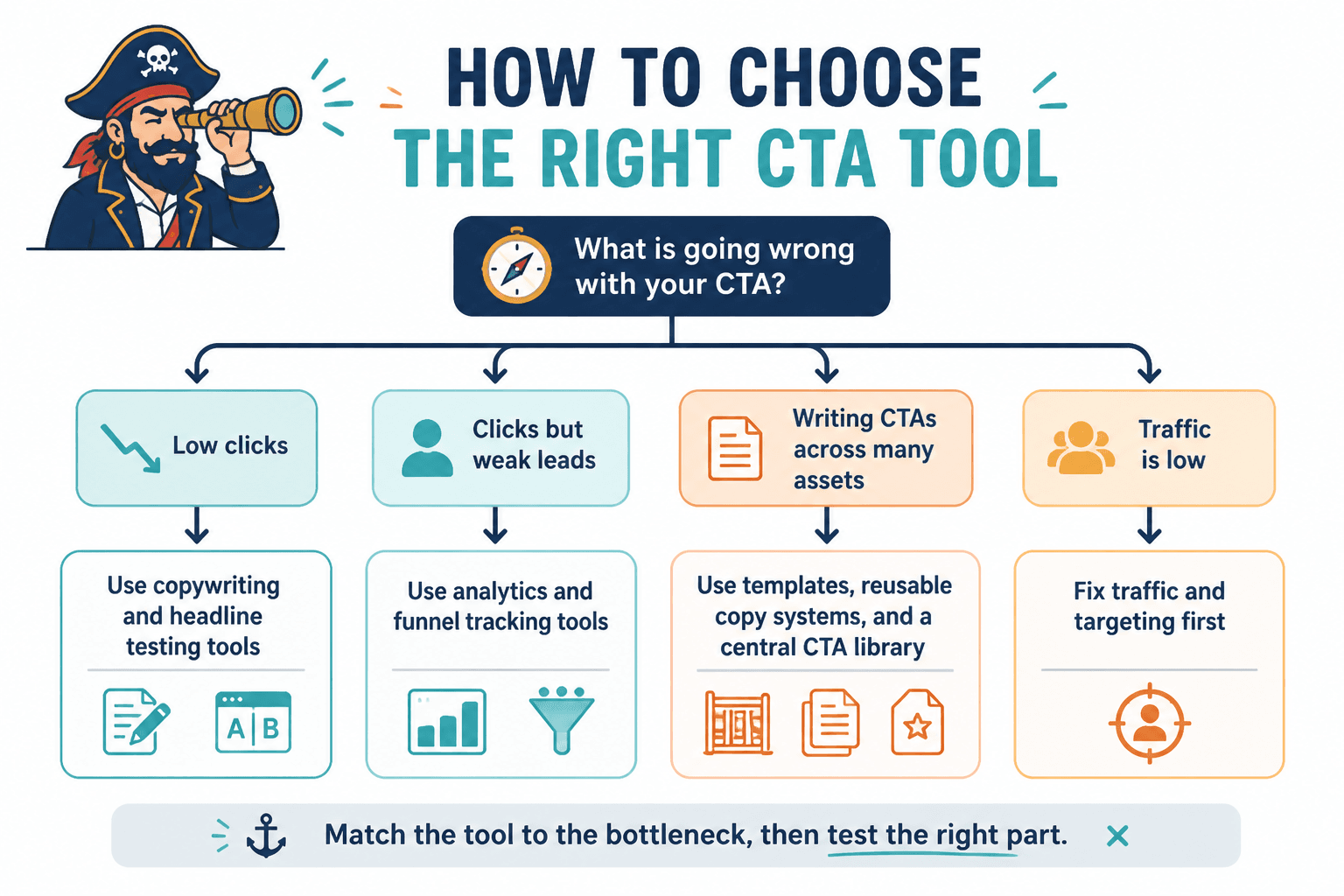
How to choose the right CTA tool for your real problem
Most people choose CTA tools backwards. They ask, “What tool should I buy?” before asking, “What problem am I trying to solve?” Then they end up with seven dashboards and the same weak call to action.
Here is the cleaner way to decide.
If your CTAs sound bland or repetitive
Use AI ideation tools and a swipe file system.
Your issue is message variation. You need more angles, stronger language, and a faster way to generate options. You do not need a full CRO suite just because your buttons keep sounding like office furniture.
If people are visiting but not clicking
Use heatmaps, session recordings, and page testing tools.
Your issue may be visibility, placement, clarity, or momentum. First understand what users are doing. Then test the right part.
If clicks are happening but leads are weak
Use analytics and funnel tracking tools.
Your CTA might be too broad, too soft, or attracting the wrong people. This is a positioning and qualification problem, not just a wording problem.
If you are writing CTAs across many assets
Use templates, reusable copy systems, and a central CTA library.
This is common for creators and service businesses juggling landing pages, lead magnets, bios, emails, sales pages, and social posts. You need consistency without copy-paste sameness.
What a practical CTA tool stack looks like
You probably do not need ten tools. You usually need three to five that work together without making you spend your week checking dashboards instead of improving copy.
Here is a practical stack by business type.
| Business type | Useful CTA tool stack | Why it works |
|---|---|---|
| Solo creator | AI writing tool + swipe file + simple analytics | Fast variation, reusable ideas, basic performance visibility |
| Coach or consultant | AI writing tool + landing page builder + funnel tracking | Better CTA phrasing, cleaner offer pages, better lead quality data |
| Service business | A/B testing tool + heatmap tool + analytics | Strong for improving consultation or inquiry CTAs |
| Info product brand | AI writing tool + test tool + template system + analytics | Useful for scaling CTA variations across multiple offers |
| Content-heavy personal brand | Swipe file + CTA templates + profile and page analytics | Keeps messaging consistent across posts, bios, lead magnets, and pages |
If you need a stronger strategic base across conversion copy, browse the broader conversion copy section. There is also the wider website conversion copy area, though that URL situation is not exactly winning beauty contests.
Features that matter more than brand names
People love arguing about which tool is “best.” Usually the smarter move is checking whether a tool has the features your CTA workflow actually needs.
Look for these:
- Fast variation generation: Can you create multiple CTA angles quickly?
- Tone control: Can you shift from direct to soft, casual to premium, concise to explanatory?
- Testing support: Can you compare variants easily?
- User behavior visibility: Can you see where people hesitate or exit?
- Reusable storage: Can you save winning CTA patterns for later?
- Mobile preview: Does the CTA still work on smaller screens?
- Analytics connection: Can you track beyond clicks?
- Easy implementation: Can you update CTA language without technical drama?
Brand names change. Features are what shape your results.
How to use tools without writing robotic CTAs
This is the part people skip. Then they wonder why all their CTAs sound like they were approved by a committee of mildly anxious funnels.
If you want tools to help without flattening your voice, use this process.
Start with the actual next step
Before touching a tool, write down the real action you want. Not the vague category. The actual step.
- Download the checklist
- Book a 20-minute consult
- Join the newsletter
- Start the free trial
- Request the proposal
Then define why that step matters to the user, not just to you.
Feed the tool context, not just commands
Bad input creates boring output. If you ask a tool to “write 10 CTA options,” you will get the usual parade of generic urgency and “discover more” filler.
Instead, give it:
- The audience
- The offer
- The pain point
- The payoff
- The tone
- The friction to reduce
- The action to encourage
That one difference improves outputs a lot. Not because the tool became brilliant. Because you finally gave it enough to work with.
Edit for specificity and honesty
After generating CTA options, cut anything that sounds inflated, vague, or oddly dramatic.
Weak:
- Unlock your path to transformation
- Start your journey today
- Take your business to the next level
Better:
- Get the 5-email welcome sequence
- See the pricing and deliverables
- Book a fit call
- Grab the checklist
- Request your custom audit
Specific beats dramatic. Nearly every time.
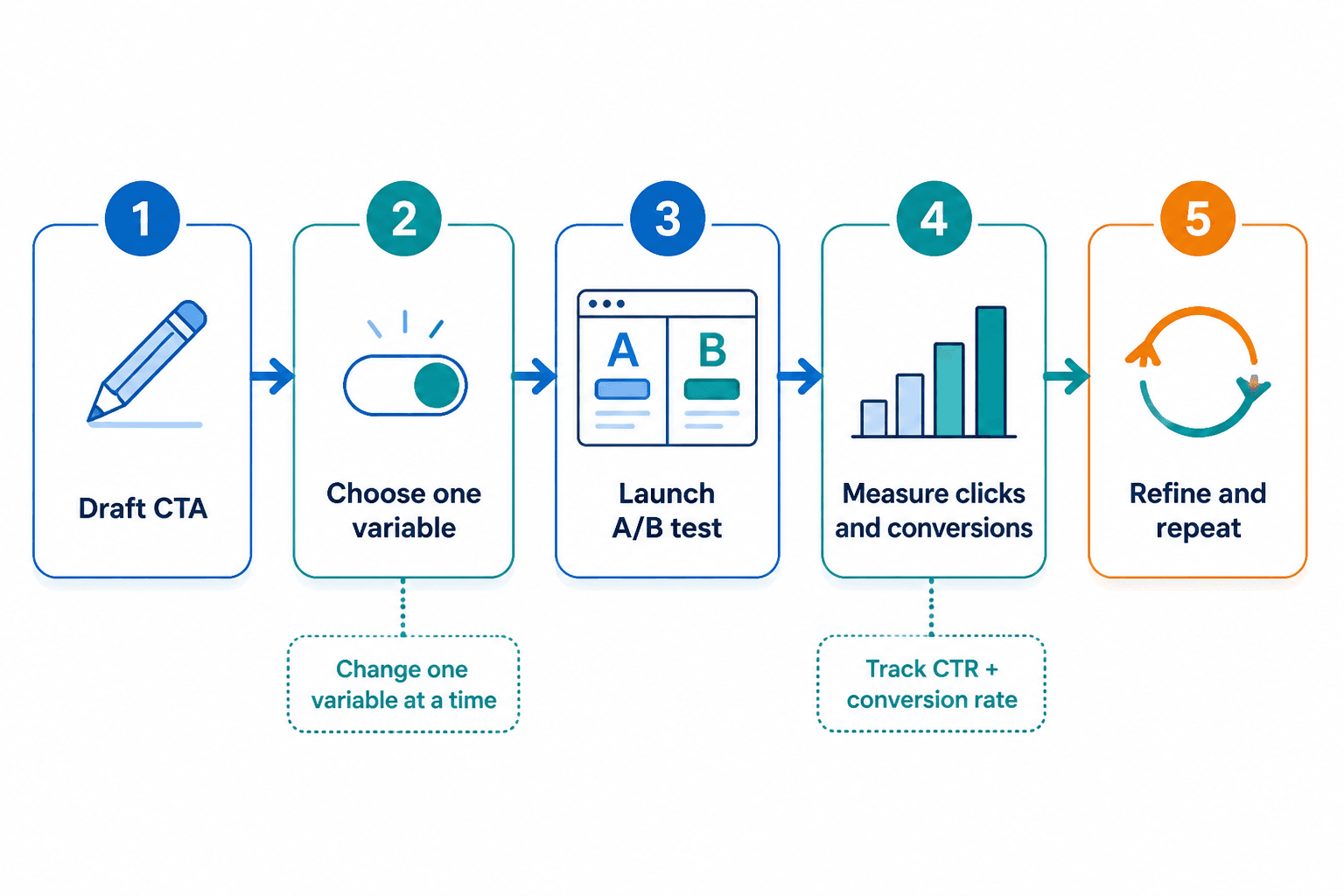
Test one real variable at a time
If you change the CTA wording, placement, page layout, headline, and offer framing at once, you cannot learn much. That is not testing. That is chaos wearing analytics glasses.
Pick one variable. Measure it. Then make the next move.
Common tool mistakes that make CTAs worse
Tools can speed up good thinking. They can also accelerate nonsense. Here are the mistakes that show up constantly.
Using AI before clarifying the offer
If your offer is fuzzy, the CTA will be fuzzy too. Software cannot sharpen what you have not defined.
Testing tiny details before fixing big friction
Do not obsess over button color while your page still hides the price, rambles for six screens, and asks for too much commitment too soon.
Copying CTA formulas from other industries
A CTA that works for a free SaaS tool may fail hard for a premium coaching service. Audience trust, risk level, and buying intent are different. Context matters more than trend-chasing.
Measuring clicks without measuring outcome quality
This is how teams accidentally optimize for junk leads and then act surprised when the pipeline feels cursed.
Keeping every generated option
Tools produce volume. Your job is taste. If you keep every inflated, vague, over-eager CTA variation, your page starts sounding desperate in twelve slightly different ways.
A simple workflow for better CTA writing with tools
The bigger point is simple: clearer structure and clearer writing make the piece more useful. That is usually what makes the ending land better too.
CTA writing works best when the next step feels specific, natural, and easy to trust. A clearer ask usually outperforms a louder one.