Most people do not have a bio and profile copy problem. They have a clarity problem wearing a tool hat.
They open an AI writer or a site builder, type something vague like “write a compelling bio for a coach,” and get back the usual oatmeal: passionate professional, mission-driven founder, helping people unlock results, somewhere between polished and completely forgettable. Then they blame the tool.
The truth is a bit less dramatic. The best AI writing tools and site builders for website bio and profile copy can help a lot, but only if you use them for the parts they are actually good at: drafting, structuring, tightening, testing angles, and getting you out of the blank-page spiral. They cannot invent a sharp position for you, and they definitely cannot save a bio that says nothing.
This guide will help you pick the right kind of tool for the job, use it without sounding like a brochure in loafers, and build website bio and profile copy that is clearer, more credible, and much easier to trust.
If you want the broader foundation first, start with bio and profile copy for websites. If you want the tool-specific shortlist version, you can also see best AI tools for bio and profile copy for websites.
For the broader learning path, visit our parent guide.
What makes a tool good for website bio and profile copy
A good bio tool is not the one that writes the fanciest sentence. It is the one that helps you get to a clearer answer, faster.
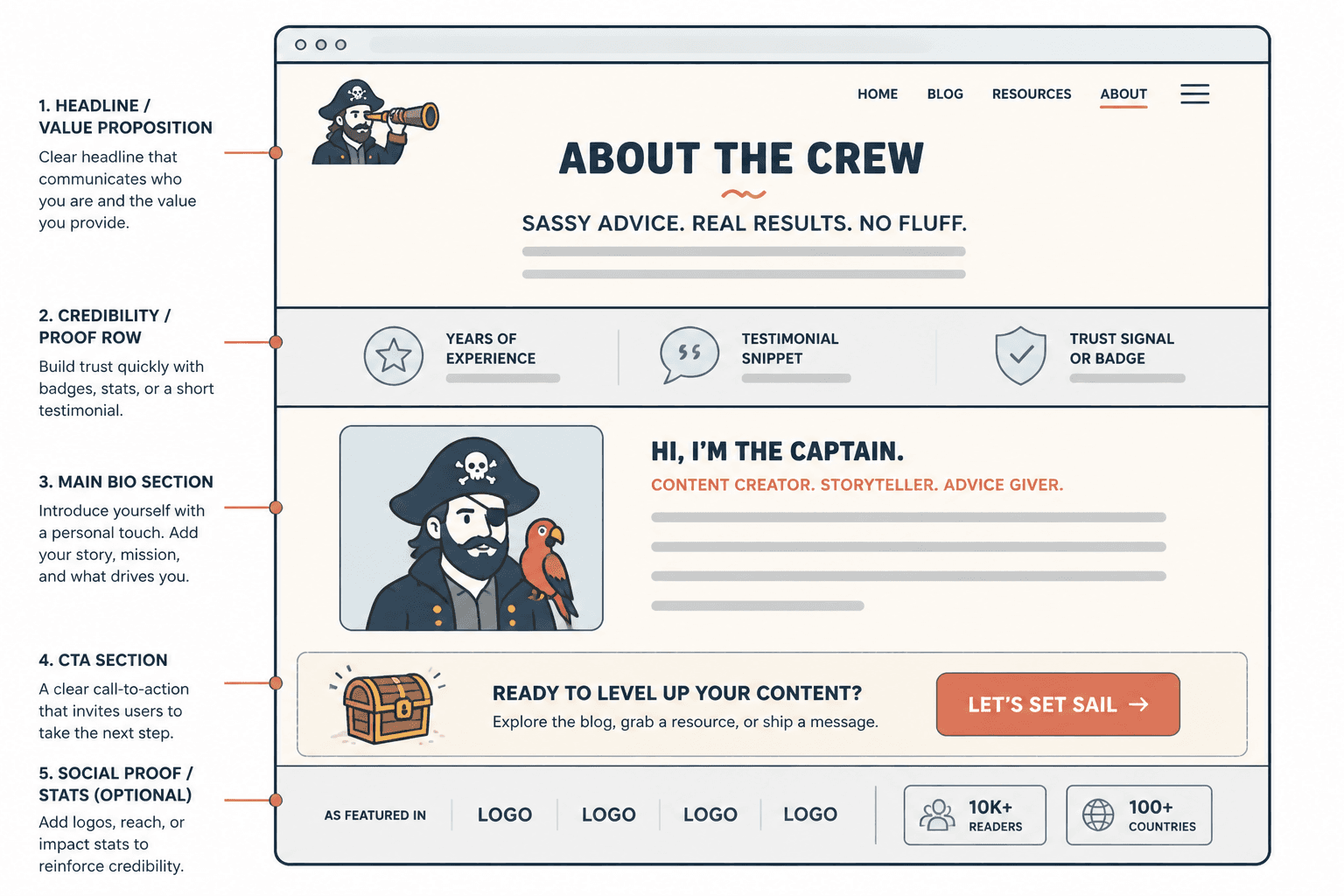
Your website bio usually has to do four things pretty quickly:
- Say who you help
- Explain what you help them do
- Show why you are credible
- Give them a next step
So the best tools for this kind of copy tend to be good at one or more of these jobs:
- Turning rough notes into readable drafts
- Giving you multiple positioning angles
- Shortening bloated copy
- Rewriting stiff language into something more human
- Helping you structure the page visually
- Making testing and updates less annoying
That last part matters more than people think. A clean site builder with decent editing flow is often more useful than a “brilliant” AI writer that leaves you wrestling with the layout afterward.
The two tool categories you actually need to understand
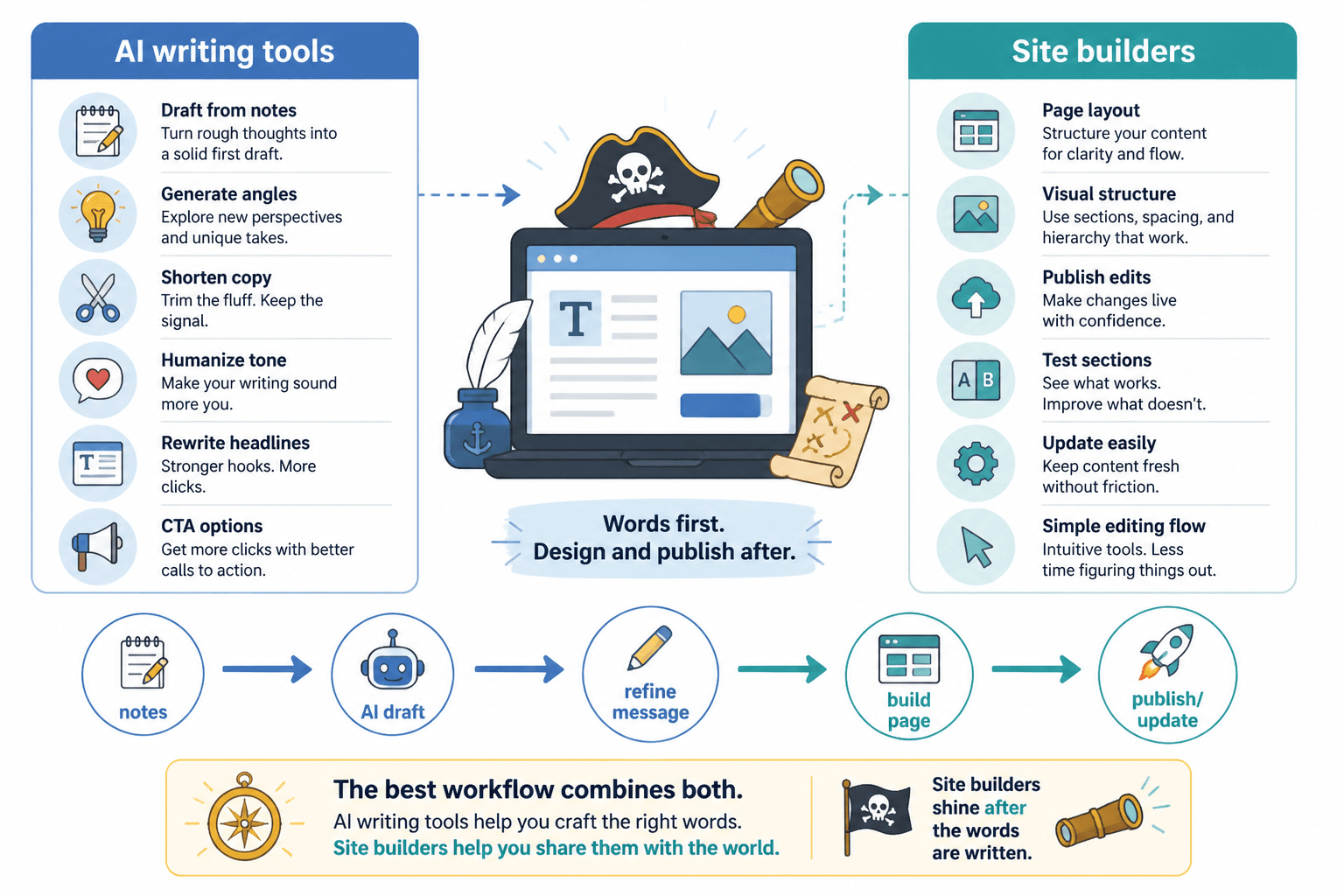
People lump these together, but they do different jobs.
1. AI writing tools
These help you generate, reshape, expand, shorten, or refine the words.
They are useful for:
- Bio drafts
- Headline variations
- About section rewrites
- Tone adjustments
- Proof-point formatting
- CTA options
They are not useful for:
- Magically making vague positioning specific
- Knowing which achievements matter to your audience without context
- Creating trust from thin air
- Fixing a weak offer
2. Site builders with AI features
These help you place the copy on an actual site and often include AI assistance for sections, headlines, layouts, or on-page edits.
They are useful for:
- Building a personal website fast
- Creating an About page with usable structure
- Testing different profile section layouts
- Editing CTA placement
- Making your copy easier to scan
They are less useful if you expect them to nail nuanced positioning by default. Most built-in AI site copy tools are good enough for scaffolding. Very few are good enough to publish untouched.
Best AI writing tools for website bio and profile copy
There is no single winner for everyone, which is annoying if you wanted a clean one-tool answer. But it is also more honest.
Here are the categories that tend to matter most.
General AI writing assistants
These are your flexible drafting tools. They are best when you already have messy raw material like client notes, old bios, testimonials, offer descriptions, podcast intros, or your own half-decent bullet points.
Use them for:
- Creating 5 to 10 bio directions from the same source notes
- Rewriting formal copy into a warmer voice
- Shortening long About-page sections
- Turning braggy claims into cleaner proof
What works well is giving the tool constraints. What fails is asking for “a compelling bio” and then acting shocked when it sounds like every other compelling bio on the internet.
Bad prompt: “Write a professional bio for my website.”
Better prompt: “Rewrite this website bio for a conversion copywriter who helps coaches and consultants improve homepage and About-page copy. Keep it under 90 words, plain English, confident but not corporate, and include one credibility detail plus a soft CTA.”
Brand voice and rewrite tools
These are useful when your first draft is technically fine but sounds slightly embalmed.
Good rewrite tools can help you:
- Strip out corporate filler
- Adjust formality
- Make sentences less stiff
- Create variants for different pages
This matters because website bios often get too polished. Readers do not need your profile copy to sound expensive. They need it to sound believable.
If the tool keeps producing things like “driven by excellence” or “committed to empowering brands,” it is not helping. It is just putting lip gloss on fog.
Template-plus-AI tools
These are handy if you freeze when asked to start from zero. They combine prompts, structures, and draft generation so you are not staring into the void trying to invent an About section from scratch.
They work best for:
- Solo founders building a first site
- Coaches updating personal brand copy
- Freelancers who need a service-based bio quickly
- Consultants trying to reposition their expertise
They work worst when you follow the template too literally and publish something that sounds assembled rather than written. Templates are support rails, not a substitute for judgment.
If you want more structure help, best templates and tools for bio and profile copy for websites is a useful next read.
Best site builders for bio and profile copy pages
The best site builder for your bio copy is usually the one that makes three things easy:
- Editing copy without friction
- Structuring sections clearly
- Testing CTA placement and page flow
Fancy animations are rarely the bottleneck. Clear messaging is. Shocking, I know.
Simple drag-and-drop builders
These are ideal if you want speed, visual control, and low setup pain.
They are usually best for:
- Personal brand websites
- Coach and consultant About pages
- Freelancer portfolio sites
- Lean service-business websites
The upside is fast publishing. The downside is they can tempt you into overdesigning weak copy. If your bio needs three animations to feel interesting, the words probably need work.
Website platforms with built-in AI section writing
These can be useful for rough first passes. They often generate About sections, hero headlines, team blurbs, and profile intros based on a few business details.
Use them to get momentum, not to skip thinking.
A smart workflow looks like this:
- Generate a rough About or bio section.
- Pull out the one or two lines that are actually decent.
- Replace vague claims with specifics.
- Add proof.
- Cut anything that sounds like a networking event in sentence form.
Builders that make testing easier
If your website exists to generate leads, then your bio is not just an identity paragraph. It is a conversion asset. So testing matters.
Good builders let you easily adjust:
- Bio length
- Photo and copy balance
- Proof placement
- CTA button wording
- Section order
For that side of the stack, best landing page builders and testing tools for landing pages can help you pair copy with actual performance decisions instead of vibes.
How to choose the right tool stack
You probably do not need more tools. You need a saner combination.
| If you are… | Best tool setup | Why it works |
|---|---|---|
| A solo creator building a personal site | Simple site builder + general AI writer | Fast drafts, easy editing, low complexity |
| A coach or consultant repositioning your brand | AI writer + template tool + flexible builder | Helps you explore angles before publishing |
| A freelancer with an outdated About page | Rewrite tool + drag-and-drop builder | Good for tightening without rebuilding everything |
| A service business focused on leads | AI drafting tool + test-friendly builder | Supports both message clarity and conversion testing |
If your current stack makes small edits feel annoying, that matters. A lot of weak bio copy stays weak because updating it feels like opening a cursed filing cabinet.
What AI can help you write in a website bio section
Used well, AI can help you build nearly every part of a solid profile section.
Headlines
Instead of bland identity lines like “About Me” or “Founder and Consultant,” AI can help generate headline options based on audience and outcome.
For example:
- Weak: Marketing Consultant and Business Strategist
- Stronger: I help service businesses turn confusing messaging into cleaner websites that convert
Short bios
This is where AI is genuinely handy. Short bios need compression, and compression is easier when a tool can generate several versions quickly.
A good short bio usually includes:
- Who you help
- What you help them do
- A proof marker
- A hint of personality, if appropriate
Longer About-page intros
This is where AI can save time, but also where it can create the most sludge. Long-form bio copy tends to drift into padded backstory and self-congratulatory mush if you are not careful.
You want enough detail to create trust, not enough to read like a mildly polished memoir.
Proof and credibility bullets
AI can help organize achievements into cleaner proof blocks, which is especially useful if your credentials currently live in three old documents and one chaotic Notes app folder.
Examples:
- Worked with 60+ service brands across copy, positioning, and messaging
- Built website messaging systems for coaches, consultants, and solo founders
- Known for turning vague expertise into clearer offers and sharper pages
The trick is to make proof relevant. “Featured in” can help. “Obsessed with impact” cannot.
Where people misuse AI for bio and profile copy
This part is worth slowing down for, because most bad AI bio copy is bad in very predictable ways.
They ask for polish before clarity
If you do not know your audience, offer, or positioning, AI will happily generate elegant nonsense around that uncertainty. It is very efficient at that.
Start with raw facts first:
- Who you serve
- What problem you solve
- What outcome you help create
- What makes your approach credible
- What the reader should do next
They publish the first decent draft
First-pass AI copy often feels smooth enough to keep. That is the trap. Smooth is not the same as strong.
You still need to ask:
- Is this specific?
- Does this sound like me?
- Would my ideal client actually care about this sentence?
- Did we include proof?
- Is the CTA obvious?
They make the copy sound more important than useful
This is common with personal brands. The AI leans formal, the person wants to sound credible, and suddenly the bio reads like a keynote intro for someone you cannot remember meeting.
Useful beats impressive more often than people think.
Impressive: “A trusted advisor at the intersection of strategy, innovation, and transformational growth.”
Useful: “I help expert-led businesses clarify what they do, who it is for, and how to explain it without sounding generic.”
A practical workflow for writing better website bio and profile copy with AI
If you want AI to help without taking over, this workflow is usually enough.
- Gather raw inputs. Pull together your old bio, homepage copy, offer summary, testimonials, credentials, and anything clients commonly say about your work.
- Write a messy positioning note. In plain English, describe who you help, what you help them do, and why people hire you.
- Ask the AI for options, not perfection. Get 5 to 10 versions in different tones and lengths.
- Choose the strongest angle. Pick the draft that says something clear, not the one with the fanciest wording.
- Add proof manually. Case volume, years, niche experience, recognisable outcomes, specific work types.
- Cut the puff. Remove any sentence that sounds like it belongs on a conference lanyard.
- Place it in your site builder. Adjust layout, line length, spacing, and CTA placement.
- Test and refine. If people visit but do not click, your bio may be too vague, too long, or too self-focused.
What a strong AI-assisted website bio actually looks like
Here is a simple before-and-after to make this less abstract.
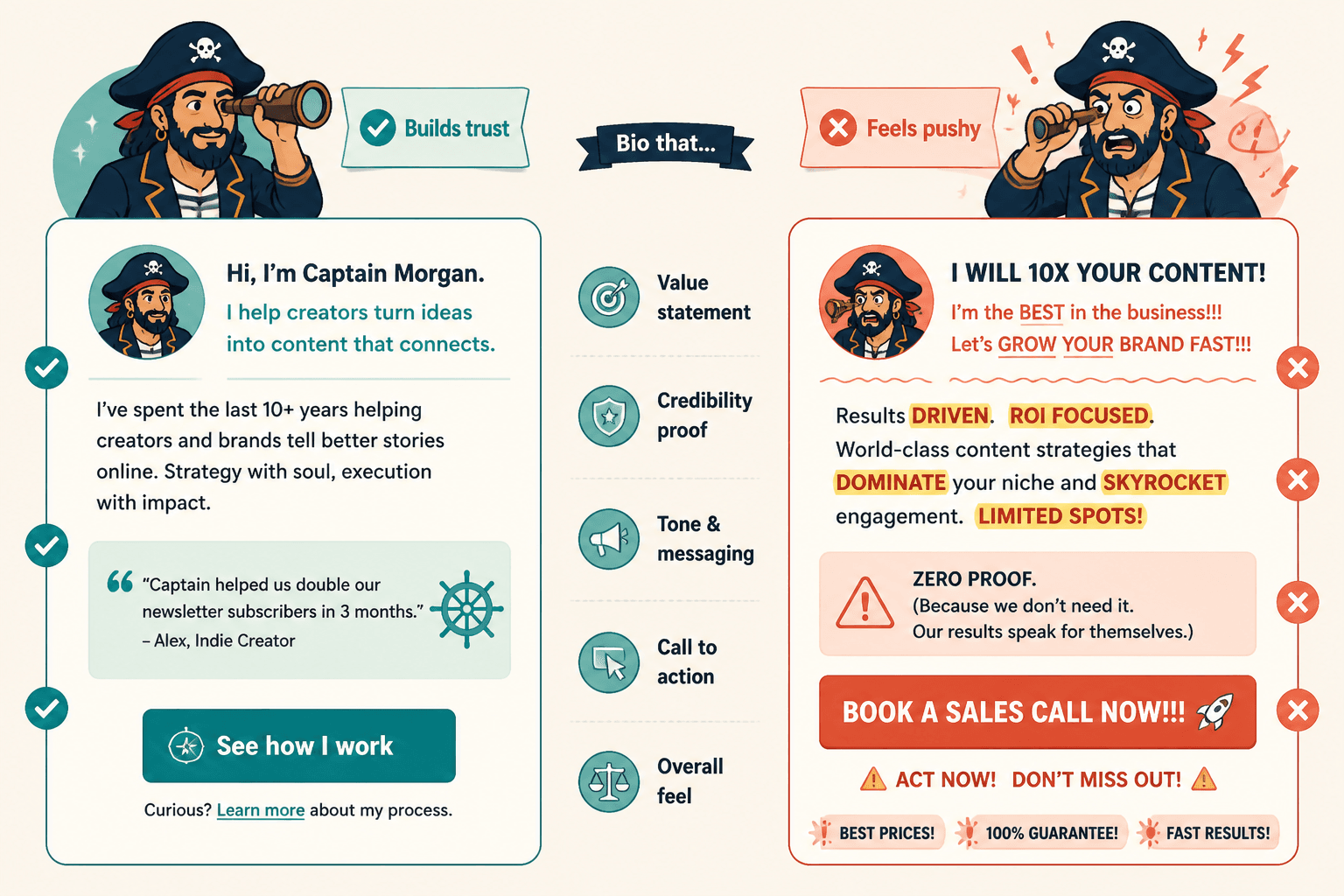
Before
I am a passionate business consultant dedicated to helping brands unlock their full potential through innovative strategy, authentic storytelling, and impactful solutions.
After
I help coaches, consultants, and service businesses turn fuzzy positioning into clearer website copy that earns more trust and better leads. My work focuses on homepages, About pages, offers, and messaging systems that sound like a real expert, not a corporate template.
The second version is not brilliant literature. It does not need to be. It is just clearer about audience, problem, outcome, and approach. That is usually what makes a bio work.
How this connects to the rest of your website funnel
Your bio does not live alone. Or at least it should not.
A strong profile section should connect naturally to a next step:
- Read the service page
- Download a lead magnet
- Join the newsletter
- Book a consultation
- Browse case studies
If your website bio gets attention but sends nowhere useful, it is doing half a job. For the next-step side, see best funnel ideas to pair with bio and profile copy for websites.
The bigger point is simple: clearer structure and clearer writing make the piece more useful. That is usually what makes the ending land better too.