
The real problem is rarely “we need more tools.” It’s the reverse: the homepage copy gets passed from browser tab to notes app to AI chat to CMS draft to Slack review, and by the time it reaches the live page it has been sanded into generic mush. One tool writes the headline, another rewrites the subhead, a third checks SEO, and a fourth quietly adds three more CTAs nobody asked for. The result is a workflow with plenty of motion and not much message.
This guide keeps the stack lean. Instead of collecting every shiny AI writing app under the sun, use tools by job: research, drafting, editing, optimization, and handoff. That’s enough to make homepage copy clearer without turning the process into a small software museum. For the broader framework behind the page itself, see the homepage copy guide.
What homepage copy actually needs from an AI tool
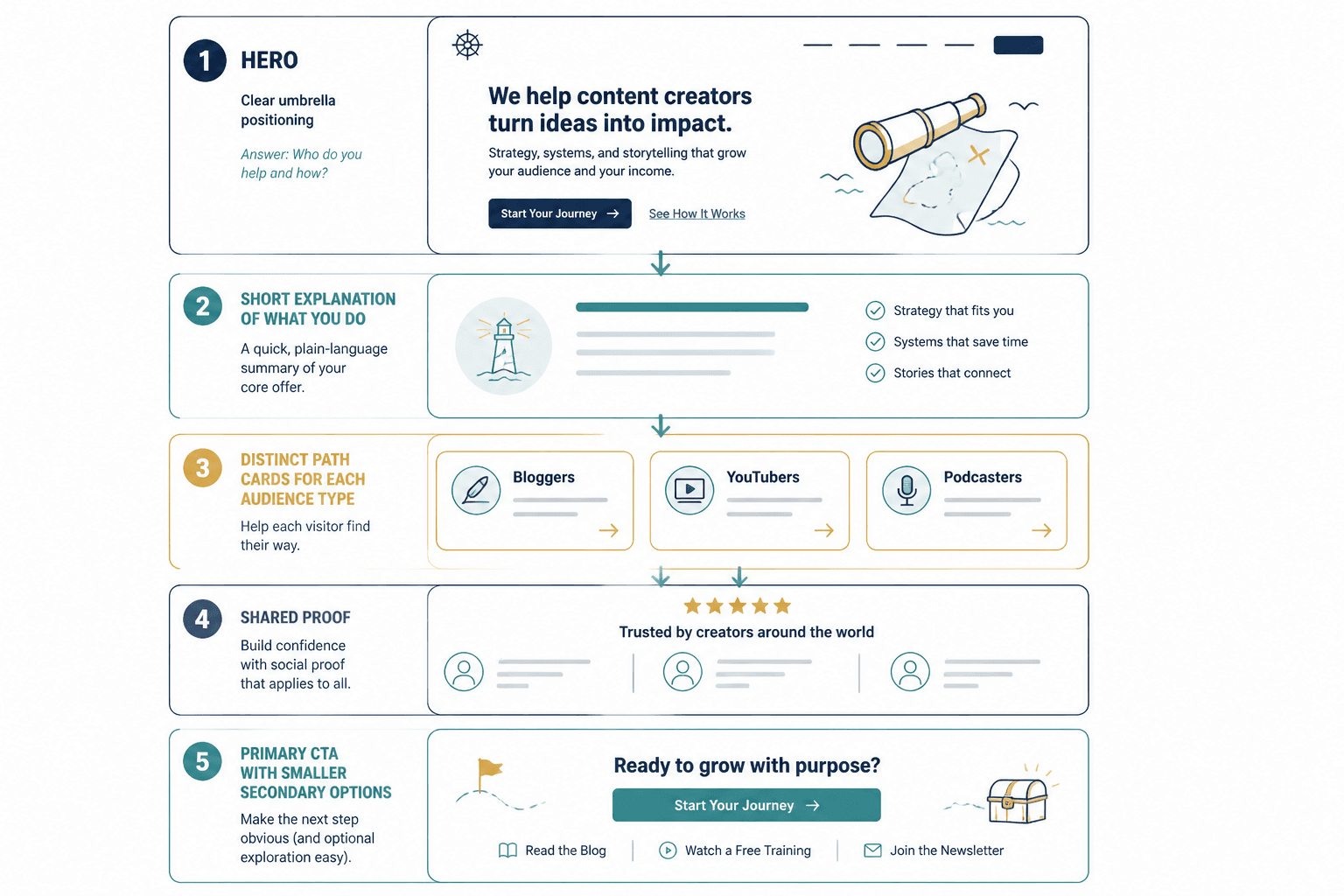
Homepage copy is not a blog post with a nicer font. It has to do several things at once: explain what the business does, show who it is for, build enough trust to keep people scrolling, and push a next step without sounding like a sales robot in a blazer.
So the best AI tools for homepage copy are not just “good writers.” They help with specific jobs:
- Research: pull in audience language, competitor patterns, and common objections.
- Positioning: surface the difference between “we do X” and “we do X for Y in a specific way.”
- Drafting: generate usable hero copy, value props, proof points, and CTA variants.
- Editing: shorten, sharpen, and remove the corporate fog.
- SEO and intent alignment: keep the page understandable to both humans and search engines.
- Workflow support: help teams review, version, and approve copy without losing the thread.
If a tool does all of that badly, it’s not a solution. It’s an expensive way to make more revisions.
The best AI tools for homepage copy, by job
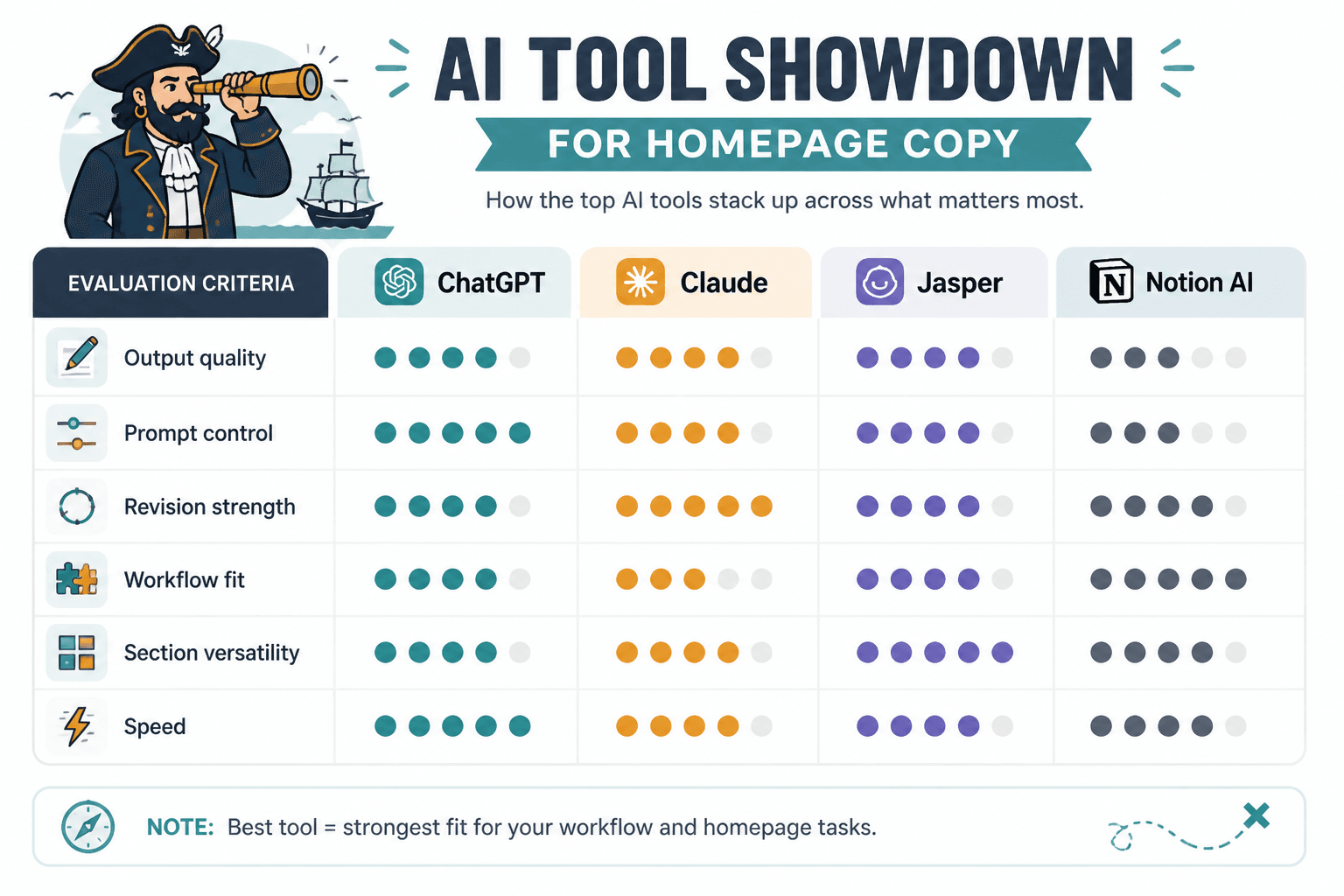
1. ChatGPT: best general-purpose drafting and rewriting
For most homepage copy work, a strong general model is the easiest place to start. ChatGPT is useful when you need fast iterations on hero lines, value propositions, FAQ blurbs, CTA options, or a cleaner version of a paragraph that’s trying too hard.
It works best when you give it structure instead of asking for “better homepage copy.” Feed it the audience, offer, proof, and desired action. Then ask for variations by section. That simple constraint usually produces better output than a vague prompt and a hopeful sigh.
- Best for: first drafts, rewrites, brainstorming multiple angles
- Strengths: flexible, fast, good at tone adjustments
- Watch out for: polished vagueness if the prompt is thin
2. Claude: best for longer positioning notes and cleaner edits
Claude is especially handy when you already have a pile of messy notes, interview snippets, or a rough strategic brief. It tends to be useful for turning “everything we do” into “what actually belongs on the homepage.”
That makes it a good fit for pages where the problem is not writing speed but editorial restraint. If the homepage is overloaded, Claude can help trim the surplus without flattening the voice.
- Best for: long context, synthesis, editing-heavy workflows
- Strengths: good at organizing scattered input into readable structure
- Watch out for: very tidy prose that still needs a human point of view
3. Jasper: best for teams that want templates and brand controls
Jasper makes sense when a team wants repeatable homepage sections and brand-guardrailed outputs. That matters if multiple people are touching homepage messaging and nobody wants the voice drifting every time a new draft appears.
It is less about magical copy generation and more about keeping the machine from wandering off the reservation.
- Best for: teams, repeatable workflows, brand consistency
- Strengths: structured templates, collaboration-friendly setup
- Watch out for: paying for process if you only need occasional drafts
4. Frase: best for search-aware homepage messaging
Homepage copy still needs to be findable and understandable. Frase is useful when you want to align copy with search intent and compare the page’s language against the terms people actually use.
It is not a substitute for positioning. But it is helpful when the homepage needs to sound like a real answer to a real query rather than a brochure trapped in a logo.
- Best for: intent research, topical alignment, SEO-informed messaging
- Strengths: search context, content gap awareness
- Watch out for: over-optimizing the homepage into keyword soup
5. Surfer: best for on-page SEO checks
Surfer is useful when the homepage needs a little more structure around search terms, headings, and topical coverage. It helps keep the page from becoming so minimalist that it forgets what business it is in.
Used carefully, it can support homepage copy decisions. Used carelessly, it can tempt you to cram in phrases that make sense to an algorithm and no one else.
- Best for: SEO review, page coverage, on-page content checks
- Strengths: clear optimization signals
- Watch out for: writing for the tool instead of the visitor
6. Notion AI or similar workspace assistants: best for keeping the process moving
For smaller teams, an AI assistant inside a workspace can be enough. It helps with rough notes, short rewrites, and keeping the working brief close to the draft. That sounds boring, which is exactly why it’s useful.
Homepage copy often breaks not at the writing stage but at the handoff stage. A tool that lives where the brief already sits can prevent a lot of tab-juggling.
- Best for: lightweight drafting and internal workflow
- Strengths: convenience, proximity to notes and docs
- Watch out for: weaker copy quality than dedicated writing tools
A simple homepage copy tool stack that stays sane
You do not need six subscriptions to write a homepage. A practical stack usually looks like this:
- One primary writing model for drafting and rewrites.
- One research or SEO tool for intent and topical checks.
- One workspace tool for notes, approvals, and version control.
That is enough for most site owners. Add specialized tools only when a real bottleneck appears. Otherwise the stack becomes a hobby.
How to use AI tools without flattening the homepage voice
The goal is not to let AI write the whole page and then praise its efficiency. The goal is to use AI where it saves time and keep a human in charge of the actual message.
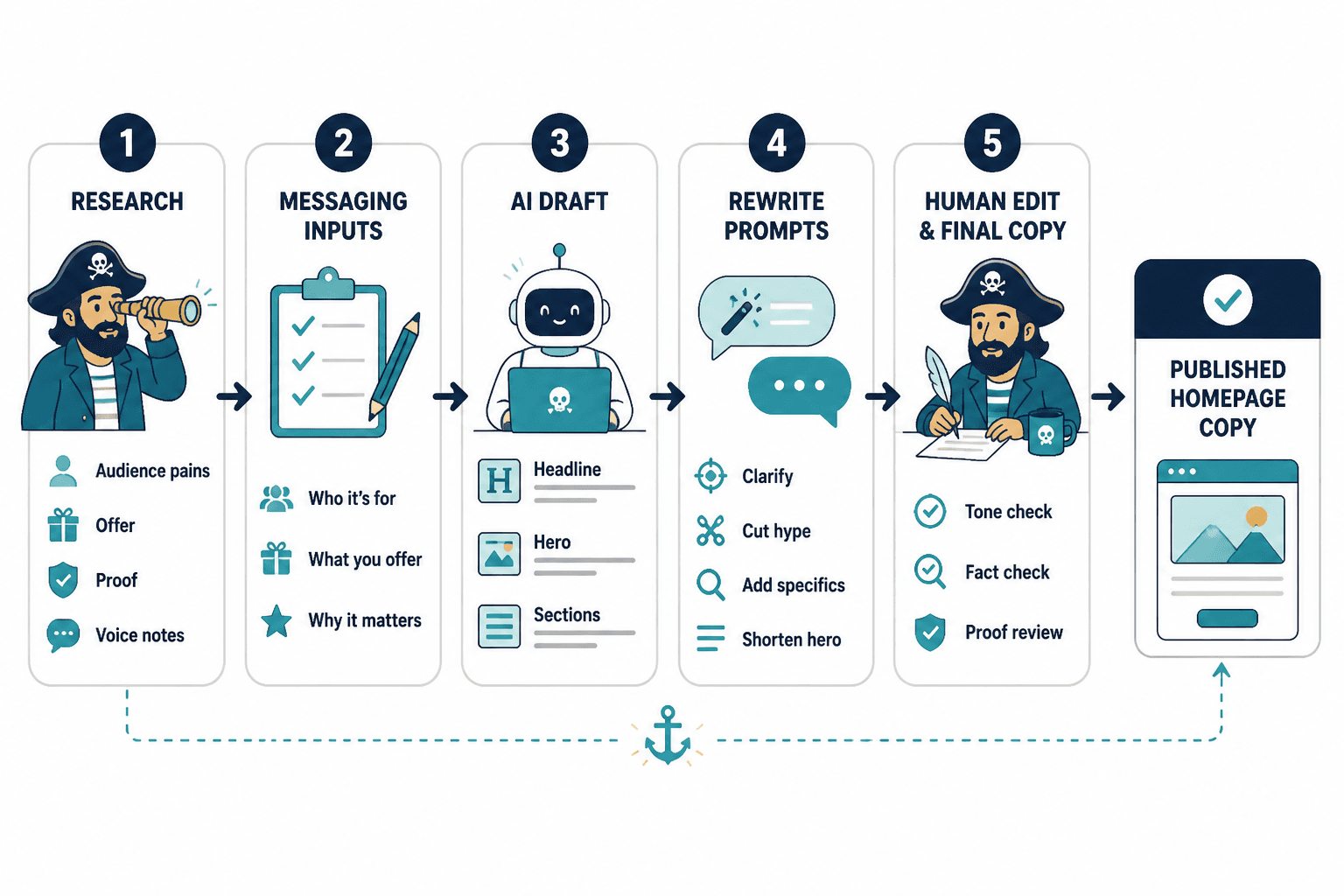
A workable process looks like this:
- Gather inputs: offer, audience, differentiators, proof, objections, and the action you want people to take.
- Draft sections separately: hero, subhead, benefits, social proof, supporting sections, CTA.
- Compare variants: keep the strongest line, not the longest one.
- Edit for clarity: remove filler, jargon, and duplicate ideas.
- Check page flow: every section should earn the next scroll.
- Review for consistency: the homepage should sound like one business, not five meeting notes.
That workflow is also why a comparison chart or checklist can help teams stay honest about which tool is doing what, and whether a simpler setup would work just as well.
Which homepage copy tool should you choose?
The right choice depends on the shape of the job.
- Solo founder or small site: start with a general-purpose model like ChatGPT, then use one SEO tool only if you need search guidance.
- Agency or team workflow: use a writing model plus a collaboration-friendly tool like Jasper or a shared workspace assistant.
- Content-heavy or search-led site: pair drafting with an intent tool such as Frase and a page-level SEO checker like Surfer.
- Messy homepage with unclear positioning: pick the tool that is best at synthesis and editing, not the one that spits out the most copy.
If you are still deciding what the page itself should do before you choose tools, the homepage copy guide and homepage copy examples are the right next stops.
Best tools by homepage copy job
- Research: Frase, Claude
- Drafting: ChatGPT, Jasper
- Editing: Claude, ChatGPT
- SEO checks: Frase, Surfer
- Workflow: Notion AI or a shared doc-based system
What to avoid
Some tool habits make homepage copy worse, not better:
- Starting with prompts instead of positioning.
- Using SEO as a substitute for clarity.
- Keeping every AI-generated variant because “options are good.”
- Letting the CTA multiply into a small family of competing buttons.
- Reviewing tone after the structure is already broken.
The homepage should feel decisive. A tool stack that encourages indecision is just a louder version of the same problem.
Bottom line
The best AI tools for homepage copy are the ones that remove friction without adding noise. Use a general writing model for draft speed, a research or SEO tool for intent, and a workspace tool for keeping the process organized. That combination is usually enough to move from vague homepage soup to something sharper, clearer, and easier to trust.
For the surrounding framework, read the homepage copy parent guide. If you want to compare structure and page patterns next, the sibling pages on homepage copy guide and homepage copy examples fit naturally beside this one.
Related reading: homepage copy works best when it sits inside a broader conversion system, not a pile of disconnected tools. The less handoff drama, the better the page.