Most Facebook long-form posts do not fail because they are too long. They fail because they are shapeless, overwritten, and painfully pleased with themselves.
A good Facebook rant is not just “thoughts typed aggressively.” A good long-form post has movement. It earns attention, builds tension, says something real, and gives people a reason to comment, share, or remember your name later. The problem is that most creators either wing it and ramble, or over-structure it until it reads like a dead workshop handout.
If you want the Best Templates and Tools for Facebook Long-Form & Rants, you do not need magic software or a fake storytelling formula from somebody who writes like a motivational fridge magnet. You need a few reliable post shapes, a better drafting process, and tools that help you think more clearly instead of helping you publish more slop.
This guide will show you which templates actually work, which tools are worth using, and how to build Facebook posts that feel human, sharp, and worth reading. If you also want a bigger picture view of the format itself, start with Facebook long-form and rants, then come back here with slightly less chaos in your drafts.
If you want the bigger picture, start with the parent guide.
What makes a Facebook long-form post worth reading
Facebook is not LinkedIn in a hoodie. People are usually more willing to engage with personality, stronger opinions, and messier human texture here. That does not mean your post should be a rambling diary entry with a sales pitch taped to the bottom.
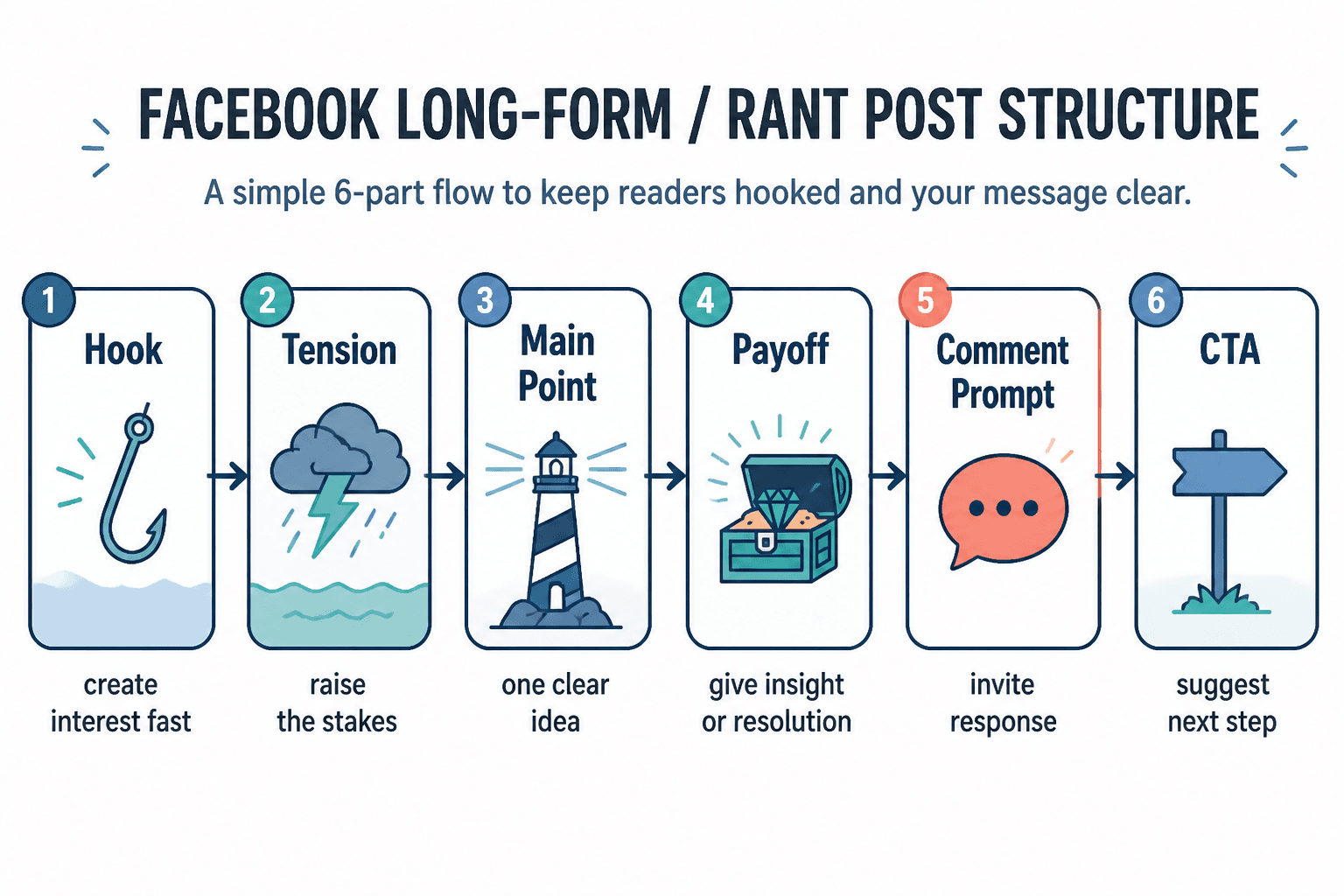
The best long-form Facebook posts usually do four things well:
- Start with a line that creates interest fast
- Build around one clear point, not seven half-points
- Use pacing so the reader feels movement
- End with a payoff, question, or clean next step
That is true for stories, opinion posts, lessons, behind-the-scenes posts, and yes, rants. The format can be loose. The thinking cannot.
One of the easiest mistakes to make is confusing emotional tone with structure. A post can sound passionate and still be badly built. It can sound raw and still be boring. Facebook readers will tolerate length if the post keeps rewarding attention. They will not tolerate 900 words of scene-setting before you get to the point.
The best templates for Facebook long-form and rants
Templates are useful when they give your thinking shape. They are useless when they make every post sound like it came from the same content vending machine. Use these as frameworks, not costumes.
1. The “problem everyone pretends is normal” template
This is one of the best templates for Facebook long-form and rants because it gives you a natural emotional engine. You are naming a frustrating thing people recognize, then showing why it is broken.
- Open with the annoying thing
- Explain why people accept it
- Show why that acceptance is wrong or costly
- Offer your sharper view
- End with a question or invitation to weigh in
Template:
Can we stop pretending [common bad practice] is normal?
People do it because [reason].
But here is what it actually causes: [consequence].
The better approach is [clear alternative].
Curious if you have noticed this too, or if I am just choosing violence before lunch.
Example:
Can we stop pretending every Facebook post needs to “provide value” in the same polished, tidy way?
People do it because they are scared that personality will make them look less professional.
But the result is a feed full of content that is technically useful and emotionally invisible.
Sometimes the most valuable post is the one with a point of view strong enough to start a real conversation.
What kind of post do you actually remember a week later: the perfect checklist or the post that made you rethink something?
2. The story-to-point template
This works well when you have a specific moment, mistake, client pattern, or behind-the-scenes situation that leads naturally into a broader lesson.
- Start inside the moment
- Add the tension or awkward detail
- Reveal what clicked
- Pull out the larger lesson
- Close with a practical takeaway or question
Template:
[Specific moment]
At first, I thought [initial assumption].
Then I noticed [important detail].
That is when it became obvious: [main point].
If you are doing [related behavior], check for [lesson].
That one shift changes more than people think.
This is especially useful if you want your Facebook post to feel personal without drifting into fake vulnerability. The trick is simple: the story is there to support the point, not replace it.
If you need more built-out story structures, these story pacing templates for busy creators are worth keeping open in another tab.
3. The controlled rant template
A rant works when it has a target, an argument, and a payoff. It fails when it is just emotional shedding in public.
- State the thing you are pushing against
- Say why it bothers you
- Show the deeper issue underneath it
- Give a better standard or alternative
- Finish with a line that invites response
Template:
I am tired of seeing [thing].
Not because it is trendy. Because it teaches people [bad lesson].
And that creates [real consequence].
What we should be doing instead is [better approach].
Strong opinion, yes. Wrong opinion? You tell me.
A good controlled rant is usually strongest when it punches at bad ideas, lazy tactics, or stale norms. It gets much weaker when it turns into vague bitterness about “people these days.” Keep it pointed.
4. The myth-busting template
This one is excellent if your audience keeps repeating bad advice and you want to correct it without sounding like a textbook with Wi-Fi.
- Name the belief
- Explain why it sounds reasonable
- Show where it breaks in real life
- Replace it with a better principle
- Offer an example
Template:
A lot of people still believe [myth].
I get why. It sounds smart on paper.
But in practice, it leads to [problem].
A better way to think about it is [replacement idea].
For example: [brief example].
5. The “here is what changed my mind” template
This is useful when you want to show nuance, growth, or expertise without writing a sermon. It also works nicely for posts that need a little more explanation and less chest-thumping certainty.
- State what you used to believe
- Explain why
- Show what changed your thinking
- Give your current view
- Tell readers what to do with that insight
Template:
I used to think [old belief].
It made sense because [reason].
Then I saw [evidence, pattern, result].
Now I think [new belief].
If you are still doing [old approach], it may be worth rechecking the assumption underneath it.
6. The audience callout template
This works when you know your people well and want them to feel seen fast. It can be powerful, but it gets cringey very quickly if you overdo the drama.
Template:
If you are a [specific type of person] doing [specific struggle], this is probably the reason it feels harder than it should.
It is not because you are lazy or inconsistent.
It is usually because [real cause].
Try [specific shift].
That tends to fix more than another burst of motivation ever will.
Notice the difference between this and generic “I see so many entrepreneurs struggling with mindset.” One sounds specific. The other sounds like an algorithm wrote a sympathy card.
How to choose the right template for the post
Do not start by asking, “Which template should I use today?” Start by asking what kind of energy the post needs.
| If your post is trying to… | Use this template |
|---|---|
| Challenge a common bad habit | Problem everyone pretends is normal |
| Turn a moment into a lesson | Story-to-point |
| Push back on a stale idea | Controlled rant |
| Correct bad advice | Myth-busting |
| Show a smarter updated view | What changed my mind |
| Speak directly to a niche group | Audience callout |
That small decision matters because structure affects tone. A story post can carry warmth and reflection. A controlled rant needs sharper rhythm and firmer edges. A myth-buster needs clarity more than heat. Choose the shape that helps the point land.
The best tools for Facebook long-form and rant writing
Tools should make your writing process cleaner, not make your voice flatter. That means the best setup usually is not one giant “content operating system” promising to automate your soul. It is a handful of tools that each do one useful job well.
1. Drafting tools
You need a place to get messy before you get good. For most people, that means a simple writing environment where ideas can breathe a little before they are turned into posts.
- Plain writing docs for rough drafting and rewriting
- Notes apps for capturing lines, post openings, and fragments
- Light outlining tools for arranging the flow of a longer post
The goal here is not fancy features. It is friction reduction. If your drafting tool makes it annoying to rearrange ideas, save snippets, or test alternate openings, it will quietly make your posts worse.
2. AI tools for expansion and variation
Used well, AI can help you expand a rough idea, tighten a section, suggest hook variations, or turn a messy voice note into something you can actually edit. Used badly, it will hand you a polished pile of corporate oatmeal.
Good uses for AI in Facebook long-form writing:
- Turning rough bullet points into a first draft
- Generating alternate openings with different emotional tones
- Spotting repetition or weak transitions
- Summarizing your own longer draft into stronger payoff lines
- Helping reshape a post into a story, rant, or myth-buster structure
Bad uses:
- Asking it to write your whole post from one vague prompt
- Publishing the first output with minor edits
- Using AI to fake voice instead of clarifying your actual view
- Expecting it to know your audience better than you do
If you want tool-specific help here, read the best AI tools for Facebook long-form and rants. The short version: AI is useful for speed, options, and cleanup. It is not useful for taste, authority, or having a point.
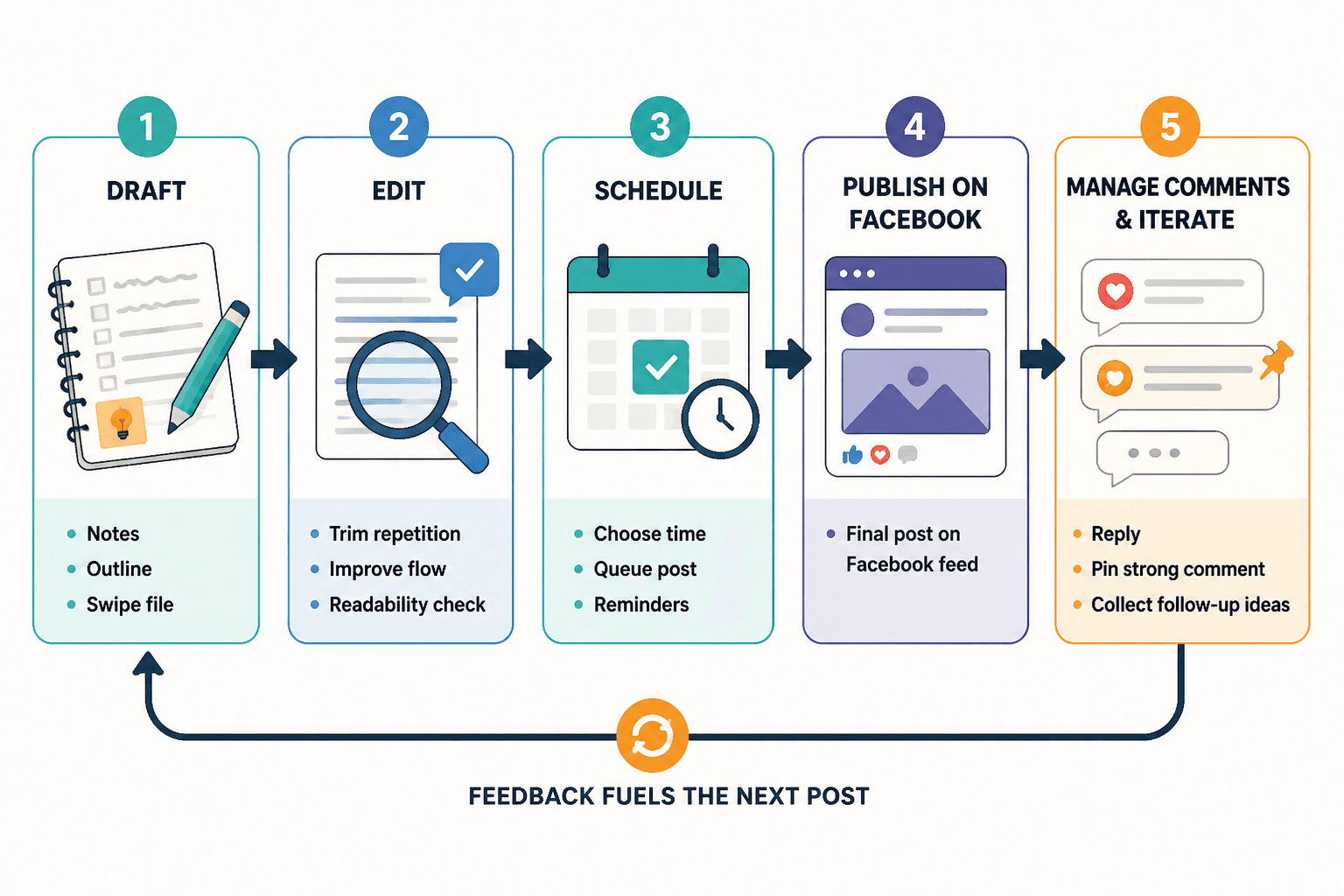
3. Editing tools
Long-form Facebook posts benefit from editing more than most people realize. Not “grammar correction” editing. Structural editing. Rhythm editing. Boredom removal.
The best editing tools help you:
- Cut repeated ideas
- Spot overlong sentences
- Check readability and flow
- Compare versions of a draft
- Keep swipe files of strong lines and proven post structures
A lot of creators assume their long-form posts need more words when they usually need better sequencing. If a draft feels weak, do not immediately add examples. First check if the argument is in the right order.
4. Community management and response tools
Facebook posts are not just publishing assets. They are conversation starters. If your post gets traction and you disappear, you are leaving half the value on the table.
Useful tool categories here include:
- Comment management tools
- Inbox and DM organization tools
- Saved reply systems for common responses
- Content planning tools that connect post ideas to audience feedback
That matters because long-form Facebook posts often create richer comments than shorter posts do. People tell stories back. They add nuance. They reveal objections. They ask follow-up questions. Those comment threads are not admin work. They are market research with better manners.
For that side of the process, check the best writing tools and community management tools for Facebook long-form and rants.
5. Content libraries and swipe files
One of the most underrated tools is a good personal swipe file. Not a folder full of random screenshots from bigger creators. A useful system for storing:
- Strong first lines
- Post endings that earned comments
- Patterns from your own top posts
- Arguments you keep coming back to
- Audience phrases worth reusing
This is how your content gets stronger over time instead of staying dependent on daily inspiration and caffeine panic.
A practical tool stack that does not become its own job
You do not need fifteen tools to write one good Facebook rant. A lean setup usually works better.
- Idea capture: a notes app or voice note tool
- Drafting: a clean writing doc
- AI assist: one tool for hook variations, cleanup, and restructuring
- Editing: a readability or revision tool
- Publishing plan: a simple scheduler or posting checklist
- Response handling: comment and inbox management support
That is enough for most creators, consultants, coaches, and personal brands. The moment your tool stack needs a diagram just to explain itself, there is a decent chance your workflow has become performance art.
How to use templates and tools together without sounding templated
This is where people usually go wrong. They grab a template, run it through AI, smooth it with an editing tool, and end up with a post that is technically clean and spiritually deceased.
The better process looks like this:
- Start with the raw point you actually care about
- Choose the template that fits that point
- Draft quickly in your own language first
- Use tools to sharpen, trim, restructure, and test alternatives
- Put your own phrasing back in if the draft starts sounding too polished
- Check that the post still feels like something you would say out loud
That fourth and fifth step matter more than people think. Tool-heavy writing often gets weirdly bloodless because all the rough human edges are sanded off. But those edges are usually where trust lives. Not every sentence should sound optimized. Some should sound honest.
A simple editing checklist for Facebook long-form posts
Before you publish, run your draft through this:
- Does the first line create interest fast?
- Is the post about one clear idea?
- Did you get to the point early enough?
- Is there a section that repeats what was already obvious?
- Does the middle keep moving, or does it sag?
- Did you include enough specificity to feel real?
- Does the ending open conversation or land a useful point?
- Could at least 15 percent be cut without hurting the post?
If yes to that last one, cut it. Long-form does not mean all available thoughts must attend.
Examples of weak versus stronger setup choices
Here is where templates and tools can make a visible difference.
Weak opening
I have been reflecting a lot lately on the kind of content people share on Facebook and how that impacts engagement and trust.
Stronger opening
A lot of Facebook posts are dying because they sound carefully helpful and completely forgettable.
Weak rant setup
Unpopular opinion: people should be more authentic online.
Stronger rant setup
I do not think most creators have an authenticity problem. I think they have a safety problem. They keep sanding every opinion down until the post cannot possibly offend anyone, which also means it cannot possibly matter.
The bigger point is simple: clearer structure and clearer writing make the piece more useful. That is usually what makes the ending land better too.