
Most people do not need more Facebook rant ideas. They need a better way to shape the rant, post it without turning it into mush, and manage the comments without losing an afternoon and half their will to live.
That is the real job of good tools for Facebook long-form and rants. Not magic. Not “content at scale.” Just help with thinking, drafting, organizing, publishing, and responding like a normal sharp person with a business to run.
If you are looking for the best writing tools and community management tools for Facebook Long-Form & Rants, the useful question is not “what is the best app?” It is “what part of the process keeps breaking?”
Some tools are good at helping you get to the point faster. Some are good at storing reusable post structures. Some help you keep comment sections warm without becoming that person who replies “Thanks for sharing” 47 times like a hostage. And some tools are mostly just expensive ways to avoid learning how to write a clear argument.
Here is how to pick the right stack for Facebook long-form posts and rants that actually go somewhere, plus which tool categories matter, which ones are overrated, and how to use them without sounding like your content was assembled by committee.
If you want the bigger picture, start with the parent guide.
What Facebook long-form and rant writers actually need help with
Facebook long-form is not LinkedIn with looser pants. The rhythm is different. The tone is usually more conversational, more emotional, and more comment-driven. A good Facebook rant has shape. It builds pressure, makes a point, and gives people something to react to.
So the best tools are the ones that support that kind of writing and interaction.
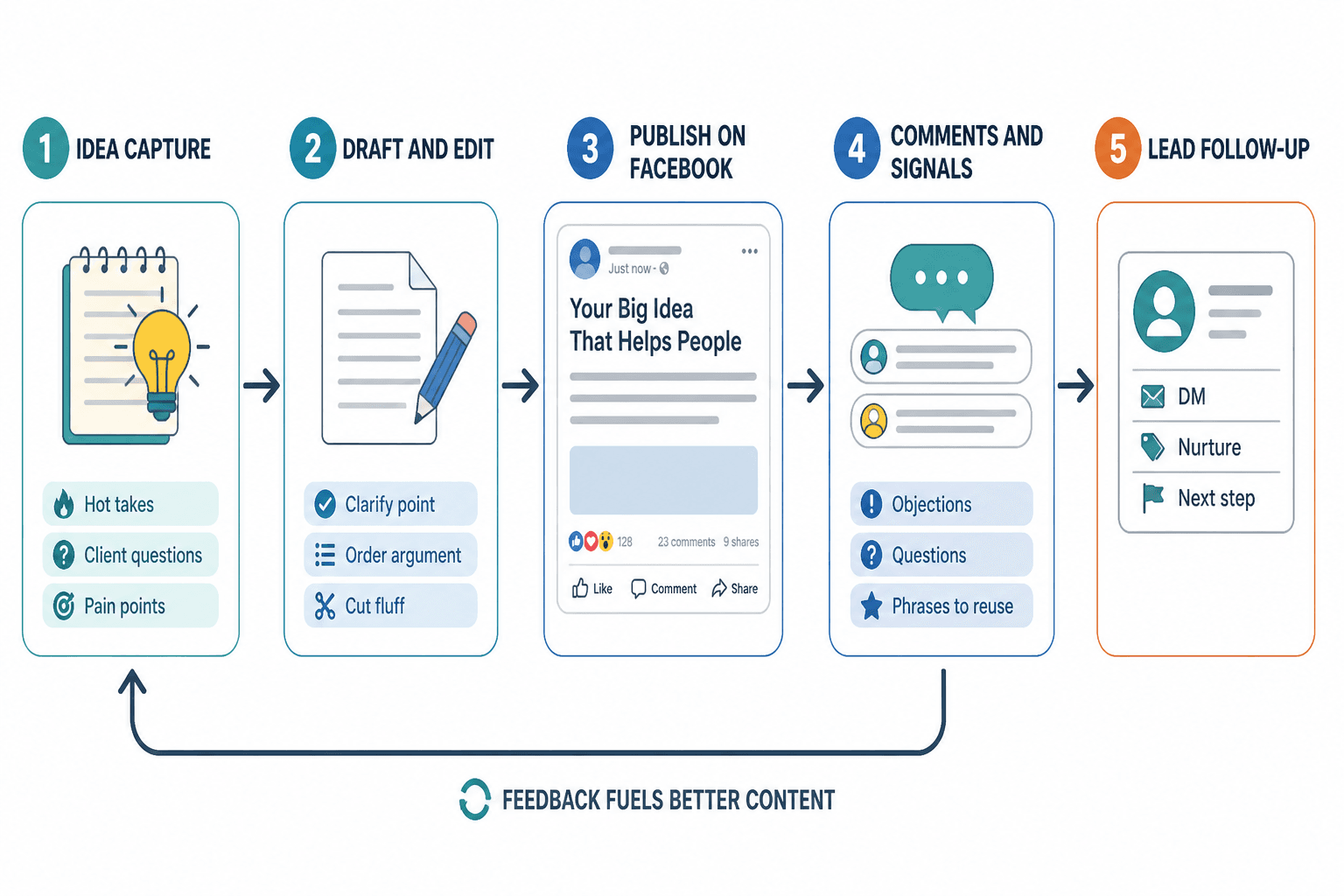
- Idea capture tools so you stop losing strong opinions in your Notes app graveyard
- Drafting tools to help structure messy thoughts into readable posts
- Editing tools to tighten pacing, repetition, clarity, and tone
- Template libraries for repeatable post formats that still sound human
- Scheduling tools if you need workflow sanity more than spontaneity
- Comment management tools to handle engagement and follow-up without chaos
- Simple CRM or labeling tools if your comments often turn into leads, clients, or collaborations
If your current setup is “write directly into Facebook, panic-edit, post, disappear, then remember comments two days later,” yes, there is room for improvement.
The best writing tools and community management tools for Facebook Long-Form & Rants, by job
There is no one perfect tool for everybody. There is a best tool for the bottleneck. That distinction matters because creators waste a lot of money buying software for imaginary future scale while their real problem is that their posts ramble for 900 words before making a point.
1. Idea capture tools: best for messy brains and strong opinions
If you write good rants, you probably do not get your best ideas while sitting politely at a desk. You get them mid-scroll, mid-walk, mid-annoyance, or five minutes after reading a terrible take.
So your first tool needs one job: catch the spark fast.
- Notes apps: great for quick lines, hooks, quote-style openings, and mini arguments
- Voice memo tools: useful if your best rants come out better spoken than typed
- Simple database tools: better if you want to tag ideas by topic, audience, emotion, or offer
What to store:
- One-line hot takes
- Comment threads that reveal audience pain points
- Client questions worth turning into posts
- Phrases you keep repeating in sales calls
- Personal frustrations that map to a business lesson
- Contrarian observations you can defend
The point is not to build a gorgeous second brain. It is to avoid saying “I had a great post idea yesterday” like that helps anyone.
For more strategic guidance on how Facebook long-form content works as a format, see this Facebook long-form and rants guide for creators who want better results.
2. Drafting tools: best for getting the rant into readable shape
This is where most writers either improve dramatically or create longer, cleaner nonsense.
A drafting tool should help you do three things:
- Get the core point clear
- Order the argument so people stay with you
- Cut the extra paragraphs that only exist because you were warming up in public
The strongest drafting environments for Facebook long-form usually have low friction. That might be a plain document app, a minimalist writing app, or a workspace where you can save repeatable frameworks.
Useful features:
- Fast capture and rewrite
- Easy heading or section separation while drafting
- Searchable archive of old posts
- Tagging or folders by topic
- Version history so you can test shorter versus longer edits
What matters more than the app itself is the drafting method. For Facebook rants, a simple structure works well:
- Opening tension: what are you pushing against?
- The real point: what do you actually believe?
- Proof or example: why should people take this seriously?
- Payoff: what should the reader understand or do differently now?
- Comment-worthy close: what invites response without begging for it?
If you need help shaping stronger post formats, these templates and tools for Facebook long-form and rants can speed things up without flattening your voice.
3. Editing tools: best for clarity, pacing, and sounding less bloated
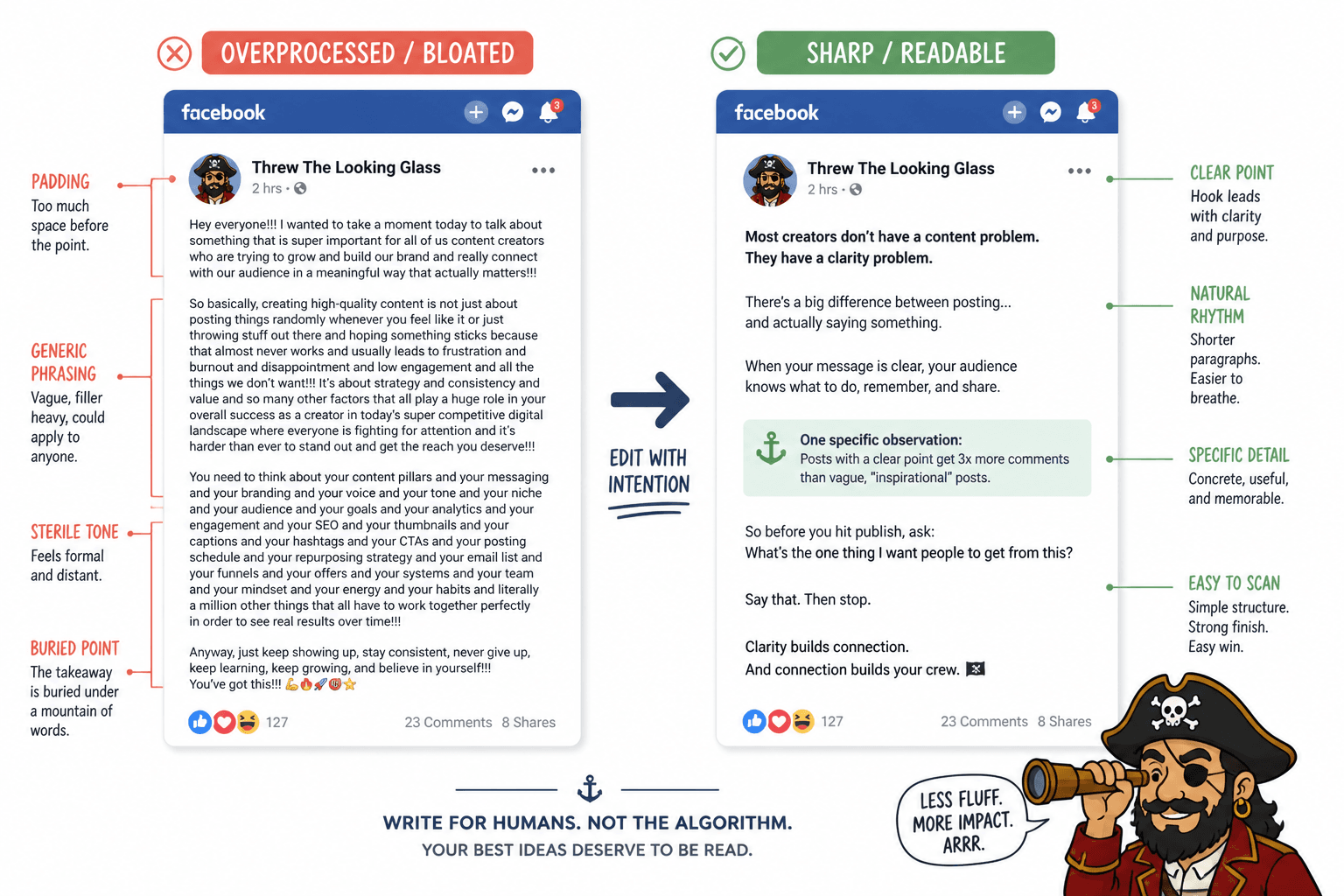
Editing matters more than brainstorming for long-form posts. A decent idea can survive mediocre ideation. It usually cannot survive six sloppy paragraphs of repetition.
Good editing tools help you catch:
- Repeated phrases
- Sentences that are too long or too vague
- Awkward transitions
- Flat wording where a sharper phrase would carry the point better
- Accidental tone drift into stiff “thought leadership” sludge
But here is the important bit: editing tools are assistants, not judges. If you blindly accept every suggestion, your writing starts sounding like it was approved by a very nervous HR department.
Use editing tools to tighten language, not sterilize it. Facebook posts often benefit from rhythm, emphasis, directness, and a little edge. Perfect grammar is not always the point. Clarity is.
The best rant edits usually remove explanation, not personality.
4. AI writing tools: useful for expansion, useless for taste
Yes, AI tools can help with Facebook long-form and rants. No, they should not be trusted to understand your audience better than you do.
Used well, AI helps with:
- Turning rough bullets into a first draft
- Generating alternate openings
- Finding gaps in an argument
- Summarizing a long voice memo
- Suggesting stronger transitions
- Repurposing one rant into shorter follow-up posts
Used badly, AI gives you that shiny dead tone people can smell in three lines.
Do not ask it to “write a powerful Facebook rant on authenticity for entrepreneurs.” That is how you get beige mush with confidence issues.
Better use:
- Paste your messy draft
- Tell it the exact point you want to sharpen
- Ask for 3-5 stronger hooks in your tone
- Ask it to cut repetition without softening the opinion
- Ask for alternate endings that invite discussion rather than fake engagement bait
If you want a deeper breakdown of where AI actually helps and where it absolutely does not, read the best AI tools for Facebook long-form and rants.
5. Template tools: best for consistency without sounding copy-pasted
Templates are underrated when used properly and awful when used lazily.
A good Facebook long-form template gives your thinking a frame. It does not force every post into the same plastic shape. You still need a real point, real specificity, and a real voice.
Useful template categories include:
- The misconception rant: “People think X. The real issue is Y.”
- The frustration-to-lesson post: “This keeps happening. Here is what it reveals.”
- The story-with-a-point structure: quick scene, tension, lesson, takeaway
- The opinion breakdown: claim, why it matters, example, implication
- The comment-conversation starter: position, nuance, question with teeth
Templates save energy because you are not reinventing structure every time. That matters when you are publishing regularly and also doing actual client work, which, rude as it is, still needs to happen.
6. Scheduling tools: best when your workflow needs help more than your creativity does
Scheduling Facebook long-form content is not mandatory. Some creators write better in the moment. Some need the pressure of posting live. Fine.
But scheduling tools are useful when:
- You batch content weekly or monthly
- You manage multiple content channels
- You want an editorial calendar instead of posting by mood swing
- You need approval or review before publishing
- You want to line up posts with launches, newsletters, or offers
Good scheduling tools for Facebook long-form should let you preview formatting cleanly, store drafts, and keep a calendar view without making publishing feel like enterprise software punishment.
That said, scheduling does not fix weak content. A bad rant posted on time is still a bad rant. Now it is just punctual.
7. Community management tools: best for not dropping the ball after the post goes live
A Facebook rant is not finished when you hit publish. In many cases, the comments are where trust deepens, nuance gets added, and business opportunities quietly appear.
This is where community management tools earn their keep.
Useful community management features include:
- Unified inboxes for comments and messages
- Saved replies for repeated questions
- Labels or tags for leads, clients, collaborators, or warm prospects
- Assignment features if you have a team
- Conversation history so you know who is who
- Response tracking so you do not ghost good people by accident
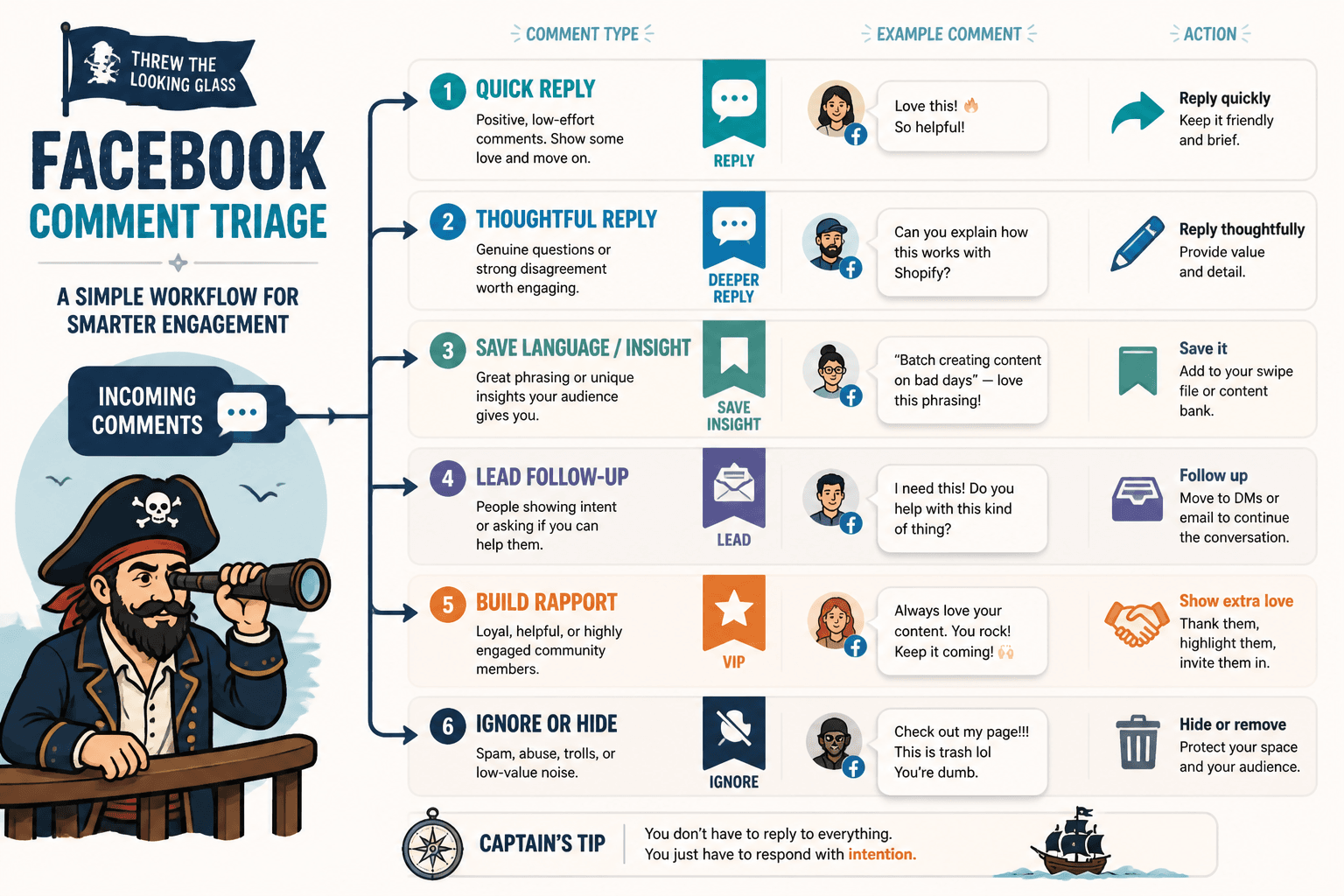
For solo creators, the goal is simple: reply quickly enough to keep momentum, thoughtfully enough to build trust, and selectively enough that you do not spend your whole day babysitting the comment section.
That means your tool should help you spot comments that matter:
- Genuine questions
- Strong disagreement worth engaging
- Audience language you can reuse in future posts
- Lead signals like “I need this” or “Do you help with this?”
- High-value community members you want to build rapport with
Not every comment deserves the same energy. “Love this” gets a light reply. A detailed objection or interested question deserves more. Tools help you sort that without relying on memory and caffeine.
What to look for in a tool stack for Facebook long-form and rants
You do not need ten tools. You need a stack that covers the whole workflow without creating extra admin theatre.
| Need | Best tool type | What to avoid |
|---|---|---|
| Capturing ideas fast | Notes app, voice memo app, simple database | Overbuilt systems you will not maintain |
| Drafting arguments | Clean writing app or document tool | Writing directly into Facebook every time |
| Tightening language | Editing assistant or grammar tool | Accepting every suggestion blindly |
| Generating variants | AI assistant with strong prompts | Generic full-post generation with no input |
| Keeping consistency | Template library or swipe file | Rigid formulas that flatten your voice |
| Publishing at scale | Scheduler with calendar and draft storage | Complex platforms built for giant teams |
| Managing comments | Unified inbox or community management tool | Ignoring replies until momentum dies |
| Turning engagement into leads | Simple CRM, labels, notes, follow-up system | Trying to remember everything manually |
If your current process feels clunky, the issue is usually not that you need “better software.” It is that one stage of the workflow is collapsing and taking the rest with it.
The most overrated tools in this category
Some tools sound impressive and still do not help much with actual Facebook performance.
Massive all-in-one content suites
If you are a solo creator or small team, giant all-in-one suites often give you a lot of dashboards and not much writing improvement. Unless you truly need deep workflow collaboration, they can be expensive clutter.
AI generators with “viral post” promises
Anything pushing one-click viral Facebook rants should be treated with healthy suspicion. Tools can help shape ideas. They cannot manufacture resonance out of generic inputs and wishful thinking.
Complicated analytics tools for tiny sample sizes
If you publish twice a month and get moderate reach, you probably do not need a sprawling analytics setup. Look at patterns that matter: which topics get comments, which openings hold attention, which posts lead to messages or profile visits. You do not need a control room.
A simple tool stack that works for most creators
If you want a sane, practical setup for Facebook long-form and rants, start here:
- One capture tool for ideas, hooks, and observations
- One drafting tool for writing and revising full posts
- One editing layer for clarity and cleanup
- One template system for repeatable post structures
- One scheduling tool if you batch content
- One community management method for comments, follow-up, and lead tracking
That is enough. Probably more than enough.
If you need examples of post types worth building tools around, read these Facebook long-form and rant ideas and examples for creators. It is easier to choose tools when you know what kind of content you are repeatedly trying to produce.
How to use tools without sounding overprocessed
This part matters because a lot of “efficient” content ends up sounding embalmed.
Facebook long-form works best when it feels like there is an actual person on the other side of the post. Not a brand committee. Not a prompt chain. Not a “content engine.” A person with a point of view.
So keep these rules in mind:
- Draft with tools, then rehumanize by hand. Read the post aloud. If it sounds too polished to be believable, fix it.
- Keep some natural rhythm. Not every sentence needs to be optimized into a sterile little rectangle.
- Use templates for structure, not wording. Readers can smell repeated phrasing faster than you think.
- Do not auto-reply your community into boredom. Saved replies are for efficiency, not impersonation.
- Leave room for specificity. The strongest rants usually hinge on one sharp real observation, not five generic lessons.
If you want broader context around platform-specific writing choices, the main social media writing section and the Facebook long-form and rants hub are both worth bookmarking.
How community management tools help you get business value from rants
A good Facebook rant can do more than get comments. It can reveal demand, surface objections, build familiarity, and open the door to sales conversations that do not feel forced.
But only if you have some kind of system after the post goes live.
Here is a simple workflow:
- Publish the post with a clear point and a discussion-friendly ending.
- Monitor comments for the first wave of real engagement.
- Reply to high-signal comments with actual thought, not filler.
- Tag or note people who ask relevant questions or show buying intent.
- Follow up later through your normal process if the interaction warrants it.
The reason community tools matter here is not because every comment is a sales opportunity. Please do not become that person. It is because conversations create context. And context is what makes future offers feel relevant instead of random.
When someone comments, “This is exactly what keeps happening with my audience,” that is not just engagement. That is research. That is messaging. Sometimes it is a lead. A good tool helps you keep that signal instead of losing it under a pile of notifications.
Best tool-buying advice nobody glamorous wants to give you
Buy tools after the process exists, not before.
The bigger point is simple: clearer structure and clearer writing make the piece more useful. That is usually what makes the ending land better too.