
Most people shopping for AI writing tools and creator CRM tools for LinkedIn posts are trying to solve the wrong problem.
They think they need a tool that writes better posts. What they usually need is a system that helps them think more clearly, store better ideas, track the right relationships, and publish consistently without sounding like a cheerful corporate mannequin.
That is the real job here. Not “automate thought leadership.” Not “scale authenticity.” Those phrases should probably be fined.
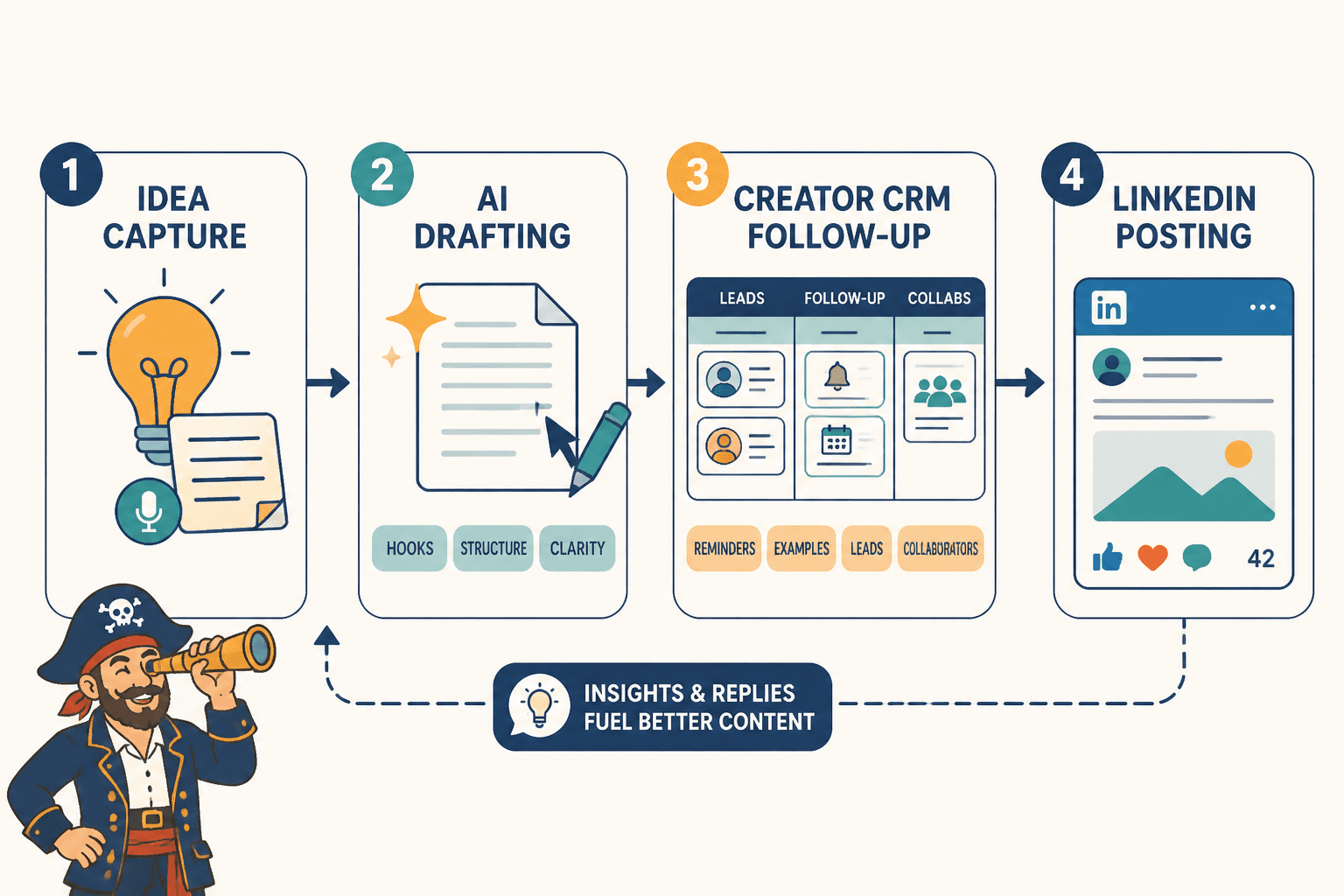
The best AI writing tools and creator CRM tools for LinkedIn posts help with four things: getting ideas out of your head, shaping those ideas into stronger posts, keeping track of the people and conversations that matter, and turning content into actual business momentum. If a tool cannot help with one of those jobs, it is probably just another dashboard asking for your monthly payment.
This guide will help you choose tools based on what they are actually good for, where they tend to fail, and how to use them without flattening your voice into AI oatmeal. You will also see a simple stack that works for creators, consultants, coaches, freelancers, and personal brands who want better LinkedIn posts without building an absurd content machine around themselves.
If you want broader LinkedIn post strategy first, start with LinkedIn posts. If you want more tool-specific help after this, best AI tools for LinkedIn posts, best AI tools for LinkedIn hooks and formatting, and best templates and tools for LinkedIn posts are the logical next stops.
For the main guide behind this topic, visit the parent guide.
What the best tools actually need to do
A useful tool stack for LinkedIn posts does not need to be huge. It needs to be functional.
At minimum, your setup should help you do these jobs:
- Capture post ideas quickly
- Turn rough thoughts into usable drafts
- Improve hooks, structure, and clarity
- Store examples, proof, stories, and reusable angles
- Track warm leads, collaborators, clients, and interesting conversations
- Follow up without acting like a DM gremlin
- Spot what content is leading to replies, profile visits, calls, or sales
That means you are not really looking for one magical AI app. You are usually choosing between categories.
And yes, that is less exciting than “top 7 secret tools.” It is also more useful.
The two tool categories that matter most
1. AI writing tools
These help you draft faster, rewrite clunky sections, generate angle variations, tighten hooks, repurpose older content, and organize messy thoughts into something readable.
What they are good at:
- Brainstorming post directions
- Rewriting weak openings
- Condensing long ideas into short posts
- Creating multiple versions of a CTA
- Turning a voice note, article, or transcript into draft material
- Helping you overcome blank-page paralysis
What they are not good at:
- Knowing what your audience actually cares about without guidance
- Providing taste, judgment, or positioning
- Creating trust from thin air
- Writing from real experience they do not have
- Saving a boring point just because it is now grammatically cleaner
2. Creator CRM tools
This is the category too many creators ignore until their pipeline becomes a pile of screenshots, forgotten DMs, and vague promises to “circle back next week.”
A creator CRM is just a relationship and opportunity system built for people whose business grows through content, conversations, referrals, collaborations, and trust.
What they are good at:
- Tracking leads from posts and comments
- Recording where someone came from
- Managing follow-up timing
- Tagging people by audience fit, offer fit, or relationship stage
- Keeping notes on conversations and content triggers
- Connecting content activity to pipeline movement
What they are not good at:
- Replacing human judgment in outreach
- Turning weak offers into easy sales
- Fixing awkward messaging
- Making generic content generate demand
Best AI writing tools and creator CRM tools for LinkedIn posts, by use case
The right choice depends less on features and more on how you work. A solo consultant posting three times a week does not need the same setup as an agency founder managing content, partnerships, leads, and speaking opportunities.
| Need | Best tool category | What it should help you do |
|---|---|---|
| Drafting posts faster | AI writing assistant | Turn rough notes into clean first drafts |
| Improving hooks and formatting | AI rewrite and editing tool | Create stronger openings, cleaner flow, and better scannability |
| Repurposing old content | AI repurposing tool or prompt workflow | Pull multiple posts from articles, podcasts, videos, or newsletters |
| Tracking warm leads from LinkedIn | Creator CRM | Log conversations, stages, notes, and follow-ups |
| Managing collaborations and referral partners | Creator CRM | Track relationships beyond just buyer leads |
| Organizing ideas, proof, and examples | Knowledge base or note system with AI support | Store stories, case studies, hooks, and content angles |
If your current setup only helps you publish and does nothing for idea quality or relationship follow-up, that setup is incomplete. A lot of people are “consistent” on LinkedIn and still getting very little business traction because they built a posting habit, not a content system.
What to look for in an AI writing tool for LinkedIn posts
You do not need an AI tool that can write 4,000 words about “leadership lessons from hiking.” You need one that can help you produce clear, opinionated, well-structured LinkedIn posts that still sound like you.
Good features to look for:
- Fast input options: paste notes, voice transcripts, old posts, article sections, or bullet points
- Rewrite modes: shorter, sharper, clearer, more conversational, more direct
- Variation support: multiple hook options, CTA options, and structure options
- Prompt flexibility: enough control to guide tone and audience
- Workspace organization: ability to save prompts, drafts, and brand voice instructions
- Low-friction editing: easy to tweak line by line instead of regenerating everything like a slot machine
Less-important features people get distracted by:
- Huge template libraries you will barely use
- Overblown “viral post generators”
- Fake performance predictions
- Fancy dashboards that make a simple workflow slower
A strong AI writing tool should feel like a useful second brain with decent editing instincts. It should not feel like a content casino.
The best use cases for AI on LinkedIn
- Turning a rough idea into three post angles
- Rewriting bland hooks into stronger first lines
- Compressing long explanations into shorter paragraphs
- Cleaning up awkward phrasing without making it robotic
- Extracting posts from webinars, podcasts, client calls, and articles
- Generating alternate CTAs that are not painfully salesy
If you want examples of stronger post directions and usable post formats, best LinkedIn posts ideas and examples for creators pairs well with this.
What to look for in a creator CRM for LinkedIn posts
This part matters more than many creators expect. LinkedIn posts are not just content assets. They are conversation starters, credibility builders, and lead filters. If someone comments, messages you, asks for details, or mentions a future need, and you do nothing with that information, you are leaking value all over the floor.
A good creator CRM should help you capture and manage:
- Inbound leads from posts
- People who repeatedly engage with your content
- Potential clients who are not ready yet
- Referral partners
- Podcast hosts, collaborators, and event contacts
- Existing clients you want to nurture with content and follow-up
Features that actually matter:
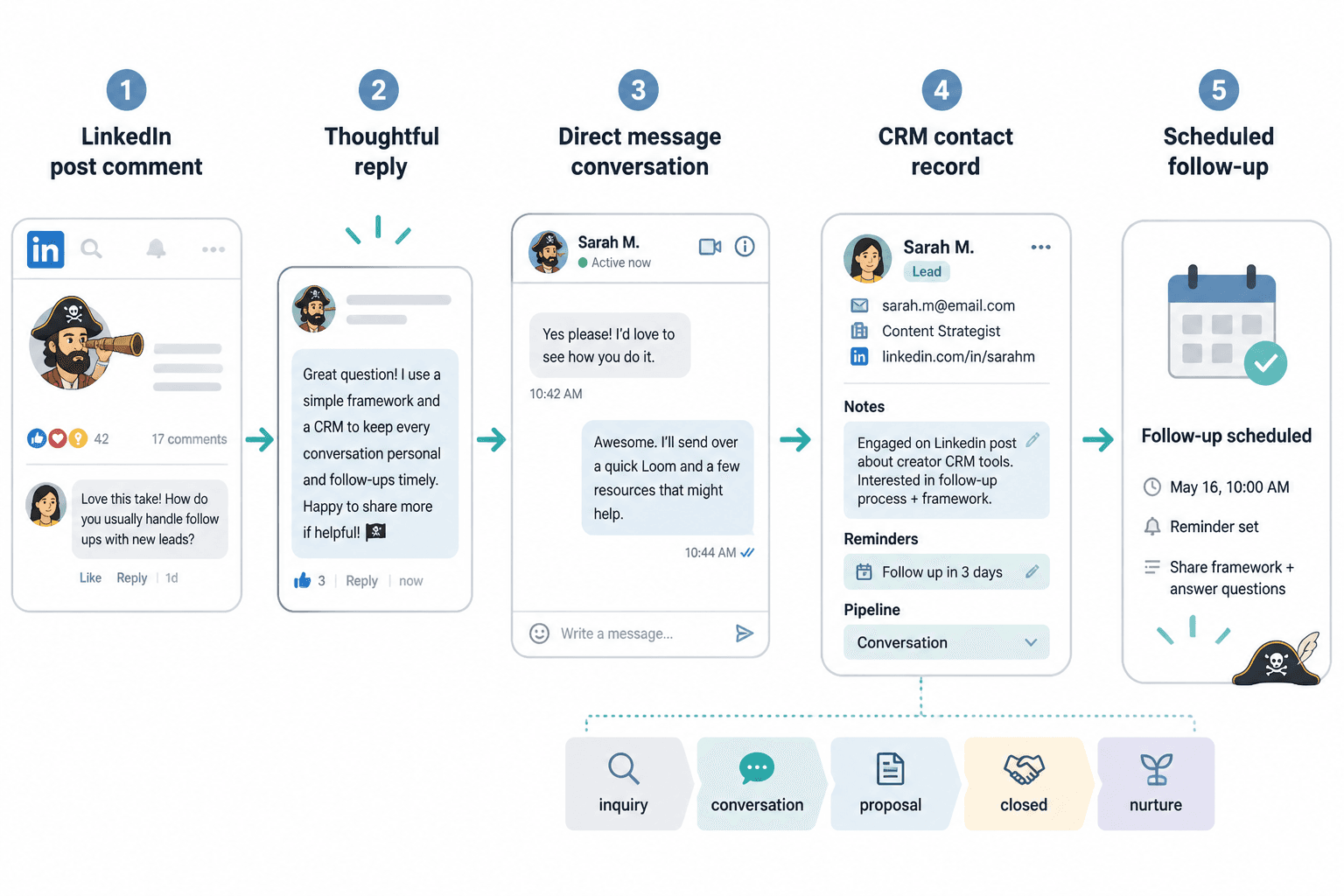
- Simple contact records: who they are, what they do, where they came from
- Custom tags: audience type, service fit, warm lead, collaborator, newsletter reader, and so on
- Notes: what they asked about, what they need, what content they reacted to
- Reminders: follow up in a week, next month, after launch, after budget cycle
- Pipeline views: inquiry, conversation, proposal, closed, nurture
- Ease of use: if logging a contact feels annoying, you will not do it
Features that sound nice but often get overrated:
- Overly complex automations
- Huge enterprise reporting suites
- Complicated scoring systems for a one-person business
- Anything that pushes you toward spammy outreach behavior
The best creator CRM is often the one you can actually keep updated in under ten minutes a day.
A practical tool stack for most LinkedIn creators
You usually do not need one all-in-one platform. You need a sane combination.
For most solo creators, consultants, coaches, and service businesses, a practical stack looks like this:
- AI writing assistant: for drafting, rewriting, repurposing, and sharpening ideas
- Notes or knowledge base tool: for storing post ideas, proof, stories, objections, and good phrases
- Creator CRM: for tracking leads, collaborators, referral partners, and follow-ups
- Optional scheduler: only if it genuinely saves time and does not make you post lazy filler
That setup covers almost everything that matters without turning your content process into a software hobby.
Lean setup
- One AI tool
- One notes app
- One lightweight CRM or database
Best for: freelancers, solo consultants, small personal brands, early-stage creators
Growth setup
- One AI tool with saved prompt workflows
- One organized content database
- One creator CRM with simple pipeline stages
- Optional post scheduling and analytics support
Best for: coaches, founders, agencies, B2B creators, and experts using LinkedIn for lead generation
How to use AI without sounding like everyone else
This is where people go wrong. They ask AI to “write a LinkedIn post about leadership” and then act surprised when they get a damp stack of generic confidence sentences.
The tool is not the main variable. The input is.
If you want useful output, give the tool useful material:
- A real opinion
- A clear audience
- A specific problem
- A practical takeaway
- A piece of proof, contrast, or experience
For example, this is weak input:
Write a LinkedIn post about consistency for entrepreneurs.
This is much better:
Write three LinkedIn post options for solo consultants who keep posting useful content but are not getting inquiries. Main point: consistency is overrated if your positioning is vague. Tone: clear, direct, lightly sharp. Use short paragraphs. Include one concrete example and a CTA that invites conversation without sounding needy.
That second prompt gives the tool something to work with. It has tension, audience fit, and an actual point. Which is more than can be said for half the posts on LinkedIn on any given Tuesday.
A simple AI workflow for better LinkedIn posts
- Start with a raw thought, proof point, story, objection, or client pattern.
- Ask the AI for 3 to 5 distinct post angles, not a full post yet.
- Choose the strongest angle yourself.
- Ask for two hook options and one rough draft.
- Edit aggressively for specificity, rhythm, and voice.
- Cut anything that sounds polished but empty.
- Add a CTA that matches your real goal.
If you want more hook-focused help, best AI tools for LinkedIn hooks and formatting is worth your time.
How creator CRM tools improve LinkedIn posts indirectly
This is the part people miss: a creator CRM does not just help after the post. It helps you write better posts in the first place.
Why? Because your best post ideas often come from patterns inside real conversations.
When you track questions, objections, hesitations, goals, and recurring phrases from leads or clients, your content gets sharper. You stop posting generic tips and start addressing the things people are actually stuck on.
For example, your CRM notes might show that prospects repeatedly say:
- “I post regularly but nothing turns into calls.”
- “I do not know what to say without repeating myself.”
- “My content gets likes from peers, not buyers.”
- “I do not want to sound salesy.”
That is not just sales data. That is content fuel.
Each line could become a stronger LinkedIn post than another vague “3 lessons on personal branding” carousel caption pretending to be profound.
A simple content-plus-CRM workflow that actually works
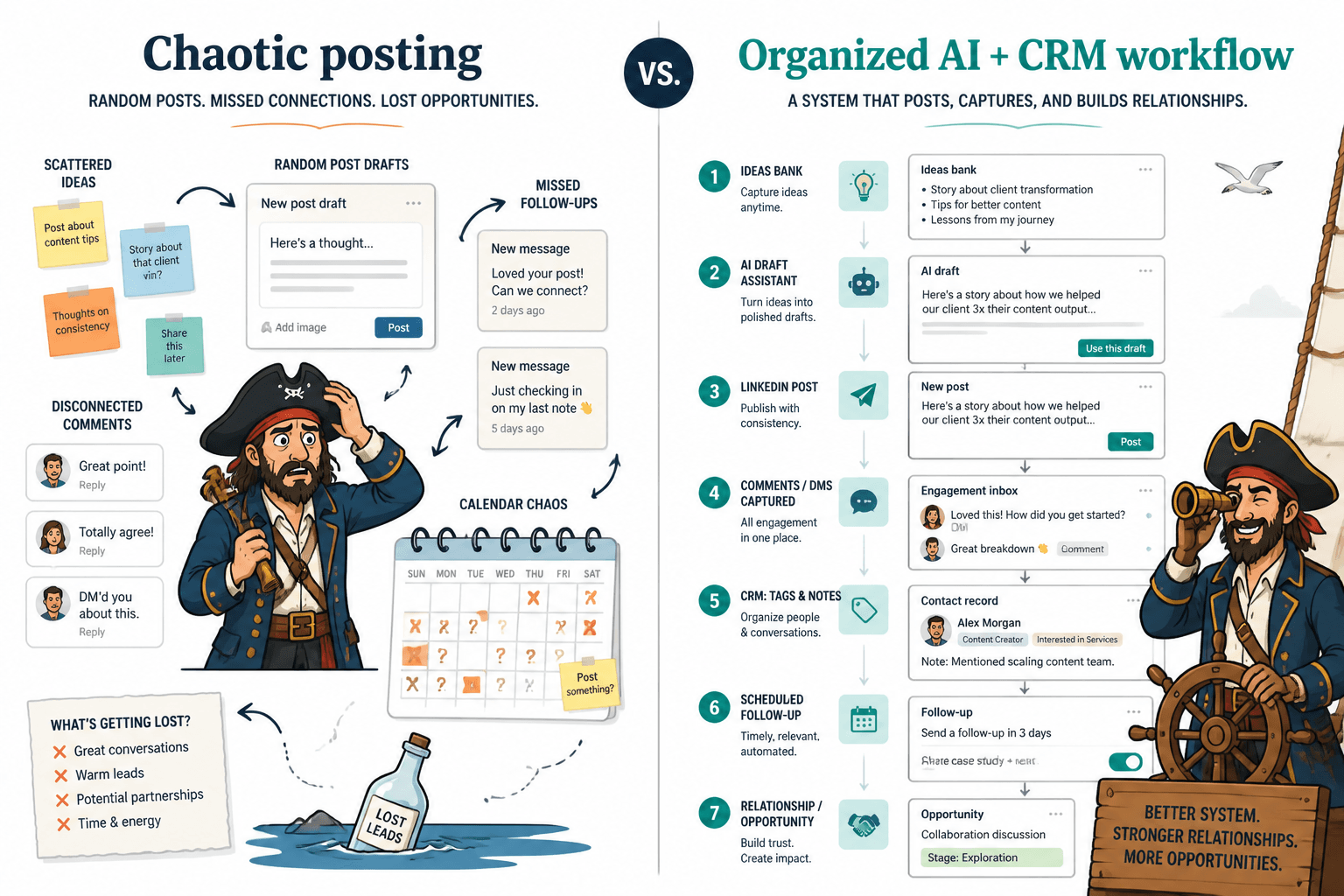
Here is a clean system for using LinkedIn posts, AI writing help, and a creator CRM together.
- Collect signals. Save client questions, sales objections, strong comments, and useful DMs.
- Turn signals into angles. Use AI to generate a few post directions from that raw material.
- Draft and refine. Write the post, then use AI for hook options, tightening, and CTA rewrites.
- Publish with purpose. Know whether the post is for reach, trust, replies, profile visits, or leads.
- Track responses. Add warm commenters, inbound leads, and interesting conversations to your CRM.
- Follow up like a normal person. Continue conversations based on context, not canned scripts.
- Review patterns. Notice which topics create useful replies, inquiries, and client-fit conversations.
That loop is where content starts earning its keep.
It also makes your next batch of posts better, because they are informed by reality instead of your mood on a random Wednesday morning.
Common mistakes when using AI writing tools for LinkedIn
- Using AI as the thinker instead of the assistant. If the tool generates the idea, angle, opinion, and phrasing, do not be shocked when the post feels lifeless.
- Publishing first drafts with minimal editing. AI can draft fast. It still needs a human spine.
- Writing too broadly. Broad posts feel safe and perform like wallpaper.
- Forgetting audience fit. A good post for peers is not always a good post for buyers.
- Keeping generic hooks. “Nobody talks about this” is usually followed by something many people have, in fact, talked about.
- Using fake-conversational CTAs. “Drop a YES below” should remain in the past where it belongs.
Common mistakes when using creator CRM tools for LinkedIn
- Tracking only hot leads. Many opportunities start lukewarm.
- Not tagging by source. If you do not know which posts or conversations bring good leads, you cannot improve intelligently.
- Making the system too complicated. Five good fields beat twenty fields you never fill in.
- Using it only for selling. Referral relationships, collaborators, and warm audience members matter too.
- Following up with generic pitch energy. If someone commented on a post, respond like a human who remembers context.
What kind of tool stack fits different creator types
Solo consultant or freelancer
You probably need a lightweight stack. One AI writing tool, one place to store ideas and proof, and one simple CRM for leads and follow-ups is enough. Your edge is not volume. It is clarity and relevance.
Coach or service provider with inbound leads
You need stronger lead tracking because posts often create delayed interest. Someone sees your post now, checks your profile later, replies next month, and buys after that. If your system cannot hold that path together, you will lose easy wins.
Founder or agency leader with a team
The bigger point is simple: clearer structure and clearer writing make the piece more useful. That is usually what makes the ending land better too.
LinkedIn posts usually improve when the point gets clearer and the fluff gets shorter. Stronger usefulness tends to outperform polished vagueness.