Most advice about AI editing and repurposing assumes you already have a decent-sized audience, a mountain of content, and enough analytics to pretend you are running a tiny media empire.
If you have a small audience, that advice can get weird fast. You do not need a 47-step content engine. You do not need to chop one post into 19 assets just because some content bro said you should “maximize every idea.” And you definitely do not need AI turning your half-decent thoughts into polished beige paste.
Creator AI Editing and Repurposing for Creators With Small Audiences works best when it does three things: helps you say your point more clearly, helps you reuse strong ideas without sounding repetitive, and helps you stay visible long enough for the right people to notice you.
That is the real job. Not “content at scale.” Not flooding five platforms with the same lifeless post wearing different hats. Just clearer ideas, better packaging, and less wasted effort.
Here’s how to use AI to edit and repurpose your content when your audience is still small, your time is limited, and your standards have not fully collapsed.
For the main guide behind this topic, visit the parent guide.
What small creators actually need from AI
Small audiences change the game a bit.
If you do not have huge reach yet, your content has to do more of the heavy lifting. It has to be clearer. More specific. More trustworthy. More worth responding to. You cannot hide behind distribution.
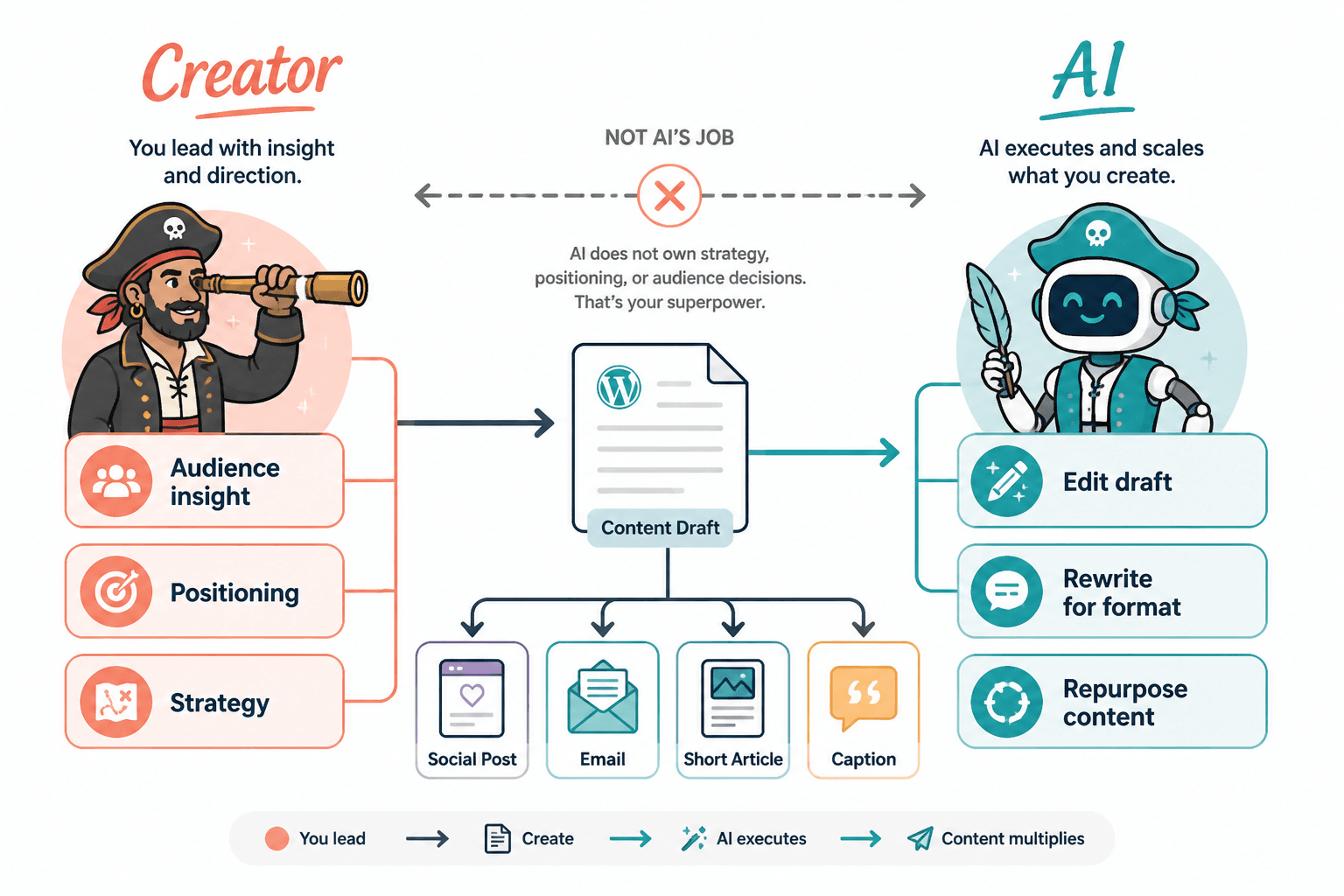
That is why AI is most useful for small creators in a support role, not the driver’s seat. It should help you sharpen, reshape, and repackage ideas you actually believe. It should not manufacture personality, expertise, or relevance out of thin air. It is a writing assistant, not a replacement spine.
- Edit rough drafts faster
- Turn one good idea into a few platform-fit versions
- Pull hooks, summaries, CTAs, and outline options from longer content
- Spot vague wording and repetitive phrasing
- Save templates and workflows so you are not rebuilding the wheel every week
What it cannot do is decide what your audience cares about, fix weak positioning, or make generic advice feel fresh. A lot of people keep handing bad inputs to AI, then acting shocked when it returns bad outputs in a friendlier font.
If you want a broader foundation first, the main creator AI editing and repurposing hub and this more complete guide for creators who want better results are both worth bookmarking.
Why repurposing matters more when your audience is small
A small audience does not mean your ideas are weak. It usually means not enough of the right people have seen them yet.
That is why repurposing matters. Not because you should squeeze every sentence until it begs for mercy, but because good ideas often need more than one format, more than one angle, and more than one chance to land.
Maybe your original LinkedIn post got decent reactions but no replies. That same idea might work better as:
- a sharper X post with a stronger opinion
- a Facebook post with more story and more room to breathe
- a short article with examples and proof
- an email with a direct CTA
- a carousel or visual summary
Repurposing is not repeating yourself badly. It is re-expressing an idea so it fits the context, attention span, and intent of the platform.
Small creators especially benefit from this because you often do not need more ideas. You need more mileage from the few strong ideas you already have.
A simple AI editing and repurposing workflow for small creators
You do not need a giant content system. You need a repeatable one.
Here is a practical workflow that keeps AI useful without turning your content into machine-made wallpaper.
1. Start with one strong source idea
Use something that already has a pulse:
- a client insight
- a post that got meaningful replies
- a question you keep hearing
- a hot take you can defend
- a lesson from your own process
Do not start with “make me 20 posts about branding.” That is how you get content that sounds like it was written inside a conference tote bag.
2. Use AI to clean the core message
Before you repurpose anything, make the original idea clearer.
Ask AI to identify:
- the main claim
- any vague phrases
- where the opening gets slow
- where proof or examples are missing
- three tighter versions of the core point
This part matters more than people think. Repurposing a blurry idea just creates blurry content in multiple places. Very efficient. Still bad.
3. Choose 2 to 4 formats, not 12
When your audience is small, depth usually beats volume. Pick a few formats that match your strengths and where your audience actually pays attention.
A good small-creator stack might look like this:
- one platform-native post
- one alternate version for another platform
- one email or article version
- one short-form asset like hooks, quotes, or summary bullets
That is enough. You are building signal, not littering the internet.
4. Make AI adapt the idea, not clone it
This is where a lot of repurposing goes wrong. People ask AI to “turn this into a LinkedIn post, X thread, email, Facebook post, and article,” and what they get is the same post copied five times with minor cosmetic surgery.
Instead, give platform-specific instructions:
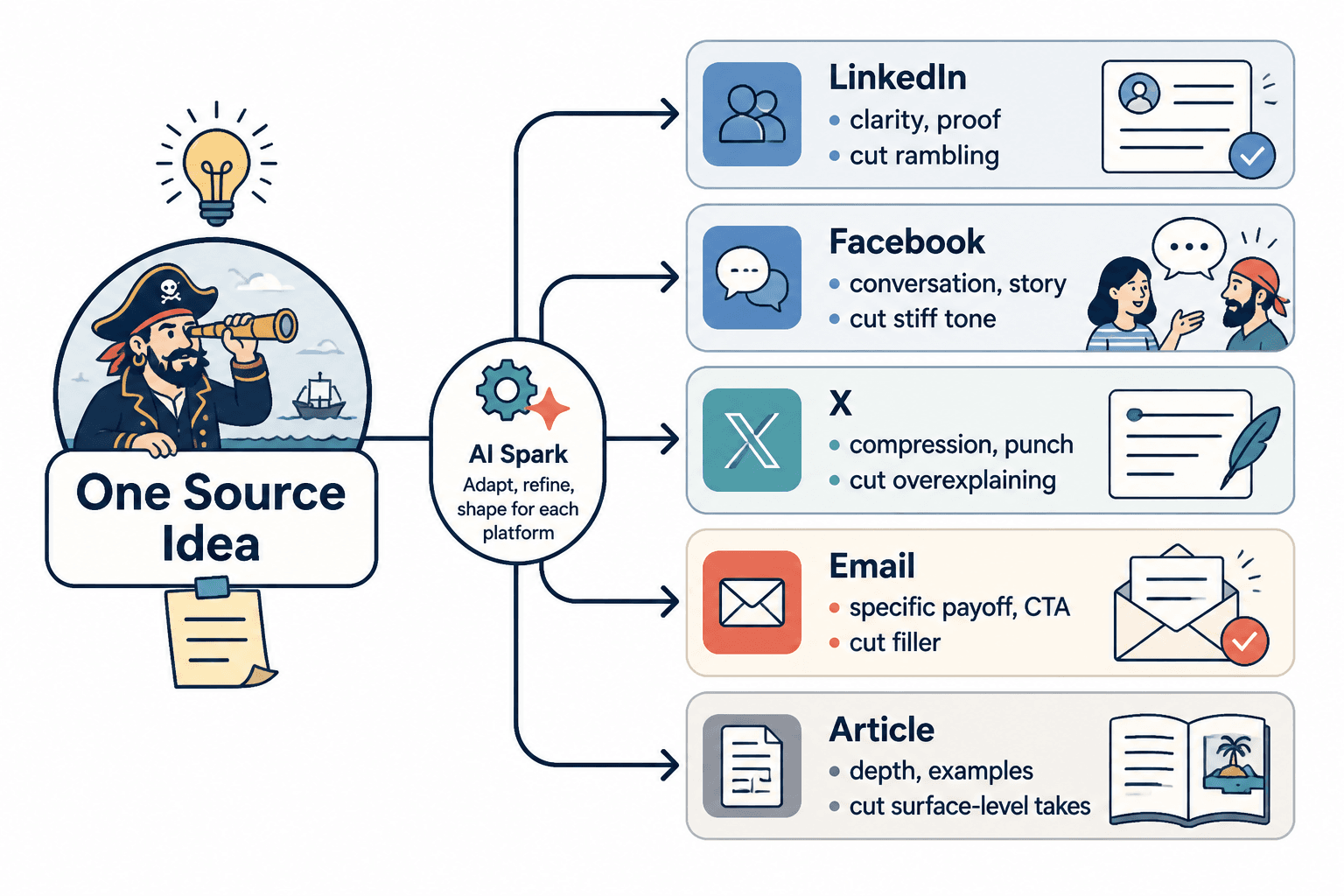
- For LinkedIn: make it clearer, more credible, and skimmable
- For X: make it tighter, punchier, and more quotable
- For Facebook: make it more conversational and story-led
- For email: make the payoff stronger and the CTA more direct
- For articles: expand examples, structure, and search intent
5. Do a human pass before publishing
This is the part people skip because they think AI saved them time. Then they publish something that sounds technically fine and emotionally dead.
Before anything goes out, check:
- Does this sound like me?
- Is the point obvious fast?
- Did AI add fluffy filler I would never say?
- Is there a real example or useful detail?
- Is the CTA natural instead of needy?
What to repurpose when you do not have much content yet
One of the more annoying assumptions in content advice is that you already have a giant content archive. A lot of small creators do not. That is fine.
You can repurpose from a very modest starting point. In fact, you probably should, because it helps you get more value from every useful thought instead of always chasing new ones.
- Client calls or coaching notes
- Voice notes where you explain an idea out loud
- Long comments you left on someone else’s post
- Emails you wrote answering a common question
- Old posts with decent engagement but weak packaging
- Workshop notes, webinar outlines, or Q&A answers
- A rough article draft that needs a better structure
A rough voice note can become a post. A useful post can become an email. An email can become a short article. A short article can become three stronger hooks. A strong hook can become a visual. This is not complicated. It just needs a clean process.
Best uses of AI editing for small-audience creators
Editing is where AI often earns its keep. Not because it writes better than you, but because it can help you spot what is muddy, bloated, repetitive, or undercooked faster than doing everything manually.
Tightening hooks
Weak hooks usually fail because they are vague, slow, or stuffed with throat-clearing.
Weak: I have been thinking a lot lately about how creators can use AI in a more intentional way.
Better: Most creators are not using AI badly because they are lazy. They are using it badly because they are asking it to do the wrong job.
AI can help generate 10 to 15 tighter opening lines from your actual point. Then you pick the one that sounds like a person, not a panel discussion.
Cutting filler
A lot of creator content gets wrecked by extra words that add no meaning. AI is useful for identifying:
- repeated points
- empty setup lines
- generic transitions
- soft qualifiers that weaken strong ideas
If a sentence could disappear without changing the meaning, it probably should.
Finding the actual point
Sometimes your draft is not bad. It is just hiding its best line under seven warm-up sentences.
Ask AI to pull out:
- the strongest claim
- the most specific example
- the line with the most tension
- the clearest takeaway
Then rebuild around that.
Rewriting for platform fit
The same idea should not sound identical everywhere. AI can help you keep the point while changing the packaging.
| Platform | What to emphasize | What to cut back |
|---|---|---|
| clarity, proof, structure, professional relevance | rambling, fake inspiration, generic lessons | |
| conversation, personality, story, relatability | stiff thought leadership tone | |
| X | compression, punch, contrast, quotability | overexplaining, soft openings |
| specific payoff, trust, clear CTA | public-post style filler | |
| Article | depth, examples, structure, search intent | surface-level takes with no proof |
What not to do with AI repurposing
This is where things usually get ugly.
- Do not repurpose weak content. If the idea is bland, multiplying it does not help.
- Do not publish AI’s first draft. It often sounds competent in the way hotel art looks decorative.
- Do not force every idea into every format. Some ideas are posts. Some are threads. Some should stay a note in your drafts folder.
- Do not strip out your opinions. AI loves sanding edges off useful ideas until they feel “balanced.” Balanced is not always better. Sometimes it is just forgettable.
- Do not confuse consistency with sameness. Repeating your message is good. Repeating the exact phrasing over and over is lazy.
One useful rule: if the repurposed version does not add a new angle, a better format, clearer language, or stronger utility, it probably does not need to exist.
A lean repurposing system you can run each week
If you want a simple weekly rhythm, use this.
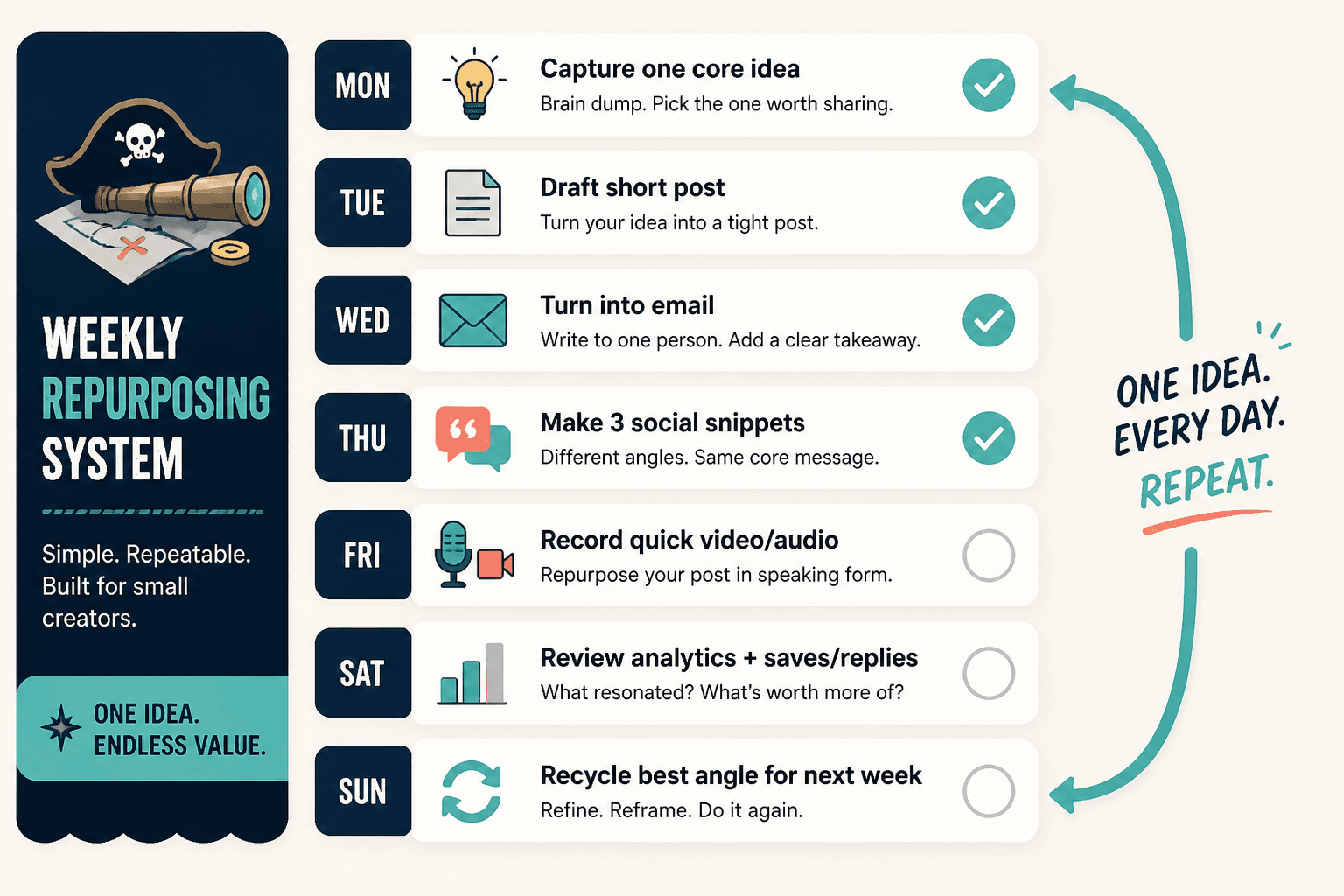
- Pick one source idea from a client question, post, note, or draft.
- Use AI to tighten the main point and generate stronger hooks.
- Create one primary version for your main platform.
- Create two repurposed versions for other formats or channels.
- Use AI to generate 3 to 5 alternate CTAs or closing lines.
- Edit everything manually for voice, clarity, and specificity.
- Track what gets replies, saves, clicks, or conversations.
- Reuse the winners later from a new angle.
This is manageable even if you are a solo creator. It gives you enough output to stay visible, enough repetition to reinforce your message, and enough flexibility to learn what lands.
If you want examples to steal intelligently instead of blindly, this collection of creator AI editing and repurposing ideas and examples will help.
How to know if your repurposing is actually working
With a small audience, raw reach can be a misleading metric. Ten thoughtful replies from relevant people can matter more than 10,000 empty impressions from strangers who will never buy anything from you.
So judge your repurposing by better signals:
- Are more people replying with specific questions?
- Are your profile visits going up?
- Are people referencing your ideas back to you?
- Are leads, calls, or email signups improving?
- Are your posts getting clearer and easier to create?
Repurposing should improve both performance and sustainability. If it creates more content but also more dread, your system is too bloated.
Where AI fits in your funnel without making everything feel salesy
For small creators, repurposing gets more valuable when it connects to a simple next step. Not every piece needs a pitch, but your best content should not just float around hoping to be admired.
A few clean funnel paths:
- Post to profile to lead magnet
- Article to related service offer
- Thread to email list
- Facebook discussion to soft DM conversation
- Email to booking page
AI can help you create the bridge pieces: summary CTAs, short lead-in blurbs, nurture emails, alternate calls to action, and repurposed landing-page snippets. But it still cannot tell you what your audience will trust unless you have done the thinking first.
If that side of the system needs work, read these funnel ideas to pair with creator AI editing and repurposing. Because content without a next step is often just public journaling with nicer formatting.
Best tool categories for creator AI editing and repurposing for creators with small audiences
You do not need one magic tool. You probably need a small stack that handles a few practical jobs well.
- AI drafting and editing tools: for rewrites, hook variations, summaries, and clarity passes
- Note capture tools: for saving raw ideas, voice notes, and reusable content fragments
- Scheduling tools: for planning distribution without living inside every platform daily
- Template libraries: for storing prompts, post structures, CTA formulas, and repurposing workflows
- Light analytics tools: for spotting which ideas deserve another version
Pick tools that reduce friction. Skip the ones that make you feel like you need onboarding, certification, and a support ticket just to publish a decent post.
For a curated breakdown, check the best AI tools for creator AI editing and repurposing. You can also browse the broader AI writing tools and workflows collection if you want the bigger ecosystem view.
FAQ
How much content do I need before repurposing it?
You need less than you think. One useful post, email, voice note, or client insight is enough to start.
Should small creators use AI to write full posts?
Usually, AI is better at helping you edit, restructure, and adapt ideas than writing the whole thing from scratch.
The bigger point is simple: clearer structure and clearer writing make the piece more useful. That is usually what makes the ending land better too.