Most newsletter subject lines do not fail because the writer is untalented. They fail because the line is vague, overcooked, or trying way too hard to sound clever.
That is where AI can actually help. Not as a magical open-rate wizard. Not as your new head of editorial taste. Just as a fast, useful assistant for generating angles, testing variations, tightening language, and getting you out of the subject-line swamp when your brain is fried.
The best AI tools for newsletter subject lines are the ones that help you think better and ship faster, without turning every email into the same polished little robot sentence. That distinction matters. A lot.
So this piece will help you pick the right kind of AI tool, use it without losing your voice, and avoid the extremely common mistake of letting software write subject lines that sound “optimized” and deeply ignorable.
If you want the broader strategy behind strong subject lines, start with the newsletter subject lines hub and the more complete newsletter subject lines guide for creators who want better results. This article is more specifically about tools, where they help, and where they absolutely do not.
What the best AI tools for newsletter subject lines actually do well
AI tools are useful for subject lines when the problem is speed, variation, or phrasing. They are not useful when the problem is that the email itself has no clear point.
That sounds obvious, but people skip right past it. They paste a dull email into a tool, ask for 20 subject lines, and then act surprised when the output feels like reheated LinkedIn leftovers in inbox form.
Used properly, AI can help you:
- generate multiple angles from one email idea
- rewrite weak subject lines with more clarity or tension
- compress long ideas into tighter phrasing
- create style variations for different audience moods
- brainstorm curiosity-based, benefit-based, or direct options
- produce testable versions quickly for A/B testing
- spot repetitive patterns in your existing subject lines
What it cannot do is know your audience better than you do. It cannot tell when a line is technically fine but emotionally flat. It cannot rescue weak positioning. And it definitely cannot manufacture trust if your newsletter has trained people to expect beige fluff every Thursday at 8:12 a.m.
AI is great at giving you more options. It is much less great at knowing which option sounds like you, fits your readers, and earns the open without feeling cheap.
That is why the best setup is usually not “pick one tool and obey it.” It is “use the tool to create raw material, then apply human judgment like an adult.”
The main types of AI tools worth using
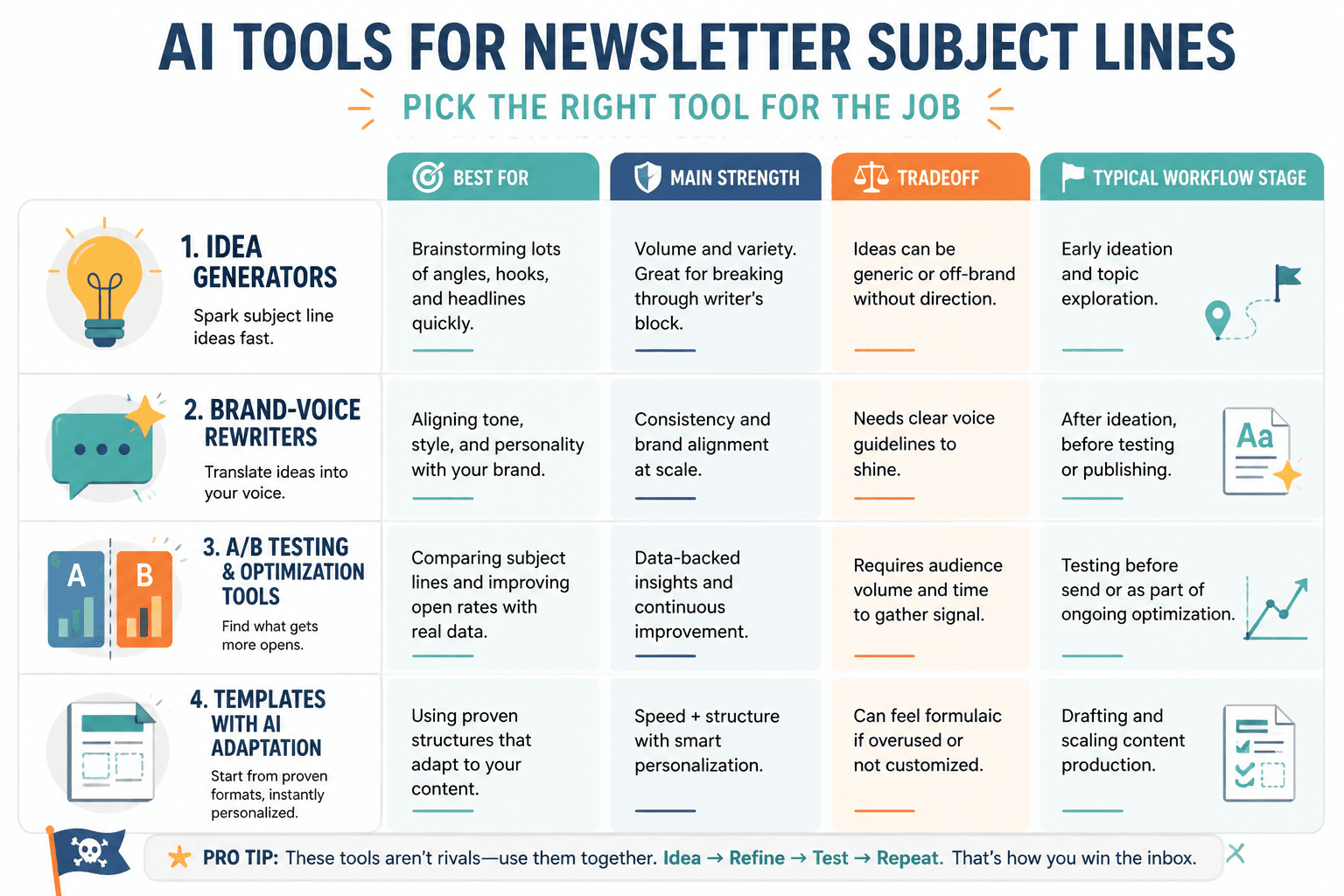
There is no single perfect tool for newsletter subject lines. There are categories, and each category is good at different parts of the job.
1. General AI writing assistants
These are your flexible idea generators. You give them context, constraints, examples, tone, audience details, and the actual point of the email. In return, they give you options.
Best for:
- brainstorming lots of angles quickly
- rewriting boring drafts
- creating tone-specific versions
- generating batches for testing
- building reusable prompts for your newsletter process
Watch out for:
- generic “you won’t believe this” energy
- samey phrasing across emails
- fake urgency
- subject lines that sound optimized but not interesting
If you already know your brand voice and can write a decent prompt, this category gives you the most leverage. It is also the easiest category to misuse if you are lazy with inputs.
2. Email platform AI subject line generators
Many newsletter platforms and email tools now offer built-in AI for subject lines. These can be handy because they sit close to your workflow and sometimes tie into testing features, drafts, or campaign goals.
Best for:
- quick subject line generation inside your email workflow
- saving time during campaign setup
- creating first drafts without switching tools
- testing small variations efficiently
Watch out for:
- limited control over voice
- cookie-cutter outputs
- suggestions optimized for broad averages, not your brand
These tools are usually convenient rather than brilliant. Useful, yes. Sacred, no.
3. AI plus testing tools
This category matters if you send enough volume to learn from actual results. The AI helps generate variants. The testing features help you stop guessing.
Best for:
- A/B testing subject line variations
- comparing tone, length, and structure
- learning what your audience actually opens
- building a stronger subject-line pattern library over time
If this is your lane, you should also read best email testing tools and newsletter software for newsletter subject lines.
4. Template and swipe-file tools with AI features
Sometimes the problem is not invention. It is structure. Tools in this category help you start from proven formats and then adapt them with AI.
Best for:
- creators who freeze when starting from a blank box
- teams that want consistency
- building repeatable subject line systems
- turning good past performers into fresh variants
For that angle, pair this article with best templates and tools for newsletter subject lines.
How to choose the right AI tool for your newsletter
The right tool depends less on “which one is smartest” and more on how you work.
| What you need | Best tool type | Why it fits |
|---|---|---|
| Fast idea generation | General AI writing assistant | Gives you lots of angles quickly |
| Built-in workflow convenience | Email platform AI | Saves time inside your send process |
| Learning from open-rate patterns | AI plus testing tools | Helps you compare real results, not vibes |
| Consistency and structure | Template plus AI tools | Useful when you want repeatable frameworks |
| Brand-voice control | General AI writing assistant | Lets you feed clearer instructions and examples |
A decent rule: if you are a solo creator or small brand, start with a flexible general AI tool and a simple process. If you are sending frequently and testing at scale, layer in platform or testing tools after that.
Do not overbuild this. You are trying to write better subject lines, not architect a subject-line Pentagon.
What to look for in the best AI tools for newsletter subject lines
Here are the features that matter more than flashy marketing pages.
Strong prompt responsiveness
If the tool cannot follow a clear instruction like “write 10 subject lines for a creator newsletter in a dry, direct voice with no hype and no spammy urgency,” it is going to annoy you fast.
Tone control
You want a tool that can write direct, playful, sharp, professional, or curiosity-driven subject lines without making them all sound like they came from the same intern with a webinar addiction.
Variation quality
Bad tools create fake variation. They give you 12 versions of the same sentence with one adjective swapped out, which is not particularly helpful unless your dream is to spend Tuesday choosing between “simple,” “easy,” and “effortless.”
Context handling
The more clearly a tool can work from your email summary, audience, offer, and style examples, the better the output tends to be. Subject lines need context. Otherwise you just get broad little phrases floating in space.
Workflow fit
A great tool that lives in the wrong place often gets ignored. If you hate switching tabs or copying drafts around, a built-in email AI feature may beat a more powerful standalone assistant that you never bother opening.
Testing support
If your audience size supports it, testing matters. Not because open rates are a perfect truth machine, but because guessing gets old fast.
The real shortlist: best AI tool categories to use
Instead of pretending there is one winner for everyone, here is the more honest shortlist.
Best overall: general AI writing assistants
These are the most useful for creators, consultants, coaches, writers, and solo brands because they adapt to your tone and process. You can feed them examples of past subject lines, describe your audience, explain the actual email content, and ask for specific styles.
Why they win:
- highest flexibility
- best for custom voice
- good for brainstorming and rewriting
- useful across your whole content process, not just email
Best for people who want control and can give decent instructions.
Best for convenience: newsletter platform AI tools
If your goal is speed and simplicity, this category is strong. You are already writing and sending in the platform, so built-in AI can remove friction.
Why they win:
- fewer steps
- easy for quick drafts
- sometimes integrated with testing or campaign setup
Best for people who value workflow efficiency over deep customization.
Best for optimization: AI paired with A/B testing
This category is strongest when you have enough subscribers and send frequency to actually learn something useful. If you do, AI-generated variations plus testing can help you find patterns faster.
Why they win:
- supports real-world learning
- useful for refining patterns over time
- helps separate preference from performance
Best for brands with enough volume to test without reading cosmic meaning into tiny sample sizes.
Best for repeatability: templates with AI adaptation
Good if you already know several subject line structures that work and want to spin up new versions faster.
Why they win:
- reduces blank-page friction
- helps maintain consistency
- works well for teams or recurring newsletter formats
Best for people who want a cleaner system instead of endless brainstorming.
How to use AI for newsletter subject lines without sounding like everybody else
This is the part most people skip. They use the tool. They do not shape the output. Then they wonder why their subject lines suddenly sound like a direct-to-inbox committee project.
Here is a better process.
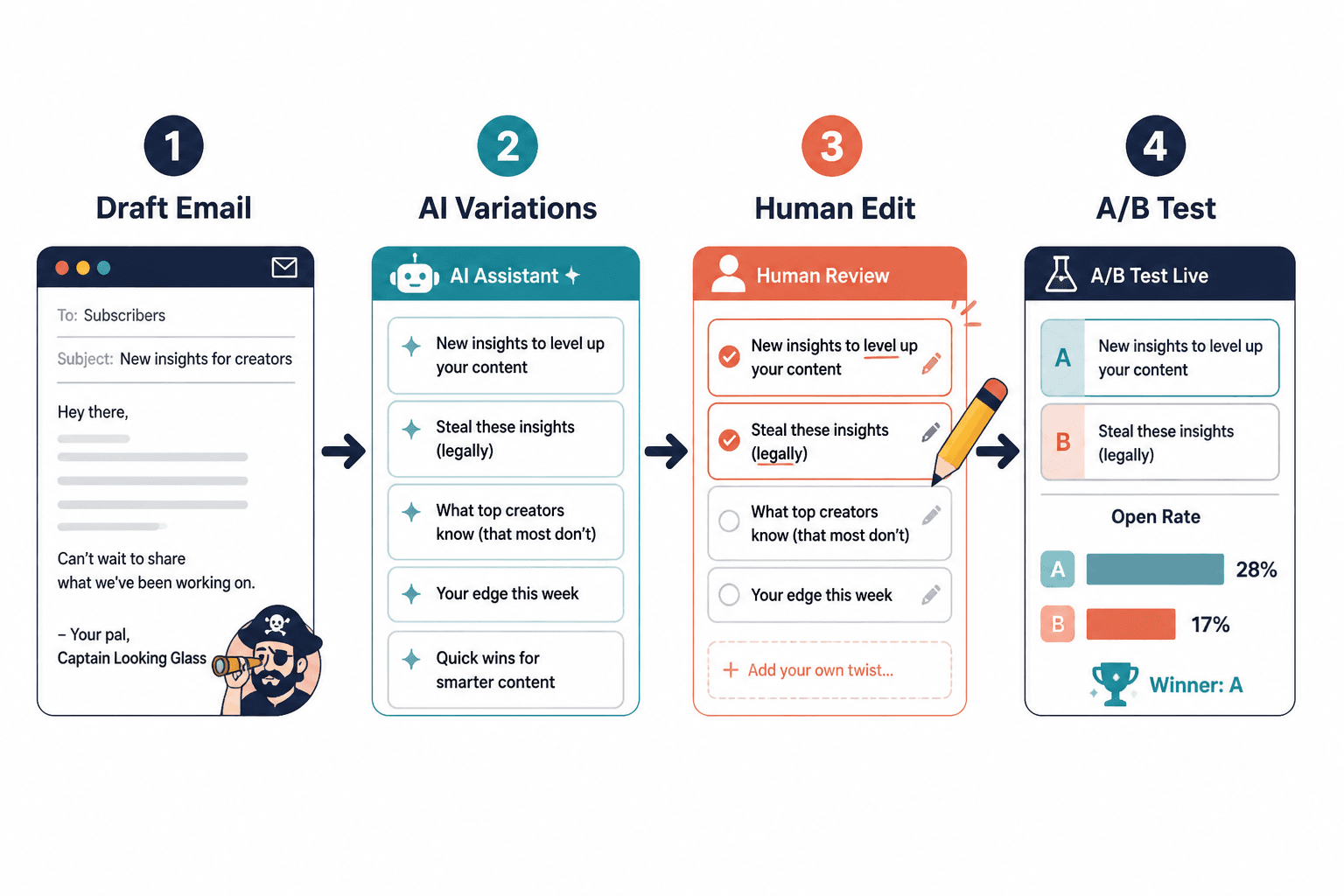
Step 1: give the tool the real point of the email
Do not just paste the full draft and say “write subject lines.” Tell the tool what the email is actually about in plain language.
For example:
This email explains why most creator newsletters get ignored, then gives 5 practical fixes for better subject lines. Audience: creators, consultants, and solo founders. Tone: smart, direct, lightly dry, not salesy. Avoid spammy urgency and cheesy curiosity hooks.
That is already much better than asking for “catchy subject lines,” which is how you end up with nonsense like “You Need to See This.” No, I do not.
Step 2: ask for different angle types
One of the best uses of AI is angle expansion. Ask for several subject line types, such as:
- direct and clear
- curiosity-driven but not clickbait
- benefit-first
- contrarian
- specific and practical
- short and punchy
This gives you strategic variation, not just cosmetic variation.
Step 3: edit for voice
This is where you earn your keep. Cut phrases you would never say. Remove fake intensity. Tighten weak verbs. Make it sound like your publication, not a platform trying to increase “engagement outcomes.”
If your brand is sharp and practical, “Transform your inbox strategy today” should be taken out back and dealt with accordingly.
Step 4: match the subject line to reader intent
A good line does not just sound decent. It matches why someone would open the email.
- If the email is highly practical, be clearer.
- If the email has a sharp opinion, lead with the tension.
- If the email tells a story with a lesson, curiosity can work.
- If the email sells something, do not hide the offer behind fake intrigue.
Step 5: save your best patterns
When a subject line works, do not just feel pleased for six seconds and move on. Save the structure. Build a swipe file. Feed good examples back into your AI prompts later.
This is how AI becomes more useful over time. Not because it got mystical. Because you finally gave it better source material.
Examples: weak AI-generated subject lines versus better edited versions
Here is where things get practical. AI often gives you something usable-ish, but not finished.
Example 1: vague benefit language
- Weak AI version: Improve Your Newsletter Performance With These Tips
- Better version: 5 subject line fixes for more newsletter opens
The stronger line is clearer, more specific, and less like it escaped from a content calendar spreadsheet.
Example 2: fake curiosity
- Weak AI version: You Will Not Believe What Impacts Open Rates
- Better version: The subject line mistake that keeps killing good emails
The improved version still creates curiosity, but it sounds like a person with a point, not a tabloid in a blazer.
Example 3: over-polished corporate mush
- Weak AI version: Optimizing Your Email Subject Line Strategy for Better Results
- Better version: Your subject lines are probably too safe
Shorter. Sharper. Easier to feel something about.
Example 4: generic creator advice
- Weak AI version: Newsletter Growth Tips for Creators
- Better version: Still getting ignored in the inbox?
The revised line is not perfect for every email, but it creates tension and feels directed at a real problem.
For more subject line inspiration, see best newsletter subject lines ideas and examples for creators.
A simple AI prompt you can reuse
If you want better output, stop feeding AI mushy instructions. Use a prompt with context and constraints.
Write 15 newsletter subject lines for this email.
Email summary: [insert 2 to 4 sentence summary]
Audience: [insert audience]
Tone: [insert tone]
Goal: [opens, clicks, replies, sales, etc.]
Avoid: spammy urgency, clickbait, cheesy self-help language, vague benefits
Include: a mix of direct, curiosity-based, contrarian, and practical options
Keep most options under 9 words.
Then follow it with one more instruction:
Now rewrite the 5 strongest options to sound more natural, specific, and less generic.
That second pass matters. A lot of first-pass AI output is not awful. It is just mid. And mid is deadly in the inbox.
Mistakes people make when using AI for subject lines
Most disappointment with AI subject line tools comes from bad use, not bad software.
- They ask for “catchy” instead of useful. Catchy is how you get hollow sparkle.
- They give no context.
- They accept the first draft. First-pass output is often fine as raw material, not as the final subject line.
- They optimize for novelty instead of fit. Weird is not the same as effective.
The better your prompt context and review standard, the more useful these tools become. AI helps most when it speeds up judgment, not when it replaces it.